Hackademy

70 posts

Hackademy

Hackademy

@hack_ademy

We teach Real Hacking here. If you want Hands-On then you are in the right place. Founded by @officialwhyte22

Root 가입일 Şubat 2026
4 팔로잉2.2K 팔로워
Hackademy
Hackademy@hack_ademy·
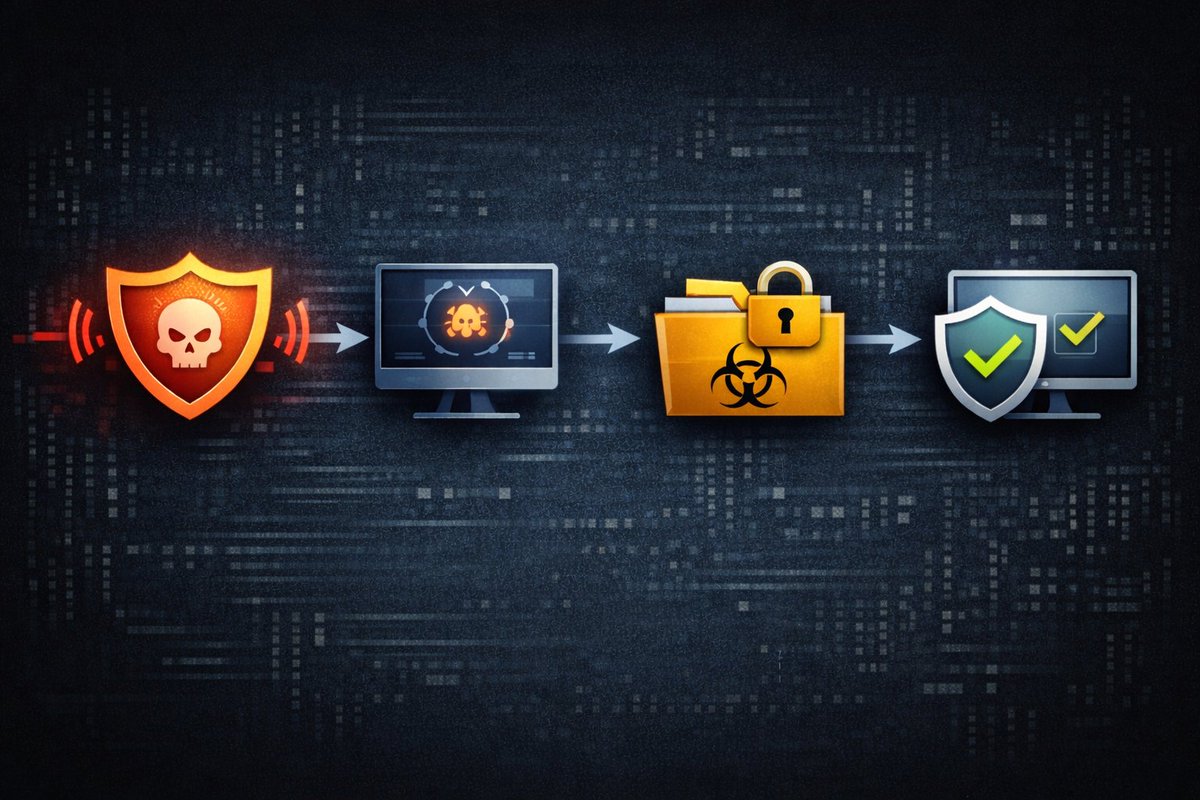
How Security Teams Detect Malware in a Network Modern organizations face thousands of cyber threats every single day. One of the most dangerous threats is malware, which refers to malicious software designed to damage systems, steal information, or secretly control computers. Because malware can spread quickly through networks, cybersecurity teams must constantly monitor systems to detect suspicious behavior before serious damage occurs. Security analysts rely on a combination of monitoring tools, automated alerts, and human investigation to identify potential malware infections. One of the first ways malware is detected is through security monitoring systems such as Endpoint Detection and Response (EDR) tools and Security Information and Event Management (SIEM) platforms. These systems continuously collect data from computers, servers, and network devices. They monitor things like unusual processes, unexpected network connections, suspicious file downloads, and abnormal login activity. When something unusual is detected, the system generates an alert so analysts can investigate further. Security teams also analyze behavior patterns to detect malware. Many modern malware programs attempt to hide themselves from traditional antivirus systems by changing their code. Instead of relying only on known malware signatures, modern security tools examine how programs behave. For example, if a file suddenly attempts to access sensitive system files, modify registry settings, or contact unknown external servers, this behavior may indicate a malware infection even if the file itself has never been seen before. Once a potential threat is detected, analysts begin the incident investigation process. They collect evidence such as log files, network traffic data, and system activity records. This helps them determine how the malware entered the system, which devices may be infected, and whether any sensitive information was compromised. During this stage, security teams often isolate affected systems from the network to prevent the malware from spreading further. After the investigation is complete, the security team moves to the containment and remediation stage. The malware is removed, infected systems are cleaned, and vulnerabilities that allowed the attack are patched. Security teams may also update detection rules to ensure that the same threat cannot affect the organization again. Through continuous monitoring, investigation, and response, cybersecurity teams are able to detect and stop malware before it causes major damage to networks and sensitive data.
Hackademy tweet media
English
0
2
9
252
Hackademy
Hackademy@hack_ademy·
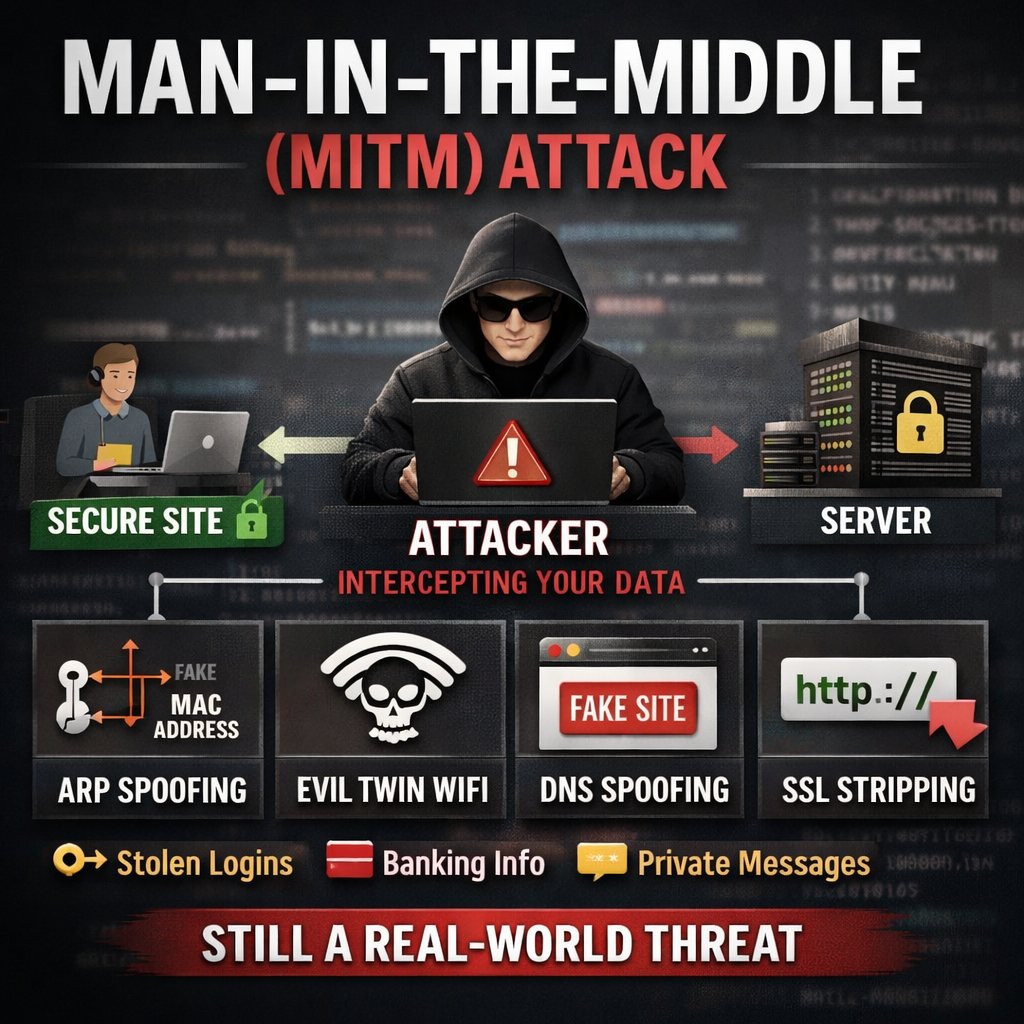
Man-in-the-Middle attacks don't get enough attention. Not because they're rare — because they're quiet. Most people picture hacking as breaking into systems. MITM is different. It's about sitting silently between two parties and watching everything flow through you. Here's what that actually looks like: Instead of this: User → Server The attacker makes it this: User → Attacker → Server Both sides think they're talking to each other. They're not. And neither side notices anything wrong — the page loads, the UI looks fine, everything feels normal. That's the whole game. Getting into the communication path is step one. Attackers do this through: —> Joining the same public WiFi and exploiting weak configs —> Setting up an Evil Twin —> a fake hotspot identical to the real one —> ARP spoofing —> tricking devices into routing traffic through their machine — DNS spoofing —> silently redirecting users to malicious destinations Once they're in the middle, the real work begins. If the connection isn't properly secured, the attacker can: —> Read credentials and session cookies in plain text —> Inject malicious scripts into responses —> Modify transactions in real time —> Strip HTTPS down to HTTP so everything becomes visible. The scary part isn't the technique. It's that the victim never notices. The website loads. The interaction feels completely normal. Meanwhile everything is being harvested in the background. This is why MITM still works in 2026 —> not because defenses don't exist, but because implementation is inconsistent and users ignore warnings. Prevention is layered: For engineers: → Enforce HTTPS everywhere + HSTS headers → Certificate pinning in applications → Mutual TLS where appropriate → Monitor for ARP/DNS anomalies → Zero Trust —> never assume a network is safe. For everyone else: → Treat public WiFi as hostile by default → Use a VPN on untrusted networks → Never ignore browser certificate warnings → Don't log into sensitive accounts on unknown networks MITM isn't an advanced exploit. It's a positioning attack combined with basic protocol abuse. That's exactly why it keeps working. If you're serious about security — don't just read about it. Spin up a lab, simulate it, and watch how easily trust breaks down. (Demo video coming soon 👀) #CyberSecurity #MITM #EthicalHacking #NetworkSecurity #OffSec #hack_ademy
Hackademy tweet media
English
0
13
49
1.1K
Hackademy
Hackademy@hack_ademy·
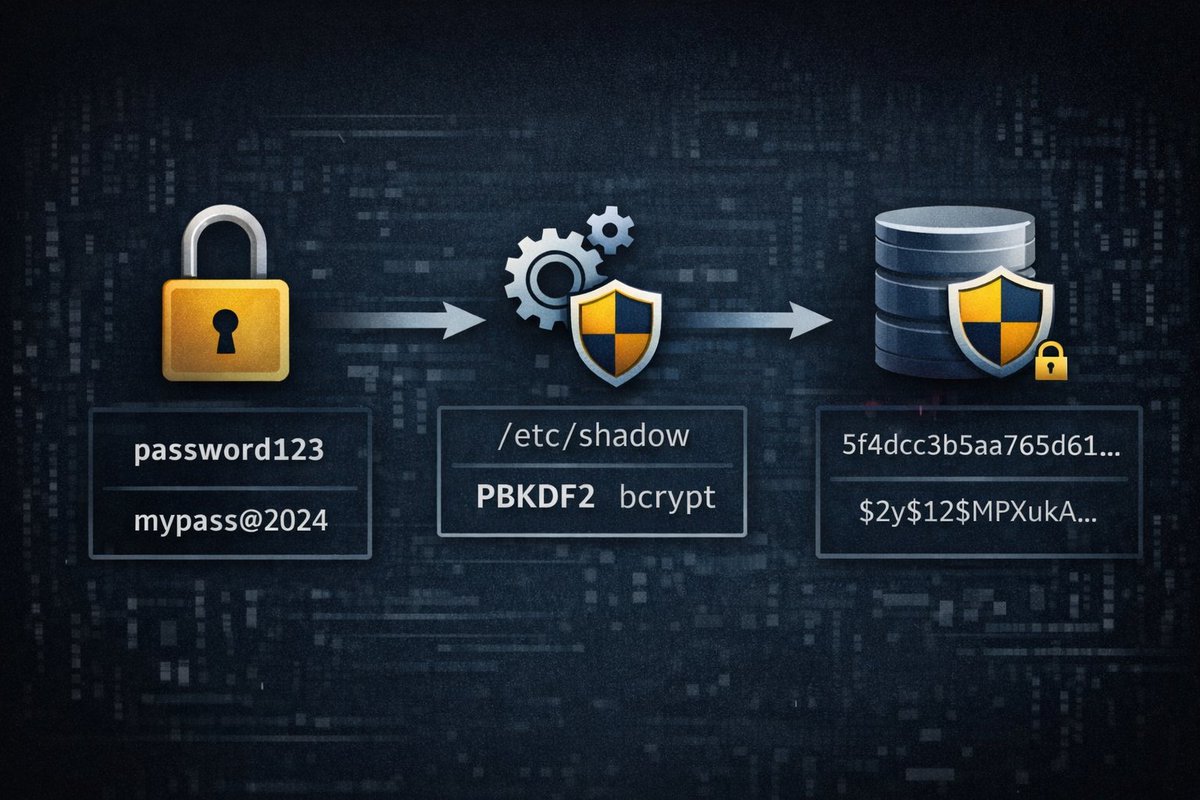
How Password Hashing Protects User Accounts Passwords are one of the most common ways people authenticate themselves on websites, company systems, and online services. Because passwords are so important, security engineers must ensure that they are stored in a way that prevents attackers from easily stealing them. If passwords were stored in plain text inside a database, any hacker who gained access to that database would immediately see every user’s password. This is why modern systems use a technique called password hashing to protect user credentials. Password hashing works by transforming a password into a completely different string of characters using a mathematical algorithm known as a hash function. When a user creates a password, the system runs the password through this algorithm. The result is a unique value called a hash. Instead of storing the actual password, the system stores only this hash inside the database. Because hash functions are designed to be one way operations, it is extremely difficult to reverse the process and retrieve the original password. When the user logs in later, the system does not check the password directly. Instead, the system takes the password the user entered and runs it through the same hash function again. If the newly generated hash matches the stored hash in the database, the system knows the password is correct. This process allows authentication to work without ever storing the actual password in readable form, which greatly improves security. Modern cybersecurity systems also add something called salting to the hashing process. A salt is a random value added to the password before hashing. This prevents attackers from using precomputed tables known as rainbow tables to crack passwords quickly. Even if two users have the same password, adding a unique salt ensures their stored hashes will be completely different. Security professionals recommend strong hashing algorithms such as bcrypt, Argon2, or PBKDF2 because they are designed to slow down attackers trying to guess passwords. By making each hashing operation computationally expensive, these algorithms help protect systems against brute force attacks. Password hashing is therefore one of the most important foundational defenses used to protect user accounts and sensitive data in modern cybersecurity systems.
Hackademy tweet media
English
0
6
25
575
Hackademy
Hackademy@hack_ademy·
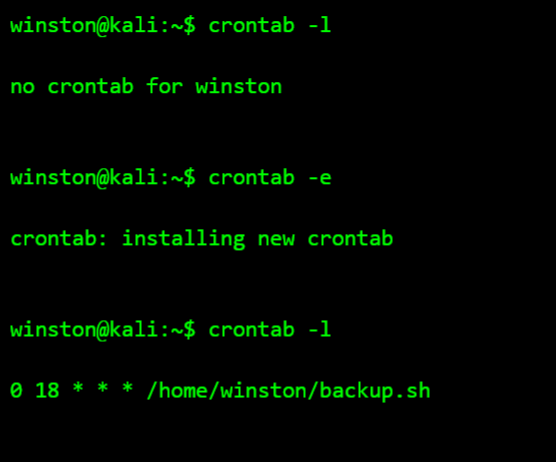
lot of Linux work is not about doing things once. It is about making sure small tasks happen quietly and consistently without you remembering them every time. That is where cron comes in. It allows you to schedule commands so the system handles them in the background at the exact time you want. In the terminal below, I am checking my current cron jobs, adding a simple scheduled task, and then confirming that it was saved properly. This is one of the cleanest ways to automate normal Linux work like backups, log checks, cleanup, or scripts you want to run at fixed times. Once you understand cron, Linux starts feeling less manual. You stop depending on memory for repetitive work and start making the system handle routine tasks for you. That is one of the habits that makes someone look settled on Linux, not just familiar with commands.
Hackademy tweet media
English
0
4
17
557
Hackademy 리트윗함
Winston Ighodaro
Winston Ighodaro@Officialwhyte22·
It’s with great joy that I’ve come to celebrate 309 students in Hackademy. I launched my academy less than a month ago, and we already have 309 students. That’s 309 people who decided to take my courses and learn from me. God bless you all for believing in me. 🎉🎉🎉 Lastly I want to say a big thank you to all my mentees and assistants for their support.
Winston Ighodaro tweet media
English
6
4
81
1.9K
Hackademy
Hackademy@hack_ademy·
How Hackers Exploit Weak Passwords Weak passwords are one of the easiest ways attackers break into systems. A lot of people still use simple passwords, repeated passwords, or small changes of old passwords, and that gives hackers an opening. Once an attacker gets a username, they can start trying common passwords, leaked passwords from old breaches, or password patterns people use every day. This is why password attacks are still very common in real incidents, even when companies have expensive security tools. Hackers normally do not sit down and guess one password at a time like in movies. They use automated tools that test large numbers of passwords very fast. Sometimes they do brute force, where they try many combinations. Sometimes they do password spraying, where they test one common password like Welcome123 across many accounts so they do not trigger lockouts quickly. Other times they use credential stuffing, where they take usernames and passwords leaked from another breach and try them on a different site, because many people reuse the same password everywhere. That is why one weak password can become a problem across email, banking, cloud apps, and work systems. The best defense is not just “make a password longer.” The real defense is using strong unique passwords for every account, turning on multi factor authentication, and watching for suspicious login attempts. Organizations should also enforce lockout rules, monitor repeated failed logins, block known leaked passwords, and train users to stop reusing passwords. A weak password is not just a small mistake. In many cases, it is the first crack that gives an attacker access to an entire network.
English
1
7
34
3.3K
Hackademy
Hackademy@hack_ademy·
@h4ruk7 They said you are an influencer. Is that true😂
English
1
0
1
37
Hackademy
Hackademy@hack_ademy·
How Hackers Discover Hidden Pages on a Website What Most People Do Not Know About Websites Many websites have pages that are not linked anywhere on the site. Developers often create admin panels, backup folders, testing environments, and old pages but forget to remove them from the server. These hidden locations can contain login portals, configuration files, or sensitive information. Even though they are not visible from the homepage, they still exist and can be accessed if someone knows the correct URL. Hackers take advantage of this by performing something called directory enumeration. Instead of randomly guessing pages manually, they use automated tools that test thousands of possible folder names. The tool sends requests like /admin, /backup, /portal, /config, and /dashboard to see which ones exist. When the server returns a 200 OK response, it means the page exists, even if it was never meant to be public. This technique is one of the first steps in most web penetration tests. Security professionals use it to find forgotten pages before attackers do. If a hidden admin panel or backup folder is discovered, it can sometimes lead to credential leaks, exposed databases, or full system compromise. This is why secure organizations constantly scan their own infrastructure for hidden endpoints and remove anything that should not be publicly accessible.
English
0
3
18
877
Hackademy
Hackademy@hack_ademy·
Open source intelligence Built a small OSINT tool some years back and one of my students made a short demo video explaining how it works. It’s cool seeing our students take on projects and create their own explanations and demos of those projects. Video credit - @TundeValentino
English
8
32
223
8.8K
Hackademy
Hackademy@hack_ademy·
After gaining access to a system, attackers often begin by identifying which users are currently logged in. Active sessions represent authenticated identities that the system already trusts. If a privileged account is active, the attacker may be able to interact with that session or harvest credentials from its processes. In the terminal below, the attacker first confirms their own identity and then enumerates logged-in users using commands like query user and qwinsta. These commands reveal both console and remote desktop sessions currently active on the machine. By identifying which users are logged in, the attacker can determine whether administrators or high-value accounts are present. Next, the attacker inspects running processes tied to those sessions and lists network sessions established by the system. This helps confirm which accounts are actively interacting with the machine. Security logs showing recent logon events provide additional confirmation of authentication activity. Instead of attacking passwords directly, the attacker is mapping existing sessions that may already grant access to trusted identities.
Hackademy tweet media
Security Trybe@SecurityTrybe

Passwords are only one part of authentication. Once a user successfully logs in, most systems create a session that proves the user has already authenticated. That session can remain valid for minutes or hours depending on the system configuration. As long as the session exists, the server trusts the user without asking for the password again. Attackers often target sessions instead of credentials because stealing a session token is easier than cracking a password. Web browsers, memory dumps, and process inspection can all expose active authentication tokens. If an attacker obtains that token, they may be able to impersonate the user immediately. This is why many breaches happen without password guessing or brute force attacks. The attacker simply takes over an already authenticated session. From the server’s perspective, nothing unusual happened. The session is still valid, so the system continues to trust it.

English
3
142
873
53.8K
Hackademy
Hackademy@hack_ademy·
If you found this useful, repost it so more people know about this attack vector. I break down real-world cyber attacks and defenses regularly.
English
0
1
4
294
Hackademy
Hackademy@hack_ademy·
Simple rule: When in doubt — don’t connect. Public Wi-Fi is convenient, but attackers rely on that convenience. Stay aware.
English
1
0
3
311
Hackademy
Hackademy@hack_ademy·
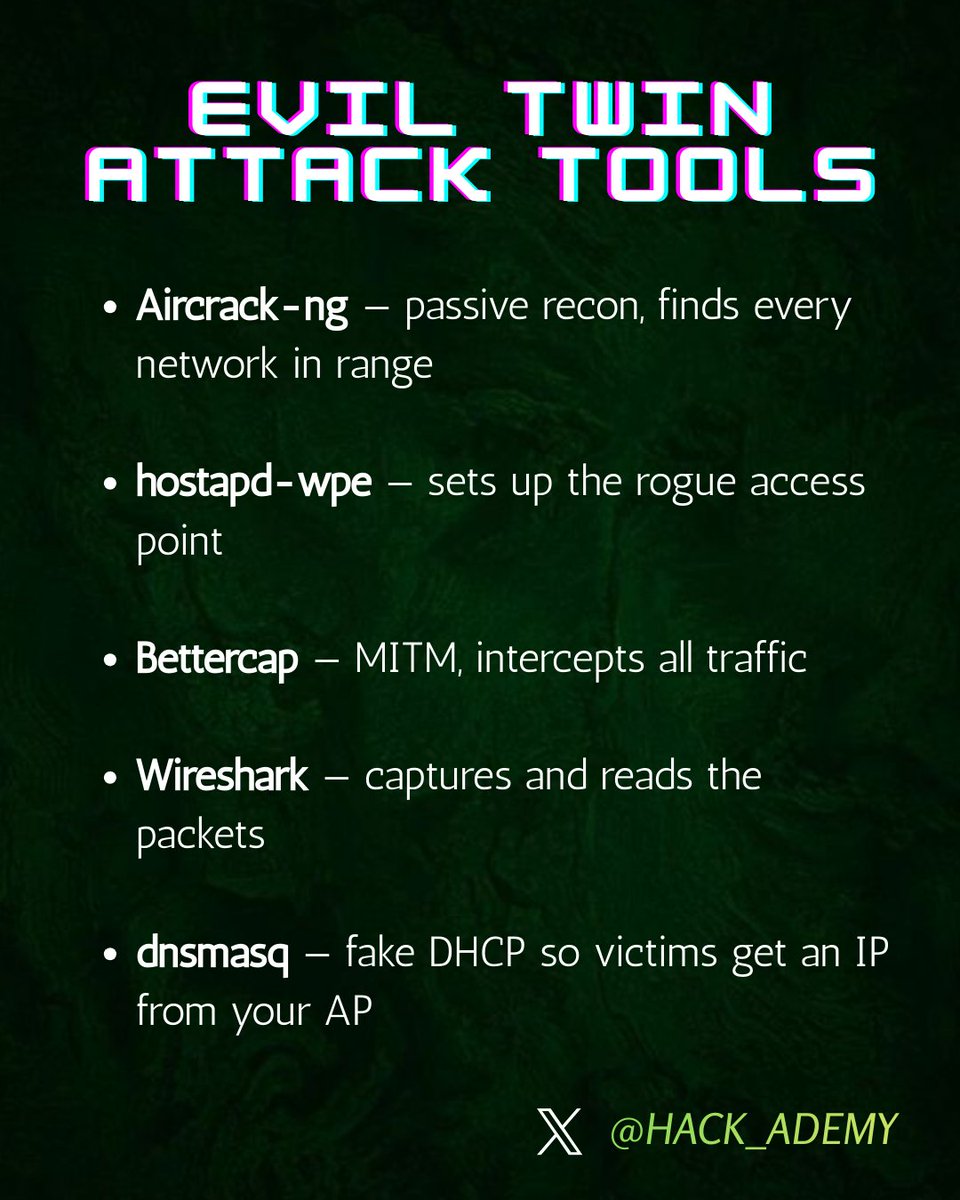
Hackers don’t always crack Wi-Fi passwords. Sometimes they just create a fake network and wait for you to connect. This is called an Evil Twin attack. Here’s how it works and how to stay safe 🧵
Hackademy tweet media
English
1
16
62
2.9K