秀德

58.5K posts

秀德 banner
秀德

秀德

@shouldwang

Taiwan 대만 🇹🇼 • Design Manager 💻 • INFJ 🧝‍♂️ Design System ❤️ DesignOps DIVE 🤿 • 𝒯𝑒𝒶𝓂 𝒫𝒪𝒫𝒪 🐶 • 유애나 💛

Taiwan 台灣 가입일 Nisan 2016
1.8K 팔로잉2.9K 팔로워
秀德 리트윗함
ImsUgreeTW
ImsUgreeTW@ConradYu5·
2026總預算已經被藍白擺爛7個月囉 2027總預算 八月 又會再出來 國民黨+民眾黨 聯手 這個停擺的立法院擺爛 台灣人 你還要承受多久?
ImsUgreeTW tweet media
中文
9
227
570
6.4K
秀德 리트윗함
Lisa ברכה
Lisa ברכה@LisaisHereone·
1/2 黃文啟司長急到都快哭出來: 我們一直在談發價書這個事情,我們現在已經遇到發價書危機了。我們現在回到執行面的問題,你講發價書拿到才做,對我們來講真的很難做 我昨天晚上已經聯絡了(美國)國防安全局局長,他的態度是很難給我們這樣子的彈性... #攸關台灣人生命安全一刻都不能等 #戰爭風險
上帝不擲骰子4️⃣9️⃣8️⃣@QED_2022

藍白就是這樣羞辱軍人的,可悲的是一堆軍人特愛投藍白。

中文
34
426
1.6K
92.1K
秀德 리트윗함
NZ ☄️
NZ ☄️@CodeByNZ·
OpenAI's latest repo has Claude as the third top contributor 😭😂
NZ ☄️ tweet media
English
152
352
8.4K
556.5K
秀德 리트윗함
Figma
Figma@figma·
Config 2026, refreshed plus 50 more speakers have been added to the line up, including: → @iamryanpowell, Waymo → Rose McManus, Instagram → @digitarald, Microsoft → Brian Ringley, Boston Dynamics → Lauren Hom, Hom Sweet Hom
English
20
20
253
26.4K
秀德 리트윗함
Claude
Claude@claudeai·
Your work tools in Claude are now available on mobile. Explore Figma designs, create Canva slides, check Amplitude dashboards, all from your phone. Give it a try: claude.com/download
English
1.3K
1.6K
20.5K
5.2M
秀德 리트윗함
Sawyer Hood
Sawyer Hood@sawyerhood·
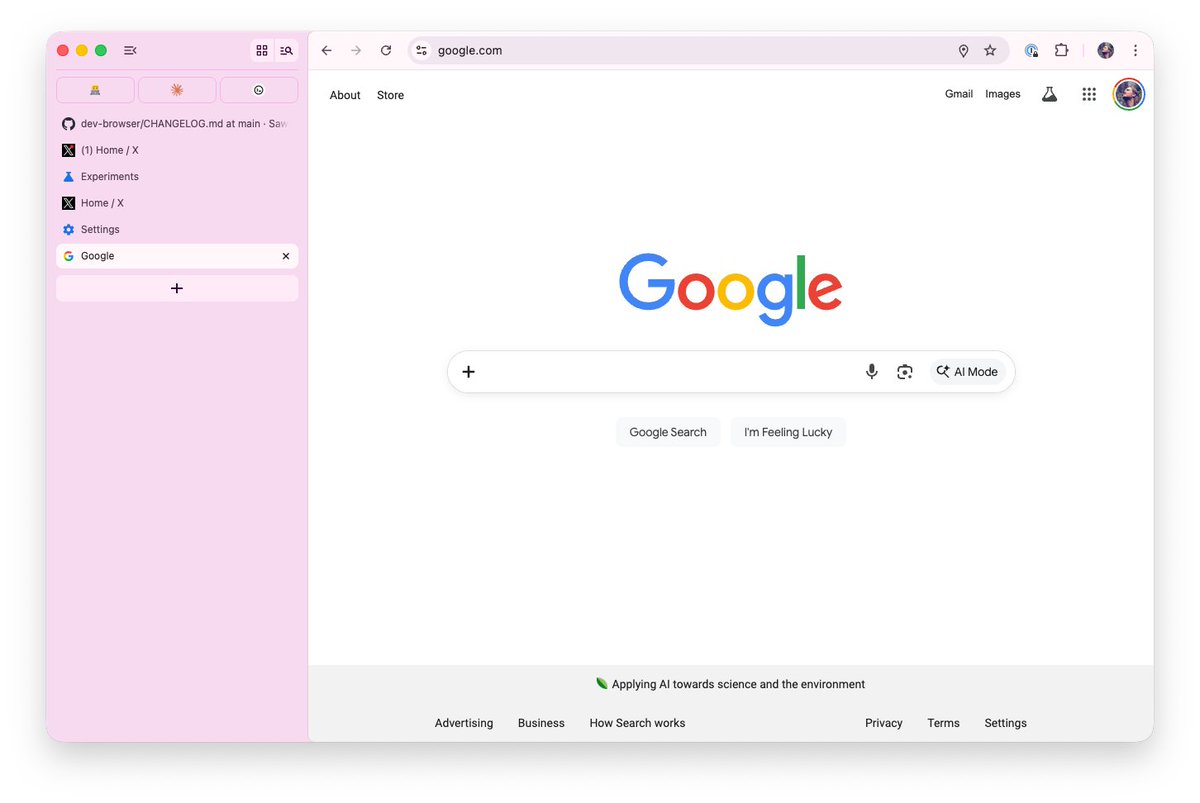
wtf chrome has vertical tabs now. finally
Sawyer Hood tweet media
English
336
204
5K
2M
秀德 리트윗함
𝓣𝓸𝓪𝓷𝓷𝓮 ღˇ◡ˇ)
#陸委會例行記者會 梁副這段話,真的很有高度☺️ ▫️▫️▫️▫️▫️▫️▫️▫️▫️▫️▫️ 凡事被滲透,你就是受害者。 每一個政黨都可能被滲透, 但是,當滲透的事實很明顯的時候,政黨就要處理。 否則,你就是自願在被滲透, 你就是在跟對岸合作!
中文
31
726
3.7K
66.7K
秀德 리트윗함
IVE OFFICIAL
IVE OFFICIAL@IVEstarship·
📢 IVE WORLD TOUR <SHOW WHAT I AM> is coming to a city near you. Don’t miss it! ✨ #IVE #아이브 #SHOW_WHAT_I_AM
IVE OFFICIAL tweet media
English
571
3.8K
17.2K
1.8M
秀德 리트윗함
Yan Practice ⭕散修🎒
靠杯 今天剛爆出一個很大的資安事件 Karpathy 都親自發文警告 Python 套件 litellm 被投毒了 現在 AI 用的太廣了 你自己都不一定知道寫了什麼腳本 更何況是依賴套件 - 很多 AI 開發者常用的 Python 套件 litellm 在 PyPI 上被塞進惡意程式 中毒版本是 1.82.7 和 1.82.8 裡面多了一個 litellm_init pth 只要 Python 啟動就會自動執行 不用主動 import 只要裝到就可能中招 很多人沒自己裝過 litellm 但很多依賴工具依賴這個包 litellm 本來就是很多 AI 工具鏈的底層依賴 所以很危險 至少有兩千多個庫依賴 litellm 惡意程式會蒐集主機上的敏感資料 像是 SSH KEY .env 錢包私鑰 環境變數等等 然後加密打包送回攻擊者的伺服器 如果它發現你在 Kubernetes 環境還會進一步橫向擴散 在整個叢集裡部署特權 Pod - 攻擊者先偷到 litellm 的 PyPI 發布權限 再直接推上帶毒版本 整個過程就是安全工具反過來變成突破口 立刻檢查 pip show litellm 1.82.6 是最後一個乾淨版本 只要你裝過 1.82.7 或 1.82.8 就直接假設所有資料都已經外洩 直接把錢包密碼全換了
Andrej Karpathy@karpathy

Software horror: litellm PyPI supply chain attack. Simple `pip install litellm` was enough to exfiltrate SSH keys, AWS/GCP/Azure creds, Kubernetes configs, git credentials, env vars (all your API keys), shell history, crypto wallets, SSL private keys, CI/CD secrets, database passwords. LiteLLM itself has 97 million downloads per month which is already terrible, but much worse, the contagion spreads to any project that depends on litellm. For example, if you did `pip install dspy` (which depended on litellm>=1.64.0), you'd also be pwnd. Same for any other large project that depended on litellm. Afaict the poisoned version was up for only less than ~1 hour. The attack had a bug which led to its discovery - Callum McMahon was using an MCP plugin inside Cursor that pulled in litellm as a transitive dependency. When litellm 1.82.8 installed, their machine ran out of RAM and crashed. So if the attacker didn't vibe code this attack it could have been undetected for many days or weeks. Supply chain attacks like this are basically the scariest thing imaginable in modern software. Every time you install any depedency you could be pulling in a poisoned package anywhere deep inside its entire depedency tree. This is especially risky with large projects that might have lots and lots of dependencies. The credentials that do get stolen in each attack can then be used to take over more accounts and compromise more packages. Classical software engineering would have you believe that dependencies are good (we're building pyramids from bricks), but imo this has to be re-evaluated, and it's why I've been so growingly averse to them, preferring to use LLMs to "yoink" functionality when it's simple enough and possible.

中文
4
180
690
80.4K
秀德 리트윗함
Chayenne Zhao
Chayenne Zhao@GenAI_is_real·
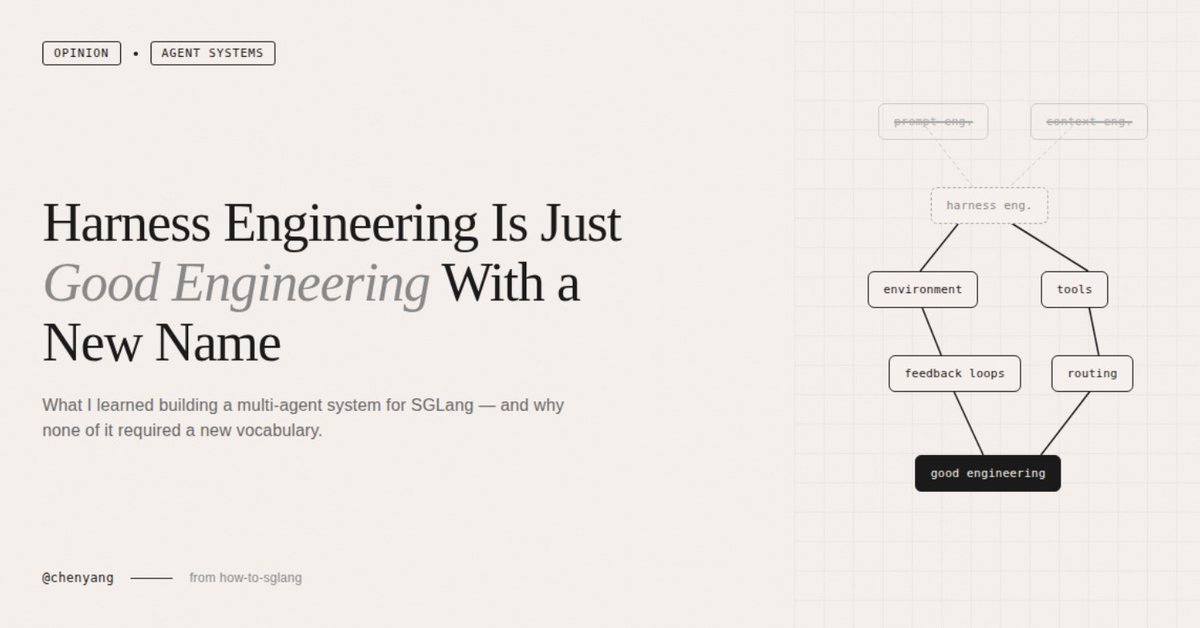
Today I read a lengthy piece on Harness Engineering — tens of thousands of words, almost certainly AI-written. My first reaction wasn't "wow, what a powerful concept." It was "do these people have any ideas beyond coining new terms for old ones?" I've always been annoyed by this pattern in the AI world — the constant reinvention of existing concepts. From prompt engineering to context engineering, now to harness engineering. Every few months someone coins a new term, writes a 10,000-word essay, sprinkles in a few big-company case studies, and the whole community starts buzzing. But if you actually look at the content, it's the same thing every time: Design the environment your model runs in — what information it receives, what tools it can use, how errors get intercepted, how memory is managed across sessions. This has existed since the day ChatGPT launched. It doesn't become a new discipline just because someone — for whatever reason — decided to give it a new name. That said, complaints aside, the research and case studies cited in the article do have value — especially since they overlap heavily with what I've been building with how-to-sglang. So let me use this as an opportunity to talk about the mistakes I've actually made. Some background first. The most common requests in the SGLang community are How-to Questions — how to deploy DeepSeek-V3 on 8 GPUs, what to do when the gateway can't reach the worker address, whether the gap between GLM-5 INT4 and official FP8 is significant. These questions span an extremely wide technical surface, and as the community grows faster and faster, we increasingly can't keep up with replies. So I started building a multi-agent system to answer them automatically. The first idea was, of course, the most naive one — build a single omniscient Agent, stuff all of SGLang's docs, code, and cookbooks into it, and let it answer everything. That didn't work. You don't need harness engineering theory to explain why — the context window isn't RAM. The more you stuff into it, the more the model's attention scatters and the worse the answers get. An Agent trying to simultaneously understand quantization, PD disaggregation, diffusion serving, and hardware compatibility ends up understanding none of them deeply. The design we eventually landed on is a multi-layered sub-domain expert architecture. SGLang's documentation already has natural functional boundaries — advanced features, platforms, supported models — with cookbooks organized by model. We turned each sub-domain into an independent expert agent, with an Expert Debating Manager responsible for receiving questions, decomposing them into sub-questions, consulting the Expert Routing Table to activate the right agents, solving in parallel, then synthesizing answers. Looking back, this design maps almost perfectly onto the patterns the harness engineering community advocates. But when I was building it, I had no idea these patterns had names. And I didn't need to. 1. Progressive disclosure — we didn't dump all documentation into any single agent. Each domain expert loads only its own domain knowledge, and the Manager decides who to activate based on the question type. My gut feeling is that this design yielded far more improvement than swapping in a stronger model ever did. You don't need to know this is called "progressive disclosure" to make this decision. You just need to have tried the "stuff everything in" approach once and watched it fail. 2. Repository as source of truth — the entire workflow lives in the how-to-sglang repo. All expert agents draw their knowledge from markdown files inside the repo, with no dependency on external documents or verbal agreements. Early on, we had the urge to write one massive sglang-maintain.md covering everything. We quickly learned that doesn't work. OpenAI's Codex team made the same mistake — they tried a single oversized AGENTS.md and watched it rot in predictable ways. You don't need to have read their blog to step on this landmine yourself. It's the classic software engineering problem of "monolithic docs always go stale," except in an agent context the consequences are worse — stale documentation doesn't just go unread, it actively misleads the agent. 3. Structured routing — the Expert Routing Table explicitly maps question types to agents. A question about GLM-5 INT4 activates both the Cookbook Domain Expert and the Quantization Domain Expert simultaneously. The Manager doesn't guess; it follows a structured index. The harness engineering crowd calls this "mechanized constraints." I call it normal engineering. I'm not saying the ideas behind harness engineering are bad. The cited research is solid, the ACI concept from SWE-agent is genuinely worth knowing, and Anthropic's dual-agent architecture (initializer agent + coding agent) is valuable reference material for anyone doing long-horizon tasks. What I find tiresome is the constant coining of new terms — packaging established engineering common sense as a new discipline, then manufacturing anxiety around "you're behind if you don't know this word." Prompt engineering, context engineering, harness engineering — they're different facets of the same thing. Next month someone will probably coin scaffold engineering or orchestration engineering, write another lengthy essay citing the same SWE-agent paper, and the community will start another cycle of amplification. What I actually learned from how-to-sglang can be stated without any new vocabulary: Information fed to agents should be minimal and precise, not maximal. Complex systems should be split into specialized sub-modules, not built as omniscient agents. All knowledge must live in the repo — verbal agreements don't exist. Routing and constraints must be structural, not left to the agent's judgment. Feedback loops should be as tight as possible — we currently use a logging system to record the full reasoning chain of every query, and we've started using Codex for LLM-as-a-judge verification, but we're still far from ideal. None of this is new. In traditional software engineering, these are called separation of concerns, single responsibility principle, docs-as-code, and shift-left constraints. We're just applying them to LLM work environments now, and some people feel that warrants a new name. I don't know how many more new terms this field will produce. But I do know that, at least today, we've never achieved a qualitative leap on how-to-sglang by swapping in a stronger model. What actually drove breakthroughs was always improvements at the environment level — more precise knowledge partitioning, better routing logic, tighter feedback loops. Whether you call it harness engineering, context engineering, or nothing at all, it's just good engineering practice. Nothing more, nothing less. There is one question I genuinely haven't figured out: if model capabilities keep scaling exponentially, will there come a day when models are strong enough to build their own environments? I had this exact confusion when observing OpenClaw — it went from 400K lines to a million in a single month, driven entirely by AI itself. Who built that project's environment? A human, or the AI? And if it was the AI, how many of the design principles we're discussing today will be completely irrelevant in two years? I don't know. But at least today, across every instance of real practice I can observe, this is still human work — and the most valuable kind.
Chayenne Zhao tweet media
English
42
140
1.2K
153K
秀德 리트윗함
Figma
Figma@figma·
Learn how to go from Claude Code to Figma and back again Livestream with Anthropic: March 31, 9:00AM PST | 12:00PM EST
English
61
280
3K
245.8K
秀德 리트윗함
冰山小企鵝
冰山小企鵝@YaleChen2020·
藍白的立法院亂象都是有安排過的 上週翁委員沒收表決的當下的影片的後段, 她直接講出事先準備好的民進黨以前的兩個類似案例。 如果沒有事先想過對手的反應、想過如何回應,先查好資料,不可能當下就講出來。 藍白的立法院亂象都是有安排過的 壞人不會變好,只會越來越熟練
中文
7
87
413
9.3K
秀德 리트윗함
Riley Walz
Riley Walz@rtwlz·
made my computer dramatically play BBC news music before every meeting
English
597
6.3K
71.8K
4.3M
秀德 리트윗함
COOL KIDS
COOL KIDS@CoolKids0901·
260322 #IVE #안유진 #ANYUJIN #아이브 느좋 바람의 여신🩵🤍 #세계_강아지의_날_축하해🐶
한국어
0
1.5K
4.9K
92.4K
秀德
秀德@shouldwang·
@pirrer 發覺自己也是這樣子去定義設計,只是後來會直接寫成一份 skill 給 Claude 用,不然每次開新東西我都要重說一次一樣的基礎設定太累了🤣
中文
0
0
2
390
fox hsiao
fox hsiao@pirrer·
再見了 Figma ? Tailwind CSS 的設計師 Steve Schoger 最近發了一支一小時的影片,展示他怎麼用 Claude Code 從零建出一個金融 App 的行銷首頁。影片開頭他就先打了預防針:「我對命令列還是非常新手,這些東西對我來說都很陌生。Adam Wathan 幫我做了初始設定,現在我就是有一個 Vite 專案模板,每次開新專案就複製一份。」 他說自己大概只會兩件事,換目錄和啟動 Claude。但用 Claude Code 當主要設計工具一個多月以來,他做出了三層式定價頁面(含比較表、testimonial、FAQ)、Tailwind Labs 內部用的金融 dashboard,而且整個過程沒有用任何 skills 或 CLAUDE.md,就是從空白畫面開始對 Claude 講話。 這支影片最有價值的部分,是他在一小時的操作過程中不斷穿插實戰設計技巧,從字型選擇、邊框處理、按鈕細節到整頁裝飾,每一個都是他身為專業設計師多年累積的判斷。以下是完整的 16 條技巧拆解。 Steve Schoger 是誰 Steve Schoger 是 Tailwind Labs 的設計師,跟 Tailwind CSS 的創辦人 Adam Wathan 長期合作。他目前正在開發一款叫 UI.SH 的工具,是給 Claude Code、Cursor、Amp 這些 AI coding agent 使用的 skills 套件,讓 AI 在寫前端程式碼的時候能套用專業級的設計標準。 他的工作流程很簡單,左邊是瀏覽器顯示 localhost 的即時預覽,右邊是 Claude Code 的終端,中間沒有 Figma。他說現在開 Figma 的唯一理由是做向量圖形(SVG logo 之類的),其他全部在 Claude Code 裡完成。他用的技術棧是 Vite + Tailwind CSS + React,但他自己不寫 CSS,所有樣式都是用自然語言告訴 Claude 要什麼效果。 他的起手 prompt 大意是:「幫一個金融 app 設計一個簡單的行銷首頁,這個 app 把所有收入來源整合到一個 dashboard 裡。頁面要包含導覽列、hero 區塊、logo 列、功能介紹、數據統計、使用者推薦、CTA 區塊和頁尾。」Claude 生成初版之後,他花了大約 50 次迭代式的對話,一步步把它從「AI 預設輸出」調整成專業水準的成品。 邊框與陰影:讓元素看起來乾淨的關鍵 📷 1. 用 outer ring 取代 solid border 這是 Schoger 在影片中反覆強調的核心技巧。當一個元素同時有陰影(shadow)和實色邊框(border)的時候,陰影和邊框之間會產生一種「muddy」(混濁)的效果,視覺上很髒。他的做法是完全不用 border,改用 outer ring,顏色設為 gray-950、opacity 10%,放在元素外側。這樣陰影和邊緣之間的過渡更銳利、更乾淨。這個技巧他套用在截圖容器、按鈕、navbar、feature card 上,幾乎所有有陰影的元素都適用。 2. Concentric radius(同心圓角) 當一個圓角容器裡面放了另一個圓角元素(比如截圖放在卡片裡),內層的 border-radius 應該等於外層的 radius 減去 padding。這樣兩層圓角會形成同心圓,視覺上才和諧。如果內外層用同樣的 radius 值,間距小的時候看起來會很彆扭。 3. Inset ring 做邊緣定義 在淡色背景的容器上,用 inset ring(5% opacity)做邊緣定義,取代傳統的 border。這個方式比 border 更微妙,不會搶走容器內容的視覺焦點。 Typography:字型的細節決定專業感 📷 4. 用 Inter variable 的 display 版本 Schoger 推薦從 rsms.me 下載 Inter 的 variable 版本,而非 Google Fonts 上的標準版。variable font 的好處是可以用「中間」字重,比如 550(介於 medium 500 和 semi-bold 600 之間),這在標準版是做不到的。他還特別關閉了一個 OpenType 特性:帶尾巴的小寫 L 變體(stylistic set ss02),因為這個變體在某些情境下會讓字看起來怪怪的。 5. 大字體要收緊 tracking 24px 以上的大字體,字距(tracking / letter-spacing)要比預設值再緊一點。字越大,字母之間的空隙在視覺上會被放大,收緊 tracking 可以讓標題更有衝擊力、更緊湊。他在 Tailwind 裡用 tracking-tight 甚至更緊的值。 6. Eyebrow 文字用 monospace section 標題上方的小標籤(eyebrow text,像是「你需要的一切」「立即開始」這類),Schoger 有一套固定公式:用 Geist Mono 字型、全大寫(uppercase)、加寬字距(tracking-wider)、小字體(text-xs)、灰色(gray-600)。monospace 字型讓這些短文字看起來更技術感、更精緻。 7. text-pretty vs text-balance Tailwind CSS 有兩個文字排版 utility:text-pretty 避免段末出現孤字(orphan word),text-balance 讓文字行更均勻分布。兩者效果不同,需要根據具體情況選用。Schoger 在不同的文字區塊之間會來回切換測試哪個效果更好。 8. 小字體行高可以翻倍 14px(text-sm)的文字,行高可以設為 28px(字體大小的兩倍)。這聽起來很誇張,但對於副標題或說明文字來說,更大的行距讓文字有更多呼吸空間,閱讀起來更舒服。 版面佈局:打破 AI 的置中預設 📷 9. 左對齊取代置中 AI 生成的網頁幾乎都是置中對齊,Schoger 第一件事就是把 hero 改成左對齊。他參考的是 Tailwind Plus 網站的 split headline 佈局:標題放左側(約 3/5 寬),副標和描述文字放右側(約 2/5 寬),頂部對齊。這種佈局比全部置中更有設計感,也更容易閱讀。 10. Inline section heading feature section 的標題,Schoger 不用傳統的「大標題 + 換行 + 副標」結構,而是把標題和副標放在同一行,用不同的顏色和字重區分。標題用深色粗體(neutral-950),副標接在後面用灰色中等字重(neutral-600, medium)。他說這個風格的靈感來自 Apple、Linear、Stripe、Adio,需要比較長的副標文案才能撐起這個效果。 11. max-width 用 ch 單位 控制文字區塊的最大寬度,Schoger 不用固定像素,而是用 ch 單位(基於字型中 0 字元的寬度)。比如 max-w-[40ch] 大約等於 40 個字元寬。好處是不管字體大小怎麼變,閱讀寬度都維持在舒適的範圍。他在調的時候自嘲:「有時候就是要一個一個試,找到剛剛好的那個。」試了 45、40、35,最後選了 40。 元素設計:按鈕、容器、截圖 📷 12. 按鈕的高度和形狀 Schoger 偏好 36 到 38px 的按鈕高度,用 padding 控制而非固定 height。形狀是 pill-shaped(全圓角),字體 14px(text-sm)。他會把 AI 預設加在按鈕裡的 icon 拿掉,保持乾淨。 13. 兩個按鈕高度差 2px 怎麼辦 這是影片裡最令人印象深刻的細節之一,當一個按鈕有 ring(外框),另一個沒有的時候,有 ring 的按鈕會比沒有的高 2px。Schoger 說:「這就是我失眠的原因。」Adam Wathan 的解法是用一個 span 包裹有 border 的按鈕,設定 inline-flex + p-px,再用 calc 計算,讓兩個按鈕視覺上完全等高。Schoger 坦承:「老實說這個我自己想不出來,這是 Adam Wathan 的魔法。」 14. Well-styled container(凹陷容器) feature section 裡的截圖容器,Schoger 給它一個極淡的背景色(gray-950 at 2.5% 到 5% opacity),移除邊框,讓截圖本身更突出。截圖從底部裁切(底部零 padding、無底部圓角),製造一種截圖「坐在容器底部」的效果。再加上 inset ring(5% opacity)做邊緣定義。 15. 截圖是最好的視覺元素 如果你沒有自訂圖形或插畫,在首頁放一張 app 的高解析度截圖,是讓頁面瞬間有視覺焦點的最簡單方法。Schoger 特別要求 Claude 用 3x 解析度擷取截圖,確保在高 DPI 螢幕上也是清晰的。 裝飾與細節:讓網站看起來不像模板 📷 16. Canvas grid(裝飾性邊框網格) 這是影片最後加的收尾裝飾,在整個網站的各個 section 之間加上裝飾性的線條邊框。水平線延伸到 viewport 全寬,垂直線保持在 page container 寬度內,形成一種精緻的網格框架。Schoger 說靈感來自 Stripe、Adio 和 Tailwind 官網。如果你沒有自訂圖形資源,這是讓網站瞬間脫離「模板感」的好技巧。 17. 背景圖片 testimonial card testimonial 區塊不用傳統的頭像 + 引言結構,而是用 AI 生成的人像照片當卡片背景,底部加暗色漸層(gradient shim),讓白色引言文字在照片上清晰可讀。這種風格比標準的圓形頭像有視覺衝擊力得多。 18. Logo cloud 處理 partner logo 列不需要標題,直接放 logo 就很清楚。用真實的 SVG logo 而非文字,移除 opacity(直接用 gray-950),佈滿容器寬度。簡單但很多人會過度設計這個區塊。 Claude Code 的 prompt 策略:設計師怎麼跟 AI 說話 Schoger 跟 Claude Code 的對話方式,跟工程師完全不同。他不寫程式碼,不指定 CSS 屬性,他用的是設計語言。 具體的值他會直接說,像是「改成 38 像素」「改成 gray-950」。模糊的方向也能用,像是「再大一點點」「再緊一點」。他甚至自嘲:「我覺得我寫的這些句子根本不太合理,但它每次都聽得懂。」 有幾個特別有效的 prompt 模式,第一個是問「這個是怎麼做的?」,用來檢查 Claude 的實作方式,發現問題再指出修正。第二個是全站同步,叫 Claude「把這個樣式套用到下面所有區塊」,一次統一風格。第三個是建立臨時工具,他要求 Claude 做了一個拖曳定位工具,讓他可以視覺化地調整截圖位置,調好後複製座標值寫進程式碼,再移除工具。 最讓他驚訝的是 Claude 會自己學習風格一致性。「它就是一邊做一邊學,這還蠻好的,我不需要再額外更新。」後面新增的按鈕自動套用了他之前定義的 ring 樣式,不需要額外指示。 整個過程他沒有用任何 skills 或 CLAUDE.md,也沒有寫任何程式碼。他用的是二十年設計經驗累積的眼光,Claude Code 負責把這些設計意圖轉成 Tailwind CSS。 UI.SH 和設計師的下一步 影片最後,Schoger 推廣了他和 Adam Wathan 正在開發的 UI.SH。這是一套給 AI coding agent 用的 skills 套件,目標是把他在影片裡手動教 Claude 的那些設計原則,預先打包成 agent 可以直接引用的設計標準。支援 Claude Code、Cursor、Amp。 這個方向很有意思,Schoger 的影片證明了一件事:AI 生成的初版網頁和專業設計師的成品之間,差距不在程式碼,在設計判斷。AI 會用 indigo 當預設色、會把所有東西置中、會用 solid border 配 shadow 製造混濁效果。設計師知道該把它改成什麼,但以前需要自己動手寫 CSS 或在 Figma 裡畫。現在只需要說出來就好。 Schoger 的 before/after 對比很有說服力。同一個 prompt 生成的初版,經過大約 50 次設計師主導的迭代,變成了一個看起來完全不同的網站。差異不在技術,在眼光。
Steve Schoger@steveschoger

I put together a one hour video on how I've been using Claude Code as my primary design tool. Packed with tons of 🔥 design tips.

中文
13
197
978
144.1K
秀德 리트윗함
뽀잉이🍁
뽀잉이🍁@theone_0924·
나안아🫲🏻🫱🏻 #IVE #아이브 #GAEUL #가을 #ガウル #アイヴ
한국어
1
471
1.7K
29.4K
秀德 리트윗함
𝟎𝟓𝟎𝟓'
𝟎𝟓𝟎𝟓'@hyeyu05·
我們치성빼 俞真聽到360度的DIVE叫他安俞真 光是看到題目就開始有點不開心的模樣ㅎㅎ
中文
1
88
663
13.5K
秀德 리트윗함
JIA
JIA@JIAJIA0102·
260321(1) #아이브 #안유진 #IVE #ANYUJIN #YUJIN
JIA tweet mediaJIA tweet mediaJIA tweet mediaJIA tweet media
1
249
1.1K
16.5K