Venkatesh

489 posts

Venkatesh banner
Venkatesh

Venkatesh

@venkateshdotdev

Backend Engineer | Java, System Design & Performance Hacks 💻 | Building scalable apps & sharing insights | Collaborate? DM!

World 가입일 Aralık 2025
108 팔로잉87 팔로워
고정된 트윗
Venkatesh
Venkatesh@venkateshdotdev·
Me and my girlfriend once went on an unplanned long road trip. No fixed destination. No hotel bookings. Just music, empty roads, and one of those drives you never forget. As we kept going, the roads became quieter. Fewer vehicles. No shops. No houses. Nothing. Just a long road cutting through the forest. Halfway through the journey… our car suddenly jerked. I stopped. Got down. And saw it. Front tyre punctured. In the middle of nowhere. Sun was already below the horizon. No vehicles passing. No repair shops nearby. No signal on our phones. And my girlfriend started panicking. “What do we do now?” “How will we get out of here?” To be honest… for a few seconds, even I panicked. Because one thought kept hitting me again and again: One small failure… and our entire journey was over. That is when I opened the back of the car and found the spare tyre. I took it out and started replacing the punctured one. And suddenly, one thought hit me: This is exactly what Fault Tolerance means in system design. Fault Tolerance is the ability of a system to keep working even when one component fails. In simple words: A failure happened… but the journey did not stop. Let’s break this down step by step. Normal journey: • 4 working tyres • Car moves normally • Everything works Failure happens: • 1 tyre gets punctured • A critical component fails Without fault tolerance: • Journey ends • You are stranded With fault tolerance: • Spare tyre takes over • System keeps running • Journey continues This is exactly how robust systems are designed. A server crashes? Another server takes over. A database replica fails? Backup replica responds. A service goes down? Traffic shifts elsewhere. Because good systems don’t assume failures won’t happen. They assume failures will happen… and prepare for them in advance. That’s Fault Tolerance. A punctured tyre did not end our road trip. Because the system had a backup built in. Congratulations 🎉 You’ve just understood one of the most important ideas in system design.
English
0
0
2
170
Venkatesh
Venkatesh@venkateshdotdev·
Damm! my time line is filled with Opus 4.8, is it worth the hype?
English
0
0
0
15
Aman 🧋
Aman 🧋@CodeWithAmann·
2021: “AI code is garbage” 2022: “AI can’t fix bugs” 2023: “AI has no reasoning” 2024: “AI can’t build real software” 2025: “AI won’t replace programmers” 2026: “Learn prompting or get left behind”
English
40
8
49
1.4K
Zinny 🎀
Zinny 🎀@Zinny_Edmund·
Which command do you use most in the terminal?
English
17
0
13
1.4K
Venkatesh
Venkatesh@venkateshdotdev·
Caching vs Database Reads You're in a backend interview, and the interviewer asks: “Why do we use caching?” A database can store data. But that doesn’t mean it should serve every request. Database Reads Every request hits the database. Fresh data every time. But repeated queries cost time. ✅ Always latest data ❌ Slower under heavy traffic Caching Frequently accessed data is stored in faster memory. Requests get served without hitting the database every time. ✅ Faster responses. Reduced load. ❌ Cache invalidation is tricky. Best for: Frequently accessed data, read-heavy systems. One line summary: Database → source of truth Cache → speed layer in front
English
0
0
0
3
Dhanian 🗯️
Dhanian 🗯️@e_opore·
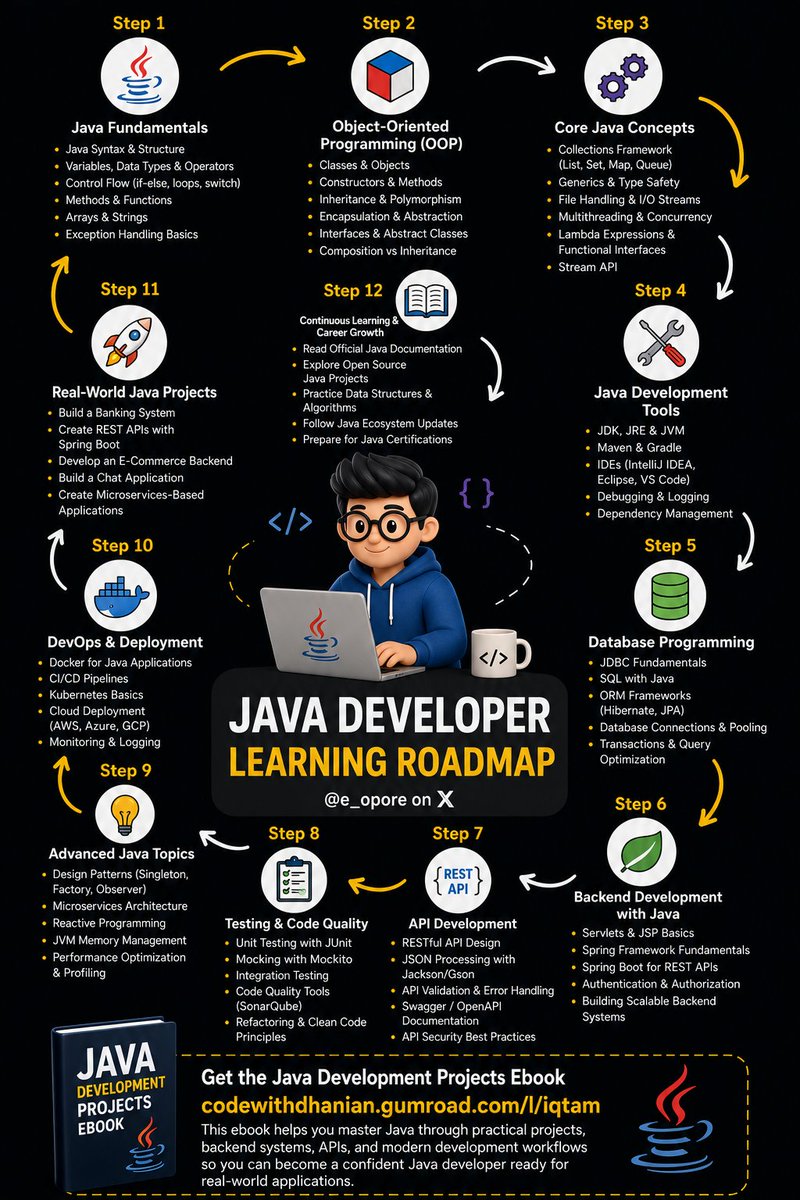
Java Developer Learning Roadmap |-- Java Fundamentals | |-- Java Syntax & Structure | |-- Variables, Data Types & Operators | |-- Control Flow (if-else, loops, switch) | |-- Methods & Functions | |-- Arrays & Strings | |-- Exception Handling Basics |-- Object-Oriented Programming (OOP) | |-- Classes & Objects | |-- Constructors & Methods | |-- Inheritance & Polymorphism | |-- Encapsulation & Abstraction | |-- Interfaces & Abstract Classes | |-- Composition vs Inheritance |-- Core Java Concepts | |-- Collections Framework (List, Set, Map, Queue) | |-- Generics & Type Safety | |-- File Handling & I/O Streams | |-- Multithreading & Concurrency | |-- Lambda Expressions & Functional Interfaces | |-- Stream API |-- Java Development Tools | |-- JDK, JRE & JVM | |-- Maven & Gradle | |-- IDEs (IntelliJ IDEA, Eclipse, VS Code) | |-- Debugging & Logging | |-- Dependency Management |-- Database Programming | |-- JDBC Fundamentals | |-- SQL with Java | |-- ORM Frameworks (Hibernate, JPA) | |-- Database Connections & Pooling | |-- Transactions & Query Optimization |-- Backend Development with Java | |-- Servlets & JSP Basics | |-- Spring Framework Fundamentals | |-- Spring Boot for REST APIs | |-- Authentication & Authorization | |-- Building Scalable Backend Systems |-- API Development | |-- RESTful API Design | |-- JSON Processing with Jackson/Gson | |-- API Validation & Error Handling | |-- Swagger / OpenAPI Documentation | |-- API Security Best Practices |-- Testing & Code Quality | |-- Unit Testing with JUnit | |-- Mocking with Mockito | |-- Integration Testing | |-- Code Quality Tools (SonarQube) | |-- Refactoring & Clean Code Principles |-- Advanced Java Topics | |-- Design Patterns (Singleton, Factory, Observer) | |-- Microservices Architecture | |-- Reactive Programming | |-- JVM Memory Management | |-- Performance Optimization & Profiling |-- DevOps & Deployment | |-- Docker for Java Applications | |-- CI/CD Pipelines | |-- Kubernetes Basics | |-- Cloud Deployment (AWS, Azure, GCP) | |-- Monitoring & Logging |-- Real-World Java Projects | |-- Build a Banking System | |-- Create REST APIs with Spring Boot | |-- Develop an E-Commerce Backend | |-- Build a Chat Application | |-- Create Microservices-Based Applications |-- Continuous Learning & Career Growth | |-- Read Official Java Documentation | |-- Explore Open Source Java Projects | |-- Practice Data Structures & Algorithms | |-- Follow Java Ecosystem Updates | |-- Prepare for Java Certifications Get the Java Development Projects Ebook codewithdhanian.gumroad.com/l/iqtam This ebook helps you master Java through practical projects, backend systems, APIs, and modern development workflows so you can become a confident Java developer ready for real-world applications.
Dhanian 🗯️ tweet media
English
6
8
39
961
Venkatesh
Venkatesh@venkateshdotdev·
@SarangSood to be honest, india is not even in the race, be it Ai, semiconductor or electronics etc every other countries are way ahead. The best we can do is compare ourselves with Pakistan and Bangladesh and feel ourselves as superior
English
0
0
6
362
Venkatesh
Venkatesh@venkateshdotdev·
being a fresher in the AI era is genuinely tough. every week there’s a new LLM, every company wants AI skills, and at the same time entry level interviews still expect strong DSA, LeetCode, system design, internships, and solid GitHub projects. freshers are basically expected to be a 3-year experienced engineer for a 3.5 LPA package.
English
0
0
1
124
Dhanush N
Dhanush N@Dhanush_Nehru·
genz are damn confused should they learn ai for software jobs or solve leetcode for software jobs
English
15
1
32
1.8K
harish.rs
harish.rs@Harish_521·
Creating content might be the best source of passive income to ever exist
harish.rs tweet media
English
14
0
57
2.8K
Venkatesh
Venkatesh@venkateshdotdev·
If your search feels bad, users notice it faster than almost any other feature. Because people don’t blame “search.” They blame your product. Here’s where developers usually mess up search systems: - Using SQL LIKE queries at scale → becomes painfully slow - Ignoring typo tolerance → terrible UX - No ranking strategy → irrelevant results - Fetching everything in realtime → latency spikes - Treating search as a database problem → it’s actually a relevance problem Fast search is important. Useful search is what users remember.
English
0
0
0
9
Raman Jha
Raman Jha@RamanRjha4647·
𝐈𝐟 𝐲𝐨𝐮𝐫 𝐚𝐩𝐩 𝐢𝐬 𝐥𝐚𝐠𝐠𝐢𝐧𝐠 𝐭𝐡𝐞𝐧 𝐲𝐨𝐮 𝐩𝐫𝐨𝐛𝐚𝐛𝐥𝐲 𝐛𝐮𝐢𝐥𝐭 𝐢𝐭 𝐨𝐧 𝐭𝐡𝐞 𝐰𝐫𝐨𝐧𝐠 𝐝𝐚𝐭𝐚𝐛𝐚𝐬𝐞. 𝐇𝐞𝐫𝐞 𝐢𝐬 𝐡𝐨𝐰 𝐲𝐨𝐮 𝐬𝐡𝐨𝐮𝐥𝐝 𝐩𝐢𝐜𝐤 𝐭𝐡𝐞 𝐫𝐢𝐠𝐡𝐭 𝐝𝐚𝐭𝐚𝐛𝐚𝐬𝐞 𝐟𝐨𝐫 𝐫𝐢𝐠𝐡𝐭 𝐟𝐞𝐚𝐭𝐮𝐫𝐞 - For auth, billing & core user data - use sql database such as supabase or MySQL - For live notifications, feed caching & leaderboards - use redis or upstash - For product catalogs & content management - use nosql database such as mongoDB - For search bars & auto-complete engines - use Elastisearch - For analytics dashboards - use Amazon redshift Feel free to add anything to this list.
English
8
1
15
266
Venkatesh
Venkatesh@venkateshdotdev·
Backend interview question: your cache is working. same query. instant response. every time. you deploy new code. users still see old data. how is that possible if the cache is “healthy”?
English
0
0
0
4
Venkatesh
Venkatesh@venkateshdotdev·
@IndianTechGuide civic sense should be taught from school as separate subject in all states(with documentaries of japan and western countries), until then these kind of will never knew what they are doing is absolute wrong.
English
2
0
0
887
Indian Tech & Infra
Indian Tech & Infra@IndianTechGuide·
A solution to this problem will save many rivers in India.
English
73
73
953
34K
Venkatesh
Venkatesh@venkateshdotdev·
@danmartell maybe we’ll eventually get strong opensource LLMs that outperform Claude and GPT. but the AI wave itself is irreversible now. Every product is going to integrate it in some form.
English
1
0
0
577
Dan Martell
Dan Martell@danmartell·
Everyone's reading this story wrong. Companies aren't cancelling Claude accounts because AI is too expensive. They're doing it because they were measuring the wrong number. Cost per token is not the metric. Revenue per head is. If your engineer spends $2,000/month on Claude Code and ships what 3 engineers shipped last year... you just 3x'd output for 5% of the cost of headcount. That's not a cost problem. That's the best deal in the history of business. The mistake isn't using AI. The mistake is letting people "tokenmaxx" without tying spend to output. Same playbook applies to humans: – No KPIs = expensive employees. – No KPIs = expensive AI. Don't cancel the tool. Build the system.
Ricardo@Ric_RTP

Microsoft just banned its own engineers from using AI. The tool was literally costing MORE than the humans it was supposed to replace. They lied to you about AI adoption and now the whole narrative is blowing up: Microsoft gave thousands of engineers access to Claude Code six months ago and encouraged them to use it. Engineers loved it and adoption exploded. But then the invoices arrived. Token-based pricing means every query, every code review, every debugging session costs money. At scale across 100,000 engineers, the numbers became so large that Microsoft issued an internal order to cancel nearly all Claude Code licenses by end of June and force everyone onto their own cheaper tool instead. The company that invested $5 billion in Anthropic just told its own people to stop using Anthropic's product because it costs too much. Uber's story is even worse... Their CTO Praveen Neppalli Naga told The Information that the budget he planned for the full year was "blown away already" by April. Uber had rolled out Claude Code in December 2025. By March, 84% of their 5,000 engineers were using it with 70% of all committed code coming from AI systems. Heavy users were burning $500 to $2,000 per month each. Naga himself spent $1,200 in a single two-hour demo session. The company had even built internal leaderboards ranking engineers by how much AI they used. They literally gamified the spending and then ran out of money. Now look at what Nvidia's own VP of applied deep learning Bryan Catanzaro said to Axios last month. Direct quote: "For my team, the cost of compute is far beyond the costs of the employees." This is a VP at the company that SELLS the chips saying that using AI is more expensive than paying humans. Think about what this means for the entire AI narrative. Every CEO on every earnings call for the past two years has said the same thing: AI will make us more efficient, reduce headcount, and cut costs. The stock market rewarded every company that said it. Fired workers, stock goes up. Announced AI adoption, stock goes up. But the actual companies deploying AI at scale are discovering the math doesn't work. The MORE employees use AI, the HIGHER the bill. Goldman Sachs forecasts a 24x increase in token consumption by 2030 as companies adopt AI agents. Gartner just published a report showing that even though individual token prices will drop 90% by 2030, total enterprise AI costs will go UP because agents consume exponentially more tokens per task than basic tools. Meta built an internal dashboard called "Claudeonomics" to track which employees use the most AI. Amazon started pushing engineers to "tokenmaxx," their internal term for consuming as many AI tokens as possible. Both companies are spending hundreds of billions on AI infrastructure this year alone. And Microsoft, the company that bet its entire future on AI, just told 100,000 engineers to stop using the tool they liked best because the per-token bills got out of control. The companies building AI are telling investors it saves money. The companies using AI are finding out it costs more than the humans it was supposed to replace. And even the company that makes the chips just admitted it through its own VP. This is the gap nobody on Wall Street is pricing in. $725 billion in AI infrastructure spending this year across Big Tech. And the first companies to actually deploy these tools at scale are already pulling back because the economics don't work. What do you think?

English
83
10
176
31.2K
Venkatesh
Venkatesh@venkateshdotdev·
yes, cooling was never the biggest challenge. real problem is everything around it connectivity, power infrastructure, logistics, and maintenance. Laying high-speed fiber cables across continents alone would cost a fortune, and even a small hardware failure would become a massive operational issue in Antarctica.
English
1
0
1
15
Smoke
Smoke@ShivamS1123·
Why data centers are not built in Antarctica. Here is why: No undersea fiber cables means satellite only internet which is too slow for real time compute. No power infrastructure. No maintenance workforce. Environmental treaties protecting the continent. Everything else costs a fortune. The cooling problem was never the hard part.
English
1
0
2
43
Venkatesh
Venkatesh@venkateshdotdev·
@unfiltered_ajit But before that talent should be recognised and give opportunities to grow
English
1
0
1
7
Shikhar
Shikhar@shekhu04·
So these are the questions that were asked; I have divided it into sections for easier understanding: Section 1 - General Questions 1. Tell me about yourself / Introduction 2. What are your hobbies? 3. What are your strengths and weaknesses? 4. Tell me about your previous experience. 5. What was your role in the project, and how did you improve the workflow? Section 2 - Frontend Questions 6. How does a React application start? 7. Difference between package.json and package-lock.json 8. What is JSX? 9. Why is React fast and popular? 10. What is the Virtual DOM? 11. What is the Diffing Algorithm in React? 12. What is reconciliation in React? 13. Difference between useEffect and useLayoutEffect 14. What is the purpose of the useRef hook? 15. Difference between Redux and Redux Toolkit 16. How do you manage global state using Redux Toolkit? (I answered it with proper diagrams) 17. What is Redux Thunk? Section 3 - Output Based Questions 20. console.log(null === undefined) tput question (I don’t remember the exact question, but I answered it correctly). 19. console.log(null == undefined) => true 20. console.log(null === undefined) => false 21. console.log(NaN == NaN) => false (I mistakenly answered true) Section 4 - Backend Questions 22. Which backend frameworks have you worked with? 23. What exactly is Node.js? 24. What is middleware? 25. What are REST APIs? 26. Difference between REST operator (...rest) and Spread operator (...spread) 27. What are WebSockets? 28. What is long polling? 29. What is Socket. IO and what extra features does it provide? 30. How does indexing work in MongoDB? 31. How does authentication work using JWTs? 32. What are the four pillars of OOPs? Section 5 - Problem Solving / DSA 33. LeetCode 83 - Remove Duplicates from Sorted List 34. LeetCode 15 - 3Sum Section 6 - AI Related Questions 35. How do you use AI in your daily workflow? 36. Which AI tools have you used for development? 37. What are the advantages and limitations of using AI while coding? 38. Have you ever used AI for debugging or learning a new technology? Section 7 - Personal Feedback and Discussion 39. I asked the interviewer for feedback after the round. (He mentioned that he still needs to evaluate my coding ability, so there is a possibility of a third round) 40. I also asked him a few questions about the company since I had researched them before the interview. Overall, I answered around 90% of the questions confidently and gave my best during the interview Let us hope for the best🤞
Shikhar@shekhu04

done with the interview one of the best interviews of my life yet will be posting the questions asked in some time Thank you everyone ❤️

English
27
0
71
2.9K