A maioria dos iniciantes em Java desiste. O motivo? Eles não têm um mapa.
Pulando de "Core Java" para "Spring" sem entender o que há no meio.
Este é o mapa. O caminho exato, passo a passo, que te impede de ficar perdido.
Salve para começar do jeito certo.
Obrigado Nelio Alves, você faz qualquer um entender Java
public class Main {
public static void main(String[] args) {
System.out.println("Olá mundo!");
}
}
Arrays in Javascript in a nutshell:
1. What are Arrays?
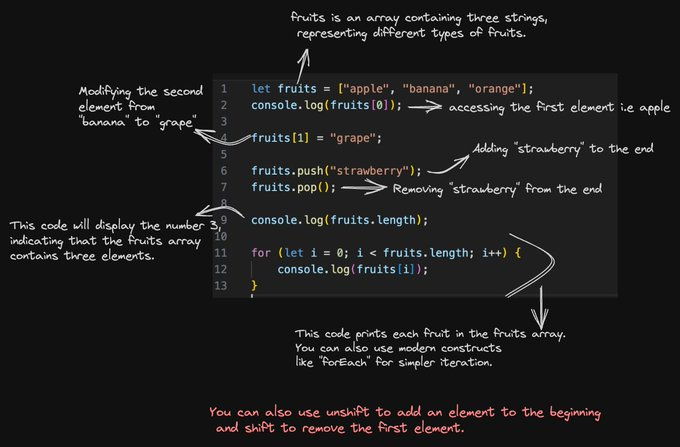
An array is a structured collection of values, where each value is assigned a unique index.
These values can be of any data type, including numbers, strings, objects, and even other arrays.
JavaScript arrays use zero-based indexing, meaning the first element is at index 0, the second at index 1, and so on.
This indexing system is common in many programming languages.
2. How to create arrays:
Arrays can be created using square brackets [].
You can initialize them with values, or they can be empty.
3. Accessing Array Elements:
Arrays use a zero-based index as mentioned earlier, meaning the first element is at index 0, the second at index 1, and so on.
You access array elements by specifying their index inside square brackets.
4. Modifying Array Elements:
You can change the value of an array element by assigning a new value to a specific index.
5. Adding and Removing Array Elements
JavaScript provides methods to add and remove elements from arrays.
The "push" method adds an element to the end,
while the "pop" method removes the last element
You can also use "unshift" to add an element to the beginning and "shift" to remove the first element.
6. Array Length:
You can find the number of elements in an array using the ''length'' property.
7. Looping Through Arrays:
Loops like for and modern methods like forEach help you iterate through array elements efficiently.
8. Array Destructuring:
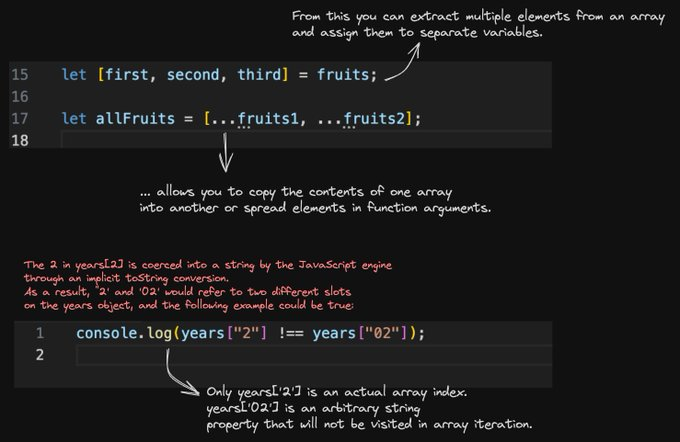
This feature allows you to extract multiple elements from an array and assign them to separate variables.
9. Array Spread Operator:
The spread operator (...) allows you to copy the contents of one array into another or spread elements in function arguments.
10. Array Manipulation:
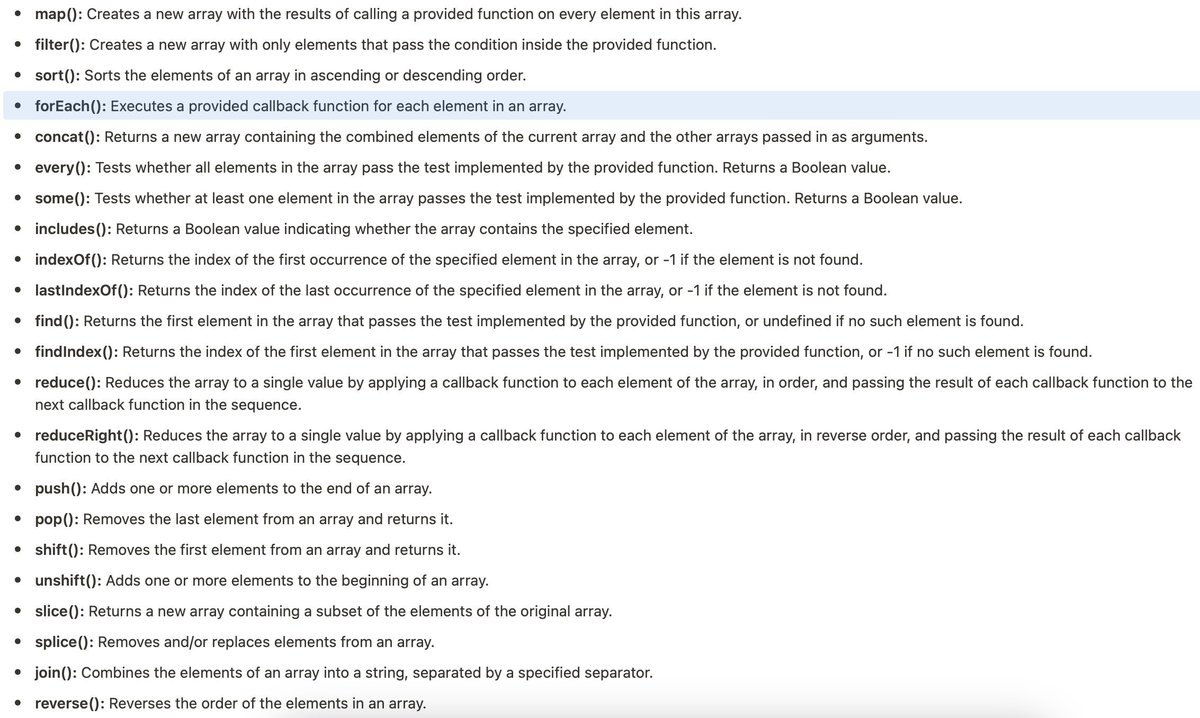
Methods like map, filter, and reduce are essential for transforming and processing array data.
11. Iterating with for...of:
The for...of loop simplifies array iteration by directly providing the elements, rather than indices.
12. Types of Arrays:
- Static Arrays:
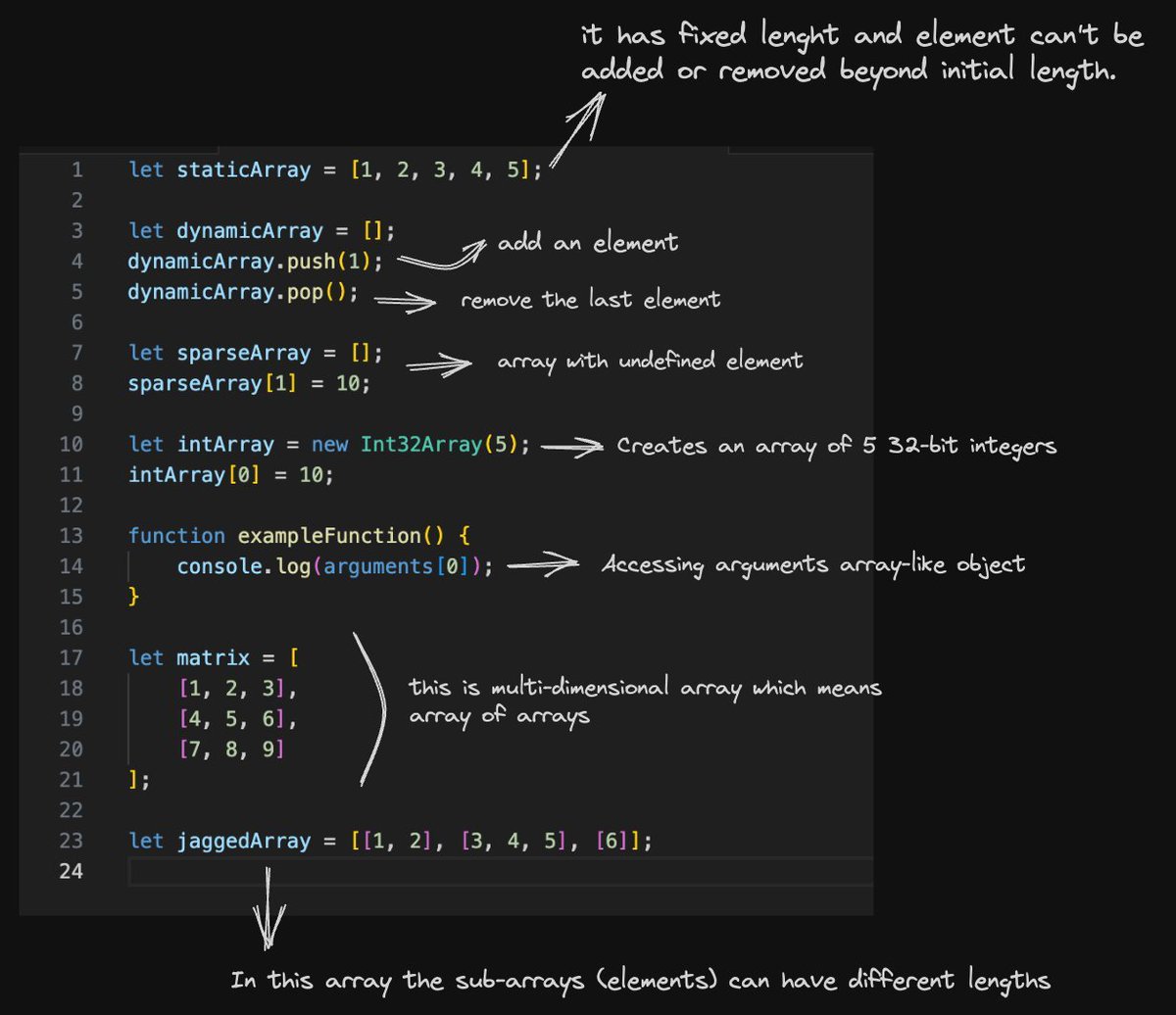
These are the most basic types of arrays.
They have a fixed length determined when the array is created.
You can't add or remove elements beyond the initial length.
- Dynamic Arrays:
Dynamic arrays are more flexible.
They can grow or shrink in size dynamically by adding or removing elements.
JavaScript arrays are typically dynamic.
- Sparse Arrays:
Sparse arrays are those with "holes" or undefined elements.
They don't have consecutive index values.
They are not commonly used but can be created intentionally.
- Typed Arrays:
Typed arrays are designed for working with binary data and have a fixed data type for their elements.
They are often used in scenarios like dealing with audio, video, or network data.
- Array-Like Objects:
Some objects in JavaScript, like the ''arguments'' object or the ''NodeList'' returned by ''querySelectorAll'' , resemble arrays but are not true arrays.
They have indexed properties, but they lack many array methods.
- 2D Arrays (Multidimensional Arrays):
These arrays are arrays of arrays, allowing you to represent data in a grid or table format.
They are useful for working with matrices or other two-dimensional data structures.
- Jagged Arrays:
Jagged arrays are arrays in which the sub-arrays (elements) can have different lengths.
They are often used in scenarios where data is irregular or doesn't conform to a strict grid structure.
Crianças estão protestando após
o Roblox bloquear Chat de voz e texto para menores de 9 anos
A medida faz parte de uma atualização de segurança que divide os Jogadores em faixas etárias para tentar impedir que adultos conversem com menores de idade.