

5t4chu
1.4K posts



89 minuta, 34 sekunda i koniec meczu Motoru Lublin z GKS-em Katowice! 🤝

Polski
English

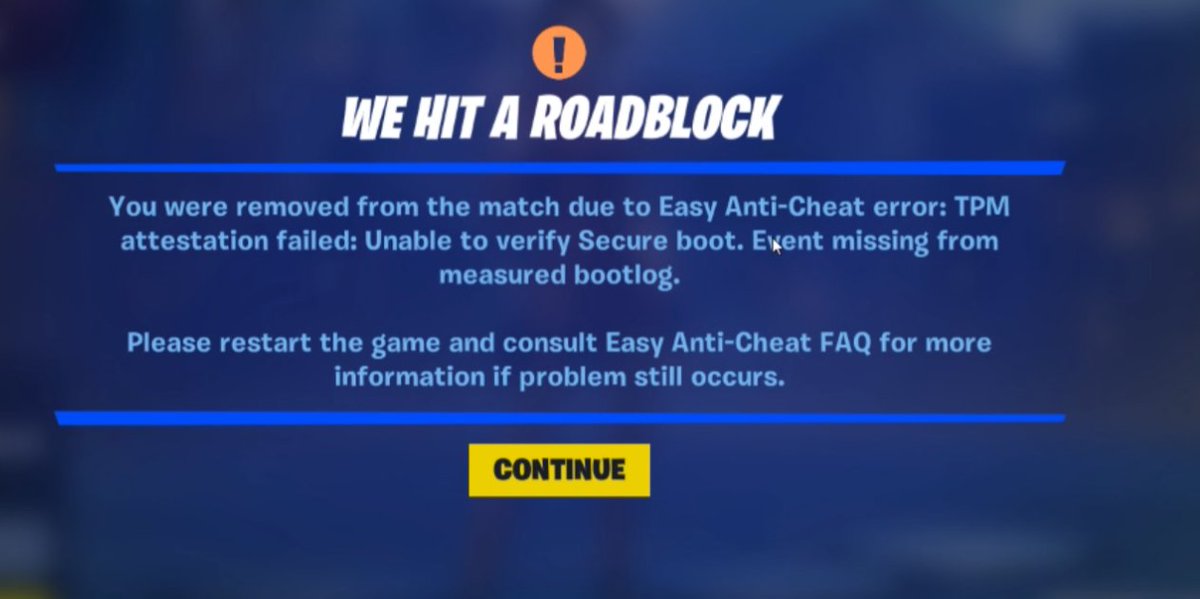
@FortniteStatus @Fortnite @FNCompetitive For anyone getting the stupid Secure Boot/TPM bug in Fortnite tourneys — here’s exactly how I fixed it (with help from ChatGPT):
1️⃣ Check your BIOS
Reboot PC → Spam DEL or F2 to enter BIOS.
Make sure Secure Boot is ON (Standard or Custom, doesn’t matter) & TPM/Trusted Computing is Enabled.
2️⃣ Grab a USB Drive
Needs at least 1GB free.
Plug into PC and format it to FAT32.
3️⃣ Download BIOS Update
Go to your motherboard brand’s support page (Google your model + "BIOS update").
Download the latest BIOS .zip file.
4️⃣ Prep the USB
Extract the .zip.
Move the BIOS update file to the USB root (don’t put it inside a folder).
5️⃣ Flash the BIOS
Reboot → Enter BIOS.
Look for EZ Flash / M-Flash / Q-Flash (depends on brand).
Select the update file from your USB → Confirm → Let it run (PC will restart).
6️⃣ Re-check Settings
After update, go back in BIOS.
Make sure Secure Boot is enabled + TPM is enabled.
Save & Exit.
✅ Launch Fortnite → Bug should be gone.
English
Polski


❗️ While we work to resolve an issue, we’re temporarily disabling Precision Air Strike in Battle Royale.
We'll let you know once it's back online.
English
Polski
Polski
@Eriiiks_ @Kianofnr @FortniteStatus jednhm działa drugim nie dziala, mnie w busie wypierdala do lobby
Polski
English

this tweet is for all FNCS Champions 2025 - check your lockers for the Blade of Champions, it's yours to keep <3
English
5t4chu retweetledi
Polski



yo, jutro chce zrobić kolejnego streama z serii "gry z widzami". jakies propozycje? wiadomo gridzik 2 bedzie ale moze macie jakies nowe gierki ktore sa za free, mozna tworzyc custom serwery i najlepiej z voicechatem
Polski

5t4chu retweetledi

