Andrew Ward

1.7K posts

Andrew Ward banner
Andrew Ward

Andrew Ward

@AndrewLeeWard

Founder @scorchsoft 📈| AI Strategist & App Expert 👨‍💻| Author of 2x Business Books 📚| Tech Optimist 😆| Powerlifter💪| Mission to Make World Tech Enabled 🌍

Birmingham, England Katılım Mayıs 2014
235 Takip Edilen120 Takipçiler
Andrew Ward
Andrew Ward@AndrewLeeWard·
For years, the typical customer buying journey looked roughly like this: Search Google -> read your blog/docs -> click around -> decide -> talk to sales. But today AI is changing where “learning” happens. Now it often looks like: Ask Copilot/ChatGPT -> copy/paste into a tool -> decide -> talk to sales. That is not a small UX change. That is a distribution change. If your growth model relies on humans visiting pages (docs, help centres, knowledge bases, even your product pages), you’re exposed to a very specific kind of failure. Your customers still use your product. They just stop visiting the places where you persuade them. This is why the Tailwind story (doc traffic down while AI-assisted usage goes up) is interesting, even if you ignore the drama. The mechanism is the point: when AI becomes the interface, the “browsing moments” disappear. And it’s not niche. GitHub’s Octoverse has been tracking how quickly AI is becoming a default part of development, and GitHub Copilot reportedly crossed 20 million all-time users in 2025. Even if you’re not selling to developers, the principle carries. AI is starting to sit between you and your customer’s attention. So the question for an SME is simple: what do you do when your best persuasion surfaces (pages) get bypassed? Here’s the practical playbook. 1) Move proof closer to the decision. Stop hiding credibility in blog posts that people may never read. Put proof in places that survive AI intermediation: - onboarding (where the user is actually trying to succeed) - proposals and SOWs (where risk gets priced in) - contracts (where objections turn into clauses) - support replies (where trust is built one ticket at a time) - inside the workflow itself (tooltips, templates, guardrails, “why this matters”) If a buyer only ever sees your product through an AI summary, you still want them to bump into specifics: outcomes, constraints, reassurance, and evidence. 2) Make your business legible to machines and humans. This is where most “documentation” efforts miss the point. Don’t just write pages. Write artefacts. Artefacts are the things that get quoted, scraped, forwarded, and pasted into Slack. Examples: - a public status page (signals maturity) - a simple API spec (even if it’s not public, make it real) - a changelog with trade-offs (not just “improvements”, tell the truth) - an integration map (what connects to what, and what doesn’t) - a one-page “what we do and don’t do” (cuts sales cycles fast) These travel better than “thought leadership”, and AI can actually use them. 3) Treat your website as a receipt, not the interface. Your site still matters. The job just changes. It becomes the place someone goes to verify what the AI told them. So clarity beats cleverness. Specifics beat slogans. If your homepage says “We deliver innovative solutions” (congrats, you sound like everyone). If it says “We build client portals that reduce admin time by 30-50% by automating onboarding, approvals, and reporting” you’re giving the verifier something concrete. A quick test: ask a customer where they learned how to use the last tool they adopted. If the honest answer is “I asked an AI assistant”, congratulations. Your marketing just got a new competitor. Sources: businessinsider.com/tailwind-engin… github.blog/news-insights/… techcrunch.com/2025/07/30/git… theverge.com/podcast/844073…
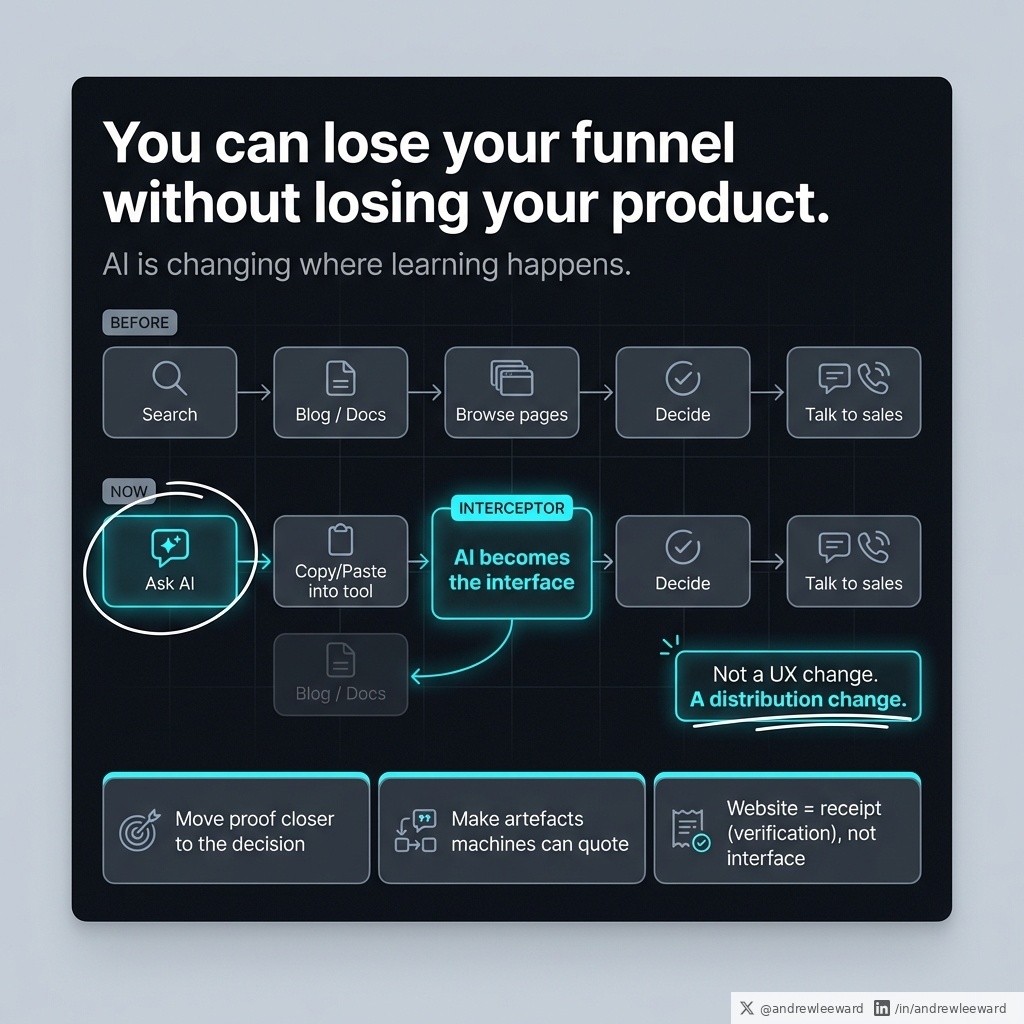
Andrew Ward tweet media
English
0
0
0
5
Andrew Ward
Andrew Ward@AndrewLeeWard·
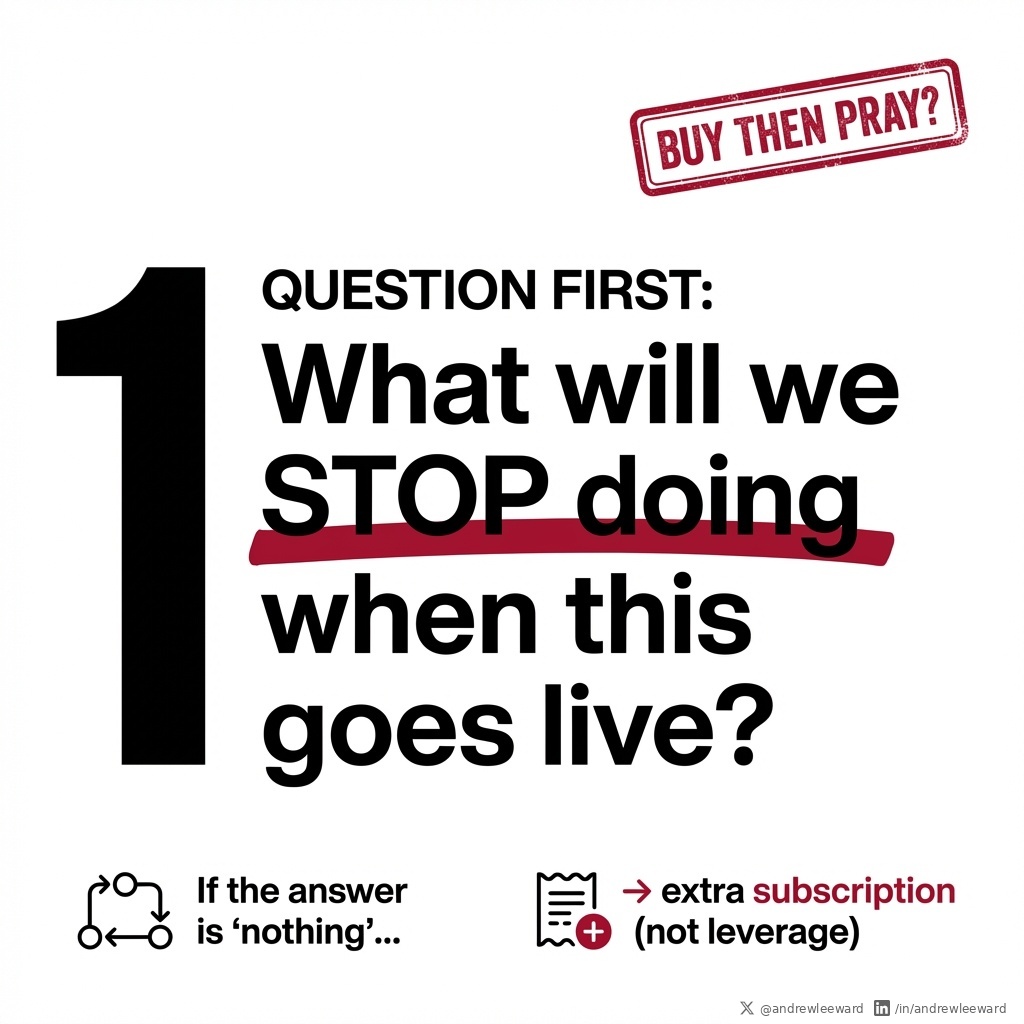
If you are debating build vs buy in 2026, ask one question first: What will we stop doing when this goes live? Most teams skip this and jump straight to features, vendor demos, and procurement theatre. But leverage is not “we added a tool”. Leverage is “we removed work”. If the answer is “nothing”, you’re not buying leverage. You’re buying an extra subscription and a new set of excuses. Here’s what I mean in plain English. Every new system creates two things by default: 1) A new place to do work 2) A new set of tasks to keep the system alive (admin, training, data cleaning, permissions, support tickets) If you do not deliberately delete old work, the new thing just piles on top. So you feel busier, not better. This is why “we implemented X” so often turns into: - “We haven’t had time to roll it out properly yet” - “People are still using spreadsheets, just in case” - “The data isn’t clean enough to trust it” - “We need another tool to make the tool work” (my personal favourite) Build vs buy is not the first decision. Deletion vs addition is. A quick way to force clarity (and avoid buying shiny stress): Step 1: Write the stop list before you choose the product Pick 1-3 things that will end when the solution goes live. Examples: - Stop producing the manual weekly KPI pack (replace with a dashboard that pulls from source) - Stop the “status update” meeting (replace with automated workflow updates) - Stop copy/pasting data between CRM, finance, and ops (replace with integration) If you cannot name what dies, pause the project. You do not have a leverage case yet. Step 2: Assign an owner for each thing you are killing Not “the business”. A named person. Their job is to: - remove access to the old process - update SOPs - retrain the team - enforce the new way (yes, politely becoming the bad guy for 2-4 weeks) Step 3: Put a date on the deletion “Parallel running” is fine for a short window, but it cannot be indefinite. Set a switch-off date, then measure whether the work actually disappeared. Step 4: Price the habit you are trying to break If the old way costs you 10 hours a week across the team, that is the number to beat. If you cannot quantify the pain, you will struggle to justify the change (and the team will treat it as optional). Now, build vs buy. Buying usually wins when: - the process is common (CRM, ticketing, HR, accounting) - speed matters more than uniqueness - you can configure 80% and live with the last 20% Building usually wins when: - you are stitching together a messy ecosystem (multiple systems, weird rules, unique data flows) - the workflow is your competitive edge - the off-the-shelf tools force ugly workarounds (which quietly become your new “nothing stops” problem) Either way, the success metric stays the same: What work did we delete? If you want your next app, portal, or AI rollout to actually move the needle, start there. Otherwise you are just collecting subscriptions like they are Pokemon cards, and wondering why nothing changes.
Andrew Ward tweet media
English
0
0
0
4
Charly Wargnier
Charly Wargnier@DataChaz·
i don't usually get hyped over doc scanners, but Google Drive's new update is insane 🤯 - Multi-page real-time scanning - Duplicate detection - Auto/continuous capture also lightning fast and UX is incredibly cool
English
11
28
166
17.4K
dayson — e/llm
dayson — e/llm@dayson·
@AndrewLeeWard @DataChaz niiiceee! in the slim chance, you can share (DM/email) such an example PDF with me (if not personal/confidential), I'd love to have a closer look - its valuable feedback for the team to improve the feature on :)
English
1
0
0
44
Andrew Ward
Andrew Ward@AndrewLeeWard·
If your offer can be bought, AI will help people buy it faster. If your offer must be sold, AI will mostly make the repetitive parts cheaper. That sounds like a throwaway line. It isn’t. It’s the difference between: - AI increasing your top line (more demand, faster conversion) - AI compressing your margins (same demand, lower perceived value) If you run an agency, consultancy, or any high-ticket service business, you live in the “must be sold” world. Let’s separate the two. A product that is bought is self-serve. The buyer can compare features, skim reviews, watch a couple of demos, and make a relatively low-risk decision. If they choose wrong, it’s annoying, not career-limiting. A service that is sold (person to person) usually has three traits: 1) High stakes Real money. Real deadlines. Reputational risk. Sometimes someone’s job. 2) Bespoke reality The messy details matter. The edge cases. The internal politics. The “we’ve tried this before and it went badly” history. 3) Trust transfer They are not just buying deliverables. They are buying the belief that you will get them through it. AI will replace transactional work first. It’s great at pattern-matching, summarising, drafting, categorising, and producing first passes at things that look like other things. But the human bit in high-ticket sales is rarely “can you write a proposal?” It’s “can you persuade a smart, cautious person to move serious money, take a risk, and change their mind?” So what should you do with AI if you sell high-ticket work? Use it to manufacture certainty. Not fake certainty. Not glossy PDFs. Not confident-sounding waffle. Real certainty, created by making your process visible. Most service businesses keep the real process in people’s heads: - The senior person knows what good discovery looks like - The PM knows what typically goes wrong - The lead dev knows the integration traps - The delivery team knows which corners you cannot cut That’s fine internally, until you try to sell it. Buyers don’t pay you because you know things. They pay you because you reduce the chance of a painful mistake. Certainty is a sales asset. So convert “what we do in our heads” into artefacts you can show, share, and use to guide decisions. Practical examples (these win trust fast): 1) A short discovery brief One page. Plain English. What you heard, what you’re solving, what you’re not solving (yet), and what you need from them. 2) A risk register Not a scary document. A reassuring one. What could go wrong, how likely it is, what it would cost, and what you’ll do about it. 3) A visible decision log Every project has forks in the road. Write them down. What decision was made, why, by whom, and what trade-off was accepted. 4) A release checklist The stuff that stops “we launched” turning into “we had an incident”. Security basics, data handling, rollback plan, monitoring, support route. 5) An integration map Boxes and arrows are not just for architects. They help non-technical leaders understand scope, dependencies, and where risk lives. AI can draft all of the above quickly. That’s not the magic. The magic is that you can put the artefacts in front of the buyer and say: “This is how we reduce risk. This is how we make decisions. This is how we stop surprises. This is how we keep you safe.” And yes, you still need humans. Because the moment the client says, “But what about our odd legacy system and the politics between Ops and Sales?”, you need judgement, not autocomplete. If you sell high-ticket work, don’t use AI to look clever. Use it to look dependable. Source: youtube.com/watch?v=0i0O_T…
YouTube video
YouTube
Andrew Ward tweet media
English
0
0
1
9
Andrew Ward
Andrew Ward@AndrewLeeWard·
The most expensive thing you can build with AI is more work. I keep seeing teams roll out “agents” and then act surprised when everyone feels busier. More drafts. More updates. More dashboards. More meetings about the dashboards. Ethan Mollick told a story where he asked an agent to turn one memo into a PowerPoint, then asked for another version, and another. He ended up with 17 decks. That is not leverage. That is a content fire hose pointed at your own head. The annoying part is: the models are now capable enough to do serious work. METR has tracked a steady increase in how long AI systems can complete tasks with at least 50% success. And GDPval style benchmarks exist because we need to test longer, more realistic work (multi-hour tasks) rather than trivia. So why are so many businesses drowning in output? Because the bottleneck was never writing. The bottleneck is judgment. If you want AI to remove work instead of multiplying it, you need three unsexy artefacts before you buy another tool (or before you “agent-ify” another process). 1) A one-sentence job spec Not a 4-page PRD. One sentence. What job is it doing, for who, what does “good” look like, and what must it not do? Example: “Draft a client update email for UK SME customers, in our tone, using these project notes, with clear next steps. Must not invent dates, prices, or commitments.” That last bit matters. Most agent failures are “did something impressive” failures, not “did nothing” failures. 2) An eval pack Real scenarios where it either passes or fails. Not a demo prompt you wrote five minutes before the meeting. Not a single happy-path example. You want the awkward stuff: - missing data - conflicting inputs - edge cases - the customer who is angry - the order that breaks your normal rules Anthropic make this point well: evals are how you stop flying blind as soon as you start iterating. Without evals, teams fall into the demo trap: impressive in a meeting, unreliable on a Tuesday. 3) An attention budget This is the one most leaders ignore. If an agent produces ten outputs and only one gets used, the other nine are waste. Not because they cost tokens. Because they cost attention. Attention is usually your scarcest input. You can always buy more software. You cannot buy more “senior person calmly reviewing 30 AI-generated options and still making a good decision”. So here’s a simple metric I use with clients: Used output rate. How many AI outputs actually get pasted into an email, pushed into a CRM, shipped in a release, or used to make a decision? If it’s low, you do not have an AI problem. You have a workflow problem. Because what’s really happening is: - AI increases supply (more words, more slides, more summaries) - but you haven’t improved the decision system that turns output into action So the organisation drowns. Practical rule: stop measuring AI by how much it produces. Measure it by how many decisions it improves. If an agent cannot answer these questions in plain English, it is not ready to touch customers, money, or operations: What decision is this output meant to change? And when it is wrong, how do we notice quickly and recover safely? That might mean: - confidence flags - “show your sources” links back into your CRM/docs - a human sign-off step for high-risk actions - fallbacks when data is missing The goal is not to make AI look clever. The goal is to make your business calmer. Sources: oneusefulthing.org/p/real-ai-agen… anthropic.com/engineering/de… metr.org/blog/2025-03-1… gdpval.dev
Andrew Ward tweet media
English
0
0
1
12
Andrew Ward
Andrew Ward@AndrewLeeWard·
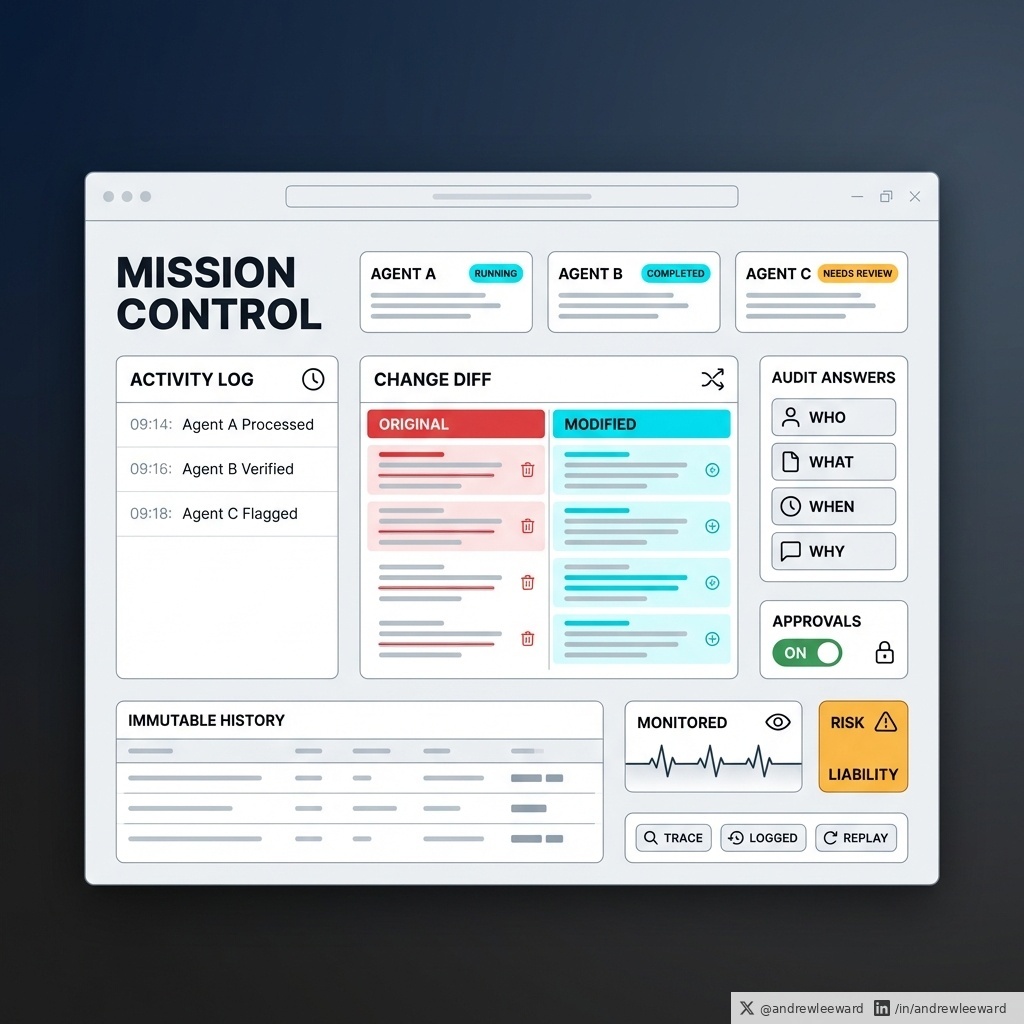
AI agents will need a control room, not a cheerleader. The hype version of agents is basically: “Let it loose, it’ll figure it out.” The business version is much less glamorous (and much more useful): you need a mission control where you can run multiple agents in parallel, monitor what they did, and audit what changed. Satya Nadella described that exact idea and it’s the direction of travel for every serious organisation using agents for real work, not demos. Here’s the uncomfortable truth. If you cannot answer: - who changed what - when they changed it - why it was changed …you do not have automation. You have a liability. Because the moment an agent touches anything that matters (customer data, pricing, invoices, contracts, CRM records, stock, access permissions, email sends), you’ve just introduced a new kind of risk: 1) Silent changes An agent can “helpfully” update 500 records in seconds. If you can’t trace it back to an exact action, you’ll spend days arguing about what happened instead of fixing it. 2) Blame without accountability When something breaks, “the AI did it” is not an acceptable answer. Regulators, clients, and your own team will want a clear audit trail. 3) Compounding errors Agents don’t just make mistakes. They can repeat them at scale, especially if you run them in parallel. So what does “mission control” actually mean in practice (for a normal SME, not a Silicon Valley lab)? It means you design your agent setup like you’d design a high-performing ops team. Start with the minimum viable control room: 1) Clear permissions Don’t give an agent the keys to the kingdom because it’s convenient. Restrict what it can read, write, delete, and approve. If it doesn’t need it, it doesn’t get it. 2) Action logs you can actually use Not “we have logs somewhere”. You need a readable timeline: agent name, action taken, system touched, before/after, timestamp, and the reason (prompt, rule, or trigger). 3) Approvals for risky steps Low risk actions can run automatically (drafting, summarising, suggesting). High risk actions need a gate (sending, deleting, changing prices, issuing refunds, updating customer status). 4) Rollback paths If an agent changes something important, you need a way to revert quickly. If rollback is impossible, the agent should not have write access in the first place. 5) Monitoring that fits your business You don’t need a NASA dashboard. You need simple signals: - what ran today - what changed - what failed - what needs human review If you’re thinking “this sounds like a lot”, it’s because you’re comparing it to chat. Agents are not chat. They are software that takes actions. And action without control is just speed-running your way into a mess you can’t explain. If you want to use agents properly, start by building mission control first. The clever bits come after. Source: youtube.com/watch?v=JI8S9T…
YouTube video
YouTube
Andrew Ward tweet media
English
0
0
0
8
Andrew Ward
Andrew Ward@AndrewLeeWard·
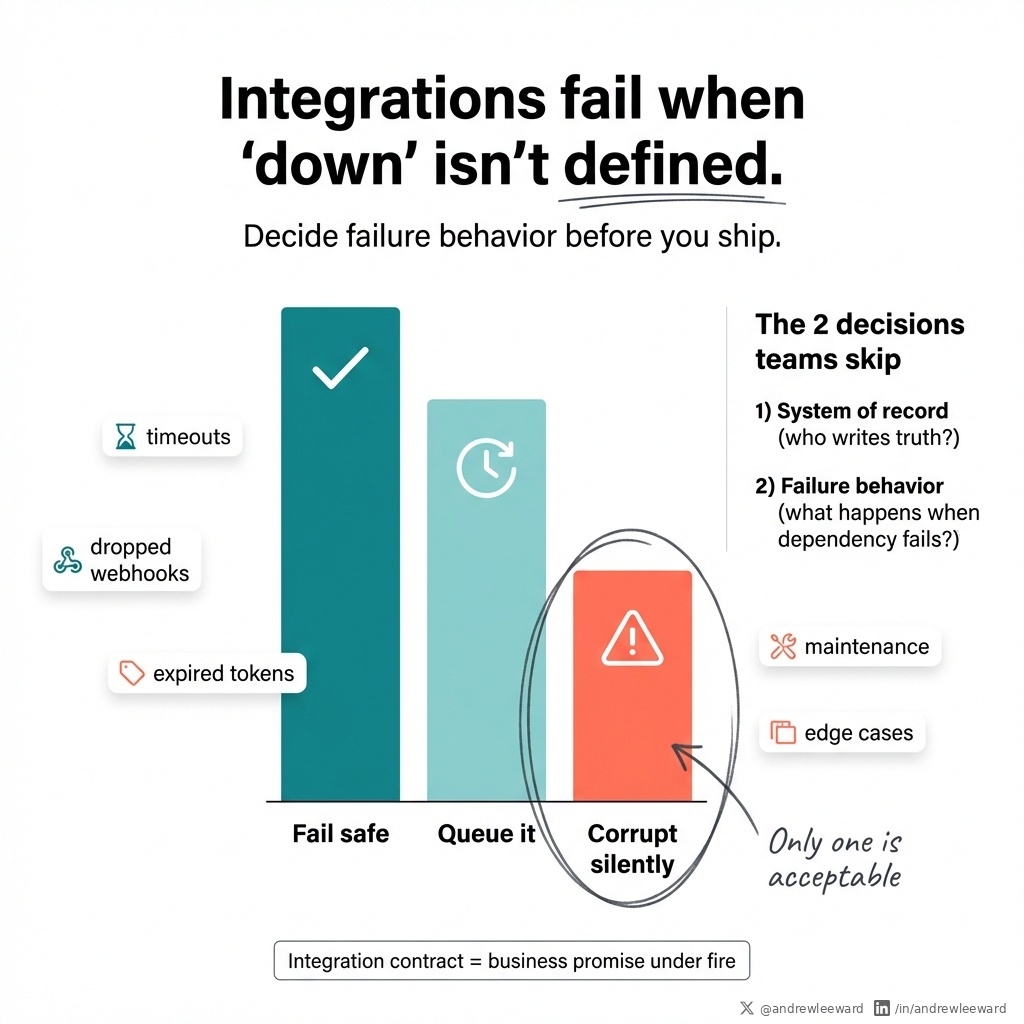
Integrations fail when nobody has agreed what "down" means. That sounds pedantic until: - a customer portal shows an invoice as paid when it is not - an ops dashboard is quietly wrong for three weeks - a support team promises something based on data that was never true This stuff rarely fails because your devs are bad. It fails because two decisions were never made explicitly, written down, and treated as non-negotiable. Decision 1: Which system is allowed to write the truth? In plain English: what is the system of record for each core concept (customer, subscription, invoice, entitlement, case status)? If System A and System B can both update “invoice status”, you do not have an integration. You have a disagreement waiting to happen. So pick one. Then design everything else around that reality (including the UI, reporting, and who gets shouted at when numbers don’t match). Decision 2 (the one founders and ops leads usually miss): What should happen when a dependency fails? Teams build integrations as if they will never break. But they will. Something will time out. A webhook will get dropped. A user will trigger a weird edge case you didn’t model. A system will be down for maintenance. A permissions token will expire at 2am on a Sunday. Someone will “just change a field name” in the third-party tool and swear it’s backwards compatible. So you need to decide failure behaviour up front. In practice, you are choosing between three bad options: 1) Fail safe Block the action and tell the user clearly what happened. This is annoying (and sometimes commercially painful), but it protects data integrity. Example: “We couldn’t take payment right now. Nothing has been marked as paid. Try again in a few minutes.” 2) Queue it Accept the request, then process it later with retries, alerts, and a visible status. This is often the best compromise for operational workflows, but only if you do the hard bits: - idempotency (so retries don’t duplicate) - monitoring (so failures don’t hide) - a dead-letter process (so stuck jobs get handled) Example: “Invoice approval received. Processing. If it hasn’t completed in 10 minutes, contact support.” 3) Silently corrupt Pretend it worked and deal with the mess later. This is how you end up with “paid” invoices that aren’t paid, stock that doesn’t exist, and customer service playing detective. Only one of these is acceptable. When people talk about “integration contracts”, this is the bit they miss. It is not just about which API exists. It is about the promise you are making to the business when things are on fire. And it gets even more important the moment you add AI. AI does not like ambiguity in inputs (it will confidently fill in gaps). Your users will not forgive ambiguity in outcomes (especially when money, access, or compliance is involved). If an AI agent is reading “payment status” and that status can be wrong, you are automating the spread of bad truth. That is not transformation. That is faster chaos. A quick exercise you can run this week: Pick one workflow end-to-end: - raising a support case - changing a subscription - approving an invoice Then force the team to answer two questions, in writing: 1) Where is the system of record for each core concept in this workflow? 2) What happens when the dependency is down (fail safe, queue, or silently corrupt)? You do not need an enterprise platform to do this. You need one clear decision, written down, before you build the next integration. Source: scorchsoft.com/blog/app-ecosy…
Andrew Ward tweet media
English
0
0
0
3
Andrew Ward
Andrew Ward@AndrewLeeWard·
AI will replace buying before it replaces selling. That sounds like a slogan, but it’s a useful way to predict where AI hits your business first. A product you buy is self-serve. You read a page, compare options, click checkout, job done. A product you are sold is different. Someone has to transfer trust. Someone has to reduce fear. Someone has to negotiate the awkward bits. Someone has to keep the deal alive when it would be easier (for everyone) to walk away. This matters because AI is unbelievably good at transactional work. It will keep eating: - Lead qualification - Follow-ups - First-draft emails - Call summaries - “Turn this into a proposal” - 20 variations of ad copy - Feature explanations and comparisons All of that keeps getting cheaper. And then the second-order effect kicks in: As execution gets cheaper, trust becomes more expensive. When everyone can produce a decent-looking proposal in 30 seconds, the proposal stops being the differentiator. When everyone can write “secure” and “scalable” and “best in class” (with a straight face), those words stop carrying any weight. So the buyer asks a different question: “Will this actually work for us, in our mess, with our politics, with our data quality, with our risks?” If you sell custom software, online portals, or AI integrations, this is the bit to take seriously. Your clients are not really buying an app. They are buying a reduction in risk. They are buying the confidence that, six months from now, they are not stuck with: - a half-finished build - a broken integration - a security panic - and an internal argument about whose fault it is So when you build your go-to-market for 2026, don’t compete in the area AI commoditises. Compete in the area it makes more valuable. Here are two practical shifts I’d make if I was selling tech services to non-technical leaders. 1) Sell evidence, not adjectives. “Secure” is cheap now. “Scalable” is cheap now. “Robust” is cheap now. Evidence is harder. Show me your risk register (even a sanitised version). Show me your release checklist. Show me how you handle rollbacks when something goes wrong. Show me how you run discovery so you can prove (or kill) the riskiest assumption in week one, not month four. If you can’t show your workings, you’re asking the buyer to take it on faith. And faith is getting expensive. 2) Sell a process that survives real life. Most projects don’t die because the code is hard. They die because the inputs are messy. Unclear definitions. Shifting priorities. Approval bottlenecks. Data quality. Someone senior changing their mind. Two departments arguing over what “active customer” actually means. A grown-up process has visible behaviours you can point to: - Weekly demos of working software (not slide decks) - Clear acceptance criteria (so “done” means done) - Named owners for definitions (so nobody can wriggle out later) - A way to pause, reverse, or re-scope decisions without drama If you’re buying AI, the same rule applies. A demo isn’t evidence. A vendor showing you one successful run isn’t the same as your team using it reliably every day, with your policies, your edge cases, and your customers. The winners won’t be the loudest. They’ll be the ones who can make risk feel smaller, in a way the buyer can actually verify. Source: youtube.com/watch?v=0i0O_T…
YouTube video
YouTube
Andrew Ward tweet media
English
0
0
0
6
Andrew Ward retweetledi
Ethan Mollick
Ethan Mollick@emollick·
After using it a bit, Claude Cowork Dispatch covers 90% of what I was trying to use OpenClaw for, but feels far less likely to upload my entire drive to a malware site.
English
191
184
5.9K
354.1K
Andrew Ward
Andrew Ward@AndrewLeeWard·
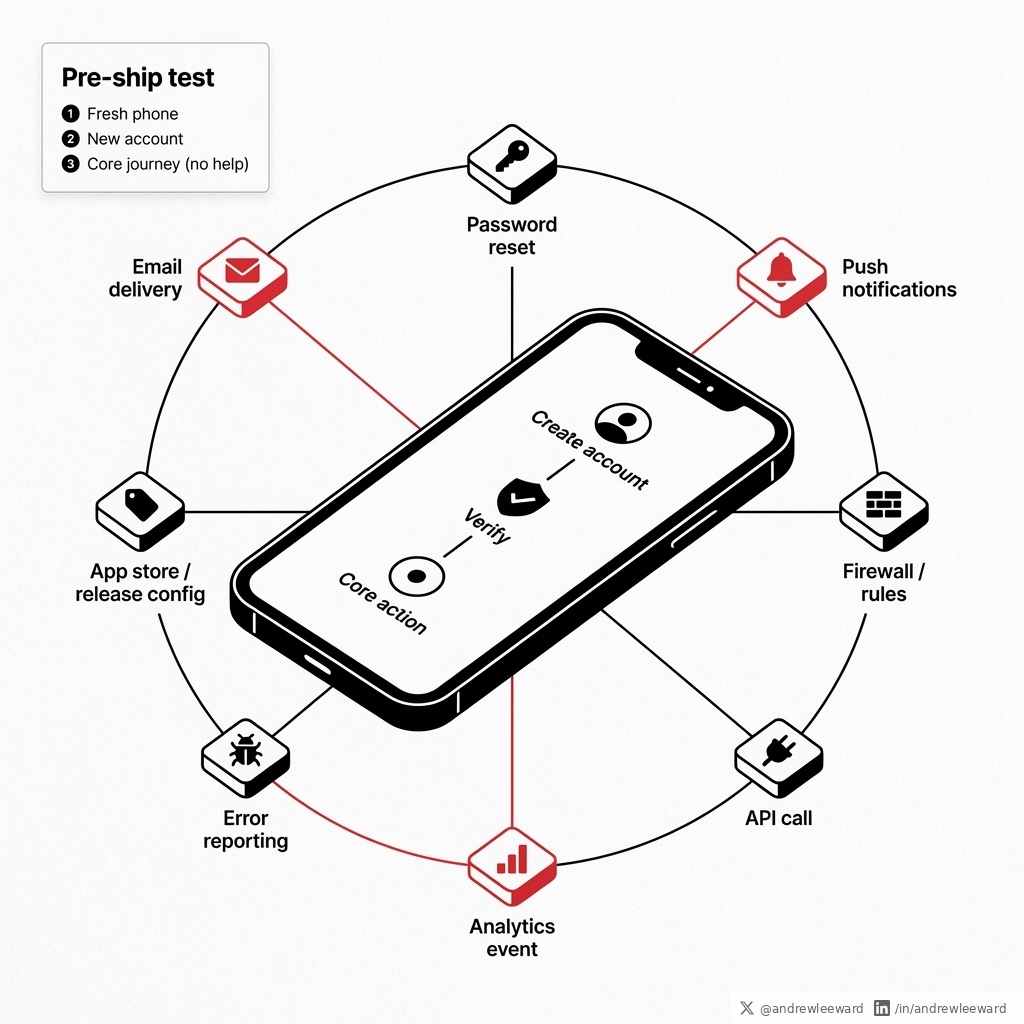
Launch failures rarely happen in the code you demo. They happen in the invisible systems around it. You can have a beautiful product walkthrough, slick UI, and a founder who can tap through the happy path at lightning speed... …and still have a launch that quietly faceplants on day one. Not because the core feature is broken. Because the bits around it (the bits you barely notice when they work) are the bits that decide whether users stick. Here’s what “invisible systems” looks like in real life: - Emails that land in spam, so nobody can verify their account. - Password reset links that never arrive (or arrive 20 minutes later, which is basically never). - Push notifications that behave perfectly in staging, then die in production because permissions, certificates, or config are different. - A firewall rule that blocks one API call, so a key screen loads forever. - A missing analytics event, so you can’t see where users drop off (and you end up arguing from vibes). - An error-reporting tool that was “on the list” but never actually switched on, so you learn about crashes from angry reviews. This is why feature freezes matter. Not because teams are being cautious. Not because “process”. Because the final stretch before launch should be about removing risk, not creating new ways to fail. Every new feature you add late in the day is another set of: - edge cases - permissions - email templates - notification triggers - analytics events - failure modes You are basically buying yourself more unknowns, at the exact moment you need fewer. One point from our own podcast episode on app launches that I repeat to clients: beta testing is non-optional, and you need to plan for the stuff users never mention until it breaks. Users don’t email you to say: “Just letting you know the password reset arrived promptly and the analytics tracked correctly.” They only show up when something is on fire. So if you want a practical, no-nonsense test to run before you ship, do this: 1) Start from a fresh phone (or wipe a test device) 2) Create a new account 3) Complete the core journey with zero staff help No dev tools. No “I’ll just manually verify you in the database”. No Slack message to an engineer. No special test login. Just you, pretending to be a normal user who has better things to do. If you cannot do it cleanly, your users will not either. And if you do it and it feels annoyingly hard, that’s not a moral failing. It’s a gift. You found the launch risk while it’s still cheap to fix. Do the invisible work. Then ship with confidence. Source: scorchsoft.com/podcast/app-la…
Andrew Ward tweet media
English
0
0
0
5
Andrew Ward
Andrew Ward@AndrewLeeWard·
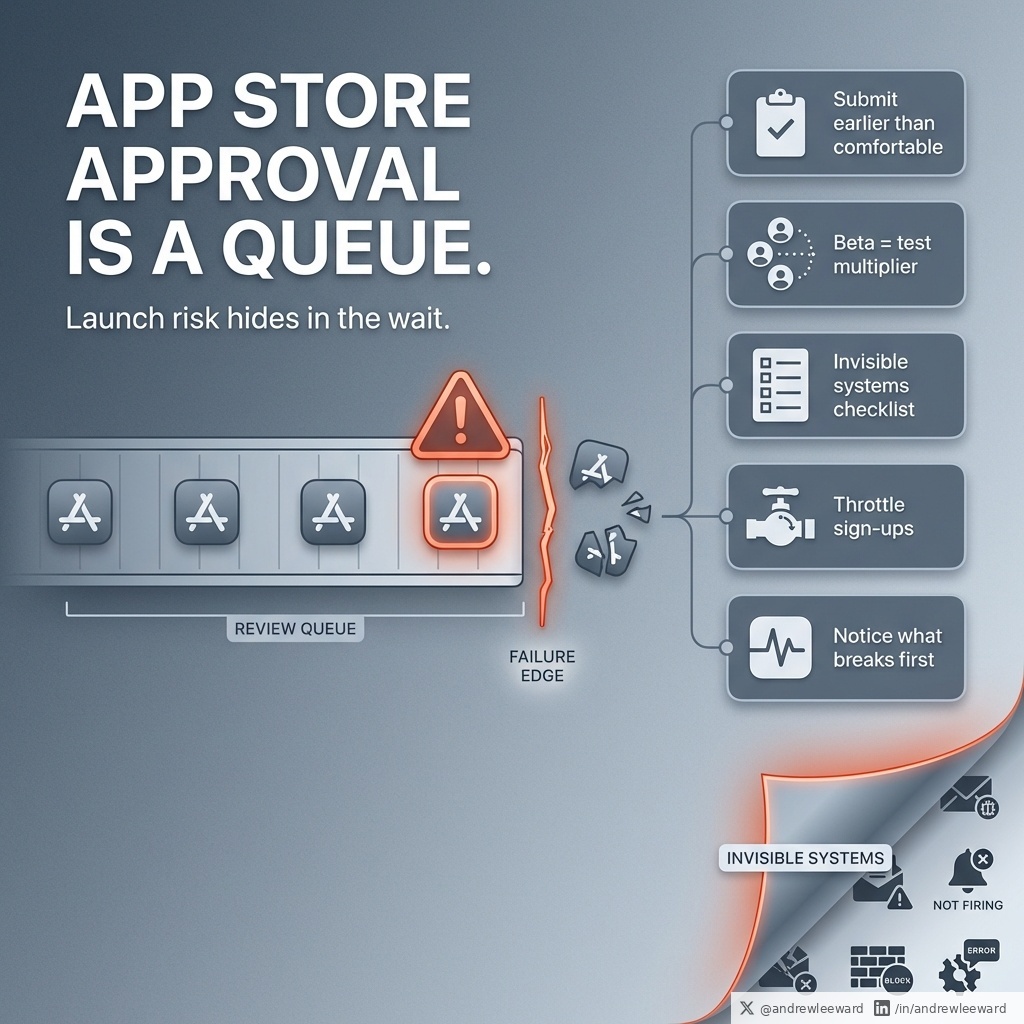
App Store approval is not a milestone; it’s a queue. And queues are where app launches die in a state of frustration. If you have ever said “we’re just waiting for Apple to re-review”, you know the pain. You are not blocked by engineering at that point, you are blocked by time, process, and a calendar that does not care about your marketing plan. Here’s the playbook we use to avoid the dreaded re-review loop (and the bigger, quieter failures that happen after you hit “publish”). 1) Get into the review queue earlier than feels comfortable Waiting to submit until the app is perfect is a lovely way to miss your own launch date. A better pattern is: - Submit something compliant and stable - Let Apple/Google do their review thing - Keep polishing in parallel If you need to, ship a second build after. That’s not a hack. It’s just sensible risk management. The mindset shift is simple: approval is a dependency, not a trophy. Treat it like one. 2) Treat beta like a test multiplier, not a nice-to-have Internal QA matters, but it can’t recreate real behaviour. Your team knows the product too well. They avoid the weird edge cases without realising it. A beta gives you messy, honest usage: - people on old devices - people on flaky WiFi - people who skip instructions - people who forget passwords instantly And the maths is brutal (in a good way). If 1,000 users spend 2 hours each in your app on day one, that’s 2,000 hours of testing in 24 hours. That’s roughly two full-time testers for a year. So run a beta. Set expectations (it’s a beta, things will wobble). Capture feedback in one place. Fix the obvious pain. If you skip this, you don’t avoid bugs. You just delay meeting them until your reputation is on the line. 3) Remember the invisible systems (the bit nobody remembers) Most launches don’t fail where you’re looking. They fail because: - emails land in spam (so nobody can verify or reset passwords) - push notifications don’t fire (so retention drops and you don’t know why) - firewall rules block a third-party tool (so payments, maps, chat, analytics, whatever, silently breaks) - error reporting isn’t connected in production (so you are blind at the exact moment you need eyes) These are not “nice-to-haves”. They are the difference between a controlled launch and a public experiment. Write the checklist before launch day, then run it the moment you go live. Not “we tested it last week”. Not “it worked on staging”. On the real thing, in production, with the same accounts and permissions your users will have. 4) Build a way to throttle sign-ups (yes, really) This one feels awkward until it saves your reputation. If your marketing works too well, you can melt: - onboarding - support - infrastructure - ops processes A simple registration pause, waitlist, invite code, or staged rollout buys you breathing room. You can always let more people in. It’s much harder to recover from 500 angry one-star reviews because the app fell over on day one. 5) Redefine what “launch” actually is Launch isn’t the day you upload the app. Launch is the first week you run operations with real users. That’s when you discover what breaks first, what confuses people, what support tickets spike, and what metrics you should have been watching all along. So if you’re planning a launch right now, answer this in one sentence: How will we notice what breaks first? If your answer is “users will tell us”, you’re about to pay for learning in public. Source: scorchsoft.com/podcast/app-la…
Andrew Ward tweet media
English
0
0
1
38
Andrew Ward
Andrew Ward@AndrewLeeWard·
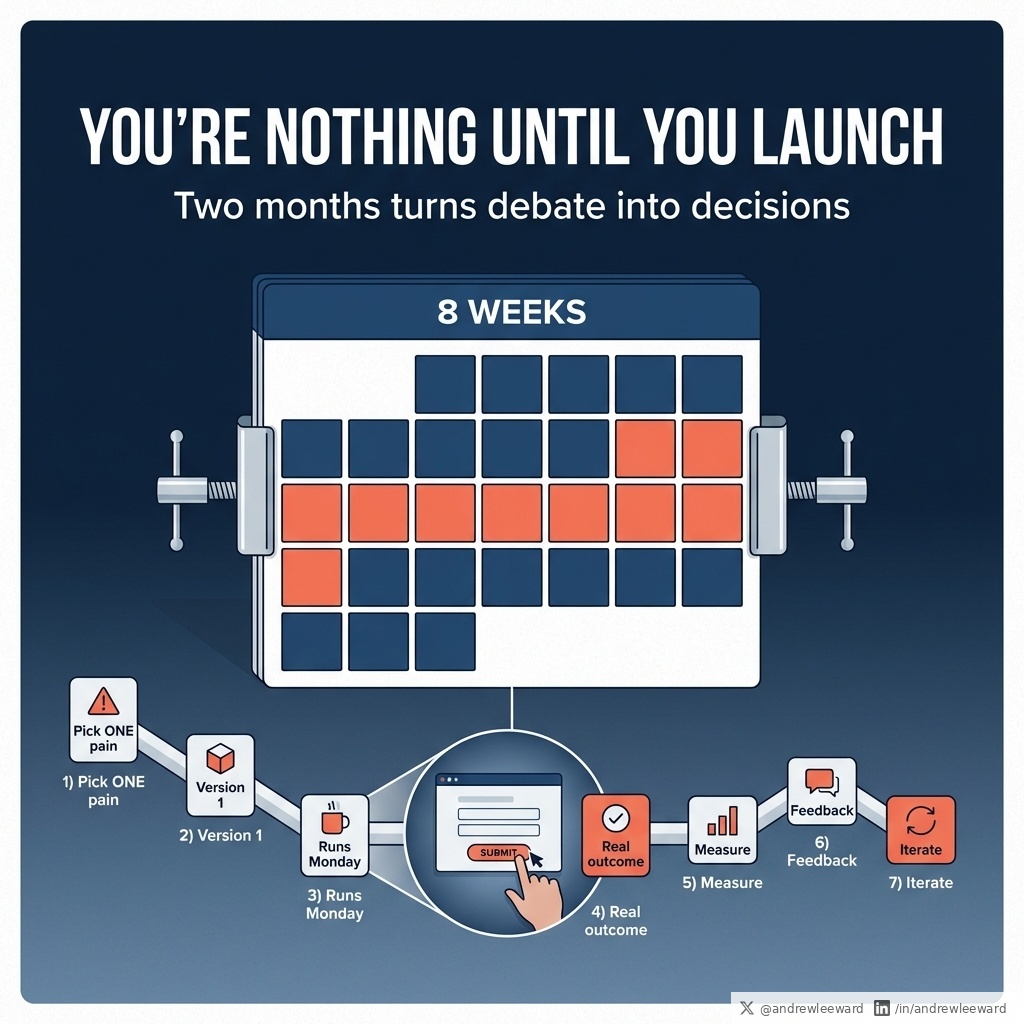
A YC talk I watched has a line I wish more founders would tattoo onto their roadmap: “You’re nothing until you launch.” It sounds harsh, but it’s basically a public service announcement. Because until something is live, you’re still in the land of opinions. You can debate edge cases, argue about “the right architecture”, and redesign the same screen 14 times (I’ve seen it). None of that is contact with reality. Two months is a brutal deadline. That’s why it works. It’s not a random sprint length. It’s a design constraint that forces you to choose what matters, and to stop hiding inside “we’re building the platform”. In SMEs, “launch” rarely means an App Store moment. It means the first version of a workflow a real person uses on a real Monday. Not a prototype. Not a demo. Not a slide deck with a beautiful future state. A thing that runs end to end, touches real data, and produces a result you can measure. Here’s what a two-month launch looks like for internal tools, portals, and AI workflows. You pick one journey, not a system. That might be: - Onboarding a customer (so it doesn’t live in 6 inboxes and a half-updated spreadsheet) - Preparing a quote (so it doesn’t take four days because approvals are basically a treasure hunt) - Responding to support (so five people don’t reply to the same customer, with five different answers) - Approving an invoice (so finance aren’t chasing people like it’s their cardio) Then you build the smallest version that runs end to end. Maybe it’s one form in a portal that captures the right info and routes it to the right place. Maybe it’s an AI-assisted workflow that drafts the first response, pulls in the relevant context, and routes exceptions to a human (because yes, humans still matter). Maybe it’s a dashboard that answers the one question you keep arguing about in leadership meetings (and magically stops that meeting running 20 minutes over). The win isn’t polish. The win is a real outcome you can measure. Examples of “measurable” that founders and ops leaders actually care about: - Quote turnaround time drops from 4 days to 1 day - Support first response time halves - Fewer handoffs (and fewer mistakes) in onboarding - Fewer invoices stuck in approval limbo - One source of truth replaces the spreadsheet that gets emailed around like it’s 2009 Once it’s live, the conversations get better fast. You stop guessing and start learning: - Where did it slow people down? - Where did they bypass it (and why)? - What data was missing? - What did the AI get wrong? - What edge case actually matters (and which ones were just theoretical)? That feedback beats another month of debate every time. Leadership often asks for “a portal”. What they actually need is one painful thing to stop happening. So if you’re leading a tech or AI initiative this year, ask yourself: What is the one recurring pain that costs you time, money, or reputation every single week? Build version one to remove that pain. Launch it inside two months. Measure it. Improve it. Yes, there are exceptions (regulated environments, money movement, safety, patient data). But even then, the constraint still helps you separate: “We need more time because risk is real” from “We need more time because we haven’t decided what version one is.” Most “big” digital programmes weren’t launched. They were announced, demoed, deployed… and never adopted. If you want to move the needle with tech this year, don’t start with a three-year roadmap. Start with a two-month launch. Source: youtube.com/watch?v=Pg72m3…
YouTube video
YouTube
Andrew Ward tweet media
English
0
0
0
5
Andrew Ward retweetledi
Andrew Neil
Andrew Neil@afneil·
So you price young people out of the labour market with huge rises in the minimum wage and national insurance. Then you subsidise employers to employ young people. Government is brilliant. Simply brilliant.
The Telegraph@Telegraph

🔴 The Telegraph understands that Pat McFadden will announce on Monday that employers will receive a £3,000 taxpayer subsidy for hiring under-25s who have been on Universal Credit for more than six months Find out more ⬇️ telegraph.co.uk/business/2026/…

English
691
2.7K
11.4K
400.9K
Andrew Ward
Andrew Ward@AndrewLeeWard·
In my first year running an agency, I felt competent about 2% of the time. The other 98% was some mix of: “what am I doing”, “this client expects what by Friday”, and “why does every problem have three hidden problems inside it”. A founder I follow put it bluntly: early business years are painful. He even called it feeling like an idiot 98% of the time. I think that’s more normal than most people admit. Especially if you’re doing anything involving software, because software is basically uncertainty with a user interface. You can have a sensible plan at 9am and by 11am you’re negotiating with reality: edge cases, stakeholders, last-minute scope creep, and a user who clicks the one thing you assumed nobody would click. What helped me wasn’t a new productivity app (I say this as someone who builds software for a living, so yes, I see the irony). It was three habits that made the chaos feel manageable and, more importantly, made progress visible. 1) Protect deep work early in the day I started guarding a couple of hours in the morning for proper deep work. No calls. No Slack firefighting. No scrolling “just for a minute”. Just the one thing that actually moved the business forward. For you, that might be: - writing the proposal that lands the next client - fixing the onboarding that’s leaking revenue - mapping the workflow before you automate it with AI - scoping the MVP so you don’t spend 6 months building the wrong thing If your calendar is full of meetings, you haven’t built a company - you’ve built a very stressful diary. 2) Stop waiting for the perfect version I stopped waiting until it was “ready”. Instead, I built the smallest prototype that solved the core problem, got it in front of real humans, then iterated in public. This is especially important in software because the gap between “what you think users need” and “what they will actually use” is usually where budgets go to die. A scrappy prototype can feel embarrassing. Good. That’s a sign you’re learning early, not late. (And to be clear: I’m not saying ship rubbish. I’m saying ship the smallest thing that proves value, then improve it with evidence.) 3) Ask the uncomfortable question: do users love this? I got a bit obsessive about one question: Do users actually love this, or are they just being polite? Founders get trapped by compliments because compliments are easy to collect and hard to verify. Your mum might love your idea. Your users might love you as a person. Neither guarantees they’ll come back next week. So I started trusting behaviour over feedback. Retention tells you if it’s useful. Referrals tell you if it’s valuable. Repeat usage tells you if it’s part of someone’s workflow. If you’re building apps, portals, internal tools, or an AI-enabled service, this matters even more because novelty can mask problems for a while. People will try something once. Love is when they keep using it without being chased. If you’re in the messy middle right now, that doesn’t mean you’re failing. It often means you’re building something real. The goal isn’t to feel competent 100% of the time. The goal is to build a system that keeps moving forward even when you feel like you’re making it up as you go (because, quietly, everyone is).
Andrew Ward tweet media
English
0
0
0
3
Andrew Ward
Andrew Ward@AndrewLeeWard·
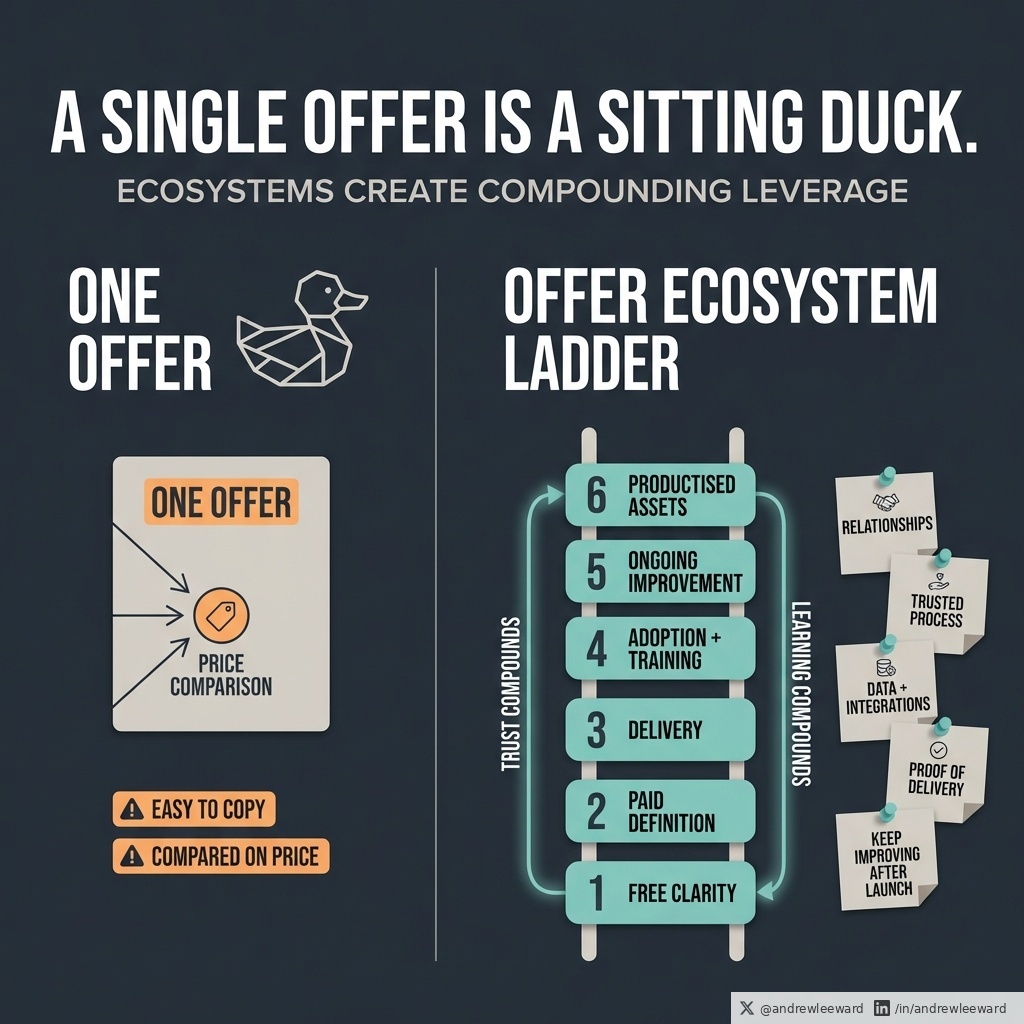
A single offer is a sitting duck. If you only sell one thing, you are one competitor, one platform change, or one procurement checklist away from being compared on price. I LOVE this simple line from Daniel Priestley: “Products and services don’t make profit. Ecosystems do.” In plain English: you do not win by having one “best” service. You win by building a connected set of offers that reinforce each other. This matters even more in 2026 because AI is making the obvious bits cheaper to copy. A competitor can replicate your surface-level output faster than ever (sometimes with a junior + a few tools). But they still cannot easily copy: - your relationships - your trusted process - your data and integrations - your proof of delivery - your ability to keep improving the system after launch So if you build apps, portals, SaaS, or AI-enabled workflows, here’s a practical way to think about your offer ecosystem. Step 1: Pick one CORE OUTCOME Not “we do software”. An outcome. Good outcomes sound like: “Turn manual ops into a portal so customers stop chasing and staff stop copy-pasting.” “Make AI safe and useful inside existing workflows, not as a side chat.” “Help non-technical leaders ship an MVP without setting fire to 6 months.” If you cannot say the outcome in one sentence, you will end up with a messy menu. And messy menus get compared on price. Step 2: Build a ladder, not a catalogue A ladder means each step creates a natural next step. Here’s a simple ladder that works in B2B tech (and stops you living in proposal hell): 1) Free clarity A one-page diagnostic, a short workshop, a teardown, a checklist. The goal is not to give the whole answer away. The goal is to create confidence and momentum. 2) Paid definition A discovery sprint that produces real artefacts: - user journeys - a prioritised backlog - an integration map - a risk list This is where you stop selling “hours” and start selling certainty. 3) Delivery Build the portal/app/workflow in slices. Ship early. Learn. Iterate. (If your plan requires perfection up front, you are basically betting the business on a spreadsheet.) 4) Adoption and training Templates, internal playbooks, short training sessions, rollout support. Because “we built it” is not the same as “they use it”. 5) Ongoing improvement A retainer that includes: - support - small iterations - analytics - “here’s what we learned” reporting This is where the system gets sharper over time, rather than dying the day after go-live. 6) Productised assets This is the compounding part. Turn repeated work into repeatable assets: - onboarding templates - prompt packs - governance rules - evaluation suites for AI workflows These assets make delivery faster and more consistent, and they stop you being the bottleneck. Step 3: Make the ecosystem self-reinforcing You want the offers to feed each other. Examples: - Discovery produces a backlog and risk list that makes delivery smoother. - Delivery produces real examples and outcomes that improve your training. - Support and iteration produce patterns you can turn into productised assets. That is how you get compounding leverage (and why it gets harder to replace you with “someone cheaper”). Step 4: Do not confuse variety with focus The goal is not “more offers”. The goal is fewer offers that work together. Quick filter: If you removed one offer, would the others become weaker? If yes, it is part of the ecosystem. If no, it is probably distraction. A founder trap I see constantly: Something starts working, then the founder gets bored. They think: “Yeah, but I’ve said that already…” Meanwhile the market is thinking: “Yes. Say it again. That is why we came.” Your job is not to be entertained. Your job is to build a machine that delivers value without needing you to be in every single step. Practical homework: Write down your ladder. Circle the step that generates the most trust. Then ask: “What would I build next so this trust turns into a system?”
Andrew Ward tweet media
English
0
0
0
12
Andrew Ward
Andrew Ward@AndrewLeeWard·
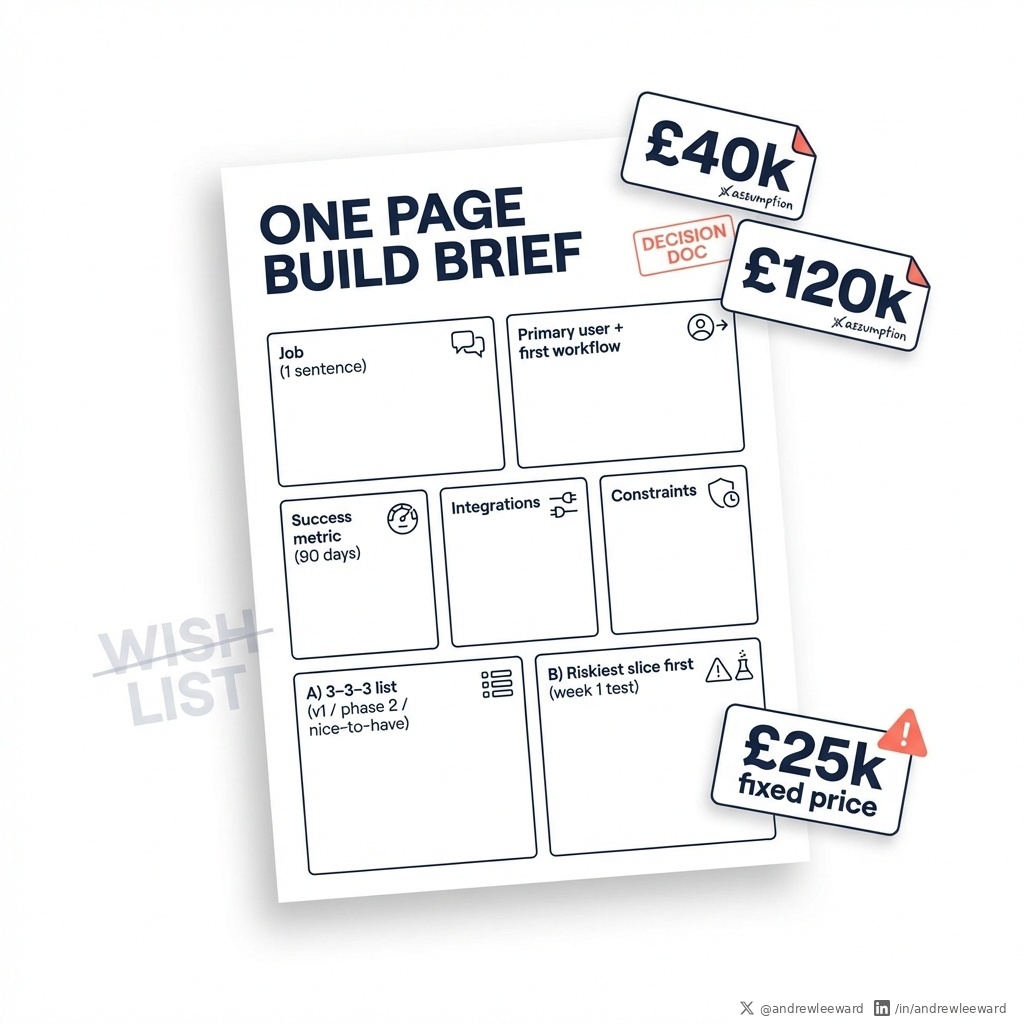
Your app brief is probably why the quotes don’t make sense. If you ask 5 suppliers for a price using a vague brief, you do not get 5 prices. You get 5 sets of assumptions. Then buyer brains melt in procurement: - one quote is £40k - one is £120k - one is “£25k fixed price” (run) The issue is not just supplier differences. It is that you have not written a decision document. You have written a wish list. The fix is not “get more quotes”. The fix is “make the brief do some actual work”. Here’s a simple way to tighten quotes, expose risk early, and stop the build turning into a slow-motion argument about what you meant. You can do this in a day. The One Page Build Brief (copy this) 1) The job in one sentence This is the outcome, not the feature list. Example: “Let customers raise and track service requests without emailing us.” If you cannot say the job in one sentence, you are not ready to price it. (Painful, but true.) 2) The primary user and the first workflow Not “everyone”. Not “all staff”. Not “customers and admins and partners and the dog”. Name the person and the first thing they will do. Example: “A site manager logs in on mobile and raises a request with photos.” This matters because suppliers estimate effort based on workflows, edge cases, and permissions. “Everyone” explodes all three. 3) The success metric 90 days after launch Pick 1 to 2. If you pick 8, you picked none. Examples: - 30% fewer inbound emails - 20% faster turnaround time - 15% fewer errors in handover This forces you to prioritise the work that moves the needle (and it stops you paying for shiny extras that do not change the business). 4) The integrations (list them plainly) CRM, finance, support platform, auth, reporting, data warehouse. If it touches money or personal data, say it. If it needs single sign-on, say it. If it needs audit logs, say it. Integrations are where “simple app” budgets go to die, mostly because they were never mentioned until week 6. 5) The constraints Deadline constraints, compliance, device requirements, internal capability. Examples: - “Must be live before renewal in June” - “Needs UK GDPR, MFA, and role-based access” - “Warehouse uses rugged Android devices” - “We have one internal admin who can own content updates” Constraints are not negativity. They are how you stop wasting time pricing a fantasy. Now add two forcing functions. These are the bits that stop scope creep disguised as enthusiasm. Forcing function A: The 3-3-3 list - 3 non-negotiables for v1 - 3 phase two items - 3 nice-to-haves If everything is a must-have, nothing is. And your quote will reflect that uncertainty. Forcing function B: The riskiest slice first Ask every supplier: “What is the riskiest part of this build and how would you test it in week 1?” Good answers sound like: - “We’ll build a thin prototype against your CRM API and prove auth + data sync” - “We’ll test the reporting model with real sample data before we design the dashboards” Bad answers sound like: - “We’ll start with discovery and see” (translation: we haven’t thought about delivery risk yet). One more thing that matters more than “near me” Weekly demos with working software. If you see progress weekly, geography matters less. If you do not see progress weekly, geography will not save you. When you send a One Page Build Brief like this, you get tighter quotes, clearer trade-offs, and a much better chance of shipping something useful without a budget bonfire. If you want the longer version of this procurement approach, here’s our full guide: scorchsoft.com/blog/app-devel…
Andrew Ward tweet media
English
0
0
0
18