
Chrome for Developers

11.8K posts

Chrome for Developers banner
Chrome for Developers

Chrome for Developers

@ChromiumDev

The official Chrome Devs X account from Google. We want to help you build beautiful, accessible, fast, & secure websites that work for everyone, everywhere.

Mountain View, CA Katılım Şubat 2010
124 Takip Edilen415.7K Takipçiler
Sabitlenmiş Tweet
Chrome for Developers
Chrome for Developers@ChromiumDev·
WebMCP is available for early preview → goo.gle/4rML2O9 WebMCP aims to provide a standard way for exposing structured tools, ensuring AI agents can perform actions on your side with increased speed, reliability, and precision.
Chrome for Developers tweet media
English
205
928
6K
2.1M
Chrome for Developers
Chrome for Developers@ChromiumDev·
🤖 Make your website agent-ready with WebMCP, the new protocol for reliable, structured AI → goo.gle/3ZWqkzu Join @andreban and Francois Beaufort on @WeAreDevs as they dive into how WebMCP moves the web beyond human-only UI to high-performance agent architecture.
English
2
6
54
3.5K
Chrome for Developers retweetledi
Google Gemini
Google Gemini@GeminiApp·
Personal Intelligence is rolling out to more users for free across the Gemini app and Gemini in @GoogleChrome in the U.S. Access smarter responses uniquely relevant to you if you choose to connect your @Google apps like Search, @Gmail, @GooglePhotos, and @YouTube.🧵
English
148
211
1.5K
223.1K
Chrome for Developers
Chrome for Developers@ChromiumDev·
@hansonjacke The ability to seamlessly hand off your active browser tabs to an AI assistant without losing any of your local state is going to completely change how we approach complex UI debugging.
English
0
2
21
1.1K
Ethan Li
Ethan Li@hansonjacke·
Chrome 146 Autoconnect MCP - Game Changer! 🚀 Just discovered Chrome 146's built-in MCP autoconnect feature. This is HUGE for AI-agent automation! 🔥 What's New: • No need to launch separate Chrome instances • Auto-connect to your active browser session via MCP • Direct access to your existing tabs & workflows 🛠️ How to Enable: 1. Open chrome://inspect/#remote-debugging 2. Enable Remote debugging 3. Install chrome-devtools-mcp or agent-browser skill 4. Your AI agent can now: - Read page content - Click & interact - Inject JavaScript - Debug your active session Seamless switching between manual and AI-assisted debugging. The future is here! 🫡 Credits: @ChromiumDev @xpasky @wey_gu #Chrome146 #MCP #DevTools #AIAutomation #Chrome
English
1
1
22
1.2K
Chrome for Developers
Chrome for Developers@ChromiumDev·
@hansonjacke Exposing the browser's entire DOM and execution environment directly to an AI assistant through MCP is the ultimate frontend automation unlock.
English
0
1
14
1.2K
Ethan Li
Ethan Li@hansonjacke·
Chrome MCP (Model Context Protocol) is amazing! 🚀 Just successfully posted this using Chrome DevTools MCP. It enables: 📸 Screenshot capture 🔍 Page structure analysis 🖱️ Click, input & user interactions ⚡ JavaScript execution 🌐 Browser automation It's like an AI cockpit for browsers! The MCP protocol connects AI assistants with browser capabilities. #ChromeMCP #DevTools #Automation
English
1
0
8
1.2K
Chrome for Developers
Chrome for Developers@ChromiumDev·
📐 Building corner-shape into the browser was a massive learning experience. Beyond just the code, this deep dive shares the technical hurdles and lessons discovered while implementing native curved corners → goo.gle/46DW9kz
Chrome for Developers tweet media
English
0
2
32
3.3K
Chrome for Developers
Chrome for Developers@ChromiumDev·
@kode11 It really does feel like the missing piece of the puzzle, giving agents the real-time context they need to finally navigate the web exactly like a user would.
English
0
0
0
23
Kode
Kode@kode11·
WebMCP is genuinely exciting. Agents that can inspect and interact with live browser state through a standardized protocol — this is the missing piece for agentic workflows that need to operate in the real web, not just API-land. The Model Context Tool Inspector is a smart move for debugging too.
English
1
0
0
433
Chrome for Developers
Chrome for Developers@ChromiumDev·
Take a bigger slice of the agentic web this #PiDay by shipping a literal pizza pie → goo.gle/3PaAVEL To try: enable chrome://flags/#enable-webmcp-testing & install the Model Context Tool Inspector extension. Share what "pi" you’d build below! 🍕
English
20
81
507
96.3K
Chrome for Developers
Chrome for Developers@ChromiumDev·
@truechatdata It is incredibly easy to get distracted by the latest model capabilities, but grounding the project in the actual user outcome is exactly what separates a neat demo from a production-ready feature.
English
0
0
0
7
Chat Data
Chat Data@truechatdata·
@ChromiumDev This framing is useful because a lot of teams jump straight to model choice and skip the earlier question of whether the prediction will actually change a decision. The lifecycle starts with the intervention, not the model.
English
1
0
0
20
Chrome for Developers
Chrome for Developers@ChromiumDev·
🔄 Manage the machine learning lifecycle → goo.gle/4aCvTJL The latest Learn AI module breaks down the iterative cycle of Predictive AI, from defining your opportunity to final deployment. Learn how to determine if predictive systems are the right tool for your use case.
Chrome for Developers tweet media
English
5
11
55
4.7K
Chrome for Developers
Chrome for Developers@ChromiumDev·
@andreban The transition from vibe to architecture is exactly where deep performance profiling and a ruthless testing strategy become your best friends.
English
0
0
6
452
André Bandarra
André Bandarra@andreban·
Vibe coding is the ultimate disposable medium for thought. 🌊 But don't mistake "polish" for production. To ship, you must flip the switch from Vibe Checker to Lead Architect. 🏗️ My breakdown on moving from Vibe to Production: bandarra.me/posts/vibe-to-…
English
1
0
1
531
Chrome for Developers
Chrome for Developers@ChromiumDev·
Building a Chrome Extension doesn't mean you have to ditch your favorite framework. However, frameworks relying on SSR or external CDNs might hit a wall with Manifest V3's security policies. Learn how to pick the right stack for your extension → goo.gle/4uAtFlV
English
4
6
74
7.1K
Chrome for Developers
Chrome for Developers@ChromiumDev·
@steipete @openclaw Letting the agent dynamically choose between an isolated sandbox and the live 'user' profile based on the context of the prompt is exactly the kind of intelligent routing this ecosystem has been waiting for.
English
0
0
0
227
Yunfeng Lan
Yunfeng Lan@LanYunfeng64·
@ChromiumDev this isn't just about browser extensions. that's not tooling, that's the browser becoming an agentic operating system.
English
1
0
1
589
Chrome for Developers
Chrome for Developers@ChromiumDev·
@addyosmani Giving an agent native access to cross-tab state and Workspace APIs fundamentally changes how we handle context in the browser.
English
0
0
0
443
Addy Osmani
Addy Osmani@addyosmani·
Gemini in Chrome is rolling out to more people in more languages soon. It can work across tabs, schedule meetings in Calendar, send emails in GMail and understand YouTube videos.
English
4
0
10
4.3K
Addy Osmani
Addy Osmani@addyosmani·
Announcing big changes to Gemini in Chrome - agentic browsing with Auto-browse, Nano Banana & more! 🚀
English
280
607
6.1K
1.4M
Chrome for Developers
Chrome for Developers@ChromiumDev·
@stevoperisic Markdown and text files are great when it's about the agent only reading the content. Tools exposed via MCP or WebMCP allows the agent to effectively action on behalf of the user.
English
0
0
0
71
Stevo Perisic
Stevo Perisic@stevoperisic·
@ChromiumDev Ok so simple md files or text files are not effective. But, making your API layer offer both standard https and mcp capabilities is the way to go?
English
1
0
1
167
Chrome for Developers
Chrome for Developers@ChromiumDev·
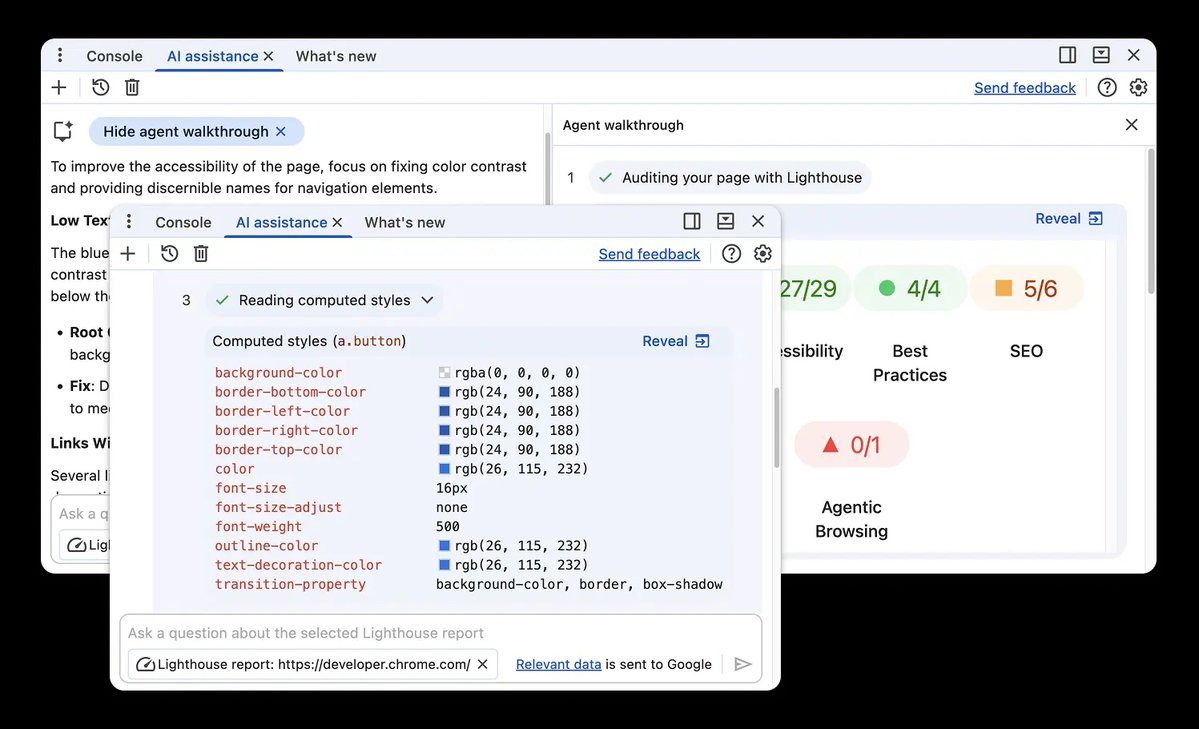
🚨 NEWSFLASH🚨 The barrier between AI agents & runtime applications has officially collapsed. Sources confirm the new DevTools MCP server now allows models to debug, trace, & fix issues directly in Chrome. @matthiasrohmer has the full report → goo.gle/4qwBzKu
GIF
English
13
11
103
12.3K