Coding Computing Coach

13.5K posts

Coding Computing Coach banner
Coding Computing Coach

Coding Computing Coach

@CodingComputing

Making Python simple for you, by exploring the fundamentals. Tips and explanations to become code-literate in this AI age. Building @PythonResources

Maximize your coding skills 👇 Katılım Mayıs 2019
104 Takip Edilen8.9K Takipçiler
Sabitlenmiş Tweet
Coding Computing Coach
Coding Computing Coach@CodingComputing·
🚨 Python Testing Series 🚨 Employ testing to gamify your coding. Learn how to test code using pytest. Build a Cash Dispenser project in Test Driven style. Ongoing series of posts, see README at: github.com/CodingComputin…
English

0
1
20
5.3K
Coding Computing Coach
Coding Computing Coach@CodingComputing·
Indexing starts from 0 for the leftmost item. The more you increase, the rightwards you go. BUT there is a negative indexing feature. The negative index starts from -1 from the rightmost item. The more you decrease, the leftwards you go.
English
0
0
0
166
Coding Computing Coach
Coding Computing Coach@CodingComputing·
@PythonPr Answer: 3 Solution: As we know, indexing starts from 0, from the leftmost item. However, python provides this feature of negative index, which makes it easy to obtain items from the right. a[-1] refers to the last (rightmost) item of the list a. Thus, here it is 3.
English
0
0
3
468
Coding Computing Coach
Coding Computing Coach@CodingComputing·
@PythonPr False. `a` is a list. tuple(a) produces a tuple from `a`. So, it has the same items, in the same order. But within a tuple as the container. As the containers don't match (list vs tuple), the comparison gives False.
English
0
0
2
222
Python Programming
Python Programming@PythonPr·
Python Quiz: What is The Output? 🐍🐍🐍
Python Programming tweet media
English
12
4
60
9.5K
Coding Computing Coach
Coding Computing Coach@CodingComputing·
In python, * doesn't just multiply...
Coding Computing Coach@CodingComputing

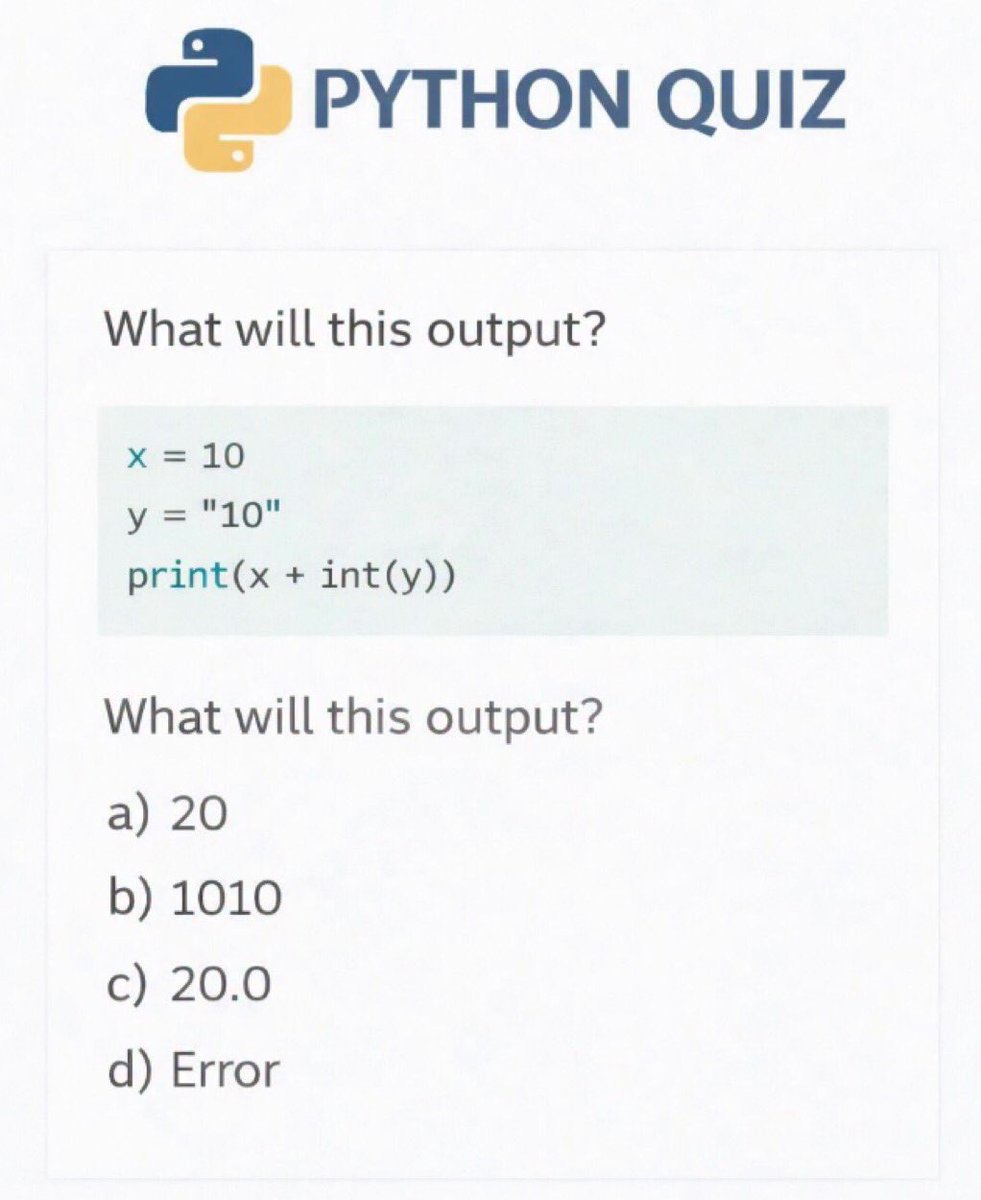
@PythonDvz Answer: C a is a str & b is an int. It seems impossible to multiply them using the * operator. But the * operator does different things for different operand types. For str and int, the * operator repeats the str, int times. '5' * 3 repeats the string thrice, ie, "555"

English
0
0
0
219
Coding Computing Coach
Coding Computing Coach@CodingComputing·
@PythonDvz Answer: C a is a str & b is an int. It seems impossible to multiply them using the * operator. But the * operator does different things for different operand types. For str and int, the * operator repeats the str, int times. '5' * 3 repeats the string thrice, ie, "555"
English
0
0
3
634
Coding Computing Coach
Coding Computing Coach@CodingComputing·
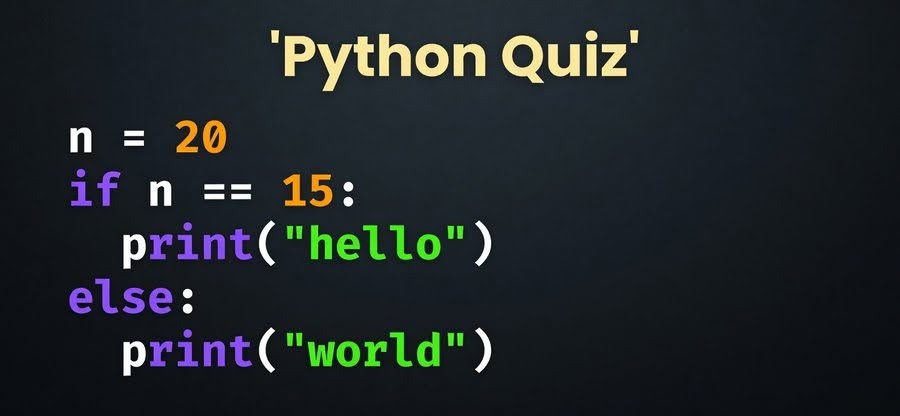
@PythonDvz Answer: Indexing starts from 0. So, x[1] refers to the 2nd item from the left, and that's the string '2'. Similarly x[2] refers to the 3rd item from the left, and that's the string '3'. If we add those two, we are adding strings, which joins them. That gives 23 to print.
English
0
0
2
194
Coding Computing Coach
Coding Computing Coach@CodingComputing·
@PythonPr Answer: 52 x is 5, y is 10. In x*y+2, the multiplication happens first (PEMDAS rule) 5*10+2 simplifies to 50+2 that is 52, which gets printed.
English
0
1
3
462
Coding Computing Coach
Coding Computing Coach@CodingComputing·
@clcoding Answer: 5 Solution: x is a list [1, 2, 3]. Now we run print(x.pop(1) + x[1]) The expression inside print now evaluates as x.pop(1) this actually removes the item at index 1 in x (thus modifying x), AND returns it here. Thus x.pop(1) evaluates to 2, and modifies x to [1, 3] +
English
1
1
5
490
Python Coding
Python Coding@clcoding·
What will be the output of the following Python code? x = [1,2,3] print(x.pop(1) + x[1])
English
6
3
38
12.8K
Coding Computing Coach
Coding Computing Coach@CodingComputing·
@clcoding At this time, x[1] is 3. Thus, the value inside print simplifies to 2 (from the pop operation) + 3 (x[1] after the pop) which works out to be 5. And that's what gets printed.
English
0
0
1
56
Coding Computing Coach
Coding Computing Coach@CodingComputing·
@RealBenjizo Answer: a. tuple Solution: In Python, a comma makes a tuple. The parentheses are actually the optional part. So, what many people assume is "python magic" like a, b = b, a is actually just a tuple assignment. The comma between the list [1, 2] and the tuple (1,2) makes a tuple
English
0
1
1
110
Benjamin Bennett Alexander
Benjamin Bennett Alexander@RealBenjizo·
Python Question: Be careful; this one is tricky. 😅 What is the output of this code and why?
Benjamin Bennett Alexander tweet media
English
17
6
60
8.1K
Coding Computing Coach
Coding Computing Coach@CodingComputing·
@RealBenjizo return = "I am done. Clean up, take this value and go back." yield = "I am done for the moment, I can take back a value. But instead of cleaning everything up, let me save my work to take it from that point when I come back to work on the next value."
English
1
1
7
243
Benjamin Bennett Alexander
Benjamin Bennett Alexander@RealBenjizo·
Pythonistas, where are you? Explain the difference between return and yield in Python functions as if I am 10.
English
5
1
18
5.1K
Coding Computing Coach retweetledi
Götz von Berlichingen #FBPE
Götz von Berlichingen #FBPE@georgebernhard·
@CodingComputing @RealBenjizo I got it wrong, too. It turns out that boolean "not" has a lower precedence than comparison operators, so this expression gets evaluated as not (None != False) => not True => False
Götz von Berlichingen #FBPE tweet mediaGötz von Berlichingen #FBPE tweet media
English
2
1
2
165