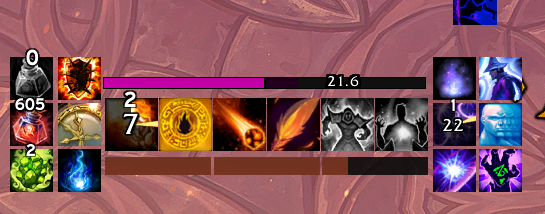
@Muftaay No idea never seen that, but try disabling smooth bars in the cast bar options that should fix it. If not, try disabling ALL non EUI addons to see if there’s a conflict happening
@EllesmereGaming Trying to set up my entire UI with your awesome addon. How do I disable this weird bouncy behaviour of the cast bar? Copied the profile from a friend, for him it doesn't bounce like that. Also happens on my druid.
@rubberharder There’s an option to auto add to a group! You can also make a group a global group (persists across all specs). So you can setup a global group, then check the auto add new spells to this group option and it’ll work the way you want
@EllesmereGaming It doesn’t seem to be in Shifter yet. I will keep a look out. Thanks for this project, loving it so far!
Also not sure if it’s a bug or intentional, but tracked bars reset or do not import from the blizzard cdm, so I’m having to set up the tracked bars each character.
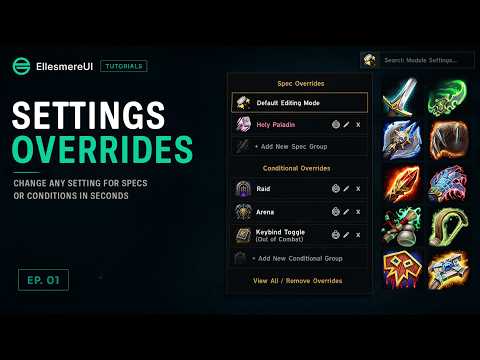
Introducing EllesmereUI's New System: Settings Overrides
Consolidate your multispec profiles, save yourself tons of time and increase your performance. This is the next evolution of addon profiles. Only maintain one profile, simply override any setting in the entire suite based on spec, content type, or even toggle via keybind. Check out the video to learn how it works!
youtu.be/8VKV26lrGSc
---- Full Patch Notes ----
**Headline Features**
- **NEW: Profiles & Presets: Settings Overrides** - Change any setting for a group of specs (all your tanks, your healers...) or based on a condition: Dungeon, Raid, Arena, Battleground, Solo, or an out-of-combat keybind toggle. Click the class glyph next to the search bar, pick who or when, and everything you change applies only there.
- **NEW: Modular Visibility** - Every Visibility dropdown is now a checklist. Combine conditions - In Combat while In a Raid, only When Dragonriding, and more - and add Mouseover to reveal on hover only while they pass. Both Dragonriding options are now available for every module.
- **NEW: PTR Ready - One Version for Both** - EllesmereUI now ships as a single version that runs on both live retail and the Midnight 12.1 PTR. Install once, play anywhere - the same addon loads on either client, with full support for the PTR's reworked aura system. No separate PTR build to download or keep in sync.
- **NEW: Character Sheet: Socket Panel** - Gem sockets from your equipped gear now line the bottom of the character sheet. Click a socket to see every socketable gem in your bags with its stats, and click a gem to socket it instantly - no Blizzard socketing window needed.
- **NEW: Unit Frames: Player Private Auras** - Boss-mechanic icons (private auras) can now show directly on your player frame. Opt-in per-slot icons with size and position controls, so you see your assignment the instant it lands - no more hunting Blizzard's floating icons mid-pull.
- **NEW: Cooldown Manager: Global Tracking Bar Groups** - Tracking bar groups can now be Global: build the group once and its bars, layout and position follow you across every spec, instead of rebuilding the same setup thirteen times.
**==== Full Notes ====**
**Action Bars:**
- **NEW: Icon Order** - Start buttons from any corner, or reverse the order
- Vehicle ability cooldowns now show their swipe and timer immediately, instead of only after mouseover or entering combat.
- The Stance Bar now stays hidden for classes with no shapeshift forms.
- Custom keybind text color no longer reverts to white after target or combat changes.
**Action Bars & Cooldown Manager:**
- Item macros no longer trigger a false spell proc glow.
**Aura & Buff Reminders:**
- **NEW: Text Anchor** - Place the label above, on, or beside the icon
- **NEW: Mana Warning Settings** - Toggle, recolor, resize and preview the ready-check warning
- Clicking preview elements now jumps to the right settings section.
**Bags:**
- The currency footer now grows with your tracked currencies instead of clipping.
- Collapsing the sidebar no longer drifts a right-anchored bag window.
**Character Sheet:**
- Collapsed stat sections now stay collapsed after switching specs, and spec-restricted stats no longer flash back when expanding a section.
- The item level tooltip's better-items list no longer misses cloaks, weapons, caster off-hands or slow-loading items, and now checks the reagent bag too.
**Cooldown Manager:**
- **NEW: Threshold Text** - Per-spell decimal countdown and color below a threshold
- Fixed icons from another spec lingering on bars after spec swaps or shapeshifting.
- Per-trinket settings now follow the equipped trinket across swaps.
- The default Buff Bar's custom order survives respecs and "Repopulate from Blizzard".
- Essence of the Blood Queen and similar untracked procs now appear on buff bars.
- Pandemic glow now wraps the whole tracking bar instead of clipping under borders.
- Tracking bar icons now always match Blizzard's resolved icon (e.g. Roll the Bones).
- Demonic Healthstone is no longer treated as unusable in combat.
- CD Ready sound no longer false-triggers on loading screens or bar rebuilds.
- Swiftmend brightness now applies reliably and its toggle works without a reload.
- FocusKick info text now matches the Show on Target setting.
- Tracking bar previews no longer linger after closing the options.
- Charge text on custom spells now follows the bar's font and position settings.
- Border style and background color now apply consistently across every icon on the Essential and Utility bars.
**Crafting Orders:**
- The Place Order / My Orders tabs now show which one is active.
**Dragon Riding:**
- The bar's height can now be adjusted from the Unlock Mode cog, and its width is no longer stuck above 96px.
- Fixed extra spacing between the charge pips and the Whirling Surge icon at certain UI scales.
- The HUD no longer stays stuck on screen after exiting Unlock Mode while dismounted.
**General:**
- **NEW: Icon Zoom** - Crop icon borders: Bags, Character Sheet, Damage Meters, Unit Frames
- **NEW: Tutorial Tips & Video Guides** - Help badges on key features open a video guide popup
- **NEW: New Patch Reminder Dot** - A dot on Patch Notes whenever your version increases
- 11 new alert sounds (Cat Meow, Kaching, Wilhelm, Warning Siren and more) in every sound picker.
- Hide when Mounted now counts druid Travel, Flight and Aquatic forms.
**Group Finder:**
- Fixed errors clicking role and filter checkboxes in Premade Groups.
**Mail:**
- The Send Mail attachment slot now reliably shows the attached item's icon.
**Minimap:**
- **NEW: Readout Scale Sliders** - Resize the Coordinates and FPS/MS text independently
**Nameplates:**
- **NEW: Rare/Quest Icon In Instances** - New toggle lifts the open-world-only restriction
- **NEW: Open World Basic Coloring** - One flat enemy color outside instances
- Fixed the Rare/Quest indicator not anchoring in the Bottom slot.
- Fixed border edges flickering or vanishing when plates rescale.
**Profiles & Presets:**
- Spec pickers gained Check Tanks / Healers / DPS quick-select links.
**Quality of Life:**
- Fixed a multi-second freeze opening /keys in large guilds.
- Quick Loot, Auto Open Containers, LFG Reminder, Low Durability Warning and Shifter now apply instantly without a reload.
- Train All no longer skips still-affordable trainer skills.
- The secondary-stats display now refreshes on gear changes.
- FPS counter labels now resize with the Text Size slider.
- Fixed the wrong icon on the Ursol's Vortex cursor macro.
- Item Upgrade, Transmog, sockets, vendors and other companion windows now dock beside a Shifter-moved Character window instead of hiding underneath it.
**Quest Tracker:**
- Fixed tracked quests overlapping after focusing a quest or changing fonts.
**Quests:**
- Fixed dark, unreadable text in quest dialogue and reward descriptions.
**Raid Frames:**
- **NEW: Buff Threshold Sounds** - Play a sound when a tracked buff hits its threshold
- **NEW: Incoming Resurrection Icon** - See queued rezzes on dead players
- **NEW: Buff Hover Tooltips** - Optional aura tooltips on Buff Manager icons
- **NEW: Show Text Above Icons** - Render name and health text above aura icons
- **NEW: Dispellable Debuff Icon Size** - Independent size for split-location dispellables
- Buff Manager Simple Setup now shows buff stack counts, with a new Show Stacks toggle plus color, size and offset controls.
- Hover and target highlights no longer cover name text or icons.
- Fixed frames sizing for a too-small raid right after zoning in.
- Fixed custom size-tier layouts drifting from their saved position.
**Resource Bars:**
- **NEW: Buff Colors** - Recolor the Class Resource bar while chosen buffs are active
- **NEW: Per-Spec Setup Moved to Spec Overrides** - Advanced mode retired; setups migrate automatically
- **NEW: Recolor Text Instead Of Bar** - Threshold colors can target the text
- **NEW: Bar Text Anchor** - Pin bar text left, center, or right
- **NEW: Stagger Full %** - Set where the Brewmaster bar reads as full
- **NEW: Hide Bar Text per Druid Form** - Independent text visibility per form
- **NEW: Hide when Dragonriding** - New visibility option
- Soul Fragments now respect Surrender to the Void's higher fragment cap.
**Tooltips:**
- **NEW: Peek Modifier** - Hold Shift/Ctrl/Alt to reveal hidden tooltips on hover
- Show Mount now marks whether you've collected the mount.
**Unit & Raid Frames:**
- New Gradient Sharp dispel overlay style.
**Unit & Resource Bars:**
- **NEW: Out of Combat Fade** - Fade frames and bars to a chosen alpha out of combat
**Unit Frames:**
- **NEW: Frame Source** - Render each frame as EllesmereUI or Blizzard's default
- **NEW: Apply All Settings To** - Copy one frame's settings to another in one click
- **NEW: Target Combat Indicator** - The combat indicator can now show on the target frame
- **NEW: Name Truncation** - Length limit and optional ellipsis on name text
- **NEW: Aura Duration Format** - New countdown styles for player buff text
- **NEW: Dispel Type Borders** - Recolor debuff borders by dispel type
- **NEW: Boss Frame Absorbs** - Absorb shields on Boss frames
- The pet frame's Class Colored fill now works.
- Fixed blank name/health/power text after a cold login.
- Fixed a detached power bar showing behind the frame border.
- Frames hidden by visibility conditions no longer absorb mouse clicks.
- Fixed the 3D portrait staying visible on its own while the rest of the frame was hidden.
- Pet, Target-of-Target and Focus Target now follow their parent frame's visibility.
**Unlock Mode:**
- **NEW: Fallback Anchors** - Anchored elements land safely when their target is missing
@EllesmereGaming Whilst I have you here:
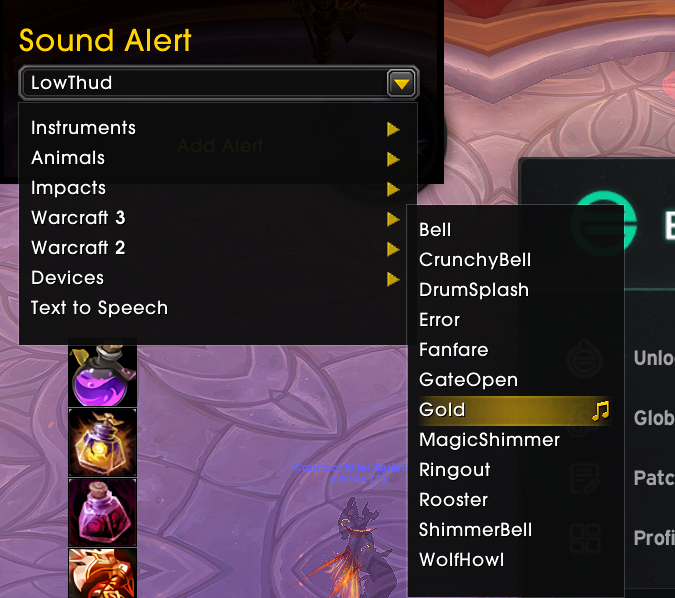
Can't find "Gold" option in EUI sound alerts
Elvui -> eui action bar migration wasnt as smooth, weirdly theyre on different numbers, i figured id lose 10-13 but even the stealth bar was lost
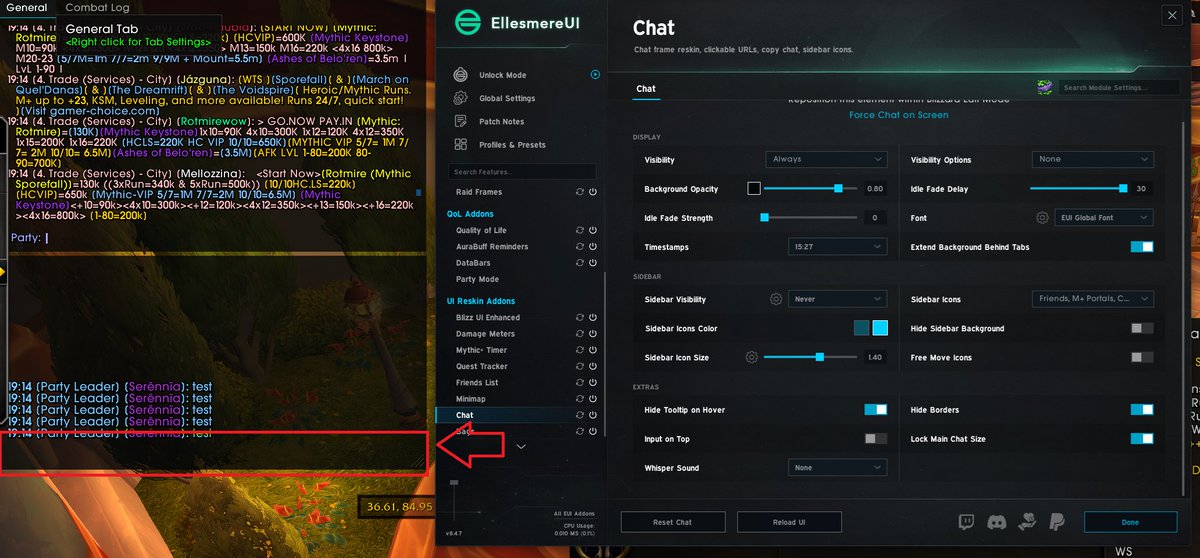
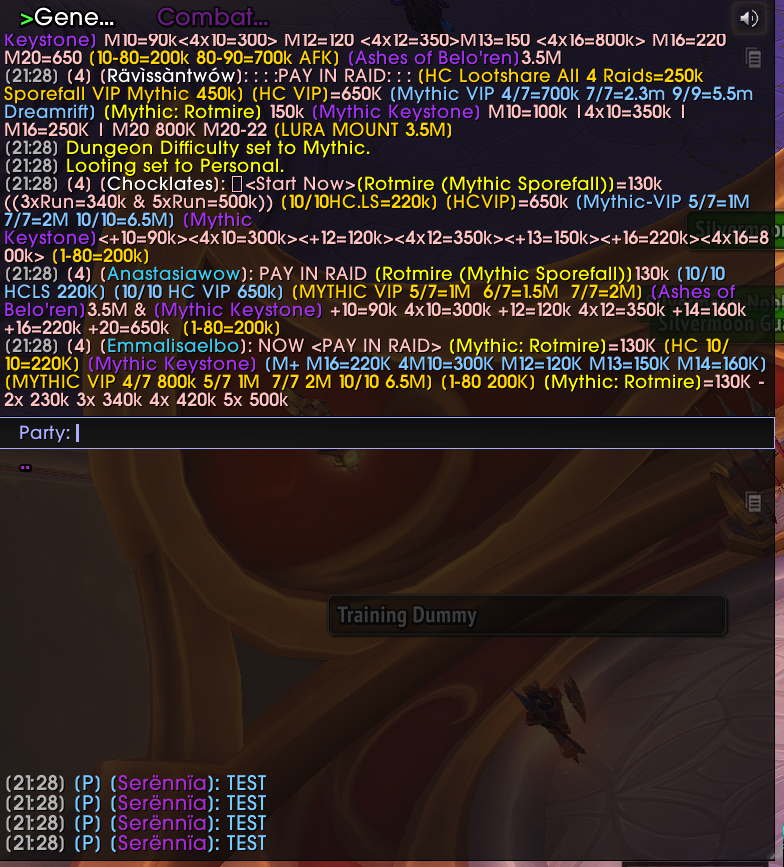
@Serennialol Oh I see ur right blizz default actually doesn’t show the input on extra undocked chats, guess I never noticed that. I’ll add it to the todo but it’s not super high prio due to ptr and everything, so can’t promise it’ll be in soon
@RyanC0097 Yes the debuffs section has an option for debuff tooltips. For buffs there’s a toggle you can disable in the extras section of frames tab at the bottom in the cogwheel for “show raid frames tooltip” setting
@GlitchFlight I found an issue in a very old migration that was flipping it to enabled for fresh installs. thank you very much for letting me know! fixed with next patch
To people who care about their chests not being opened the moment you open your inventory with @EllesmereGaming UI. Turn this off. I know some chests people like to wait on for specific reasons and stock pile for events etc.
@EllesmereGaming Is there a way to show abilities with stacks as a bar like I have them here? (Orange bars are fire blast stacks while the purple bars are shimmer stacks). If not, I would absolutely love this feature. Loving the addon otherwise! Nice work.
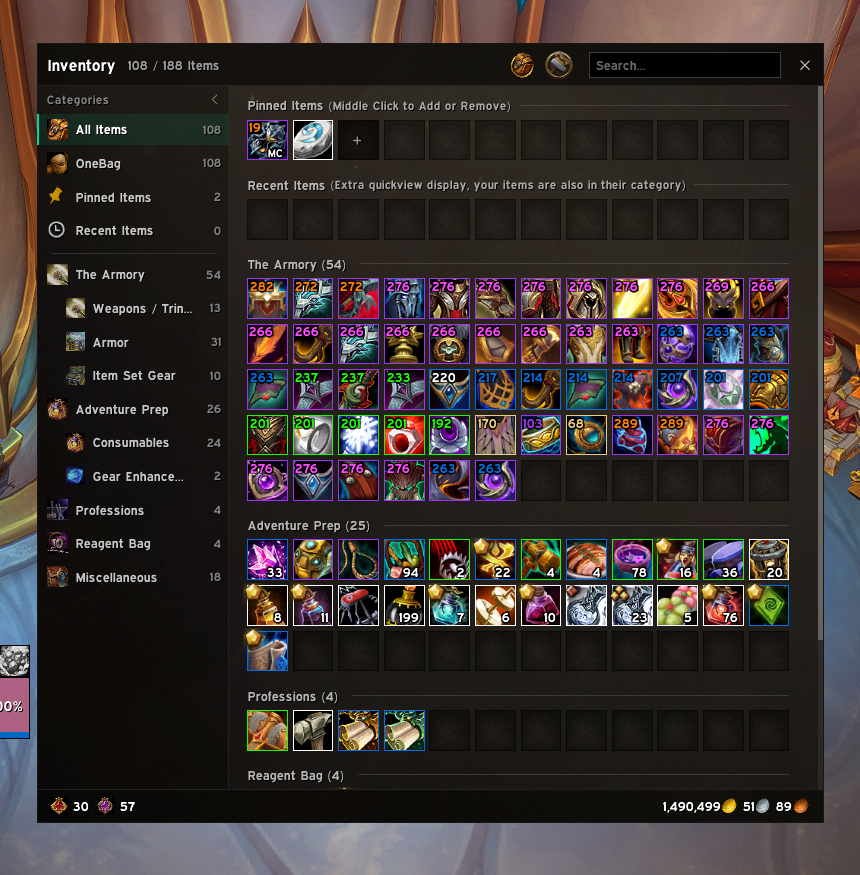
Announcing EllesmereUI's beautiful new bag addon!! It's as functional as it is pretty, and includes the following features:
- 0 cpu/memory usage when bags are not open
- Collapsible sidebar with your categories that can be dragged to reorder or group
- Full Items display split into automatic categories
- OneBag display with all items grouped into one bag
- Full currency tracking of all types + optional account wide gold display
- Colored Item level border + text, track rank, keystone level + name,
- Pinned favorites bar
- FUll bank/warbank verison
- Free move and scale bag/bank windows
and way more, check it out now it's live on curseforge/wago/wowup!
Also in this build:
- CDM buffs can now be set to "Always Show" and optionally desaturate when not active
@GlitchFlight And you hadn’t ever installed it before even one time months ago? That’s very strange, I will double check but I just recently checked on this
@EllesmereGaming hey i have this bug where 2 of my bars get stacked on top of one another and eui is lying to me telling me the second bar doesnt exist. any ideas how to fix it ?
@Evokerguy1 Do u have an addon specifically you’re referring to that does this? What information do they access and what features does it do that are otherwise not possible through normal means?
@EllesmereGaming I tested 12.1 as well. It seems like you can still bypass all the secret guards still.
The company is just bad. I reported some of this almost two months ago.
I just don’t think they can fix it.
I have not, but also blizzard does have the ability to simply ban addons and likely will if they actively look to exploit aggressively and Blizz can’t find a way around it. Not sure I reaaallllyyy want to actively fight blizzard like this but I am aware of some things that I may pull out for the features I REALLY want to preserve (targeted spells). What type of features are you targeting with these workarounds?
@EllesmereGaming Stay ahead of this.
Blizzard isn’t going to invest the money and time into paying for Mythos internally.
They either are going to revert it or just lock it down so hard that the game is unplayable.
But I’m telling you, there are legal, clever methods out there.