

Ghostproof
18 posts

Ghostproof
@GhostproofUK
Write books with AI that read like a human wrote every word. 256+ editorial rules. Idea to finished manuscript. Free to try 👻 https://t.co/TVLIVdL6Cx
Katılım Mart 2026
13 Takip Edilen13 Takipçiler



Build your 𝕏 Account
X is a full time job.
Just say "Hi" and gain 87+ mutuals under this post.

English





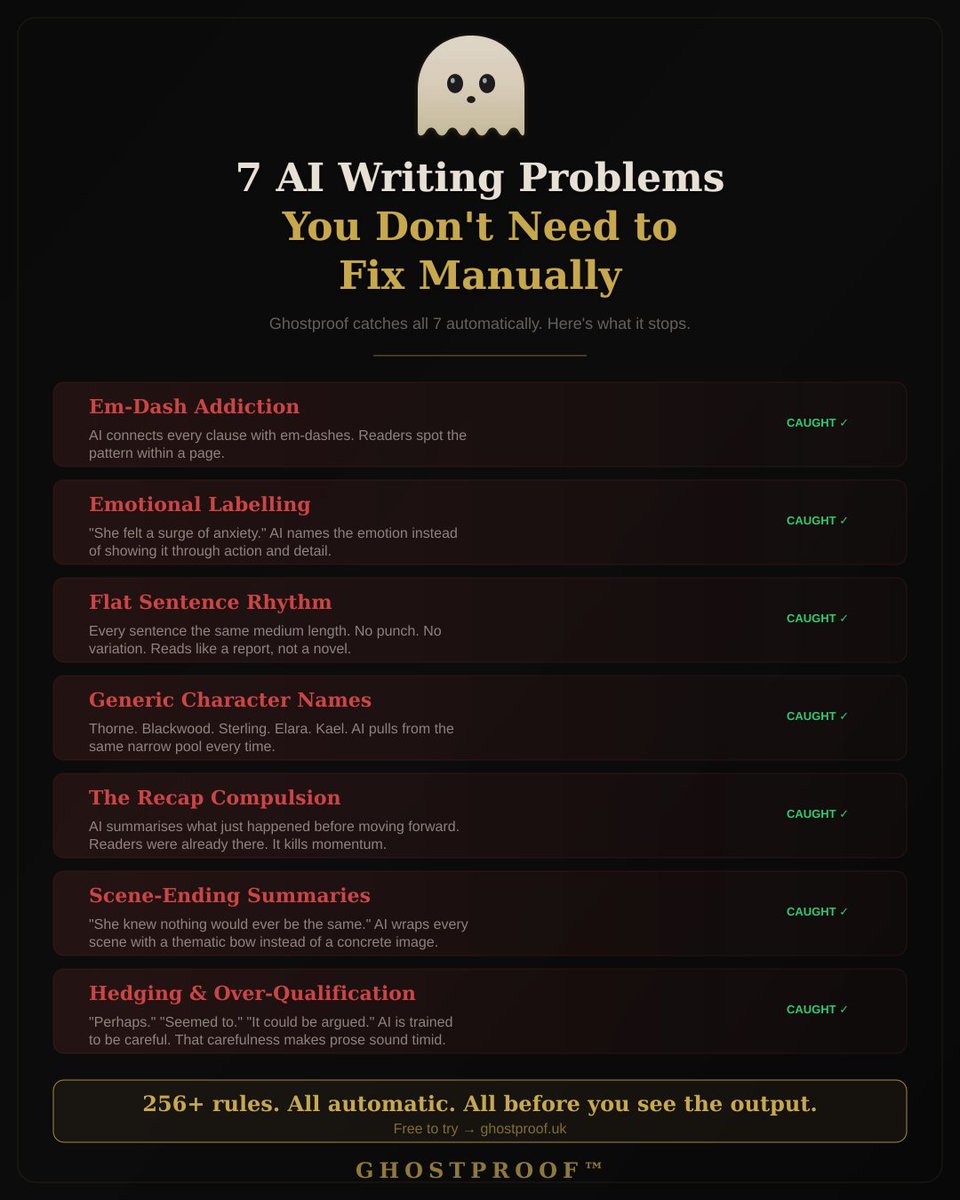
Every AI writing tool has the same 7 problems. Em-dashes everywhere. "She felt a surge of anxiety." Flat rhythm. Generic names. The recap nobody asked for. Thematic endings. Timid hedging.
Ghostproof catches all 7 automatically 👻 ghostproof.uk
English
If you ghostwrite for clients, you're probably already using AI & the clients are paying for human.
Ghostproof runs 256+ editorial rules on every word. Voice DNA matches the client's style. Continuity tracks across 20+ chapters.
ghostproof.uk
English

# FOLLOW THIS WRITING STYLE:
• SHOULD use clear, simple language.
• SHOULD be spartan and informative.
• SHOULD use short, impactful sentences.
• SHOULD use active voice; avoid passive voice.
• SHOULD focus on practical, actionable insights.
• SHOULD use bullet point lists in social media posts.
• SHOULD use data and examples to support claims when possible.
• SHOULD use “you” and “your” to directly address the reader.
• AVOID using em dashes (—) anywhere in your response. Use only commas, periods, or other standard punctuation. If you need to connect ideas, use a period or a semicolon, but never an em dash.
• AVOID constructions like "...not just this, but also this".
• AVOID metaphors and clichés.
• AVOID generalizations.
• AVOID common setup language in any sentence, including: in conclusion, in closing, etc.
• AVOID output warnings or notes, just the output requested.
• AVOID unnecessary adjectives and adverbs.
• AVOID hashtags.
• AVOID semicolons.
• AVOID markdown.
• AVOID asterisks.
• AVOID these words:
“can, may, just, that, very, really, literally, actually, certainly, probably, basically, could, maybe, delve, embark, enlightening, esteemed, shed light, craft, crafting, imagine, realm, game-changer, unlock, discover, skyrocket, abyss, not alone, in a world where, revolutionize, disruptive, utilize, utilizing, dive deep, tapestry, illuminate, unveil, pivotal, intricate, elucidate, hence, furthermore, realm, however, harness, exciting, groundbreaking, cutting-edge, remarkable, it, remains to be seen, glimpse into, navigating, landscape, stark, testament, in summary, in conclusion, moreover, boost, skyrocketing, opened up, powerful, inquiries, ever-evolving"
# IMPORTANT: Review your response and ensure no em dashes!
English
I found a great guide for humanizing AI writing: make your ai writing not sound like AI. It works like a charm for me.
sabrina.dev/p/best-ai-prom… (not me)
English

1. Claude
Anthropic’s reasoning-first AI. Best for deep thinking, long documents, and complex writing tasks, the one pros use when accuracy matters.
English

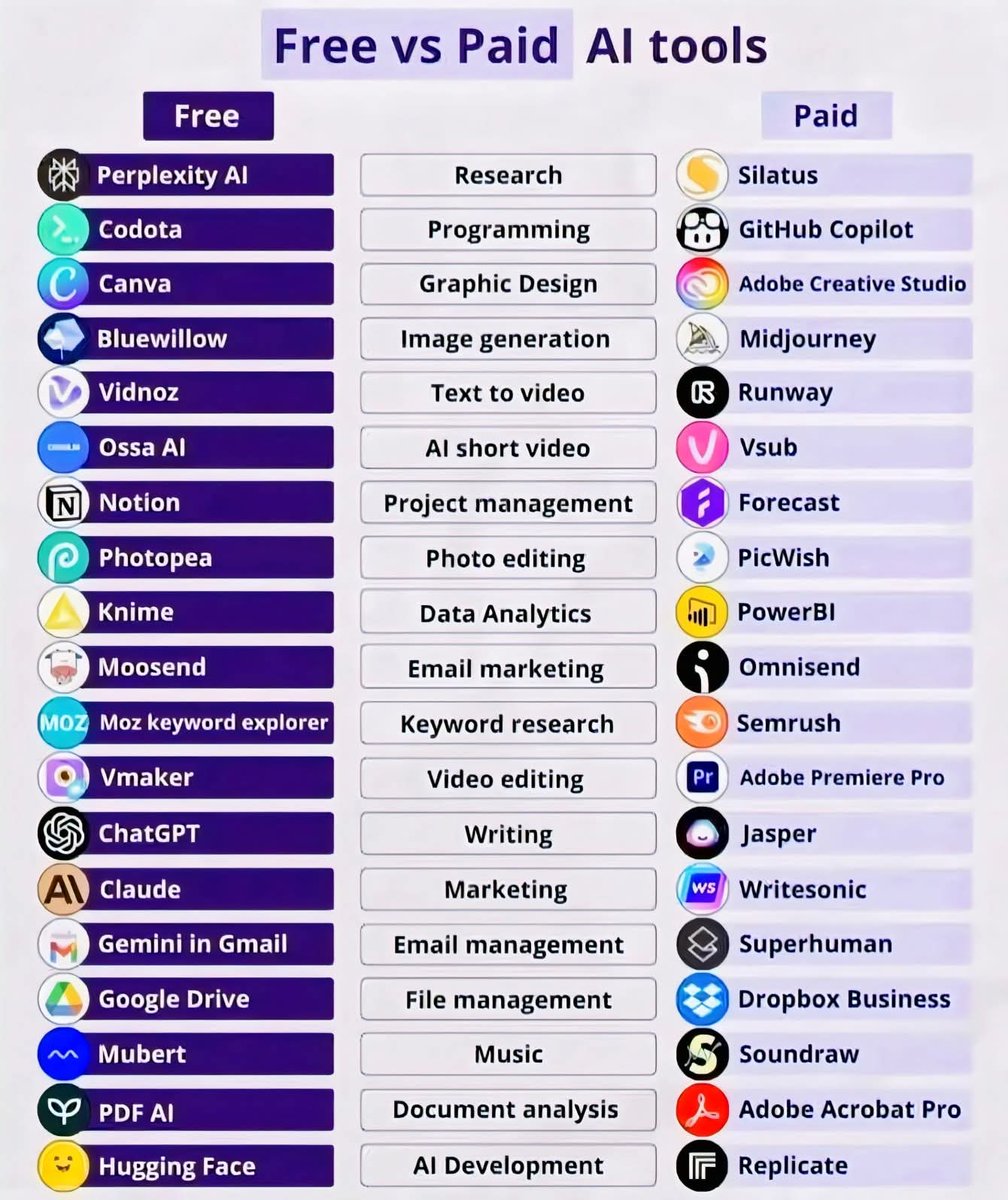
Free tools can get you started.
Paid tools can take you further.
This chart breaks down the best Free vs Paid AI tools across research, coding, design, video, marketing, writing, and more.
Follow @IamAmritaYadav for more AI Posts
#AI #AITools #FreeAITools #PaidTools
English

Dan’s stack is clean.
Claude for writing that sounds human, NotebookLM for compressing knowledge, Manus for getting shit done.
The pattern is clear: the best operators aren’t chasing every new model.
They’re picking tools that remove friction and let them stay in execution mode.
Most people overcomplicate their stack.
The winners keep it simple and ship faster.
English

My 2026 AI stack (for now…):
1. Claude: Writing that feels like me
2. NotebookLM: Deep learning compressed into minutes
3. Claude Code: Coding software when it really matters
4. Claude Cowork: Building apps while on the treadmill ;)
5. Grok: Researching when you need the most current
6. Manus: Getting sh*t done without doing it myself
English

Claude — Best for thinking.
Asked it to write a cold email.
It wrote the email AND pointed out 3 reasons why my offer was weak.
That's an AI that acts like a business partner, not a typewriter.
For solopreneurs who need strategy + writing? Claude is the move.
(4/9)
English
I tested 5 AI writing tools as a solopreneur for 30 days.
Here's the honest truth about each one:
🧵 (1/9)
English
Neither.
Claude is great for writing that actually sounds human.
Codex is strong for raw coding speed.
But the real move in 2026 isn’t choosing one model.
It’s building a clean stack where each tool does what it’s best at, and you stay in control as the orchestrator.
Most people are still picking “sides”.
The winners are directing multiple tools like a conductor.
My current pick for execution-heavy work is still Claude + a strong agent layer on top.
What are you actually using daily?
English


For writing content, I tested 3 AI tools head-to-head:
📝 Claude — best for long-form, natural tone
📝 ChatGPT — best for brainstorming ideas
📝 Gemini — best for research + writing combo
Which one do you default to? 👇
#AI #ContentCreation
English
@MathewGeorghiou If you are writing, you should check out Ghostproof 👻
English
I use 4 paid AI platforms — here’s how they compare in my workflow (yours will differ):
ChatGPT
— Knows me best (persistent memory) and aligns responses to my profile.
— My go-to for writing (I use a dedicated “Writing” project to maintain context).
— Missing a native browser sidebar (Mac-only custom browser exists).
— Agentic features are useful, but take too many clicks to get started.
— The first AI I subscribed to (because it was the first out of the gate)
Gemini
— Strong for image generation.
— Recently added a Chrome sidebar — very useful.
— Lacks agentic features, so I can’t rely on it end-to-end.
— Google made me pay for it via our Workspace subscription.
Perplexity
— First (that I used) with a browser sidebar via its custom browser, very convenient.
— Seems strong at research and comparison-style queries.
— Agentic features are easy to start.
— But it loses context too often, so I don’t fully trust it.
— New “computer” agent costs extra (haven’t tried it).
— I was given 1 year free access via my cell phone provider.
Claude
— Desktop app can access local files, unique and useful.
— Has a browser sidebar.
— But I regularly hit credit limits and pauses — frustrating.
— Purchased it recently to see what all the hype was about.
Bottom line:
I’d prefer to use just one — but for now, I'll keep jumping around to find the best tool for the job. And yes, they all make big mistakes.
This is as of March 2026 — I'm sure it will all change soon.

English

The 10-tool stack, broken down by job to be done:
>Creative and analytical work → Claude. Best model for writing, reasoning, and problem-solving. Use it when the task requires actual thinking, not just retrieval.
>Research anything → Perplexity. Kills the Google-10-tabs habit. Ask a question, get sourced answers. Use it before you write anything.
>Voice and brainstorming → ChatGPT. Voice mode is genuinely useful for processing ideas when you're not at a keyboard. Brainstorming sessions work well here.
>Google ecosystem → Gemini. If your life runs on Docs, Gmail, and Drive, Gemini is already embedded. Use it where it lives.
>Graphics → Stitch by Google. Early but promising. If you're making social graphics or quick design assets without a designer, this is worth watching.
>Voice cloning → ElevenLabs. Clone your voice once. Use it across videos, content, and anything that needs narration. This one is underused by most creators.
>Automate everything → Manus. This is where the real leverage is. Manus can execute multi-step workflows autonomously. Most people aren't using this yet.
>AI video → Veo by Google. The video generation space moves fast. Veo is one of the better options right now for quality output.
>Deep learning → NotebookLM. Upload a paper, a book, a long document. Ask it anything. The audio overview feature alone is worth it.
>Real-time data → Grok. Everything else has a knowledge cutoff. Grok doesn't. Use it for anything time-sensitive.
The people treating these as novelties will still be "testing AI" two years from now. The people building workflows around them are already operating at a different level.
You don't have to use all ten. But you do have to pick a stack and actually commit to it.
The tools removed the skill barrier. The only barrier left is habit.
English
AI writing has a tell. Not one tell — dozens. Em-dash addiction. Emotional labelling. Flat rhythm. Generic names.
We built 256+ editorial rules that catch every AI fingerprint at the generation stage — before your readers do.
Now live. Free to try. ghostproof.uk
English