Haquafresh 🧙🏽‍♂️📊

15.5K posts

Haquafresh 🧙🏽‍♂️📊 banner
Haquafresh 🧙🏽‍♂️📊

Haquafresh 🧙🏽‍♂️📊

@Haquafresh

#F5F5DC 🦄 | MemeHunter | | dataGeek | #PowerBI | #Dataviz | #Deneb | #PowerQuery | #Excel4Ever | #Linguaphile | #Dialects | #Geordie | #Català | #Español |

Katılım Ekim 2017
2.1K Takip Edilen832 Takipçiler
Haquafresh 🧙🏽‍♂️📊 retweetledi
Kurt Buhler
Kurt Buhler@kurtbuhler·
Secrets of the Power BI report metadata - how it's possible to do more with Power BI reports than what the UI says or allows... why this is interesting, but also a problem. Link below...
Kurt Buhler tweet media
English
1
4
40
1.7K
Haquafresh 🧙🏽‍♂️📊
@ehansalytics There's also a bug in the Service when you edit or download models/reports some visuals become unpimned and totally disappear, you have to reset the settings to bring them back.
English
1
0
0
140
Ed Hansberry
Ed Hansberry@ehansalytics·
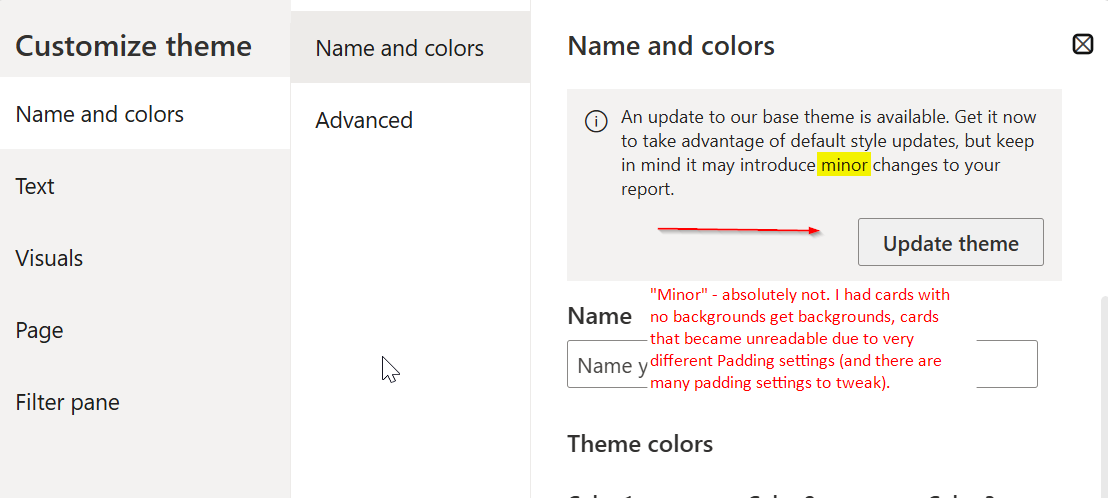
The New Card Visual in Power BI has finally out of preview. I like it overall. But... once you update the template in any older reports developed over the last 2 years or so, you may need to spend time formatting. Quite a bit of time. The updated template just wallops your card powerbi.microsoft.com/en-us/blog/dee…
Ed Hansberry tweet media
English
1
1
26
1.8K
Haquafresh 🧙🏽‍♂️📊 retweetledi
Kurt Buhler
Kurt Buhler@kurtbuhler·
Power BI needs a native Vega visual. Everything under the sun is pointing in that direction. The visuals are holding so much potential back right now.
English
3
1
42
1.8K
Haquafresh 🧙🏽‍♂️📊 retweetledi
Science girl
Science girl@sciencegirl·
Timelapse of a kitten into a grown up cat. 📹 Nils Jacobi
English
174
7.1K
90.2K
2.4M
Haquafresh 🧙🏽‍♂️📊 retweetledi
Andrew McCarthy
Andrew McCarthy@AJamesMcCarthy·
Here's the full photo briefly featured in my recent video post showing @BlackGryph0n against the full solar chromosphere after his jump. Crazy how small he looks despite being nearly 50,000,000x closer! This ended up being my most popular print (vs the closeup) linked in my bio.
Andrew McCarthy tweet media
English
428
4.3K
23.9K
1.3M
Haquafresh 🧙🏽‍♂️📊 retweetledi
Andrew McCarthy
Andrew McCarthy@AJamesMcCarthy·
Immense planning and technical precision was required for this absolutely preposterous (but real) view: I captured my friend @BlackGryph0n transiting the sun during a skydive. This might be the first photo of it's kind in existence. See a video of this moment in the reply 👇
Andrew McCarthy tweet media
English
1.8K
11.4K
70.6K
8.7M
Haquafresh 🧙🏽‍♂️📊 retweetledi
Kurt Buhler
Kurt Buhler@kurtbuhler·
I've been using the Fabric CLI a lot. Reflecting on it, I honestly think this is the most impactful feature for me from Fabric OR Power BI in recent years. I really do mean that. If you want an introduction to the Fabric CLI, I've written about it here: tabulareditor.com/blog/agentic-o… Since I discovered the Fabric CLI, I find that I'm using it daily. TBH, I don't think I've EVER used ANY Power BI feature daily. To be clear, I don't execute commands most of the time; I give it to coding agents (I favor Claude Code) who do it for me. Incrementally over the months I've built up context files and examples, and compiled those in a few skills. Here's a few examples of things I've done with it, just in my own tenant: 1. I got a notification that a model refresh failed. I was at a conference and I needed that model for a demo, but I didn't have time to look into it. I just sent Claude Code after it using the Fabric CLI, asking to inspect the refresh history, model, notebooks, and data to figure out the issue. In a few minutes it crawled through the workspace and found the issue in one of the notebooks, fixed it, and then re-ran each notebook in sequence and refreshed the model, confirming if the refresh succeeded and querying it to validate. 2. I saw my Fabric Trial ticking down to 3 days and realized I needed to migrate all my trial workspaces. I can't automate this deterministically because each workspace needs a separate human decision: migrate to PPU, migrate to F SKU, migrate to Pro, or archive and delete. So I created a re-usable prompt and with a few parallel agents went through and did it in 20 minutes. I wrote about that here: lnkd.in/eufDkMkh -- my trial did get renewed though :P 3. I use it to facilitate CI/CD during agentic report development. This is something I've shared briefly ( lnkd.in/eqBTRDCx ) and started documenting in a longer video and article, but illness and injury in the last month has kept me from finishing it... IYKYK. Of course the Fabric CLI is also amazing for deterministic automation scenarios too, which many have blogged about like Peer Grønnerup ( lnkd.in/e-vJK52X ) and Kevin C. ( lnkd.in/ek4YUYiR ) If you were to tell me last year that 2025 was the year I'd fall in love with the command-line, I'd have laughed at you. "I'm a designer! I practically live in Figma and Excalidraw." And yet, here we are -- Claude Code and the Fabric CLI changed everything, for me. That's pretty cool.
English
3
4
27
1.4K
Haquafresh 🧙🏽‍♂️📊 retweetledi
Con Stoitsis
Con Stoitsis@vivstoitsis·
One last great image of Comet C/2025 A6 Lemmon by Muhammad Ibraheem.
Con Stoitsis tweet media
English
4
177
1.1K
19.6K
Kurt Buhler
Kurt Buhler@kurtbuhler·
I've been a bit decked by the flu and a fluke back injury the last week, but looking forward to sharing some new power bi stuff. Later this month I'll also be going on paternity leave as our second is soon born -- going to be fully away during that time until the new year 🙂
English
10
0
44
1.2K
Haquafresh 🧙🏽‍♂️📊 retweetledi
KratosBI
KratosBI@KratosBi·
You built a Power BI theme… but is it perfect? Creating a great theme isn’t one-and-done - it’s an art of iteration. In Episode 3 of my Power BI Theme Masterclass, we dive into how to validate and refine your theme so it not only looks great but works perfectly across every report in your org. Here’s what we cover: - How to test your Power BI theme for color contrast & accessibility - Spotting subtle design flaws before they go live - Iterating fast with real visuals and dashboards Perfecting your theme means delivering consistency, clarity, and confidence - every time someone opens your report. Watch here → youtu.be/0xXCU3A-UJM Let’s make your Power BI themes not just good… but legendary. #datagods #PowerBI #MicrosoftFabric #KratosBI #PowerBITips #PowerBITheme #DataVisualization #DesignMatters #AnalyticsDesign #DataCulture
YouTube video
YouTube
KratosBI tweet media
English
0
8
36
1.8K
Haquafresh 🧙🏽‍♂️📊 retweetledi
Respectful Memes
Respectful Memes@RespectfulMemes·
Respectful Memes tweet media
ZXX
10
318
8.5K
105.1K
Haquafresh 🧙🏽‍♂️📊 retweetledi
PowerBI.Tips
PowerBI.Tips@PowerBITips·
PBIP is the future of Power BI. Even if you still use PBIX, PBIP will be used behind the scenes. It's the only format moving forward, disguised as PBIP. This is the new Power BI report format V2. #PowerBI #PBIP youtube.com/watch?v=mQWWRC…
YouTube video
YouTube
English
0
1
15
872
Haquafresh 🧙🏽‍♂️📊 retweetledi
Chandeep Chhabra
Chandeep Chhabra@chandeep2786·
While performing Grouping in Power Query, you might want to concatenate the values instead of summarizing them. For all those times, here is a neat trick ✌️. I’ve covered many more tips and tricks like this in my #PowerQuery book, Grab your copy here - products.goodly.co.in/power-query-bo… {M}joy
Chandeep Chhabra tweet media
English
1
6
56
1.5K
Haquafresh 🧙🏽‍♂️📊 retweetledi
Reza Rad #PowerBI #MicrosoftFabric #AI
#PIVOT is a very common transformation when you bring Name-Value structured data from systems such as #CRM #ERP #Dynamics #D365, because these columns let you create a custom field, but behind the scenes, they store it as Name-Value. In today's video, I explained how you can transpose that #data using #PowerQuery in #PowerBI and import it properly as a table youtu.be/Y6jXBm0rr-s #DataAnalytics #Analytics #BusinessIntelligence #MicrosoftFabric #ETL #DataFactory #Dataflow #Tech
YouTube video
YouTube
Reza Rad #PowerBI #MicrosoftFabric #AI tweet media
English
0
2
3
529
Haquafresh 🧙🏽‍♂️📊 retweetledi
Kurt Buhler
Kurt Buhler@kurtbuhler·
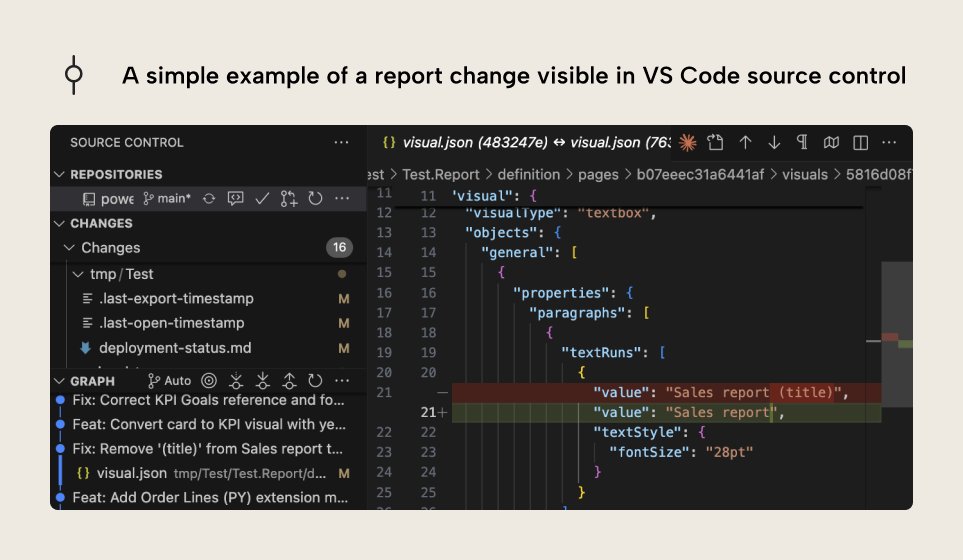
Visual studio code and VS code extension for Power BI developers... in simple terms. This article explains the basics of why VS Code is a must-use for Power BI... even if you're not technical. From source control to extensions like Fabric Studio and AI tools... (Link Below)
Kurt Buhler tweet media
English
3
17
108
5.3K