HYBEE.W3B 🕸️ $XAGE
11.7K posts

HYBEE.W3B 🕸️ $XAGE
@HybeeT007
| Technologist | Web3 Researcher | Bullish on Personal growth | Community builder | Content Creator | Data Analyst @InventMoneyapp


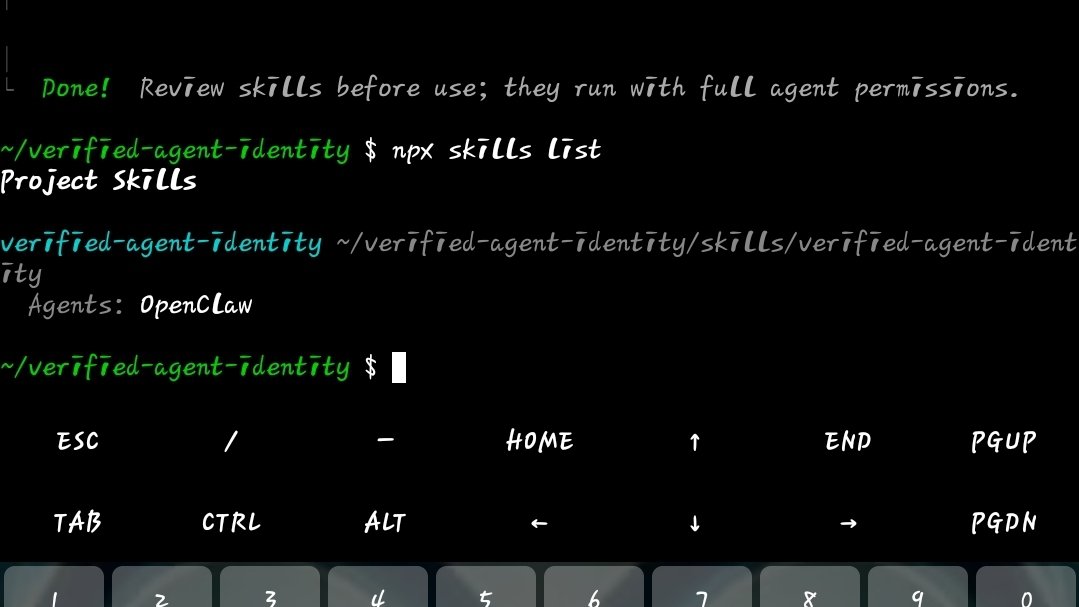
Finally the complete guide is here for mobile users 🙌 Yes, recently @billions_ntwk introduced Verified Agent Identity for AI agents. If you want to run it on mobile (Android) using Termux, many people are struggling with the setup. So I tried it myself and did it easily, here is a simple step-by-step guide for you all. 1. First install 𝐓𝐞𝐫𝐦𝐮𝐱 𝐚𝐩𝐩 from Play Store (it’s a terminal app that lets you run Linux commands on Android). 2. Once installed, open Termux and follow the commands below 👇 𝗖𝗼𝗺𝗺𝗮𝗻𝗱 𝟭 "pkg update && pkg upgrade" 𝐍𝐨𝐭𝐞 :- " 𝐦𝐚𝐫𝐤 𝐢𝐬𝐧'𝐭 𝐩𝐚𝐫𝐭 𝐨𝐟 𝐜𝐨𝐦𝐦𝐚𝐧𝐝 𝗖𝗼𝗺𝗺𝗮𝗻𝗱 𝟮 & 𝟯 "pkg install nodejs" And after that, "pkg install git" To check everything is fine perfectly, you can use command "node -v" (It’ll show you something like v25.x.x if everything is correct) 𝗖𝗼𝗺𝗺𝗮𝗻𝗱 𝟰 (𝗶𝗺𝗽𝗼𝗿𝘁𝗮𝗻𝘁) "git clone github.com/BillionsNetwor…" Then open the folder using this command "cd verified-agent-identity" 𝗖𝗼𝗺𝗺𝗮𝗻𝗱 𝟱 "npx clawhub@latest install verified-agent-identity" 𝐍𝐨𝐭𝐞 – 𝐰𝐡𝐞𝐫𝐞𝐯𝐞𝐫 𝐢𝐭 𝐬𝐚𝐲𝐬 (𝐲) 𝐭𝐨 𝐩𝐫𝐨𝐜𝐞𝐞𝐝, 𝐭𝐲𝐩𝐞 𝐲 𝐚𝐧𝐝 𝐩𝐫𝐞𝐬𝐬 𝐞𝐧𝐭𝐞𝐫. 𝗖𝗼𝗺𝗺𝗮𝗻𝗱 𝟲 Create your Agent Ethereum Identity "node scripts/createNewEthereumIdentity.js" This will generate your Agent identity. If you get an error here then please read instructions written at the last of this post. 𝗖𝗼𝗺𝗺𝗮𝗻𝗱 𝟳 Link your Human identity with Agent node scripts/manualLinkHumanToAgent.js --challenge '{"name":"YourAgent","description":"AI agent"}' (Copy the full command) After running this command, you will get a verification URL in the terminal. Copy that URL → open it in browser → connect wallet → verify. Done, Your Agent identity will now be linked with your human wallet. ––––––––––––––––––––––––––––––––– If you face some common errors (like I did), here are quick fixes 👇 𝗜𝘀𝘀𝘂𝗲 𝟭(you may get this while creating Ethereum identify for your agent) 𝘌𝘳𝘳𝘰𝘳: 𝘊𝘢𝘯𝘯𝘰𝘵 𝘧𝘪𝘯𝘥 𝘮𝘰𝘥𝘶𝘭𝘦 '𝘴𝘩𝘦𝘭𝘭-𝘲𝘶𝘰𝘵𝘦' 𝐅𝐢𝐱 𝐮𝐬𝐢𝐧𝐠 𝐭𝐡𝐢𝐬 𝐜𝐨𝐦𝐦𝐚𝐧𝐝 "npm install shell-quote" 𝗜𝘀𝘀𝘂𝗲 𝟮 (in the next step while linking your human identity with agent) 𝐄𝐫𝐫𝐨𝐫: 𝐂𝐚𝐧𝐧𝐨𝐭 𝐟𝐢𝐧𝐝 𝐦𝐨𝐝𝐮𝐥𝐞 '@𝐢𝐝𝐞𝐧𝟑/𝐣𝐬-𝐢𝐝𝐞𝐧𝟑-𝐚𝐮𝐭𝐡' Fix using this command "npm install @iden3/js-iden3-auth" After installing, run the previous command again. Hope this helps anyone trying to run it on mobile. If you get stuck somewhere, feel free to ask.


My agent is now 𝗲𝗹𝗶𝗴𝗶𝗯𝗹𝗲 𝗳𝗼𝗿 𝗙𝗔𝗜𝗔𝗥 𝗿𝗲𝘄𝗮𝗿𝗱𝘀 from @billions_ntwk, 𝗶𝘀 𝘆𝗼𝘂𝗿𝘀? It's eligible only if: - you have verified your agent on Billions - you have access to your agent to install skills (this is why I posted a tweet earlier, but many ignored it, still quoted) - your agent has the Verified Identity Skill installed on OpenClaw Most of you have completed the first two points. You just need to install the Verified Identity Skill now I’m going to post a small guide on this, it’s super easy, but before that make sure: - if you verified your agent on Termux, you didn’t uninstall it. And if you did, you linked a new agent because you’ve lost access to the previous one - same for PC users, you didn’t uninstall Git and Node.js from your system Once you’re ready, installing the Verified Identity Skill is very easy. I’ll be back with a guide in an hour gBillions 💙