REX@Developer, CTO, Medium writer

7.9K posts

REX@Developer, CTO, Medium writer banner
REX@Developer, CTO, Medium writer

REX@Developer, CTO, Medium writer

@IT_makesUsHappy

Japanese developer / Python, AI, Web, iOS / Physics MD. I'd love to associate with people around the world. I write Medium, Let'sfollow each other!

Katılım Ağustos 2019
4.7K Takip Edilen2.6K Takipçiler
Sabitlenmiş Tweet
REX@Developer, CTO, Medium writer
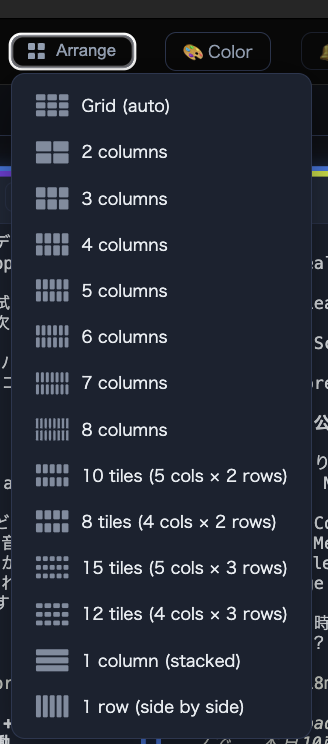
Ship Claude Code sessions in parallel. Tile any number on one macOS canvas. ⌘-click → broadcast keystrokes to a set. ⌘⌘ → fisheye-focus any panel. Sessions auto-`--resume` on relaunch. Source code included. $10 launch (¥1,000 JPY). techathletes-store.web.app/agent-desk
REX@Developer, CTO, Medium writer tweet mediaREX@Developer, CTO, Medium writer tweet media
English
0
0
0
20
REX@Developer, CTO, Medium writer retweetledi
Money Ape
Money Ape@TheMoneyApe·
@WatcherGuru $SPCX holders who bought the top.
Money Ape tweet media
English
16
14
661
29.2K
REX@Developer, CTO, Medium writer
@__spekulator__ (I'm Japanese, so some of the log text in the demo is in Japanese — sorry about that! The app itself is in English; that's just my own session content😂)
English
1
0
0
15
REX@Developer, CTO, Medium writer
Yes — that's exactly what the demo shows. I force-quit the app to simulate a crash, then relaunch it, and every session that was open comes back: each panel re-opens in its own project folder and resumes its own Claude Code session, so the full conversation/context is right there — you pick up exactly where you left off, per window. Under the hood each panel persists its working directory + its session ID, and on launch it re-runs claude --resume in that folder. So it's not a fresh start — it's the same agent, same thread, same project, restored side-by-side across all panels at once. (On a soft reload where the underlying process is still alive, it also replays the terminal's exact scrollback buffer, so the on-screen logs are restored verbatim too.)
English
2
0
0
31
REX@Developer, CTO, Medium writer
I built a Mac app that lets you run 8 Claude Code sessions from one command center. ⌘-click to select panels → type once → every agent gets it. Double-⌘ to zoom any panel to fullscreen with unwrapped scrollback. It's called agent-desk. Ships today ↓
REX@Developer, CTO, Medium writer tweet media
English
2
0
4
570
REX@Developer, CTO, Medium writer
Great question — it's both, not just the chat thread. Agent-Desk persists each panel's working directory and its Claude Code session ID separately. On relaunch, every panel: (I attached the demo movie) 1. Re-opens its terminal in the exact same project workspace (the original cwd), and 2. Resumes the same Claude session by running claude --resume in that directory — so you get the full conversation/context back, in the right project. So each window comes back where it left off: same folder, same agent, same thread. Nothing is just a detached chat log. One honest caveat: because Claude Code scopes sessions to the folder they were started in, if you move or rename a project directory after the fact, that panel's resume needs to point at the new path (you own the source, so this is easy to tweak — and it's on my list to make automatic). If you want! ($10 for Solo): tech-athletes.com/agent-desk/
English
1
0
0
76
SPEKULATOR
SPEKULATOR@__spekulator__·
@IT_makesUsHappy got it — so the panel state is fully restored, including the active claude code session. does it also re-attach to the same project workspace or just the chat thread?
English
1
0
0
31
REX@Developer, CTO, Medium writer
@__spekulator__ Also — you clearly know your way around code, so feel free to fork the source and hack in whatever features you want. Give it a try. Oh, and I forgot: double-tap ⌘ zooms the active panel to fullscreen. Have fun with it.
English
0
0
0
2
SPEKULATOR
SPEKULATOR@__spekulator__·
@IT_makesUsHappy the zoom on one panel while the others stay live is a sweet detail. does it save context windows between uses, or do you start fresh each run?
English
3
0
0
12
REX@Developer, CTO, Medium writer
An automated email should send the download — if it doesn't arrive, just DM me and I'll ship the file directly! (polishing the app itself right now, payment plumbing is still a bit rough — sorry lol) You're an important early adopter for me, so I've got you covered. Auto-email should send the download — if it doesn't arrive, DM me and I'll ship the file directly. Polishing the app itself, payment plumbing is still rough — sorry lol. Promise it's not a scam, just an indie shipping in public. (Definitely not a scam, promise) $10 launch — direct to checkout: buy.stripe.com/5kQ5kEaPMbWL7s…
English
0
0
0
16
REX@Developer, CTO, Medium writer
Under the hood: ▸ Grid drag/resize/swap · ⌘Z undoes any layout ▸ ⌘+click multi-select · ⌘⇧+click range select ▸ Sessions persist restarts (claude --resume auto-bind) ▸ 512KB raw PTY buffer per panel for fisheye replay ▸ macOS 12+, Apple Silicon & Intel
English
0
0
1
70
REX@Developer, CTO, Medium writer
The killer feature I didn't expect I'd need: double-⌘ on any panel = fullscreen. But it doesn't just enlarge — it resizes the source PTY and re-flows past output at the new width. 30-col narrow panel becomes 240-col readable. Grasp a session in one glance.
REX@Developer, CTO, Medium writer tweet media
English
1
0
1
66