Darcy

82 posts

Darcy banner
Darcy

Darcy

@ItsDarcy_AI

AI Content Creator 🤖 | Driving Brand Growth with AI & Smart Digital Strategies 📈 | Open to Collaborations 🤝 | Sharing AI Tools, Web Development & Marketing I

Texas, USA Katılım Mart 2026
7 Takip Edilen319 Takipçiler
Darcy
Darcy@ItsDarcy_AI·
Anthropic just introduced the Claude Architect Certification — and it’s not easy. 60 questions. 5 competency areas. One sitting. No breaks. No external help. Here’s a simple roadmap to prepare: Week 1 — Foundations • Claude API • Model Context Protocol (MCP) • Claude Code • Claude 101 Week 2 — Build • Claude Code • Agent SDK • Anthropic API • MCP Week 3 — Understand the Exam • Exam scenarios • Competency areas • Required skills Week 4 — Practice Systems • Multi-tool agent with escalation • Team workflow setup • Data extraction pipeline • Multi-agent research system Week 5 — Test Yourself Practice exam → Target 850+ Week 6 — Final Attempt One attempt. Be ready.
Darcy tweet media
English
0
0
3
33
Darcy
Darcy@ItsDarcy_AI·
Darcy tweet media
ZXX
0
0
4
25
Darcy
Darcy@ItsDarcy_AI·
Darcy tweet media
ZXX
0
0
6
31
Darcy
Darcy@ItsDarcy_AI·
If you want to become a Claude Certified Architect, this guide can be your best friend to pass the exam! Claude Code is closer to an AI development operating system than a coding agent and this guide will help you to navigate through it! 1️⃣ First, it explains the core capability layer. Claude Code has full file-system access, meaning it can read, write, organize, and refactor entire codebases locally. It can run shell commands, execute scripts, manage Git workflows, and perform hours-long tasks autonomously. This moves AI from suggesting code to operating directly inside your development environment. 2️⃣ Second, the guide introduces MCP. Think of it as USB-C for LLMs. With MCP, Claude connects to external tools like GitHub, Slack, Notion, Gmail, PostgreSQL, or internal APIs. Instead of switching tools, Claude becomes a central orchestration layer for your stack. 3️⃣ Third, it shows the agent workflow model: Analyze → Plan → Execute → Scale. Claude can research documents, draft PRDs, generate prototypes, create dashboards, and automate workflows using reusable skills. The guide also covers advanced mechanics most people miss: 🔸Slash commands (/compact, /model, /config) 🔸Project memory via CLAUDE.md 🔸Reusable automation skills 🔸Multi-agent delegation In short: this guide shows how Claude evolves from assistant → autonomous teammate → development infrastructure. And if you’re building with AI agents, that shift is massive. #ai #claude #agents
Darcy tweet media
English
0
0
5
73
Darcy
Darcy@ItsDarcy_AI·
Claude Code just dropped major updates (March 2026). Most people missed them. Here’s what actually matters 👇 • Opus 4.6 = default Faster + cheaper (medium effort by default) • 1M token context Entire codebase in one prompt • /loop Run tasks on autopilot (like cron inside Claude) • Voice mode Talk → Claude executes • Remote control Run tasks on your PC from your phone • Computer use (preview) Claude can operate your desktop • HTTP hooks Trigger Slack, CI/CD, webhooks 💡 Small updates. Massive shift. Claude is becoming an autonomous dev agent. Save this 💾 Follow for AI workflows 🚀
Darcy tweet media
English
0
0
4
57
Darcy
Darcy@ItsDarcy_AI·
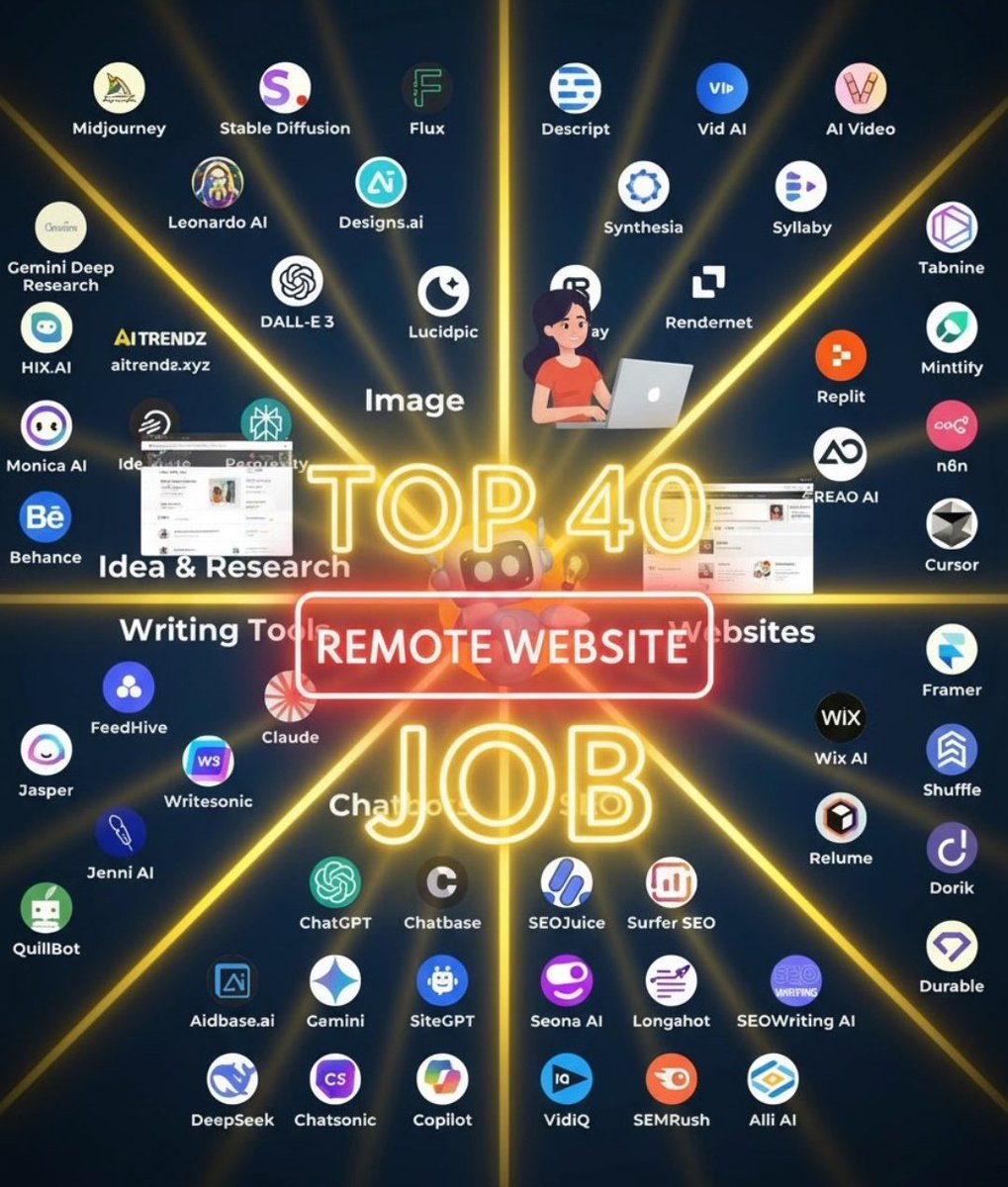
LIST OF 40 WEBSITES TO FIND REMOTE JOBS 1. Linkedin. com 2. Indeed. com 3. Glassdoor. com 4. FlexJobs. com 5. weworkremotely. com 6. Remote. com 7. Upwork. com 8. Freelancer. com 9. Fiverr. com 10. Guru. com 11. Toptal. com 12. AngelList. com 13. Hubstafftalent. com 14. Simplyhired. com 15. Remotive. com 16. Virtualvocations. com 17. workingnomads. com 18. Hired. com 19. cloudpeeps. com 20. taskrabbit. com 21. talent. com 22. Remote OK - remoteok. io 23. DRemote - dremote. io 24. Jooble - jooble. org 25. stackoverflow. com/jobs 26. jobspresso. com 27. onlinejobs. ph 28. simplyhired. com 29. themuse. com 30. skipthedrive. com 31. zirtual. com 32. justremote. com 33. hireable. com 34. remoteworkhub. com 35. jobbatical. com 36. freelancewritinggigs. com 37. contentwritingjobs. com 38. problogger. com/jobs 39. behance. net 40. designhill. com
Darcy tweet media
English
0
2
15
460
Darcy
Darcy@ItsDarcy_AI·
6 Month Roadmap to AI Engineer 📚📘
Darcy tweet media
English
7
151
795
27K
Darcy
Darcy@ItsDarcy_AI·
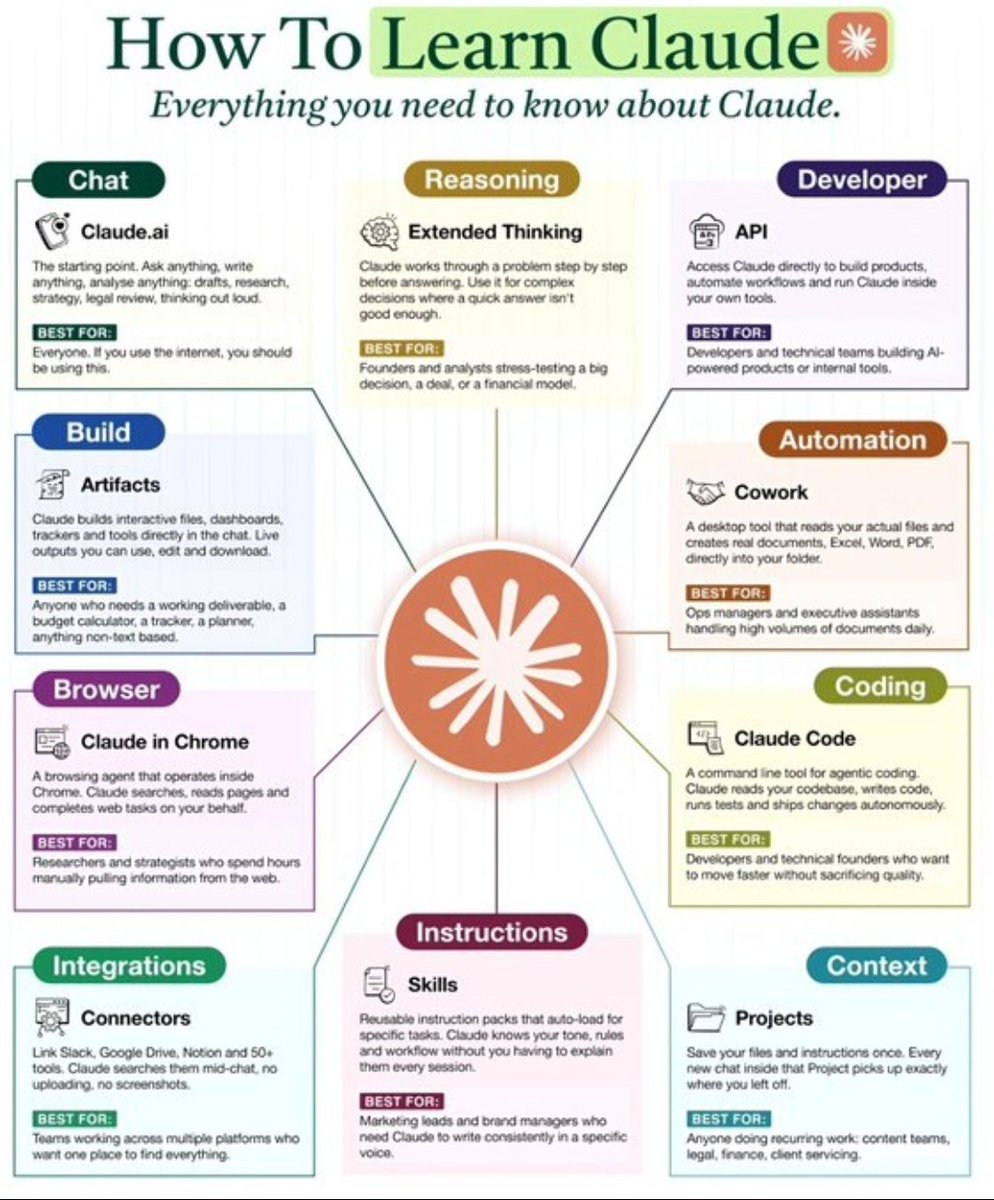
How To Learn Claude ✳️ Everything you need to know about Claude. ━━━━━━━━━━━━━━━━━━━ 1. Chat 🔺Claude.ai The starting point. Ask anything, write anything, analyse anything: drafts, research, strategy, legal review, thinking out loud. ✅BEST FOR: Everyone. If you use the internet, you should be using this. ━━━━━━━━━━━━━━━━━━━ 2. Reasoning 🔺Extended Thinking Claude works through a problem step by step before answering. Use it for complex decisions where a quick answer isn't good enough. ✅BEST FOR: ●Founders and analysts stress-testing a big decision, a deal, or a financial model. ━━━━━━━━━━━━━━━━━━━ 3. Developer 🔺API Access Claude directly to build products, automate workflows and run Claude inside your own tools. ✅BEST FOR: Developers and technical teams building AI-powered products or internal tools. ━━━━━━━━━━━━━━━━━━━ 4. Build 🔺Artifacts Claude builds interactive files, dashboards, trackers and tools directly in the chat. Live outputs you can use, edit and download. ✅BEST FOR: Anyone who needs a working deliverable, a budget calculator, a tracker, a planner, anything non-text based. ━━━━━━━━━━━━━━━━━━━ 5. Automation 🔺Cowork A desktop tool that reads your actual files and creates real documents, Excel, Word, PDF, directly into your folder. ✅BEST FOR: Ops managers and executive assistants handling high volumes of documents daily. ━━━━━━━━━━━━━━━━━━━ 6. Coding 🔺Claude Code A command line tool for agentic coding. Claude reads your codebase, writes code, runs tests and ships changes autonomously. ✅BEST FOR: Developers and technical founders who want to move faster without sacrificing quality. ━━━━━━━━━━━━━━━━━━━ 7. Browser 🔺Claude in Chrome A browsing agent that operates inside Chrome. Claude searches, reads pages and completes web tasks on your behalf. ✅BEST FOR: Researchers and strategists who spend hours manually pulling information from the web. ━━━━━━━━━━━━━━━━━━━ 8. Instructions 🔺Skills Reusable instruction packs that auto-load for specific tasks. Claude knows your tone, rules and workflow without you having to explain them every session. ✅BEST FOR: Marketing leads and brand managers who need Claude to write consistently in a specific voice. ━━━━━━━━━━━━━━━━━━━ 9. Integrations 🔺Connectors Link Slack, Google Drive, Notion and 50+ tools. Claude searches them mid-chat, no uploading, no screenshots. ✅BEST FOR: Teams working across multiple platforms who want one place to find everything. ━━━━━━━━━━━━━━━━━━━ 10. Context 🔺Projects Save your files and instructions once. Every new chat inside that Project picks up exactly where you left off. ✅BEST FOR: Anyone doing recurring work: content teams, legal, finance, client servicing. ━━━━━━━━━━━━━━━━━━━ ❤️ Like 🔁 Retweet 🔖 Bookmark Follow👤 @ItsDarcy_AI for more such posts
Darcy tweet media
English
2
1
7
186
Darcy
Darcy@ItsDarcy_AI·
DATABASE INDEXING & PERFORMANCE COMPARISON IN SYSTEM DESIGN Database indexing is one of the most powerful techniques for improving query performance in system design. The diagram clearly shows the difference between unindexed (full scan) and indexed (B+ Tree lookup) approaches. → UNINDEXED DATABASE (FULL TABLE SCAN) → Query → Database scans every row sequentially → No shortcut → must check each record one by one → Time Complexity → O(n) → What happens → User query → Table → Row 1 → Row 2 → Row 3 → … → Match found → Inefficient for large datasets (millions of rows) → Performance → Slow response time → High CPU and disk usage → Does not scale well → INDEXED DATABASE (B+ TREE INDEX) → Query → Uses B+ Tree structure to locate data quickly → Time Complexity → O(log n) → How it works → Query → Root Node → Internal Nodes → Leaf Node → Data Row → Instead of scanning everything, it navigates directly to the correct location → Performance → Extremely fast lookups → Minimal disk I/O → Scales efficiently with large datasets → PERFORMANCE COMPARISON → Full Table Scan → O(n) → Slow → Indexed Lookup → O(log n) → Fast → Example from diagram: → Full scan → ~1000ms → Indexed query → ~2–5ms → Result → 100x to 1000x faster queries → TYPES OF INDEXES (FROM DIAGRAM) → CLUSTERED INDEX → Data stored in the same order as the index → Only one per table → Typically created using PRIMARY KEY → Fastest for range queries → NON-CLUSTERED INDEX → Separate structure → stores key + pointer to row → Does not change physical data order → Useful for frequent lookups → COMPOSITE INDEX → Index on multiple columns (e.g., name + created_at) → Works best when query matches the leftmost columns → Improves multi-condition queries → COVERING INDEX → Contains all required columns for a query → Eliminates need to access the main table → Fastest type for specific queries → INDEXING IMPACT IN SYSTEM DESIGN → Faster APIs → Reduced response time → Lower database load → fewer scans → Better scalability → handles large traffic → Efficient joins and filtering → TRADE-OFFS → Faster reads → slower writes (INSERT/UPDATE) → Extra storage required for indexes → Too many indexes → performance degradation → WHEN TO USE INDEXING → Frequently queried columns (WHERE, JOIN, ORDER BY) → Large datasets with heavy read traffic → High-performance applications (e.g., e-commerce, SaaS) → QUICK TIP → Without indexing → full scan → slow (O(n)) → With indexing → direct lookup → fast (O(log n)) → B+ Tree indexing enables massive performance gains → Proper index design is critical for scalable systems
Darcy tweet media
English
0
1
12
140
Darcy
Darcy@ItsDarcy_AI·
DATABASE INDEXING & PERFORMANCE COMPARISON IN SYSTEM DESIGN Database indexing is one of the most powerful techniques for improving query performance in system design. The diagram clearly shows the difference between unindexed (full scan) and indexed (B+ Tree lookup) approaches. → UNINDEXED DATABASE (FULL TABLE SCAN) → Query → Database scans every row sequentially → No shortcut → must check each record one by one → Time Complexity → O(n) → What happens → User query → Table → Row 1 → Row 2 → Row 3 → … → Match found → Inefficient for large datasets (millions of rows) → Performance → Slow response time → High CPU and disk usage → Does not scale well → INDEXED DATABASE (B+ TREE INDEX) → Query → Uses B+ Tree structure to locate data quickly → Time Complexity → O(log n) → How it works → Query → Root Node → Internal Nodes → Leaf Node → Data Row → Instead of scanning everything, it navigates directly to the correct location → Performance → Extremely fast lookups → Minimal disk I/O → Scales efficiently with large datasets → PERFORMANCE COMPARISON → Full Table Scan → O(n) → Slow → Indexed Lookup → O(log n) → Fast → Example from diagram: → Full scan → ~1000ms → Indexed query → ~2–5ms → Result → 100x to 1000x faster queries → TYPES OF INDEXES (FROM DIAGRAM) → CLUSTERED INDEX → Data stored in the same order as the index → Only one per table → Typically created using PRIMARY KEY → Fastest for range queries → NON-CLUSTERED INDEX → Separate structure → stores key + pointer to row → Does not change physical data order → Useful for frequent lookups → COMPOSITE INDEX → Index on multiple columns (e.g., name + created_at) → Works best when query matches the leftmost columns → Improves multi-condition queries → COVERING INDEX → Contains all required columns for a query → Eliminates need to access the main table → Fastest type for specific queries → INDEXING IMPACT IN SYSTEM DESIGN → Faster APIs → Reduced response time → Lower database load → fewer scans → Better scalability → handles large traffic → Efficient joins and filtering → TRADE-OFFS → Faster reads → slower writes (INSERT/UPDATE) → Extra storage required for indexes → Too many indexes → performance degradation → WHEN TO USE INDEXING → Frequently queried columns (WHERE, JOIN, ORDER BY) → Large datasets with heavy read traffic → High-performance applications (e.g., e-commerce, SaaS) → QUICK TIP → Without indexing → full scan → slow (O(n)) → With indexing → direct lookup → fast (O(log n)) → B+ Tree indexing enables massive performance gains → Proper index design is critical for scalable systems
Darcy tweet media
English
0
1
8
85
Darcy
Darcy@ItsDarcy_AI·
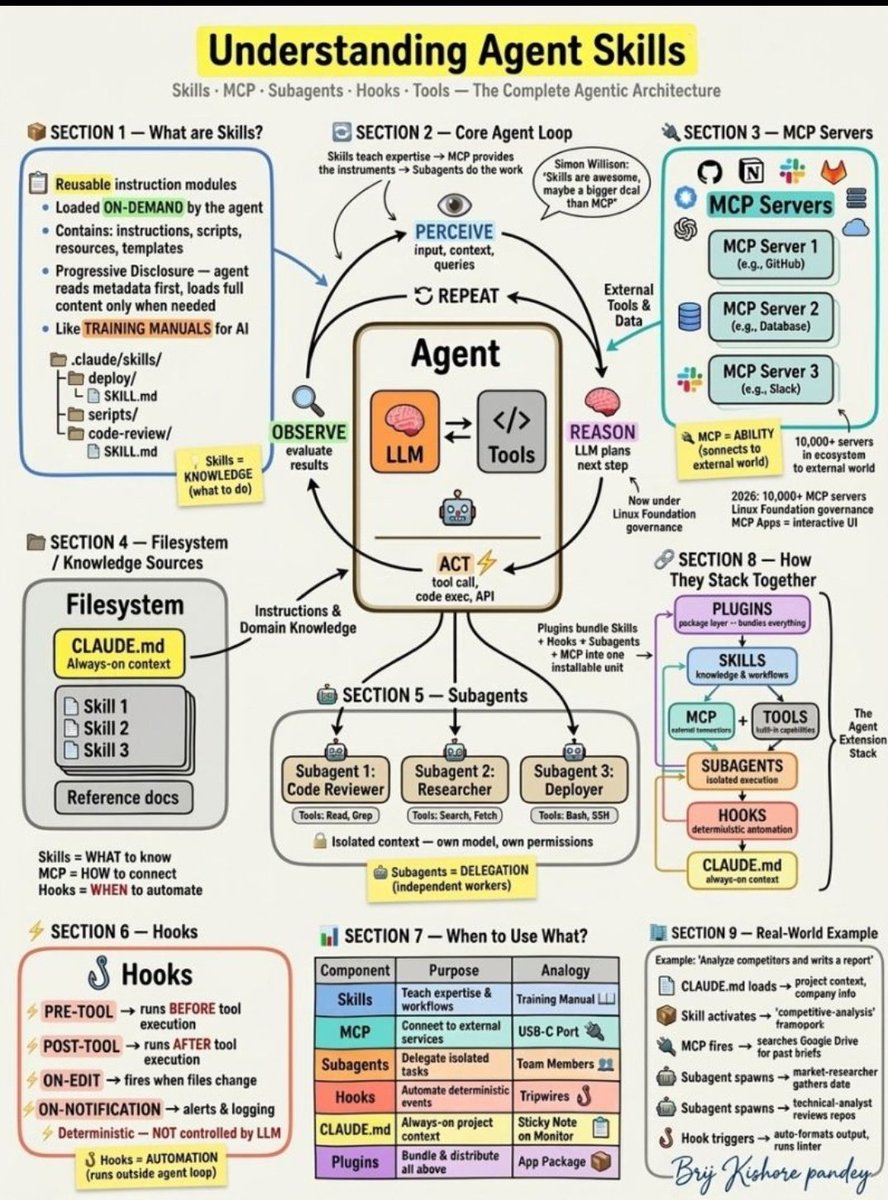
Most people think Skills and MCP are the same thing. They're not. And confusing them is costing you weeks of wasted architecture decisions. I just mapped the entire Agentic AI extension stack on a whiteboard — here's the breakdown: 𝗦𝗸𝗶𝗹𝗹𝘀 Reusable knowledge modules that agents load on-demand. The agent scans metadata first, then loads full instructions only when relevant. This is called Progressive Disclosure — it keeps your context window clean while giving agents deep domain expertise when they need it. Think of them as training manuals for AI. 𝗠𝗖𝗣 (𝗠𝗼𝗱𝗲𝗹 𝗖𝗼𝗻𝘁𝗲𝘅𝘁 𝗣𝗿𝗼𝘁𝗼𝗰𝗼𝗹) The universal connection layer between agents and external tools. Standardized protocol — like USB-C for AI. 10,000+ MCP servers in the ecosystem today. Now governed by Linux Foundation's Agentic AI Foundation. If Skills teach you to cook, MCP gives you the kitchen. 𝗦𝘂𝗯𝗮𝗴𝗲𝗻𝘁𝘀 Independent agent instances running in isolated context. They can use a different model, different tools, different permissions than the parent agent. Like specialized team members with their own workspace. You delegate. They execute. They return summaries. 𝗛𝗼𝗼𝗸𝘀 Deterministic scripts that fire outside the agent loop entirely. Pre-tool, post-tool, on-edit, on-notification triggers. The LLM does NOT control these. Pure event-driven automation. Think of them as tripwires — when X happens, do Y. Always. 𝗖𝗟𝗔𝗨𝗗𝗘. 𝗺𝗱 Always-on project context loaded every single session. Your conventions. Your patterns. Your team preferences. The sticky note permanently on your monitor. 𝗣𝗹𝘂𝗴𝗶𝗻𝘀 The packaging layer that bundles everything above — Skills + Hooks + Subagents + MCP configs into one installable, shareable unit. Here's what most architects miss: These are not competing approaches. They are layers that stack: Skills = WHAT to know MCP = HOW to connect Subagents = WHO does the work Hooks = WHEN to automate CLAUDE. md = WHERE you ground it Plugins = HOW you ship it The real power is in the combination: CLAUDE. md loads project context → Skill provides domain expertise → MCP connects to external systems → Subagent executes in isolation → Hook automates the handoff → Plugin packages it all for the team If you want to excel at building agents in 2026, stop picking one layer over another. Learn to orchestrate all six together. That's what separates demo agents from production agents. Which layers are you actually using today?
Darcy tweet media
English
0
0
6
58
Darcy
Darcy@ItsDarcy_AI·
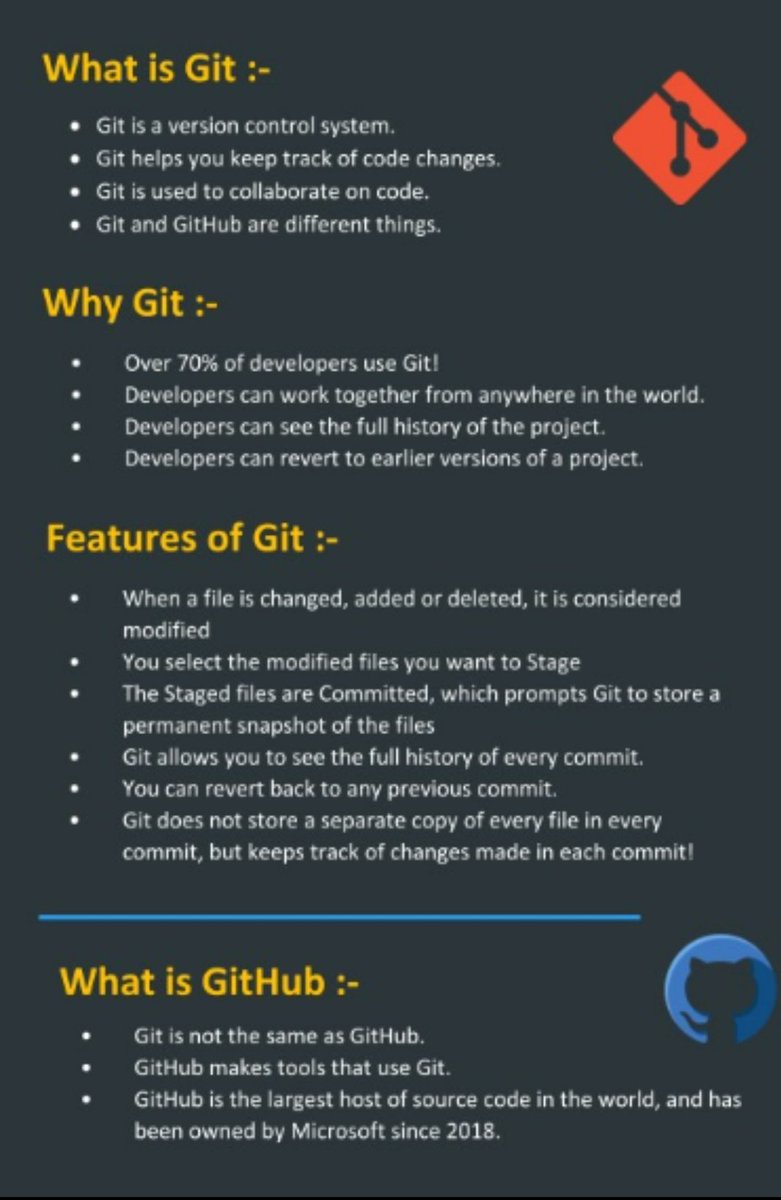
When Git finally makes sense, everything in your development workflow starts feeling easier. A lot of people find GitHub confusing at first, but once you understand the basics, everything becomes much more organized. 𝗛𝗲𝗿𝗲’𝘀 𝘁𝗵𝗲 𝘀𝗶𝗺𝗽𝗹𝗲𝘀𝘁 𝘄𝗮𝘆 𝘁𝗼 𝘁𝗵𝗶𝗻𝗸 𝗮𝗯𝗼𝘂𝘁 𝗶𝘁: - Repository → your project workspace - Commit → a saved snapshot of your progress - Branch → a safe parallel version for testing changes - Merge → combining updates from different branches - Push / Pull → syncing local and remote code 𝗚𝗶𝘁 𝗰𝗼𝗺𝗺𝗮𝗻𝗱𝘀 𝗲𝘃𝗲𝗿𝘆 𝗯𝗲𝗴𝗶𝗻𝗻𝗲𝗿 𝘀𝗵𝗼𝘂𝗹𝗱 𝗸𝗻𝗼𝘄 - "git init" → create a new repository - "git clone " → copy an existing repo to your system - "git status" → check modified files - "git add ." → stage all changes - "git commit -m "message"" → save your work with a note - "git push" → upload local changes - "git pull" → fetch the latest updates - "git branch" → view available branches - "git checkout -b dev" → create and switch to a new branch - "git merge dev" → merge branch changes 𝗣𝗿𝗮𝗰𝘁𝗶𝗰𝗮𝗹 𝗚𝗶𝘁 𝗵𝗮𝗯𝗶𝘁𝘀 𝘁𝗵𝗮𝘁 𝘀𝗮𝘃𝗲 𝘁𝗶𝗺𝗲 - Don’t run commands blindly—understand what each one does - Avoid working directly on "main"; use branches - Keep commit messages clear and meaningful - Always run "git status" before committing - Pull latest changes before pushing your code Save this as a quick Git cheat sheet for your practice sessions. lnkd.in/gg46n9fP Comment “GitHub” and I’ll share the full beginner-friendly PDF.
Darcy tweet media
English
0
0
7
84
Darcy retweetledi
Darcy
Darcy@ItsDarcy_AI·
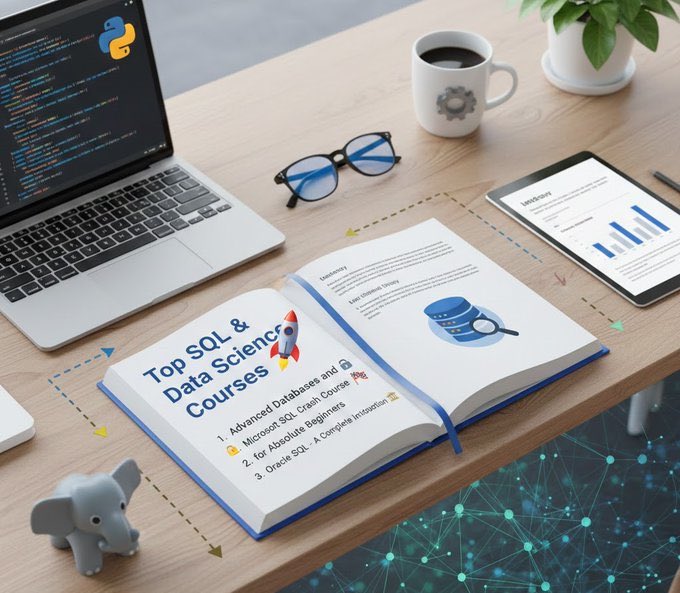
Top SQL & Data Science Courses 1. Advanced Databases and SQL Querying http:// udemy.com/course/advance... 2. Microsoft SQL Crash Course for Absolute Beginners http:// udemy.com/course/complet… 3. Oracle SQL - A Complete Introduction http:// udemy.com/course/introdu… 4. Databases and SQL for Data Science with Python http:// imp.i384100.net/WqEdEZ 5. SQL 101: A Beginners Guide to SQL http:// udemy.com/course/sql-101… 6. Learn SQL Basics for Data Science Specialization http:// imp.i384100.net/9g7yx4 7. PostgreSQL for Everybody Specialization http:// imp.i384100.net/eKLkB1 8. Google Data Analytics Professional Certificate http:// imp.i384100.net/0ZOBkL 9. Meta Database Engineer Professional Certificate http:// imp.i384100.net/jrLWKP 10. IBM Data Analyst Professional Certificate http:// imp.i384100.net/DKAjjG 11. Introduction to Relational Database and SQL http:// imp.i384100.net/1rvZOz 12. IBM Data Science Professional Certificate http:// imp.i384100.net/9gxbbY
Darcy tweet media
English
0
16
77
2.5K
Darcy
Darcy@ItsDarcy_AI·
@Krishnasagrawal No code, no patching tools, just one prompt and a clean dashboard. This is the future of building AI products.
English
0
0
4
40
Krishna Agrawal
Krishna Agrawal@Krishnasagrawal·
I built a competitor research system with a working UI in 12 minutes. Recorded the entire build 👇 No dev team. No patching tools together. Just one prompt. Here’s what it looks like 👇
English
44
40
138
23.1K
Dhairya
Dhairya@dkare1009·
Better advertising results do not come from simply increasing overall budgets. They come from making smarter and more informed creative decisions. Platforms like @omneky analyze campaign data using advanced AI models. They identify which creatives drive engagement and conversions effectively. This helps marketers continuously improve campaigns and maximize ROI. omneky.com #AI #GrowthMarketing
English
5
5
26
274
Aastha
Aastha@aastha_mhaske·
Marketing has evolved from intuition-based decisions to data-driven strategies. However, data is useful only when it is properly analyzed. Platforms like @omneky use AI to interpret campaign performance signals. They identify which creative elements actually drive meaningful results. This helps marketers move from guesswork to clarity and precision. omneky.com #AItools #MarketingAI
English
3
4
16
209
Khushabu
Khushabu@khushabu_27·
Modern marketing generates a huge amount of data across multiple channels. But data alone does not create value without proper interpretation. Platforms like @omneky use AI to analyze campaign signals deeply. They turn raw data into actionable creative insights for marketers. This helps teams build stronger campaigns and improve performance consistently. omneky.com #AItools #MarketingAI
English
11
8
40
301