Microsoft just moved Purview under the same exec who leads Intune.
What does it mean for Intune admins?
Time to start learning Purview?
@IAMERICAbooted says yes 😀
Microsoft releases Entra Connect v2.6.79.0 with security fixes and recommends upgrading to this version as soon as possible!
To download the Microsoft Entra Connect Sync tool:
1. Sign in to Microsoft Entra admin center.
2. Navigate to Entra ID > Entra Connect > Get Started > Manage.
3. Select the "Download Connect Sync agent".
4. Select the "Accept terms & download" button.
5. Run the tool on the Entra Connect server and follow the wizard.
Note: The release is only for download via the Microsoft Entra admin center, and auto-upgrade is not available.
Learn more:
- alitajran.com/upgrade-micros…
- #26790" target="_blank" rel="nofollow noopener">learn.microsoft.com/en-us/entra/id…
#Microsoft365#EntraID#EntraConnect#Cybersecurity
I just wrote a new blog on bypassing CA policies in Entra ID that have a resource exclusion, and why you probably want to enable baseline enforcement if you have such policies. Enjoy!
dirkjanm.io/bypassing-cond…
Entra Connect v2.6.79.0 was just released and contains undisclosed security fixes and @Microsoft recommends to update fast. On the bright side, it will finally support FIDO2 based authentication!
@arpeyton Entra Authentication methods might actually matter, but not because of SSPR, possibly policy tripping that up
But that cadence makes it seem it would be this, but notice the blue text right below...
Auth methods migration complete? Wonder if started around that time?
Apparently M365 Developer tenants only enforce 1 factor for SSPR for admins... 🫠
Almost had a heart attack and opened a ticket with MSRC, lol
I've checked several retail tenants now, and they are all properly enforcing 2 factors 😅
Security Alert: Disable "Remember multifactor authentication on trusted devices" setting on all Microsoft tenants!
We are still seeing many environments having this feature enabled.
This setting MUST be UNCHECKED.
If this setting is enabled, users will be prompted with the option to skip MFA, which is not recommended!
While this setting is placed under Per-user MFA, it's actually a tenant-wide setting and applies regardless of the MFA configuration method used:
- Adaptive MFA using Conditional Access
- MFA using Security defaults
- Legacy MFA (Per-user)
Read more:
alitajran.com/disable-rememb…#Microsoft365#EntraID
#MAM Multiple Managed Accounts for #APP is gradually rolling out in #MSIntune#app-multiple-managed-accounts-" target="_blank" rel="nofollow noopener">learn.microsoft.com/en-us/intune/w…
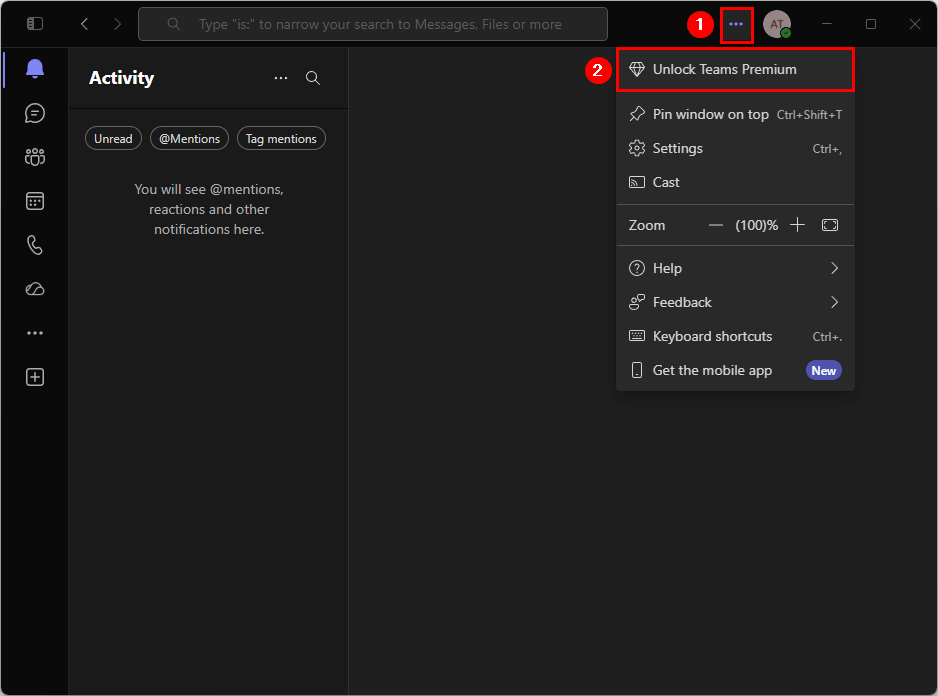
Remove the Unlock Teams Premium Button from Microsoft Teams!
An Unlock Teams Premium button appears in Microsoft Teams for users, and many keep asking what it is.
Some even click it and start a Trial.
That's something most organizations want to avoid.
Here's what you should do:
Prevent users from accidentally starting Teams Premium trials and reduce confusion about features that are not licensed in your organization.
This helps maintain a consistent user experience and keeps license management under control.
Learn more:
alitajran.com/remove-unlock-…#Microsoft365#Teams#Microsoft
"Most people use Claude at 10% of its capability. Here are 89 commands that can completely change how you work with AI."
Most people type a question into Claude and call it a day.
Power users treat it like a command center.
Here's the complete cheat sheet 👇
1. START & CREATE
→ /new → Start a fresh conversation
→ /upload → Attach files for Claude to read
→ /template → Use a pre-built prompt structure
2. FOCUS & CONTEXT
→ /focus → Tell Claude exactly what you want
→ /context → Add background so answers are sharper
→ /clarify → Let Claude ask the right questions first
3. THINK & SOLVE
→ /analyze → Break any problem into parts
→ /compare → Put two options head to head
→ /brainstorm → Generate ideas fast, no filter
4. WRITE & EDIT
→ /write → Generate content from scratch
→ /edit → Clean up what you already have
→ /rewrite → Same message, better delivery
→ /shorten → Cut the fluff, keep the punch
5. ORGANIZE & STRUCTURE
→ /outline → Build a skeleton before you write
→ /bullet → Turn walls of text into scannable points
→ /table → Organize comparisons visually
→ /mindmap → Map out connected ideas
6. CODE & TECH
→ /code → Write code in any language
→ /debug → Find and fix what's broken
→ /optimize → Make it faster and cleaner
7. DATA & ANALYSIS
→ /analyze-data → Find patterns in raw data
→ /visualize → Turn numbers into charts
→ /insights → Pull the "so what" from the data
8. AUTOMATE & INTEGRATE
→ /workflow → Design a repeatable process
→ /automate → Remove manual steps entirely
→ /api → Connect Claude to other tools
9. PERSONALIZE & CONTROL
→ /tone → Formal, casual, bold — your call
→ /style → Match a writing voice or persona
→ /memory → Tell Claude what to always remember
10. LEARN & RESEARCH
→ /search → Pull current info from the web
→ /research → Go deep on any topic
→ /fact-check → Verify before you trust it
11. COLLABORATE & SHARE
→ /export → Save the output in your format
→ /download → Get the file instantly
→ /email → Draft and send directly
1. Follow @coder_surya
2. Save the post.
3. Repost to your network.
4. Join AI Community: tinyurl.com/mvsz79eu
____________________________
#ArtificialIntelligence#AI#GenerativeAI#MachineLearning#Technology#Innovation#FutureOfWork#DigitalTransformation
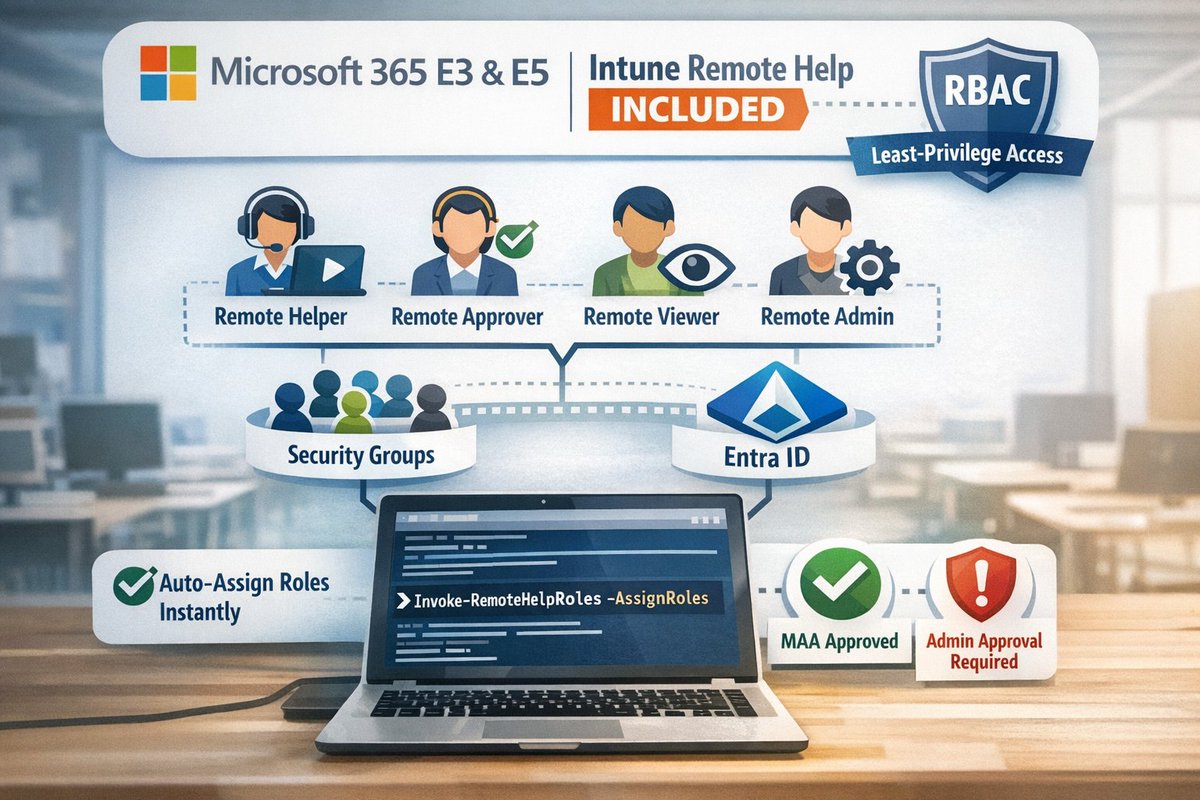
📢 From July 1, Remote Help is included in M365 E3/E5.
I updated my PowerShell script to create four least-privilege custom RBAC roles + groups in seconds.
It now includes -AssignRoles to assign roles to groups automatically, plus full Multi Admin Approval (MAA) support.
imab.dk/remote-help-is…#MicrosoftIntune#MSIntune#RemoteHelp#PowerShell
🛠️ Rolling out Microsoft 365 Copilot? This Microsoft Learn guide covers recommended configuration settings to help IT admins optimize setup and support a smoother deployment.
Read more: msft.it/6012veLww#Microsoft365Copilot#ITAdmins#EnterpriseIT
Microsoft's new Global Secure Access Operations Guide is really good.
Almost all maintenance and health checks are easy to set up as automated tasks using Sentinel, playbooks, or the Zero Trust Assessment (using Azure Automation)
Includes a full RACI matrix, and the playbooks on managing app segments + config backup is very useful 😇 learn.microsoft.com/en-us/entra/gl…