Suryakant Chaurasiya

1.7K posts

Suryakant Chaurasiya banner
Suryakant Chaurasiya

Suryakant Chaurasiya

@coder_surya

Helping startup founders hire better talent using AI systems Hiring • Talent • AI Systems Founder @Nxthiring Linkedin: 52K+ Followers Instagram: 31K+ Follower

Join 2,588+ subscribers ➜ Katılım Temmuz 2022
90 Takip Edilen4.7K Takipçiler
Sabitlenmiş Tweet
Suryakant Chaurasiya
Suryakant Chaurasiya@coder_surya·
People think learning AI takes months. It's really just a couple of hours. And I wrote 17 free guides to start right away: Claude 101: ruben.substack.com/p/claude Claude Code: ruben.substack.com/p/claude-code Claude Skills: ruben.substack.com/p/claude-skills Nano banana 2: ruben.substack.com/p/banana-2-3bd Claude in Excel: ruben.substack.com/p/ai-couldnt-d… Best AI for Search: ruben.substack.com/p/grok-420 1M followers with AI: ruben.substack.com/p/1000000 Claude for your team: ruben.substack.com/p/claude-for-t… No prompt saves you: ruben.substack.com/p/magic AI Slides (PPT in 2026): ruben.substack.com/p/powerpoint Set up Claude Cowork: ruben.substack.com/p/claude-cowor… Claude to sound like you: ruben.substack.com/p/i-am-just-a-… Claude interactive charts: ruben.substack.com/p/claude-charts Claude as your computer: ruben.substack.com/p/claude-compu… Claude Cowork + Project: ruben.substack.com/p/claude-cowor… You're an AI workaholic: ruben.substack.com/p/ai-holic Setup AI before prompting: ruben.substack.com/p/how-to-bette… ___ 1. Save this list for later (three dots, top right). 2. Share it with a friend by ♻️ reposting this image.
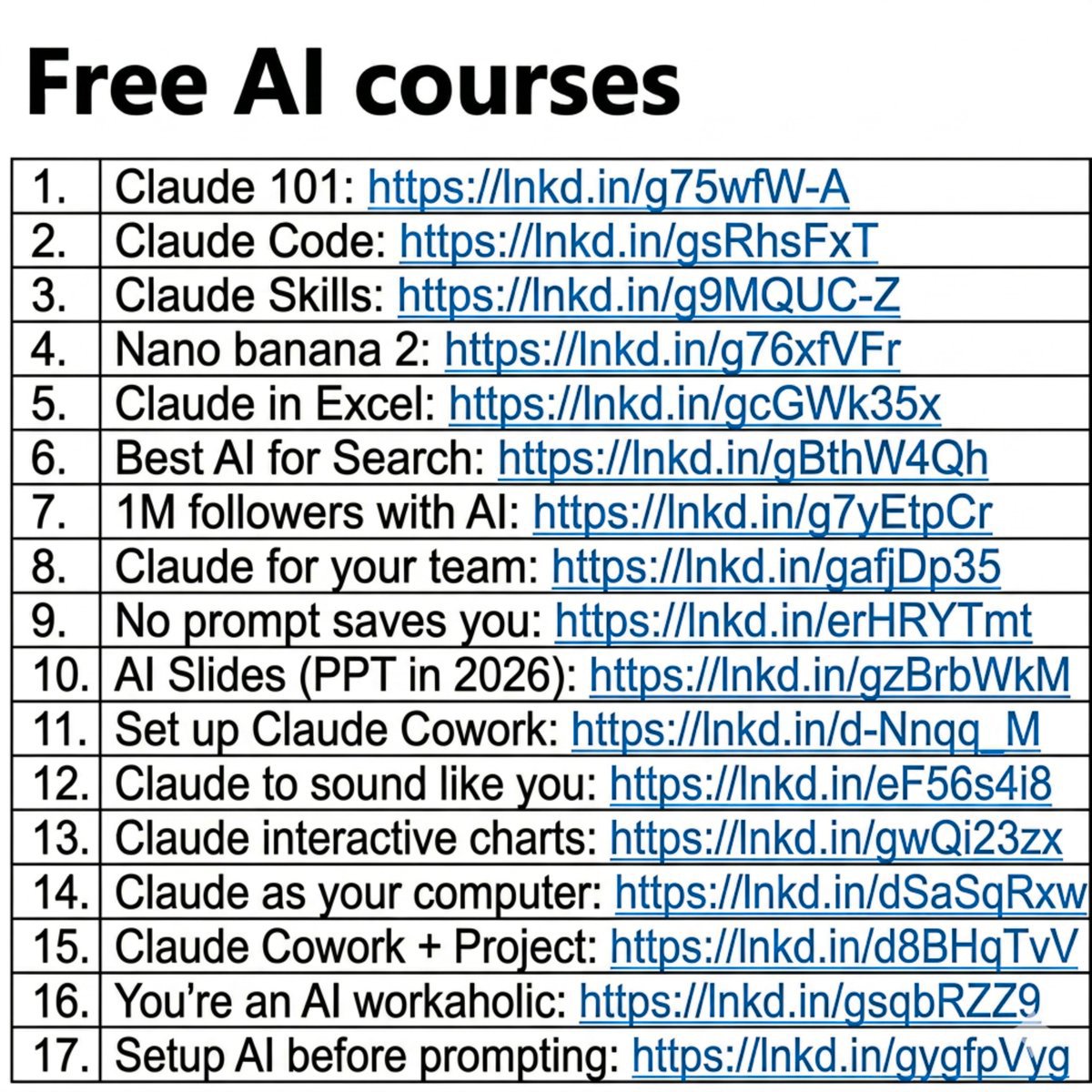
Suryakant Chaurasiya tweet media
English
8
120
407
31.7K
Suryakant Chaurasiya
Suryakant Chaurasiya@coder_surya·
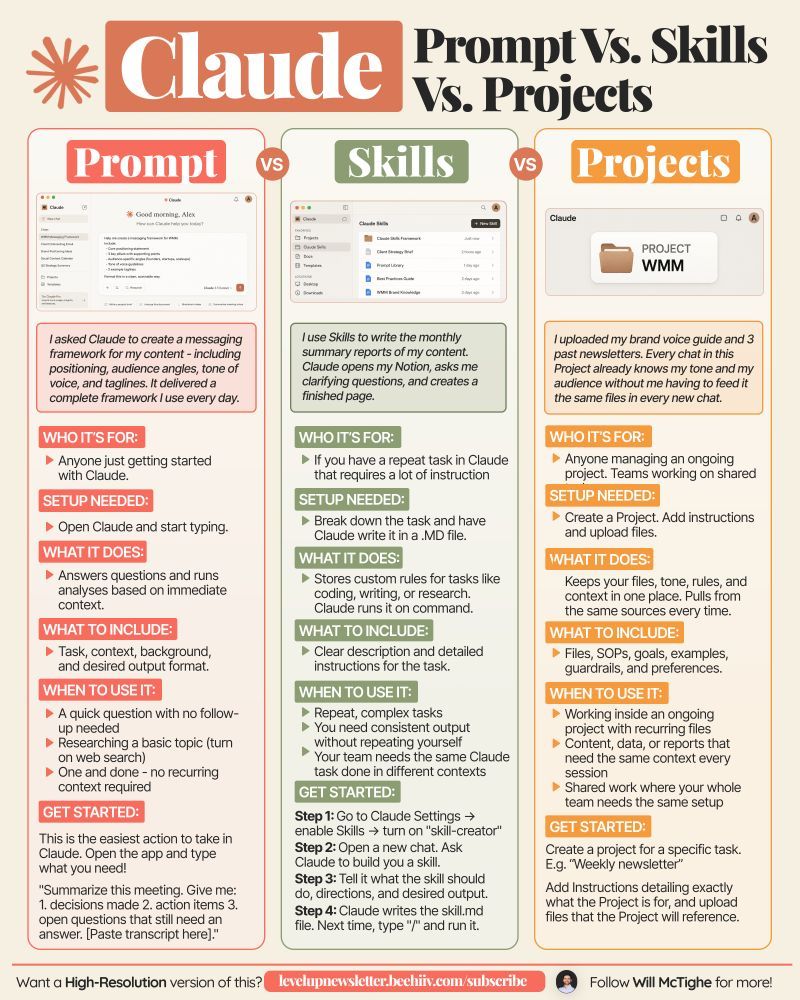
Claude Prompt vs Skills vs Projects ________ Are you using the right Claude feature? Most people are not. The most common way to use Claude is to open it and just start typing. That works for simple tasks. But for anything you do more than once, there are better ways. Here's how 3 of them work: 1/ Claude Prompt: For 90% of users, 90% of the time. Use it when you just need a fast answer like draft an email, summarize a PDF, brainstorm ideas, etc. Or weird tasks like matching socks with your outfits like I did (ONCE). Every chat starts from scratch. It's perfect when you need Claude quickly for a one off task. 2/ Claude Project: For tasks you repeat at least 2x a week. Use it when you keep giving Claude the same background again and again. Like working with different clients, analyzing customer calls, tracking expenses, etc. A Project is basically a workspace - you upload files once, write the instructions and Claude uses that context every time. You can also update the files and instructions with time. 3/ Claude Skills: For tasks that need strict standardized results. Use it when you want Claude to follow a particular process the same way every time. This is best for automating workflows, brand guidelines, tool integrations, etc. I recently created an Anti AI Slop skill that automatically detects AI tones, mistakes, and styles in anything that my team creates. Before your next Claude session, ask one question, "Will I need to do this exact thing again?" If no, prompt it. If yes, build a dedicated project or a skill. 📌 If you want a high-res PDF of this guide: 1. Follow @coder_surya 2. Save the post. 3. Repost to your network. 4. Join AI Community: tinyurl.com/mvsz79eu Credit to Will McTighe. Follow him for more.
Suryakant Chaurasiya tweet media
English
8
20
69
626
Suryakant Chaurasiya
Suryakant Chaurasiya@coder_surya·
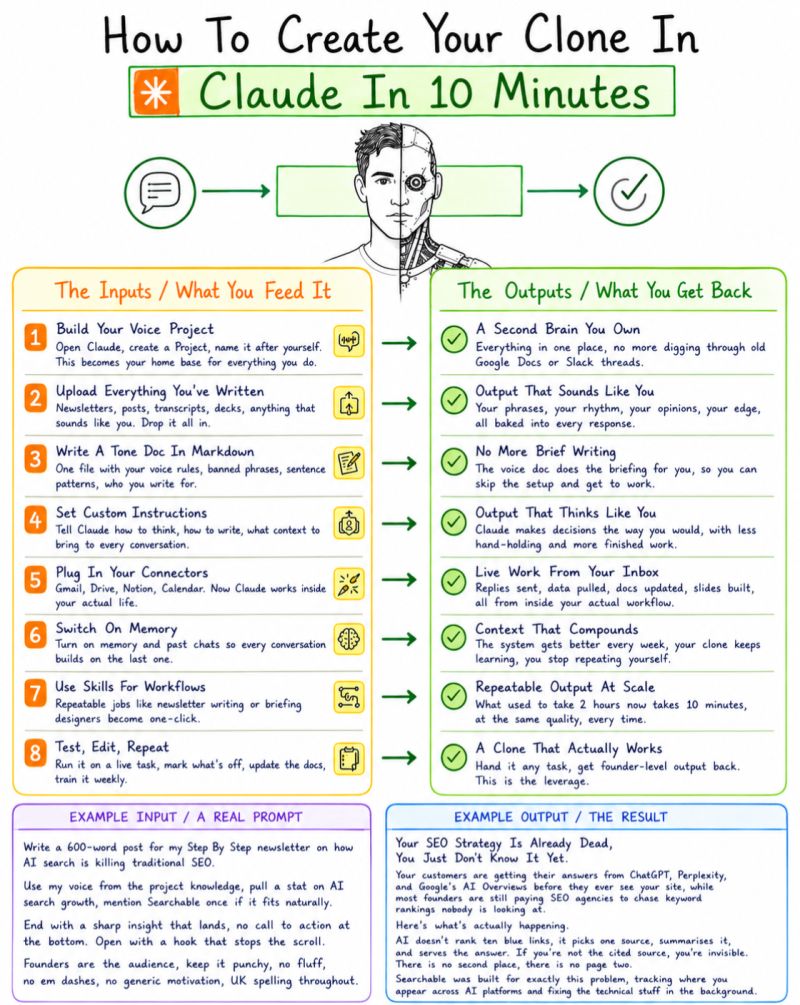
I spent 3 hours every week briefing Claude from scratch. Same context. Same tone rules. Same "here's who I write for." Every. Single. Time. Then I stopped treating Claude like a chatbot and started treating it like a system. Here's what changed → - I built a Project named after myself. - Dropped every post I've written, every brand brief, every tone rule into it. - Wrote a markdown doc with my banned phrases, sentence patterns, and what I never say. - Turned on memory. - Connected my calendar. - Set custom instructions once. Now I open Claude and say: "Draft a post about RAG pipelines for a non-technical audience." That's it. No preamble. ❌ No "I'm a Data Engineer who writes like this." ❌ No context dump. ❌ It already knows. ✅ The output sounds like me, my edge, my rhythm, my opinions. Not a polished LinkedIn robot. Not a GPT-flavoured thought leader. Me. 💯 I'm not the only one doing this. But most people are still using Claude like Google Search, one prompt, one answer, no memory. Comment "CLONE" if you want the exact setup I use, I'll guide you. 1. Follow @coder_surya 2. Save the post. 3. Repost to your network. 4. Join AI Community: tinyurl.com/mvsz79eu
Suryakant Chaurasiya tweet media
English
8
18
56
187
Suryakant Chaurasiya
Suryakant Chaurasiya@coder_surya·
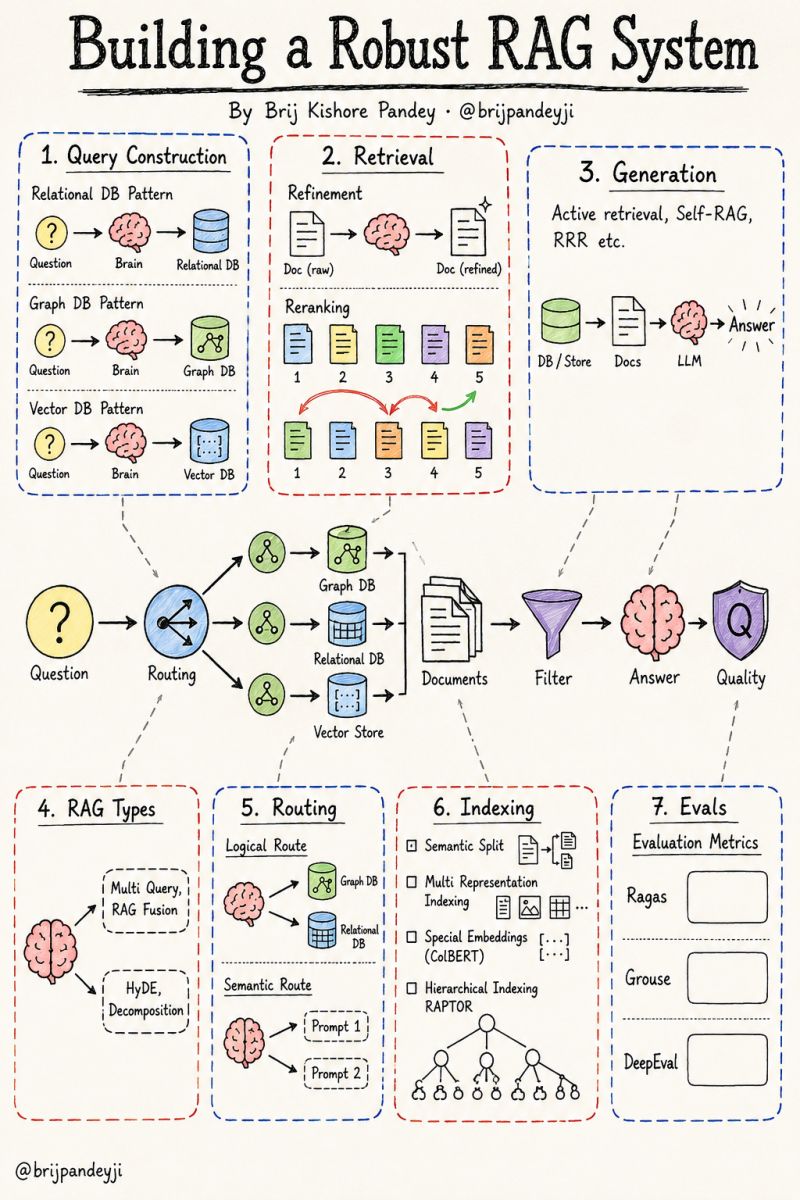
Most RAG systems fail in production for one reason: people treat "retrieval + LLM" as the whole architecture. It isn't. It's maybe 20% of it. A robust RAG system is a pipeline of decisions, and every stage is a place where quality leaks out before the answer ever reaches the user. Here's the full picture, stage by stage. 𝗤𝘂𝗲𝗿𝘆 𝗖𝗼𝗻𝘀𝘁𝗿𝘂𝗰𝘁𝗶𝗼𝗻 Before you retrieve anything, you translate the question into the language of your data store. → Relational data needs text-to-SQL → Graph data needs text-to-Cypher → Vector data needs a clean semantic query The store decides the translation. Skip this and you retrieve noise. 𝗤𝘂𝗲𝗿𝘆 𝗧𝗿𝗮𝗻𝘀𝗹𝗮𝘁𝗶𝗼𝗻 (𝗥𝗔𝗚 𝗧𝘆𝗽𝗲𝘀) One user question is rarely the best question to search with. → Multi-Query and RAG-Fusion widen the net → HyDE generates a hypothetical answer to search against → Decomposition breaks complex questions into sub-questions The goal is the same: give retrieval a better shot. 𝗥𝗼𝘂𝘁𝗶𝗻𝗴 Now decide where the question should go. → Logical routing picks the right data source (graph vs relational vs vector) → Semantic routing picks the right prompt for the job A question about relationships goes to the graph. A factual lookup goes elsewhere. Routing is what makes the system feel intelligent instead of brute-force. 𝗜𝗻𝗱𝗲𝘅𝗶𝗻𝗴 This is the quietest stage and the one that decides everything downstream. → Semantic splitting chunks by meaning, not character count → Multi-representation indexing stores summaries for retrieval, full docs for context → Special embeddings like ColBERT match at the token level → Hierarchical indexing (RAPTOR) clusters and summarizes recursively Bad chunks cannot be rescued by a good model. 𝗥𝗲𝘁𝗿𝗶𝗲𝘃𝗮𝗹 Getting documents back is not the same as getting the right ones in the right order. → Refinement cleans and compresses what came back → Reranking reorders results by true relevance, not just similarity score Top-k similarity is a starting point, not the answer. 𝗚𝗲𝗻𝗲𝗿𝗮𝘁𝗶𝗼𝗻 The model can now decide it needs more. → Active retrieval lets the system fetch again mid-generation → Self-RAG critiques its own output and re-grounds it → Retrieve-Rewrite-Read loops tighten the answer Generation becomes a feedback loop, not a single pass. 𝗘𝘃𝗮𝗹𝘂𝗮𝘁𝗶𝗼𝗻 None of this matters if you can't measure it. → Ragas, Grouse, and DeepEval score faithfulness, relevance, and groundedness If you're shipping RAG without evals, you're shipping vibes. The pattern across all seven stages is the same: a robust RAG system is mostly the work that happens before and after the model runs. The LLM is the easy part. If you had to point to the single stage where most teams lose the most quality, where would you put your money: indexing or retrieval? cc: Brij Kishore pandey
Suryakant Chaurasiya tweet media
English
20
36
96
1.3K
Suryakant Chaurasiya
Suryakant Chaurasiya@coder_surya·
Save this post right now. This is the exact 9-step system to create a professional product video with Claude. No agency. No video team. No $5,000 production budget. Just you and Claude. Here is exactly how: ☑️ 1. What You Need Before You Start → One clean product photo, white or neutral background preferred. → A Claude Pro account for MCP connections. → One clear goal picked before you touch anything: awareness, conversion, or retargeting. ↳ Clean photo in = clean video out. This step alone saves 30 minutes of fixing. ☑️ 2. Connect Higgsfield MCP to Claude → Go to Claude. ai > Connectors → Search "Higgsfield." → Click Add. → Authenticate and return to Claude, Higgsfield tools now appear in your chat. → Type "list available Higgsfield tools" to confirm the connection is live. ↳ This unlocks Claude, sending your product image directly to Higgsfield and retrieving the video. ☑️ 3. Write Your Video Brief With Claude Paste this prompt: "I am creating a 15-second TikTok product video for [product]. Target audience: [audience]. Tone: [energetic/luxurious/cinematic]. Goal: [awareness/conversion]. Write: video concept in 2 sentences, 3-scene shot sequence, voiceover script under 15 seconds, text overlay plan for each scene." ↳ The brief directs everything. Skip it, and your video is random. ☑️ 4. Generate the Product Video With Higgsfield MCP Prompt: "Using Higgsfield, generate a product video for the image I will upload. Motion: [slow zoom/orbit/floating/cinematic pan]. Style: [luxury/energetic/minimal]. Duration: 15 seconds. Subtle depth of field. Output in 9:16 vertical format."* ↳ Motion style guide: Slow zoom = luxury. Orbit = tech. Floating = wellness. Cinematic pan = fashion. ☑️ 5. Write the Voiceover With Claude Prompt: "Write a 15-second voiceover for [product]. Tone: [tone]. Hook in the first 2 seconds. Short, punchy sentences. End with soft CTA: 'Shop now' or 'Try it today.' Max 40 words total." ↳ Voice style by product: Luxury = slow, breathy. Tech = clear, fast. Wellness = warm, calm. Fashion = punchy, bold. ☑️ 6. Add Text Overlays and Captions With Claude Prompt: "Write a text overlay plan for a 15-second video for [product]. Divide into 3 scenes, each 5 seconds long. For each scene: overlay text (max 5 words), position, font style, and timing." → Add auto-captions and apply one color grade preset matching the brand's mood. ☑️ 7. Write the Caption and Hashtags With Claude Caption prompt: "Write 3 TikTok captions for [product]. Each: hook under 10 words, soft CTA, under 150 chars. Label them: Curiosity / Social Proof / Benefit-led." ♻️ Repost to give your network an unfair advantage.__ 📌 If you want a high-res PDF of this guide: 1. Follow @coder_surya 2. Save the post. 3. Repost to your network. 4. Join AI Community: tinyurl.com/mvsz79eu ____________________________
Suryakant Chaurasiya tweet media
English
12
15
61
364
Suryakant Chaurasiya
Suryakant Chaurasiya@coder_surya·
You ask AI a question. 400ms later, it answers like magic. But your prompt just traveled through an invisible infrastructure pipeline most developers never think about: → API Gateways → Load Balancers → Tokenizers → GPU Routers → Inference Engines → KV Cache → Safety Filters → Billing Systems → Observability Pipelines Every single token touches dozens of systems before it reaches your screen. And here's the crazy part: The model itself is only ONE layer. The real engineering challenge is everything around it. Most AI latency bugs aren't "the model being slow." They're: • bad routing • cold GPUs • token explosion • cache misses • overloaded gateways • broken streaming • safety rechecks • observability bottlenecks Modern AI apps are no longer "just calling an API." They're distributed systems pretending to be chatbots. The developers who understand this stack will build the next generation of AI infrastructure. Everyone else will keep blaming the model. Save this before your next mysterious latency spike 🔖♻️ Repost to give your network an unfair advantage.__ 📌 If you want a high-res PDF of this guide: 1. Follow @coder_surya 2. Save the post. 3. Repost to your network. 4. Join AI Community: tinyurl.com/mvsz79eu _________________
Suryakant Chaurasiya tweet media
English
8
25
77
326
Suryakant Chaurasiya
Suryakant Chaurasiya@coder_surya·
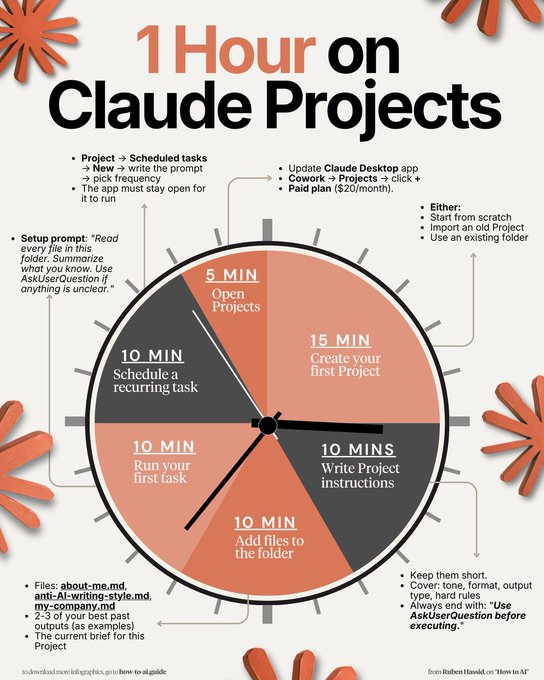
How to set up Claude Projects completely in 1 hour: (duplicate my exact project, files, and prompts) 1. Update your Claude desktop app. 2. Click the Cowork tab at the top. 3. You need a Pro plan ($20/mo). Worth it. ----- → 0-5 min: Open Projects in Cowork. Cowork tab → Projects → click '+'. 3 choice: scratch, import old Project, existing folder. Pick the recurring task you do every single week. (This is where 90% of people overthink. Don't) → 5-20 min: Create your first Project. Start from scratch = brand new folder. Import a Claude Project = old files + instructions. Use existing folder = your Cowork memory + rules. (Pick one. You can build more next weekend) → 20-30 min: Write Project instructions. Keep them short. 5-8 lines max. Cover: tone, format, output type, hard rules. End with: "Use AskUserQuestion before executing." (You write this once. It runs every time) → 30-40 min: Add files to the folder. about-me .md = who you are, how you work. anti-ai-style .md = every word you'd never use. (These files replace 500-word prompts forever) → 40-50 min: Run your first real task. Setup prompt: "Read every file in this folder. Summarize what you know about this workspace." Then: "I want to [task]. Ask me questions first." Claude generates clickable forms to prompt you. (Stop prompting. Start directing) → 50-60 min: Schedule a recurring task. Open the Project → Scheduled tasks → New. "Every Monday at 7am, create my weekly briefing." You wake up to a finished doc. That's the endgame. Pro tip: Keep the desktop app open + computer awake. Scheduled tasks need it running. ♻️ Repost to give your network an unfair advantage.__ 📌 If you want a high-res PDF of this guide: 1. Follow @coder_surya 2. Save the post. 3. Repost to your network. 4. Join AI Community: tinyurl.com/mvsz79eu _____________
Suryakant Chaurasiya tweet media
English
10
27
87
319
Suryakant Chaurasiya
Suryakant Chaurasiya@coder_surya·
The best AI courses in 2026 are free. Your team has no excuse. Neither do you. Google, Anthropic, Microsoft, OpenAI, NVIDIA, IBM, AWS. They’re giving away what used to cost thousands. Here are 12 free AI courses for leaders, teams, and builders: FOR LEADERS 1. Google AI Essentials Gemini, prompting, responsible AI. Beginner-friendly. → lnkd.in/egFJM3ae 2. Anthropic Academy 15+ AI courses with certificates included. → lnkd.in/eRAyEiR4 3. IBM SkillsBuild AI fundamentals, ethics, governance, strategy. → skillsbuild.org 4. Microsoft Power Up Copilot for business from beginner to advanced. → lnkd.in/ep3wPVtv FOR TEAMS 5. OpenAI Introduction APIs, prompts, fine-tuning, function calling. → lnkd.in/eYGUIHr5 6. DeepLearning.AI — Agent Skills Build AI agents that actually work. Hands-on. → lnkd.in/eAFgg_AD 7. AWS Skill Builder 600+ free AI/ML courses and Bedrock labs. → skillbuilder.aws 8. Building with the Claude API Production-ready Claude workflows and integrations. → lnkd.in/eNbTZvuz FOR BUILDERS 9. GitHub Copilot CLI Terminal workflows, code reviews, testing. → lnkd.in/emApzFpp 10. LangChain.js for Beginners Build AI agents with TypeScript. 70+ examples. → lnkd.in/eEZdDqPa 11. NVIDIA Fundamentals of Deep Learning PyTorch, TensorFlow, neural networks. → lnkd.in/eZXUKBW2 12. Stanford LLM Course Transformers to agentic LLMs. Free lectures online. → lnkd.in/eEBbbNPf The gap between AI-fluent and AI-illiterate developers is widening. The people moving ahead are not always smarter. They are just learning faster. Save this. And send it to someone who wants to get into AI in 2026. 🚀
Suryakant Chaurasiya tweet media
English
14
26
126
1.8K
Suryakant Chaurasiya
Suryakant Chaurasiya@coder_surya·
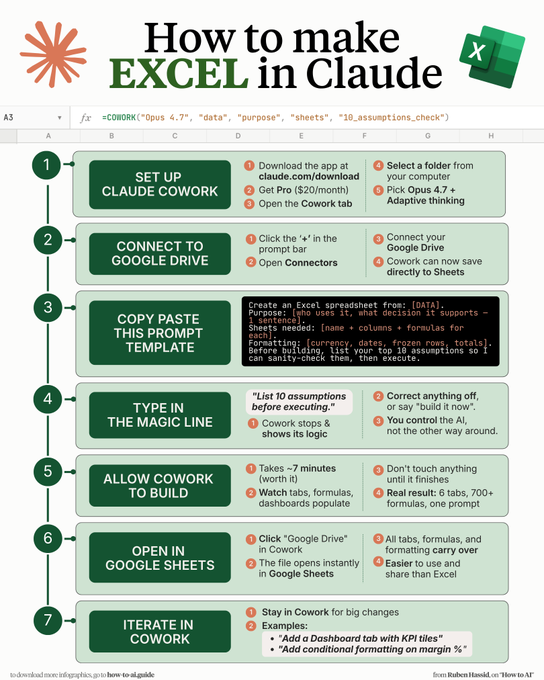
How to make Excel in Claude Cowork in just 7 mins: (even if you signed up for Claude yesterday) "Create an Excel spreadsheet from: [DATA]. Purpose: [who uses it, what decision it supports - 1 sentence]. Sheets needed: [name + columns + formulas for each]. Formatting: [currency, dates, frozen rows, totals]. Before building, list your top 10 assumptions so I can sanity-check them, then execute." 8. The magic is in the last line. ✦ Cowork stops and shows its logic. ✦ Correct anything off, or say "build it now." ✦ You control the AI, not the other way around. 9. Let Cowork build for ~7 minutes. ✦ Watch tabs, formulas, dashboards populate. ✦ Don't touch anything until it finishes. ✦ Result: 6 tabs, 700+ working formulas, 1 prompt. 10. Click "Google Drive" inside Cowork. ✦ The file opens instantly in Google Sheets. ✦ All tabs, formulas, formatting carry over. ✦ Easier to use & share than Excel. 11. Stay inside Cowork for any big change: ✦ "Make the Bull scenario more optimistic." ✦ "Add a Dashboard tab with KPI tiles." ✦ "Add conditional formatting on margin %." What Cowork still can't do (yet): ✗ No macros or VBA. ✗ No live database connections. ✗ Not for final client deliverables without review. Pro tip: the prompt is 80% of the result. Always force the "10 assumptions" check first. Now you know what to do first. 7 mins setup to build what used to cost $5,000. ♻️ Repost to give your network an unfair advantage.__ 📌 If you want a high-res PDF of this guide: 1. Follow @coder_surya 2. Save the post. 3. Repost to your network. 4. Join AI Community: tinyurl.com/mvsz79eu . . . . . . . .
Suryakant Chaurasiya tweet media
English
6
24
68
239
Suryakant Chaurasiya
Suryakant Chaurasiya@coder_surya·
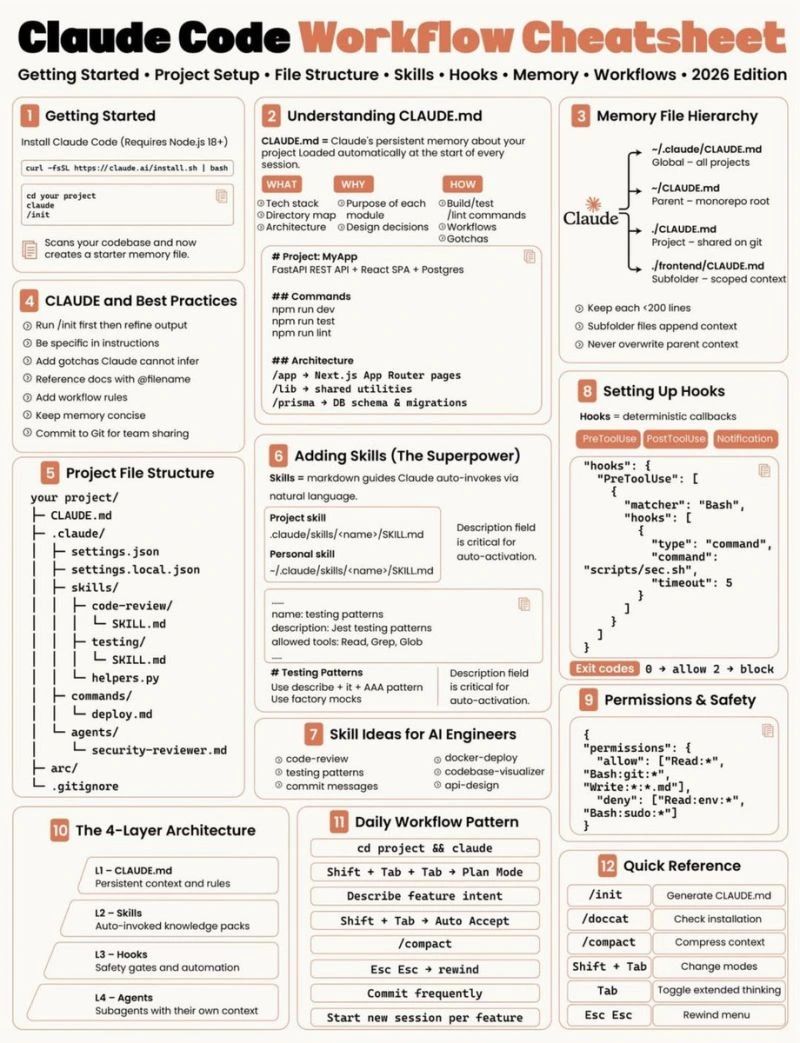
If your Claude Code feels weaker than expected, it's probably because the setup around it is too thin. The .claude/ setup is not just config. It’s where a lot of the real leverage starts to live: - instructions, guardrails, reusable workflows, local preferences, and project-specific behavior. A good setup helps with a few common problems: → repeating the same instructions every session → mixing team rules with personal preferences → forgetting important commands or conventions → having no reusable workflow for common tasks → giving the agent too much or too little permission The most useful parts to set up: 📌 𝐂𝐋𝐀𝐔𝐃𝐄.𝐦𝐝 Use this for stable project context: tech stack, folder structure, architecture notes, coding conventions, important commands, and review expectations. 📌 𝐥𝐨𝐜𝐚𝐥 𝐟𝐢𝐥𝐞𝐬 Keep your personal preferences separate from team-wide instructions, especially if the repo is shared. 📌 𝐜𝐨𝐦𝐦𝐚𝐧𝐝𝐬 / 𝐫𝐮𝐥𝐞𝐬 / 𝐬𝐤𝐢𝐥𝐥𝐬 Turn repeated prompts into reusable workflows. Useful for things like code review, testing patterns, deployment steps, commit messages, or API design. 📌 𝐬𝐞𝐭𝐭𝐢𝐧𝐠𝐬 / 𝐩𝐞𝐫𝐦𝐢𝐬𝐬𝐢𝐨𝐧𝐬 Set clear boundaries for what Claude can read, edit, and run. This matters a lot once it starts working across files or running commands in your project. 📌 𝐡𝐨𝐨𝐤𝐬 Use hooks when you want deterministic checks or callbacks around tool use, instead of relying on the model to remember every safety step. The simple rule: If you keep telling Claude the same thing, it probably belongs somewhere in your setup. ♻️ Repost to give your network an unfair advantage.__ 📌 If you want a high-res PDF of this guide: 1. Follow @coder_surya 2. Save the post. 3. Repost to your network. 4. Join AI Community: tinyurl.com/mvsz79eu ...........
Suryakant Chaurasiya tweet media
English
10
21
70
191
Suryakant Chaurasiya
Suryakant Chaurasiya@coder_surya·
What Is Vibe Coding? __________ Most people still think "vibe coding" means randomly prompting AI and praying it works. It doesn't. Real vibe coding is when your idea becomes a working product before your motivation disappears. A few months ago, building software felt impossible unless you could code, manage developers, set up infrastructure, design interfaces, connect payments, and survive endless back-and-forth. Now? I'm watching people go from: → "I have an idea." to → "here's the live product link." in a single evening. That change is crazy. And after testing most AI coding environments out there, I finally understand why most of them break halfway through the process. They help you: • generate code • create a UI • maybe ship a prototype But the moment you need: → task management → live deployment → payments → design iteration → multi-platform outputs → connected workflows Everything falls apart. That's where Replit feel completely different. The entire workflow actually holds together. ✅You describe your idea in plain English ✅The AI agent decomposes the work into tasks ✅Multiple operations run in parallel ✅Design + development happen together ✅You can deploy instantly ✅Payments are already integrated ✅Your product goes live fast That's the real definition of vibe coding. And honestly, This changes who gets to build software. I saw someone use Replit Agent 4 to: • build a CRM • connect dashboards • generate reports • add Stripe payments • deploy publicly Without touching manual infrastructure. That's wild. The craziest part? Replit is becoming an execution environment for ideas. You can: → build web apps → generate mobile experiences → create dashboards → connect spreadsheets → pull data from tools → generate pitch decks → iterate visually → publish instantly All inside one system. Replit Agent 4 massively compresses the distance between: Idea → execution → launch → revenue That's the unlock. If you want to understand where software creation is heading next, Check the infographic below 👇 Credit to Matic Pogladic. Follow him for more. 1. Follow @coder_surya 2. Save the post. 3. Repost to your network. 4. Join AI Community: tinyurl.com/mvsz79eu ......
Suryakant Chaurasiya tweet media
English
13
25
92
897
Suryakant Chaurasiya
Suryakant Chaurasiya@coder_surya·
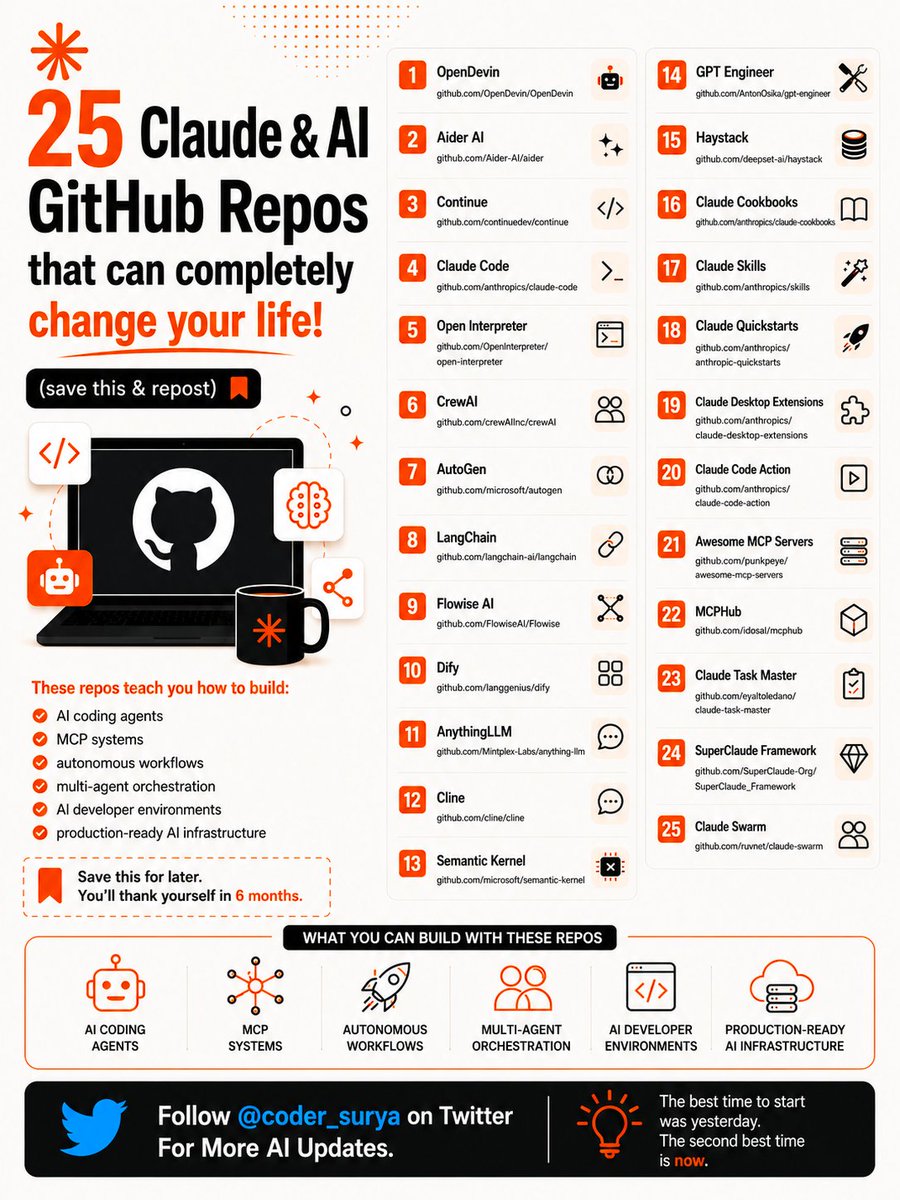
25 AI GitHub Repos that will change your life completely (you must bookmark this :) 1️⃣ OpenDevin → lnkd.in/gAKHkh9h 2️⃣ Aider AI → github.com/Aider-AI/aider 3️⃣ Continue → lnkd.in/gWia8H8G 4️⃣ Claude Code → lnkd.in/gJ_zQzSb 5️⃣ Open Interpreter → lnkd.in/grZN-rfh 6️⃣ CrewAI → lnkd.in/gcsqTCiW 7️⃣ AutoGen → lnkd.in/gRyCFZUu 8️⃣ LangChain → lnkd.in/g_btYWpg 9️⃣ Flowise AI → lnkd.in/g5t5dMCt 🔟 Dify → github.com/langgenius/dify 1️⃣1️⃣ AnythingLLM → lnkd.in/gnzs9jYj 1️⃣2️⃣ Cline → github.com/cline/cline 1️⃣3️⃣ Semantic Kernel → lnkd.in/g9gVqvhS 1️⃣4️⃣ GPT Engineer → lnkd.in/gAgyPnZk 1️⃣5️⃣ Haystack → lnkd.in/gHXvZzsV 1️⃣6️⃣ Claude Cookbooks → lnkd.in/gVDKgmru 1️⃣7️⃣ Claude Skills → lnkd.in/gBmv56Mx 1️⃣8️⃣ Claude Quickstarts → lnkd.in/gvFYYXAk 1️⃣9️⃣ Claude Desktop Extensions → lnkd.in/gNZJQxbG 2️⃣0️⃣ Claude Code Action → lnkd.in/gS4F6WSE 2️⃣1️⃣ Awesome MCP Servers → lnkd.in/gHXUi2CP 2️⃣2️⃣ MCPHub → github.com/idosal/mcphub 2️⃣3️⃣ Claude Task Master → lnkd.in/gEcZwtYa 2️⃣4️⃣ SuperClaude Framework → lnkd.in/gkb-y-rm 2️⃣5️⃣ Claude Swarm → lnkd.in/gJsr-wJP Most people are still using AI like a chatbot. But these repos teach you how to build: → AI coding agents → MCP systems → autonomous workflows → multi-agent orchestration → local AI environments → production-ready AI infrastructure The next generation of developers won’t just use AI. They’ll build with it. Save this for later. Which repo are you exploring first? 1. Follow @coder_surya 2. Save the post. 3. Repost to your network. 4. Join AI Community: tinyurl.com/mvsz79eu _________ 🎉 Free Data Analyst + GenAI Certificate 👉 Register here: lnkd.in/g26Dvb5H Do share with your Friends & Juniors too _________
Suryakant Chaurasiya tweet media
English
17
45
127
1.6K
Suryakant Chaurasiya
Suryakant Chaurasiya@coder_surya·
Claude quietly dropped 13 AI courses (with certificates) No $500 course needed. No “guru” required. Just real skills straight from Claude itself. Here’s the full list: 👇 1. Claude 101 lnkd.in/gCPUQsRg 2. AI Fluency: Frameworks & Foundations lnkd.in/gS6ceZ_M 3. Introduction to Agent Skills lnkd.in/g_wWNiEb 4. Building with the Claude API lnkd.in/gDr5K_B4 5. Claude Code in Action lnkd.in/g9wWZbK9 6. Introduction to Model Context Protocol lnkd.in/gAj5HqMY 7. MCP: Advanced Topics lnkd.in/g3eDwBFY 8. AI Fluency for Students lnkd.in/gKKujHGG 9. AI Fluency for Educators lnkd.in/gVcKnuhA 10. Teaching AI Fluency lnkd.in/g9P4gJFM 11. AI Fluency for Nonprofits lnkd.in/gpsm_BVf 12. Claude with Amazon Bedrock lnkd.in/gbfPjSFt 13. Claude with Google Vertex AI lnkd.in/gvVgB4Ub — If you go through even HALF of these… You’ll be ahead of 95% of people using AI. Most people won’t. Because they’re still: • Watching random YouTube videos • Buying overpriced courses • “Learning AI” without actually building Don’t be that person. Do this instead: 1. Save this post (you’ll come back to it) 2. Pick 1 course → start today 3. Share it with someone who needs this Free. Practical. No excuses. 1. Follow @coder_surya 2. Save the post. 3. Repost to your network. 4. Join AI Community: tinyurl.com/mvsz79eu 🎉 Free Data Analyst + GenAI Certificate 👉 Register here: lnkd.in/g26Dvb5H Do share with your Friends & Juniors too —
Suryakant Chaurasiya tweet media
English
14
27
88
1.3K
Suryakant Chaurasiya
Suryakant Chaurasiya@coder_surya·
I have seen many builders get excited after a great demo. The agent answers well. The workflow looks smart. The prototype feels almost magical. But production is a very different world. In production, the agent needs more than intelligence. It needs clear goals. It needs trusted tools. It needs the right context. It needs guardrails. It needs evaluations. It needs observability. It needs orchestration. And most importantly, it needs a safe human handoff when things become uncertain. A single prompt is not a production system. A powerful model is not enough if the agent does not know: What it is allowed to do. What it should never do. Which tools it can trust. When to ask for approval. How to recover from failure. How to explain what it did. How to be monitored, tested, and improved. This is where most agentic AI projects break. Not in the demo. Not in the model selection. Not in the first workflow. They break when real users, real data, real tools, real permissions, and real business risk enter the picture. The future of AI agents is not just about building smarter agents. It is about building more reliable systems around them. Production AI is not just about intelligence. It is about reliability, control, and trust. 1. Follow @coder_surya 2. Save the post. 3. Repost to your network. 4. Join AI Community: tinyurl.com/mvsz79eu 🎉 Free Data Analyst + GenAI Certificate 👉 Register here: lnkd.in/g26Dvb5H Do share with your Friends & Juniors too
Suryakant Chaurasiya tweet media
English
14
24
80
623
Suryakant Chaurasiya
Suryakant Chaurasiya@coder_surya·
20 YouTube channels that teach AI better than most CS degrees. Free. No application required. No tuition. This list covers everything: theory, intuition, implementation, research. Here's the full list: 👇 1. Andrej Karpathy Deep, intuitive walkthroughs of neural networks and modern LLMs Link: lnkd.in/gE6S6raT 2. 3Blue1Brown Visual intuition for math, linear algebra, and neural networks Link: lnkd.in/g4wC_iPQ 3. StatQuest with Josh Starmer Clear, friendly explanations of statistics and ML fundamentals Link: lnkd.in/gTaEyqYg 4. Stanford Online University-grade ML and AI lecture series (Andrew Ng, CS229, etc.) Link: lnkd.in/gavEEh5v 5. freeCodeCamp Full-length AI and ML courses — structured, free, and constantly updated Link: lnkd.in/gtiyfnHr 6. sentdex Practical machine learning and Python projects Link: lnkd.in/gPAY_ga8 7. Yannic Kilcher Deep dives into ML and AI research papers Link: lnkd.in/gFkDZWE7 8. MIT OpenCourseWare Rigorous academic courses on ML, AI, and applied mathematics Link: lnkd.in/gNaRSdSZ 9. DeepLearningAI Structured learning paths for deep learning and generative AI Link: lnkd.in/gdGfUwpj 10. Two Minute Papers Fast, accessible summaries of cutting-edge AI research Link: lnkd.in/gr93SaYD 11. Umar Jamil Clear, implementation-focused explanations of transformers and LLMs Link: lnkd.in/gurTw-yi 12. Hugging Face Open-source LLMs, transformers, and modern NLP tooling Link: lnkd.in/g_sfHVnH 13. AI Explained Accessible breakdowns of the latest AI research and model releases Link: lnkd.in/gpMdBCaw 14. Lex Fridman Long-form conversations with top AI researchers and practitioners Link: lnkd.in/g4VduFAM 15. Matt Wolfe The fastest way to stay current on AI tools, news, and releases Link: lnkd.in/g6jnjuPY 16. Machine Learning Street Talk Unfiltered, technical discussions on AI research and theory Link: lnkd.in/gKHEsafg 17. Jeremy Howard Practical deep learning with strong intuition Link: lnkd.in/gjpiiJCK 18. Kaggle Applied ML, competitions, notebooks, and real-world workflows Link: lnkd.in/gd-m8w_j 19. Tina Huang Career-focused AI and data science from an ex-Meta data scientist Link: lnkd.in/gktJmQME 20. Anthropic AI safety, model research, and how frontier AI actually gets built Link: lnkd.in/gxmbpF8d The best AI education isn't behind a paywall. It never was. While people debate which bootcamp to buy, the best instructors in the world are uploading for free. Every week. 💡 Pro Tip: Save this post (you'll come back to it) 1. Follow @coder_surya 2. Save the post. 3. Repost to your network. 4. Join AI Community: tinyurl.com/mvsz79eu .........
Suryakant Chaurasiya tweet media
English
19
36
121
1.4K
Suryakant Chaurasiya
Suryakant Chaurasiya@coder_surya·
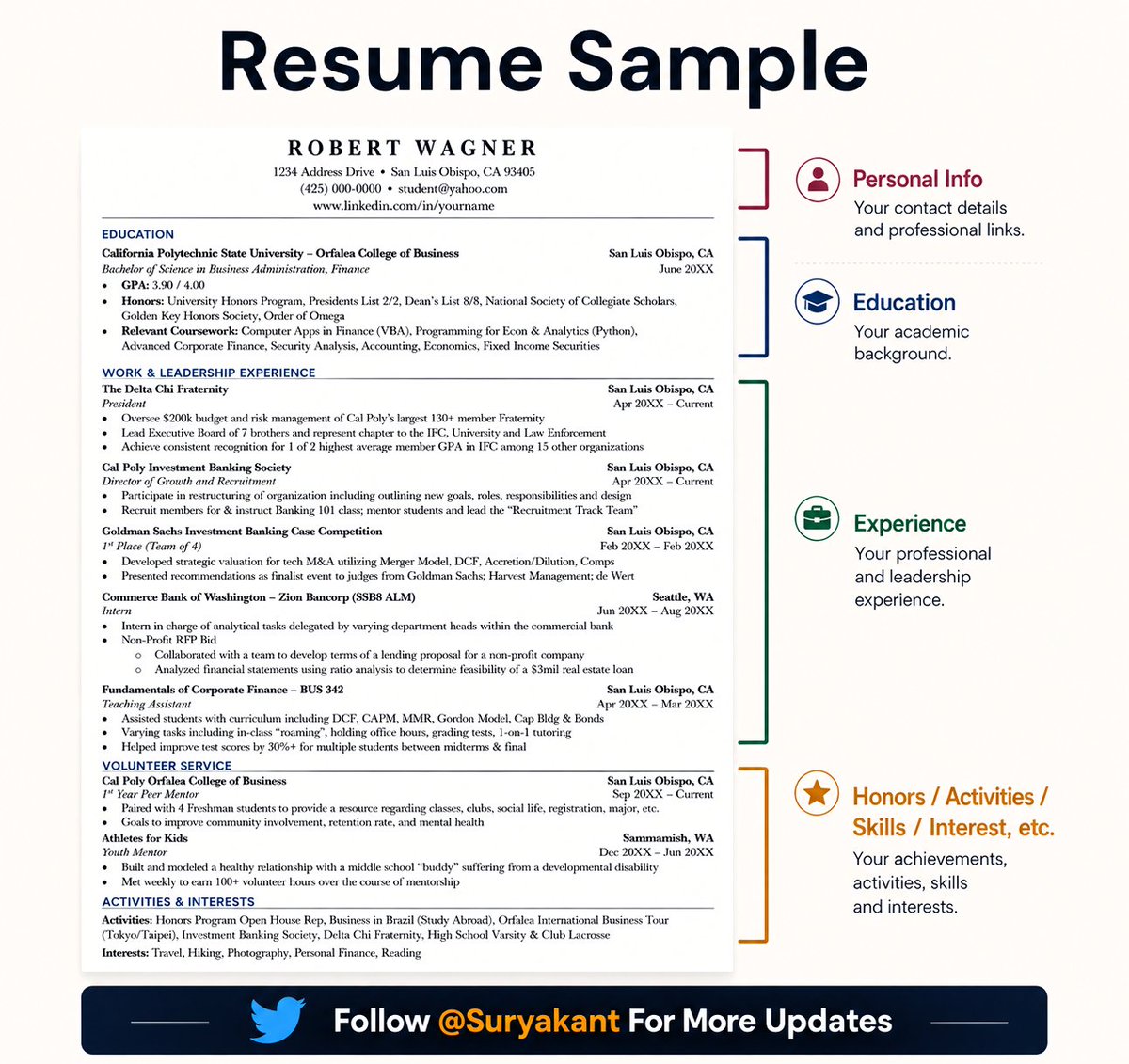
Stop blocking your own job opportunities. Many job seekers are not rejected because they are useless. They are rejected because they keep repeating small mistakes that close doors before the employer even knows their real value. Stop applying casually. Stop procrastinating until the deadline is too close. Stop using one generic CV for every job. Stop submitting the same cover letter everywhere. Stop applying without reading the job description properly. Stop ignoring the required skills and documents. Stop sending applications with spelling and grammar errors. Stop using weak email subjects like “Application” or “CV”. Stop applying for roles you clearly do not understand. Stop waiting until you feel 100% ready before you start. Stop depending only on job adverts. Stop hiding from networking because you are shy. Stop sending empty connection requests without a message. Stop asking strangers for jobs without showing what you can do. Stop keeping your LinkedIn profile empty or outdated. Stop using an unprofessional email address. Stop applying with a CV that has no achievements, numbers or evidence. Stop listing duties only. Show results. Stop ignoring your transferable skills. Stop thinking rejection means you are finished. Stop blaming everything on the system without improving your strategy. Stop learning random skills without a clear job direction. Stop taking courses but never building proof of work. Stop waiting for someone to “help you” before you help yourself. Stop being busy but not strategic. Job search is not just about applying. It is about positioning. Fix your CV. Fix your profile. Fix your strategy. Fix your proof of work. Fix how you communicate your value. Opportunities are hard, yes. But do not make them harder by blocking yourself. ♻️ Repost to give your network an unfair advantage.__ 1. Follow @coder_surya 2. Save the post. 3. Repost to your network. -- Join AI Community: tinyurl.com/mvsz79eu
Suryakant Chaurasiya tweet media
English
12
25
64
481
Suryakant Chaurasiya
Suryakant Chaurasiya@coder_surya·
𝐀 𝐲𝐞𝐚𝐫 𝐚𝐠𝐨, 𝐦𝐨𝐬𝐭 𝐀𝐈 𝐝𝐞𝐦𝐨𝐬 𝐞𝐧𝐝𝐞𝐝 𝐚𝐟𝐭𝐞𝐫 𝐨𝐧𝐞 𝐢𝐦𝐩𝐫𝐞𝐬𝐬𝐢𝐯𝐞 𝐚𝐧𝐬𝐰𝐞𝐫. Today, users expect AI to: • Research • Plan • Use tools • Remember context • Complete real work That shift is exactly why traditional RAG is no longer enough. AI systems are now evolving through three major stages: 𝐑𝐀𝐆 → 𝐀𝐠𝐞𝐧𝐭𝐢𝐜 𝐑𝐀𝐆 → 𝐌𝐮𝐥𝐭𝐢-𝐀𝐠𝐞𝐧𝐭 𝐑𝐀𝐆 Here is the difference 👇🏻 📚 𝐑𝐀𝐆 • Retrieves relevant knowledge before generation • Grounds responses using documents and external data • Best for enterprise search, document chat, and grounded Q&A ➨ Useful when the goal is better answers. 🤖 𝐀𝐠𝐞𝐧𝐭𝐢𝐜 𝐑𝐀𝐆 • Goes beyond answering questions • Uses planning, memory, tools, and reasoning • Dynamically decides the next best action • Best for copilots, research workflows, and automation systems ➨ Useful when the goal is execution. 🏢 𝐌𝐮𝐥𝐭𝐢-𝐀𝐠𝐞𝐧𝐭 𝐑𝐀𝐆 • Multiple specialized agents collaborate together • Separates retrieval, reasoning, validation, and execution • Coordinates workflows across tools and systems • Best for enterprise-scale autonomous operations ➨ Useful when the goal is coordination at scale. 𝐓𝐡𝐞 𝐫𝐞𝐚𝐥 𝐬𝐡𝐢𝐟𝐭: • RAG improves answers • Agentic RAG completes tasks • Multi-Agent RAG scales intelligence After all, The future of AI products will not be defined only by smarter models. It will be defined by smarter systems built around them. Which stage do you think most companies still underestimate today: RAG, Agentic RAG, or Multi-Agent RAG? ♻️ Repost to help someone stay ahead in AI. ➕ Follow @coder_surya for daily hands-on AI learnings. - Join AI Community: tinyurl.com/mvsz79eu - Save the post. - Repost to your network. #AI #RAG #AgenticAI #MultiAgentSystems #LLM #GenerativeAI #AIAgents #AIEngineering #AIArchitecture #BuildingAI
Suryakant Chaurasiya tweet media
English
11
24
76
536
Suryakant Chaurasiya
Suryakant Chaurasiya@coder_surya·
9 free AI courses with certificates from Google, Amazon, Microsoft, and Anthropic. No tuition. No waitlist. Just credentials. Most people spend $500 on a bootcamp to learn what's sitting here for free. Here's the full list: 👇 1. IBM — AI for Everyone: Master the Basics ↳ lnkd.in/eSNbPbwp 2. Elements of AI — University of Helsinki ↳ lnkd.in/ew8PHNYy 3. AI & Career Empowerment — University of Maryland ↳ lnkd.in/eh_VFsxE 4. HP — AI for Business Professionals ↳ lnkd.in/evgfGRp2 5. Google — AI Essentials ↳ lnkd.in/eUhVCWM2 6. Amazon — Foundations of Prompt Engineering ↳ lnkd.in/e_bUsJ3P 7. Anthropic — AI Fluency: Framework & Foundations ↳ lnkd.in/eaSqRpNq 8. Microsoft — Introduction to Generative AI ↳ lnkd.in/e5aD8cmA 9. LinkedIn Learning — Everyday AI Concepts ↳ lnkd.in/eVrSdFZT These aren't random YouTube playlists. They're structured courses from the companies building the technology with certificates you can actually put on a resume. AI fluency is becoming what Excel was in 2005. Not optional. Not a nice-to-have. The baseline for being taken seriously at work. The people starting now will be 18 months ahead of the people who wait. That gap doesn't shrink. It widens. Pick one. Start today. Not next Monday. 1. Save this post (you'll come back to it) 2. Choose 1 course that matches where you are right now 3. Block 30 minutes this week — not "someday," this week Free. Certified. No excuses. ♻️ Repost to give your network an unfair advantage.__ 1. Follow @coder_surya 2. Save the post. 3. Repost to your network. 4. Join AI Community: tinyurl.com/mvsz79eu . . . . . . . . .
Suryakant Chaurasiya tweet media
English
16
51
150
4K
Suryakant Chaurasiya
Suryakant Chaurasiya@coder_surya·
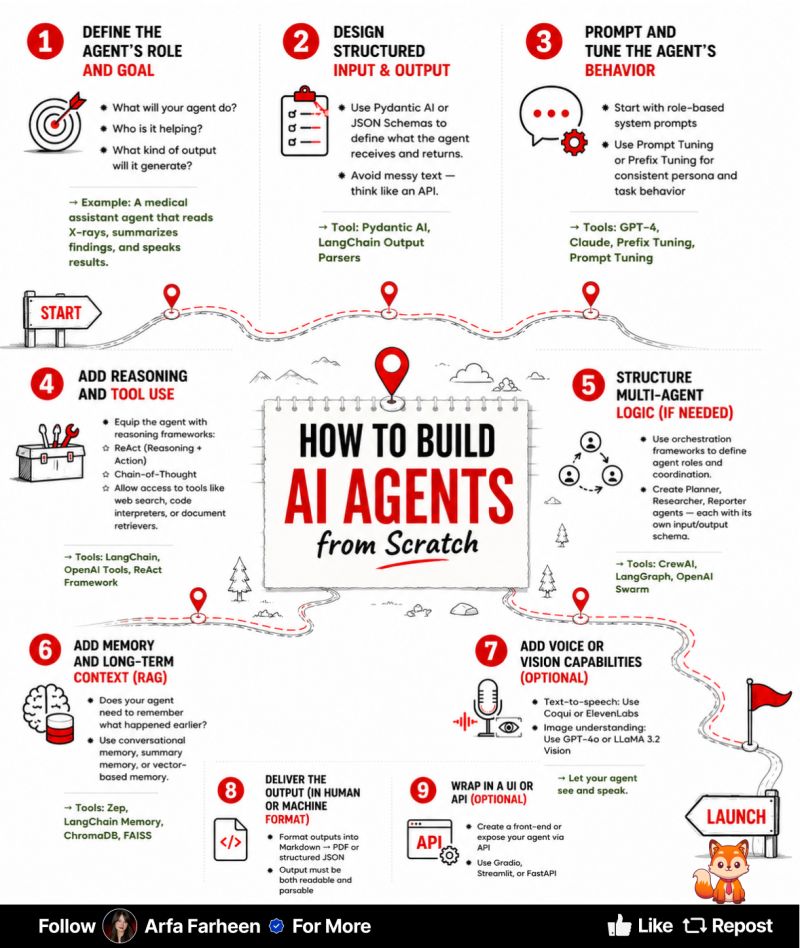
Learn how to build AI agents. (Without overcomplicating the whole thing.) Here’s what usually happens. You open a tool. Connect GPT. Write a big, impressive prompt. Sit back like… “this is about to be genius.” And then… It kind of works. Then breaks. Then says something weird. And now you’re debugging a robot like it’s a moody teenager. I’ve seen people spend hours tweaking prompts… when the real issue was simpler: The agent didn’t have a clear job. No defined role. No structure. Just a general idea of “do something useful.” And that’s where things fall apart. AI works best when you give it direction Not just instructions. Clear direction. Here’s the shift that actually works: 1. Define the role first ↳ What does it do? ↳ Who does it help? ↳ What does success look like? If this is unclear, everything breaks. 2. Structure inputs and outputs ↳ Stop passing messy text. ↳ Think like an API. ↳ Clean in → clean out. Garbage in, chaos out. 3. Control behavior ↳ Use system prompts intentionally. ↳ Tune for consistency, not creativity. Consistency beats cleverness. 4. Add reasoning + tools ↳ Let it think step-by-step. ↳ Give it access to the right tools. Smart agents use leverage. 5. Go multi-agent (if needed) ↳ Planner. Researcher. Executor. Don’t overload one system. 6. Add memory (RAG) ↳ Short-term + long-term context. Memory = usefulness over time. 7. Add voice/vision (optional) ↳ Now it can see and speak. That’s where things get interesting. 8. Format outputs properly ↳ Readable for humans. ↳ Parsable for machines. Clarity at the end matters too. 9. Wrap it in UI or API ↳ If no one can use it… it doesn’t exist. Here’s where people get distracted: They chase tools. New framework. New stack. New trend. But tools don’t fix unclear thinking. They just speed it up. The real skill? Designing behavior. What should happen? When should it happen? What does “done” actually look like? That’s the difference between a chatbot… and something actually useful. So before you build your next agent, don’t ask: “What tool should I use?” Ask: “What am I trying to make this thing do… clearly?” That question alone will save you hours. Probably days. Maybe your sanity. ♻️ Repost to give your network an unfair advantage.__ 1. Follow @coder_surya 2. Save the post. 3. Repost to your network. 4. Join AI Community: tinyurl.com/mvsz79eu ......
Suryakant Chaurasiya tweet media
English
13
27
78
950
Suryakant Chaurasiya
Suryakant Chaurasiya@coder_surya·
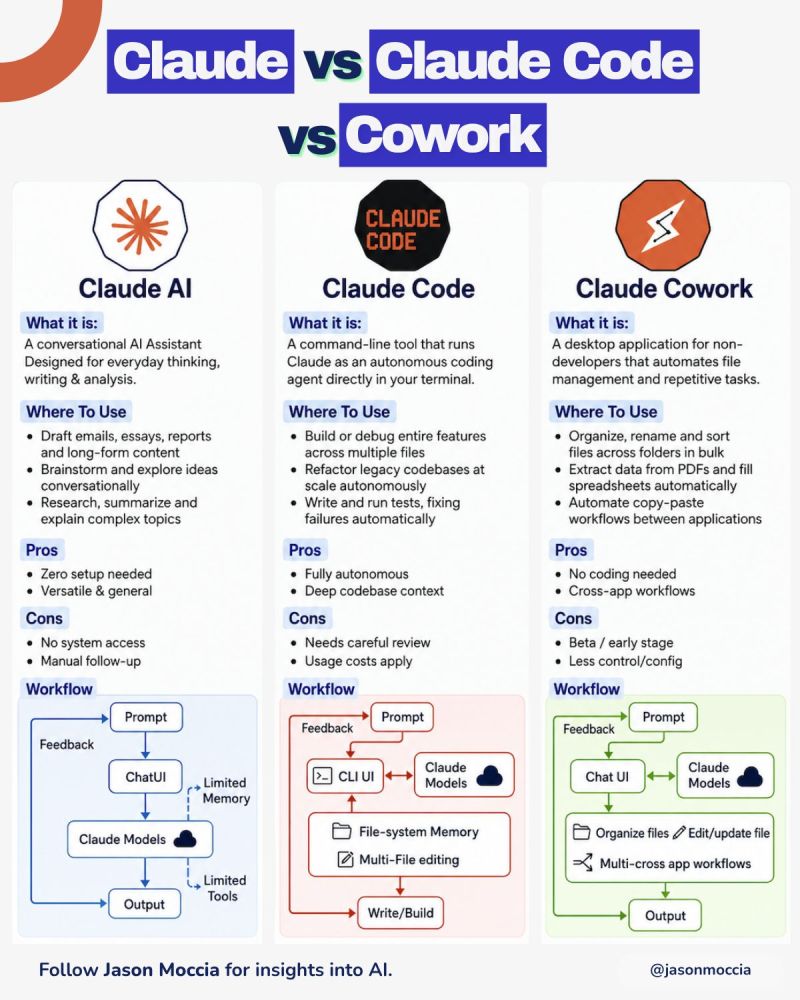
Claude vs Claude Code vs Cowork Claude has three modes. Most people only use one. Here is what each one is for: → Claude AI: Think with it Write, research, brainstorm, summarize, analyze. Your everyday conversational layer. Zero setup. Limited by manual follow-up and no system access. → Claude Code: Build with it An autonomous coding agent in your terminal. Works across files, debugs features, refactors codebases, writes and runs tests. Powerful, but needs careful review. Usage costs apply. → Claude Cowork: Operate with it A desktop assistant for non-developers. Organizes files, extracts data from PDFs, fills spreadsheets, and automates repetitive workflows across apps. Still early, but promising. AI is moving from answering questions to doing work. First, it helped us think faster. Then it helped developers build faster. Now it is starting to help entire teams operate faster. But the mistake is treating all three the same. The question isn't, "Should I use Claude?" It's "Do I need it to think with me, build with me, or work alongside me?" That distinction is where real productivity gains happen. ♻️ Repost to give your network an unfair advantage.__ 📌 If you want a high-res PDF of this guide: 1. Follow @coder_surya. 2. Save the post. 3. Repost to your network. 4. Join AI Community: tinyurl.com/mvsz79eu ..........................
Suryakant Chaurasiya tweet media
English
9
15
57
227
Shubhangi Shrivastava
Shubhangi Shrivastava@shubhangi_HR_·
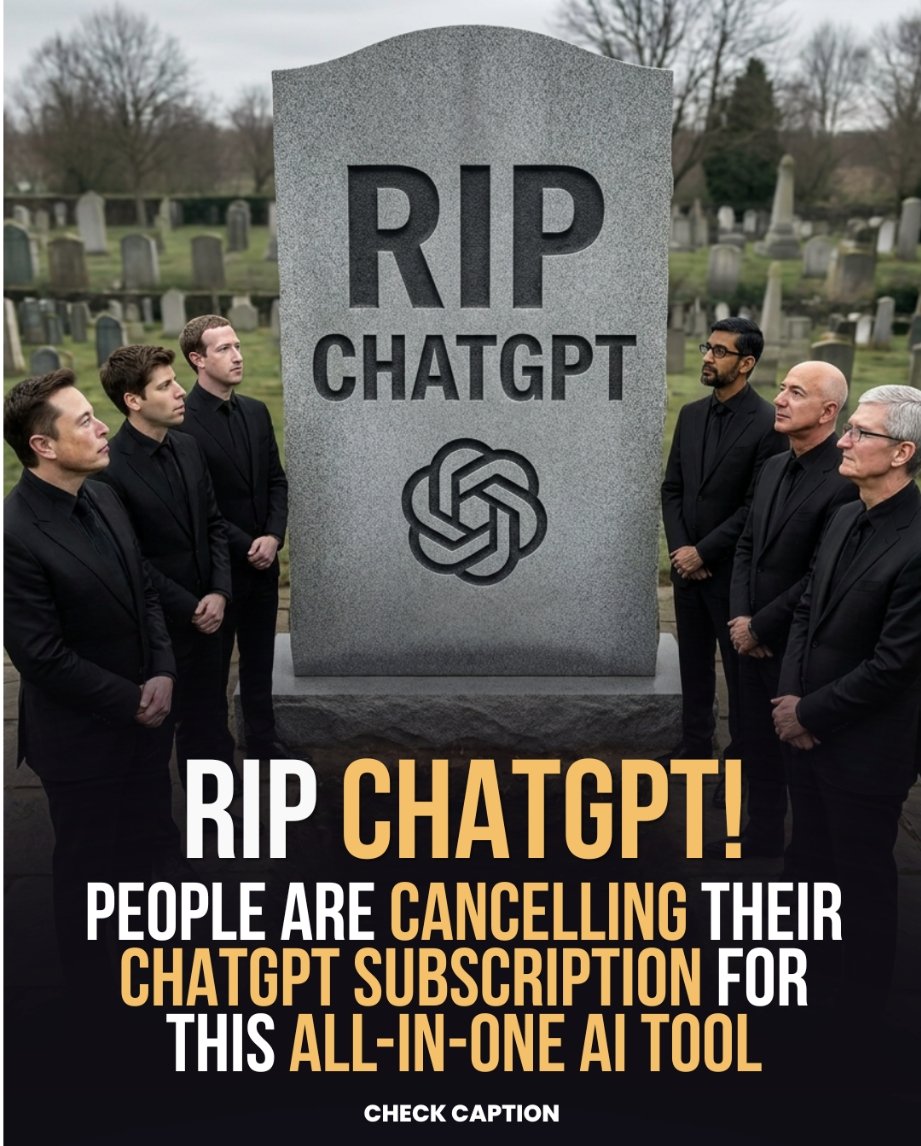
“RIP ChatGPT” posts miss the real point. People aren’t leaving because of the models. They’re tired of jumping between 10 different AI tools just to finish one task. Writing in one app. Images in another. Video somewhere else. Coding in another tab. That workflow breaks momentum. Tried Abacus.AI’s ChatLLM and finally understood the shift: One workspace. Multiple top AI models. App building, image generation, video creation, agents, presentations, coding — all connected. The future of AI isn’t just smarter models. It’s fewer steps between an idea and execution. 👉 chatllm.abacus.ai
Shubhangi Shrivastava tweet media
English
7
1
17
240