Someone built a Chromium browser that runs entirely in your terminal.
It's called Carbonyl, and it renders actual web pages in your command line. The best part is it runs with 0% CPU usage when idle.
- Full Chromium engine in the terminal.
- dles at exactly 0% CPU.
- Fast, lightweight, and completely terminal-native.
100% Open Source.
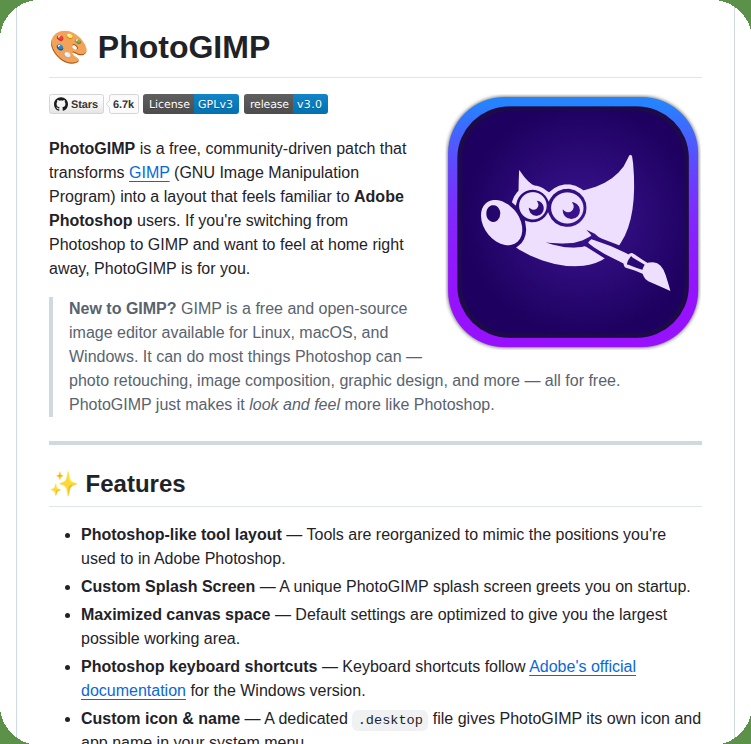
🚨Breaking: Someone patched GIMP to look and feel exactly like Adobe Photoshop.
Same keyboard shortcuts. Same tool layout. Same everything.
It's called PhotoGIMP and it's free.
Here's exactly what it changes:
→ Every keyboard shortcut mapped to match Adobe's official Photoshop layout
→ Tools reorganized to match the Photoshop panel positions you already know
→ Canvas space maximized -- same default workspace as Photoshop
→ Custom splash screen and app icon so it feels like a real product
→ Pre-defined canvas templates matching Photoshop defaults
→ Works on Windows, macOS, and Linux -- installs in under a minute
Here's the wildest part:
Adobe Photoshop costs $600/year.
GIMP is free. PhotoGIMP makes it feel like Photoshop.
The only reason most designers don't switch is muscle memory every shortcut is in a different place and it feels wrong from the first click.
This patch fixes that entirely. Ctrl+Z undo. Ctrl+J duplicate layer. Ctrl+T transform. All of it.
Download a zip. Extract to your home folder. Done.
6.7K GitHub stars. Works with GIMP 3.0+.
100% Open Source. GPL-3.0 License.
(Link in the comments)
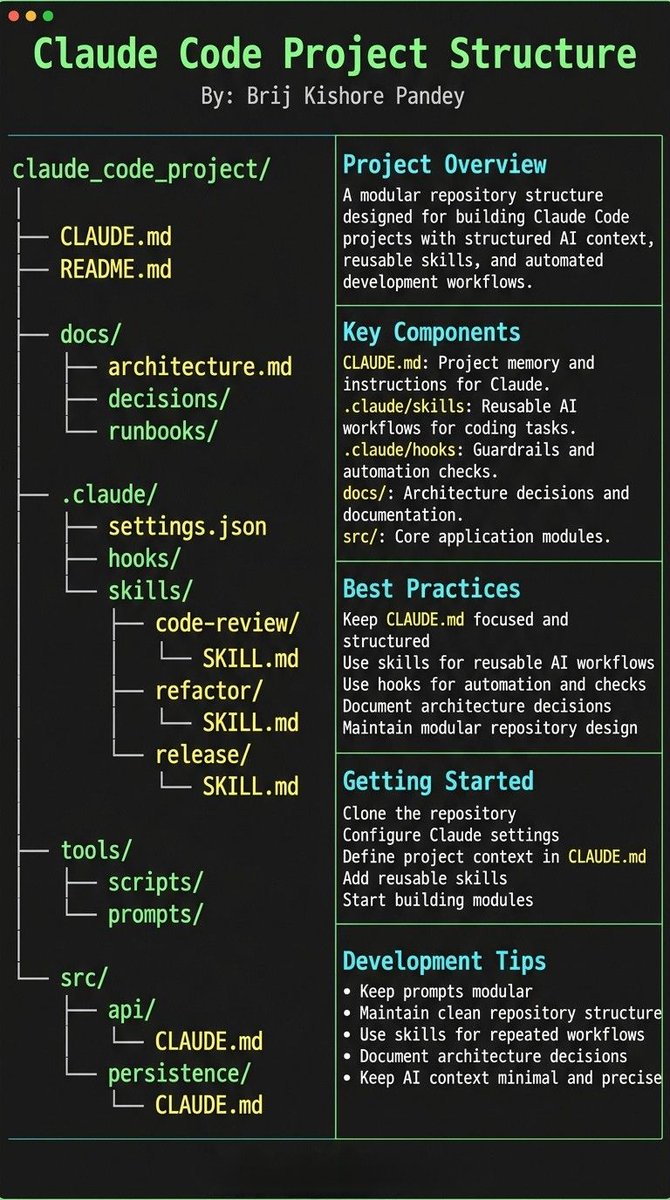
Most people treat CLAUDE.md like a prompt file.
That’s the mistake.
If you want Claude Code to feel like a senior engineer living inside your repo, your project needs structure.
Claude needs 4 things at all times:
• the why → what the system does
• the map → where things live
• the rules → what’s allowed / not allowed
• the workflows → how work gets done
I call this:
The Anatomy of a Claude Code Project 👇
━━━━━━━━━━━━━━━
1️⃣ CLAUDE.md = Repo Memory (keep it short)
This is the north star file.
Not a knowledge dump. Just:
• Purpose (WHY)
• Repo map (WHAT)
• Rules + commands (HOW)
If it gets too long, the model starts missing important context.
━━━━━━━━━━━━━━━
2️⃣ .claude/skills/ = Reusable Expert Modes
Stop rewriting instructions.
Turn common workflows into skills:
• code review checklist
• refactor playbook
• release procedure
• debugging flow
Result:
Consistency across sessions and teammates.
━━━━━━━━━━━━━━━
3️⃣ .claude/hooks/ = Guardrails
Models forget.
Hooks don’t.
Use them for things that must be deterministic:
• run formatter after edits
• run tests on core changes
• block unsafe directories (auth, billing, migrations)
━━━━━━━━━━━━━━━
4️⃣ docs/ = Progressive Context
Don’t bloat prompts.
Claude just needs to know where truth lives:
• architecture overview
• ADRs (engineering decisions)
• operational runbooks
━━━━━━━━━━━━━━━
5️⃣ Local CLAUDE.md for risky modules
Put small files near sharp edges:
src/auth/CLAUDE.md
src/persistence/CLAUDE.md
infra/CLAUDE.md
Now Claude sees the gotchas exactly when it works there.
━━━━━━━━━━━━━━━
Prompting is temporary.
Structure is permanent.
When your repo is organized this way, Claude stops behaving like a chatbot…
…and starts acting like a project-native engineer.