
Level Up Coding retweetledi
Level Up Coding
516 posts


Level Up Coding
@LevelUpCoding_
Helping you become a great engineer. System design made simple.
Level Up Coding Newsletter → Katılım Nisan 2024
2 Takip Edilen10.2K Takipçiler
Level Up Coding retweetledi

How companies ship AI systems
(clearly explained in under 2 minutes):

English
Level Up Coding retweetledi
How RAG actually works
(clearly explained in under 2 mins):
RAG (Retrieval-Augmented Generation) is a system that retrieves relevant data and feeds it into an LLM before generating a response.
It lets models answer questions using external knowledge, not just what they were trained on.
If you’re building with these patterns, here's a great guide on scaling multi-agent RAG systems: lucode.co/multi-agent-ra…
Here’s a simple mental model to understand it:
𝟭) 𝗗𝗮𝘁𝗮 𝗶𝘀 𝗶𝗻𝗴𝗲𝘀𝘁𝗲𝗱
↳ Documents (PDFs, docs, APIs) are collected and split into chunks
↳ Each chunk is cleaned and formatted ready for embedding
𝟮) 𝗘𝗺𝗯𝗲𝗱𝗱𝗶𝗻𝗴𝘀 𝗮𝗿𝗲 𝗰𝗿𝗲𝗮𝘁𝗲𝗱
↳ Each chunk is converted into a vector representation
↳ Similar meaning → closer vectors
𝟯) 𝗗𝗮𝘁𝗮 𝗶𝘀 𝘀𝘁𝗼𝗿𝗲𝗱
↳ Vectors are stored in a vector database
↳ Enables fast similarity search across large datasets
𝟰) 𝗥𝗲𝗹𝗲𝘃𝗮𝗻𝘁 𝗰𝗼𝗻𝘁𝗲𝘅𝘁 𝗶𝘀 𝗿𝗲𝘁𝗿𝗶𝗲𝘃𝗲𝗱
↳ The user's query is converted into an embedding (vector representation)
↳ The system compares it against stored vectors and retrieves the most relevant chunks
𝟱) 𝗧𝗵𝗲 𝗟𝗟𝗠 𝗴𝗲𝗻𝗲𝗿𝗮𝘁𝗲𝘀 𝘁𝗵𝗲 𝗮𝗻𝘀𝘄𝗲𝗿
↳ The query + retrieved context are combined into a prompt
↳ The model generates a grounded response
That's the foundation of RAG. There are several types of RAG, each designed for different use cases and levels of complexity.
If you’re curious what this actually looks like in practice (beyond diagrams), this repo is a great place to start: lucode.co/ai-developer-h…
It has:
↳ E2E implementations of RAG, AI applications, agents, and systems
↳ Resources covering AI agent architecture, reasoning strategies, and memory systems.
↳ Hands-on workshops and guided learning
Start it to keep it bookmarked. This repo will keep growing, and you'll want it on hand as you build.
What else would you add?
——
♻️ Repost to help others learn AI engineering.
🙏 Thanks to @Oracle for sponsoring this post.
➕ Follow me ( Nikki Siapno ) to improve at AI engineering.

English
Level Up Coding retweetledi
9 database types developers should know:
1) 𝗥𝗲𝗹𝗮𝘁𝗶𝗼𝗻𝗮𝗹
↳ Stores structured data in tables with predefined schemas & SQL queries.
2) 𝗞𝗲𝘆-𝗩𝗮𝗹𝘂𝗲
↳ Stores simple key-value pairs for ultra-fast lookups & caching.
3) 𝗗𝗼𝗰𝘂𝗺𝗲𝗻𝘁
↳ Stores data as JSON-like documents with flexible, nested structures.
PS: Get my free 142-page System Design Handbook when you join my free weekly newsletter. Join 33,000+ engineers → lucode.co/system-design-…
4) 𝗪𝗶𝗱𝗲-𝗖𝗼𝗹𝘂𝗺𝗻
↳ Stores data in flexible column families for large-scale distributed workloads.
5) 𝗧𝗶𝗺𝗲-𝗦𝗲𝗿𝗶𝗲𝘀
↳ Stores time-stamped data for metrics, logs, & event tracking.
6) 𝗚𝗿𝗮𝗽𝗵
↳ Stores relationships between entities to query connected data efficiently.
7) 𝗩𝗲𝗰𝘁𝗼𝗿
↳ Stores embeddings to enable similarity search & AI-powered retrieval.
8) 𝗖𝗼𝗹𝘂𝗺𝗻𝗮𝗿
↳ Stores data by columns instead of rows to optimize analytical queries.
9) 𝗜𝗺𝗺𝘂𝘁𝗮𝗯𝗹𝗲 𝗟𝗲𝗱𝗴𝗲𝗿
↳ Stores tamper-proof records where data cannot be modified or deleted.
Remember, there's no one-size-fits-all database anymore. Most systems don’t use just one database, they combine multiple types for different workloads.
Full breakdown (with visuals) here → lucode.co/database-types…
What else would you add?
♻️ Repost to help others learn databases.
➕ Follow me ( Nikki Siapno ) to improve at system design.

Nikki Siapno@NikkiSiapno
Git branching strategies: Do you know the differences? 𝗙𝗲𝗮𝘁𝘂𝗿𝗲 𝗯𝗿𝗮𝗻𝗰𝗵𝗶𝗻𝗴 keeps each feature in its own branch, isolated from the main branch; making pull requests easier to review. Once complete, the feature is merged back into main. 𝗚𝗶𝘁𝗳𝗹𝗼𝘄 uses two long-lived branches: dev for development and main for production. Features are built in separate branches, then merged into dev. Releases are prepared in dedicated branches before merging into production. 𝗚𝗶𝘁𝗟𝗮𝗯 𝗳𝗹𝗼𝘄 combines feature branching with environment-based deployment workflows. Changes move through environments like staging before reaching production, making it well-suited for CI/CD and staged releases. 𝗚𝗶𝘁𝗛𝘂𝗯 𝗳𝗹𝗼𝘄 simplifies things. The main branch is always deployable. Developers create short-lived branches, open pull requests, and merge once approved, often triggering deployment. 𝗧𝗿𝘂𝗻𝗸-𝗯𝗮𝘀𝗲𝗱 𝗱𝗲𝘃𝗲𝗹𝗼𝗽𝗺𝗲𝗻𝘁 minimizes branching. Changes are merged into main frequently, supported by strong automated testing, CI pipelines, and feature flags to maintain stability. Each strategy solves the same core problem: How do teams move fast without breaking the system? But most issues don’t come from the branching model, they come from inside the branches: unclear changes, weak reviews, missing context. That’s what CodeRabbit Agent helps solve. A single agent inside your workflow that follows work end-to-end. It pulls your org’s context into one place and helps teams investigate, plan, and execute work directly from Slack. So instead of losing context between branches, your work stays connected as it evolves. 𝗧𝗿𝘆 𝗖𝗼𝗱𝗲𝗥𝗮𝗯𝗯𝗶𝘁 𝗔𝗴𝗲𝗻𝘁 𝗳𝗼𝗿 𝗳𝗿𝗲𝗲 → lucode.co/coderabbit-age… What else would you add? —— ♻️ Repost to help others learn and grow. 🙏 Thanks to @coderabbitai for sponsoring this post. ➕ Follow me ( Nikki Siapno ) to improve at system design.
English
Git Branching Strategies
(explained in under 2 mins):
𝗙𝗲𝗮𝘁𝘂𝗿𝗲 𝗯𝗿𝗮𝗻𝗰𝗵𝗶𝗻𝗴 keeps each feature in its own branch, isolated from the main branch; making pull requests easier to review. Once complete, the feature is merged back into main.
𝗚𝗶𝘁𝗳𝗹𝗼𝘄 uses two long-lived branches: dev for development and main for production. Features are built in separate branches, then merged into dev. Releases are prepared in dedicated branches before merging into production.
𝗚𝗶𝘁𝗟𝗮𝗯 𝗳𝗹𝗼𝘄 combines feature branching with environment-based deployment workflows. Changes move through environments like staging before reaching production, making it well-suited for CI/CD and staged releases.
𝗚𝗶𝘁𝗛𝘂𝗯 𝗳𝗹𝗼𝘄 simplifies things. The main branch is always deployable. Developers create short-lived branches, open pull requests, and merge once approved, often triggering deployment.
𝗧𝗿𝘂𝗻𝗸-𝗯𝗮𝘀𝗲𝗱 𝗱𝗲𝘃𝗲𝗹𝗼𝗽𝗺𝗲𝗻𝘁 minimizes branching. Changes are merged into main frequently, supported by strong automated testing, CI pipelines, and feature flags to maintain stability.
Each strategy solves the same core problem: How do teams move fast without breaking the system?
But most issues don’t come from the branching model, they come from inside the branches: unclear changes, weak reviews, missing context.
That’s what CodeRabbit Agent helps solve.
A single agent inside your workflow that follows work end-to-end. It pulls your org’s context into one place and helps teams investigate, plan, and execute work directly from Slack.
So instead of losing context between branches, your work stays connected as it evolves.
𝗧𝗿𝘆 𝗖𝗼𝗱𝗲𝗥𝗮𝗯𝗯𝗶𝘁 𝗔𝗴𝗲𝗻𝘁 𝗳𝗼𝗿 𝗳𝗿𝗲𝗲 → lucode.co/coderabbit-age…
What else would you add?
——
♻️ Repost to help others learn and grow.
🙏 Thanks to @coderabbitai for sponsoring this post.

Nikki Siapno@NikkiSiapno
Git branching strategies: Do you know the differences? 𝗙𝗲𝗮𝘁𝘂𝗿𝗲 𝗯𝗿𝗮𝗻𝗰𝗵𝗶𝗻𝗴 keeps each feature in its own branch, isolated from the main branch; making pull requests easier to review. Once complete, the feature is merged back into main. 𝗚𝗶𝘁𝗳𝗹𝗼𝘄 uses two long-lived branches: dev for development and main for production. Features are built in separate branches, then merged into dev. Releases are prepared in dedicated branches before merging into production. 𝗚𝗶𝘁𝗟𝗮𝗯 𝗳𝗹𝗼𝘄 combines feature branching with environment-based deployment workflows. Changes move through environments like staging before reaching production, making it well-suited for CI/CD and staged releases. 𝗚𝗶𝘁𝗛𝘂𝗯 𝗳𝗹𝗼𝘄 simplifies things. The main branch is always deployable. Developers create short-lived branches, open pull requests, and merge once approved, often triggering deployment. 𝗧𝗿𝘂𝗻𝗸-𝗯𝗮𝘀𝗲𝗱 𝗱𝗲𝘃𝗲𝗹𝗼𝗽𝗺𝗲𝗻𝘁 minimizes branching. Changes are merged into main frequently, supported by strong automated testing, CI pipelines, and feature flags to maintain stability. Each strategy solves the same core problem: How do teams move fast without breaking the system? But most issues don’t come from the branching model, they come from inside the branches: unclear changes, weak reviews, missing context. That’s what CodeRabbit Agent helps solve. A single agent inside your workflow that follows work end-to-end. It pulls your org’s context into one place and helps teams investigate, plan, and execute work directly from Slack. So instead of losing context between branches, your work stays connected as it evolves. 𝗧𝗿𝘆 𝗖𝗼𝗱𝗲𝗥𝗮𝗯𝗯𝗶𝘁 𝗔𝗴𝗲𝗻𝘁 𝗳𝗼𝗿 𝗳𝗿𝗲𝗲 → lucode.co/coderabbit-age… What else would you add? —— ♻️ Repost to help others learn and grow. 🙏 Thanks to @coderabbitai for sponsoring this post. ➕ Follow me ( Nikki Siapno ) to improve at system design.
English
Level Up Coding retweetledi
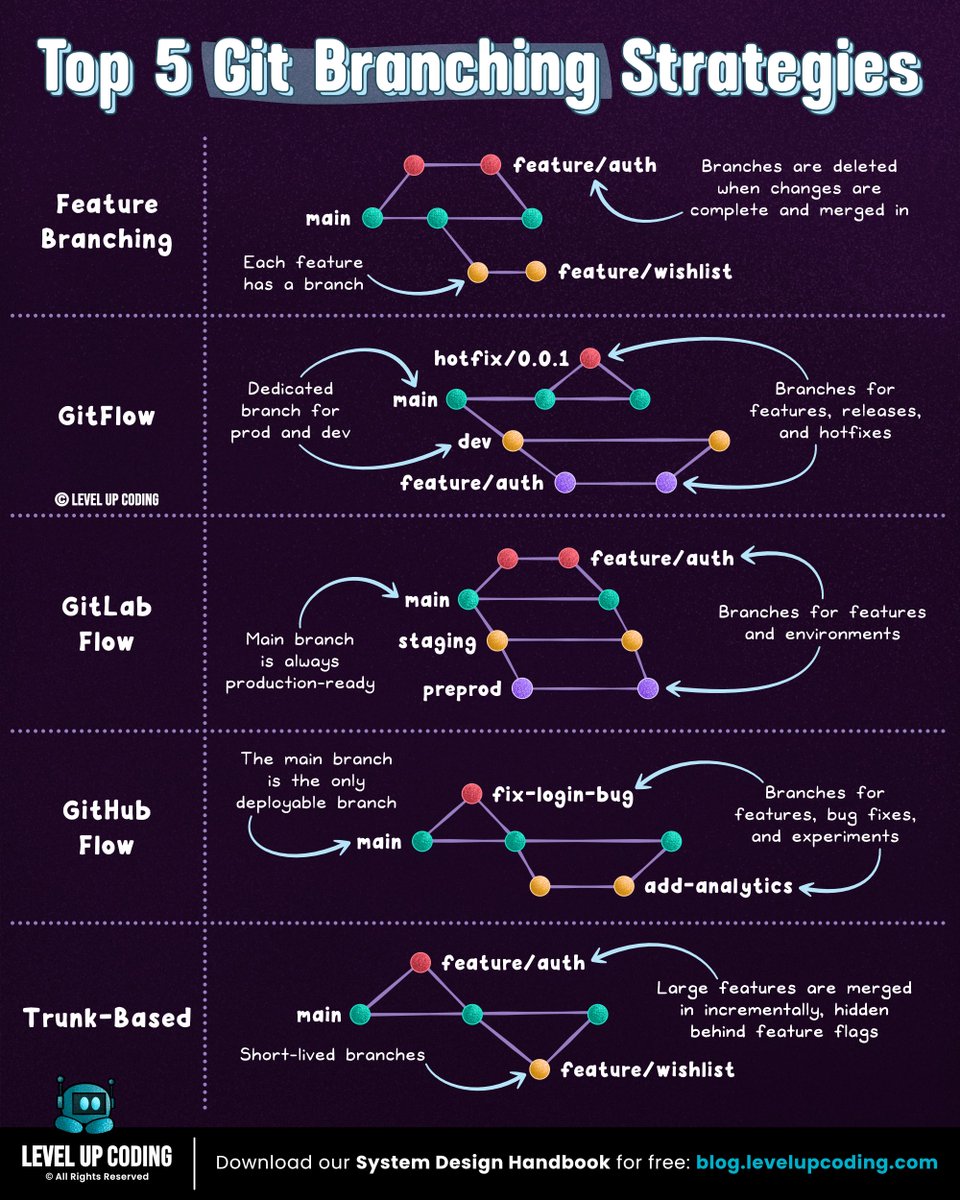
Git branching strategies: Do you know the differences?
𝗙𝗲𝗮𝘁𝘂𝗿𝗲 𝗯𝗿𝗮𝗻𝗰𝗵𝗶𝗻𝗴 keeps each feature in its own branch, isolated from the main branch; making pull requests easier to review. Once complete, the feature is merged back into main.
𝗚𝗶𝘁𝗳𝗹𝗼𝘄 uses two long-lived branches: dev for development and main for production. Features are built in separate branches, then merged into dev. Releases are prepared in dedicated branches before merging into production.
𝗚𝗶𝘁𝗟𝗮𝗯 𝗳𝗹𝗼𝘄 combines feature branching with environment-based deployment workflows. Changes move through environments like staging before reaching production, making it well-suited for CI/CD and staged releases.
𝗚𝗶𝘁𝗛𝘂𝗯 𝗳𝗹𝗼𝘄 simplifies things. The main branch is always deployable. Developers create short-lived branches, open pull requests, and merge once approved, often triggering deployment.
𝗧𝗿𝘂𝗻𝗸-𝗯𝗮𝘀𝗲𝗱 𝗱𝗲𝘃𝗲𝗹𝗼𝗽𝗺𝗲𝗻𝘁 minimizes branching. Changes are merged into main frequently, supported by strong automated testing, CI pipelines, and feature flags to maintain stability.
Each strategy solves the same core problem: How do teams move fast without breaking the system?
But most issues don’t come from the branching model, they come from inside the branches: unclear changes, weak reviews, missing context.
That’s what CodeRabbit Agent helps solve.
A single agent inside your workflow that follows work end-to-end. It pulls your org’s context into one place and helps teams investigate, plan, and execute work directly from Slack.
So instead of losing context between branches, your work stays connected as it evolves.
𝗧𝗿𝘆 𝗖𝗼𝗱𝗲𝗥𝗮𝗯𝗯𝗶𝘁 𝗔𝗴𝗲𝗻𝘁 𝗳𝗼𝗿 𝗳𝗿𝗲𝗲 → lucode.co/coderabbit-age…
What else would you add?
——
♻️ Repost to help others learn and grow.
🙏 Thanks to @coderabbitai for sponsoring this post.
➕ Follow me ( Nikki Siapno ) to improve at system design.
English
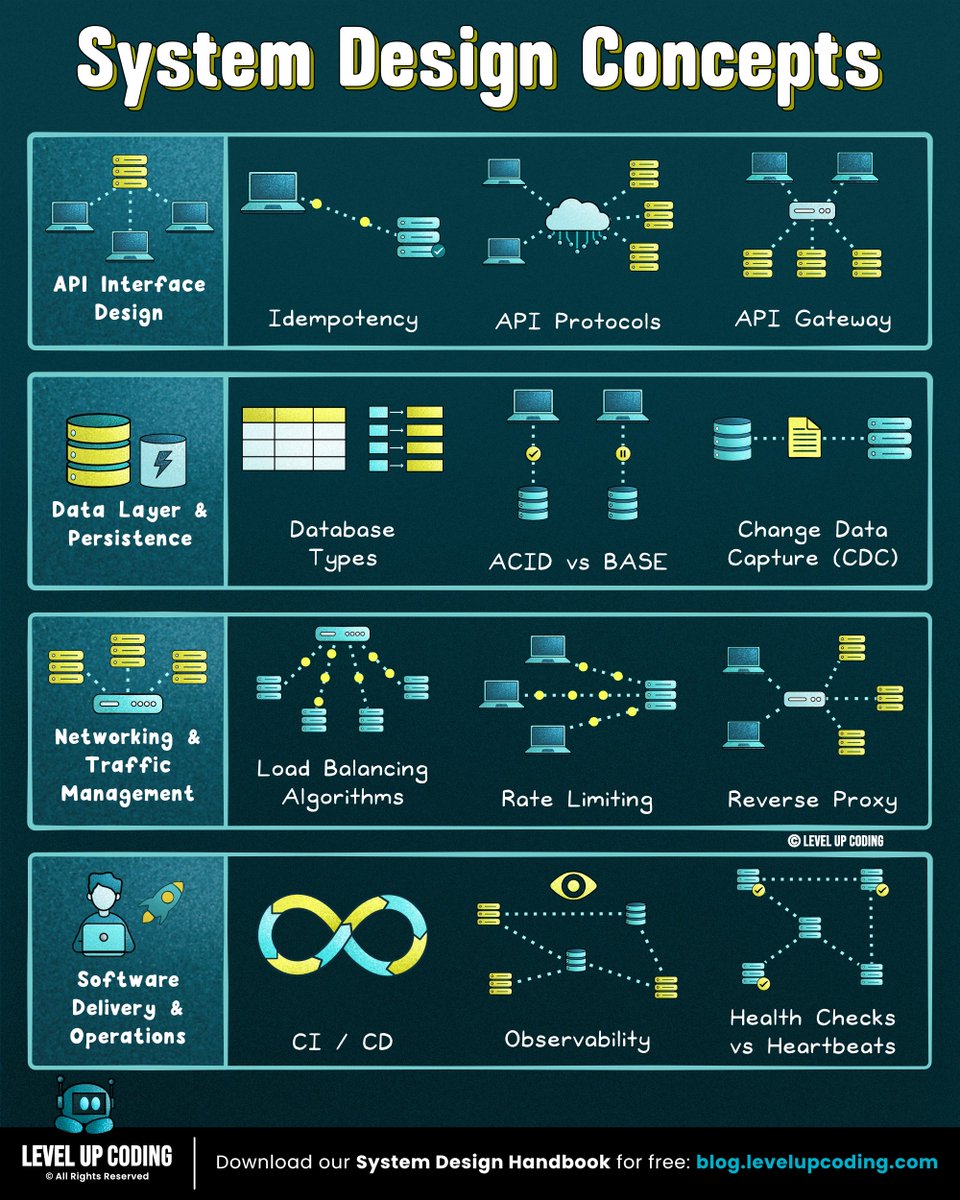
35 resources to learn system design:
1. Microservices
↳ lucode.co/microservices-…
2. Redis
↳ lucode.co/redis-explaine…
3. Event-driven architecture
↳ lucode.co/event-driven-a…
4. Database indexing
↳ lucode.co/database-index…
5. Circuit breakers
↳ lucode.co/circuit-breake…
6. ACID vs BASE
↳ lucode.co/acid-vs-base-l…
7. Rate limiting
↳ lucode.co/rate-limiting-…
PS - if you want a structured path, get our free 142-page System Design Handbook when you join our free weekly newsletter → lucode.co/system-design-…
8. Observability
↳ lucode.co/observability-…
9. System design quality attributes
↳ lucode.co/system-design-…
10. CAP theorem
↳ lucode.co/cap-theorem-li…
11. Idempotency
↳ lucode.co/idempotency-in…
12. REST APIs
↳ lnkd.in/gi5zd2jR
13. Sync vs Async
↳ lnkd.in/gG-EnbA9
14. Network protocols
↳ lucode.co/network-protoc…
15. Change Data Capture (CDC)
↳ lucode.co/change-data-ca…
16. CI/CD pipelines
↳ lucode.co/ci-cd-lil1nlsm
17. SSO (single sign-on)
↳ lnkd.in/gXdVyqBg
18. JWT
↳ lucode.co/json-web-token…
19. gRPC
↳ lucode.co/grpc-explained…
20. Health checks vs heartbeats
↳ lucode.co/health-checks-…
21. API gateway vs load balancer vs reverse proxy
↳ lucode.co/api-gateway-vs…
22. HTTPS
↳ lucode.co/https-explaine…
23. Load balancing algorithms
↳ lucode.co/load-balancing…
24. Database caching
↳ lucode.co/database-cachi…
25. API protocols
↳ lucode.co/api-architectu…
26. CDN
↳ lucode.co/cdn-lil1nlsm
27. Database types
↳ lucode.co/database-types…
28. Message Queues
↳ lucode.co/message-queues…
29. Hashing vs encryption vs tokenization
↳ lnkd.in/gfqGYQnq
30. Service Discovery
↳ lucode.co/service-discov…
31. Pub/Sub
↳ lucode.co/pub-sub-lil1nl…
32. Connection pooling
↳ lucode.co/connection-poo…
33. Forward proxy vs reverse proxy
↳ lucode.co/forward-vs-rev…
34. Consistent hashing
↳ lucode.co/consistent-has…
35. SQL vs NoSQL
↳ lucode.co/sql-vs-nosql-l…
——
👋 PS: Get my free 142-page System Design Handbook when you join my free weekly newsletter.
Join 33,000+ engineers → lucode.co/system-design-…
——
♻️ Repost to help others learn system design.
Nikki Siapno@NikkiSiapno
I wrote 35 articles for 35 system design concepts: 1) Microservices: lucode.co/microservices-… 2) Redis: lucode.co/redis-explaine… 3) Event-driven architecture: lucode.co/event-driven-a… 4) Database indexing: lucode.co/database-index… 5) Circuit breakers: lucode.co/circuit-breake… 6) ACID vs BASE: lucode.co/acid-vs-base-l… 7) Rate limiting: lucode.co/rate-limiting-… PS - if you want a structured path, get my free 142-page System Design Handbook when you join my free weekly newsletter → lucode.co/system-design-… 8) Observability: lucode.co/observability-… 9) System design quality attributes: lucode.co/system-design-… 10) CAP theorem: lucode.co/cap-theorem-li… 11) Idempotency: lucode.co/idempotency-in… 12) REST APIs: lnkd.in/gi5zd2jR 13) Sync vs Async: lnkd.in/gG-EnbA9 14) Network protocols: lucode.co/network-protoc… 15) Change Data Capture (CDC): lucode.co/change-data-ca… 16) CI/CD pipelines: lucode.co/ci-cd-lil1nlsm 17). SSO (single sign-on): lnkd.in/gXdVyqBg 18) JWT: lucode.co/json-web-token… 19) gRPC: lucode.co/grpc-explained… 20) Health checks vs heartbeats: lucode.co/health-checks-… 21) API gateway vs load balancer vs reverse proxy: lucode.co/api-gateway-vs… 22) HTTPS: lucode.co/https-explaine… 23) Load balancing algorithms: lucode.co/load-balancing… 24) Database caching: lucode.co/database-cachi… 25) API protocols: lucode.co/api-architectu… 26) CDN: lucode.co/cdn-lil1nlsm 27) Database types: lucode.co/database-types… 28) Message Queues: lucode.co/message-queues… 29) Hashing vs encryption vs tokenization: lnkd.in/gfqGYQnq 30) Service Discovery: lucode.co/service-discov… 31) Pub/Sub: lucode.co/pub-sub-lil1nl… 32) Connection pooling: lucode.co/connection-poo… 33) Forward proxy vs reverse proxy: lucode.co/forward-vs-rev… 34) Consistent hashing: lucode.co/consistent-has… 35) SQL vs NoSQL:lucode.co/sql-vs-nosql-l… —— 👋 PS: Get my free 142-page System Design Handbook when you join my free weekly newsletter. Join 33,000+ engineers → lucode.co/system-design-… —— ♻️ Repost to help others learn system design. ➕ Follow me ( Nikki Siapno ) to become good at system design.
English
Level Up Coding retweetledi
I wrote 35 articles for 35 system design concepts:
1) Microservices: lucode.co/microservices-…
2) Redis: lucode.co/redis-explaine…
3) Event-driven architecture: lucode.co/event-driven-a…
4) Database indexing: lucode.co/database-index…
5) Circuit breakers: lucode.co/circuit-breake…
6) ACID vs BASE: lucode.co/acid-vs-base-l…
7) Rate limiting: lucode.co/rate-limiting-…
PS - if you want a structured path, get my free 142-page System Design Handbook when you join my free weekly newsletter → lucode.co/system-design-…
8) Observability: lucode.co/observability-…
9) System design quality attributes: lucode.co/system-design-…
10) CAP theorem: lucode.co/cap-theorem-li…
11) Idempotency: lucode.co/idempotency-in…
12) REST APIs: lnkd.in/gi5zd2jR
13) Sync vs Async: lnkd.in/gG-EnbA9
14) Network protocols: lucode.co/network-protoc…
15) Change Data Capture (CDC): lucode.co/change-data-ca…
16) CI/CD pipelines: lucode.co/ci-cd-lil1nlsm
17). SSO (single sign-on): lnkd.in/gXdVyqBg
18) JWT: lucode.co/json-web-token…
19) gRPC: lucode.co/grpc-explained…
20) Health checks vs heartbeats: lucode.co/health-checks-…
21) API gateway vs load balancer vs reverse proxy: lucode.co/api-gateway-vs…
22) HTTPS: lucode.co/https-explaine…
23) Load balancing algorithms: lucode.co/load-balancing…
24) Database caching: lucode.co/database-cachi…
25) API protocols: lucode.co/api-architectu…
26) CDN: lucode.co/cdn-lil1nlsm
27) Database types: lucode.co/database-types…
28) Message Queues: lucode.co/message-queues…
29) Hashing vs encryption vs tokenization: lnkd.in/gfqGYQnq
30) Service Discovery: lucode.co/service-discov…
31) Pub/Sub: lucode.co/pub-sub-lil1nl…
32) Connection pooling: lucode.co/connection-poo…
33) Forward proxy vs reverse proxy: lucode.co/forward-vs-rev…
34) Consistent hashing: lucode.co/consistent-has…
35) SQL vs NoSQL:lucode.co/sql-vs-nosql-l…
——
👋 PS: Get my free 142-page System Design Handbook when you join my free weekly newsletter.
Join 33,000+ engineers → lucode.co/system-design-…
——
♻️ Repost to help others learn system design.
➕ Follow me ( Nikki Siapno ) to become good at system design.

English
Level Up Coding retweetledi
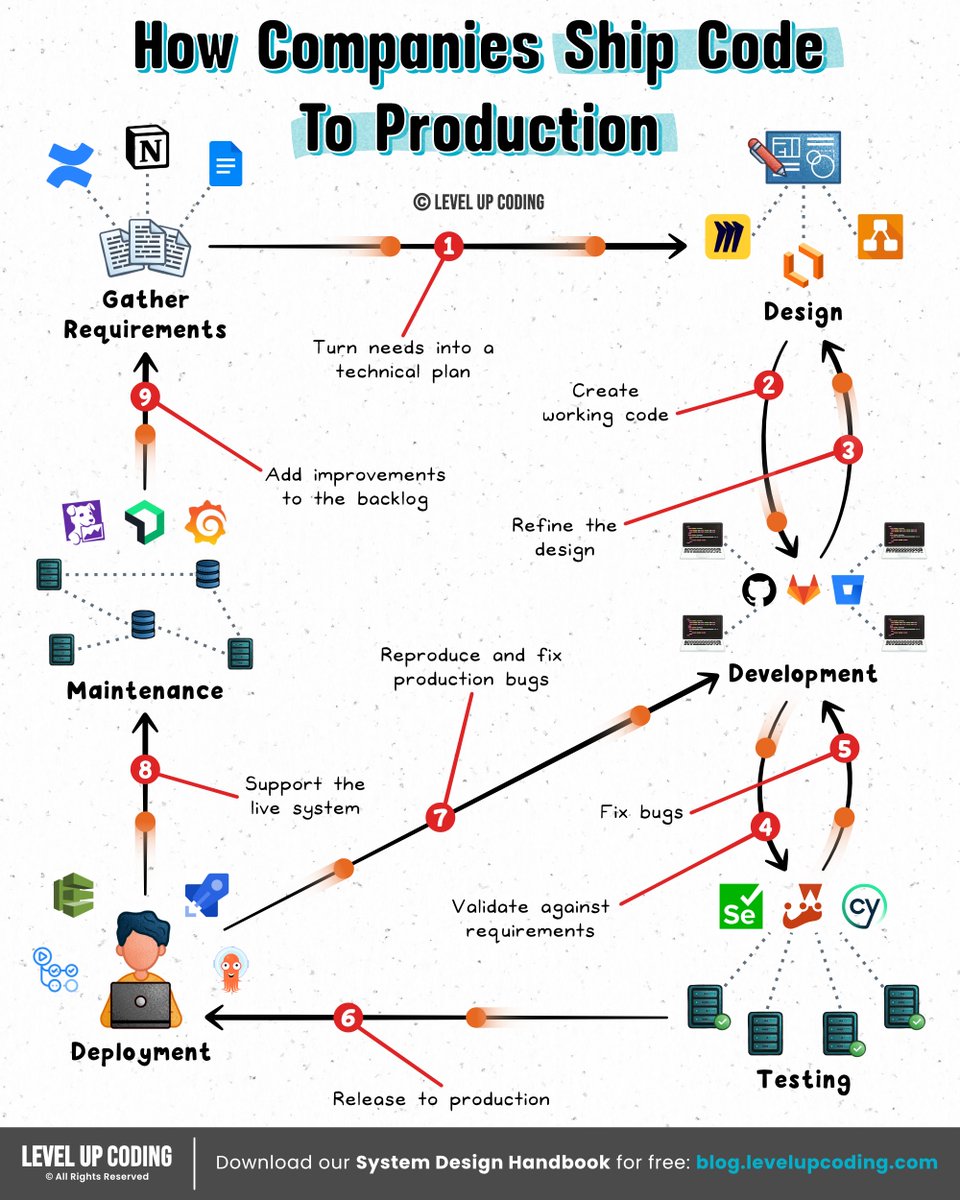
How do companies ship code to production?
Nikki Siapno@NikkiSiapno
What actually happens when you deploy to AWS? Deploying an app can feel like “just push code → it’s live.” In reality, your cloud is setting up compute, networking, and traffic routing before your app can even be reached. The simple mental model: Build → Provision → Run → Route → Shift traffic 𝟭) 𝗗𝗲𝗽𝗹𝗼𝘆 𝗶𝘀 𝘁𝗿𝗶𝗴𝗴𝗲𝗿𝗲𝗱 ↳ CI/CD pipeline starts and orchestrates the rollout. 𝟮) 𝗔𝗽𝗽𝗹𝗶𝗰𝗮𝘁𝗶𝗼𝗻 𝗶𝘀 𝗯𝘂𝗶𝗹𝘁 + 𝗽𝗮𝗰𝗸𝗮𝗴𝗲𝗱 ↳ Code is compiled, dependencies installed, artifact created. 𝟯) 𝗜𝗻𝗳𝗿𝗮𝘀𝘁𝗿𝘂𝗰𝘁𝘂𝗿𝗲 𝗶𝘀 𝗿𝗲𝘀𝗼𝗹𝘃𝗲𝗱 (𝗜𝗮𝗖) ↳ IaC defines the desired state, and AWS provisions resources to match it. 𝟰) 𝗖𝗼𝗺𝗽𝘂𝘁𝗲 𝗿𝗲𝘀𝗼𝘂𝗿𝗰𝗲𝘀 𝗮𝗿𝗲 𝗰𝗿𝗲𝗮𝘁𝗲𝗱 ↳ VMs, containers, or functions are spun up. 𝟱) 𝗦𝘁𝗼𝗿𝗮𝗴𝗲 𝗶𝘀 𝗽𝗿𝗼𝘃𝗶𝘀𝗶𝗼𝗻𝗲𝗱 ↳ Databases, buckets, and volumes are created or attached. 𝟲) 𝗔𝗽𝗽𝗹𝗶𝗰𝗮𝘁𝗶𝗼𝗻 𝘀𝘁𝗮𝗿𝘁𝘀 𝗿𝘂𝗻𝗻𝗶𝗻𝗴 ↳ Artifact is deployed and connects to services at runtime. 𝟳) 𝗧𝗿𝗮𝗳𝗳𝗶𝗰 𝗿𝗼𝘂𝘁𝗶𝗻𝗴 + 𝗛𝗧𝗧𝗣𝗦 𝗮𝗿𝗲 𝗰𝗼𝗻𝗳𝗶𝗴𝘂𝗿𝗲𝗱 ↳ Load balancer, DNS, and TLS are configured or reused. 𝟴) 𝗧𝗿𝗮𝗳𝗳𝗶𝗰 𝗶𝘀 𝘀𝗵𝗶𝗳𝘁𝗲𝗱 𝘁𝗼 𝘁𝗵𝗲 𝗻𝗲𝘄 𝘃𝗲𝗿𝘀𝗶𝗼𝗻 ↳ Rolling, blue-green, or canary deployment happens. The bigger question: Why does running code require all of this in the first place? Somewhere along the way, “deploying” turned into designing infrastructure, which feels like overkill when you just want to run something. Tools like exe[.]dev flip the flow: → Spin up a real machine instantly → Connect over SSH → It’s live You still get: → A persistent environment (it doesn’t disappear) → Automatic HTTPS (no networking setup) → Full control, without designing infra upfront It sits in a spot where it's more control than serverless, way less overhead than a VPS. If you're tired of infra decisions blocking momentum, it’s worth having on your radar. Check it out ➟ lucode.co/exe-dot-dev-z8… What else would you add? —— ♻️ Repost to help others learn and grow. 🙏 Thanks to @ssh_exe_dev for sponsoring this post. ➕ Follow me ( Nikki Siapno ) to improve at system design.
English
Level Up Coding retweetledi
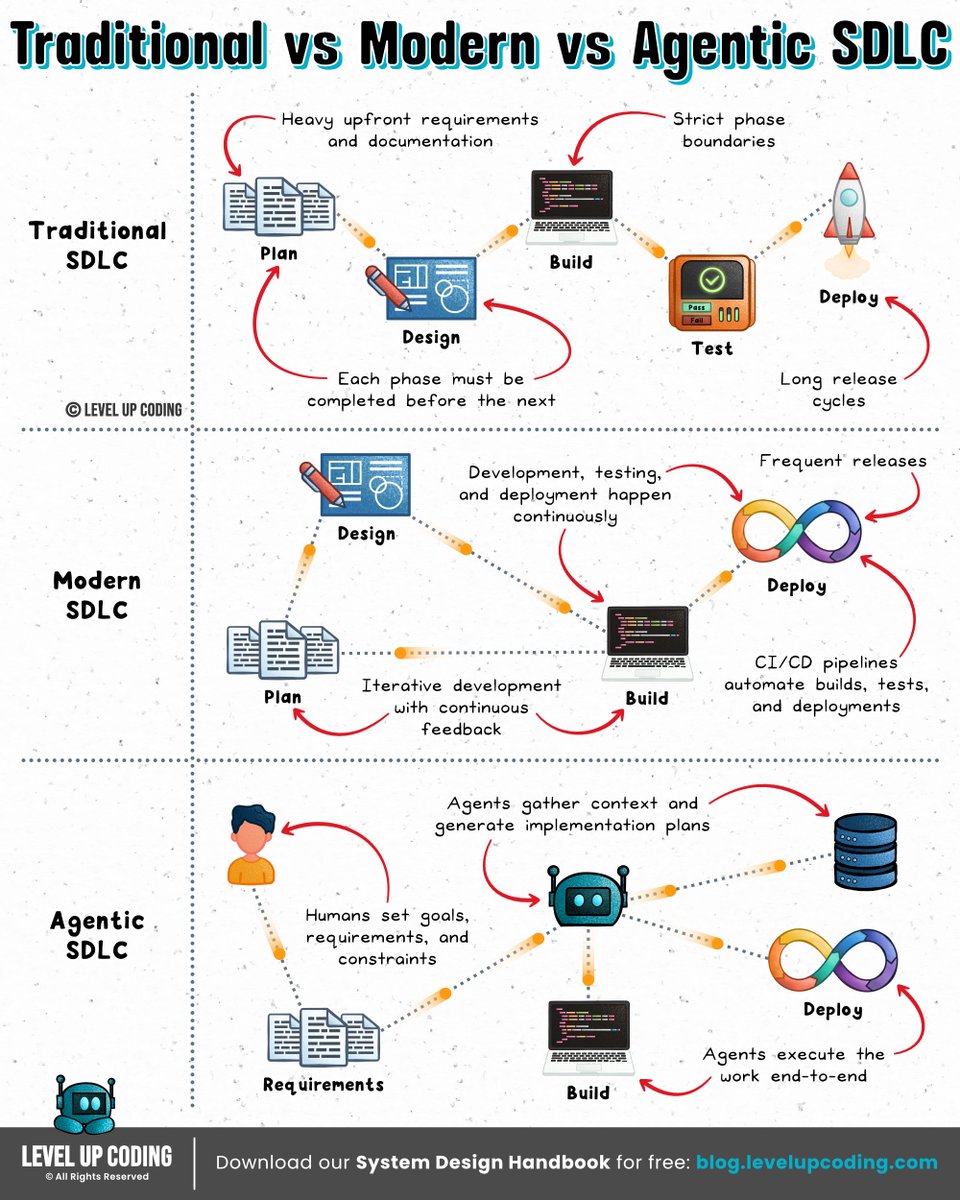
Software Development Lifecycle

Nikki Siapno@NikkiSiapno
Traditional SDLC vs Modern SDLC vs Agentic SDLC 𝗧𝗿𝗮𝗱𝗶𝘁𝗶𝗼𝗻𝗮𝗹 𝗦𝗗𝗟𝗖 (Waterfall era) is all about planning everything upfront and moving step-by-step through build and testing before shipping. It works when things are predictable, but becomes slow and costly the moment requirements change. 𝗠𝗼𝗱𝗲𝗿𝗻 𝗦𝗗𝗟𝗖 (Agile + DevOps) shifts to smaller iterations, continuous delivery, and fast feedback loops. It’s far more flexible, but humans are still responsible for most of the execution, including writing, testing, and fixing. 𝗔𝗴𝗲𝗻𝘁𝗶𝗰 𝗦𝗗𝗟𝗖 (emerging) introduces AI agents that can plan, code, test, and debug. Humans stay involved, but shift toward setting goals, reviewing outcomes, and guiding decisions, while agents handle more of the execution end-to-end. The shift isn’t just speed. It’s ownership of the work: Traditional → humans execute Modern → humans + automation Agentic → agents execute But here’s where most teams still break down: Even with AI, the SDLC is still fragmented. Planning happens in one tool. Code in another. PRs somewhere else. Context gets lost between every step. Agentic SDLC only works when that context doesn’t reset. That’s exactly what CodeRabbit Agent is built for. Instead of context resetting between tools, CodeRabbit Agent lives directly in your team’s workflow inside Slack, pulling in context from across your tools and systems and carrying it forward as work evolves. It can investigate issues, propose fixes, and open PRs, all within the same thread, carrying context forward as work moves from problem to resolution. If you want to see how agentic SDLC actually works in practice → lucode.co/coderabbit-age… What else would you add? —— ♻️ Repost to help others learn AI engineering. 🙏Thanks to @coderabbitai for sponsoring this post. ➕ Follow me ( Nikki Siapno ) to improve at AI engineering.
English
Level Up Coding retweetledi
Traditional SDLC vs Modern SDLC vs Agentic SDLC
𝗧𝗿𝗮𝗱𝗶𝘁𝗶𝗼𝗻𝗮𝗹 𝗦𝗗𝗟𝗖 (Waterfall era) is all about planning everything upfront and moving step-by-step through build and testing before shipping. It works when things are predictable, but becomes slow and costly the moment requirements change.
𝗠𝗼𝗱𝗲𝗿𝗻 𝗦𝗗𝗟𝗖 (Agile + DevOps) shifts to smaller iterations, continuous delivery, and fast feedback loops. It’s far more flexible, but humans are still responsible for most of the execution, including writing, testing, and fixing.
𝗔𝗴𝗲𝗻𝘁𝗶𝗰 𝗦𝗗𝗟𝗖 (emerging) introduces AI agents that can plan, code, test, and debug. Humans stay involved, but shift toward setting goals, reviewing outcomes, and guiding decisions, while agents handle more of the execution end-to-end.
The shift isn’t just speed. It’s ownership of the work:
Traditional → humans execute
Modern → humans + automation
Agentic → agents execute
But here’s where most teams still break down:
Even with AI, the SDLC is still fragmented. Planning happens in one tool. Code in another. PRs somewhere else. Context gets lost between every step.
Agentic SDLC only works when that context doesn’t reset.
That’s exactly what CodeRabbit Agent is built for.
Instead of context resetting between tools, CodeRabbit Agent lives directly in your team’s workflow inside Slack, pulling in context from across your tools and systems and carrying it forward as work evolves.
It can investigate issues, propose fixes, and open PRs, all within the same thread, carrying context forward as work moves from problem to resolution.
If you want to see how agentic SDLC actually works in practice → lucode.co/coderabbit-age…
What else would you add?
——
♻️ Repost to help others learn AI engineering.
🙏Thanks to @coderabbitai for sponsoring this post.
➕ Follow me ( Nikki Siapno ) to improve at AI engineering.
English
Level Up Coding retweetledi
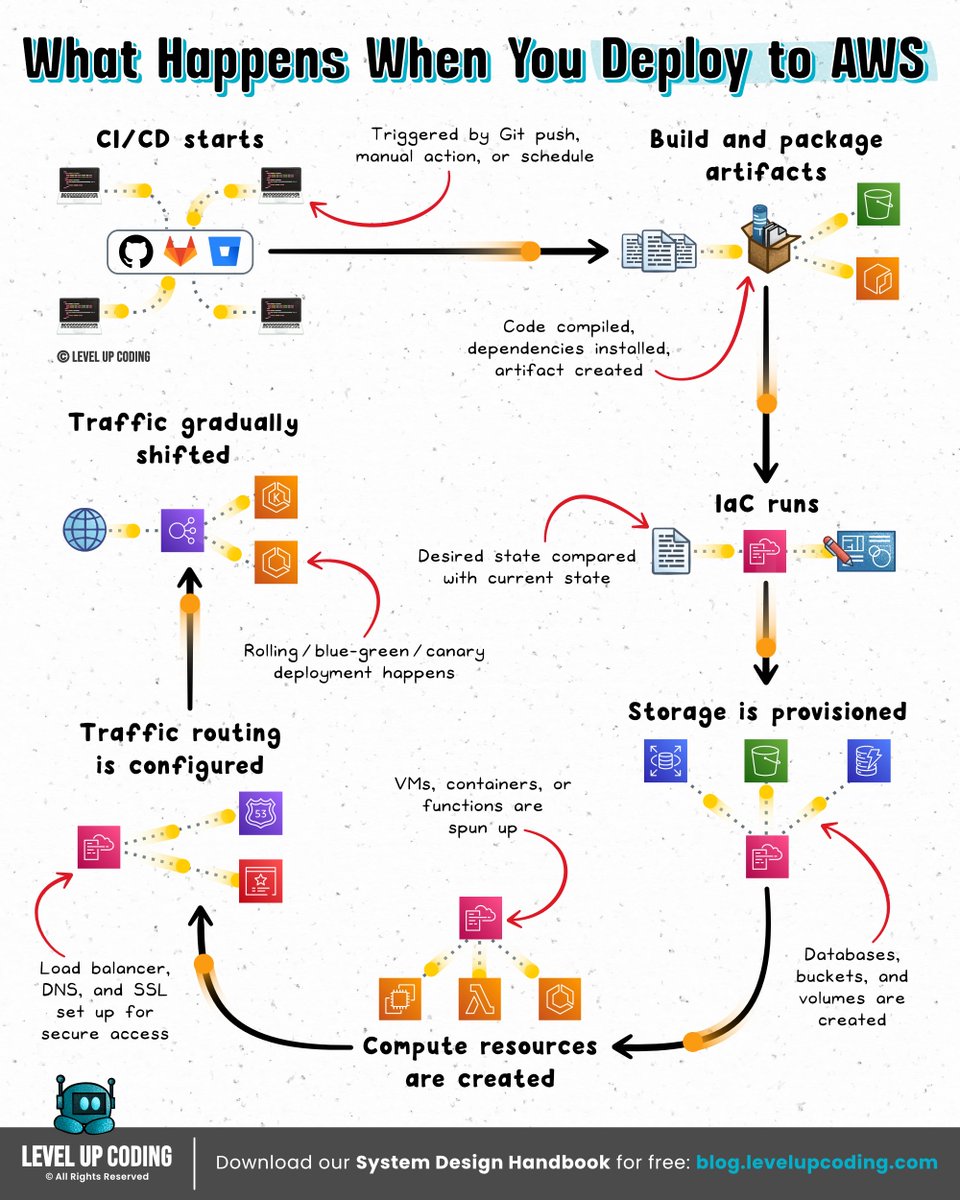
What actually happens when you deploy to AWS?
Deploying an app can feel like “just push code → it’s live.”
In reality, your cloud is setting up compute, networking, and traffic routing before your app can even be reached.
The simple mental model:
Build → Provision → Run → Route → Shift traffic
𝟭) 𝗗𝗲𝗽𝗹𝗼𝘆 𝗶𝘀 𝘁𝗿𝗶𝗴𝗴𝗲𝗿𝗲𝗱
↳ CI/CD pipeline starts and orchestrates the rollout.
𝟮) 𝗔𝗽𝗽𝗹𝗶𝗰𝗮𝘁𝗶𝗼𝗻 𝗶𝘀 𝗯𝘂𝗶𝗹𝘁 + 𝗽𝗮𝗰𝗸𝗮𝗴𝗲𝗱
↳ Code is compiled, dependencies installed, artifact created.
𝟯) 𝗜𝗻𝗳𝗿𝗮𝘀𝘁𝗿𝘂𝗰𝘁𝘂𝗿𝗲 𝗶𝘀 𝗿𝗲𝘀𝗼𝗹𝘃𝗲𝗱 (𝗜𝗮𝗖)
↳ IaC defines the desired state, and AWS provisions resources to match it.
𝟰) 𝗖𝗼𝗺𝗽𝘂𝘁𝗲 𝗿𝗲𝘀𝗼𝘂𝗿𝗰𝗲𝘀 𝗮𝗿𝗲 𝗰𝗿𝗲𝗮𝘁𝗲𝗱
↳ VMs, containers, or functions are spun up.
𝟱) 𝗦𝘁𝗼𝗿𝗮𝗴𝗲 𝗶𝘀 𝗽𝗿𝗼𝘃𝗶𝘀𝗶𝗼𝗻𝗲𝗱
↳ Databases, buckets, and volumes are created or attached.
𝟲) 𝗔𝗽𝗽𝗹𝗶𝗰𝗮𝘁𝗶𝗼𝗻 𝘀𝘁𝗮𝗿𝘁𝘀 𝗿𝘂𝗻𝗻𝗶𝗻𝗴
↳ Artifact is deployed and connects to services at runtime.
𝟳) 𝗧𝗿𝗮𝗳𝗳𝗶𝗰 𝗿𝗼𝘂𝘁𝗶𝗻𝗴 + 𝗛𝗧𝗧𝗣𝗦 𝗮𝗿𝗲 𝗰𝗼𝗻𝗳𝗶𝗴𝘂𝗿𝗲𝗱
↳ Load balancer, DNS, and TLS are configured or reused.
𝟴) 𝗧𝗿𝗮𝗳𝗳𝗶𝗰 𝗶𝘀 𝘀𝗵𝗶𝗳𝘁𝗲𝗱 𝘁𝗼 𝘁𝗵𝗲 𝗻𝗲𝘄 𝘃𝗲𝗿𝘀𝗶𝗼𝗻
↳ Rolling, blue-green, or canary deployment happens.
The bigger question: Why does running code require all of this in the first place?
Somewhere along the way, “deploying” turned into designing infrastructure, which feels like overkill when you just want to run something.
Tools like exe[.]dev flip the flow:
→ Spin up a real machine instantly
→ Connect over SSH
→ It’s live
You still get:
→ A persistent environment (it doesn’t disappear)
→ Automatic HTTPS (no networking setup)
→ Full control, without designing infra upfront
It sits in a spot where it's more control than serverless, way less overhead than a VPS.
If you're tired of infra decisions blocking momentum, it’s worth having on your radar.
Check it out ➟ lucode.co/exe-dot-dev-z8…
What else would you add?
——
♻️ Repost to help others learn and grow.
🙏 Thanks to @ssh_exe_dev for sponsoring this post.
➕ Follow me ( Nikki Siapno ) to improve at system design.
English
Level Up Coding retweetledi
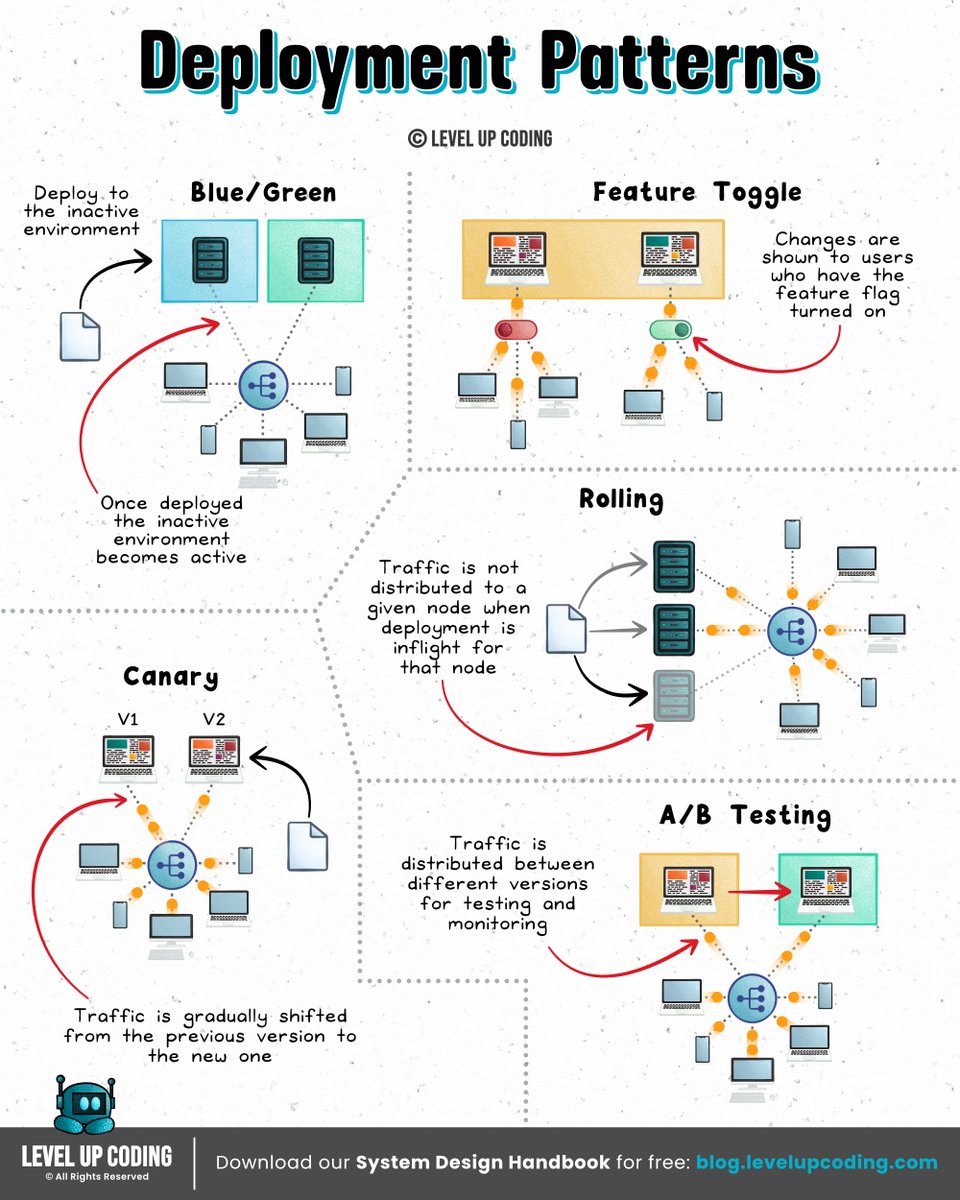
Top 5 Deployment Patterns
Nikki Siapno@NikkiSiapno
SLO vs SLI vs SLA An 𝗦𝗟𝗜 (Service Level Indicator) measures what’s actually happening in your system; like request latency, error rate, or uptime. It’s the raw signal that tells you how your service is performing. An 𝗦𝗟𝗢 (Service Level Objective) defines the acceptable range for an SLI; like “99.9% of requests succeed within 200ms.” It’s what your team aims to achieve to maintain reliability. An 𝗦𝗟𝗔 (Service Level Agreement) is a formal contract with users or customers, often tied to penalties if targets aren’t met. It defines the consequences, not just the goal. And when failures occur, that’s where postmortems should close the loop. But here’s the gap: Most postmortems are written after the fact. Digging through Slack. Rebuilding timelines. Guessing what actually happened. Which means they’re slow, and painful. So they get deprioritised, half-finished, or never written at all. That’s not just a process problem. It’s an experience and tooling problem. incident[.]io’s new postmortem workflow flips this: → It builds the draft for you from real incident data → So you start with context, not a blank page → It turns postmortems into a collaborative, structured workflow that’s actually easy to write and complete Worth a read → lucode.co/postmortems-re… SLIs tell you what happened. SLOs define what should happen. SLAs define what happens if you fail. Postmortems are where you make sure it doesn’t happen again. What else would you add? —— ♻️ Repost to help others learn and grow. 🙏 Thanks to @incident_io for sponsoring this post. ➕ Follow me ( Nikki Siapno ) to improve at system design.
English
Level Up Coding retweetledi
SLO vs SLI vs SLA
An 𝗦𝗟𝗜 (Service Level Indicator) measures what’s actually happening in your system; like request latency, error rate, or uptime. It’s the raw signal that tells you how your service is performing.
An 𝗦𝗟𝗢 (Service Level Objective) defines the acceptable range for an SLI; like “99.9% of requests succeed within 200ms.” It’s what your team aims to achieve to maintain reliability.
An 𝗦𝗟𝗔 (Service Level Agreement) is a formal contract with users or customers, often tied to penalties if targets aren’t met. It defines the consequences, not just the goal.
And when failures occur, that’s where postmortems should close the loop.
But here’s the gap:
Most postmortems are written after the fact. Digging through Slack. Rebuilding timelines. Guessing what actually happened. Which means they’re slow, and painful. So they get deprioritised, half-finished, or never written at all.
That’s not just a process problem. It’s an experience and tooling problem.
incident[.]io’s new postmortem workflow flips this:
→ It builds the draft for you from real incident data
→ So you start with context, not a blank page
→ It turns postmortems into a collaborative, structured workflow that’s actually easy to write and complete
Worth a read → lucode.co/postmortems-re…
SLIs tell you what happened.
SLOs define what should happen.
SLAs define what happens if you fail.
Postmortems are where you make sure it doesn’t happen again.
What else would you add?
——
♻️ Repost to help others learn and grow.
🙏 Thanks to @incident_io for sponsoring this post.
➕ Follow me ( Nikki Siapno ) to improve at system design.

English
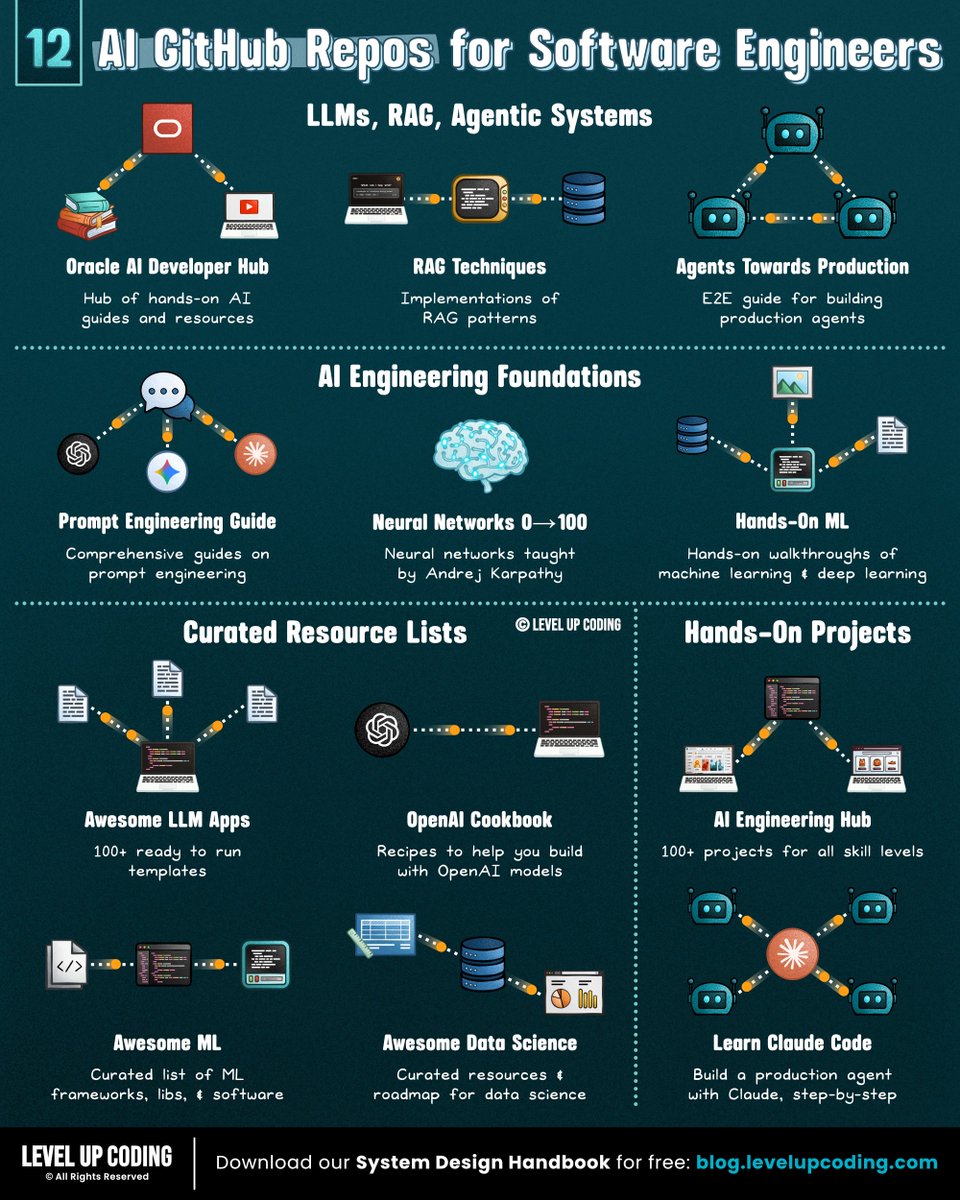
If you want to become good at AI engineering,
bookmark these 12 GitHub repos:
𝗟𝗟𝗠𝘀, 𝗥𝗔𝗚 & 𝗔𝗴𝗲𝗻𝘁𝗶𝗰 𝗦𝘆𝘀𝘁𝗲𝗺𝘀
1) Guides to build RAG, agents, vector search
↳ lucode.co/ai-developer-h…
2) RAG patterns
↳ github.com/NirDiamant/RAG…
3) E2E guide for building agents
↳ github.com/NirDiamant/age…
𝗔𝗜 𝗘𝗻𝗴𝗶𝗻𝗲𝗲𝗿𝗶𝗻𝗴 𝗙𝗼𝘂𝗻𝗱𝗮𝘁𝗶𝗼𝗻𝘀
4) Prompt engineering
↳ github.com/dair-ai/Prompt…
5) Hands-on ML + deep learning
↳ github.com/ageron/handson…
6) Neural networks
↳ github.com/karpathy/nn-ze…
𝗖𝘂𝗿𝗮𝘁𝗲𝗱 𝗥𝗲𝘀𝗼𝘂𝗿𝗰𝗲 𝗟𝗶𝘀𝘁𝘀
7) Examples building with openAI
↳ github.com/openai/openai-…
8) Ready to run templates
↳ github.com/Shubhamsaboo/a…
9) ML frameworks, libs, & software
↳ github.com/josephmisiti/a…
10) Data Science resources
↳ github.com/academic/aweso…
𝗛𝗮𝗻𝗱𝘀-𝗢𝗻 𝗣𝗿𝗼𝗷𝗲𝗰𝘁𝘀
11) 100+ projects
↳ github.com/patchy631/ai-e…
12) E2E project with Claude Code
↳ github.com/shareAI-lab/le…
If you're serious about AI engineering, this repo is worth bookmarking (star it): lucode.co/ai-developer-h…
It’s not just theory; you’ll find:
• Full AI apps and reference implementations
• Jupyter notebooks for RAG, agents, and vector search
• Practical guides on agent architecture and memory systems
If you found this list useful, star the repo so you can come back to it later (and support more content like this)
What other AI GitHub repos should be on the list?
——
♻️ Repost to help others learn and grow.
🙏 Thanks to @Oracle for sponsoring this post.
➕ Follow me ( Nikki Siapno ) to improve at AI engineering.
Nikki Siapno@NikkiSiapno
12 GitHub repos to improve at AI engineering (categorized): 𝗟𝗟𝗠𝘀, 𝗥𝗔𝗚 & 𝗔𝗴𝗲𝗻𝘁𝗶𝗰 𝗦𝘆𝘀𝘁𝗲𝗺𝘀 1) Guides to build RAG, agents, vector search ↳ lucode.co/ai-developer-h… 2) RAG patterns ↳ github.com/NirDiamant/RAG… 3) E2E guide for building agents ↳ github.com/NirDiamant/age… 𝗔𝗜 𝗘𝗻𝗴𝗶𝗻𝗲𝗲𝗿𝗶𝗻𝗴 𝗙𝗼𝘂𝗻𝗱𝗮𝘁𝗶𝗼𝗻𝘀 4) Prompt engineering ↳ github.com/dair-ai/Prompt… 5) Hands-on ML + deep learning ↳ github.com/ageron/handson… 6) Neural networks ↳ github.com/karpathy/nn-ze… 𝗖𝘂𝗿𝗮𝘁𝗲𝗱 𝗥𝗲𝘀𝗼𝘂𝗿𝗰𝗲 𝗟𝗶𝘀𝘁𝘀 7) Examples building with openAI ↳ github.com/openai/openai-… 8) Ready to run templates ↳ github.com/Shubhamsaboo/a… 9) ML frameworks, libs, & software ↳ github.com/josephmisiti/a… 10) Data Science resources ↳ github.com/academic/aweso… 𝗛𝗮𝗻𝗱𝘀-𝗢𝗻 𝗣𝗿𝗼𝗷𝗲𝗰𝘁𝘀 11) 100+ projects ↳ github.com/patchy631/ai-e… 12) E2E project with Claude Code ↳ github.com/shareAI-lab/le… If you're serious about AI engineering, this repo is worth bookmarking (star it): lucode.co/ai-developer-h… It’s not just theory; you’ll find: • Full AI apps and reference implementations • Jupyter notebooks for RAG, agents, and vector search • Practical guides on agent architecture and memory systems If you found this list useful, star the repo so you can come back to it later (and support more content like this) What other AI GitHub repos should be on the list? —— ♻️ Repost to help others learn AI engineering. 🙏 Thanks to @Oracle for sponsoring this post. ➕ Follow me ( Nikki Siapno ) to improve at AI engineering.
English
Level Up Coding retweetledi
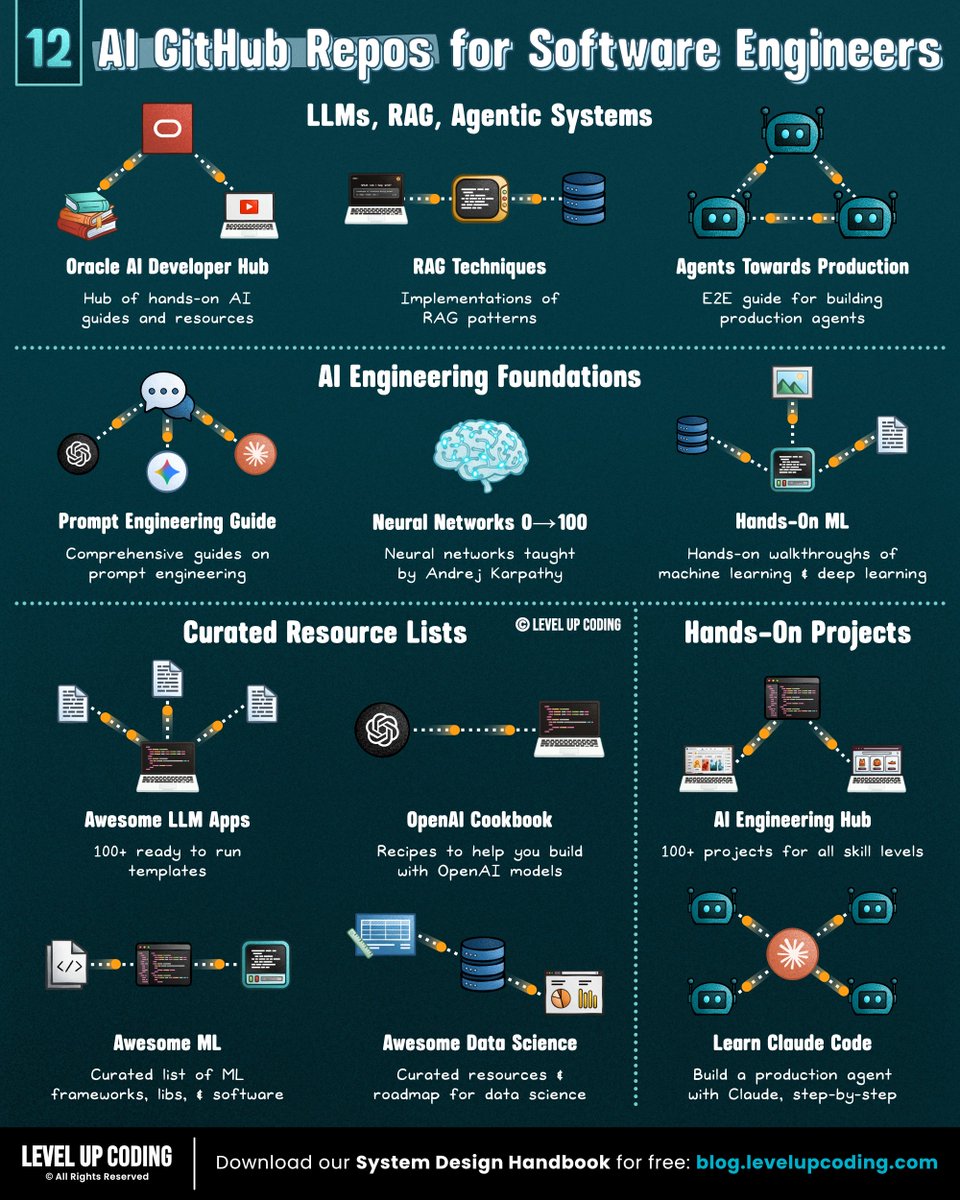
12 GitHub repos to improve at AI engineering (categorized):
𝗟𝗟𝗠𝘀, 𝗥𝗔𝗚 & 𝗔𝗴𝗲𝗻𝘁𝗶𝗰 𝗦𝘆𝘀𝘁𝗲𝗺𝘀
1) Guides to build RAG, agents, vector search
↳ lucode.co/ai-developer-h…
2) RAG patterns
↳ github.com/NirDiamant/RAG…
3) E2E guide for building agents
↳ github.com/NirDiamant/age…
𝗔𝗜 𝗘𝗻𝗴𝗶𝗻𝗲𝗲𝗿𝗶𝗻𝗴 𝗙𝗼𝘂𝗻𝗱𝗮𝘁𝗶𝗼𝗻𝘀
4) Prompt engineering
↳ github.com/dair-ai/Prompt…
5) Hands-on ML + deep learning
↳ github.com/ageron/handson…
6) Neural networks
↳ github.com/karpathy/nn-ze…
𝗖𝘂𝗿𝗮𝘁𝗲𝗱 𝗥𝗲𝘀𝗼𝘂𝗿𝗰𝗲 𝗟𝗶𝘀𝘁𝘀
7) Examples building with openAI
↳ github.com/openai/openai-…
8) Ready to run templates
↳ github.com/Shubhamsaboo/a…
9) ML frameworks, libs, & software
↳ github.com/josephmisiti/a…
10) Data Science resources
↳ github.com/academic/aweso…
𝗛𝗮𝗻𝗱𝘀-𝗢𝗻 𝗣𝗿𝗼𝗷𝗲𝗰𝘁𝘀
11) 100+ projects
↳ github.com/patchy631/ai-e…
12) E2E project with Claude Code
↳ github.com/shareAI-lab/le…
If you're serious about AI engineering, this repo is worth bookmarking (star it): lucode.co/ai-developer-h…
It’s not just theory; you’ll find:
• Full AI apps and reference implementations
• Jupyter notebooks for RAG, agents, and vector search
• Practical guides on agent architecture and memory systems
If you found this list useful, star the repo so you can come back to it later (and support more content like this)
What other AI GitHub repos should be on the list?
——
♻️ Repost to help others learn AI engineering.
🙏 Thanks to @Oracle for sponsoring this post.
➕ Follow me ( Nikki Siapno ) to improve at AI engineering.
English
Level Up Coding retweetledi
REST vs GraphQL

Nikki Siapno@NikkiSiapno
REST vs GraphQL vs gRPC (explained in under 2 mins): 𝗥𝗘𝗦𝗧 is resource-based and uses standard HTTP methods like GET, POST, PUT, and DELETE. It’s simple, widely adopted, and easy to debug, but can lead to over-fetching or under-fetching when clients need specific data. 𝗚𝗿𝗮𝗽𝗵𝗤𝗟 lets clients request exactly the data they need through a single endpoint. It reduces over-fetching and improves flexibility, but adds complexity around schema design, caching, and performance tuning. 𝗴𝗥𝗣𝗖 is a high-performance RPC framework that uses Protocol Buffers and HTTP/2. It’s efficient, strongly typed, and ideal for internal service-to-service communication, but less human-readable and harder to use from browsers. Where they typically fit: REST is often used for public APIs, GraphQL for complex frontend data needs, and gRPC for internal service communication. Each one shifts complexity to a different place. You’re not choosing an API, you’re choosing tradeoffs. Full breakdown (with visuals) here → lucode.co/api-protocols-… What else would you add? ♻️ Repost to help others learn system design. ➕ Follow me ( Nikki Siapno ) to improve at system design.
English
Level Up Coding retweetledi
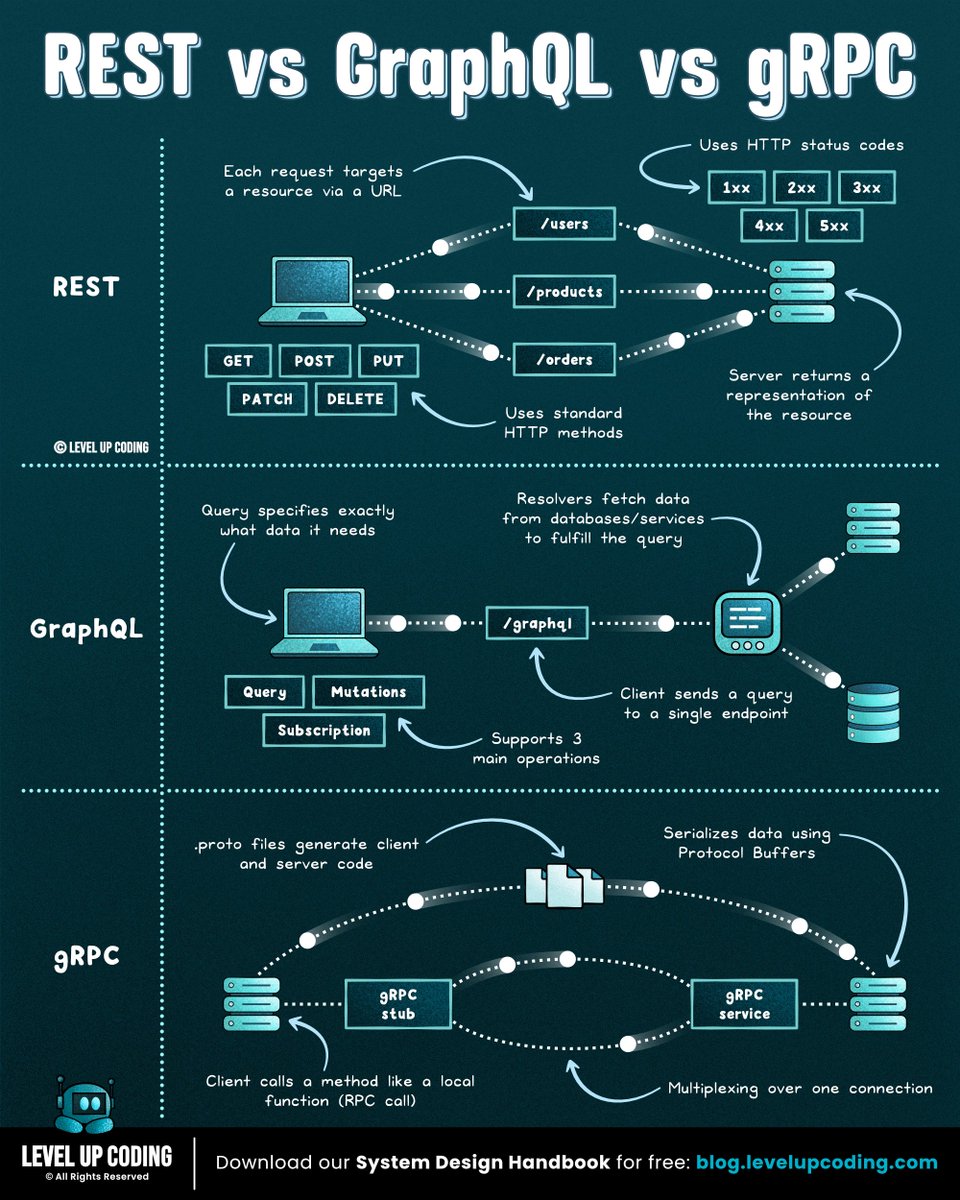
REST vs GraphQL vs gRPC
(explained in under 2 mins):
𝗥𝗘𝗦𝗧 is resource-based and uses standard HTTP methods like GET, POST, PUT, and DELETE. It’s simple, widely adopted, and easy to debug, but can lead to over-fetching or under-fetching when clients need specific data.
𝗚𝗿𝗮𝗽𝗵𝗤𝗟 lets clients request exactly the data they need through a single endpoint. It reduces over-fetching and improves flexibility, but adds complexity around schema design, caching, and performance tuning.
𝗴𝗥𝗣𝗖 is a high-performance RPC framework that uses Protocol Buffers and HTTP/2. It’s efficient, strongly typed, and ideal for internal service-to-service communication, but less human-readable and harder to use from browsers.
Where they typically fit: REST is often used for public APIs, GraphQL for complex frontend data needs, and gRPC for internal service communication.
Each one shifts complexity to a different place. You’re not choosing an API, you’re choosing tradeoffs.
Full breakdown (with visuals) here → lucode.co/api-protocols-…
What else would you add?
♻️ Repost to help others learn system design.
➕ Follow me ( Nikki Siapno ) to improve at system design.
English
Level Up Coding retweetledi
I love when companies provide seamless migrations like this.
Smart move from Replit. #ReplitPartner
Replit ⠕@Replit
We’ve invested deeply in security at Replit, including our recent launches with Security Agent + Auto-Protect. If you want to move your app to Replit, we’re offering free app imports for a limited time. Bring your app over and keep building safely. Get started here: replit.com/free-import
English
Level Up Coding retweetledi
