PowerPoint

9.1K posts

PowerPoint banner
PowerPoint

PowerPoint

@powerpoint

News and tips from the Microsoft #PowerPoint team. Support: https://t.co/JDn3yX1nGw or @MicrosoftHelps.

Sunnyvale, CA Katılım Haziran 2019
57 Takip Edilen54.6K Takipçiler
Sabitlenmiş Tweet
PowerPoint retweetledi
Microsoft 365
Microsoft 365@Microsoft365·
Enterprise AI is entering a new chapter. Organizations are moving beyond experimentation and deploying AI at enterprise scale. Microsoft 365 Copilot has now surpassed 30M+ paid seats, with customers expanding deployments across entire workforces and reaching high usage faster than ever before. But the bigger story isn’t adoption. It’s transformation. From procurement and manufacturing to HR, organizations are using AI and agents to reimagine how work gets done. See how customers across industries are putting Copilot and agents to work: msft.it/6016a65Tr
English
14
30
144
16.7K
PowerPoint retweetledi
Derek Johnson
Derek Johnson@DerekJohnsonSV·
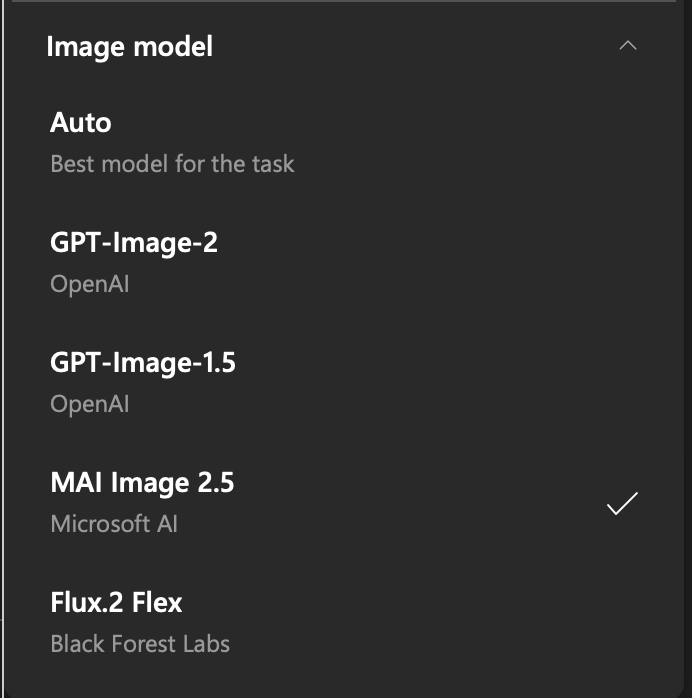
MAI-Image-2.5 is now available in Copilot in PowerPoint! You can choose Microsoft's latest image model to create and modify presentation-ready visuals directly where you work. MAI-Image-2.5 delivers a new level of quality and control, with stronger prompt adherence, more detailed image generation, and precise editing capabilities. Whether you're generating a new visual, refining an existing image, updating text, or making targeted changes, the model is designed to preserve the details that matter while giving you greater creative control. Great partnership with @mustafasuleyman and @MicrosoftAI!
English
4
12
76
5.6K
Soulstice culture
Soulstice culture@Soulstice_Cult·
Some movie villains would’ve won if they had just explained the plan in one PowerPoint instead of a 12-minute monologue.
English
1
0
3
1K
PowerPoint retweetledi
Derek Johnson
Derek Johnson@DerekJohnsonSV·
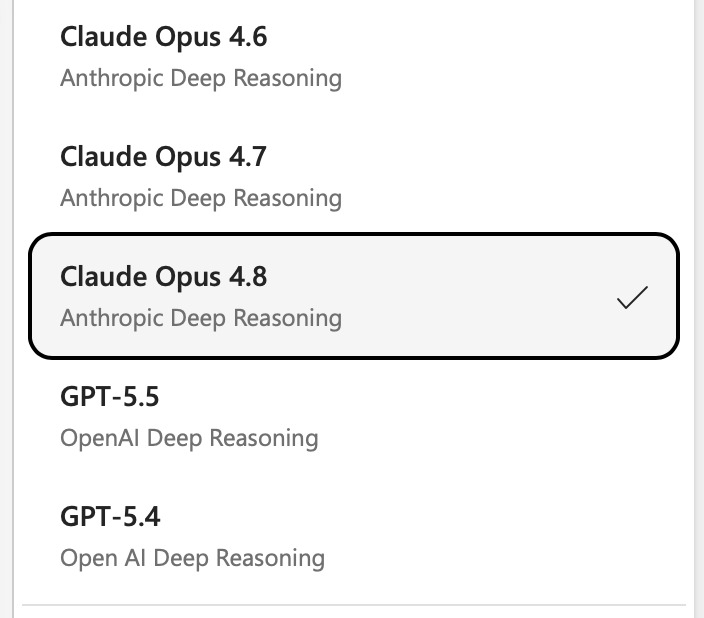
Today, we're rolling out GPT 5.6 in Copilot in PowerPoint. GPT 5.6 is OpenAI's latest and most powerful model, and when used in PowerPoint, I find it faster than other models, designs better looking slides than GPT 5.5, and creates great structured presentations that closely adhere to your branded templates. Give it a try now and let me know what you think. I'd love to hear from you on how it compares with other models we have in PowerPoint, like Claude Opus 4.8.
English
9
12
153
23.8K
PowerPoint retweetledi
Microsoft 365
Microsoft 365@Microsoft365·
From rough ideas to quality work. OpenAl's GPT-5.6 is rolling out across Microsoft 365 Copilot in Word, Excel, PowerPoint, Chat, and Copilot Cowork. Optimized with OpenAl for knowledge work, GPT-5.6 is the preferred model for Microsoft 365 Copilot.
English
15
59
318
35.2K
PowerPoint retweetledi
Microsoft 365
Microsoft 365@Microsoft365·
Now available in Copilot Cowork and PowerPoint, Claude Sonnet 5 helps tackle complex, multi-step work by planning, reasoning, and creating across documents, spreadsheets, and presentations. Combined with Work IQ, Microsoft 365 Copilot delivers results grounded in your organization's context.
English
2
24
186
21.7K
PowerPoint retweetledi
Derek Johnson
Derek Johnson@DerekJohnsonSV·
Everyone's optimizing how they create content with AI. Almost no one's rethinking how they share it. PowerPoint Live in Teams is a glimpse of the other half: every participant gets their own high-quality, navigable copy of the slides, not a laggy screen-share of someone else's cursor. We're shipping 2 new experiences on top of PowerPoint Live now: 1. Highlight things on the slide (privately!) to have Copilot explain them to you in a click. 2. Presenters can quickly refresh the deck so everyone sees the latest version. Incredibly useful for those last minute edits that always come in right as the meeting is starting. techcommunity.microsoft.com/blog/microsoft…
Derek Johnson tweet media
English
1
2
6
4.4K
PowerPoint retweetledi
Derek Johnson
Derek Johnson@DerekJohnsonSV·
Claude Fable 5 is now available for Copilot in PowerPoint through a private preview. I'm finding it to be incredibly capable with building presentations, particularly with strong narratives and instruction following. techcommunity.microsoft.com/blog/Microsoft…
Derek Johnson tweet media
English
2
1
2
674
PowerPoint retweetledi
Sumit Chauhan
Sumit Chauhan@sumit_c·
The suite of MAI models will start rolling out to Word, Excel, PowerPoint & Outlook soon alongside the other foundation models. Giving customers more choices between capabilities, performance and efficiency for the job that need to be done. (@mustafasuleyman - Great job MAI team) microsoft.ai/news/building-…
English
4
23
126
10.6K
PowerPoint
PowerPoint@powerpoint·
@DerekJohnsonSV Exciting update for Copilot in PowerPoint. Looking forward to what Day Two at Build brings.
English
0
0
2
811
Derek Johnson
Derek Johnson@DerekJohnsonSV·
MAI-Image-2.5 joins the family of state-of-the-art image models in Copilot in PowerPoint. This model, announced today by @mustafasuleyman at #MicrosoftBuild, efficient and powerful, and is available to use right now in PowerPoint. Using the best tool for the job is a key tenet that makes Copilot in PowerPoint so powerful. If you haven't tried it recently, give it a try today.
Derek Johnson tweet media
English
2
2
4
1K
PowerPoint retweetledi
Sumit Chauhan
Sumit Chauhan@sumit_c·
Microsoft PowerPoint has enabled Claude Opus 4.8, on the very same day it became available. We are committed to bringing the best and latest models directly to our customers.
Sumit Chauhan tweet media
English
2
25
269
14.7K
PowerPoint retweetledi
Derek Johnson
Derek Johnson@DerekJohnsonSV·
We're rolling out Opus 4.8 in Copilot for PowerPoint now, joining other world-class models to best serve your needs in PowerPoint. Give it a try and let us know what you think!
Derek Johnson tweet media
English
1
3
10
894
PowerPoint retweetledi
Derek Johnson
Derek Johnson@DerekJohnsonSV·
If you haven't tried Copilot in PowerPoint in the last couple weeks, you need to take a second look today. It is saving myself and my team a ton of time, but more importantly, leading to better slides and better meetings. You can ask it to summarize emails, chats and meetings into slides, like this: "Summarize the action items from the Leadership Team Offsite in two slides with owners and suggested next steps." You don't need to be an expert with AI to make the most of it. "Make this slide look great" is surprisingly effective! To get started, just open up PowerPoint, click the Copilot icon and ask for what you want. I'd love to know what you think, and how we can continue to make it better for you.
English
1
4
15
1.6K
PowerPoint
PowerPoint@powerpoint·
@CFC_OBED Should’ve trusted the dude with the PowerPoint
English
0
0
5
340
OB
OB@CFC_OBED·
If you ever feel stupid remember Luis Enrique came to Chelsea with a power point presentation but they rejected him . Since then he has taken pSG to back to back champions league finals .
OB tweet media
English
269
2.3K
25.5K
315.2K
PowerPoint retweetledi
Satya Nadella
Satya Nadella@satyanadella·
We're making a big change to the Copilot experience. Agent Mode is generally available and now the default across Copilot in Word, Excel, and PowerPoint. As models become more capable, we’re bringing that power to where real work happens, right in the canvas. The power of a spreadsheet as an example is its spatial representation of information. What sits next to what, what feeds what. Give an agent that canvas to reason over, and a single prompt can reshape the model, the bridge, and the narrative at once. Read more: microsoft.com/en-us/microsof…
English
292
338
2.5K
439.4K
PowerPoint
PowerPoint@powerpoint·
Copilot in PowerPoint is now widely available. Learn more on the blog and try it for yourself: msft.it/6011vDsAP
English
0
0
4
623
PowerPoint
PowerPoint@powerpoint·
If you work in decks, there are always changes. With Microsoft 365 Copilot in PowerPoint, you can restructure, reformat, and build new slides directly within branded templates. So you can get to final, and stay on brand, faster.
English
1
0
11
1.2K