Stefan @ QTally

18 posts

Stefan @ QTally

Stefan @ QTally

@QTallyApp

Katılım Haziran 2016
0 Takip Edilen26 Takipçiler
Stefan @ QTally
Stefan @ QTally@QTallyApp·
@jpait There are problems with the sync between the phone and watch. You may try restarting both devices and that may fix it for you but you will likely have problems with it again based on other users’ feedback. I may remove support for watch due to these problems if I can’t fix them.
English

2
0
0
0
Jonathan Pait
Jonathan Pait@jpait·
@QTallyApp Clarify... does working on the Apple Watch mean syncing data with my phone? All I ever get is “Please open the main app to create your tallies.”
English
2
0
0
0
Stefan @ QTally
Stefan @ QTally@QTallyApp·
@jonmorrismusic Hi there, it’s not possible to do that right now but I can see how that might be helpful. I’ll see about improving the export, thanks for the feedback!
English
0
0
0
0
Jon Morris
Jon Morris@jonmorrismusic·
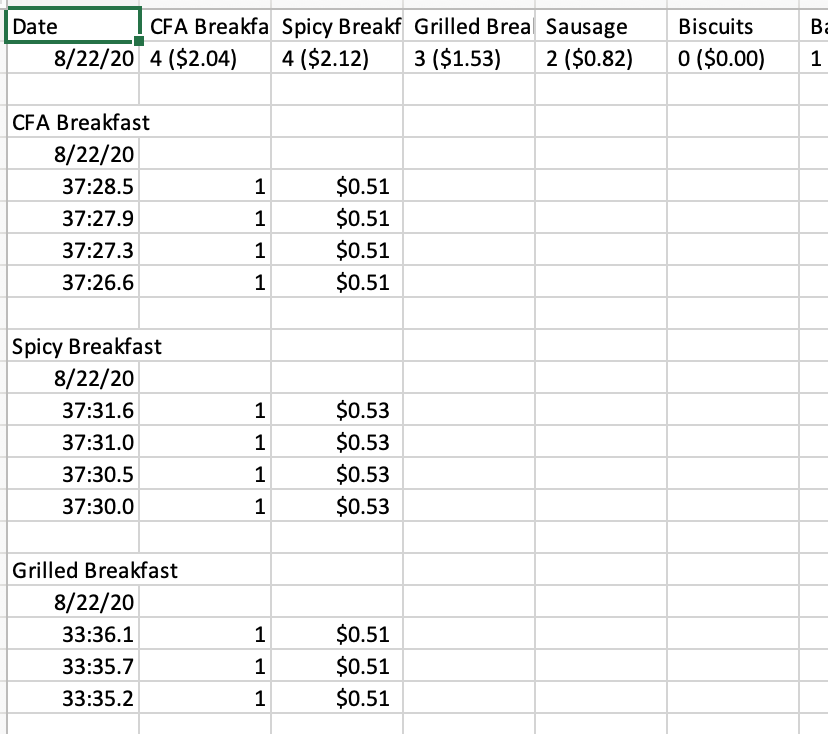
@QTallyApp Any way to separate the consolidated number values and dollar values in the top summary cells when you export? As you can see the top summary cells COMBINE number and dollar values, though the breakdown separates. Would be v helpful for those cells to be separated.
Jon Morris tweet media
English
1
0
0
0
Stefan @ QTally
Stefan @ QTally@QTallyApp·
@PranitShah10 Hi, thanks for getting in touch. Syncing between your devices via iCloud is currently in progress. Hopefully it will be available some time soon.
English
2
0
0
0
Stefan @ QTally
Stefan @ QTally@QTallyApp·
@Anacapa2 This is actually by design. Do you reset it manually, or do you have tallies with goals where they reset automatically? I can see about it including them in the exports.
English
0
0
1
0
Anacapa
Anacapa@Anacapa2·
@QTallyApp great app!! there is a bug in the csv history export function: resets to zero are not taken into account in the csv file.
English
1
0
0
0
Stefan @ QTally
Stefan @ QTally@QTallyApp·
@justintumilaar You currently need to have Apple’s Mail app set up in order to export. I’ll look to improve this in the future!
English
0
0
1
0
Justin Tumilaar
Justin Tumilaar@justintumilaar·
@QTallyApp Hey Stefan, I'm trying to export data from QTally on an ipad, but I get a message saying 'Cannot Send. Make sure your mail is set up correctly.' Can you tell me how to fix this?
English
1
0
0
0
Stefan @ QTally
Stefan @ QTally@QTallyApp·
@johngmagic At the moment you have to set a goal value for it to reset. Also, there is currently no way to view the history in this way either. I’ll note these things down and perhaps allow for them in the future. Thanks for getting in touch!
English
0
0
1
0
Stefan @ QTally
Stefan @ QTally@QTallyApp·
@MeggieBolton The export data is incorrect? Could you provide some screenshots of the export vs graph? If you’d like, you could also get in touch via email through the app’s Feedback feature. Thanks
English
0
0
0
0
Stefan @ QTally
Stefan @ QTally@QTallyApp·
@rickmz1958 Tap anywhere on that line where it says “TEST” and “3”. That should open the history specific to that tally.
English
0
0
0
0
Stefan @ QTally
Stefan @ QTally@QTallyApp·
@rickmz1958 There should be a + button on the top right when you’re viewing the graphs for an individual tally.
English
0
0
0
0
Stefan @ QTally
Stefan @ QTally@QTallyApp·
@McCubbinKaren I'd definitely like to make a video showcasing the app, but I don't think I'll be able to make one very soon
English
0
0
0
0
Stefan @ QTally
Stefan @ QTally@QTallyApp·
@benjaminrowe89 yes it does retain them. Entering data for specific dates will be added soon! Sorry for the delayed response
English
0
0
1
0
Stefan @ QTally
Stefan @ QTally@QTallyApp·
@BTS_Calgary just letting you know that the export feature is now available, in version 3.3
English
0
0
0
0
Stefan @ QTally
Stefan @ QTally@QTallyApp·
@BTS_Calgary Thanks for that. It seems that you are not on the latest version of the app. Have you tried updating?
English
1
0
0
0
Stefan @ QTally
Stefan @ QTally@QTallyApp·
@BTS_Calgary press and hold the tally and it should open in full screen. The history button is on the bottom left. CSV export coming soon!
English
3
0
1
0