Salmaan

9.5K posts

Salmaan banner
Salmaan

Salmaan

@SlmnMANUTD

W11 tester. h/w & s/w tech support engg. Manchester United Fan. Love Lions, follow a lot of them from Sabi Sands Game reserve & Kruger National Park.

Katılım Şubat 2021
27 Takip Edilen287 Takipçiler
Sabitlenmiş Tweet
Salmaan
Salmaan@SlmnMANUTD·
@_ArsenalTeam I told you bro, the bottle will be legendary!
Salmaan@SlmnMANUTD

@_ArsenalTeam The bottle will be legendary. I wanted you lot to win the league but now with this Amad thingy, I am rooting against you people. Lol. I am gonna watch every AFC game this season and enjoy the bottle! The legendary bottle!

English

0
0
1
193
Salmaan
Salmaan@SlmnMANUTD·
@ImChrisHughes Ya it was happening a lot for me too but its gone now after the last update.
English
0
0
1
3
Chris Hughes
Chris Hughes@ImChrisHughes·
Has anyone seen that bug in Windows 11 where it freezes and you can't click on anything until you Ctrl-Alt-Delete and come back? I think this is the 6th or 7th time I've seen it. Thought it was me but it might be actually Microsoft...
English
0
0
0
31
Salmaan
Salmaan@SlmnMANUTD·
@MagnusMothVT While format type is the USB? NTFS or something else? Do you know if the USB port works? Tried like a USB mouse to see if it powers on ( Red light is ON at bottom) ?
English
0
0
0
3
Magnus Moth ཐིཋྀ🧡
@LigerzeroTTV I’m able to access BIOS and I have the thumb drive with Windows 11 back on it, but the pc isn’t recognizing that there’s a USB being plugged in. How do I reinitialize the TPM? 😭
English
2
0
0
60
Magnus Moth ཐིཋྀ🧡
Need tech support I’m pretty sure I essentially bricked my PC It prompted me to clear my tpm and I did it without thinking, so I tried to run a windows thumb drive to reinstall windows Install failed and I’m stuck in the boot menu Thumb drive is possibly damaged
English
5
0
24
838
Salmaan retweetledi
MayankUTD
MayankUTD@MayankUTD·
@FabrizioRomano Mourinho dealt with Lazy Manchilds like Pogba, Lukaku, Rashford, Lingard etc. and finished 2nd in the League! Tells a lot about Mou
MayankUTD tweet media
English
4
7
249
9.3K
Frost~ 🩷
Frost~ 🩷@FireSparkMLP·
windows 10 is so fucking transphobic it doesnt have the trans flag emoji 🏳️‍⚧️🏳️‍⚧️🏳️‍⚧️🏳️‍⚧️
English
1
0
2
35
Salmaan
Salmaan@SlmnMANUTD·
@OhShnikki @Microsoft 👨‍👩‍👧‍👦 This is trad family, man, women, girl & boy. Its in W11
English
0
0
0
6
Salmaan
Salmaan@SlmnMANUTD·
@gerald90030987 Update BIOS, All your chipset drivers, and your USB drivers from your Motherboard's manufacturers website and see if that helps.
English
0
0
0
10
gerald
gerald@gerald90030987·
@msiUSA_Tech I have a MSI MPG X570 Motherboard and need to add a TPM Module so I can upgrade to Windows 11. I bought a MSI-4462 TPM Module from Amazon. When I install it the USB quits working so the keyboard and mouse dont work. When I take it out everything works again.
English
1
0
1
11
TrialMacameau 👑
TrialMacameau 👑@TrialMacameau·
(cont.) Privacy settings ? None of these are important ! The command to create Local account still works on the latest version of Windows 11. I don't need and don't want to log in to Windows with my Microsoft account !
English
1
0
0
16
TrialMacameau 👑
TrialMacameau 👑@TrialMacameau·
Just a thought here @Microsoft @Windows Did you get flaked so much for removing ways to create local account and by your own statements, saying that we are skipping critical setup screens. What screens are we critically skipping ? Internet ? Windows Update ? Microsoft Account ?
TrialMacameau 👑 tweet media
English
1
0
2
65
ThisOldGuy 🤘🎸🎮
ThisOldGuy 🤘🎸🎮@ThisOldGuy3·
@JenMsft @Microsoft Doesn't seem like it would be that difficult to add an option to the UI to place the task bar at the top or on the side, but I am not a coder so maybe I'm wrong.
English
1
0
1
47
Salmaan retweetledi
Fix my PC Store™
Fix my PC Store™@FIXMYPCSTORE·
Windows 11 24H2 BitLocker Bug: How to Recover a Locked PC WINDOWS 11 24H2 BITLOCKER BUG: HOW TO RECOVER A LOCKED PC IN 2026 TL;DR: The Windows 11 24H2 update has been triggering unexpected BitLocker recovery screens on thousands of PCs in 2026 - even on machines where encryption was never manually turned on. If your computer won't boot after a Windows update and you're staring at a blue BitLocker recovery screen, don't panic. This guide walks you through exactly how to retrieve your recovery key, get back into your PC, and prevent this from happening again. WHY IS MY PC SUDDENLY ASKING FOR A BITLOCKER RECOVERY KEY? Let's break this down, because this one catches a LOT of people off guard. If you recently updated Windows 11, changed a BIOS setting, or had a firmware update push through automatically, you might have been greeted by a terrifying blue screen asking for a 48-digit BitLocker recovery key. Your first thought was probably: "I never turned on BitLocker. What is happening?" Here's the thing - you're absolutely right. You probably didn't turn it on manually. But Windows 11 24H2 introduced something called automatic device encryption. On PCs that meet certain hardware requirements (a TPM 2.0 chip, Secure Boot enabled, and a Microsoft account sign-in), Windows 11 quietly enables BitLocker encryption in the background. No prompt. No confirmation. It just... does it. And that's totally fine - until something disrupts the trust chain between your hardware and the encryption. A BIOS update, a firmware change, a failed Windows update, or even a hardware swap can trigger the BitLocker recovery screen. Suddenly your PC is locked, and you need a key you never knew existed. This Windows 11 24H2 BitLocker bug has been one of the most common issues we've seen at our computer repair shop in West Palm Beach throughout 2026. You are definitely not alone in this. HOW AUTOMATIC DEVICE ENCRYPTION WORKS IN WINDOWS 11 24H2 Let me explain this in a way that actually makes sense, because Microsoft's documentation can be a bit dense. BitLocker is a full-disk encryption feature built into Windows. It's designed to protect your data if your laptop gets stolen. When it's working properly, it's invisible - your PC boots normally, and the TPM chip handles the decryption automatically. With Windows 11 24H2, Microsoft expanded the criteria for automatic device encryption. Previously, this feature only kicked in on certain OEM devices. Now, it activates on a much wider range of hardware. According to Microsoft's BitLocker documentation, the encryption is tied to your Microsoft account, and the recovery key is supposed to be automatically backed up to your account. The keyword there is "supposed to." WHY THE RECOVERY KEY SOMETIMES DOESN'T GET SAVED Here's where things get tricky. The automatic backup of your BitLocker recovery key depends on a few things going right: • You were signed into a Microsoft account (not a local account) when encryption activated • Your internet connection was stable during the encryption process • The backup process completed without errors If any of those conditions weren't met - maybe you switched to a local account, maybe your Wi-Fi dropped at the wrong moment - your recovery key might not be saved anywhere. And that's when a routine Windows update can turn into a full-blown crisis. STEP-BY-STEP: HOW TO RETRIEVE YOUR BITLOCKER RECOVERY KEY Okay, deep breath. Let's walk through this together. There are several places your recovery key might be hiding, and we're going to check every single one. OPTION 1: CHECK YOUR MICROSOFT ACCOUNT ONLINE This is the most common place to find it, and it works for most people. Here's what to do: • Grab another device - a phone, a tablet, a friend's computer, anything with a web browser • Go to account.microsoft.com/devices/recove… • Sign in with the Microsoft account you use on the locked PC • Look for your device name and the associated 48-digit recovery key • Type that key into the BitLocker recovery screen on your locked PC Found it? Amazing! That's a huge win. Type it in carefully (those 48 digits are not forgiving of typos), and you should be back in business. For more detailed instructions, check out Microsoft's official BitLocker recovery key guide. OPTION 2: CHECK YOUR AZURE ACTIVE DIRECTORY OR WORK ACCOUNT If your PC is managed by an employer or school, the recovery key might be stored in your organization's Azure Active Directory (now called Microsoft Entra ID). Contact your IT department - they can usually retrieve it in minutes. OPTION 3: CHECK FOR A PRINTED OR SAVED COPY Did you (or whoever set up your PC) ever print the recovery key or save it to a USB drive? It's worth checking. Some PC manufacturers also include BitLocker recovery information in their setup documentation. OPTION 4: CHECK YOUR MICROSOFT ACCOUNT UNDER A DIFFERENT EMAIL Here's one people miss - if you've ever signed into your PC with a different Microsoft account (even temporarily), the key might be saved under that account instead. Try every Microsoft email address you've ever used. WHAT IF YOU CAN'T FIND YOUR BITLOCKER RECOVERY KEY? I'm not going to sugarcoat this one. If your recovery key truly isn't saved anywhere, the situation gets more complicated. But it's not hopeless. Let's talk about your options. PROFESSIONAL DATA RECOVERY Without the recovery key, the encrypted drive cannot be unlocked through normal means. BitLocker uses AES encryption, which is extremely strong by design. However, a professional data recovery service can sometimes help in specific scenarios: • If the encryption was only partially completed before the lockout • If the drive has a suspended protection state that can be leveraged • If there are backup partitions or recovery partitions that weren't encrypted Our technicians at Fix My PC Store in West Palm Beach have recovered data from BitLocker-locked drives in cases where the encryption wasn't fully applied. It's not guaranteed, but it's absolutely worth exploring before you give up on your files. CLEAN WINDOWS REINSTALL If your data isn't critical (or you have cloud backups - please tell me you have cloud backups!), a clean reinstall of Windows is the fastest path back to a working computer. Here's the general process: • Create a Windows 11 installation USB drive using another PC and Microsoft's Media Creation Tool • Boot from the USB drive on the locked PC • During installation, delete the encrypted partition and create a new one • Install Windows fresh Important: This will erase everything on the encrypted drive. There's no going back once you delete that partition. If there's any chance your data can be recovered, talk to a professional first. WHEN TO BRING YOUR PC TO A PROFESSIONAL Look, I love empowering you to fix things yourself. That's kind of my whole deal! But there are times when bringing your machine to a trusted laptop repair specialist is the smartest move. Here's when I'd recommend it: • You have important files on the locked drive and no backup • You're not comfortable creating bootable USB drives or editing partitions • Your PC has other issues beyond the BitLocker screen (hardware problems, multiple failed updates) • You need your computer back fast for work or school Our team at Fix My PC Store handles BitLocker recovery cases every week. We serve customers across West Palm Beach, Boynton Beach, Lake Worth, Jupiter, and the greater Palm Beach County area. We've seen every variation of this bug, and we know exactly how to approach each scenario. HOW TO PREVENT THE WINDOWS 11 24H2 BITLOCKER BUG FROM HAPPENING AGAIN Once you're back into your PC (and you WILL get back in - you've got this), let's make sure this never catches you off guard again. BACK UP YOUR BITLOCKER RECOVERY KEY RIGHT NOW Seriously, do this immediately. Here's how: • Open Settings > Privacy & Security > Device Encryption (or search "BitLocker" in the Start menu) • Click Back up your recovery key • Save it to your Microsoft account, print it, AND save it to a USB drive • Store the printed copy somewhere safe (not taped to your laptop, please!) I recommend saving it in at least two different places. Future you will be incredibly grateful. CONSIDER WHETHER YOU ACTUALLY NEED BITLOCKER If you're using a desktop PC that never leaves your home, you might decide that full-disk encryption isn't necessary for your situation. You can turn off device encryption in Settings > Privacy & Security > Device Encryption. Just toggle it off. A word of caution: If you travel with a laptop or store sensitive information, BitLocker is genuinely valuable protection. Don't disable it just because it caused one bad experience. Instead, make sure your recovery key is properly backed up. BE CAREFUL WITH BIOS AND FIRMWARE UPDATES Since BIOS and firmware updates are the most common trigger for this bug, here's a smart approach: • Before any BIOS update, suspend BitLocker protection temporarily (you can do this from the BitLocker control panel) • Complete the BIOS update • Reboot and confirm everything works • BitLocker will automatically resume protection This simple step prevents the TPM from detecting a hardware change and triggering the recovery screen. It takes 30 seconds and saves you hours of stress. KEEP REGULAR BACKUPS OF YOUR IMPORTANT FILES This is my broken record moment, but I'll say it anyway: back up your files! Use OneDrive, Google Drive, an external hard drive, or all three. If your drive ever becomes truly inaccessible, having a backup means you've lost nothing but a little time. WHY THIS BITLOCKER BUG IS SO WIDESPREAD IN 2026 The reason this issue has exploded in 2026 is a perfect storm of factors. Microsoft has been pushing Windows 11 24H2 updates more aggressively, including cumulative updates that modify boot components. Hardware manufacturers have been rolling out firmware updates for security vulnerabilities. And the expanded automatic encryption criteria means millions more PCs are encrypted than their owners realize. It's not really a "bug" in the traditional sense - BitLocker is working exactly as designed. The problem is that the automatic encryption happens so silently that users have no idea it's there until something goes wrong. Microsoft could absolutely do a better job of notifying users and ensuring recovery keys are saved before encryption activates. Until that changes, awareness and preparation are your best defenses. And now you have both! GET EXPERT BITLOCKER RECOVERY HELP IN PALM BEACH COUNTY If you're staring at a BitLocker recovery screen right now and feeling stuck, we're here for you. The team at Fix My PC Store has been helping customers across Palm Beach County recover from this exact issue all year. Whether you need help retrieving your recovery key, recovering data from an encrypted drive, or getting a fresh Windows installation up and running, our experienced technicians can help. We offer professional computer repair services for desktops, laptops, and everything in between. Walk-ins are welcome at our West Palm Beach location, or give us a call to describe your situation - we'll let you know exactly what to expect before you bring your machine in. Remember: getting locked out of your own PC is frustrating, but it's fixable. You've got this - and if you need a hand, we've got you covered. LOCKED OUT AFTER A WINDOWS UPDATE? Fix My PC Store in West Palm Beach specializes in BitLocker recovery, data recovery, and Windows repair. Let our expert technicians get you back into your PC fast.Get Help Today ──── Fix My PC Store | Royal Palm Beach, FL auto-scheduled
English
0
1
1
107
Salmaan retweetledi
娑婆助
娑婆助@shabasuke·
Windows11をローカルアカウントでインストールする方法はマイクロソフトアカウントのメールアドレスを入れた後に二段階認証を恣意的に失敗させるだな。失敗するとローカルアカウントでパスワード作成画面が出て先に進めるぽい。これでユーザーフォルダをxxxxとお好みの名前付けられるようになる。
日本語
1
2
2
204
Salmaan
Salmaan@SlmnMANUTD·
@Sekigema Have you tried ReactOS? Open source Windows project
English
0
0
0
30
Sekigema 💎😈 KONTON
after using it for a day and streaming with it, tiny11 + chris titus util (for anything tiny11 missed) has been an actually solid experience still wouldnt recommend people use default windows 11, but the cut down ones seem pretty solid 👍
English
2
0
6
175
Salmaan retweetledi
Raunak Yadush
Raunak Yadush@raunak_yadush·
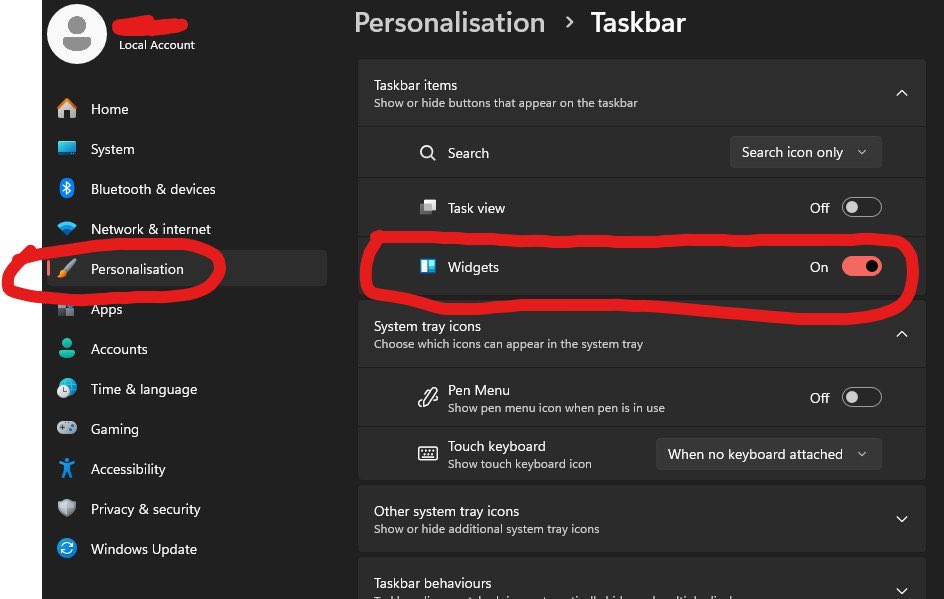
Windows 11 Widgets are running in the background eating your CPU even if you never open them. WidgetService.exe and Microsoft.Widgets.exe load at startup and stay resident, checking for weather updates, news feeds, and stock prices while you game. Fix: Settings -> Personalization -> Taskbar -> Widgets -> OFF Easy way to gain more FPS in CPU intensive games like Fortnite, CSGO2, and Valorant!
Raunak Yadush tweet media
English
9
15
176
16.4K
Banananomics
Banananomics@Banananomic·
@bariksis Why? Why do we like Microsoft at all now? TA aside, what does Microsoft do that deserves to surpass their all time high? Is Windows 11 great? Is $69 Billion for Activision-Blizzard paying off? Is Co-Pilot the AI of choice? Tell me why Microsoft is even remotely valuable now
English
1
0
0
19
マゼラン 🌚
マゼラン 🌚@MazeranPickman·
ちょっとした文書作業があったのでメモ帳開いて文章打ってたんですけど、今さら気付いたんですがWindows11って同じ場所に置いてあるメモ帳が全部タブとして表示される感じなんですか???なんでこんな仕様にしたの????(困惑)
日本語
1
0
5
950
Salmaan
Salmaan@SlmnMANUTD·
@raiku132 Try Shift + Right Click, and see if that helps. (To get the old RC menu back)
English
0
0
1
12
右でも左でもない異常な日本人
Windows11は通常右クリックのシンプルなメニューがクソすぎる。 Windows10が最後のOSじゃなかったんですか???
日本語
1
0
1
48
coromo
coromo@crmgd_9898·
windows11でタスクバーのアイコンとか左寄せにしてない人見るたびに適応力高いなぁって思ってる
日本語
1
0
3
56
TriGremlin
TriGremlin@TriGremlin·
@Pirat_Nation The Windows 11 right click menus are an example of open hostility to users. Why should I have to do extra clicks just to rename a folder? Almost never is the option I'm looking for in the first page of their stupid right click menu, almost always have to click show more options.
English
2
0
0
33
Pirat_Nation 🔴
Pirat_Nation 🔴@Pirat_Nation·
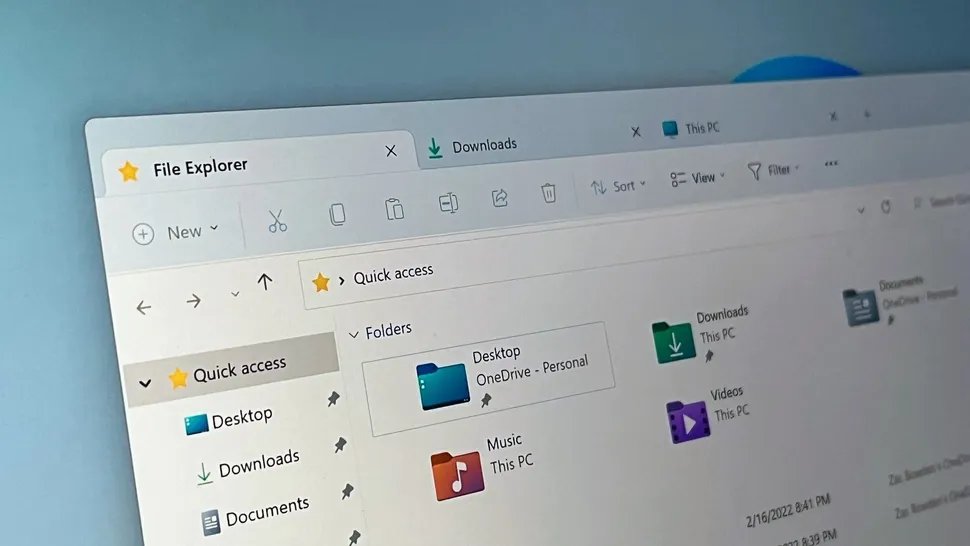
Microsoft is working to make File Explorer in Windows 11 noticeably faster this year. The main improvements include: -Much quicker context menus (right-click), folder navigation, and search -Faster and more reliable copying or moving of large files The first updates are expected to reach Windows Insiders soon
Pirat_Nation 🔴 tweet mediaPirat_Nation 🔴 tweet media
English
73
22
588
32.2K