Sabitlenmiş Tweet

🔞You can add adult-only scenes to Trivia About You by installing the R18 Patch.
The patch does not affect the main story and is provided as optional extra content.
Please decide for yourself whether you wish to use it.
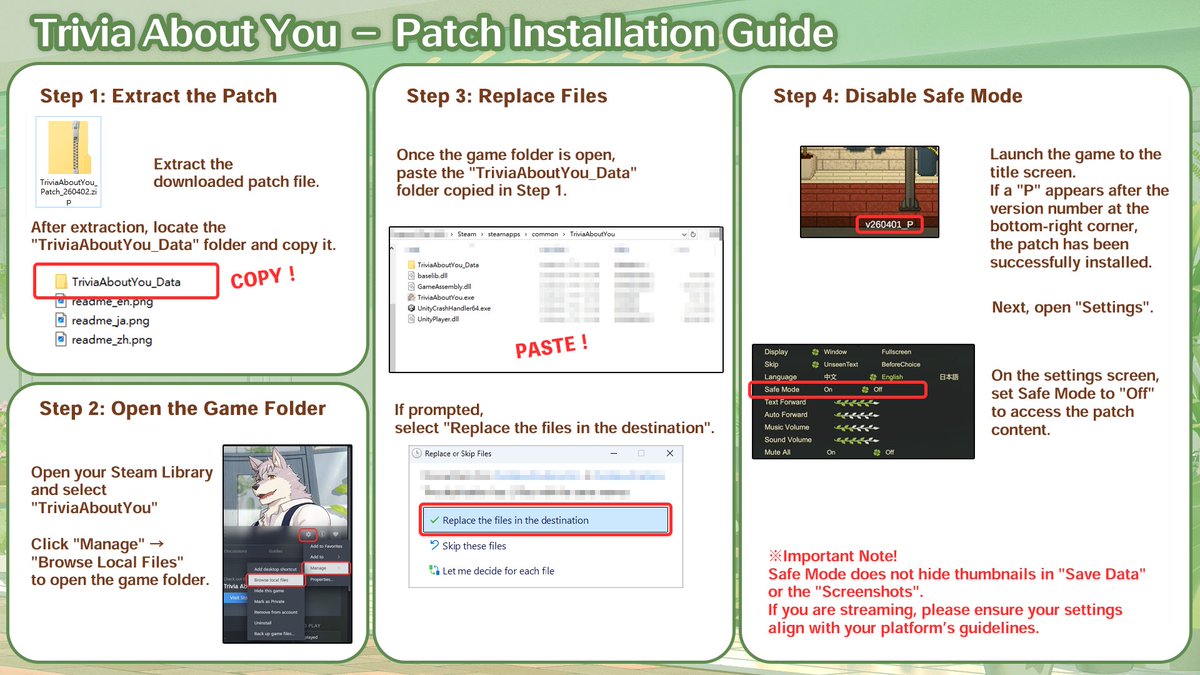
📥 After downloading the patch, follow the instructions below:
Step 1: Extract the patch
1. Right-click the downloaded patch file
2. Select “Extract All”
3. Click “Extract”
A folder containing the patch will appear after extraction
Step 2: Open the game installation folder
1. Open Steam
2. Go to your Library
3. Find “Trivia About You”
4. Click the gear icon next to the game title
5. Select “Manage”
6. Click “Browse Local Files”
Steam will open the game’s installation directory
Step 3: Copy and replace the files
1. Copy the “TriviaAboutYou_Data” folder extracted in Step 1
and paste it into the game installation folder opened in Step 2
2. If prompted, Select “Replace the files in the destination”
Step 4: Disable Safe Mode in the game
1. Launch “Trivia About You Demo”
2. Open Settings
3. Set “Safe Mode” to Off
※This patch contains adult-only (18+) content.
Please ensure you are 18 years or older before downloading
※Important Note!
Safe Mode does not hide thumbnails in "Save Data" or the "Screenshots" menus.
If you are streaming or recording content, please ensure your settings align with your platform’s guidelines.
Patch download: drive.google.com/file/d/1pIEN2q…
English