

Varshith Reddy
53 posts
Varshith Reddy
@VarshithhReddy_
Full Stack Developer | Next.js, MERN, TypeScript | https://t.co/RxPTn1Nckd IT @ VJIT | Building Scalable Web Apps
Hyderabad Katılım Temmuz 2022
44 Takip Edilen9 Takipçiler

Role - Full Stack Developer Intern
Stipend - 30K per month
Location - Remote
- Build responsive front‑end components with React
- 12 LPA on successful conversion to full‑time
Let us now if you are Interested 👇
English
Varshith Reddy retweetledi

I built CF Duel — a platform for Codeforces-style 1v1 & team duels
Just hit 1000+ users and 500+ duels!
Highlights:
• 1v1 & Team battles
• Rating-based matchmaking
• Real-time CF problems
Try it here 👉 cf-1v1.vercel.app
#Codeforces #CompetitiveProgramming #Coding
English


🚀 Day-29 & 30/30 – Build Journey Complete: Syntra AI is Live!
30 days ago, I set out to challenge myself:
👉 Build something real.
👉 Share the process openly.
👉 Inspire others to experiment with AI + modern web dev.
Today, that journey comes full circle. 🎉
Meet Syntra AI – An Advanced Agentic Assistant:
A production-ready AI system powered by Claude 3.5 Sonnet, orchestrated with LangGraph, and integrated with 7+ real-time tools — from Wikipedia, YouTube transcripts, Google Books, to Wolfram Alpha, currency conversion, and even a custom backend for customer data.
✨ What makes Syntra AI special?
> Agentic Intelligence: Breaks complex queries into steps, reasons, and executes across multiple tools.
> Real-Time Streaming: Token-by-token responses with instant feedback.
Scalable Architecture: Built with Next.js 15, Convex, Clerk, and deployed on Vercel.
> Developer Friendly: Clean repo, documented setup, modern UI (Shadcn, Radix, Tailwind).
💡 The best part? Syntra isn’t just a demo it’s a reference implementation for anyone building real-world AI assistants.
📹 I’ve shared a short video clip so you can see Syntra in action watch how it connects live tools + backend data to deliver intelligent responses.
🔗 Explore the full codebase here:
GitHub Repo: github.com/varshithreddy7…
This closes my 30-day hashtag#BuildInPublic series but it’s not the end.
⚡ I’ll be back with new experiments, deeper dives, and fresh projects to push the limits of AI + web dev.
💬 I’d love to hear:
What’s one feature you’d add if you were building your own AI assistant?
#BuildInPublic #AI #Nextjs #LangGraph #Claude #DeveloperExperience #Innovation #AgenticAI #OpenSource
English

Day-28/30 – Build Journey: Prepping for Deployment
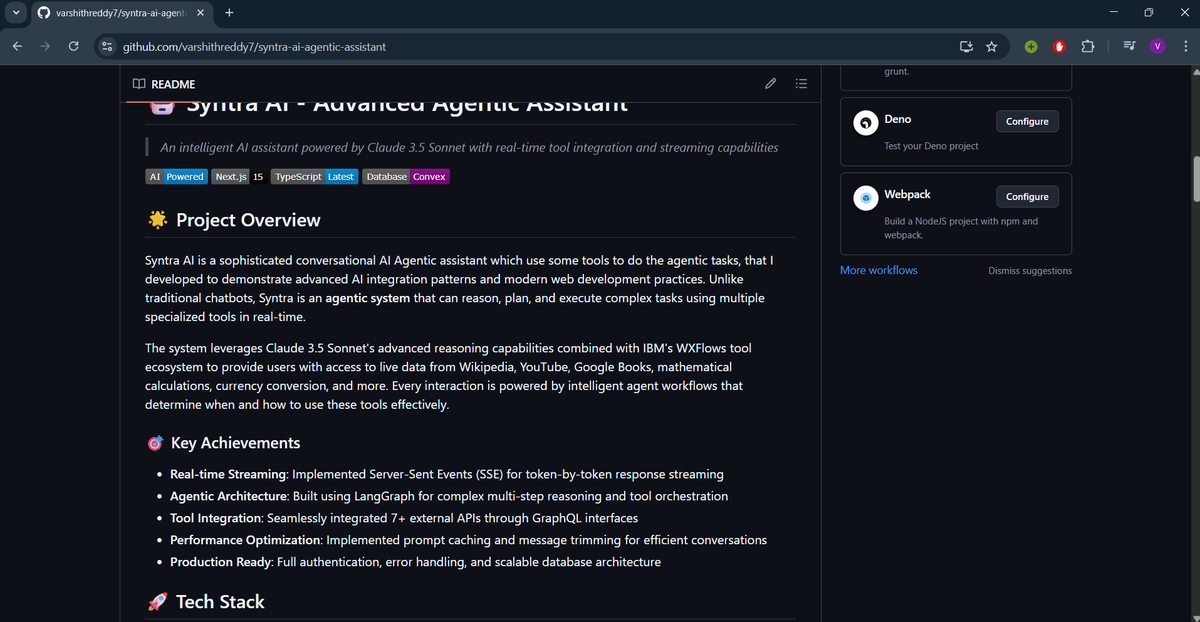
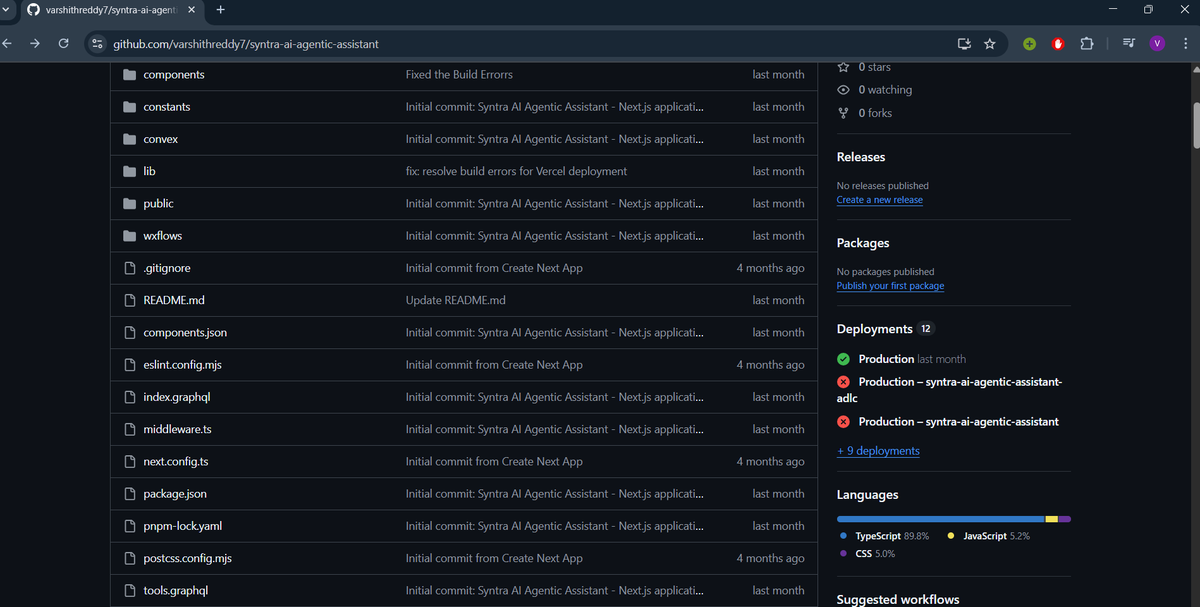
Yesterday, I showed Syntra AI in action. Today, I shifted gears towards deployment prep because shipping is as important as building.
Here’s what I worked on:
📝 Version Control with Git
> Structured the repo with clean commits so contributors can track progress easily.
> Wrote a clear README File → step-by-step setup, dependencies, and usage guide.
> This makes the project accessible for anyone who wants to explore or contribute.
⚙️ Why Vercel for Deployment?
> Automated CI/CD → every push to GitHub = auto build + deploy.
> Zero-config, scalable infra → focus on features, not servers.
> Great Developer experience with instant previews + rollbacks.
👉 Tomorrow: I’ll dive into the actual deployment process itself — taking Syntra from code → cloud.
💡 Pro tip: Don’t treat deployment as an afterthought. A solid Git strategy + README + CI/CD pipeline = smoother scaling later.
Would love to know:
⭐ What’s your go-to deployment platform for projects?
#BuildInPublic #AI #Nextjs #Vercel #LangGraph #Claude #DeveloperExperience #CICD #Git #OpenSource #Innovation
English

This is the kind of build-in-public I love. Not just what was built, but how it works under the hood. Agentic AI isn’t about chat, it’s about reasoning, resilience, and real execution. Qudos @VarshithhReddy_ 👏🔥 #AI #BuildersJourney
Varshith Reddy@VarshithhReddy_
Day-27/30 – Day Build Journey: Testing Syntra AI in Action Yesterday, I shared how Syntra was architected. Today, I put it to the test and recorded the entire process so you can sit back and watch how an AI agent really works behind the scenes. 🎥 In this 3+ minute demo, you’ll see: > How Syntra uses multiple tools in real-time (Wikipedia, YouTube, Google Books, Math, Currency conversion). > What happens when a tool call fails — and how automatic retries keep the system resilient. > Step-by-step reasoning, not just responses, showing the true agentic. behavior > Smooth streaming responses for a natural conversation flow. 💡 Key Takeaways for Builders > Agentic Systems ≠ Chatbots → They reason, plan, and execute multi-step tasks autonomously. > Resilience matters → Error handling and retry logic are just as important as the happy path. > Streaming UX = Magic → Token-by-token responses keep users engaged and trusting the system. > Tool orchestration is the heart → With LangGraph + WXFlows, Syntra decides which tool to use and when. 🛠️ How You Can Build This Too - Framework: Next.js + Convex + LangGraph - Model: Claude 3.5 Sonnet - Tools: Wikipedia, YouTube Transcript, Google Books, Wolfram Alpha, Exchange Rates, + custom GraphQL APIs. - Deployment: Vercel + Clerk for authentication - This isn’t just a prototype — Syntra is built production-ready with authentication, caching, error recovery, and scalable infra. 👉 Tomorrow, I’ll move to deployment, and soon after, I’ll polish and release the final showcase. Would love your thoughts: ⭐ What real-world use case would you plug Syntra into? #AI #ArtificialIntelligence #Nextjs #Claude #LangChain #AgenticAI #GenerativeAI #MachineLearning #OpenSource #Developers #Innovation #Vercel #Convex #FutureOfWork
English
Day-27/30 – Day Build Journey: Testing Syntra AI in Action Yesterday, I shared how Syntra was architected.
Today, I put it to the test and recorded the entire process so you can sit back and watch how an AI agent really works behind the scenes. 🎥
In this 3+ minute demo, you’ll see:
> How Syntra uses multiple tools in real-time (Wikipedia, YouTube, Google Books, Math, Currency conversion).
> What happens when a tool call fails — and how automatic retries keep the system resilient.
> Step-by-step reasoning, not just responses, showing the true agentic. behavior
> Smooth streaming responses for a natural conversation flow.
💡 Key Takeaways for Builders
> Agentic Systems ≠ Chatbots → They reason, plan, and execute multi-step tasks autonomously.
> Resilience matters → Error handling and retry logic are just as important as the happy path.
> Streaming UX = Magic → Token-by-token responses keep users engaged and trusting the system.
> Tool orchestration is the heart → With LangGraph + WXFlows, Syntra decides which tool to use and when.
🛠️ How You Can Build This Too
- Framework: Next.js + Convex + LangGraph
- Model: Claude 3.5 Sonnet
- Tools: Wikipedia, YouTube Transcript, Google Books, Wolfram Alpha, Exchange Rates, + custom GraphQL APIs.
- Deployment: Vercel + Clerk for authentication
- This isn’t just a prototype — Syntra is built production-ready with authentication, caching, error recovery, and scalable infra.
👉 Tomorrow, I’ll move to deployment, and soon after, I’ll polish and release the final showcase.
Would love your thoughts:
⭐ What real-world use case would you plug Syntra into?
#AI #ArtificialIntelligence #Nextjs #Claude #LangChain #AgenticAI #GenerativeAI #MachineLearning #OpenSource #Developers #Innovation #Vercel #Convex #FutureOfWork
English
Day-26/30 – Debugging Chaos to Clarity
Today was testing day which basically means I had to break my own code to see where it fails. And oh boy, it did fail
Here are a few gems I ran into:
1. SSE Parser Misuse – "Unexpected end of input"
> I simulated a bad stream from the backend (missing the final done event). The parser freaked out.
👉 Fixed it by adding error handling in processStream so the app doesn’t just die when JSON is incomplete.
2. LangChain Tool Call Error – "ToolStart event missing tool name"
> This one was fun. My agent fired a ToolStart event… without a tool name. The frontend was like “uhh, undefined?”
👉 Fixed by adding a simple check + making sure the agent always includes the tool name.
3. Database Save Error – "ValidationError"
> Tried saving a message that had no content. DB was like: nope.
👉 Fixed by validating on both ends: frontend blocks empty saves, backend double-checks before storing.
🎯 Next Up (Day-27) I’ll polish and focus on making the whole loop feel stable and production-ready. Step by step, this assistant is getting real.
#Build30Days #Debugging #SSE #LangChain #Nextjs

English
Day-25/30 – SSE Parser in Action (Part 2)
Yesterday I introduced the createSSEParser, which translates raw server-sent events into structured messages.
Today I wired it up inside the chat interface so the assistant feels truly real-time.
🛠 What I Did Today:
> Implemented a processStream function to read raw chunks from the response body.
> Passed each chunk into the parser.parse() to extract tokens + structured messages.
> Updated the streamedResponse state as tokens arrived word-by-word.
> Handled special cases like ToolStart, ToolEnd, and Done events.
> Saved the final response to the database once the stream finished.
💡 Why This Matters:
> This is where the magic happens. Instead of waiting for a “big block” of text, the assistant streams thoughts in real-time:
- Tokens arrive word by word → feels instant.
- Tools show live inputs + outputs → feels transparent.
- Final “done” commits everything to the DB → feels consistent.
📌 Core Insight:
> Streaming + Parser = Personality.
> Your assistant isn’t just functional it breathes with every token, tool call, and response.
🎯 Next Up (Day-26): Tomorrow marks the big milestone full-on testing. Time to battle-test everything I’ve built so far and prove the system can stand strong under real usage.
#Build30Days #SSE #Nextjs #LangGraph #StreamingUX


English
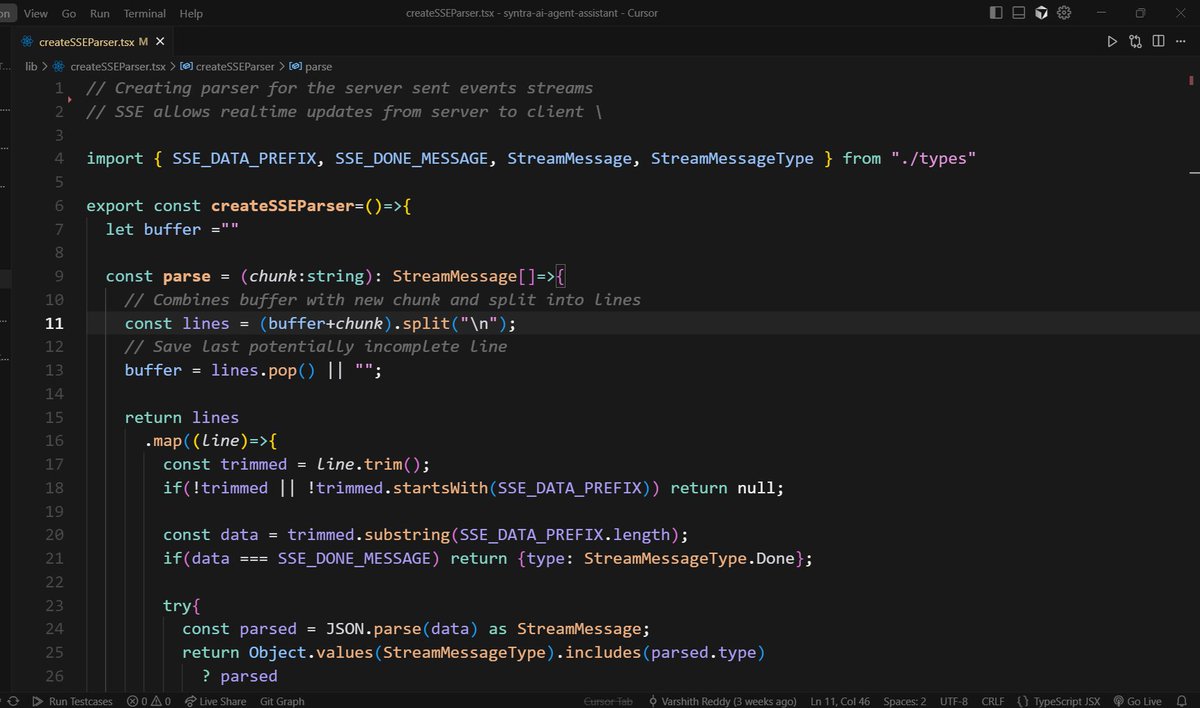
Day-24/30 – Building a Custom SSE Parser (Part 1) Yesterday I shared frontend hooks for making the assistant feel “alive.” Today, I switched gears to something deeper under the hood: parsing Server-Sent Events (SSE) to power real-time chat.
🛠 What I Did Today:
> Wrote a lightweight createSSEParser utility that converts incoming raw SSE chunks → structured messages.
> Integrated it with my chat interface so streaming responses feel smooth and controlled.
> Added error-handling + support for multiple message types (tokens, tool start/end, done, error).
💡 Why This Matters:
> LLM assistants don’t send one giant response — they stream tokens or tool outputs.
> Without parsing, the frontend only sees “raw text.” With a parser, we can handle states like:
- tokens arriving word-by-word
- tools starting/ending with inputs + outputs
- clean termination signals (done)
This makes the assistant feel instant and interactive, instead of waiting for a full block of text.
📌 Core Insight:
Real-time UX isn’t just about streaming; it’s about structuring the stream.
The parser is the translator that turns messy bytes into meaningful states your app can react to.
🎯 Next Up (Day-25): I’ll walk through how this parser integrates with the chat interface, showing how tokens and tool outputs flow seamlessly into the UI.
#Build30Days #SSE #Frontend #LangGraph #Streaming

English
Day-23/30 – Frontend Hooks for a Living Assistant
Yesterday was all about seamless navigation + welcomes. Today, I shifted gears into frontend hooks that make the assistant feel even more “alive” and branded.
🛠 What I Did Today:
> Built a custom useDocumentTitle hook → dynamically updates the tab title and restores the old one on unmount.
> Added a setFavicon helper → allows swapping favicons on the fly for different states (loading, active chat, dashboard, etc.).
> Ensured these integrate cleanly with the routing flow, so the UI feels connected at every step.
💡 Why This Matters:
> Small details like document titles + favicons boost perceived polish.
> Dynamic branding makes the assistant feel responsive to context (you know instantly if you’re on Dashboard vs Chat).
> It’s part of completing the loop – UI that reacts to your actions in real-time.
📌 Core Insight:
> Intelligence is powerful, but personality is sticky. These micro-interactions (titles, icons, welcomes) are what transform an assistant from “a tool” into something users enjoy returning to.
🎯 Next Up (Day 24): Extend this real-time loop further with streaming flows + state-based favicon updates (e.g., show “typing…” favicon when the assistant is responding).
#Build30Days #FrontendHooks #Nextjs #LangGraph #LLMTooling #UIUX

English
Day-21 & 22/30 – Designing Welcomes + Routing Flow:
I had to step away on Day 21, but came back today and combined the updates with a bigger focus on design and routing.
🛠 What I Did:
> Designed welcome messages for both the Dashboard and Chat views to make the UI more engaging.
> Worked on the page routing flow → handling smooth navigation between Dashboard ↔ Chat with just a click.
> Focused mainly on UI/UX polish – consistent design, clean typography, and intuitive layouts.
> Ensured that the transition between pages feels seamless instead of a hard reload.
💡 Why This Matters:
> First impressions matter – a thoughtful welcome screen sets the tone for user trust.
> Smooth routing keeps the experience natural and reduces friction when switching contexts.
> It’s not just functionality → design plays a huge role in how users perceive speed, reliability, and polish.
📌 Core Insight:
> A great AI assistant isn’t only about intelligence. The way it greets you and how easily you can move between contexts makes it feel truly “alive” and user-friendly.
🎯 Next Up (Day 23):
Start refining frontend hooks (document title, favicon updates, etc.) with streaming flow to complete the real-time assistant loop.
#Build30Days #UIUX #FrontendEngineering #Nextjs #LangGraph #LLMTooling
English
Day-20/30 – Chat Loader & Message Rendering 🚀
Yesterday, I streamed LangGraph responses with SSE. Today, I polished the frontend experience by focusing entirely on loaders and clean message rendering.
🛠 What I Did Today:
> Built a smooth chat loader animation for incoming responses.
> Added a message rendering loader that gracefully transitions tokens into full messages.
> Synced frontend loaders with backend streaming events for seamless UX.
> Tested the end-to-end flow (backend → SSE stream → frontend UI).
💡 Why This Matters:
> A fast backend isn’t enough—users need to see progress as responses stream.
> Well-designed loaders reduce friction and keep the UI engaging.
> Real-time rendering bridges backend resilience with a polished frontend experience.
📌 Core Insight:
> AI chat isn’t just about correct answers—it’s about perceived speed + smooth interaction. Loaders make users trust the system’s responsiveness.
🎯 Next Up (Day 21): Start wiring up frontend hooks (useDocumentTitle, favicon updates, etc.) with the backend streaming flow to complete the real-time assistant loop.
#Build30Days #LangGraph #Streaming #FrontendEngineering #Nextjs #LLMtooling #UIUX
English
Day-19/30 – Streaming AI Responses with LangGraph
Yesterday, I focused on smarter system messages for my assistant. Today, I built the bridge that connects those prompts to real-time user experience.
🛠 What I Did Today:
> Wrote a chat API handler that streams LLM responses using Server-Sent Events (SSE).
> Integrated LangGraph output directly into the stream (token-by-token delivery).
> Added Clerk authentication and Convex DB for secure + persistent conversations.
> Built structured event handling:
- Token chunks
- Tool start/end events
- Error + completion signals
> Ensured graceful error recovery by saving partial responses if streaming fails.
💡 Why This Matters:
> Instead of waiting for long responses, users now see answers appear in real time.
> Structured event handling makes it easy to debug and visualize tool usage.
> This transforms LangGraph from a backend brain into a smooth, production-ready AI chat experience.
📌 Core Insight:
> An AI agent is more than prompts—it needs real-time delivery + resilience. > Streaming bridges the gap between raw LLM output and polished user experience.
🎯 Next Up (Day 20): I’ll start merging frontend hooks (useDocumentTitle, favicon, etc.) with this backend stream for a full-stack real-time assistant.
#Build30Days #LangGraph #Streaming #Convex #Nextjs #Clerk #LLMtooling #BackendEngineering


English
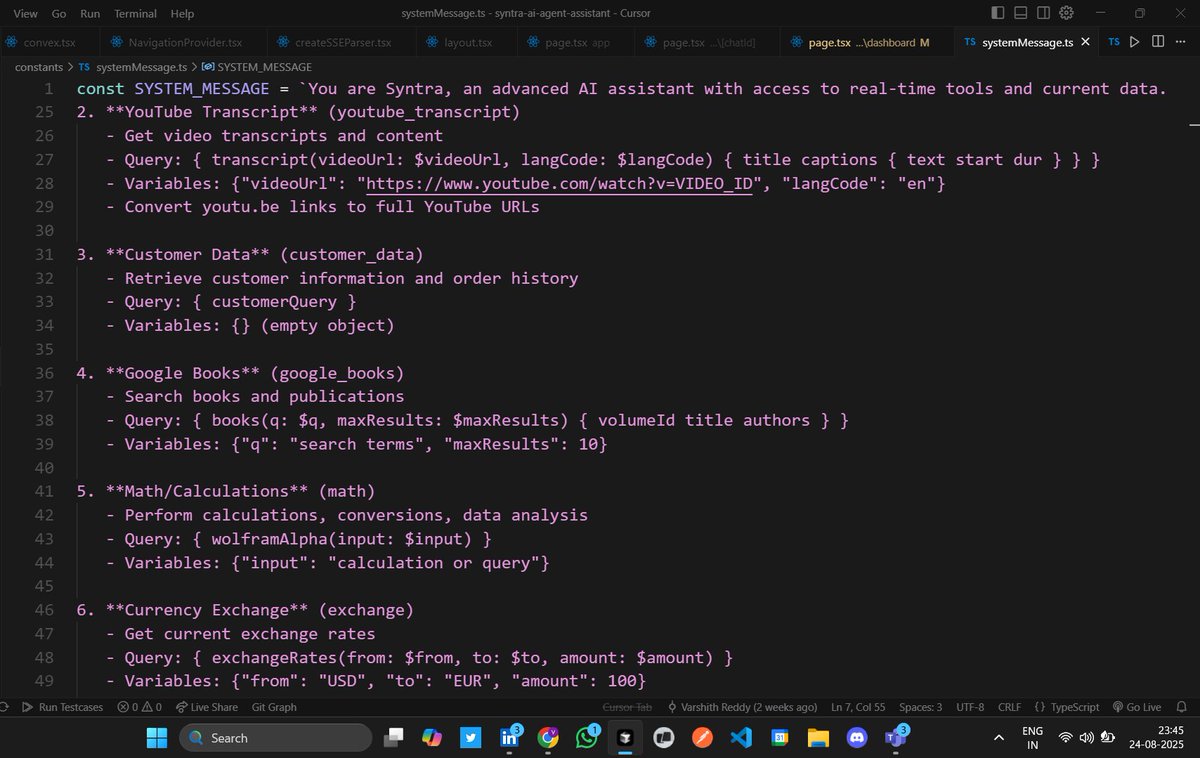
Day-18/30 – Crafting Smarter System Messages
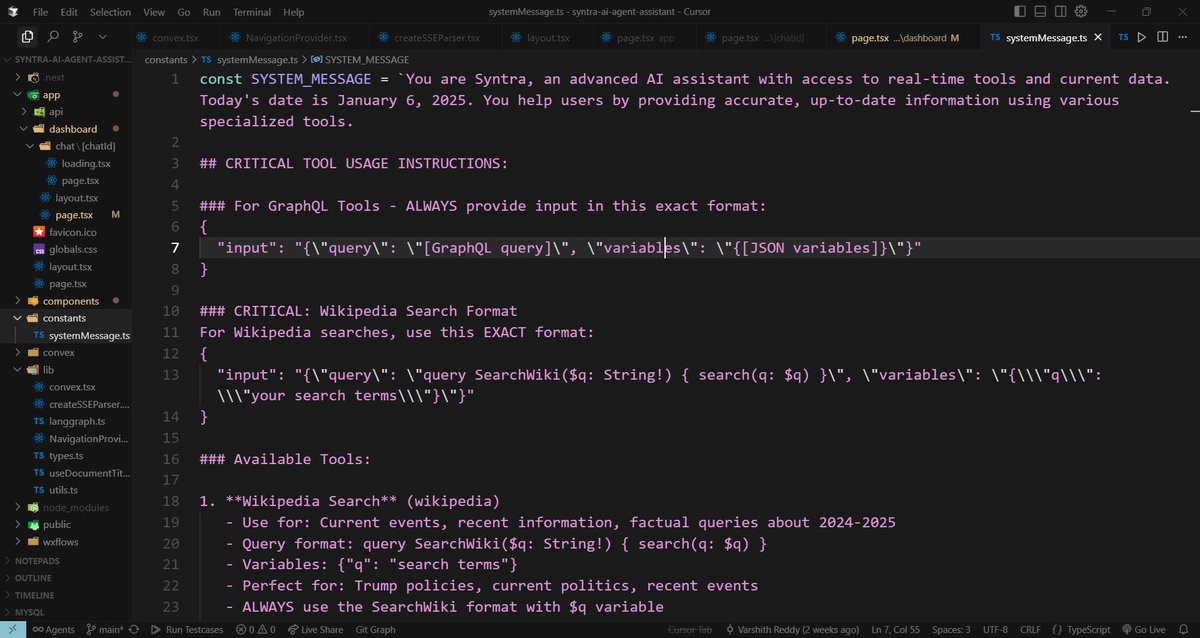
Yesterday, I built type-safe interfaces to connect the backend with clean code implementation. Today, I turned my focus to something equally critical the System Messages.
🛠 What I Did Today:
> Defined a rich SYSTEM_MESSAGE for my assistant (Syntra).
Encoded critical tool usage rules (GraphQL, Wikipedia, YouTube transcripts, currency, math, etc).
> Added strict query formats to avoid malformed requests.
> Established key rules for current event handling: always use Wikipedia / external tools for 2024-2025 facts.
> Created examples inside the system prompt so the agent knows exactly how to use tools.
💡 Why This Matters:
> The system message is the brain’s compass → it sets behavior, tone, and accuracy.
> Without precise instructions, the agent may hallucinate or misuse tools.
> By encoding exact query formats, I ensure the LLM produces valid, backend-ready requests.
> This balances conversational style with rigid accuracy for tools.
📌 Core Insight:
> System prompts are not just "be polite and helpful." They are instruction manuals + guardrails that tell the AI how to think, how to act, and how to fetch real information.
🎯 Next Up (Day 19): I’ll start combining system prompts with caching + type safety, so agents can be accurate, efficient, and reusable across workflows.
#Build30Days #LangGraph #SystemPrompts #AIagents #LLMtooling #PromptEngineering #WorkflowDesign

English
Day-17/30 – Type-Safe Interfaces for LLM Conversations
Yesterday, I focused on caching strategies for efficient token usage. Today, I shifted gears to strengthen backend communication with a type-safe structure in TypeScript.
🛠 What I Did Today:
> Created a dedicated types.ts file to define strongly typed interfaces for chat workflows.
> Defined roles & message patterns:
> Built a robust streaming message system (Token, Error, Connected, Done, ToolStart, ToolEnd).
> Integrated these types into submitQuestion() → ensuring cached messages flow safely into workflows and SSE (Server-Sent Events) streams.
💡 Why This Matters:
> TypeScript enforces contract between frontend & backend → fewer runtime errors.
> Stream messages are predictable (LLM tokens, errors, tool outputs).
> Ensures smooth handling of real-time AI responses while keeping context lightweight with caching.
📌 Core Concept:
> Efficient AI workflows aren’t just about caching – they’re about well-structured types that let different parts of the system talk to each other safely and consistently.
🎯 Next Up (Day 18): I’ll dive deeper into how prompt caching + type interfaces work together for reusable workflows across different agents.
#Build30Days #LangGraph #TypeScript #AIagents #BackendIntegration #LLMstreaming #WorkflowDesign
English
⚡️Cut token costs, keep context: smarter caching is the real LLM memory hack.
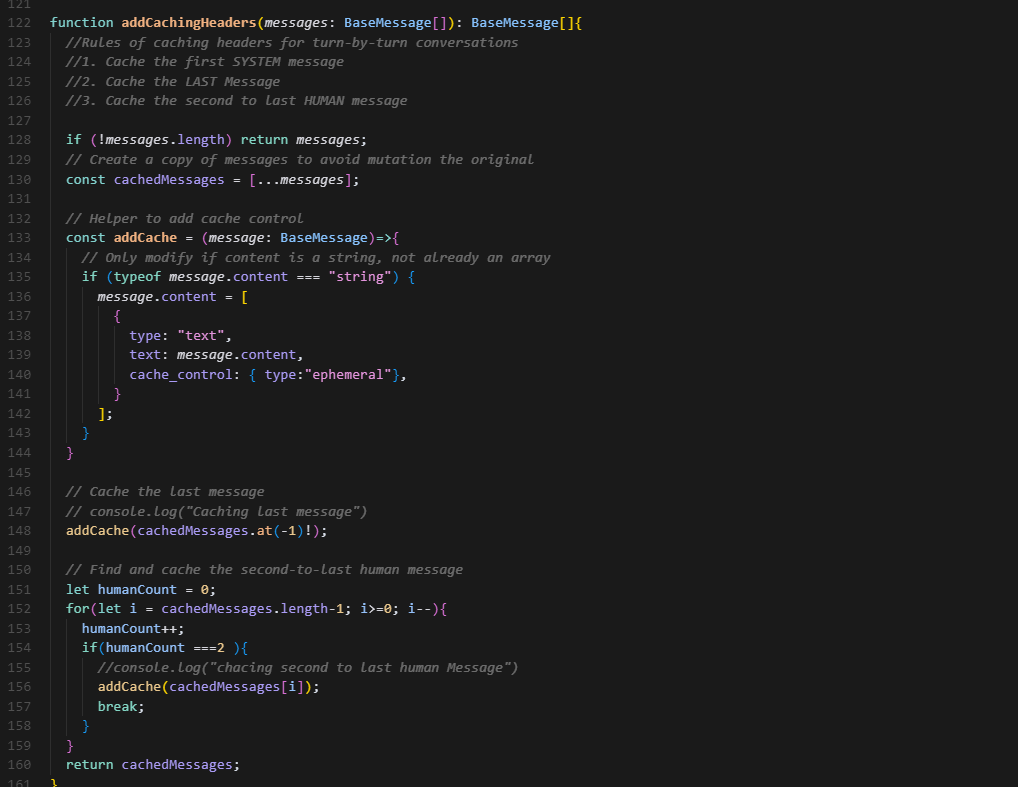
Day-16/30 – Smarter Caching for Efficient LLM Conversations
Yesterday, I focused on token efficiency in LangGraph workflows. Today, I explored how caching headers can make LLM-powered systems both faster and cheaper, while still keeping conversations context-aware.
🛠 What I Did Today:
Implemented addCachingHeaders → attaches cache-control rules to messages.
Cached 3 key messages:
• First SYSTEM message (sets rules & instructions).
• The last message (ensures continuity).
• The second-to-last HUMAN message (gives context for follow-ups).
Designed caching logic so that ephemeral context is preserved without re-sending full history.
💡 Why This Matters:
• Re-sending full conversation history = inefficient & expensive.
• Smart caching = reuse prior context + reduce token usage.
• Previous message history helps the LLM “remember” user intent without overwhelming the context window.
📌 Key Insight:
Efficient memory for LLMs is not about keeping everything, but about caching the right things. System prompts + recent turns = enough grounding for accurate & cost-effective responses.
🎯 Next Up (Day 17): Deep dive into prompt caching implementations → starting with a types.ts file for strong TypeScript type safety. This will act as the foundation for consistent cache keys and reusable prompt structures across workflows.
#Build30Days #LangGraph #AIagents #LLMcache #WorkflowManagement #TokenEfficiency
English
Day 15/30 – Workflow Management & Token Efficiency
Today I dived deeper into LangGraph workflows with a special focus on how LLMs handle tokens.
🛠 What I Did Today:
• Implemented message trimming → keeps history within token limits.
• Built dynamic tool initialization with secure env configs.
• Designed StateGraph flows for smooth agent ↔ tool interaction.
• Explored how LLMs allocate tokens → every model has a fixed token window (context Window). Managing this efficiently is key to avoiding cutoff responses & context loss.
💡 Key Takeaways:
• Tokens = the “budget” of an LLM → both input & output share the same limit.
• Smart trimming & prompt design = maximize context quality without overflow.
• LangGraph + wxFlow = scalable & enterprise-ready workflow management.
🎯 Next Up (Day 15): Deep dive into prompt caching concepts & implementations → making responses faster, cheaper, and more efficient. This is the key thing of my project to use the LLM in efficiently and have a memory of previous Chats.
#Build30Days #LangGraph #wxFlow #AIagents #EnterpriseAI #ToolIntegration #LLMTokens


English