Smile
89 posts

Sabitlenmiş Tweet

credit to @OpenAI Sora2 and @pinai_io voice keyboard
My Sora invitation code : XK22AP
My PIN AI invitation code: p48GtNj
PIN AI Download link: pinai.com/product
First 3 users who reply will get SORA invite code
English
Smile retweetledi

LLM Knowledge Bases
Something I'm finding very useful recently: using LLMs to build personal knowledge bases for various topics of research interest. In this way, a large fraction of my recent token throughput is going less into manipulating code, and more into manipulating knowledge (stored as markdown and images). The latest LLMs are quite good at it. So:
Data ingest:
I index source documents (articles, papers, repos, datasets, images, etc.) into a raw/ directory, then I use an LLM to incrementally "compile" a wiki, which is just a collection of .md files in a directory structure. The wiki includes summaries of all the data in raw/, backlinks, and then it categorizes data into concepts, writes articles for them, and links them all. To convert web articles into .md files I like to use the Obsidian Web Clipper extension, and then I also use a hotkey to download all the related images to local so that my LLM can easily reference them.
IDE:
I use Obsidian as the IDE "frontend" where I can view the raw data, the the compiled wiki, and the derived visualizations. Important to note that the LLM writes and maintains all of the data of the wiki, I rarely touch it directly. I've played with a few Obsidian plugins to render and view data in other ways (e.g. Marp for slides).
Q&A:
Where things get interesting is that once your wiki is big enough (e.g. mine on some recent research is ~100 articles and ~400K words), you can ask your LLM agent all kinds of complex questions against the wiki, and it will go off, research the answers, etc. I thought I had to reach for fancy RAG, but the LLM has been pretty good about auto-maintaining index files and brief summaries of all the documents and it reads all the important related data fairly easily at this ~small scale.
Output:
Instead of getting answers in text/terminal, I like to have it render markdown files for me, or slide shows (Marp format), or matplotlib images, all of which I then view again in Obsidian. You can imagine many other visual output formats depending on the query. Often, I end up "filing" the outputs back into the wiki to enhance it for further queries. So my own explorations and queries always "add up" in the knowledge base.
Linting:
I've run some LLM "health checks" over the wiki to e.g. find inconsistent data, impute missing data (with web searchers), find interesting connections for new article candidates, etc., to incrementally clean up the wiki and enhance its overall data integrity. The LLMs are quite good at suggesting further questions to ask and look into.
Extra tools:
I find myself developing additional tools to process the data, e.g. I vibe coded a small and naive search engine over the wiki, which I both use directly (in a web ui), but more often I want to hand it off to an LLM via CLI as a tool for larger queries.
Further explorations:
As the repo grows, the natural desire is to also think about synthetic data generation + finetuning to have your LLM "know" the data in its weights instead of just context windows.
TLDR: raw data from a given number of sources is collected, then compiled by an LLM into a .md wiki, then operated on by various CLIs by the LLM to do Q&A and to incrementally enhance the wiki, and all of it viewable in Obsidian. You rarely ever write or edit the wiki manually, it's the domain of the LLM. I think there is room here for an incredible new product instead of a hacky collection of scripts.
English
Smile retweetledi
Smile retweetledi

Introducing PIN Claw on Telegram 🦀
t.me/PINClaw_AI_bot
Consumer AI shouldn’t just be a chatbot.
It should be a personal agent that works for you.
PIN Claw is an event-driven AI agent powered by OpenClaw that quietly handles life logistics in the background:
✈️ Flight price drops → cheaper ticket automatically rebooked
💳 Bill due tomorrow → payment scheduled
📉 Investment dips → portfolio alert generated
🛒 Groceries running low → Instacart cart prepared
The more you interact with PIN Claw, the more it adapts — learning your habits and becoming truly personal.
No prompts. No dashboards.
Just one agent managing everyday tasks for you.
Try it now 👉 t.me/PINClaw_AI_bot
English
Smile retweetledi
Smile retweetledi

Why The Next Billion Internet Users Will Interact Through Personal AI Agents hubs.li/Q044XKDX0 Written by @reganonearth of @pinai_io
English
Smile retweetledi
Smile retweetledi

The AI party just got a major upgrade. 🦞✨
Today, we’re launching AgentHub by PIN AI — the interaction layer where agents finally talk to each other.
Let’s be real:
❌ Siloed agents = Garbage out.
✅ Connected agents = Compounding output.
We’re not just building a tool; we’re building the Open Agent Network. It’s time to stop the isolation and start the collaboration.
Repost if you’re ready for the era of Personal Intelligence Network! 🚀
English

Smile retweetledi
Smile retweetledi
Smile retweetledi
Smile retweetledi

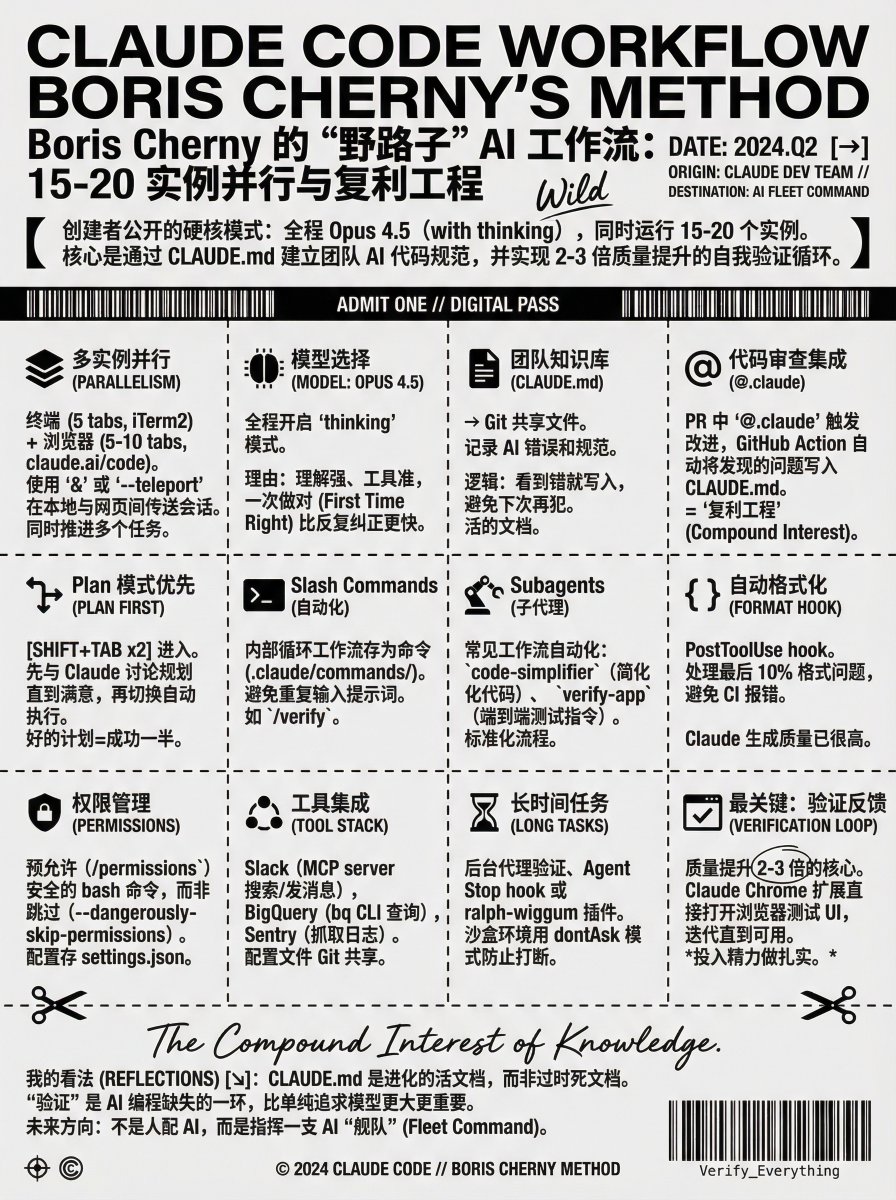
Claude Code 的创建者 Boris Cherny 公开了他的 CC 使用方法。
这套流程核心的两个思维方式比较有意思:
复利思维和验证
复利思维体现在 CLAUDE. md 不是一次性写完的文档,而是团队在日常工作中持续积累的知识库。每次代码审查、每次发现问题,都在让这个文件变得更好。
Boris 强调验证能让质量提升 2-3 倍,这其实暴露了当前 AI 编程的一个核心问题:AI 很会写代码,但不一定知道代码是否真的能用、用户体验是否好。
总结一下做个笔记👇
## 多实例并行:同时运行 15-20 个 Claude
Boris 的电脑上至少跑着 15 个 Claude 实例。终端里开 5 个标签页,每个标签编号 1-5,用 iTerm2 的系统通知功能知道哪个 Claude 需要输入。
浏览器里还会同时开 5-10 个 claude. ai/code 页面。他会在终端和网页之间来回切换,用 & 符号把本地会话转到网页,或者用 --teleport 在两边传送。这种并行工作方式让他能同时推进多个任务。
## 模型选择:全程 Opus 4.5 with thinking
Boris 只用 Opus 4.5,而且开着 thinking 模式。他的理由很直接:虽然 Opus 更大更慢,但因为理解能力强、工具使用准确,最后反而比用小模型更快。
不需要反复纠正和引导,一次就能做对,这才是真正的效率。
## 团队知识库:共享的 CLAUDE .md 文件
Claude Code 团队有一个共享的 CLAUDE. md 文件,提交到 git 里,整个团队每周都会往里面加内容。
这个文件的逻辑很简单:只要看到 Claude 做错了什么,就写进 CLAUDE. md,下次 Claude 就知道不要这么做。相当于把团队的代码规范和踩坑经验都记录下来,让 AI 助手也能遵守。
## 代码审查集成:@.claude 标签触发改进
在代码审查时,Boris 会在同事的 PR 上 @.claude,让 Claude 把发现的问题加到 CLAUDE. md 里。这是通过 Claude Code 的 GitHub action 实现的(用 /install-github-action 安装)。
这就是他们版本的"复利工程"。每次代码审查都在让 CLAUDE. md 变得更好,而 CLAUDE. md 又让后续的代码质量自动提升。
## Plan 模式:先规划再执行
大部分会话都从 Plan 模式开始(按两次 shift+tab 进入)。Boris 会跟 Claude 来回讨论,直到计划让他满意,然后切换到自动接受编辑模式,Claude 通常能一次性完成。
一个好的计划就是成功的一半。
## Slash Commands:内部循环工作流自动化
Boris 把每天重复做很多次的"内部循环"工作流都做成了 slash commands。这些命令保存在 .claude/commands/ 目录下,提交到 git。
这样就不用每次都重复输入相同的提示词,而且 Claude 自己也能使用这些命令。比如团队有一个 /verify 命令用来验证更改。
## Subagents:常见工作流的自动化
Boris 经常用几个 subagents:code-simplifier 在 Claude 完成工作后简化代码,verify-app 包含了端到端测试 Claude Code 的详细指令。
Subagents 本质上就是把最常见的工作流自动化,让每个 PR 都能跑一遍标准流程。
## PostToolUse Hook:自动格式化代码
团队用 PostToolUse hook 自动格式化 Claude 生成的代码。Claude 通常生成的代码格式就挺好,hook 只是处理最后 10%,避免后面 CI 报格式错误。
## 权限管理:预允许而非跳过
Boris 不用 --dangerously-skip-permissions。他用 /permissions 预先允许那些在他环境里确定安全的常见 bash 命令,避免不必要的权限提示。
这些配置大部分都保存在 .claude/settings.json 里,跟团队共享。
## 工具集成:Slack、BigQuery、Sentry
Claude Code 会使用 Boris 的所有工具。通过 Slack 的 MCP server 搜索和发布消息,用 bq CLI 跑 BigQuery 查询回答分析问题,从 Sentry 抓取错误日志。
Slack MCP 的配置文件 .mcp.json 也是提交到 git 跟团队共享的。
## 长时间任务:后台代理和 Stop Hook
对于特别长的任务,Boris 有几种方法:
让 Claude 在完成时用后台代理验证工作
用 agent Stop hook 更确定性地做验证
用 ralph-wiggum 插件(Geoffrey Huntley 最初想出来的)
在沙盒环境里,他会用 --permission-mode=dontAsk 或 --dangerously-skip-permissions,让 Claude 能持续工作不被权限提示打断。
## 最关键的一点:给 Claude 验证反馈
Boris 说最重要的是给 Claude 一个验证工作的方法。有了这个反馈循环,最终结果的质量能提升 2-3 倍。
Claude Code 团队用 Claude Chrome 扩展测试每个改动。Claude 会打开浏览器,测试 UI,然后迭代直到代码能跑、用户体验也好。
验证方法因领域而异。可能就是跑一个 bash 命令,或者跑测试套件,或者在浏览器或手机模拟器里测试应用。但一定要投入精力把这个做扎实。

Boris Cherny@bcherny
I'm Boris and I created Claude Code. Lots of people have asked how I use Claude Code, so I wanted to show off my setup a bit. My setup might be surprisingly vanilla! Claude Code works great out of the box, so I personally don't customize it much. There is no one correct way to use Claude Code: we intentionally build it in a way that you can use it, customize it, and hack it however you like. Each person on the Claude Code team uses it very differently. So, here goes.

中文
Smile retweetledi
Smile retweetledi
Smile retweetledi

原来 OpenAI 的这个流程图使用这个开源库 ReactFlow 画的:
reactflow.dev
我看了一下,真的很不错啊,交互很丝滑,自定义能力也很强,每个组件都是 shadcn/ui 和 tailwindcss 做的,所以可以随意自定义如果有朋友有做这种模式的流程图的需求,可以用起来。
它们还有个 Pro 的收费版本,有一些高级功能,一般的需求用开源免费版本就足够了。官网有一些例子可以感受一下:reactflow.dev/examples

xyflow · React Flow · Svelte Flow@xyflowdev
Hey @OpenAI :) We just saw that you are using our open source library React Flow 🔥 We offer startup discount codes :) Let us know if you are interested 👀
中文

credit to @OpenAI Sora2 and @pinai_io voice keyboard
My Sora invitation code : XK22AP
My PIN AI invitation code: p48GtNj
PIN AI Download link: pinai.com/product
First 3 users who reply will get SORA invite code
English