Yolo Labs

8 posts

Yolo Labs banner
Yolo Labs

Yolo Labs

@YoloLabsAI

Katılım Ekim 2025
2 Takip Edilen3 Takipçiler
Yolo Labs
Yolo Labs@YoloLabsAI·
𝐖𝐨𝐫𝐤 𝐒𝐭𝐫𝐞𝐚𝐦𝐬 let you split a project into parallel, isolated units of work, each with its own TODO, agent, and git branch. You can point a work stream at a plan, whether that is a markdown file, a pasted prompt, or a written brief, assign an AI agent, and let it run autonomously. A shared dashboard shows progress bars, live status, and task checkboxes across every active stream. When a stream is done, you can merge it back with a single click. Under the hood, each work stream runs in its own lane: an isolated git clone with local control files that define the agent’s contract. Those files never enter version control, so coordination stays local and clean. The result is multiple agents working in parallel without stepping on each other, all visible from a single workspace tile. If you want it even punchier for a landing page, I would phrase it like this: 𝐖𝐨𝐫𝐤 𝐒𝐭𝐫𝐞𝐚𝐦𝐬 Break one project into many parallel AI work lanes. Each stream gets its own branch, TODO list, and assigned agent. Drop in a plan, launch execution, and track everything from one dashboard with live status, progress, and task updates. When a stream finishes, merge it back in one click. Behind the scenes, every stream runs in an isolated git clone with local-only control files that act as the agent’s contract. That keeps agents coordinated, branches clean, and parallel execution safe. A few things that make the concept especially compelling: 𝐏𝐚𝐫𝐚𝐥𝐥𝐞𝐥𝐢𝐬𝐦 𝐰𝐢𝐭𝐡 𝐬𝐚𝐟𝐞𝐭𝐲 is the real hook. 𝐋𝐨𝐜𝐚𝐥 𝐨𝐧𝐥𝐲 𝐜𝐨𝐧𝐭𝐫𝐨𝐥 𝐟𝐢𝐥𝐞𝐬 is a strong implementation detail because it explains how coordination works without polluting the repo. 𝐒𝐢𝐧𝐠𝐥𝐞 𝐭𝐢𝐥𝐞 / 𝐬𝐢𝐧𝐠𝐥𝐞 𝐝𝐚𝐬𝐡𝐛𝐨𝐚𝐫𝐝 gives the user a clear mental model. The only part I would watch is the phrase “𝐰𝐚𝐭𝐜𝐡 𝐢𝐭 𝐞𝐱𝐞𝐜𝐮𝐭𝐞 𝐚𝐮𝐭𝐨𝐧𝐨𝐦𝐨𝐮𝐬𝐥𝐲.” It is exciting, but it can sound vague unless the rest of the UI makes that autonomy feel concrete. Your progress bars, status, checkboxes, and merge action help solve that, so I would lean into those. A sharper one line positioning statement could be: 𝐖𝐨𝐫𝐤 𝐒𝐭𝐫𝐞𝐚𝐦𝐬 𝐭𝐮𝐫𝐧𝐬 𝐨𝐧𝐞 𝐩𝐫𝐨𝐣𝐞𝐜𝐭 𝐢𝐧𝐭𝐨 𝐦𝐮𝐥𝐭𝐢𝐩𝐥𝐞 𝐢𝐬𝐨𝐥𝐚𝐭𝐞𝐝 𝐀𝐈 𝐰𝐨𝐫𝐤 𝐥𝐚𝐧𝐞𝐬 𝐭𝐡𝐚𝐭 𝐫𝐮𝐧 𝐢𝐧 𝐩𝐚𝐫𝐚𝐥𝐥𝐞𝐥 𝐚𝐧𝐝 𝐦𝐞𝐫𝐠𝐞 𝐛𝐚𝐜𝐤 𝐜𝐥𝐞𝐚𝐧𝐥𝐲. #Ai #Aibuilder #Build #yolo
English
0
0
0
6
Yolo Labs
Yolo Labs@YoloLabsAI·
𝐏𝐢𝐜𝐤 𝐀𝐧𝐲 𝐀𝐠𝐞𝐧𝐭, 𝐖𝐞 𝐇𝐚𝐧𝐝𝐥𝐞 𝐭𝐡𝐞 𝐑𝐞𝐬𝐭. YOLO Studio is evolving into a truly agent-agnostic development platform. Instead of being locked into a single AI coding assistant, workspaces now support a growing roster of agents through a unified registry. 𝐂𝐥𝐚𝐮𝐝𝐞 𝐂𝐨𝐝𝐞, 𝐂𝐨𝐝𝐞𝐱, and 𝐆𝐞𝐦𝐢𝐧𝐢 𝐂𝐋𝐈 come built in, preinstalled, always available, and pinned to the top of the picker. Community agents like 𝐀𝐢𝐝𝐞𝐫, 𝐆𝐨𝐨𝐬𝐞, 𝐚𝐧𝐝 𝐀𝐦𝐚𝐳𝐨𝐧 𝐐 are available on demand: select one, and YOLO Studio installs it in real time, streams progress directly to your workspace, and persists it across restarts so setup only happens once. For power users, bring your own agent support lets you plug in any CLI-based agent seamlessly. No matter which agent you choose, YOLO Studio handles everything consistently: * Authentication and credential management * Process lifecycle and monitoring * Shell integration * Unified UI and activity tracking Switch effortlessly between: * 𝐂𝐥𝐚𝐮𝐝𝐞 for deep architectural reasoning * 𝐂𝐨𝐝𝐞𝐱 for rapid iteration * 𝐀𝐢𝐝𝐞𝐫 for collaborative pair programming * 𝐆𝐞𝐦𝐢𝐧𝐢 for alternative perspectives Every agent receives the same first-class treatment, with full access to orchestration features like 𝐟𝐚𝐧 𝐨𝐮𝐭 𝐞𝐱𝐞𝐜𝐮𝐭𝐢𝐨𝐧, 𝐝𝐞𝐩𝐞𝐧𝐝𝐞𝐧𝐜𝐲 𝐭𝐫𝐢𝐠𝐠𝐞𝐫𝐬, 𝐚𝐧𝐝 𝐰𝐚𝐭𝐜𝐡 𝐭𝐢𝐥𝐞𝐬. 𝐎𝐧𝐞 𝐰𝐨𝐫𝐤𝐬𝐩𝐚𝐜𝐞. 𝐌𝐚𝐧𝐲 𝐚𝐠𝐞𝐧𝐭𝐬. 𝐙𝐞𝐫𝐨 𝐜𝐨𝐧𝐟𝐢𝐠𝐮𝐫𝐚𝐭𝐢𝐨𝐧 𝐨𝐯𝐞𝐫𝐡𝐞𝐚𝐝. #Ai #dev #Yolostudio
English
0
0
1
19
Yolo Labs
Yolo Labs@YoloLabsAI·
𝐖𝐡𝐚𝐭 𝐢𝐬 𝐘𝐨𝐥𝐨𝐒𝐭𝐮𝐝𝐢𝐨.𝐚𝐢? 𝐘𝐨𝐥𝐨𝐒𝐭𝐮𝐝𝐢𝐨.𝐚𝐢 is where AI agents move beyond assisting and start actually building. It’s a multi-agent development environment designed to take you from idea to production faster, by letting AI handle real, hands on work, not just suggestions. Instead of relying on a single model, YoloStudio brings multiple agents together, each working in parallel on specific tasks within structured workspaces. 𝐈𝐧𝐬𝐢𝐝𝐞 𝐘𝐨𝐥𝐨𝐒𝐭𝐮𝐝𝐢𝐨, 𝐚𝐠𝐞𝐧𝐭𝐬 𝐜𝐚𝐧: • Write and refine code • Execute tasks and workflows • Handle different parts of an application • Continuously iterate across multiple lanes What truly sets it apart is how everything is organized. With features like lanes, each workflow is clearly separated so agents don’t clash or overwrite each other’s progress. One agent can focus on frontend, another on backend, while another manages infrastructure, all happening at the same time. The experience feels less like using a tool and more like leading a team. 𝐘𝐨𝐥𝐨𝐒𝐭𝐮𝐝𝐢𝐨.𝐚𝐢 is built for speed, clarity, and scale: • Parallel execution instead of step-by-step workflows • Autonomous agents instead of constant prompting • Structured environments instead of scattered outputs It’s not just about building faster. It’s about building better, with AI that actually works alongside you. 𝐘𝐨𝐥𝐨𝐒𝐭𝐮𝐝𝐢𝐨.𝐚𝐢 is the workspace for the next generation of development. Follow for more insights on AI and building the future. #yolostudio #Build #Aibuilder #AIDev #Ai
English
0
0
1
9
Yolo Labs
Yolo Labs@YoloLabsAI·
𝐋𝐚𝐧𝐞𝐬: 𝐆𝐢𝐯𝐢𝐧𝐠 𝐀𝐈 𝐀𝐠𝐞𝐧𝐭𝐬 𝐓𝐡𝐞𝐢𝐫 𝐎𝐰𝐧 𝐖𝐨𝐫𝐤𝐬𝐩𝐚𝐜𝐞 AI agents shouldn’t work in chaos and at YoloLabs, they don’t. 𝐋𝐚𝐧𝐞𝐬 are how we bring structure to multi-agent systems. Each lane is a dedicated workspace where an agent operates independently, with its own tasks, state, and responsibilities. From the interface above, you can already see the power of this model: A Main Lane holding shared context Specialized lanes like edge, migrations, and frontend Clear status indicators like clean, dirty, scoped, and implement This isn’t just organization, it’s orchestration. Each lane allows an agent to focus on a specific part of the workflow: The frontend lane builds and iterates on UI The migrations lane handles backend changes and infrastructure The edge lane manages deployment ready logic All running in parallel. All visible. All controlled. By separating concerns into lanes, agents don’t step on each other’s work. They move faster, make fewer errors, and collaborate more effectively, just like a high performing engineering team. Lanes turn AI workflows into structured systems: Clear ownership Real time progress tracking Parallel execution at scale This is how YoloLabs transforms AI from a single assistant into a coordinated team of agents. Because powerful AI isn’t just about intelligence, it’s about giving that intelligence the right environment to operate. #Ai #Aideveloper #Yolo #Aidev #Build
Yolo Labs tweet media
English
1
0
2
12
Yolo Labs
Yolo Labs@YoloLabsAI·
𝐋𝐚𝐧𝐞𝐬: 𝐆𝐢𝐯𝐢𝐧𝐠 𝐀𝐈 𝐀𝐠𝐞𝐧𝐭𝐬 𝐓𝐡𝐞𝐢𝐫 𝐎𝐰𝐧 𝐖𝐨𝐫𝐤𝐬𝐩𝐚𝐜𝐞 AI agents shouldn’t work in chaos and at YoloLabs, they don’t. 𝐋𝐚𝐧𝐞𝐬 are how we bring structure to multi-agent systems. Each lane is a dedicated workspace where an agent operates independently, with its own tasks, state, and responsibilities. From the interface above, you can already see the power of this model: A Main Lane holding shared context Specialized lanes like edge, migrations, and frontend Clear status indicators like clean, dirty, scoped, and implement This isn’t just organization, it’s orchestration. Each lane allows an agent to focus on a specific part of the workflow: The frontend lane builds and iterates on UI The migrations lane handles backend changes and infrastructure The edge lane manages deployment ready logic All running in parallel. All visible. All controlled. By separating concerns into lanes, agents don’t step on each other’s work. They move faster, make fewer errors, and collaborate more effectively, just like a high performing engineering team. Lanes turn AI workflows into structured systems: Clear ownership Real time progress tracking Parallel execution at scale This is how YoloLabs transforms AI from a single assistant into a coordinated team of agents. Because powerful AI isn’t just about intelligence, it’s about giving that intelligence the right environment to operate. #Ai #Aideveloper #Yolo #Aidev #Build
Yolo Labs tweet media
English
0
0
0
10
Yolo Labs
Yolo Labs@YoloLabsAI·
𝐖𝐨𝐫𝐤𝐬𝐩𝐚𝐜𝐞𝐬: 𝐘𝐨𝐮𝐫 𝐀𝐈 𝐄𝐧𝐠𝐢𝐧𝐞𝐞𝐫𝐢𝐧𝐠 𝐓𝐞𝐚𝐦 𝐢𝐧 𝐎𝐧𝐞 𝐒𝐜𝐫𝐞𝐞𝐧 Introducing Workspaces the tiled AI development environment that turns your solo coding into a full engineering team. Imagine a multi-monitor setup… but every screen has its own autonomous AI agent working in parallel. All inside isolated cloud containers with full Linux power. This changes everything. 𝐊𝐞𝐲 𝐬𝐮𝐩𝐞𝐫𝐩𝐨𝐰𝐞𝐫𝐬: • Grid of Agents Arrange AI coders, terminals, live previews, and CI/CD monitors in a customizable grid. They run side-by-side, in real time. • YOLO Mode Zero approval prompts. Agents read, write, test, and commit at machine speed. You choose the autonomy level (or go full send). • Voice Control Talk to your workspace. “Add error handling to the backend agent” or “Run the tests.” Deepgram + smart intent routing makes it feel magical. Hands-free or click-to-talk. 𝐌𝐨𝐫𝐞 𝐦𝐚𝐠𝐢𝐜: • Live Preview Tiles Hot-reloading previews for 30+ frameworks (Next.js, Vite, Rails, Django…) right next to your agents. No tab switching. • Virtual Desktops Backend on Desktop 1, Frontend on 2, Testing on 3. Switch with Ctrl+1-9. • Branch-Per-Agent Git Each agent works in its own git worktree. Parallel development with zero merge conflicts. • Session Planner Just open a repo and it auto-recommends the perfect tile layout. Or pick a preset. 𝐖𝐡𝐲 𝐢𝐭 𝐦𝐚𝐭𝐭𝐞𝐫𝐬: Traditional dev is slow and sequential. Workspaces make everything happen simultaneously. One agent builds the API, another crafts the frontend, a third runs tests while the live preview updates in real time. All visible at once. Solo devs get team output. Teams get department-level velocity. 𝐑𝐞𝐚𝐝𝐲-𝐭𝐨-𝐮𝐬𝐞 𝐥𝐚𝐲𝐨𝐮𝐭𝐬: Web App → Claude agent + Terminal + Live Preview Full-Stack → Backend + Frontend agents + Preview API/Backend → Focused coding + testing terminal Just Explore → Full-width agent to deeply understand any codebase 𝐖𝐨𝐫𝐤𝐬𝐩𝐚𝐜𝐞𝐬 𝐚𝐫𝐞𝐧’𝐭 𝐣𝐮𝐬𝐭 𝐚𝐧𝐨𝐭𝐡𝐞𝐫 𝐭𝐨𝐨𝐥. 𝐓𝐡𝐞𝐲’𝐫𝐞 𝐲𝐨𝐮𝐫 𝐀𝐈-𝐩𝐨𝐰𝐞𝐫𝐞𝐝 𝐰𝐚𝐫 𝐫𝐨𝐨𝐦 𝐟𝐨𝐫 𝐬𝐡𝐢𝐩𝐩𝐢𝐧𝐠 𝐟𝐚𝐬𝐭𝐞𝐫 𝐭𝐡𝐚𝐧 𝐞𝐯𝐞𝐫. WHO's ready to go YOLO? Sign up for early updates and the YOLO Studio release: yololabs.ai #YOLO #AIDev #DeveloperTools #Build #Ai
Yolo Labs tweet media
English
0
1
1
42
Yolo Labs
Yolo Labs@YoloLabsAI·
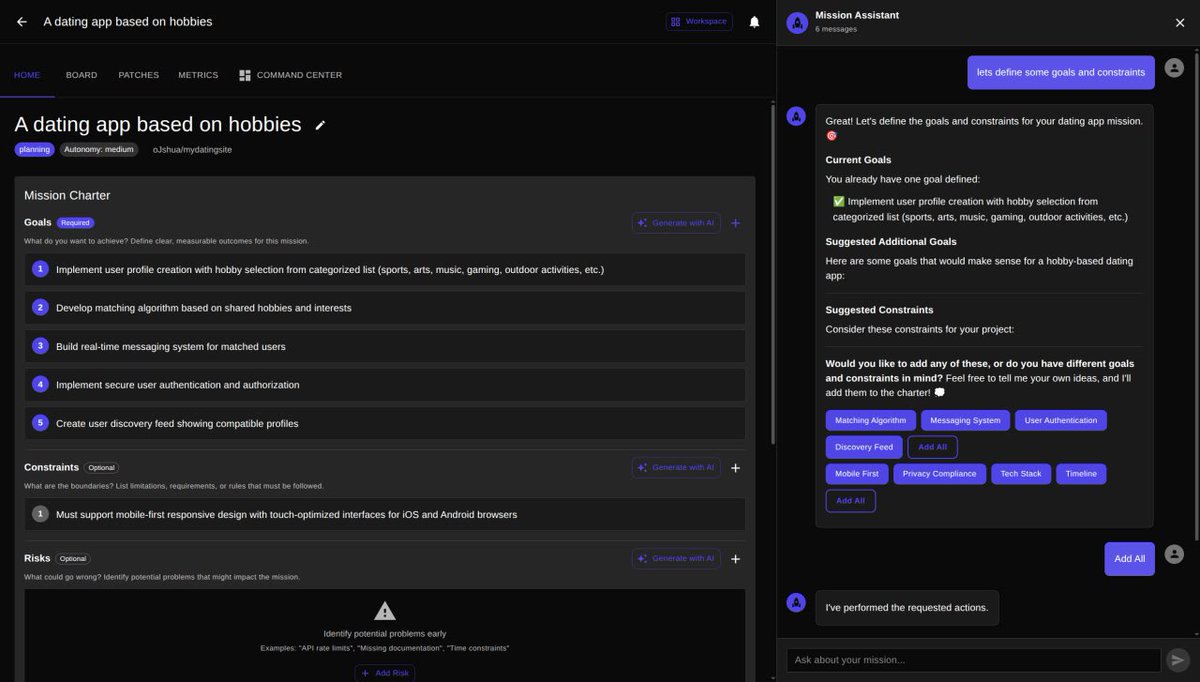
𝐖𝐞’𝐫𝐞 𝐧𝐨𝐭 𝐛𝐮𝐢𝐥𝐝𝐢𝐧𝐠 𝐣𝐮𝐬𝐭 𝐚𝐧𝐨𝐭𝐡𝐞𝐫 𝐚𝐩𝐩. 𝐖𝐞’𝐫𝐞 𝐛𝐮𝐢𝐥𝐝𝐢𝐧𝐠 𝐚𝐧 𝐞𝐜𝐨𝐬𝐲𝐬𝐭𝐞𝐦. Introducing YOLO Labs, an AI-powered platform where anyone, developers and non-developers alike, can turn ideas into real, working products. Websites. Applications. Systems. Projects. No experience barrier. At the core of YOLO is a new way to build: 𝐌𝐢𝐬𝐬𝐢𝐨𝐧𝐬. 𝐆𝐨𝐚𝐥-𝐃𝐫𝐢𝐯𝐞𝐧 𝐃𝐞𝐯𝐞𝐥𝐨𝐩𝐦𝐞𝐧𝐭 Most tools start with tasks, and somewhere along the way, the why gets lost. YOLO changes that. 𝐒𝐭𝐚𝐫𝐭 𝐰𝐢𝐭𝐡 𝐚 𝐠𝐨𝐚𝐥: “Build a real-time messaging system.” “Launch a scalable app.” Then let the platform take over. 𝐇𝐨𝐰 𝐈𝐭 𝐖𝐨𝐫𝐤𝐬 • 𝐃𝐞𝐟𝐢𝐧𝐞 𝐲𝐨𝐮𝐫 𝐦𝐢𝐬𝐬𝐢𝐨𝐧; YOLO structures goals, constraints, and risks • 𝐆𝐞𝐧𝐞𝐫𝐚𝐭𝐞 𝐚 𝐩𝐥𝐚𝐧; Clear roadmap (Now / Next / Later) • 𝐄𝐱𝐞𝐜𝐮𝐭𝐞; Autonomous building with testing, validation, and code generation 𝐁𝐮𝐢𝐥𝐭-𝐈𝐧 𝐐𝐮𝐚𝐥𝐢𝐭𝐲 Every step is validated through tests, linting, and builds, with real-time performance tracking. 𝐖𝐡𝐚𝐭 𝐌𝐚𝐤𝐞𝐬 𝐘𝐎𝐋𝐎 𝐃𝐢𝐟𝐟𝐞𝐫𝐞𝐧𝐭 YOLO isn’t a chatbot or a basic dev tool. It’s a goal-driven execution engine. From idea to production, without the usual friction. Be among the first to experience YOLO. Sign up for early updates and the YOLO Studio release: yololabs.ai Welcome to YOLO Labs. #YOLOLabs #BuildInPublic #AI #Startups #NoCode #Developers #Innovation
Yolo Labs tweet media
English
0
1
1
44
Yolo Labs
Yolo Labs@YoloLabsAI·
Gm builders 👨‍💻
English
0
0
0
13