KHOA AI | HILL

4K posts

KHOA AI | HILL banner
KHOA AI | HILL

KHOA AI | HILL

@aitrothu

🚀 Trang về AI cho Kinh Doanh & Marketing 🎁 Nhận ngay QUÀ TẶNG MIỄN PHÍ 30 tài nguyên AI chất lượng cao!

VIỆT NAM Katılım Haziran 2025
1.8K Takip Edilen1.4K Takipçiler
Sabitlenmiş Tweet
KHOA AI | HILL
KHOA AI | HILL@aitrothu·
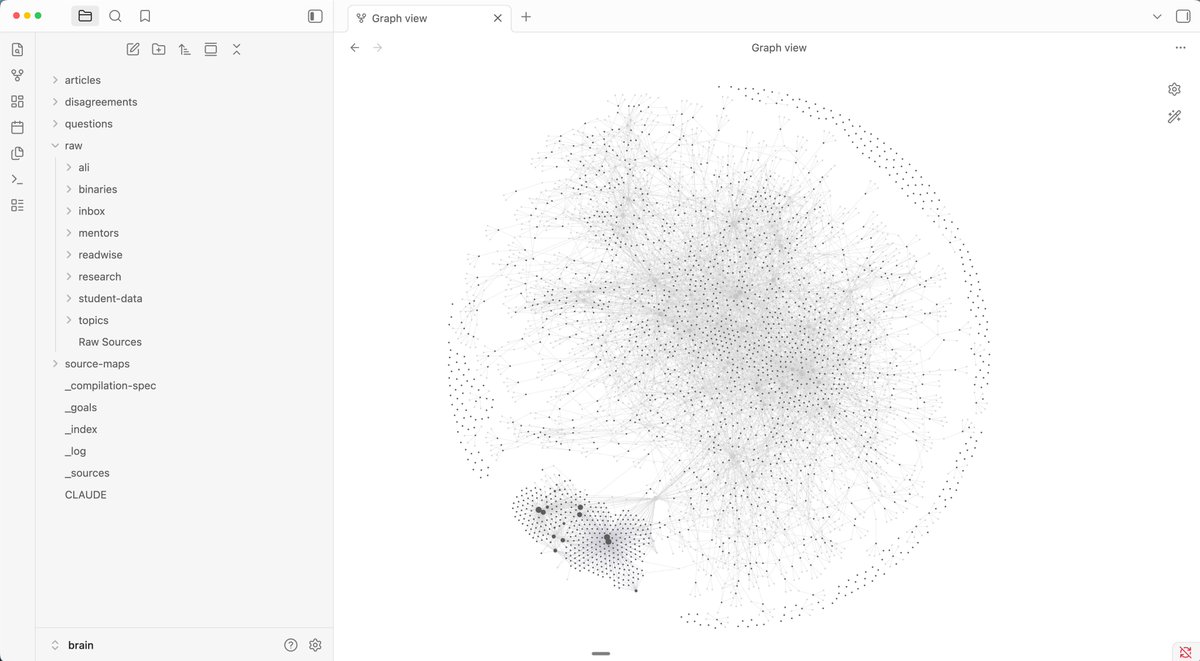
⚡ Bạn đổ tiền vào RAG để AI Agent "nhớ" — nhưng chính bạn lại KHÔNG ĐỌC ĐƯỢC bộ nhớ đó. Karpathy vừa chỉ ra cách khác. Thay vì biến dữ liệu thành vector (black box), ông đề xuất dùng Wiki — file Markdown mà cả người lẫn AI đều đọc được. Mình đã thử xây cho Agent của mình: - Dữ liệu thô → nạp vào thư mục raw - Chạy lệnh compile → tự động tạo Wiki + backlink - Mở Obsidian → xem graphic, kiểm tra, chỉnh sửa trực tiếp Kết quả? Agent truy xuất chính xác hơn. Chi phí token giảm. Và quan trọng nhất — mình KIỂM SOÁT ĐƯỢC 100% bộ nhớ của nó. Mình đã làm sẵn template. Miễn phí. Cài là dùng được luôn. Video hướng dẫn chi tiết mình để ở comment đầu tiên 👇 #KhoaAI #AIAgent #WikiKarpathy
KHOA AI | HILL tweet media
Tiếng Việt
1
0
1
32
KHOA AI | HILL
KHOA AI | HILL@aitrothu·
⚡ Bạn đổ tiền vào RAG để AI Agent "nhớ" — nhưng chính bạn lại KHÔNG ĐỌC ĐƯỢC bộ nhớ đó. Karpathy vừa chỉ ra cách khác. Thay vì biến dữ liệu thành vector (black box), ông đề xuất dùng Wiki — file Markdown mà cả người lẫn AI đều đọc được. Mình đã thử xây cho Agent của mình: - Dữ liệu thô → nạp vào thư mục raw - Chạy lệnh compile → tự động tạo Wiki + backlink - Mở Obsidian → xem graphic, kiểm tra, chỉnh sửa trực tiếp Kết quả? Agent truy xuất chính xác hơn. Chi phí token giảm. Và quan trọng nhất — mình KIỂM SOÁT ĐƯỢC 100% bộ nhớ của nó. Mình đã làm sẵn template. Miễn phí. Cài là dùng được luôn. Video hướng dẫn chi tiết mình để ở comment đầu tiên 👇 #KhoaAI #AIAgent #WikiKarpathy
KHOA AI | HILL tweet media
Tiếng Việt
1
0
1
32
Ali Abdaal
Ali Abdaal@AliAbdaal·
building out the llm second brain inspired by all the @karpathy shenanigans over the past few days
Ali Abdaal tweet media
English
73
40
1.2K
84.6K
KHOA AI | HILL
KHOA AI | HILL@aitrothu·
After @karpathy shared his approach to building personal knowledge bases with LLMs, I went ahead and built it — then open-sourced the entire system as a GitHub template. One click to clone. Zero config. Just start dumping your research. 🧵👇
Andrej Karpathy@karpathy

LLM Knowledge Bases Something I'm finding very useful recently: using LLMs to build personal knowledge bases for various topics of research interest. In this way, a large fraction of my recent token throughput is going less into manipulating code, and more into manipulating knowledge (stored as markdown and images). The latest LLMs are quite good at it. So: Data ingest: I index source documents (articles, papers, repos, datasets, images, etc.) into a raw/ directory, then I use an LLM to incrementally "compile" a wiki, which is just a collection of .md files in a directory structure. The wiki includes summaries of all the data in raw/, backlinks, and then it categorizes data into concepts, writes articles for them, and links them all. To convert web articles into .md files I like to use the Obsidian Web Clipper extension, and then I also use a hotkey to download all the related images to local so that my LLM can easily reference them. IDE: I use Obsidian as the IDE "frontend" where I can view the raw data, the the compiled wiki, and the derived visualizations. Important to note that the LLM writes and maintains all of the data of the wiki, I rarely touch it directly. I've played with a few Obsidian plugins to render and view data in other ways (e.g. Marp for slides). Q&A: Where things get interesting is that once your wiki is big enough (e.g. mine on some recent research is ~100 articles and ~400K words), you can ask your LLM agent all kinds of complex questions against the wiki, and it will go off, research the answers, etc. I thought I had to reach for fancy RAG, but the LLM has been pretty good about auto-maintaining index files and brief summaries of all the documents and it reads all the important related data fairly easily at this ~small scale. Output: Instead of getting answers in text/terminal, I like to have it render markdown files for me, or slide shows (Marp format), or matplotlib images, all of which I then view again in Obsidian. You can imagine many other visual output formats depending on the query. Often, I end up "filing" the outputs back into the wiki to enhance it for further queries. So my own explorations and queries always "add up" in the knowledge base. Linting: I've run some LLM "health checks" over the wiki to e.g. find inconsistent data, impute missing data (with web searchers), find interesting connections for new article candidates, etc., to incrementally clean up the wiki and enhance its overall data integrity. The LLMs are quite good at suggesting further questions to ask and look into. Extra tools: I find myself developing additional tools to process the data, e.g. I vibe coded a small and naive search engine over the wiki, which I both use directly (in a web ui), but more often I want to hand it off to an LLM via CLI as a tool for larger queries. Further explorations: As the repo grows, the natural desire is to also think about synthetic data generation + finetuning to have your LLM "know" the data in its weights instead of just context windows. TLDR: raw data from a given number of sources is collected, then compiled by an LLM into a .md wiki, then operated on by various CLIs by the LLM to do Q&A and to incrementally enhance the wiki, and all of it viewable in Obsidian. You rarely ever write or edit the wiki manually, it's the domain of the LLM. I think there is room here for an incredible new product instead of a hacky collection of scripts.

English
7
0
1
75
KHOA AI | HILL
KHOA AI | HILL@aitrothu·
@karpathy This was built studying @karpathy's original tweet and @faborez's wiki-gen-skill. MIT licensed. Fork it, customize it, make it yours. Reply "link" and I'll send it 👇 Or check my bio for the repo. What topic would you build your first wiki on?
English
0
0
0
34
KHOA AI | HILL
KHOA AI | HILL@aitrothu·
@karpathy 1. Click "Use this template" on GitHub 2. Open in Obsidian 3. Point your AI agent at it (it reads AGENTS.md as its operating manual) 4. /ingest your first article 5. /compile → watch wiki articles appear The AI handles all the bookkeeping.
English
0
0
0
36
KHOA AI | HILL
KHOA AI | HILL@aitrothu·
@karpathy The magic is the compound loop: Raw data → /compile → Wiki → /ask → Answers → file back → Richer wiki Each cycle makes it smarter. Each question creates new knowledge. "Obsidian is the IDE; the LLM is the programmer; the wiki is the codebase." — @karpathy
English
0
0
0
27
KHOA AI | HILL
KHOA AI | HILL@aitrothu·
What you get with this template: 📂 Full Obsidian vault structure 🔄 5 automated workflows (/ingest, /compile, /ask, /cleanup, /breakdown) 📊 Self-maintaining indexes, glossary, backlinks ⚖️ Quality gates — anti-cramming, size guardrails, encyclopedia tone 🔍 100% inspectable — every piece of knowledge is a .md file Works with Gemini CLI, Claude Code, Cursor, or any agent that reads files.
English
0
0
0
31
KHOA AI | HILL
KHOA AI | HILL@aitrothu·
The LLM Wiki pattern flips everything: Dump raw sources into raw/ (articles, tweets, papers, videos) LLM compiles them into structured wiki articles Ask questions → get answers grounded in YOUR knowledge Knowledge compounds with every cycle No vector DB. No RAG pipeline. Just Markdown files you can read.
English
0
0
0
21
KHOA AI | HILL
KHOA AI | HILL@aitrothu·
The problem with most "second brain" tools: → You spend more time organizing than learning → Notes rot after a week → Cross-references? You maintain them manually → Search returns fragments, not understanding Karpathy nailed it: "The wiki stays maintained because the cost of maintenance is near zero." github.com/KHOAAI-HILL/ll…
English
0
0
0
12
KHOA AI | HILL
KHOA AI | HILL@aitrothu·
🔴 AI Agent thế hệ cũ bắt bạn làm mọi thứ thủ công. Hermes Agent TỰ VIẾT LẠI CHÍNH NÓ. 15.000 GitHub stars trong vài tuần. Mã nguồn mở. Và nó đang khiến cộng đồng dev dậy sóng. Đây là những gì OpenClaw KHÔNG có: - Tự học sau mỗi 15 tool calls (GEPA loop) - Bộ nhớ SQLite 4 lớp — không bao giờ quên - Chạy trên VPS 5$, serverless, 24/7 không heartbeat - Ra lệnh qua Telegram, Discord, Slack, WhatsApp - Chuyển từ OpenClaw chỉ 1 dòng: hermes claw migrate Hôm qua mình thử giao cho nó một task phức tạp, nghĩ chắc phải babysit. Đi ngủ. Sáng dậy mở logs... nó đã tự retry 3 lần, tự sửa lỗi, và hoàn thành sạch sẽ. (Mình ngồi đấy cảm giác hơi thừa thãi 😅) Đây không còn là chatbot. Đây là NHÂN VIÊN SỐ TỰ CHỦ. Bạn đang ở level agent nào? 👇 #HermesAgent #AIAgent #KhoaAI
KHOA AI | HILL tweet media
Tiếng Việt
2
0
1
72
KHOA AI | HILL
KHOA AI | HILL@aitrothu·
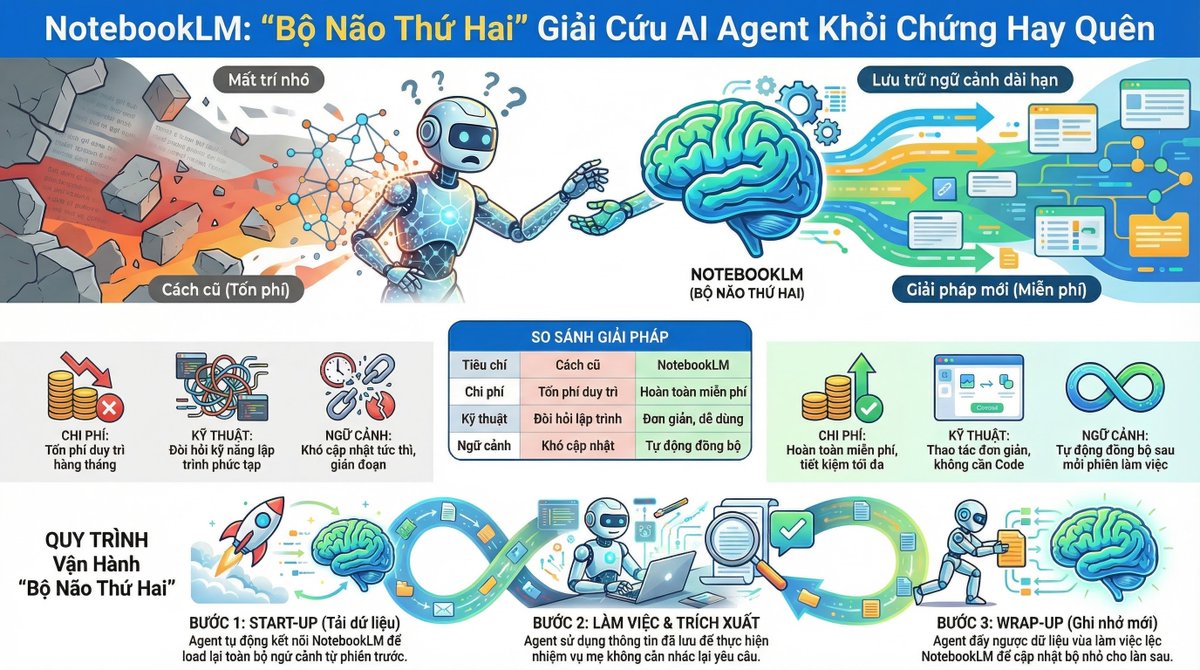
⚡ Con AI Agent của bạn đang "mất trí nhớ" mỗi lần chuyển session? Đây là vấn đề lớn nhất mà ít ai nói tới: - Nhiều ngữ cảnh = hiệu suất tệ - Chuyển session mới = quên sạch - Phải yêu cầu nó phân tích lại từ đầu Giải pháp cũ: RAG + Pinecone → Khó triển khai → Tốn phí Giải pháp mới: NotebookLM — bộ não thứ hai cho Agent Cách hoạt động: - /startup → Agent load lại toàn bộ ngữ cảnh từ NotebookLM - Làm việc bình thường - /wrapup → Agent tự tổng hợp và lưu lại phiên làm việc Kết quả: Agent nhớ liên tục qua MỌI session. Không mất ngữ cảnh. Tiết kiệm token. Và cái hay nhất? HOÀN TOÀN MIỄN PHÍ. Mình đã demo chi tiết cách triển khai trong video mới. Bạn đang giải quyết vấn đề bộ nhớ Agent bằng cách nào? 🤔 #KhoaAI #AIAgent #NotebookLM
KHOA AI | HILL tweet media
Tiếng Việt
1
0
2
48
KHOA AI | HILL
KHOA AI | HILL@aitrothu·
Mình đang deep dive Hermes Agent trong cộng đồng KHOA AI — bao gồm cách setup, deploy và tận dụng GEPA loop. Tham gia miễn phí: 👉 skool.com/khoa-ai-ung-du…
Tiếng Việt
0
0
0
45
KHOA AI | HILL
KHOA AI | HILL@aitrothu·
📌 Mình có breakdown chi tiết + ví dụ thực tế cho từng thuật ngữ trong cộng đồng KHOA AI. Join miễn phí: 👉 skool.com/khoa-ai-ung-du…
Tiếng Việt
0
0
1
14
KHOA AI | HILL
KHOA AI | HILL@aitrothu·
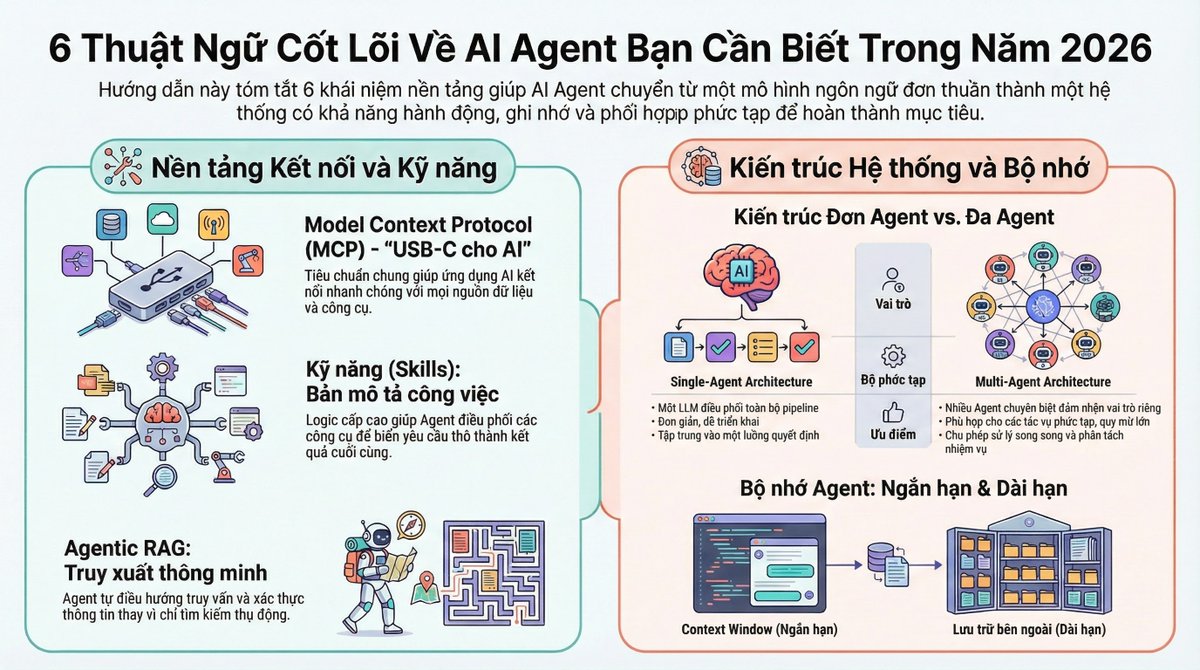
🔴 6 thuật ngữ AI Agent mà ai cũng dùng nhưng 90% hiểu sai. Bạn nói "AI Agent" hàng ngày. Nhưng bạn có phân biệt được MCP với Skills không? Đây là BẢN ĐỒ 6 TẦNG mà mọi người làm AI năm 2026 cần nắm: 1️⃣ MCP (Model Context Protocol) - "USB-C cho AI" — 1 chuẩn kết nối duy nhất thay vì build tích hợp riêng cho từng tool 2️⃣ Skills - "Bản mô tả công việc" của agent — logic bậc cao điều phối MCP + tools thành kết quả hoàn chỉnh 3️⃣ Single Agent Architecture - 1 agent xử lý tất cả: hiểu → lên kế hoạch → dùng tool → trả kết quả 4️⃣ Multi-Agent Architecture - Nhiều agent chuyên biệt phối hợp — mỗi agent 1 nhiệm vụ, cùng nhau tạo ra hệ thống mạnh hơn 5️⃣ Agentic RAG - RAG nhưng THÔNG MINH hơn — agent tự chọn nguồn, tự validate, tự quyết định dùng data nào 6️⃣ Agent Memory - Bộ nhớ ngắn hạn (context window) + dài hạn (vector DB) — giúp agent nhớ và học qua từng phiên Hầu hết mọi người kẹt ở tầng 1-2 mà nghĩ mình đã ở tầng 5. Hiểu đúng 6 thuật ngữ này = biết chính xác mình đang ở đâu trên bản đồ AI Agent. Bạn đang ở tầng nào? 💬 #KhoaAI #AIAgent #MCP
KHOA AI | HILL tweet media
Tiếng Việt
1
0
2
44