Alex Widua

80 posts

Alex Widua banner
Alex Widua

Alex Widua

@alexwidua

Human Interface Designer at Apple

San Francisco Katılım Mayıs 2010
48 Takip Edilen13.7K Takipçiler
Alex Widua
Alex Widua@alexwidua·
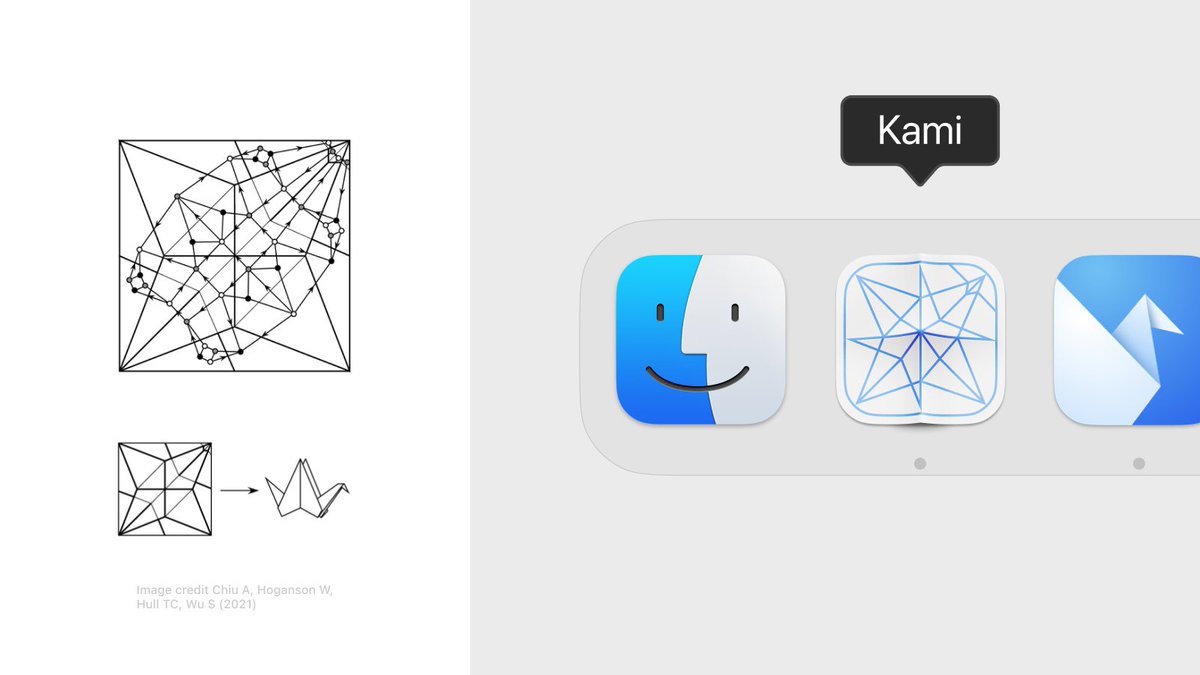
When designing the app icon I learned about ‘crease patterns’ – structural representations of intricate origami folds. The app icon shows the crease pattern for an Origami Crane – a nod to Origami Studio’s original app icon.
Alex Widua tweet media
English
9
15
336
38.5K
Alex Widua
Alex Widua@alexwidua·
In my day-to-day prototyping I use it mostly to create little utility patches and ‘jigs’ for all sorts of things (transforms, validate strings, randomize this and that etc.) Just describing the desired inputs and outputs of a patch helps a lot – it makes you break down the logic of a prototype and is almost as useful as generating the patch itself.
English
1
0
16
15.9K
Alex Widua
Alex Widua@alexwidua·
I’ve made a little AI copilot for Origami Studio. Think of it as a tiny code editor that sits on top of Origami's canvas and lets you generate patches using GPT-4 – all within the same surface. It’s a native macOS app and you can get it here: kami.alexwidua.com
English
19
28
362
50.4K
Alex Widua
Alex Widua@alexwidua·
PS. little accidental find: You get a directional Motion Blur for free if you blur the layer *before* applying the distortion shader. The shader compresses the blur horizontally but stretches/emphasizes the blur vertically
English
1
4
53
10.4K
Alex Widua
Alex Widua@alexwidua·
Couldn't resist and had to remix @jmtrivedi's mesh animation and tried to recreate a 'genie effect' using SwiftUI
English
14
34
654
77.4K
Alex Widua
Alex Widua@alexwidua·
The blur strength responds to the drag/scale velocity. I'm using @jmtrivedi's fantastic Wave package which makes it easy to work with the velocity + animate the shader values. The code is up here: github.com/alexwidua/zoom…
English
1
1
100
9.7K
Alex Widua
Alex Widua@alexwidua·
Prototyped a subtle Zoom Blur and Motion Blur SwiftUI shader this weekend. It's a little detail that changes the feel of the dragged element entirely (and is fun to play around with)
English
10
15
542
76.3K
Alex Widua
Alex Widua@alexwidua·
It’s an amalgam of SpriteKit particle layers, gradients and blend modes. Together they create a nice materiality. I liked the idea of using a turbulence burst to change between the material's colors
English
7
8
186
18.7K
Alex Widua
Alex Widua@alexwidua·
Tried to re-create the new iPhone’s Titanium particle effect last night and made this interactive ‘material sample’ in SwiftUI
English
63
171
3.2K
244.6K
saint laurent del rey
saint laurent del rey@laurentdelrey·
back on x today, with a personal update: i left snapchat a few weeks ago 💛 joining the product design team has been a dream come true and i'll be forever grateful 🥹 now embracing the blank page, following my intuition with no plans in sight 🧃
English
62
4
523
67.9K
Alex Widua
Alex Widua@alexwidua·
@ollybromham For the time, I just had a hunch how it should move and feel. I pulled some of the variables into sliders and built a little 'design tool' which allowed me to fidget around with the values and feel it out (this makes SwiftUI such a neat prototyping tool!) :-)
English
4
2
118
10.5K
Alex Widua
Alex Widua@alexwidua·
@ollybromham The stick itself is a spline that gets more flexion the longer it gets (like a flimsy piece of wood). It's a v subtle detail that gives the interface more materiality and makes it feel less like a slider – even if you're not consciously aware of it
English
1
0
51
9.6K
Alex Widua
Alex Widua@alexwidua·
Riffed on @ollybromham's Incense timer in SwiftUI. A pinch of gestures, haptics, motion, blurs and particles
English
22
114
1.5K
346.8K
Alex Widua
Alex Widua@alexwidua·
@hturan This is brilliant, thank you for sharing!
English
1
0
2
695
harley turan
harley turan@hturan·
i've been thinking a lot about exif data recently, and how it's effectively a spatiotemporal dataset we all carry around with us. come along with me as we explore what’s possible! — hturan.com/writing/explor…
English
9
6
66
14.9K
Alex Widua
Alex Widua@alexwidua·
@tarngerine @parkerhendo @diagram yea we had to abandon it for reasons, but I still believe in the idea behind it. One pattern I love is that the code is stored on the Artboard itself, so to iterate on a prototype you'd just option-drag/duplicate the frame – it's like visual versioning, felt p great & natural
English
1
0
6
357
parker
parker@parkerhendo·
Every time I try to prototype something with complex interactions that would be a nightmare to build with html/js from scratch (mainly due to time), I reach for origami which is great, but things are impossible to share and have weird quirks because it's primarily for mobile prototypes. Makes me really miss Framer Classic and friends.
English
6
0
22
8K
Seungmee
Seungmee@smee_leee·
One quick prototype of 'ambience on your screen', inspired by nice reading time under sunshine over the weekend. ambient-reader.vercel.app (Turn your audio on 🔈) made with #threejs
English
8
15
171
16.1K