Ambika Gupta

48 posts

Ambika Gupta banner
Ambika Gupta

Ambika Gupta

@ambika1045

chill until i'm not

Katılım Mart 2025
10 Takip Edilen10 Takipçiler
Anushka Gupta
Anushka Gupta@Anushkaa1407·
Sales Navigator's industry filter is 10% accurate. a security guard agency client needed to target schools in Arizona. a filter for "primary and secondary education" + decision maker titles would've resulted in oil and gas workers, church employees, sports company people, etc. because LinkedIn's industry tag is self-reported. there's no verification. whatever you type when you create your page, becomes your industry. this is what 90% accuracy looks like instead: we went to Google Maps first. searched "schools in Maricopa County" and every result is a confirmed, physical, registered school. the category self-verified before we touched Sales Nav. took those domains into Clay. ran a Google search for the exact titles you want, principal, director of security, facility manager. LinkedIn URL surfaces directly. Sales Nav came in last as the contact enricher. week one of this campaign: responses started coming in. wherever your niche has already confirmed itself, Google Maps, trade registries, license databases, accreditation bodies... that's your real list source. Sales Nav is for finding people. not for finding companies.
English
1
1
3
43
Anushka Gupta
Anushka Gupta@Anushkaa1407·
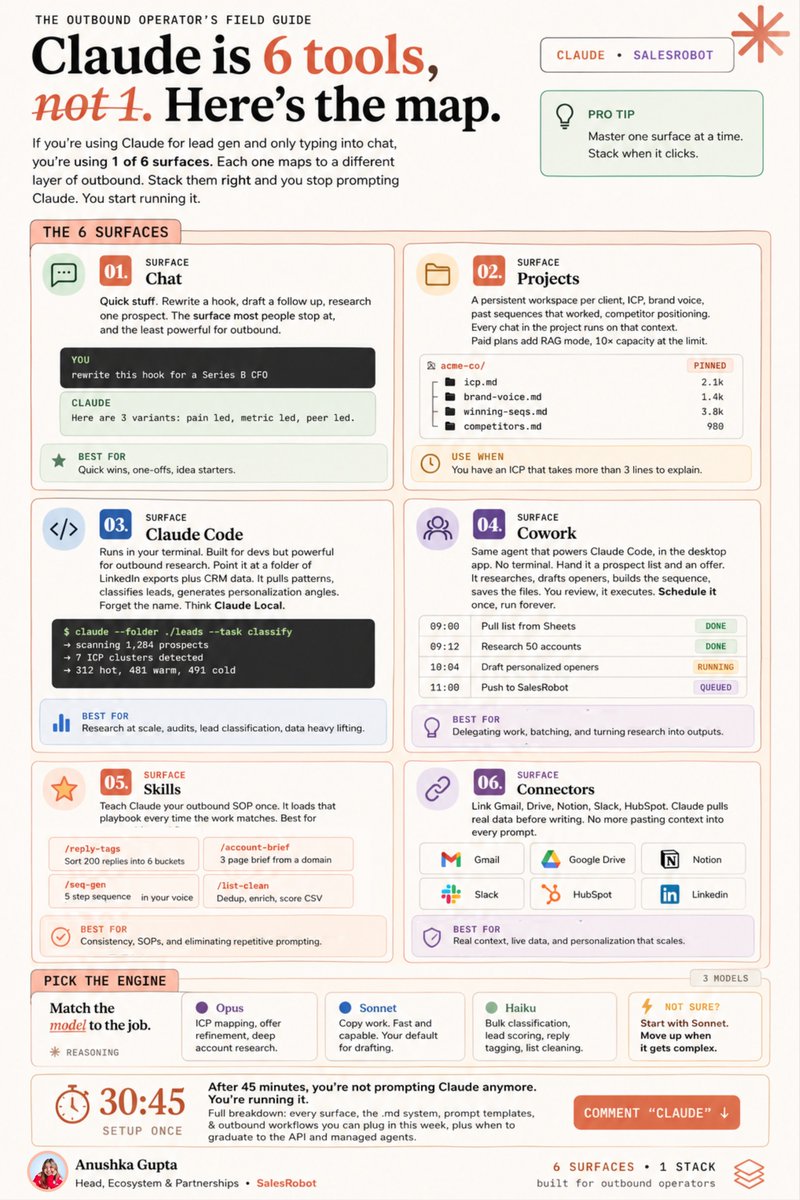
You're stuck at “good prompts for Claude” while Anthropic has quietly shifted how people can use Claude completely. (well.. not so quietly) So stop using it like a search engine if you actually want to get some work done. Here’s 6 different tools inside claude, explained - chat, projects, code, cowork, skills, connectors. want the full breakdown on how to use these for outbound? link’s in the comments below. It has the entire skill.md file system, prompt templates, 8 outbound workflows, and when to graduate to the API and managed agents.. Thank me later :))
Anushka Gupta tweet media
English
1
3
7
65
Anushka Gupta
Anushka Gupta@Anushkaa1407·
how to fix any average LinkedIn lead gen campaign 3 metrics that tell you everything: 1/ connection acceptance rate: aim for above 25% 2/ reply rate: min target 20 - 30% of people who accepted 3/ positive reply to booking rate: min 20% fixing problems: low acceptance rate? profile or targeting problem: → audit your headline and featured section (prospects check before accepting) → a/b test the shit out - connection notes vs blank notes → review your filters - too broad kills relevance and acceptance drops → engage on their posts 2 to 3 days before sending the request → check if your profile photo is clear and professional low reply rate? copy or timing problem: → run a short message test (under 50 words vs longer format) → personalize beyond first name and company name - use a recent post or a specific result, not their college → test openers: question vs observation vs compliment (2 to 3 variants, 100 sends each), provide insane value → try voice notes for warmer leads - reply rates jump to 40%+ → review your sending time - morning sends typically outperform afternoon, avoid weekends (doesn't work for all) booking rate below 40%? friction or follow-up problem: → warm up prospects through content before you message them - brand recall matters → build a 3-touch follow-up after the positive reply - most people forget to book → put the calendar link directly in the DM, reduce friction as much as possible → offer two time slots in the message - cuts the back and forth → make sure your booking page doesn't ask for 10 fields before they can schedule which of these is the one your campaigns are actually stuck on?
English
3
1
6
106
Ashwini
Ashwini@AshwiniNK21·
We used to publish a blog like this: Write → format → copy paste into Webflow → images break → fix images → meta fields → slug → preview looks wrong → fix again → publish → Webflow decides today is not the day → cry → try again tomorrow One hour. Minimum. On a good day. Now it's 30 seconds 😎 Same 6 steps. Just automated. And Webflow doesn't get a vote anymore. Built it myself. No backend. Browser only. Runs quietly while the team thinks it's just "the blog tool." Named it ShipIt. because "please just work and stop making me cry" wasn't a good tool name. It ships. Every time. No mood swings. #BuildInPublic #ShipIt
Ashwini tweet media
English
3
0
7
70
Anushka Gupta
Anushka Gupta@Anushkaa1407·
Claude code + CLI is how you automatically trigger a LinkedIn campaign. CLI makes the setup faster and SalesRobot handles the sending, linkedin compliance, sequences, inbox management. without automation, it’s switching 5 different tabs to import a list, add prospects to a campaign, start the sequence. it's just 3 prompts in Claude Code. here's what the setup looks like: → claude code writes the script against salesrobot's api → you paste your prospect list as a csv → one command adds everyone to your campaign and starts the sequence → salesrobot handles everything after: sending, timing, compliance, replies once it's running, you don't touch it. Not even for the replies. but claude code lives in a terminal. if you've never opened one, expect the first 20 minutes to feel uncomfortable. wrote up the starter kit. the exact prompts, the api setup, and the script structure that gets you from zero to a running an end-to-end campaign. comment "CODE", i'll send it over.
Anushka Gupta tweet media
English
6
0
7
79
Ashwini
Ashwini@AshwiniNK21·
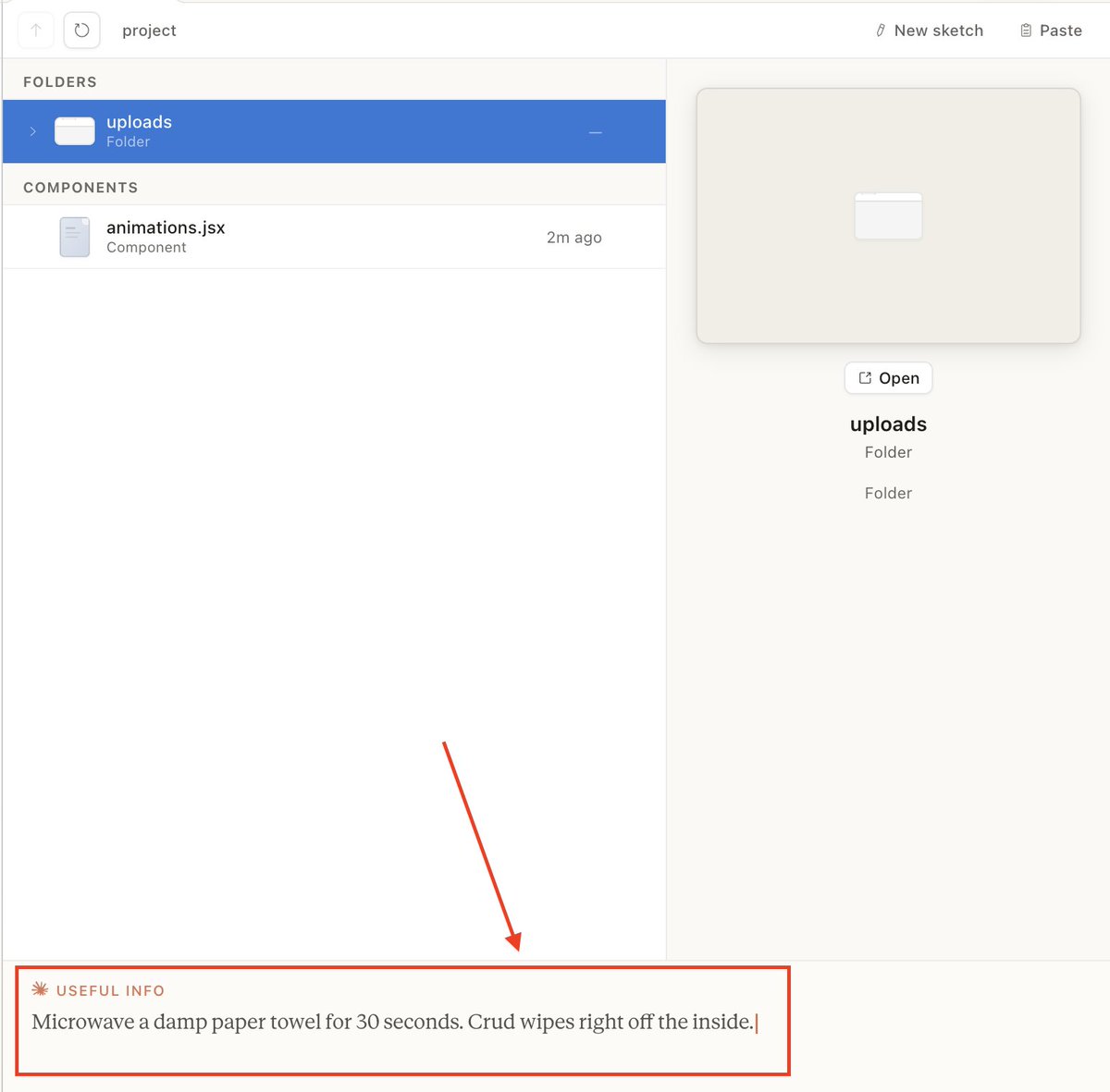
me: opens claude design to build something claude design: microwave a damp paper towel for 30 seconds. crud wipes right off. me: ...noted. the design can wait. #ClaudeAI #ClaudeDesign #ClaudeCode
Ashwini tweet media
English
2
0
5
147
Upamanyu Roy
Upamanyu Roy@UpamanyuRo20884·
I look at competitor posts for two reasons: To get jealous, and find my next warmed up lead list. I target my competitor's LinkedIn posts using CLI. No browser. No clicking. No manual prospecting. One curl command to find every person who commented on a competitor's post. Another curl command to drop them into a personalized LinkedIn campaign. Here's the workflow: Step 1: Find a competitor's post that's getting traction. Step 2: Grab the post URL. Step 3: Run this in your terminal: “curl -X POST \ 'api.salesrobot.co/api/add-from-s…' \ -H 'X-API-KEY: YOUR_KEY' \ -d '{"searchUrl": "COMPETITOR_POST_URL", "searchType": "normal"}' “ That's it. Every commenter on that post is now in your SalesRobot campaign (or any outbound tool you’re using really). They already showed interest in the topic. They already engaged. They're warm. Your campaign hits them with a connection request + personalized follow-up referencing the exact post they commented on. Reply rates from post commenter campaigns: 25-45%. Reply rates from cold lists: 3-5%. Same effort. Wildly different results. I run this every morning. Takes 2 minutes. I check 3-4 competitor posts, grab the URLs, run the commands. By the time I finish my coffee, 50-100 new qualified leads are in my pipeline. All pre-qualified by their own behavior. CLI terminals don’t mess around. It just books meetings.
English
4
0
6
41
Prerona Basu
Prerona Basu@HelloPrerona·
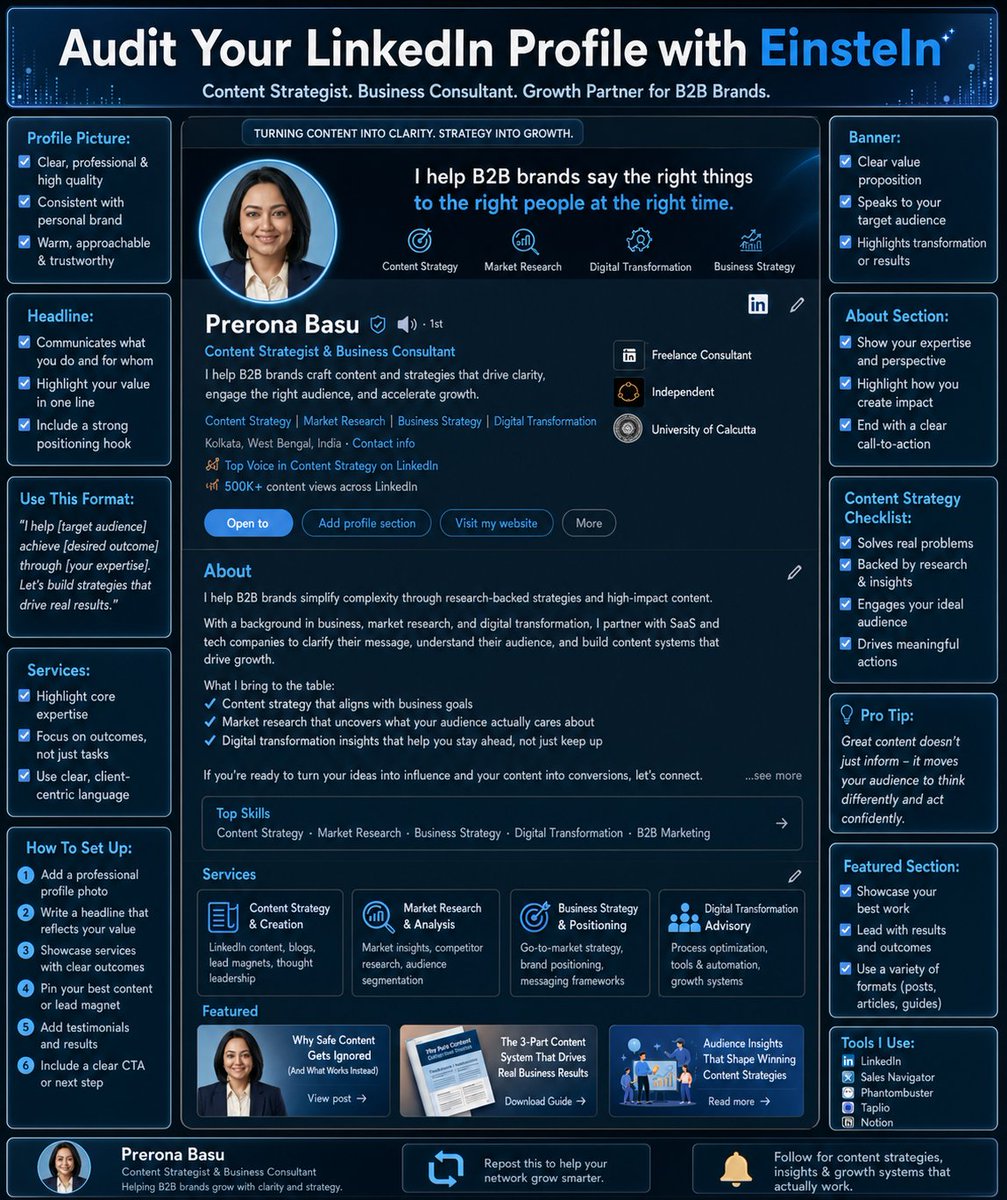
I got 2 job offers right after fixing my About section on LinkedIn. (Screenshot in the comments) Look, I know you've been posting on LinkedIn for months. Decent content. Okay engagement. But zero leads. And this happens because you do everything except fix the first thing anyone sees when they land on your profile. Your bio. So even if you study the algorithm. Post at 8 AM on Tuesdays because someone on YouTube said so. You’ll be losing clients if your LinkedIn profile isn’t sorted. Now you could build a skill on Claude and fix it yourself. Or if you're running low on time and patience, use our free tool EinsteIN instead. Sorts your profile in minutes. Costs nothing. Just comment SEND and I'll DM you the link. Easy. (Save this post so you can come back to it if you're in the middle of something.)
Prerona Basu tweet media
English
7
1
8
104
Ambika Gupta retweetledi
Anushka Gupta
Anushka Gupta@Anushkaa1407·
"scared money does not make money. you never win a lottery you never bought a ticket for." - life lesson from an 89-year-old man. saw his reel and couldn't stop thinking about it. he built his fortune in tobacco. said he doesn't even like the smell of it. he just read something in the WSJ one day about a gap in the market, and went for it. no passion. no perfect moment. just a lottery ticket he bought. then ended up saying something that kind of didn't settle in - "i moved my kids to california when i was 29. that was 60 years ago. it was yesterday." this man has done everything, and time still felt like it collapsed on him. what's your excuse for waiting? credits - theschoolofhardknockz
English
1
1
5
73
Ashwini
Ashwini@AshwiniNK21·
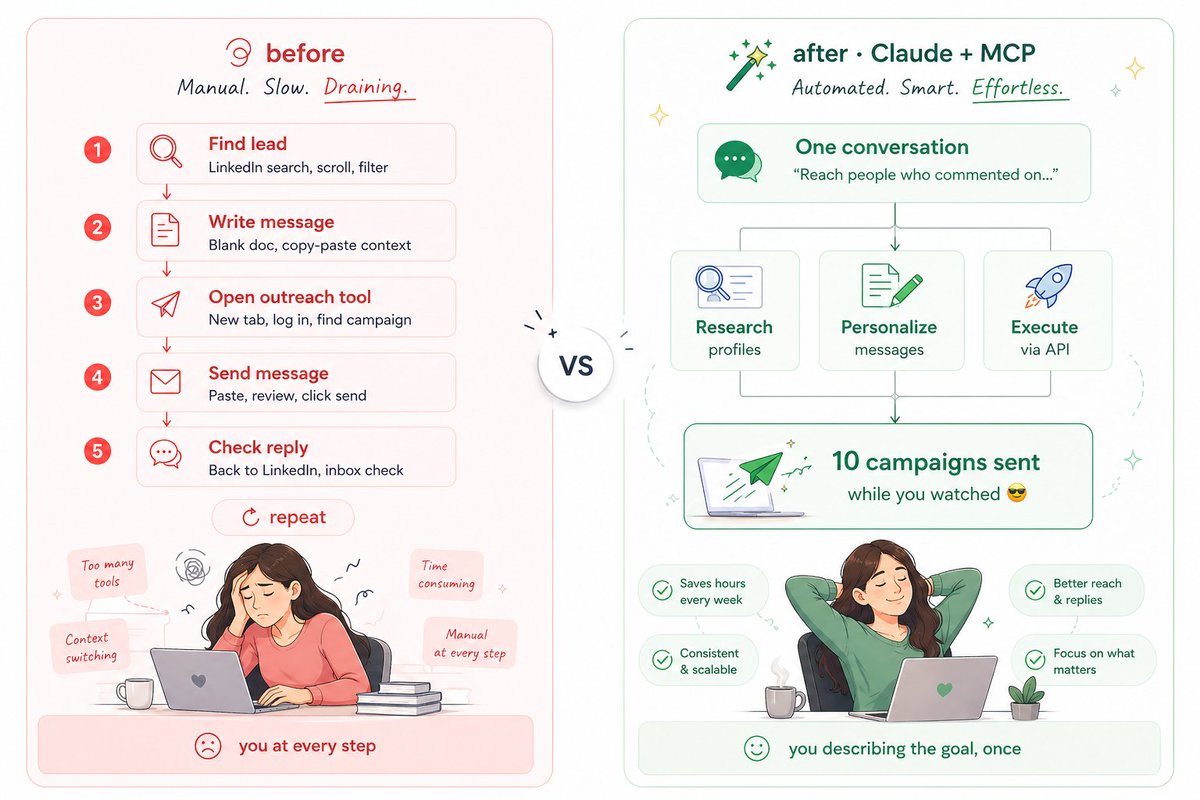
Everyone's talking about connecting Claude to LinkedIn via MCP. Here's what that actually means in plain English. MCP is basically a way to give Claude access to external tools. Instead of copy-pasting between tabs, Claude can read data, take actions, and talk to other platforms directly from the chat window. So when people say "Claude + MCP + LinkedIn" - what they mean is: Claude finds the right person, figures out what to say, and hands it off to a tool that actually sends the message on LinkedIn. Claude handles the thinking. The tool handles the doing. The reason this matters: outreach used to require YOU to be in the loop at every step. Find lead. Write a message. Open tool. Send. Check reply. Repeat. MCP collapses that into ONE conversation. You describe who you want to reach. Claude does the rest - research, personalization, execution, without you switching tabs twelve times. It's just a better-connected stack. While SalesRobot does not have a native MCP right now, we do have an API that you can feed into Claude Code. It basically pulls up all the API endpoints and starts running campaigns for you. This is how I ran ten campaigns last night, reaching out to people who had commented on all of our influencers' LinkedIn posts in the last two weeks. Drop a "MCP tutorial" and I'll show you my entire Claude Code session on how I did that.
Ashwini tweet media
English
5
0
8
90
Anushka Gupta
Anushka Gupta@Anushkaa1407·
Want this in a copy-pasteable format? Reply "yes" and i'll send it right away.
English
1
0
0
50
Anushka Gupta
Anushka Gupta@Anushkaa1407·
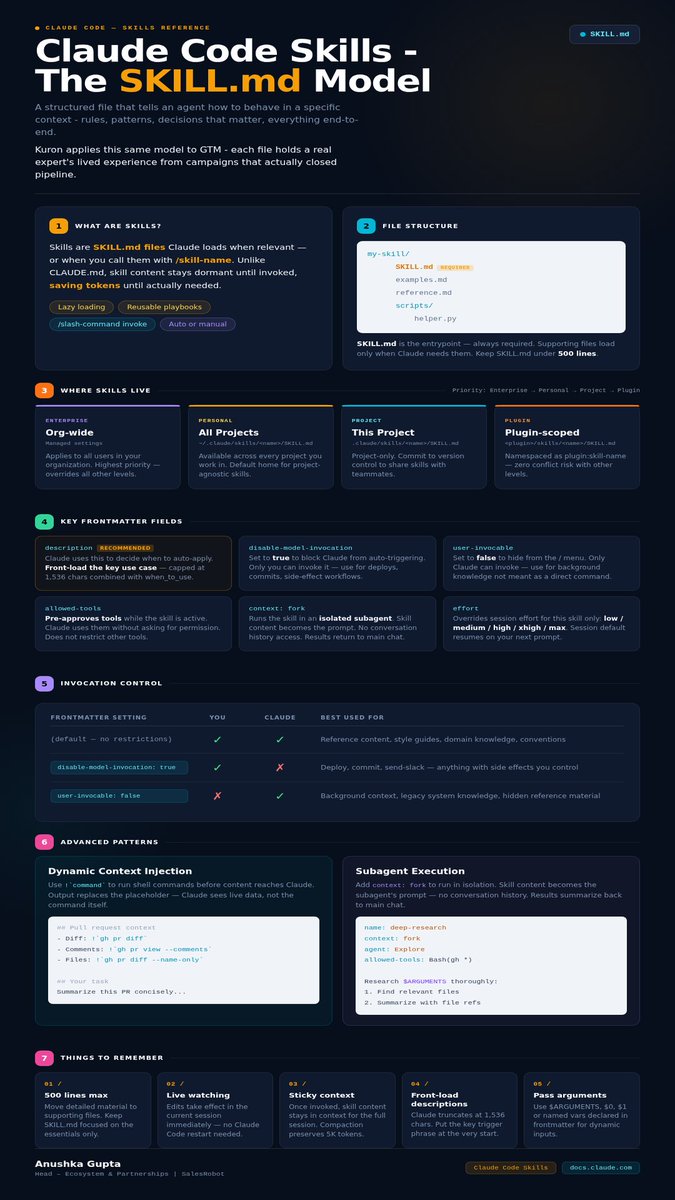
Used Claude Code? You might know what a SKILL.md file does. it's a structured file that tells the agent how to behave in a specific context. rules, patterns, decisions that matter, everything end-to-end. Kuron uses the same thing. except each file holds a GTM expert's lived experience (yes, their entire lived experience). here's what goes into each one: → which segments worked (and which ones looked good but didn't)  → which copy angles drove replies vs. got archived  → how objections were handled at each stage  → what actually moved pipeline for that ICP and vertical structured and callable knowledge from real campaigns. 40+ of these. across SaaS, agencies, consulting, recruiting, real estate. so when Kuron recommends a segment to you, it's matched against what actually worked for someone running the same play in your vertical, while every other AI SDR is trained on the same public data soup. sign up for early access at kuron.ai
Anushka Gupta tweet media
English
1
0
4
63
Ambika Gupta retweetledi
Anushka Gupta
Anushka Gupta@Anushkaa1407·
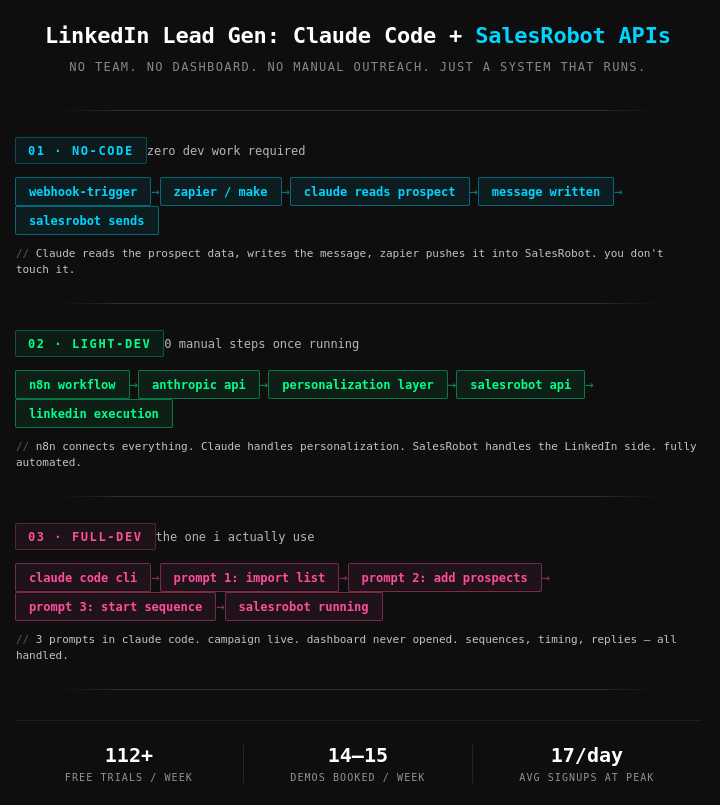
We've been booking 2-4 calls/ day, 100% autopilot, using Claude, no MCP. 1/ no-code: Webhooks fire into zapier or make. Claude reads the prospect data, writes the message, zapier pushes it back into SalesRobot. 2/ light-dev: n8n connects everything. Claude via the anthropic API handles personalization. SalesRobot API handles the linkedin execution. 0 manual steps. 3/ full-dev: Claude code + CLI. 3 prompts. prospects imported, campaign started, SalesRobot running, without opening the dashboard once. hint: our MCP is coming soon. Once it’s here, Claude can research, write, and trigger everything into SalesRobot directly. but you don't need to wait for that to start booking calls. I have the full architecture for all 3 above, step-by-step. like + comment "STACK" here and i'll send it over (must be following)
Anushka Gupta tweet media
English
4
2
6
237
Prerona Basu
Prerona Basu@HelloPrerona·
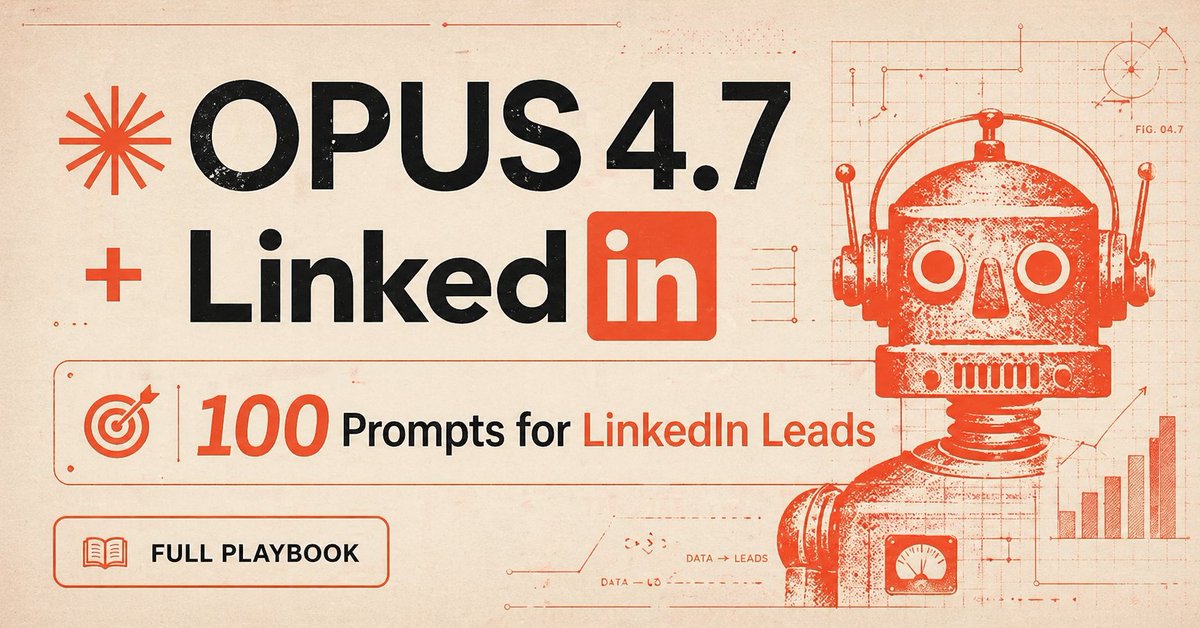
Everyone and their grandma is talking about Opus 4.7 Learn how to use it to generate hot leads on LinkedIn. I'm giving away 100+ prompts you can use to pull clients out of LinkedIn. Comment "PROMPT" and I'll DM you the full pack. Inside: Make a stranger save your post for later Turn your profile into a silent salesperson Get a cold prospect to reply within an hour Build a lead magnet people will actually open Write a hook that makes scrollers stop mid-thumb Close in the DMs without sounding like a pitch deck Note: Each prompt is 15-30 lines long with role, context inputs, constraints, output format, voice guideline. These prompts will arrive to you in a Notion doc. Just duplicate it and it’s yours to keep. Make the most of these till Opus 4.8 arrives. To get access: - Bookmark my post (X algo loves this) - Drop “OPUS” and I'll DM it to you ♻️ Repost for priority access. And love.
Prerona Basu tweet media
English
7
2
7
63
Ambika Gupta retweetledi
Ashwini
Ashwini@AshwiniNK21·
Our Founder posted something I've been waiting to see since I joined this company. $1.2M. Bootstrapped. India team. No VC. No shortcuts. I joined almost a year before the graph started going up. Sat in the hard part without knowing it was the hard part. The turn came. I watched it happen from two feet away. He broke down exactly how - the product fix, the content system, the white label channel nobody saw coming. Go read it. Seriously. @SalesRobotAi #BuildInPublic x.com/saguppa/status…
English
3
4
10
113