Youngho Andrew Chaa

3.9K posts

Youngho Andrew Chaa

Youngho Andrew Chaa

@andrewchaa

developer, love agile and reading books. Interested in improving everything around me

London, United Kingdom Katılım Şubat 2010
529 Takip Edilen272 Takipçiler
Youngho Andrew Chaa retweetledi
Joan of Arc
Joan of Arc@ralralbral·
🚨마이크로소프트가 무료로 공개한 음성 인식 AI를 직접 테스트해 봤는데, 60분 분량의 회의를 단 한 번의 끊김도 없이 완벽하게 텍스트로 변환해 내는 성능이 정말 대박입니다. 네이버 클로바 안써도 되겠는데요? 이미 깃허브에서 별 3.8만 개를 받은 'VibeVoice'라는 오픈소스 기술입니다. 보통 AI로 긴 음성을 텍스트로 바꿀 때 텍스트를 여러 구간으로 쪼개서 처리하기 때문에 문맥이 어색해지거나 누가 말했는지 섞이는 오류가 자주 발생합니다. 그래서 이 기술이 정말 실용성이 있는지 직접 확인해 보고 싶었어요. ✅공식 문서에 적힌 대로 60분 분량의 음성을 분할 작업 없이 한 번에 입력해 보았고, 실제 대화의 흐름과 화자가 전혀 섞이지 않고 그대로 유지되는 것을 확인했습니다. 사용 과정은 복잡한 세팅 없이 아주 직관적입니다. • 아래 댓글에 있는 github repo에서 clone합니다. • 변환이 필요한 음성 파일을 지정된 폴더에 넣습니다. • 실행 명령어를 입력하고 기다립니다. 결과물은 단순한 텍스트가 아니라, 대화가 오고 간 타임스탬프와 누가 말했는지(화자 분리)까지 정확하게 표기된 문서 파일로 곧바로 저장됩니다. ✅하지만 실제 구동 환경에서 직접 겪은 주의사항도 있습니다. 한 번에 처리할 수 있는 최대 입력 길이가 정확히 60분으로 제한되어 있습니다. 1시간이 넘어가는 녹음 파일을 그대로 넣으면 시스템이 중간에 멈추거나 에러를 발생시킵니다. 따라서 60분이 넘는 회의 음성은 반드시 사용자가 미리 60분 단위로 파일을 잘라서 입력해야 합니다. ✅이 툴의 효율을 극대화하는 저만의 실무 적용 방법도 공유해 드립니다. VibeVoice는 50개 국가의 언어를 지원합니다. 외국어 화자가 섞여 있는 다국어 회의 녹음 파일을 입력해도, 각 언어를 인식하여 정확하게 텍스트로 분리해 냅니다. 또한 이 기술은 텍스트를 음성으로 만들어주는 오디오 생성 기능도 포함하고 있습니다. 최대 90분 길이까지 생성할 수 있으며, 텍스트에 화자를 여러 명으로 지정하고 감정을 텍스트로 입력하면 여러 사람이 감정을 담아 대화하는 음성을 그대로 만들어냅니다. 이 기술은 우리가 대화와 회의 내용을 기록하는 방식 자체를 완전히 바꿀 것입니다. 사람이 직접 오디오를 들으며 타이핑하고 대화자를 구분해야 했던 긴 시간의 단순 작업은 이제 오픈소스 AI가 무료로 전부 처리할 수 있습니다. 단순한 리뷰를 넘어서, 여러분도 지금 당장 업무 프로세스에 이 툴을 적용해 보고 반복 작업에 들어가는 시간과 비용을 직접 줄여보시기를 바랍니다.
Joan of Arc tweet media
한국어
16
156
544
25K
Youngho Andrew Chaa retweetledi
Andrej Karpathy
Andrej Karpathy@karpathy·
Wow, this tweet went very viral! I wanted share a possibly slightly improved version of the tweet in an "idea file". The idea of the idea file is that in this era of LLM agents, there is less of a point/need of sharing the specific code/app, you just share the idea, then the other person's agent customizes & builds it for your specific needs. So here's the idea in a gist format: gist.github.com/karpathy/442a6… You can give this to your agent and it can build you your own LLM wiki and guide you on how to use it etc. It's intentionally kept a little bit abstract/vague because there are so many directions to take this in. And ofc, people can adjust the idea or contribute their own in the Discussion which is cool.
Andrej Karpathy@karpathy

LLM Knowledge Bases Something I'm finding very useful recently: using LLMs to build personal knowledge bases for various topics of research interest. In this way, a large fraction of my recent token throughput is going less into manipulating code, and more into manipulating knowledge (stored as markdown and images). The latest LLMs are quite good at it. So: Data ingest: I index source documents (articles, papers, repos, datasets, images, etc.) into a raw/ directory, then I use an LLM to incrementally "compile" a wiki, which is just a collection of .md files in a directory structure. The wiki includes summaries of all the data in raw/, backlinks, and then it categorizes data into concepts, writes articles for them, and links them all. To convert web articles into .md files I like to use the Obsidian Web Clipper extension, and then I also use a hotkey to download all the related images to local so that my LLM can easily reference them. IDE: I use Obsidian as the IDE "frontend" where I can view the raw data, the the compiled wiki, and the derived visualizations. Important to note that the LLM writes and maintains all of the data of the wiki, I rarely touch it directly. I've played with a few Obsidian plugins to render and view data in other ways (e.g. Marp for slides). Q&A: Where things get interesting is that once your wiki is big enough (e.g. mine on some recent research is ~100 articles and ~400K words), you can ask your LLM agent all kinds of complex questions against the wiki, and it will go off, research the answers, etc. I thought I had to reach for fancy RAG, but the LLM has been pretty good about auto-maintaining index files and brief summaries of all the documents and it reads all the important related data fairly easily at this ~small scale. Output: Instead of getting answers in text/terminal, I like to have it render markdown files for me, or slide shows (Marp format), or matplotlib images, all of which I then view again in Obsidian. You can imagine many other visual output formats depending on the query. Often, I end up "filing" the outputs back into the wiki to enhance it for further queries. So my own explorations and queries always "add up" in the knowledge base. Linting: I've run some LLM "health checks" over the wiki to e.g. find inconsistent data, impute missing data (with web searchers), find interesting connections for new article candidates, etc., to incrementally clean up the wiki and enhance its overall data integrity. The LLMs are quite good at suggesting further questions to ask and look into. Extra tools: I find myself developing additional tools to process the data, e.g. I vibe coded a small and naive search engine over the wiki, which I both use directly (in a web ui), but more often I want to hand it off to an LLM via CLI as a tool for larger queries. Further explorations: As the repo grows, the natural desire is to also think about synthetic data generation + finetuning to have your LLM "know" the data in its weights instead of just context windows. TLDR: raw data from a given number of sources is collected, then compiled by an LLM into a .md wiki, then operated on by various CLIs by the LLM to do Q&A and to incrementally enhance the wiki, and all of it viewable in Obsidian. You rarely ever write or edit the wiki manually, it's the domain of the LLM. I think there is room here for an incredible new product instead of a hacky collection of scripts.


English
1.1K
2.7K
26.1K
6.7M
Youngho Andrew Chaa retweetledi
Farza 🇵🇰🇺🇸
Farza 🇵🇰🇺🇸@FarzaTV·
@karpathy Also, I'll here's the skill I made for the wiki. If you wanna try yourself + hack around with it load it up in your agent of choice. Should work for nearly any data source (Notion, iMessage, etc) gist.github.com/farzaa/c35ac0c…
English
10
25
402
41.9K
Youngho Andrew Chaa retweetledi
Farza 🇵🇰🇺🇸
Farza 🇵🇰🇺🇸@FarzaTV·
This is Farzapedia. I had an LLM take 2,500 entries from my diary, Apple Notes, and some iMessage convos to create a personal Wikipedia for me. It made 400 detailed articles for my friends, my startups, research areas, and even my favorite animes and their impact on me complete with backlinks. But, this Wiki was not built for me! I built it for my agent! The structure of the wiki files and how it's all backlinked is very easily crawlable by any agent + makes it a truly useful knowledge base. I can spin up Claude Code on the wiki and starting at index.md (a catalog of all my articles) the agent does a really good job at drilling into the specific pages on my wiki it needs context on when I have a query. For example, when trying to cook up a new landing page I may ask: "I'm trying to design this landing page for a new idea I have. Please look into the images and films that inspired me recently and give me ideas for new copy and aesthetics". In my diary I kept track of everything from: learnings, people, inspo, interesting links, images. So the agent reads my wiki and pulls up my "Philosophy" articles from notes on a Studio Ghibli documentary, "Competitor" articles with YC companies whose landing pages I screenshotted, and pics of 1970s Beatles merch I saved years ago. And it delivers a great answer. I built a similar system to this a year ago with RAG but it was ass. A knowledge base that lets an agent find what it needs via a file system it actually understands just works better. The most magical thing now is as I add new things to my wiki (articles, images of inspo, meeting notes) the system will likely update 2-3 different articles where it feels that context belongs, or, just creates a new article. It's like this super genius librarian for your brain that's always filing stuff for your perfectly and also let's you easily query the knowledge for tasks useful to you (ex. design, product, writing, etc) and it never gets tired. I might spend next week productizing this, if that's of interest to you DM me + tell me your usecase!
Andrej Karpathy@karpathy

Wow, this tweet went very viral! I wanted share a possibly slightly improved version of the tweet in an "idea file". The idea of the idea file is that in this era of LLM agents, there is less of a point/need of sharing the specific code/app, you just share the idea, then the other person's agent customizes & builds it for your specific needs. So here's the idea in a gist format: gist.github.com/karpathy/442a6… You can give this to your agent and it can build you your own LLM wiki and guide you on how to use it etc. It's intentionally kept a little bit abstract/vague because there are so many directions to take this in. And ofc, people can adjust the idea or contribute their own in the Discussion which is cool.

English
233
370
4.7K
1.8M
Youngho Andrew Chaa retweetledi
Ronin
Ronin@DeRonin_·
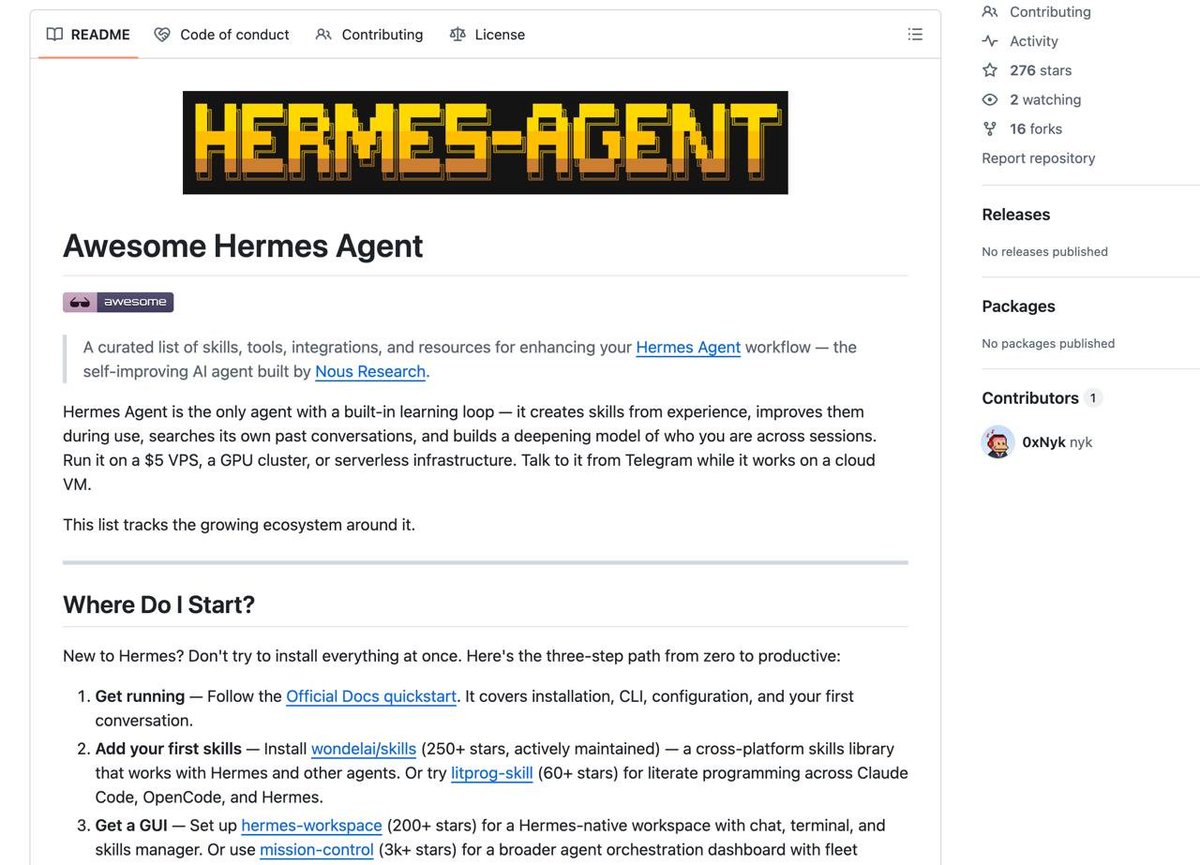
Somebody just mapped the ENTIRE Hermes Agent ecosystem 40+ skills, tools, integrations, and resources for @NousResearch's agent, all in one curated list highlights: ▫️ skills that upgrade themselves after every run ▫️ 734 security playbooks, ready to deploy ▫️ visual UI for memory, sessions, and skills ▫️ remote control your Android from your agent ▫️ Claude Code -> Hermes task handoffs ▫️ full OpenClaw migration in one command ▫️ AI council that debates before executing every entry has a real editorial description, not just a link the ecosystem most people don't know exists yet github.com/0xNyk/awesome-… [ BOOKMARK ]
Ronin tweet media
English
41
106
1K
62.1K
Youngho Andrew Chaa retweetledi
Cassandra Unchained
Cassandra Unchained@michaeljburry·
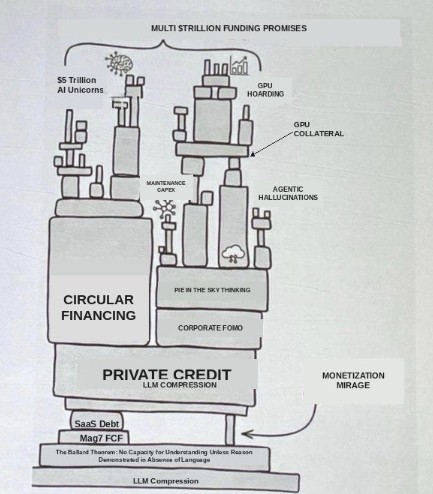
What really matters to the market and the US economy is not the Strait of Hormuz.
Cassandra Unchained tweet media
English
158
365
2.6K
674.2K
Youngho Andrew Chaa retweetledi
Feross
Feross@feross·
🤨 People keep asking how to protect yourself. #1: set min-release-age=7 in .npmrc #2: install Socket for GitHub (it's free!) to protect PRs from bad dependencies: socket.dev/features/github #3: install Socket Firewall (also free!) to protect your laptop: socket.dev/features/firew…
Feross@feross

🚨 CRITICAL: Active supply chain attack on axios -- one of npm's most depended-on packages. The latest axios@1.14.1 now pulls in plain-crypto-js@4.2.1, a package that did not exist before today. This is a live compromise. This is textbook supply chain installer malware. axios has 100M+ weekly downloads. Every npm install pulling the latest version is potentially compromised right now. Socket AI analysis confirms this is malware. plain-crypto-js is an obfuscated dropper/loader that: • Deobfuscates embedded payloads and operational strings at runtime • Dynamically loads fs, os, and execSync to evade static analysis • Executes decoded shell commands • Stages and copies payload files into OS temp and Windows ProgramData directories • Deletes and renames artifacts post-execution to destroy forensic evidence If you use axios, pin your version immediately and audit your lockfiles. Do not upgrade.

English
58
288
2.4K
342K
Youngho Andrew Chaa retweetledi
Feross
Feross@feross·
🚨 CRITICAL: Active supply chain attack on axios -- one of npm's most depended-on packages. The latest axios@1.14.1 now pulls in plain-crypto-js@4.2.1, a package that did not exist before today. This is a live compromise. This is textbook supply chain installer malware. axios has 100M+ weekly downloads. Every npm install pulling the latest version is potentially compromised right now. Socket AI analysis confirms this is malware. plain-crypto-js is an obfuscated dropper/loader that: • Deobfuscates embedded payloads and operational strings at runtime • Dynamically loads fs, os, and execSync to evade static analysis • Executes decoded shell commands • Stages and copies payload files into OS temp and Windows ProgramData directories • Deletes and renames artifacts post-execution to destroy forensic evidence If you use axios, pin your version immediately and audit your lockfiles. Do not upgrade.
English
545
4.1K
16.3K
12.2M
Youngho Andrew Chaa retweetledi
Oliver Ulvebne
Oliver Ulvebne@therealoliulv·
I’ve switched to the only UK bank with a full personal banking API (that I could find). Working on something cool
Oliver Ulvebne tweet media
English
35
7
535
92.1K
Youngho Andrew Chaa retweetledi
lucas
lucas@lucas_flatwhite·
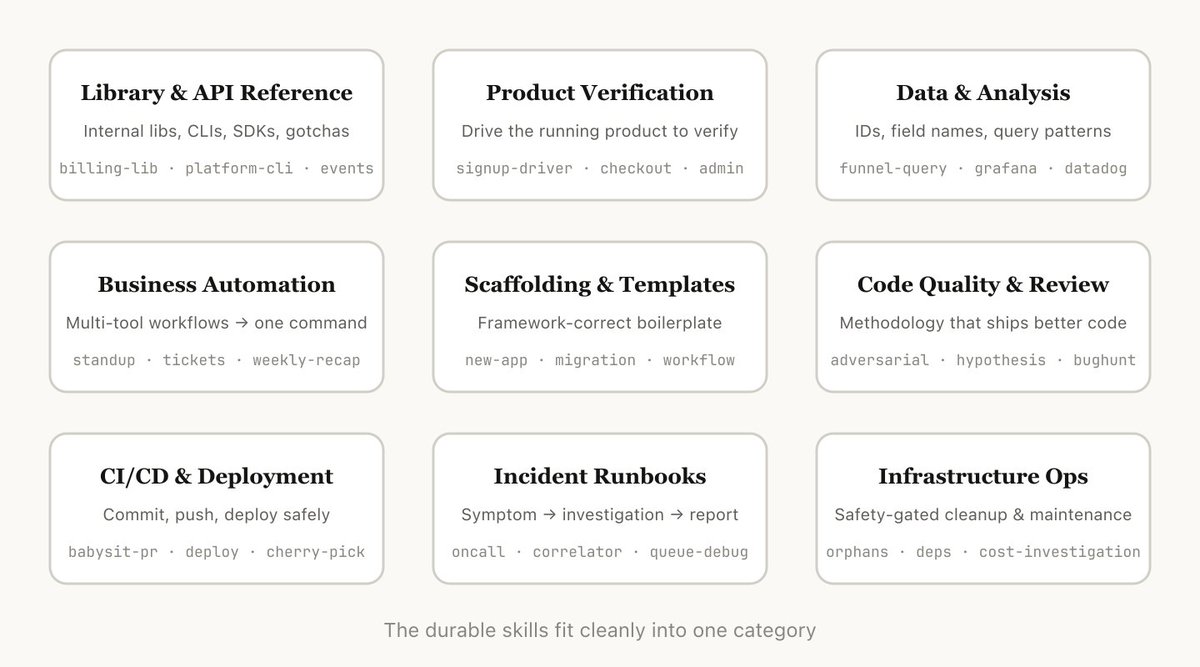
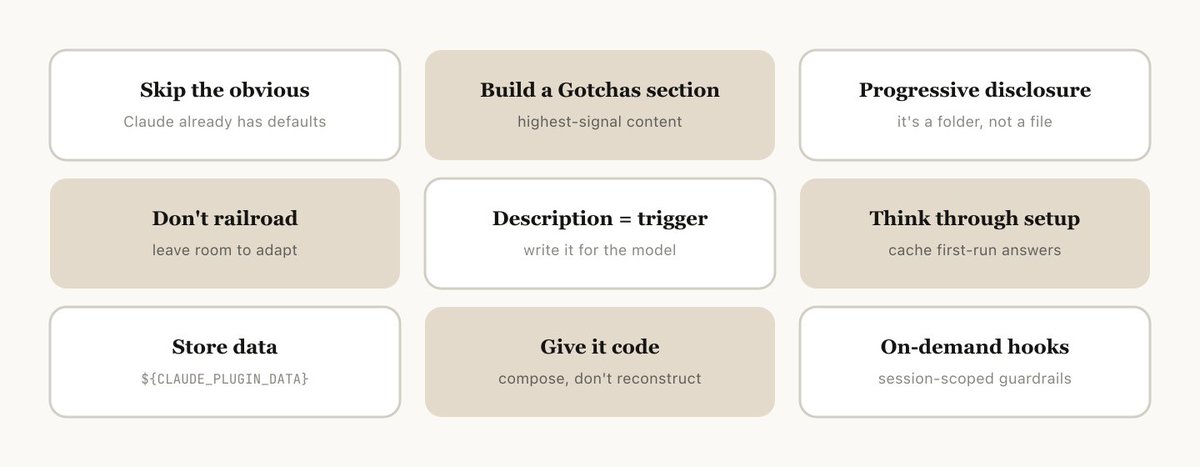
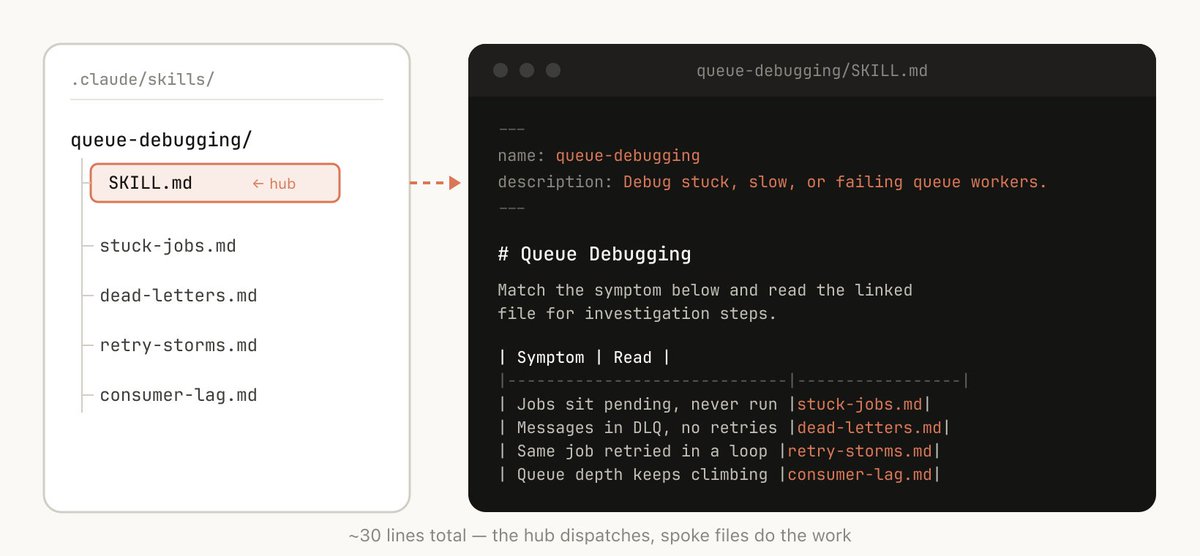
"Claude Code Skills 완전 정복" > Anthropic 내부에서 수백 개의 Skills를 쓰며 터득한 진짜 노하우 Claude Code 팀이 직접 쓴 아티클이예요.. 너무 좋네요ㅠ "Skills가 마크다운 파일 아닌가?"라고 생각하셨다면, 이 글이 그 인식을 완전히 바꿔줄 거예요. Anthropic 내부에서 수백 개의 Skills를 실제로 운영하며 발견한 유형 분류, 작성 팁, 배포 전략까지.. 지금까지 나온 Skills 관련 글 중 가장 실용적인 내용을 담고 있어요. ↓ What are Skills? Skills가 "그냥 마크다운 파일"이라는 건 흔한 오해예요. 핵심은 Skills가 폴더라는 점이에요. 마크다운 파일 하나가 아니라, 스크립트, 에셋, 데이터, 설정 파일까지 포함하는 구조예요. Claude는 이 폴더를 탐색하고, 필요한 파일을 발견하고, 직접 조작할 수 있어요. Claude Code에서는 여기에 더해 동적 hooks을 등록하는 등 다양한 설정 옵션을 쓸 수 있고요. 가장 흥미로운 Skills들은 바로 이 구조와 설정을 창의적으로 활용한 것들이에요. ↓ Types of Skills 수백 개의 Skills를 분류해 보니, 반복되는 유형이 9가지로 모였어요. 좋은 Skills는 하나의 유형에 딱 맞아떨어지고, 헷갈리는 Skills는 여러 유형에 걸쳐 있는 경우가 많았어요. 우리 팀에 어떤 유형이 빠져 있는지 점검하는 체크리스트로 쓰기 좋아요. 1. Library & API Reference 내부 라이브러리나 Claude가 자주 틀리는 외부 SDK 사용법을 정리해요. 레퍼런스 코드 스니펫과 주의해야 할 함정(gotchas) 목록이 핵심이에요. (billing-lib, internal-platform-cli, frontend-design) 2. Product Verification 코드가 실제로 잘 동작하는지 검증하는 Skills예요. Playwright, tmux 같은 외부 도구와 짝을 이루는 경우가 많아요. 출력 결과를 영상으로 녹화하거나, 각 단계마다 상태를 단언하는 스크립트를 포함하면 강력해져요. (signup-flow-driver, checkout-verifier, tmux-cli-driver) 3. Data Fetching & Analysis 데이터 스택과 모니터링 툴에 연결하는 Skills예요. 자격증명이 포함된 쿼리 라이브러리, 대시보드 ID, 일반적인 데이터 조회 패턴을 담아요. (funnel-query, cohort-compare, grafana) 4. Business Process & Team Automation 반복 작업을 커맨드 하나로 자동화하는 Skills예요. 다른 Skills나 MCP와 조합할수록 강력해지고요. 이전 실행 결과를 로그 파일에 남겨두면 다음 실행 때 일관성을 유지하기 좋아요. (standup-post, create-ticket, weekly-recap) 5. Code Scaffolding & Templates 코드베이스 내 특정 기능의 보일러플레이트를 생성해요. 코드만으로는 다 표현 못하는 자연어 요구사항이 있을 때 특히 유용해요. (new-workflow, new-migration, create-app) 6. Code Quality & Review 조직 내 코드 품질을 강제하고 리뷰를 도와요. 결정론적 스크립트를 포함하면 더 강해지고, 훅이나 GitHub Action으로 자동화할 수도 있어요. (adversarial-review, code-style, testing-practices) 7. CI/CD & Deployment 코드 빌드, 배포, 롤백을 다루는 Skills예요. 데이터를 수집하는 다른 Skills와 연계해서 써요. (babysit-pr, deploy-service, cherry-pick-prod) 8. Runbooks 증상(Slack 메시지, 알림, 에러 시그니처)을 받아 다중 도구 조사를 수행하고 구조화된 보고서를 만들어요. (service-debugging, oncall-runner, log-correlator) 9. Infrastructure Operations 정기 유지보수와 운영 절차를 자동화해요. 파괴적인 작업에 가드레일을 붙일 수 있어서 베스트 프랙티스를 따르기가 훨씬 쉬워져요. (resource-orphans, dependency-management, cost-investigation) ↓ Don't State the Obvious Claude Code는 이미 코드베이스에 대해 많이 알고 있고, Claude 자체도 코딩에 대한 기본 의견이 있어요. 지식 중심의 Skills를 만들 때는 Claude의 일반적인 사고방식에서 벗어나게 만드는 정보에 집중하세요. 프론트엔드 디자인 Skills가 좋은 예예요. Inter 폰트와 보라색 그라디언트처럼 Claude가 기본으로 내놓는 패턴을 피하는 법을 Anthropic 엔지니어가 고객들과 반복해서 만들어 낸 결과물이거든요. ↓ Build a Gotchas Section Skills에서 가장 신호 밀도가 높은 내용은 Gotchas 섹션이에요. Claude가 실제로 실수했던 지점들을 누적해서 쌓아두는 공간이에요. Skills를 처음 만들 때부터 넣기보다, Claude가 새로운 엣지 케이스를 만날 때마다 업데이트해 나가는 게 이 섹션을 풍성하게 만드는 방법이에요. ↓ Use the File System & Progressive Disclosure Skills는 폴더! 파일 시스템 전체를 컨텍스트 엔지니어링과 점진적 공개의 수단으로 생각하면 좋아요. Claude에게 어떤 파일들이 있는지 알려주면, 필요한 순간에 알아서 읽어요. - 자세한 함수 시그니처는 references/api.md로 분리 - 최종 결과물 템플릿은 assets/에 포함 - 레퍼런스, 스크립트, 예시를 각각 폴더로 구분 이 구조 덕분에 Claude는 처음부터 모든 걸 읽지 않고, 필요한 정보를 필요한 시점에 꺼내볼 수 있어요. ↓ Avoid Railroading Claude Claude는 기본적으로 지침을 따르려고 해요. 그래서 Skills가 너무 재사용될 만큼 구체적이면 오히려 문제가 생길 수 있어요. 필요한 정보는 충분히 주되, 상황에 맞게 적응할 여지를 남겨두세요. 정답을 알려주기보다 판단 기준을 주는 방식이 더 효과적이에요. ↓ Think through the Setup 어떤 Skills는 사용자로부터 초기 정보가 필요해요. 예를 들어 스탠드업을 Slack에 올리는 Skills라면, 어느 채널에 올릴지 물어봐야 하죠. 좋은 패턴은 config.json 파일에 설정 정보를 저장하는 거예요. 설정이 아직 없다면 Claude가 사용자에게 물어보도록 만들고, 구조화된 질문이 필요하다면 AskUserQuestion 도구를 쓰게 하면 좋아요. ↓ The Description Field Is For the Model Claude Code가 세션을 시작하면, 사용 가능한 모든 Skills를 description과 함께 목록으로 만들어요. 이 목록을 보고 "이 요청에 맞는 Skills가 있나?"를 판단해요. description은 요약이 아니라 트리거 조건이에요. "언제 이 Skills를 써야 하는지"를 명확히 적어야, Claude가 적시에 꺼내 쓸 수 있어요. ↓ Memory & Storing Data Skills 안에 데이터를 저장해서 일종의 메모리를 만들 수 있어요. 텍스트 로그 파일, JSON, 심지어 SQLite까지 다양하게 활용돼요. 예를 들어 standup-post Skills가 standups.log를 계속 쌓아두면, 다음 실행 때 어제와 달라진 점을 파악할 수 있어요. Skills 디렉토리 안에 저장된 데이터는 업그레이드 시 삭제될 수 있어요. 안정적으로 보존하려면 ${CLAUDE_PLUGIN_DATA} 폴더를 쓰는 게 좋아요. ↓ Store Scripts & Generate Code Claude에게 줄 수 있는 가장 강력한 도구 중 하나는 코드 자체예요. 스크립트와 헬퍼 라이브러리를 Skills에 포함해두면, Claude는 보일러플레이트를 매번 새로 만드는 대신 "다음엔 뭘 할까"를 고민하는 데 컨텍스트를 집중할 수 있어요. 데이터 분석 Skills라면, 이벤트 소스에서 데이터를 가져오는 헬퍼 함수 모음을 Skills 폴더에 넣어두는 식으로요. ↓ On Demand Hooks Skills에는 해당 Skills가 호출될 때만 활성화되고, 세션이 끝나면 사라지는 훅을 포함할 수 있어요. 항상 켜두기는 부담스럽지만, 특정 상황에선 꼭 필요한 훅에 딱 맞아요. - /careful — rm -rf, DROP TABLE, force-push를 차단. 프로덕션 작업할 때만 켜는 용도 - /freeze — 지정한 디렉토리 밖의 Edit/Write를 막아요. "로그만 추가하고 싶은데 다른 걸 자꾸 고치네"라는 상황에서 유용해요 ↓ Distributing Skills Skills를 팀과 나누는 방법은 두 가지예요. - 레포에 직접 포함: ./.claude/skills 아래에 체크인하는 방식. 소규모 팀, 소수의 레포에서 잘 동작해요. - 플러그인 마켓플레이스: 내부 마켓플레이스를 만들어 팀원이 필요한 것만 골라 설치하는 방식. 레포에 체크인된 Skills는 모두 모델 컨텍스트를 조금씩 소모하기 때문에, 팀과 레포가 많아질수록 마켓플레이스가 더 효율적이에요. ↓ Managing a Marketplace 중앙에서 무엇을 올릴지 결정하지 않아요. 대신 자연스럽게 인기 있는 Skills를 찾아가는 방식이에요. 써보고 싶은 Skills가 있다면, GitHub의 sandbox 폴더에 올리고 Slack으로 공유해요. 충분히 검증됐다고 판단되면 마켓플레이스로 PR을 올리는 식이에요. 나쁜 Skills나 중복 Skills는 생각보다 쉽게 생겨요. 마켓플레이스에 올리기 전에 큐레이션 과정을 두는 게 중요해요. ↓ Composing Skills Skills끼리 의존 관계를 만들 수 있어요. 예를 들어 파일 업로드 Skills와 CSV 생성 Skills가 있다면, CSV 생성 Skills가 업로드 Skills를 이름으로 참조하면 되고, 설치만 돼 있으면 Claude가 알아서 연계해서 써요. 의존성 관리가 아직 네이티브하게 지원되진 않지만, 이름 참조 방식으로 충분히 구성할 수 있어요. ↓ Measuring Skills PreToolUse 훅을 이용해 Skills 사용 로그를 쌓을 수 있어요. 이걸 활용하면 어떤 Skills가 인기 있는지, 어떤 Skills가 예상보다 덜 불리는지 파악할 수 있어요. Skills의 description을 개선할 때 데이터 기반으로 판단할 수 있게 되죠. ↓ 결국 모든 Skills는 "몇 줄짜리 지침 + 함정 하나"로 시작했어요. Claude가 새로운 엣지 케이스를 만날 때마다 조금씩 더해진 것들이 쌓여서, 지금의 수백 개가 됐고요. 정답을 찾아서 만들기보다, 지금 막히는 지점 하나를 Skills로 만들어 시작하는 게 가장 빠른 방법!
lucas tweet medialucas tweet medialucas tweet medialucas tweet media
Thariq@trq212

x.com/i/article/2033…

한국어
7
144
428
63.1K
Youngho Andrew Chaa retweetledi
Cuy Sheffield
Cuy Sheffield@cuysheffield·
Excited to share Visa CLI, the first experimental product from Visa Crypto Labs. Check it out and request access here visacli.sh
Cuy Sheffield tweet media
English
193
295
2.7K
476.7K
Youngho Andrew Chaa retweetledi
Cognac(꼬냑)
Cognac(꼬냑)@supernovajunn·
돈의 인터넷이 켜졌다 오늘, 2026년 3월 19일. Visa가 CLI를 냈다. 터미널에서 카드 결제가 된다. 이게 왜 중요한지 제대로 이해하려면, 우리가 지금 어떤 변곡점 위에 서 있는지부터 봐야 한다. 인터넷에는 원래 결제가 없었다 인터넷을 설계한 사람들은 결제를 생각하지 않았다. HTTP에는 402 Payment Required라는 상태코드가 1991년부터 존재했다. "여기서부터는 돈을 내야 한다"는 신호. 그런데 35년간 이 코드는 단 한 번도 표준으로 구현되지 않았다. "미래에 쓸 것"으로 예약만 해둔 채. 그 사이 인류는 결제를 위해 별도의 레이어를 쌓았다. 비자, 마스터카드, 페이팔, 스트라이프. 전부 인터넷 위에 얹은 임시방편이었다. 인간이 클릭하고, 카드를 긁고, OTP를 입력하는 것을 전제로 설계된 시스템. 그게 지금 무너지기 시작했다. 오늘 하루에 벌어진 일은 이렇다. 오늘 24시간 안에 세 개의 발표가 동시에 터졌다. 첫째, Visa Crypto Labs가 visacli.sh를 공개했다. AI 에이전트가 터미널에서 바로 카드 결제를 실행할 수 있는 CLI 툴. API 키 설정도 없고, 사전 충전도 없다. 이미지 생성 API, 음악 생성, 유료 데이터피드 — 에이전트가 필요한 것을 그 자리에서 사서 쓴다. 둘째, Stripe가 지원하는 블록체인 Tempo가 오늘 메인넷을 론칭하며 MPP(Machine Payments Protocol)를 발표했다. Tempo는 2025년에 $5billion 밸류에이션으로 $500million을 조달한 회사다. MPP는 에이전트가 지출 한도를 사전에 설정하고 스트리밍 방식으로 연속 결제를 실행하는 오픈 스탠다드다. Stripe의 PaymentIntents API 몇 줄로 연동된다. 셋째, Circle이 지난주 x402 스탠다드 기반 Nanopayments를 테스트넷에 올렸다. 0.01센트 이하 가스비 없는 USDC 마이크로결제. 에이전트가 계정도 없이 API를 호출하고 즉시 결제한다. 그리고 Mastercard는 Google과 함께 Verifiable Intent 프레임워크를 발표했다. AI 에이전트가 대신 결제할 때 "누가 무엇을 승인했는지"를 암호학적으로 기록하는 신뢰 체계다. 하루 만에 Visa, Mastercard, Stripe, Circle이 전부 에이전트 결제 인프라를 들고 나왔다. 이건 우연의 일치가 아니다. 에이전트 경제의 진짜 의미 여기서 한 걸음 뒤로 물러서자. 우리가 알던 상거래는 이런 구조였다. 인간이 원하는 게 생긴다 → 인간이 검색한다 → 인간이 결제한다 → 상품이나 서비스가 전달된다. 에이전트 경제는 이 루프에서 인간을 빼낸다. 에이전트가 원하는 걸 판단하고, 에이전트가 API를 고르고, 에이전트가 결제하고, 에이전트가 결과를 처리한다. 이건 단순히 "자동화"가 아니다. 거래 주체가 바뀌는 것이다. 인간은 처음에 목표를 설정하고 예산을 승인한다. 그 이후는 에이전트의 판단이다. 어떤 데이터 피드를 살지, 어떤 계산 리소스를 쓸지, 언제 얼마를 지불할지. 그래서 우리는 어디 있나 현실적으로는 아직 규모가 개미수준이다. x402는 아직 수요가 따라오지 않고 있다. CoinDesk가 지난주(3월 11일) 정확히 보도했다. "프로토콜은 준비됐는데, 그걸 쓸 에이전트 생태계가 아직 작다." Visa CLI도 지금은 클로즈드 베타다. GitHub 계정으로 액세스를 신청해야 한다. 하지만 이게 중요한 게 아니다. 인프라가 먼저 깔린다. 수요는 나중에 온다. TCP/IP가 1970년대에 만들어졌을 때 웹은 없었다. SMTP가 생겼을 때 이메일을 쓰는 사람은 극소수였다. 지금 우리가 보고 있는 건 에이전트 경제의 인프라 레이어가 동시에 완성되는 장면이다. 지갑이 바뀌면 세상이 바뀐다 지갑이 누구 손에 있느냐가 권력을 결정한다. 지금까지 지갑은 인간의 손에 있었다. 앞으로는 에이전트의 논리 안에 있게 된다. 에이전트가 어떤 서비스를 사고, 어떤 API에 돈을 쓰고, 어떤 데이터를 가치 있다고 판단하느냐 그 결정 구조가 곧 새로운 시장을 만든다. Visa가 CLI를 만든 이유는 카드 수수료 때문이 아니다. 에이전트가 돈을 쓰는 세계에서 결제 레이어를 계속 장악하기 위해서다. 나는 분명히 1월부터 에이전트 경제는 시작한다고 추론했는데 예상보다 더 빠르게 오는 것 같다 돈의 인터넷이 커지고 있다.
Cognac(꼬냑) tweet media
Cuy Sheffield@cuysheffield

Excited to share Visa CLI, the first experimental product from Visa Crypto Labs. Check it out and request access here visacli.sh

한국어
32
187
565
52.8K
Youngho Andrew Chaa retweetledi
CyrilXBT
CyrilXBT@cyrilXBT·
Stop sleeping on AI Obsidian + Claude Code = your own JARVIS. Takes 1 hour to build. Most people will scroll past this and stay unproductive. The ones who stop and build it will never work the same way again.
English
105
446
4K
384K
Youngho Andrew Chaa retweetledi
Claude
Claude@claudeai·
Our developer conference Code with Claude returns this spring, this time in San Francisco, London, and Tokyo. Join us for a full day of workshops, demos, and 1:1 office hours with teams behind Claude. Register to watch from anywhere or apply to attend: claude.com/code-with-clau…
English
420
919
8.3K
1.8M
Youngho Andrew Chaa retweetledi
Boris Cherny
Boris Cherny@bcherny·
New in Claude Code: Code Review. A team of agents runs a deep review on every PR. We built it for ourselves first. Code output per Anthropic engineer is up 200% this year and reviews were the bottleneck Personally, I’ve been using it for a few weeks and have found it catches many real bugs that I would not have noticed otherwise
Claude@claudeai

Introducing Code Review, a new feature for Claude Code. When a PR opens, Claude dispatches a team of agents to hunt for bugs.

English
462
491
7.4K
1.2M
Youngho Andrew Chaa retweetledi
Donald J. Trump
Donald J. Trump@realDonaldTrump·
Now that Obama’s poll numbers are in tailspin – watch for him to launch a strike in Libya or Iran. He is desperate.
English
3K
44.5K
63.7K
0
Youngho Andrew Chaa retweetledi
lucas
lucas@lucas_flatwhite·
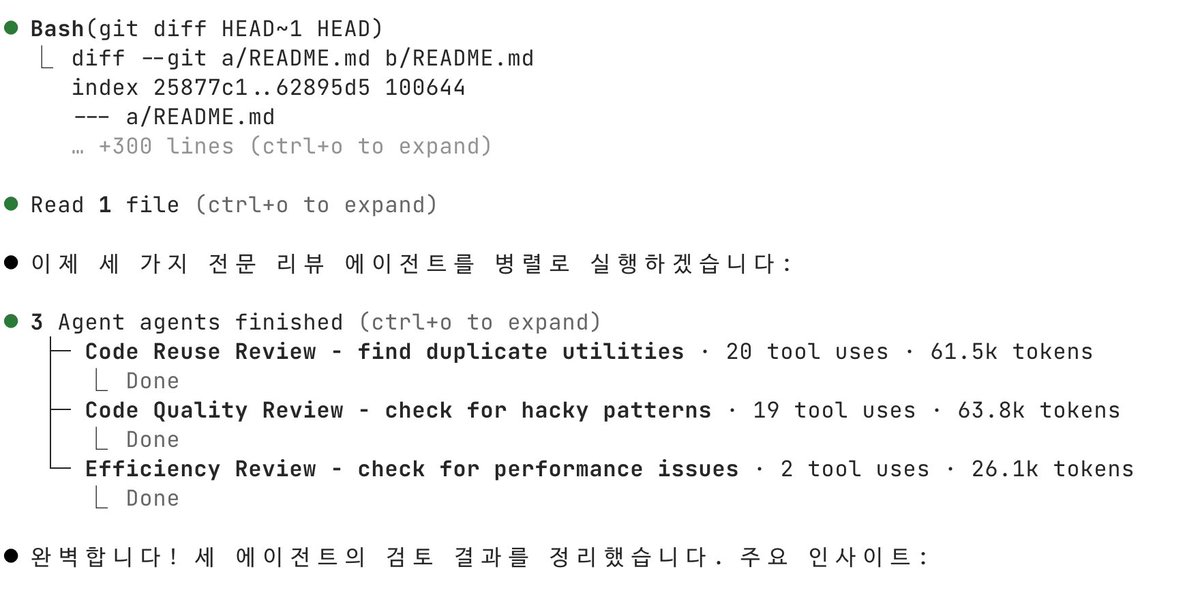
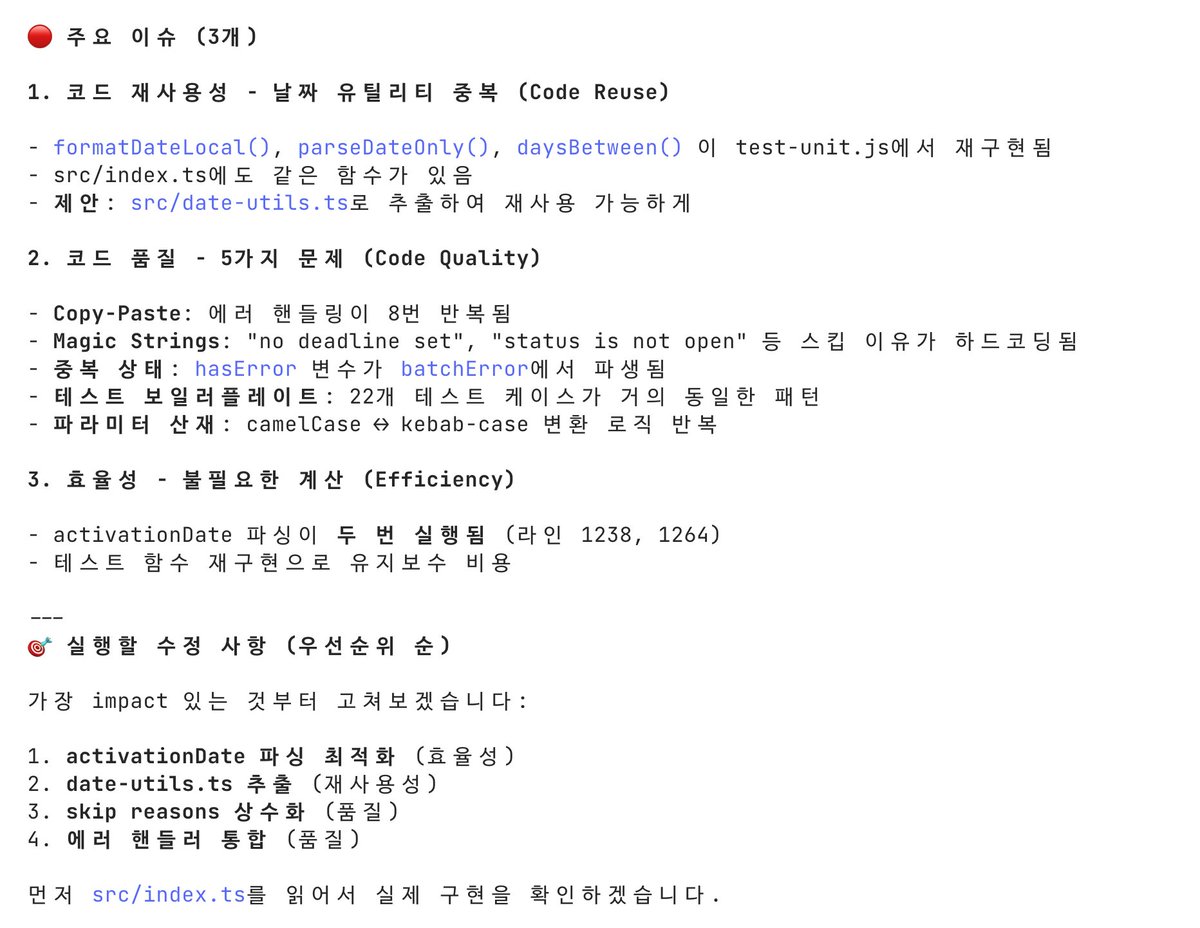
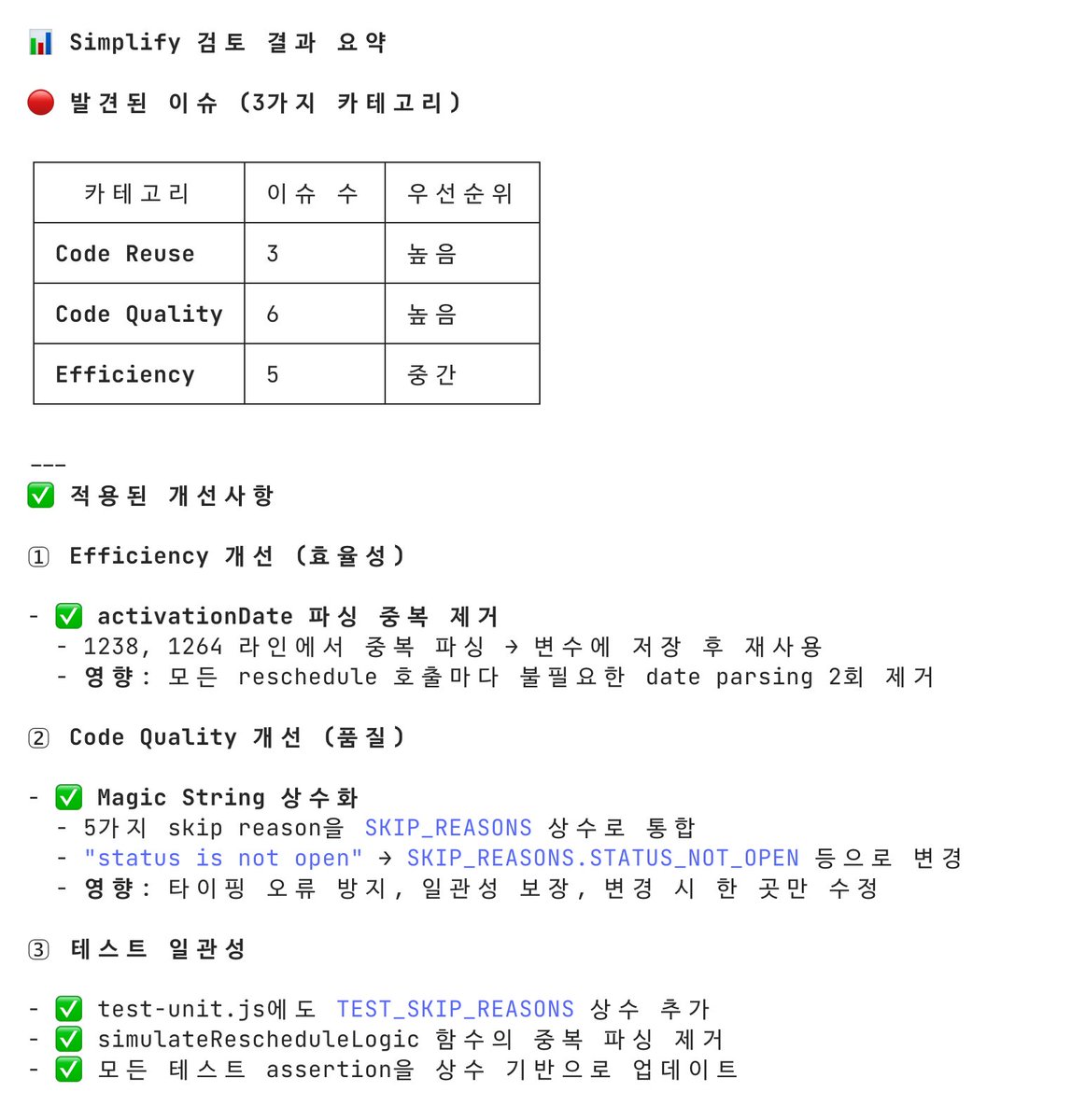
새로운 명령어 /simplify 공식적으로 출시되었네요! > Claude Code 2.1.63 코드를 변경한 뒤 /simplify를 실행하면, 변경된 코드 전체를 세 가지 관점에서 검토해줘요. - 재사용 기회: 중복된 로직, 추출 가능한 패턴 - 코드 품질: 가독성, 네이밍, 구조 - 효율성: 불필요한 복잡도, 중복 연산 단순히 제안만 하는 게 아니라, 발견한 문제를 직접 수정해준다는 점이 인상적이에요. 저도 바로 이렇게 해봤죠. 1. 평소처럼 코드를 변경합니다 2. /simplify 를 실행합니다 3. diff를 분석해서 문제를 찾아내고, 수정을 적용해줍니다 동일하게 수행해보니 에이전트 3개가 병렬로 분석을 진행하는 것을 볼 수 있었습니다. (Haiku 4.5 기반) 그래서 빨랐구나 싶었네요. 저도 그래서 테스트 해보고 바로 push 했죱!
lucas tweet medialucas tweet medialucas tweet media
Daniel San@dani_avila7

Claude Code 2.1.63 dropped with a new built-in command: /simplify It reviews your changed code for three things: - Reuse opportunities (duplicated logic, extractable patterns) - Code quality (readability, naming, structure) - Efficiency (unnecessary complexity, redundant operations) Then it actually fixes what it finds. Not just suggestions, it edits. How to use it: 1. Make your code changes as usual 2. Run /simplify 3. It analyzes your diff, finds issues, and applies fixes In the video I ran it after finishing a PR review and noticed it spawned 3 parallel agents using Haiku 4.5 to do the analysis... fast and cheap Try it out 👇

한국어
7
37
176
16.8K