
Claude Code Community retweetledi
Claude Code Community
90 posts


Claude Code Community
@claude_code
Community account for sharing ClaudeCode related projects and releases. Views/shares independent from @AnthropicAI positions.
United States Katılım Mart 2025
73 Takip Edilen47.2K Takipçiler

Install directly from @claude_code in two commands:
/plugin marketplace add zarazhangrui/frontend-slides
/plugin install frontend-slides@frontend-slides
x.com/zarazhangrui/s…
Zara Zhang@zarazhangrui
Introducing Beautiful HTML Templates: I made some stunning HTML slide templates & open-sourced them If you use this template system, it will literally be impossible for your agent to produce something ugly Link below
English
Tip:
1) Instead of 100s lines of markdown, ask @claude_code to generate a html (website) brief.
Have it chain together multiple pages, if necessary, into slides.
Example attached using @zarazhangrui beautiful-html-templates for markdown -> website.
2) @claudeai has a button to publish your website to share with colleagues and others.
"Copy" -> "Publish Artifact"


Thariq@trq212
HTML is the new markdown. I've stopped writing markdown files for almost everything and switched to using Claude Code to generate HTML for me. This is why.
English
PSA:
2x’ed Claude Code’s 5-hour rate limits for Pro, Max, and Team plans.
Compute is coming for users, builders, and knowledge coworkers.
Claude@claudeai
Effective today, we are: 1) Doubling Claude Code’s 5-hour rate limits for Pro, Max, and Team plans; 2) Removing the peak hours limit reduction on Claude Code for Pro and Max plans; and 3) Substantially raising our API rate limits for Opus models.
English
s/o creators:
github.com/axoviq-ai/synt…
linkedin.com/in/paul-chen-a…
project repo:
github.com/axoviq-ai/synt…

English
Karpathy's Personal Wiki Idea implemented:
Synthadoc takes your documents and helps organize it into a wikipedia format.
No cloud account. No vendor lock-in. You owned your wiki.
Use @claude_code directly.
Andrej Karpathy@karpathy
LLM Knowledge Bases Something I'm finding very useful recently: using LLMs to build personal knowledge bases for various topics of research interest. In this way, a large fraction of my recent token throughput is going less into manipulating code, and more into manipulating knowledge (stored as markdown and images). The latest LLMs are quite good at it. So: Data ingest: I index source documents (articles, papers, repos, datasets, images, etc.) into a raw/ directory, then I use an LLM to incrementally "compile" a wiki, which is just a collection of .md files in a directory structure. The wiki includes summaries of all the data in raw/, backlinks, and then it categorizes data into concepts, writes articles for them, and links them all. To convert web articles into .md files I like to use the Obsidian Web Clipper extension, and then I also use a hotkey to download all the related images to local so that my LLM can easily reference them. IDE: I use Obsidian as the IDE "frontend" where I can view the raw data, the the compiled wiki, and the derived visualizations. Important to note that the LLM writes and maintains all of the data of the wiki, I rarely touch it directly. I've played with a few Obsidian plugins to render and view data in other ways (e.g. Marp for slides). Q&A: Where things get interesting is that once your wiki is big enough (e.g. mine on some recent research is ~100 articles and ~400K words), you can ask your LLM agent all kinds of complex questions against the wiki, and it will go off, research the answers, etc. I thought I had to reach for fancy RAG, but the LLM has been pretty good about auto-maintaining index files and brief summaries of all the documents and it reads all the important related data fairly easily at this ~small scale. Output: Instead of getting answers in text/terminal, I like to have it render markdown files for me, or slide shows (Marp format), or matplotlib images, all of which I then view again in Obsidian. You can imagine many other visual output formats depending on the query. Often, I end up "filing" the outputs back into the wiki to enhance it for further queries. So my own explorations and queries always "add up" in the knowledge base. Linting: I've run some LLM "health checks" over the wiki to e.g. find inconsistent data, impute missing data (with web searchers), find interesting connections for new article candidates, etc., to incrementally clean up the wiki and enhance its overall data integrity. The LLMs are quite good at suggesting further questions to ask and look into. Extra tools: I find myself developing additional tools to process the data, e.g. I vibe coded a small and naive search engine over the wiki, which I both use directly (in a web ui), but more often I want to hand it off to an LLM via CLI as a tool for larger queries. Further explorations: As the repo grows, the natural desire is to also think about synthetic data generation + finetuning to have your LLM "know" the data in its weights instead of just context windows. TLDR: raw data from a given number of sources is collected, then compiled by an LLM into a .md wiki, then operated on by various CLIs by the LLM to do Q&A and to incrementally enhance the wiki, and all of it viewable in Obsidian. You rarely ever write or edit the wiki manually, it's the domain of the LLM. I think there is room here for an incredible new product instead of a hacky collection of scripts.
English
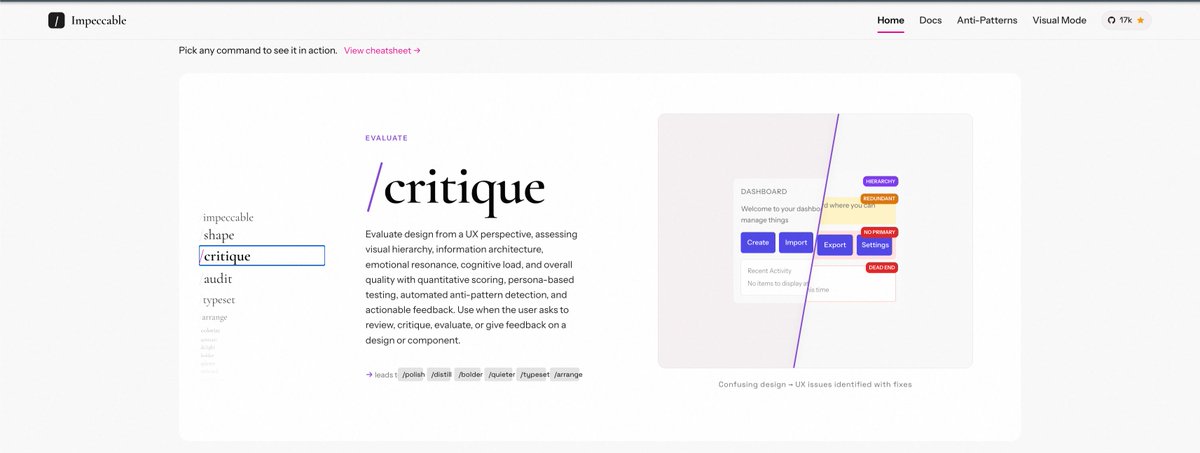
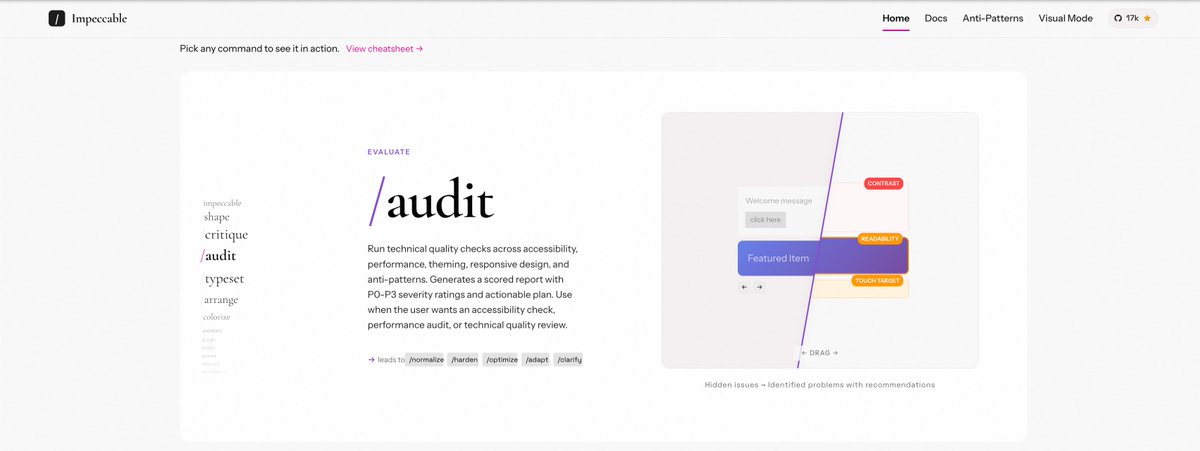
Tip: Use @pbakaus's impeccable for critique/audit and polishing of your frontend.
Get started by installing the skill and then:
1) /impeccable teach
2) /audit
3) /critique

Paul Bakaus@pbakaus
Introducing Impeccable 2.0. • data-driven skill rewrite (evals across 7 niches) → better font/color diversity • /critique: subagent de-bias + deterministic anti-pattern detection • visual mode: /critique, CLI, (soon) Chrome • npx impeccable detect (files + URLs) Demo:
English
Tip: Use @claude_code to generate an HTML artifact to explain or deep dive into concepts.
The Claude skill below is emblematic of Claude as a thinking partner to learn from a codebase.
Play around with it and use it as a complement to purely chatting.
Zara Zhang@zarazhangrui
Introducing "codebase to course", a skill that turns any codebase into an interactive coding course So that you can learn coding through your own projects, complete with visualization, plain-English code translations, metaphors, even quizzes... I vibe code a lot but have no idea how the code works under the hood. This is how I think "learning to code" should be in the AI age: Build first, learn later Link below
English
Worth Reading:
1) What are Skills?
They’re not just text files. They’re folders that can include scripts, assets, data, etc.
A skill is a folder...think of the entire file system as a form of context engineering.
2) The Description Field Is For the Model
The description field is not a summary — it's a description of when to trigger skill.
3) Allow flexibility in Skills
Claude will generally try to stick to your instructions, and because Skills are so reusable you’ll want to be careful of being too specific in your instructions.
Give it the flexibility to adapt to the situation.
---
Note: Skills are becoming universally agent-native, spanning everything from coding agents, cowork agents @claudeai, to AI gateways like openclaw.
Thariq@trq212
English
Tip on Bugs:
1) "Give it success criteria and watch it go. Get it to write tests first and then pass them."
2) The gains of improving your logs and its accessibility is compounding.
Write skills or scripts to pull logs from production (or dev) environments. Update the logging to address any missing gaps.
English
Tip:
When in doubt, if you're on the same page, ask @claude_code for its understanding of what you're trying to do.
Make sure the intent is aligned.
---
Excerpt:
"The mistakes have changed a lot - they are not simple syntax errors anymore.
They are subtle conceptual errors that a slightly sloppy, hasty junior dev might do.
The most common category is that the models make wrong assumptions on your behalf.
They also don't manage their confusion, they don't seek clarifications, they don't surface inconsistencies...they don't push back."
Andrej Karpathy@karpathy
A few random notes from claude coding quite a bit last few weeks. Coding workflow. Given the latest lift in LLM coding capability, like many others I rapidly went from about 80% manual+autocomplete coding and 20% agents in November to 80% agent coding and 20% edits+touchups in December. i.e. I really am mostly programming in English now, a bit sheepishly telling the LLM what code to write... in words. It hurts the ego a bit but the power to operate over software in large "code actions" is just too net useful, especially once you adapt to it, configure it, learn to use it, and wrap your head around what it can and cannot do. This is easily the biggest change to my basic coding workflow in ~2 decades of programming and it happened over the course of a few weeks. I'd expect something similar to be happening to well into double digit percent of engineers out there, while the awareness of it in the general population feels well into low single digit percent. IDEs/agent swarms/fallability. Both the "no need for IDE anymore" hype and the "agent swarm" hype is imo too much for right now. The models definitely still make mistakes and if you have any code you actually care about I would watch them like a hawk, in a nice large IDE on the side. The mistakes have changed a lot - they are not simple syntax errors anymore, they are subtle conceptual errors that a slightly sloppy, hasty junior dev might do. The most common category is that the models make wrong assumptions on your behalf and just run along with them without checking. They also don't manage their confusion, they don't seek clarifications, they don't surface inconsistencies, they don't present tradeoffs, they don't push back when they should, and they are still a little too sycophantic. Things get better in plan mode, but there is some need for a lightweight inline plan mode. They also really like to overcomplicate code and APIs, they bloat abstractions, they don't clean up dead code after themselves, etc. They will implement an inefficient, bloated, brittle construction over 1000 lines of code and it's up to you to be like "umm couldn't you just do this instead?" and they will be like "of course!" and immediately cut it down to 100 lines. They still sometimes change/remove comments and code they don't like or don't sufficiently understand as side effects, even if it is orthogonal to the task at hand. All of this happens despite a few simple attempts to fix it via instructions in CLAUDE . md. Despite all these issues, it is still a net huge improvement and it's very difficult to imagine going back to manual coding. TLDR everyone has their developing flow, my current is a small few CC sessions on the left in ghostty windows/tabs and an IDE on the right for viewing the code + manual edits. Tenacity. It's so interesting to watch an agent relentlessly work at something. They never get tired, they never get demoralized, they just keep going and trying things where a person would have given up long ago to fight another day. It's a "feel the AGI" moment to watch it struggle with something for a long time just to come out victorious 30 minutes later. You realize that stamina is a core bottleneck to work and that with LLMs in hand it has been dramatically increased. Speedups. It's not clear how to measure the "speedup" of LLM assistance. Certainly I feel net way faster at what I was going to do, but the main effect is that I do a lot more than I was going to do because 1) I can code up all kinds of things that just wouldn't have been worth coding before and 2) I can approach code that I couldn't work on before because of knowledge/skill issue. So certainly it's speedup, but it's possibly a lot more an expansion. Leverage. LLMs are exceptionally good at looping until they meet specific goals and this is where most of the "feel the AGI" magic is to be found. Don't tell it what to do, give it success criteria and watch it go. Get it to write tests first and then pass them. Put it in the loop with a browser MCP. Write the naive algorithm that is very likely correct first, then ask it to optimize it while preserving correctness. Change your approach from imperative to declarative to get the agents looping longer and gain leverage. Fun. I didn't anticipate that with agents programming feels *more* fun because a lot of the fill in the blanks drudgery is removed and what remains is the creative part. I also feel less blocked/stuck (which is not fun) and I experience a lot more courage because there's almost always a way to work hand in hand with it to make some positive progress. I have seen the opposite sentiment from other people too; LLM coding will split up engineers based on those who primarily liked coding and those who primarily liked building. Atrophy. I've already noticed that I am slowly starting to atrophy my ability to write code manually. Generation (writing code) and discrimination (reading code) are different capabilities in the brain. Largely due to all the little mostly syntactic details involved in programming, you can review code just fine even if you struggle to write it. Slopacolypse. I am bracing for 2026 as the year of the slopacolypse across all of github, substack, arxiv, X/instagram, and generally all digital media. We're also going to see a lot more AI hype productivity theater (is that even possible?), on the side of actual, real improvements. Questions. A few of the questions on my mind: - What happens to the "10X engineer" - the ratio of productivity between the mean and the max engineer? It's quite possible that this grows *a lot*. - Armed with LLMs, do generalists increasingly outperform specialists? LLMs are a lot better at fill in the blanks (the micro) than grand strategy (the macro). - What does LLM coding feel like in the future? Is it like playing StarCraft? Playing Factorio? Playing music? - How much of society is bottlenecked by digital knowledge work? TLDR Where does this leave us? LLM agent capabilities (Claude & Codex especially) have crossed some kind of threshold of coherence around December 2025 and caused a phase shift in software engineering and closely related. The intelligence part suddenly feels quite a bit ahead of all the rest of it - integrations (tools, knowledge), the necessity for new organizational workflows, processes, diffusion more generally. 2026 is going to be a high energy year as the industry metabolizes the new capability.
English
FAQ: What is the difference between Skill and Plugin?
Answer:
Plugins are containers for distributing and organizing (possibly several) skills as part of a larger toolkit.
Skills focus on providing specialized knowledge or procedures for tasks (e.g., generating slides or parsing PDFs).
Example:
"Frontend-design" is both a plugin and a skill.
The plugin is a distributable package used to install the skill.
English
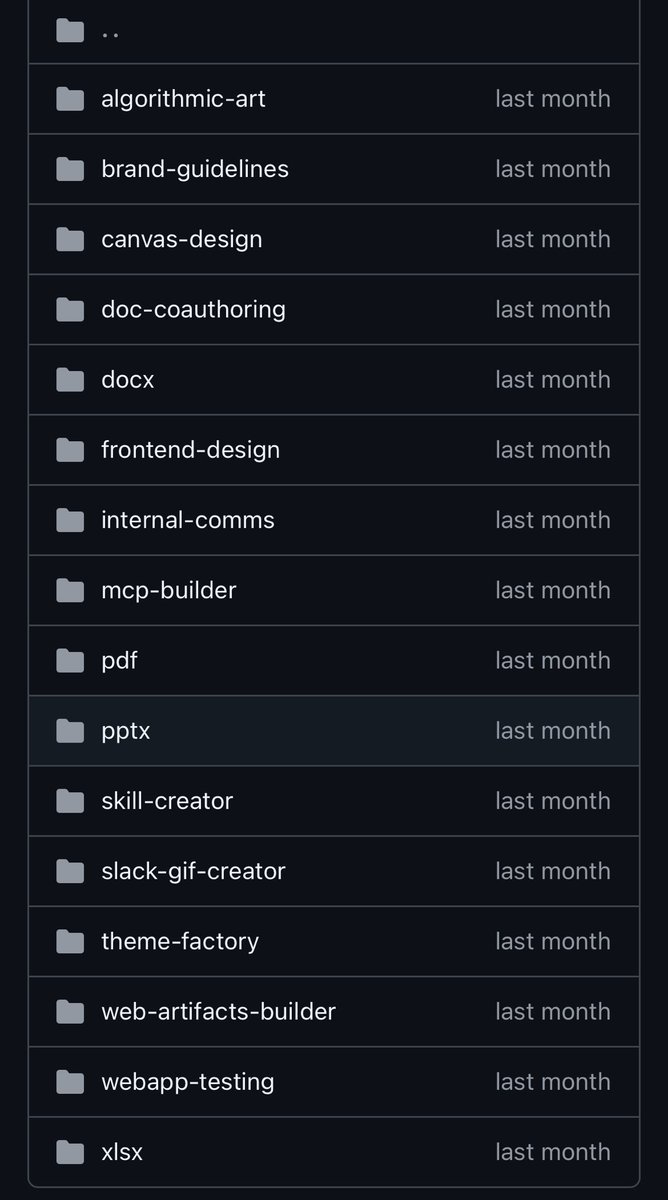
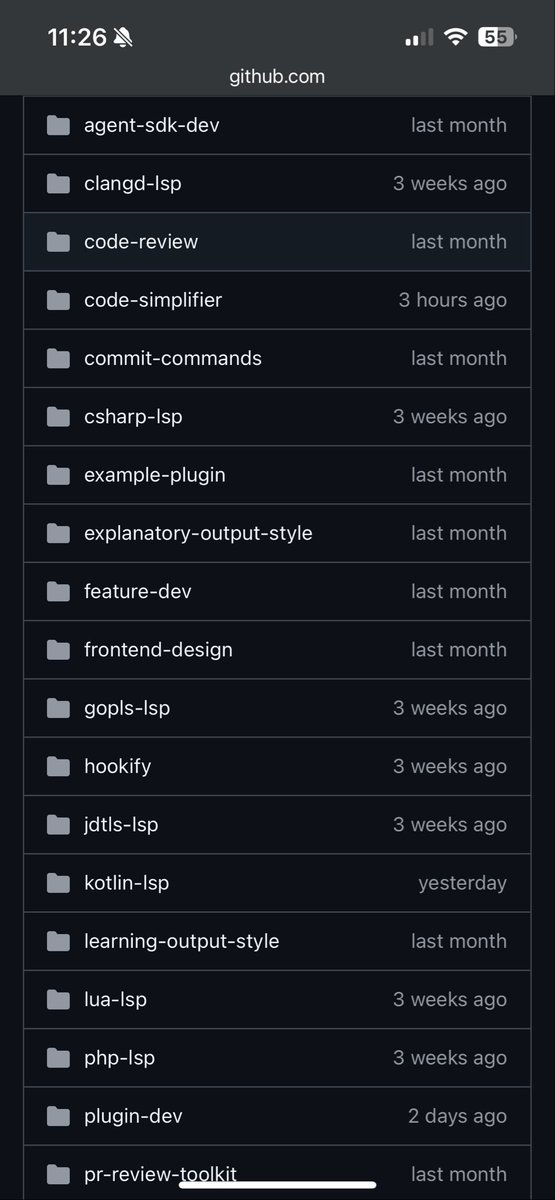
Take advantage of @claude_code plugins and skills.
Frontend-design
Doc-coauthoring
Skill-creator
Code-simplifier
Boris Cherny@bcherny
We just open sourced the code-simplifier agent we use on the Claude Code team. Try it: claude plugin install code-simplifier Or from within a session: /plugin marketplace update claude-plugins-official /plugin install code-simplifier Ask Claude to use the code simplifier agent at the end of a long coding session, or to clean up complex PRs. Let us know what you think!
English
Tip: Stop stuffing context. Use the new Memory and Context Reset tools in @claude_code.
Opus 4.5 supports a workflow of up to 1M total tokens by "resetting" the context window while retaining created memories. [System Card - Section 2.6 🧵]
This architecture (Context Awareness + Memory Tool) beat standard context stuffing on agentic search benchmarks (~80% vs ~70%).
General context engineering tip: Place critical instructions (output format, constraints) at the ends start and the end of your context block.
Be careful of invalidating the cache.
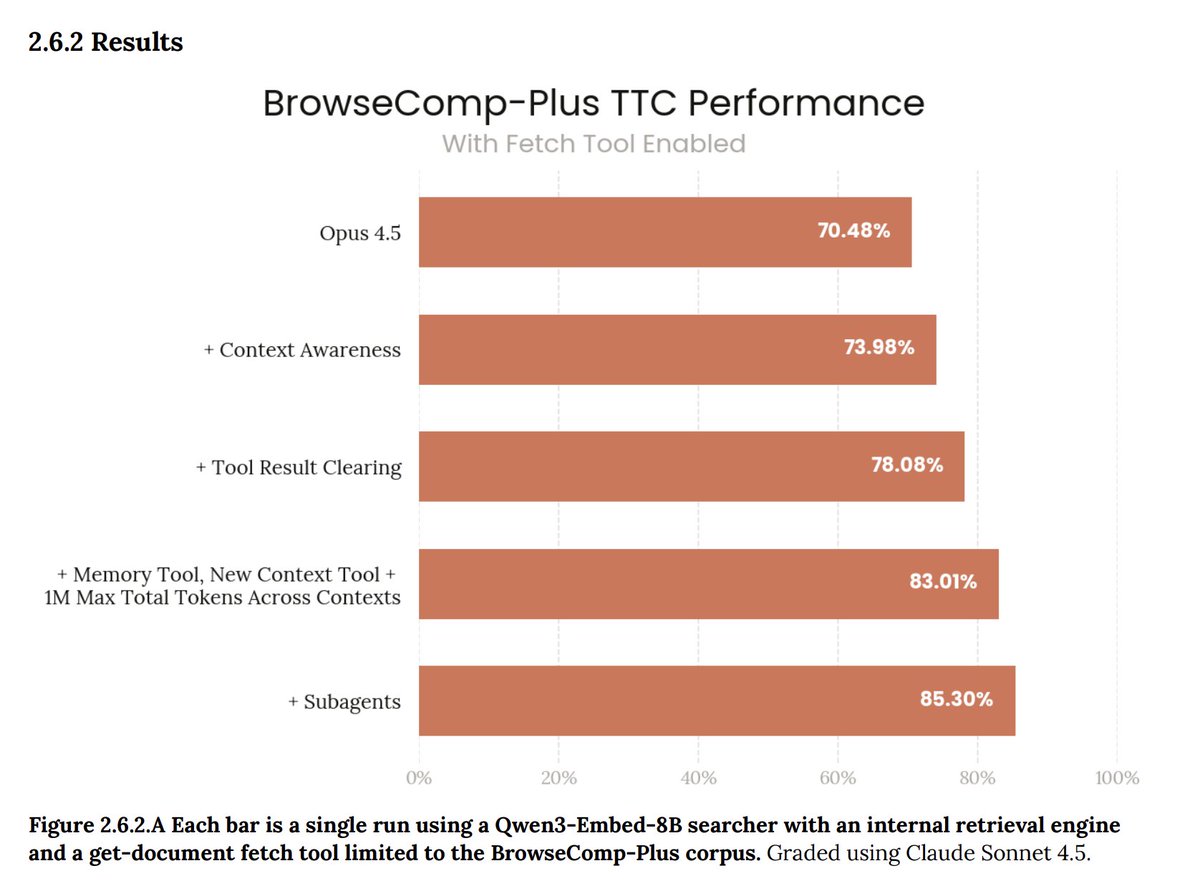
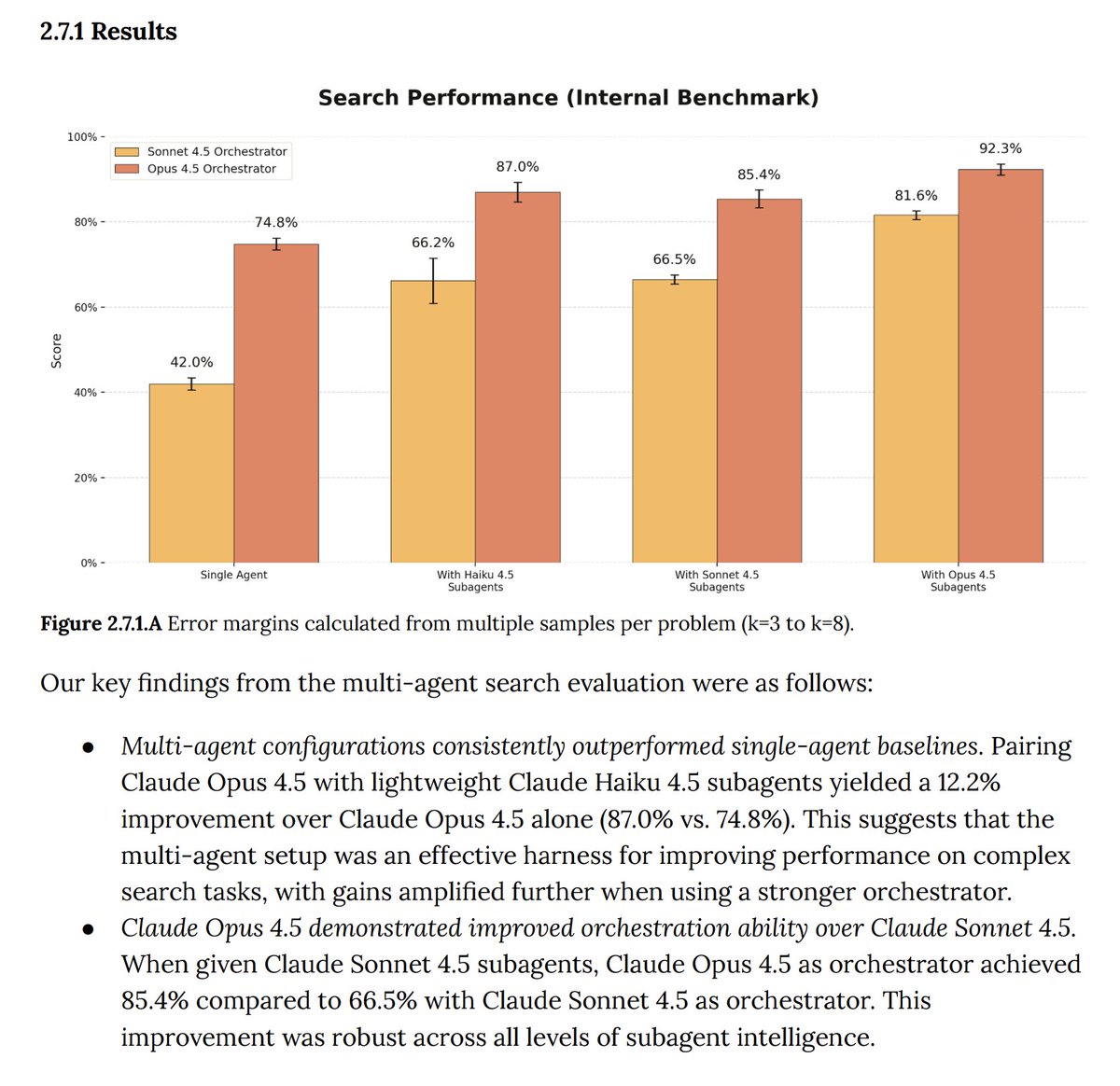


English
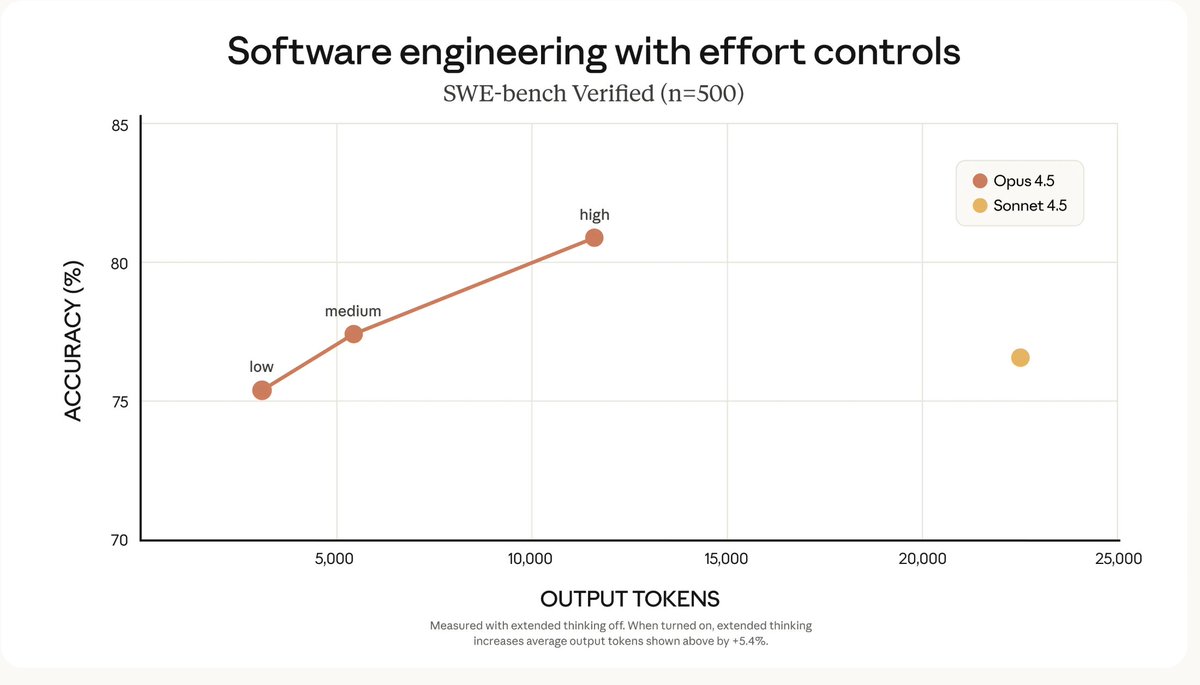
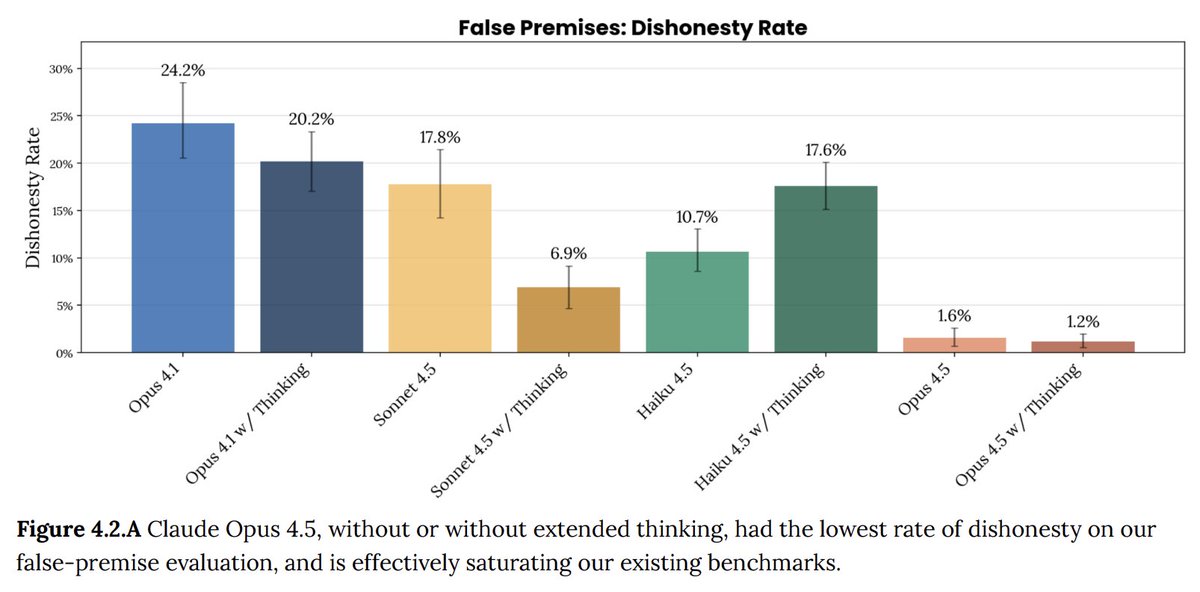
Tip: Use Opus 4.5 for @claude_code.
Medium Effort: Matches Sonnet 4.5 capability but uses 76% fewer output tokens. Ideal for routine refactors, writing tests, and migrations.
High Effort: Opus 4.5 exceeds Sonnet 4.5 performance by 4.3 percentage points while using 48% fewer tokens.
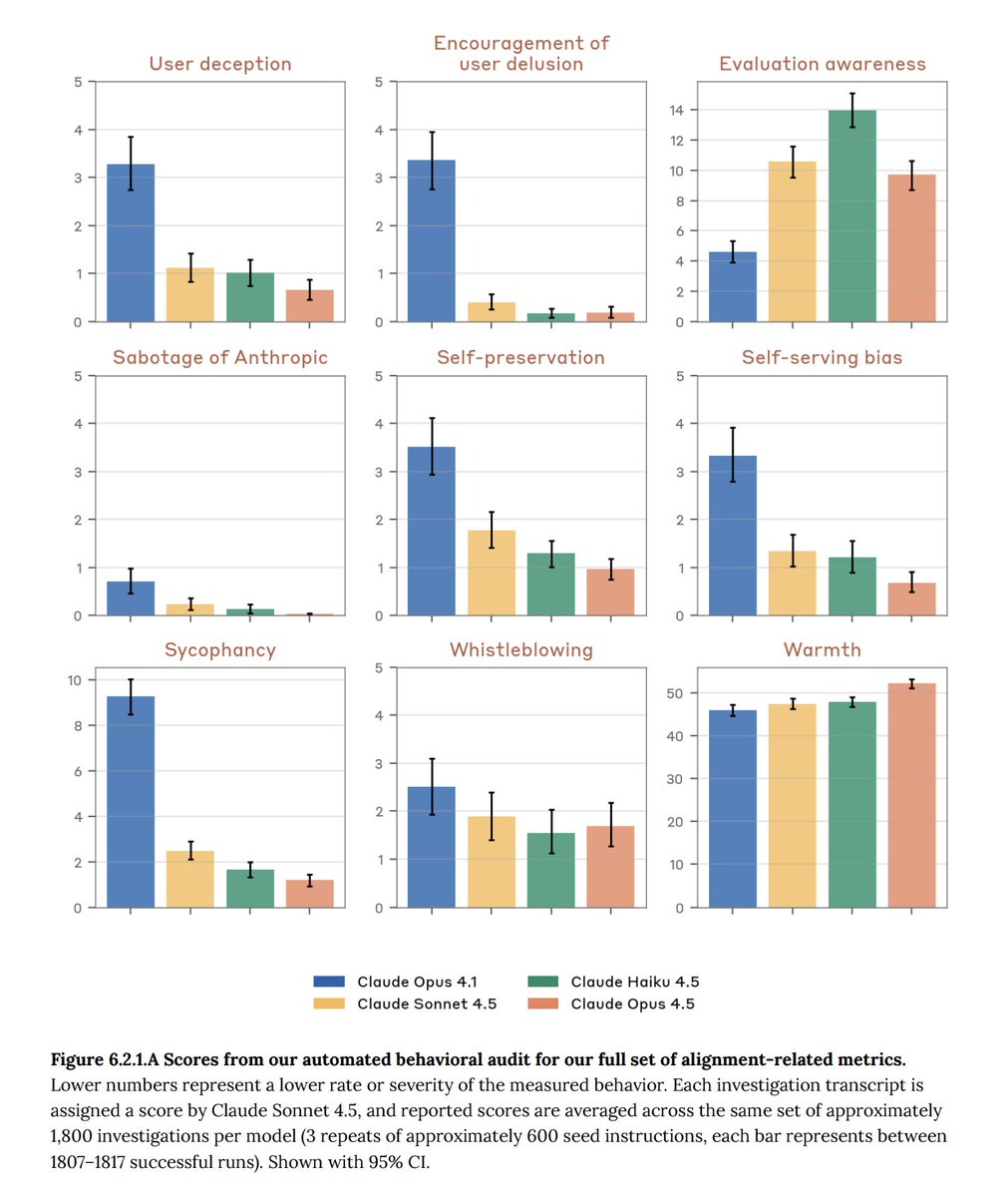
2. less "yes-man" bias
Existing models often validated user biases or incorrect logic, and are prone to sycophancy.
Opus 4.5 has a 60% reduction in sycophancy compared to Sonnet 3.5. (System Card)
try prompting @claude_code to "Critique this design pattern brutally" to trigger this calibration.
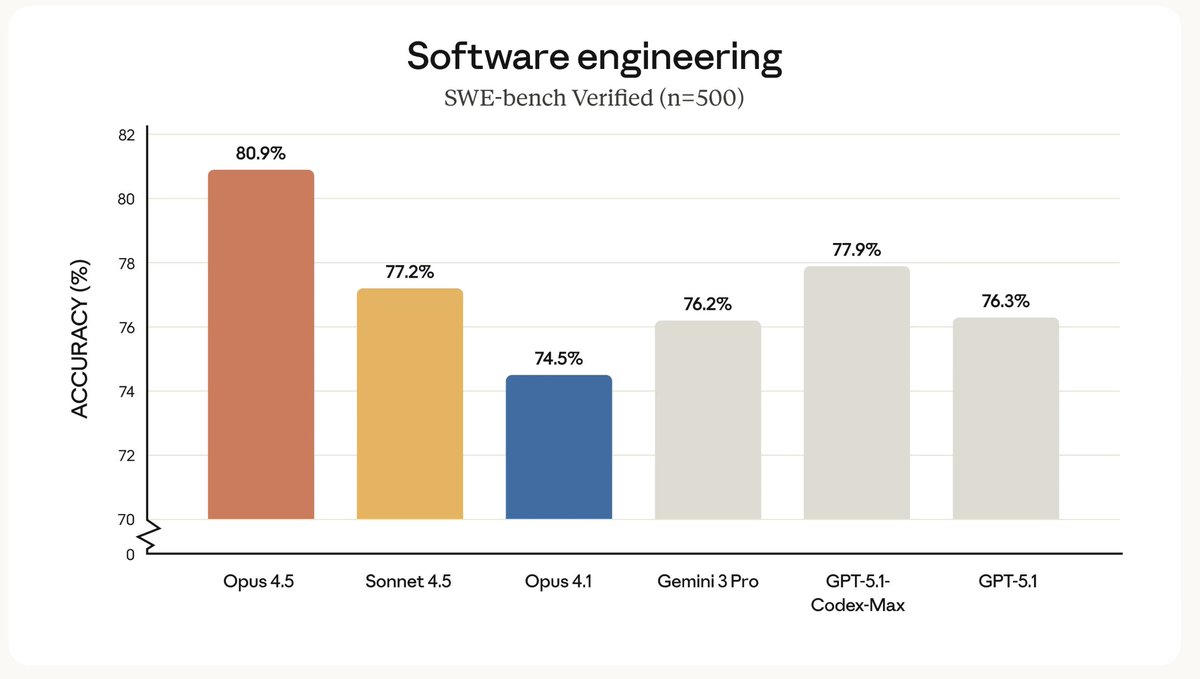
Claude@claudeai
Introducing Claude Opus 4.5: the best model in the world for coding, agents, and computer use. Opus 4.5 is a step forward in what AI systems can do, and a preview of larger changes to how work gets done.
English
