@olebegemann I wonder if this is bug, unintended feature or deliberate feature?
For 4-6 to work as you intend, there would need to be a 2-step update. Step 1 to immediately update modifiers outside `animation` – preserving old state inside – then Step 2 to animate state inside.
@layoutSubviews Yeah, I feel this undermines one of Swift’s best features (nullability correctness). Whatever ergonomics this was supposed to address should have been fixed elsewhere.
Can Swift deprecate a protocol conformance?
@thedevme Typo “verses” in the animation should be “versus”. Although if you actually have SwiftUI “verses” (groupings in poetry) that would be awesome, like Perl Poetry.
Monday night from 6PM - 8PM. I am going to livestream my first #SwiftUI vs #UIKit Series. For UIKit I’m using Compositional
Layout/Storyboard & SwiftUI (iOS15). Join me as you will be able to ask questions live. Please RT!!
YouTube Channe to Subscribel:
youtube.com/channel/UCHgE-…
“And SwiftUI now includes ViewThatFits, which lets you specify multiple variations of a given view and lets SwiftUI automatically choose the one that best fits in the available space.”
developer.apple.com/xcode/swiftui/
Swift Async avoids many pre-existing terms like "thread", "queue", or "concurrent" so understanding the details of this table is critical. It's easy to end up with everything unstructured on the main actor when you wanted cancellable background work.
From developer.apple.com/videos/play/ww…
Final note: don't choose RAM over faster CPU. I also tested a 2018 6x2.9Ghz 32GB MBP. Those numbers look better than a 2019 2.6Ghz 16GB MBP but the CPU is 30% slower – not a gap that its bigger RAM will ever close.
These tests were run on 2019 MacBook Pros. Is it different on M1 Macs? I don't have two to compare but RAM numbers will likely be about the same. Performance difference may be less noticeable but I'd expect similar ratios between 16GB and 32GB machines.
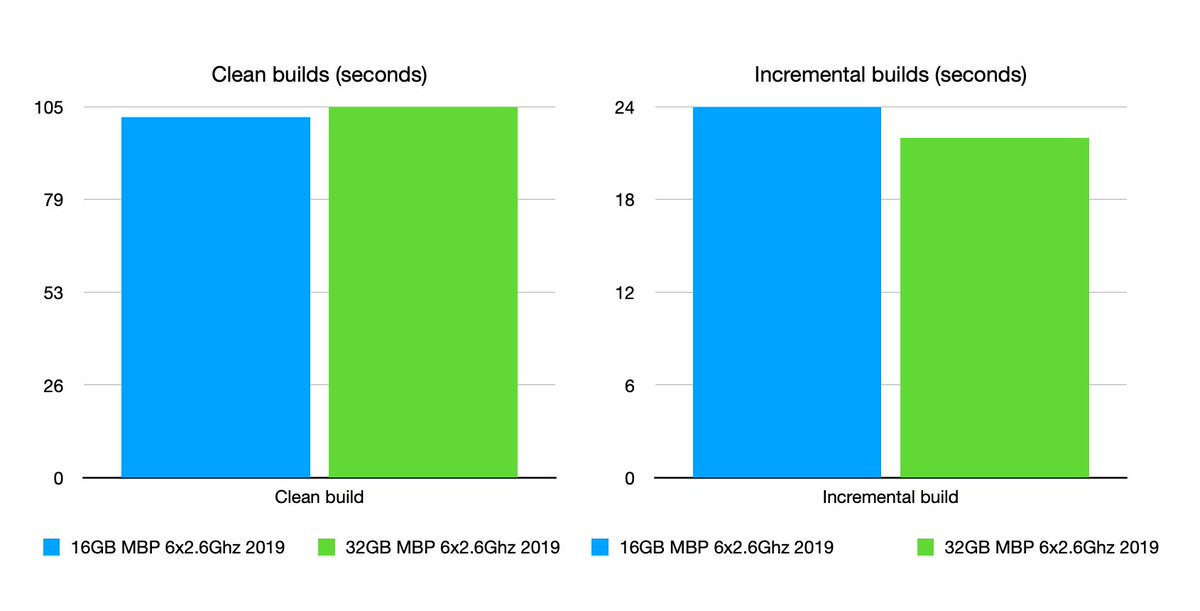
Xcode alone can fill the RAM on a 16GB system. Yeah, okay, half of that is "Cached Files" (not app memory) so the effect is subtle. Incremental builds are 5% slower compared to a 32GB system but clean builds are about the same. (Blue is 16GB, green is 32GB, lower is faster.)
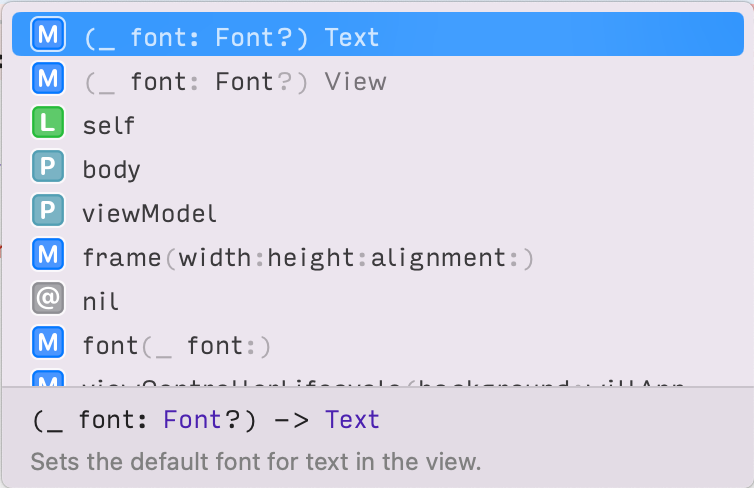
Instead, I spin the Wheel of Autocomplete and nearly a third of the time I get useful options but mostly, I get documentation that tells me what I’ve already typed, or technically correct but useless autocomplete for `Optional`.
If Xcode’s autocomplete popup for `font` would show the “Dynamic Type Sizes” table from Human Interface Guidelines, it would save me many hours per year.
@dennispilarinos I’m always shy around big releases. I know the compromises I made and the bugs I didn’t fix. I’m usually proud of the nothing release, five patches later.
Why do some people celebrate tenure at a company - "I've been at XYZCo for n years!"? I think a better signal is celebrating accomplishment "We just shipped X or I've been promoted to Y!"
@tonyarnold Happens on Intel Macs, too. It looks like the entire web processing and renderer stops responding even though the menus and toolbar continue working.