
Convermax

347 posts

Convermax banner
Convermax

Convermax

@convermax

Advanced site search tailor-made for auto parts e-commerce. Fast, accurate search results that convert!

Barcelona, Spain Katılım Ekim 2013
17 Takip Edilen60 Takipçiler
Convermax
Convermax@convermax·
Shopify app update: YMM collapsed state setting on mobile You can now set up the appearance of the Year Make Model widget on the mobile version directly in the Shopify theme editor. When you enable the toggle, the YMM widget appears collapsed. Shoppers in your store first see a compact version and can click to expand it. If you disable the toggle, the YMM widget appears on the page in an expanded state. Merchants can now control this behavior, depending on what fits their theme design better, without needing to ask support to change it. 📷
Convermax tweet media
English
0
0
1
23
Convermax
Convermax@convermax·
Shopify app update: Theme Embed Status We’ve updated the Shopify app home page to make theme configuration easier to understand. The app now displays which Shopify themes currently have the Convermax app embed enabled. This helps merchants quickly verify that the app is active on the correct storefront theme without digging through Shopify settings.
Convermax tweet media
English
0
0
1
20
Convermax
Convermax@convermax·
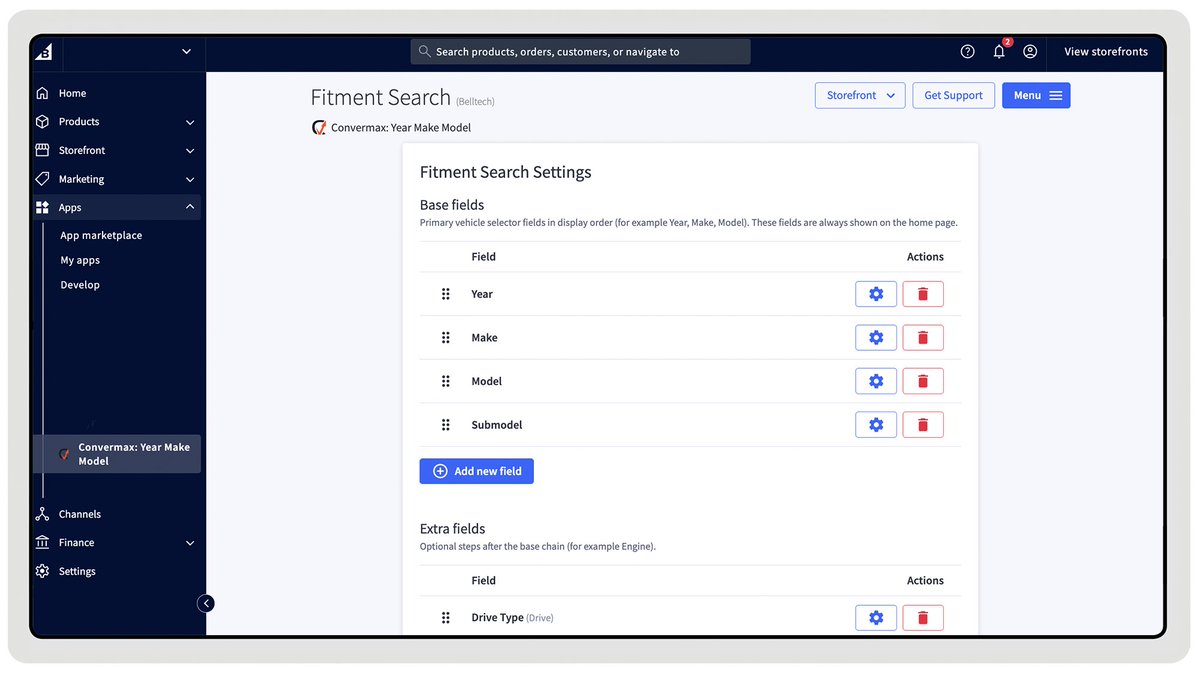
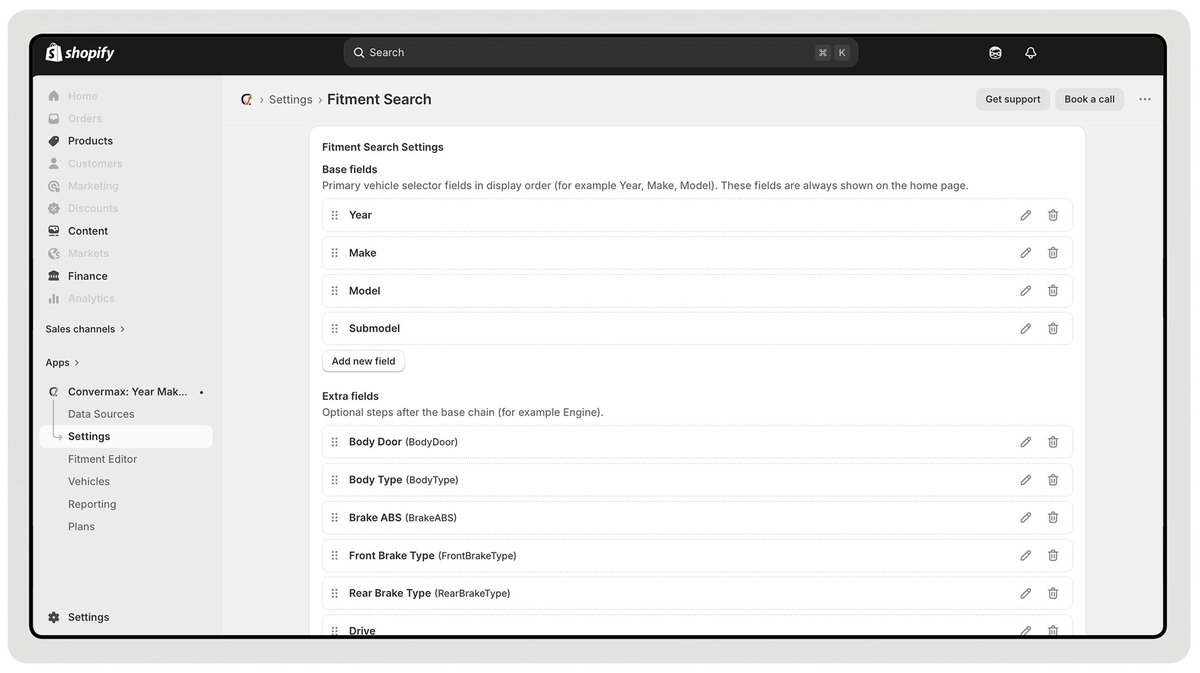
Configure YMM lookup inside the app You can now customize the Year-Make-Model lookup on your own, without reaching out to our team. Simply open the “Fitment Search” tab in your Shopify or BigCommerce app and adjust the fields as needed. Merchants can: Reorder fields — Move fields the way that best fits your store. Disable fields — Hide fields you don’t need. For example, if your store only sells Ford parts, you can remove the Make field entirely. Rename fields — For instance, replace Submodel with Trim.
Convermax tweet mediaConvermax tweet media
English
1
0
1
27
Convermax
Convermax@convermax·
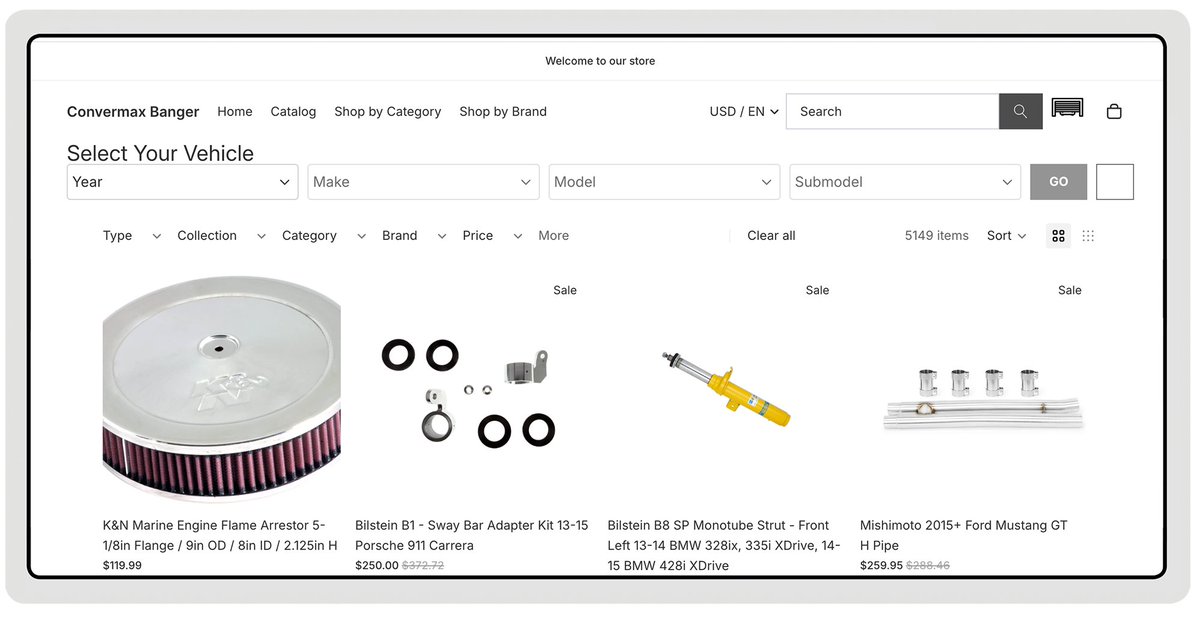
Convermax Search: hybrid htmx/JavaScript client As part of our ongoing work on the htmx client, we’ve built a hybrid version of htmx and JavaScript client for Convermax search. Until now, Convermax has used a fully JavaScript-based client. It works well, but there is one drawback. If you change how product cards look in your Shopify theme, those changes won’t automatically appear in search results. One of our engineers needs to review the new design and adapt it for our app. The new hybrid approach changes that. JavaScript still handles Convermax widgets such as the search box, verify fitment, YMM lookup, etc. And htmx now renders product results and filters using your store theme's liquid code. When you update product cards or layouts in Shopify, the htmx client detects your theme, pulls the updated markup to our server. Then the new design is rendered on our side and an updated HTML layout of search results is returned back to your store. Because rendering happens on the server side, it also reduces the load on the user’s device, making the experience smoother. In the pictures, you can see how it renders for 'Dawn' and 'Horizon' themes. The new approach gives more flexibility and control to merchants and design agencies. You depend less on our team and can make changes faster. This is a major step toward a fully htmx-based client. We’re moving closer to a version where search is completely aligned with native Shopify rendering
Convermax tweet mediaConvermax tweet media
English
0
0
2
27
Convermax
Convermax@convermax·
Fitment Editor Update: multiple selections It’s now easier and faster to select vehicles in the Fitment Editor, so you can add fitment data in bulk more quickly. Add multiple vehicles at once Before, merchants could only select multiple values for Year. Now, they can choose several options for all base vehicle fields and add multiple vehicles at the same time. To make this work reliably, we validate selections against the vehicles already in the store, using the database or search index, to make sure only valid combinations are added. Before applying, merchants can preview the full list of selected vehicles, so they know exactly what will be added. Select year ranges in one action Merchants can now select multiple values in dropdowns using Shift + Click. Click one value to set the starting point, hold Shift, and click another value to select the full range. After selecting one range, you can set a new anchor and repeat the process. “All” option for Year Additionally, we have added an "All" option, allowing merchants to select all applicable years for vehicles based on the other selected parameters (Make, Model, and Submodel).
GIF
English
0
0
1
7
Convermax
Convermax@convermax·
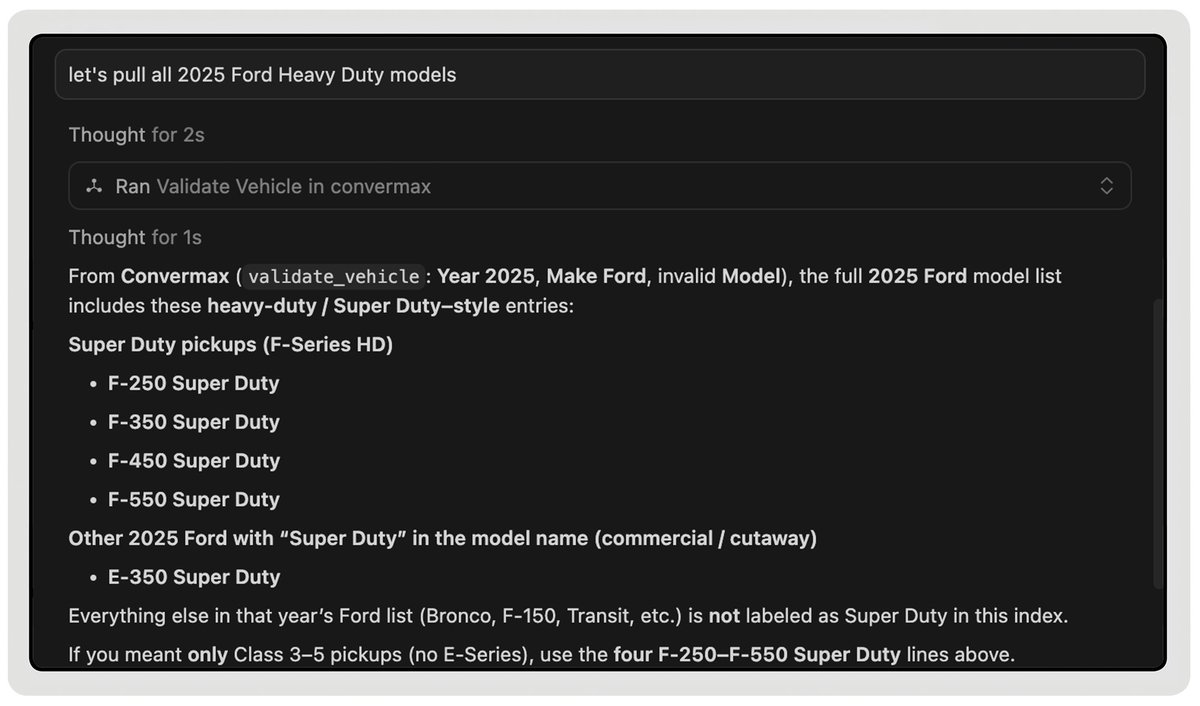
After configuration, your AI assistant can access your vehicle and fitment data and answer your questions. For example, you can say, “Let’s pull all 2025 Ford Heavy Duty Models.” The assistant will quickly give you a short summary, so you don’t have to dig through spreadsheets. You can use any external AI tool you like. Your team is not limited to Shopify Sidekick, and you can add fitment data to your current AI workflows. Currently available for customers on Shopify, coming to BigCommerce soon. Try it now and share your feedback with us.
Convermax tweet media
English
0
0
1
9
Convermax
Convermax@convermax·
'AI Tools' tab inside Convermax app Now you can connect AI assistants directly to your store’s fitment data. Convermax supports the Model Context Protocol (MCP), which lets AI tools securely access structured data from your store. This helps your team check fitment before uploading new data and choose the right options. To connect, open the app settings and click on the new 'AI Tools' tab. Generate a token, then use the URL and token to set up your AI assistant.
GIF
English
1
0
1
16
Convermax
Convermax@convermax·
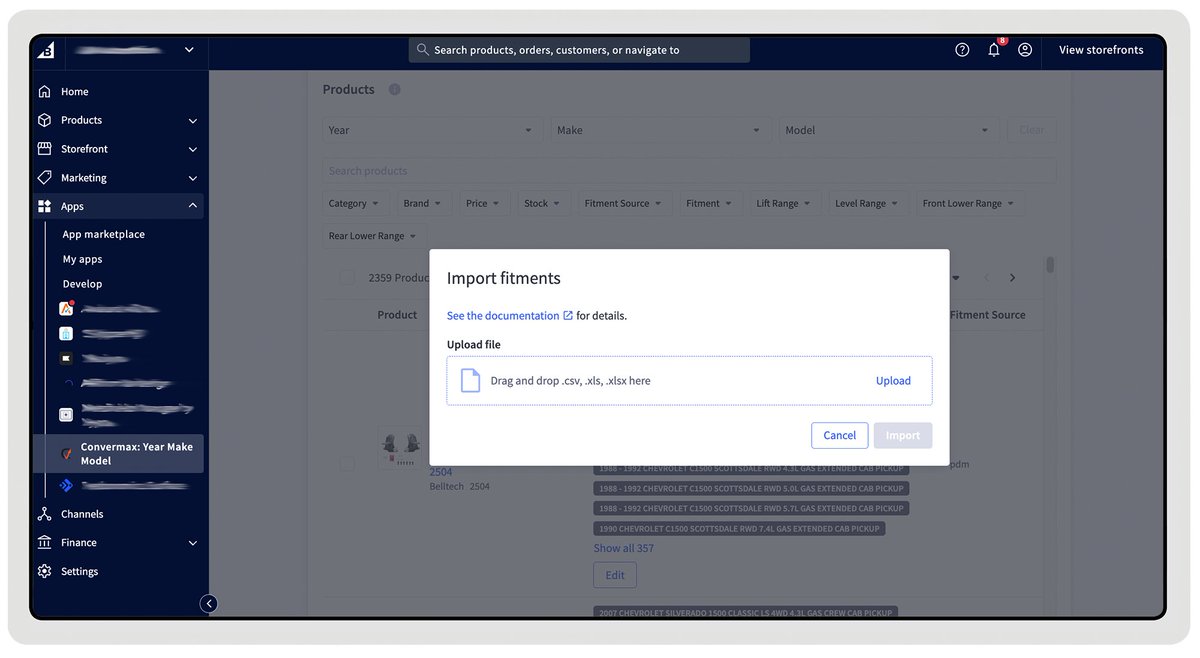
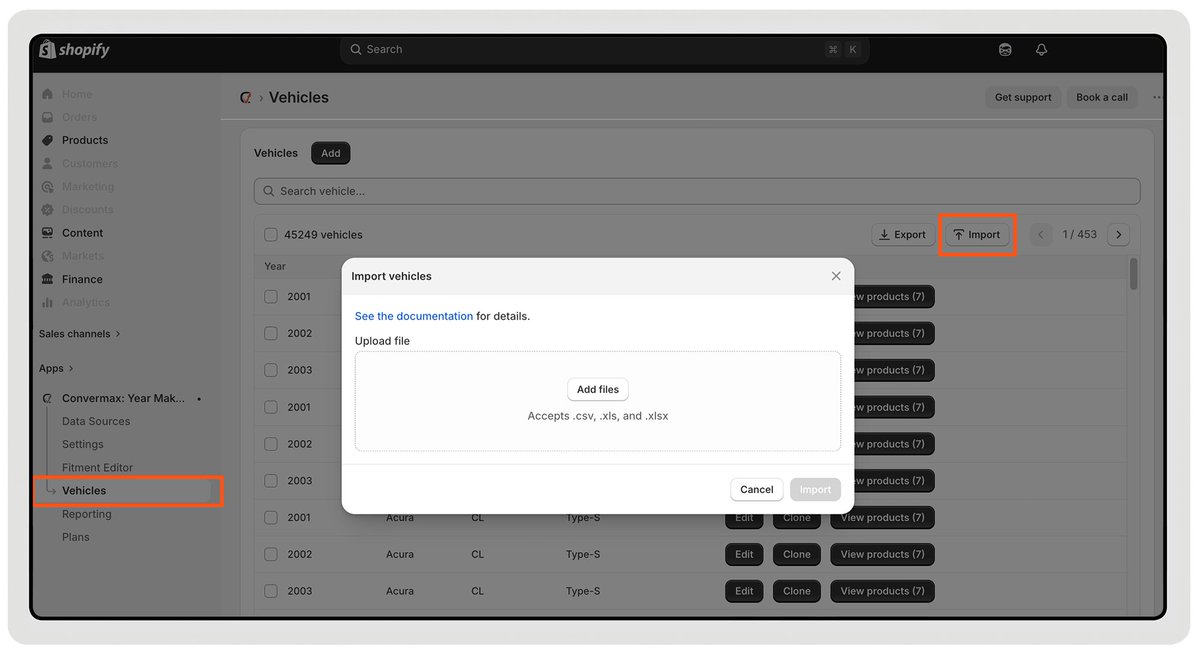
Fitment Editor Update: Import Merchants can now import fitment data or a vehicle list right in the Fitment Editor. Vehicle List Import You can upload a vehicle data file in the app. The editor checks each row, updating existing vehicles if an ID is present, or creating new ones if no ID is found. If some rows are missing required fields, they won’t break the import. They’ll be skipped and shown as errors, so you can review and fix them later. Fitment Data Import You can now import fitment data from CSV, XLS, or XLSX files right in the Fitment Editor. A sample file is available in the documentation. You can import by product ID, SKU, or brand. Invalid rows are skipped, so the import keeps going. If a product isn’t found, it won’t be added by accident. The new fitment values will appear after the store re-indexes. The feature is now live for Convermax apps on Shopify and BigCommerce.
Convermax tweet mediaConvermax tweet media
English
0
0
1
9
Convermax
Convermax@convermax·
Convermax JavaScript bundle transfer reduced by 25% We optimized the size of our JavaScript bundle, so Convermax loads and renders faster on your website. This means search, filters, and fitment elements appear quicker for your customers. The exact improvement depends on the store and enabled features. For example, one compressed minified file decreased from 172 kB to 129 kB. On average, the bundle became 25% lighter. We continuously work on reducing every kilobyte and fight for every millisecond of loading, so your store pages perform better.
English
0
0
1
13
Convermax
Convermax@convermax·
Fitment Editor Update: Exports We’ve added two new export options to the Fitment Editor: Vehicles List and Fitments. It helps you to audit, clean, and reuse fitment information outside the app. Vehicles List Export You can now export a list of vehicles available in your store. This can include all fields or only the ones you need (e.g., Make and Model). There are several ways to use this export: 1) Merchants can create a whitelist of vehicles (the only vehicles they need in store) or, on the contrary, create black ist of vehicles (those they don’t need in the store). We will use this list to update the fitment data in your store. 2) Another common use case is working with Vehicle Landing Pages. If you create these pages manually, the export gives you a complete list of vehicles present in your store. 3) It’s also helpful when validating fitment data from new sources. You can compare the external file with your current vehicle list. Fitments Export You can export all fitment data as a backup file or filter it before exporting. For example, you can filter out by category or by brand, export this specific segment, and find out what SKUs are currently missing fitment data. We continue improving the Fitment Editor to make it a more flexible tool, so managing fitment data becomes faster and easier. If you have feedback, we’d love to hear it.
GIF
GIF
English
0
0
1
14
Convermax
Convermax@convermax·
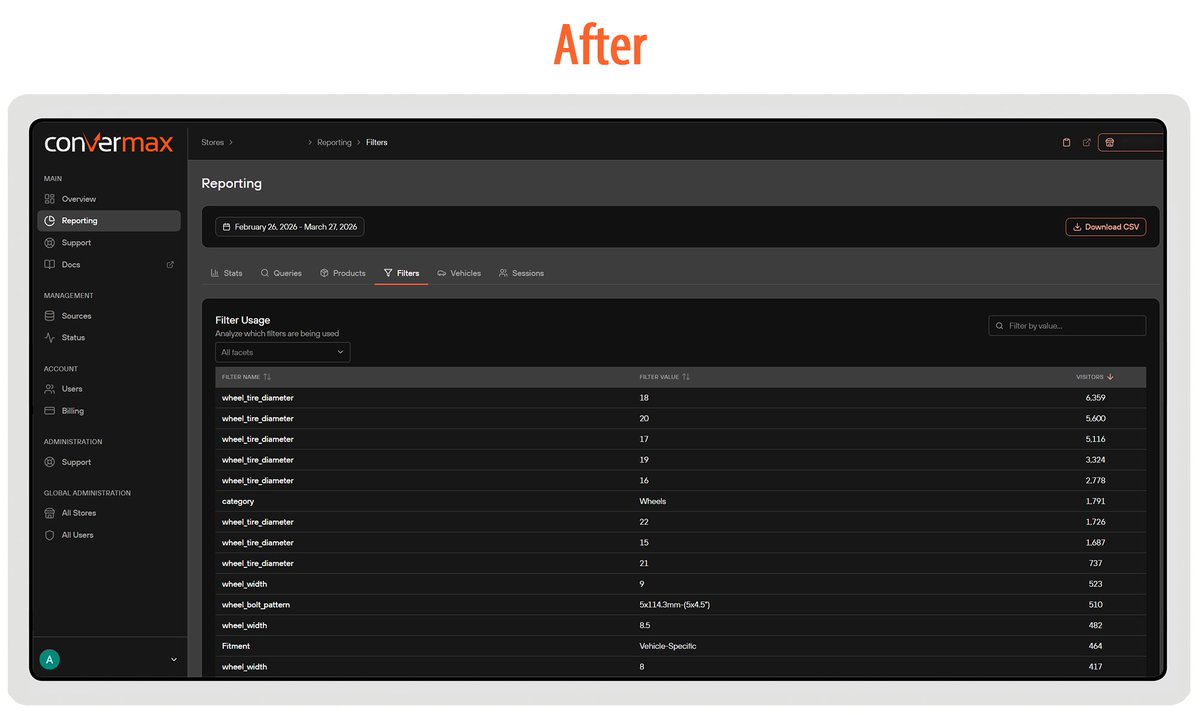
Dashboard Update: Filters Report We’ve updated the Filters Report to make it easier to understand how shoppers actually use filters on your site. The old report was hard to read. YMM fields dominated the data, making it difficult to see which filters shoppers actually use after selecting a vehicle. The report now shows only filters visible in your facet panel, excluding YMM. The Sessions and Clicks columns have been removed. We’ve added the Visitors column instead and the ability to filter by facet name. We hope the updated, cleaner look makes the report easier to read and more useful in your day-to-day decisions.
Convermax tweet mediaConvermax tweet media
English
0
0
1
20
Convermax
Convermax@convermax·
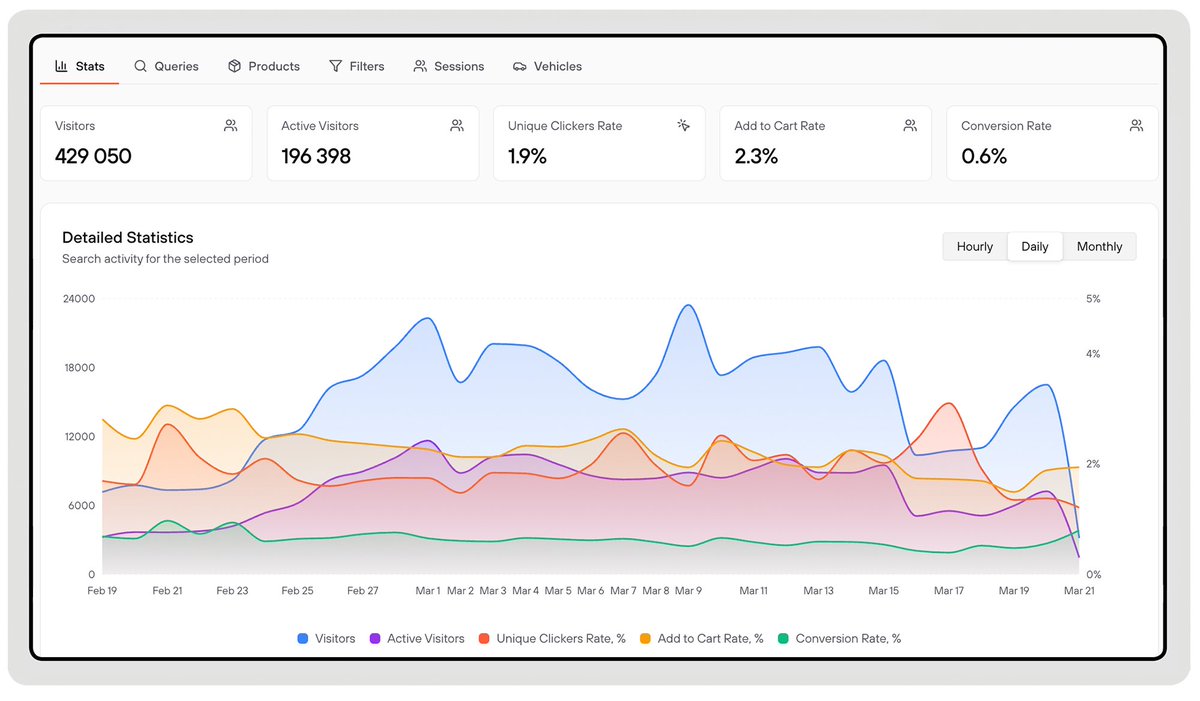
Dashboard Reporting Update We’ve revamped the Reporting section to help merchants better understand their analytics and clearly see the results of changes made to their store. Whether you update fitment data, adjust filters, expand your catalog, or improve navigation, the new reports make it easier to measure the impact and compare performance over time. Before, our metrics didn’t provide enough context, so it was harder to tell if changes in your store were helpful or needed more work. Now, you have percentage-based metrics you can benchmark against your store’s past performance and typical e-commerce conversion ranges. What do we change? We moved from session-based stats to unique visitors. A session usually expires after about 30 minutes of inactivity. If a shopper searches today and finishes checkout later, that’s one journey. We don’t want to miss it. With a user-based approach, your analytics more accurately reflect how people actually use your store. The new Active Visitors metric indicates the number of people who have actually interacted with your store: searching, selecting a vehicle, adding items to their cart, or making a purchase. On the Overview page, we've renamed the Clicks metric to Unique Card Clickers. This now shows how many unique users clicked on a product in search results at least once, instead of counting every click. We've also added Unique Clickers Rate, which shows how many visitors clicked a product compared to the total number of visitors. For stores using the web pixel, two more metrics are available — Add to Cart Rate and Conversion Rate — both calculated from total visitors. These numbers make it clearer how navigation, search, and fitment affect real sales. We also removed some older metrics: Total Searches, Unique Queries. We hope these updated reports make it easier to see what’s working in your store and what can be improved, and help you with decision-making. If you want to see other metrics in Reporting, please let us know in the comments or email our support team. We want to build analytics based on how merchants actually use them.
Convermax tweet media
English
0
0
1
8
Convermax
Convermax@convermax·
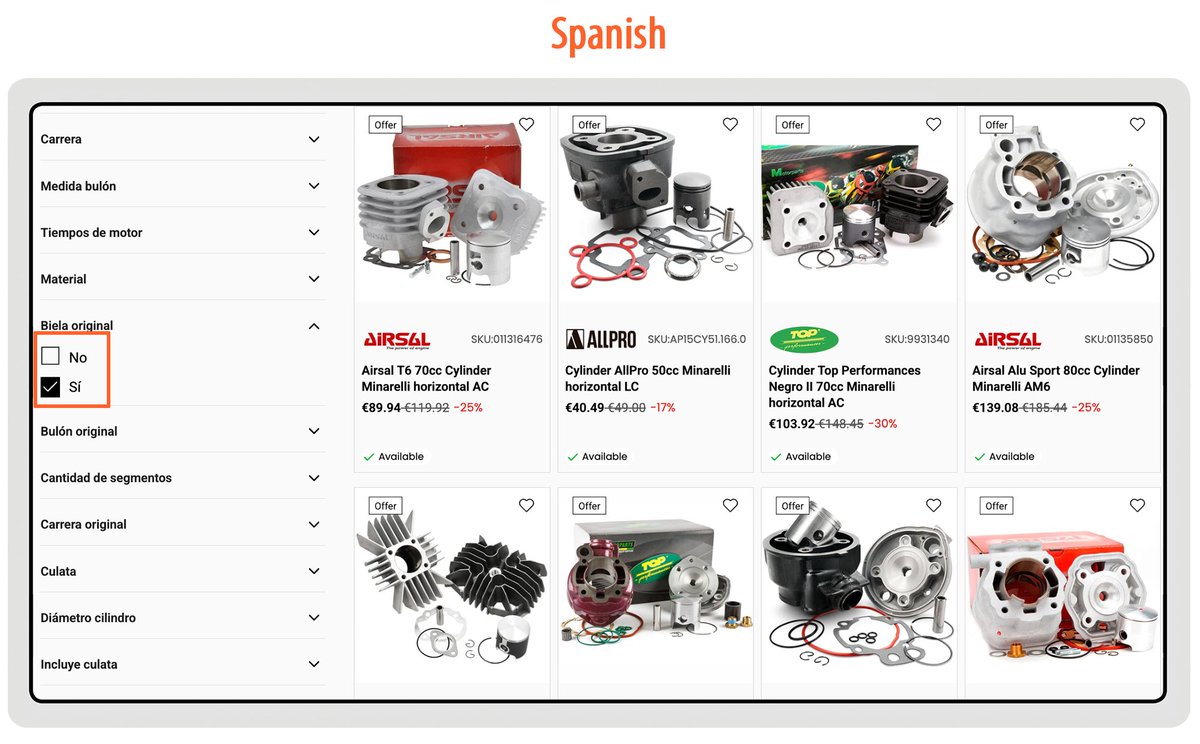
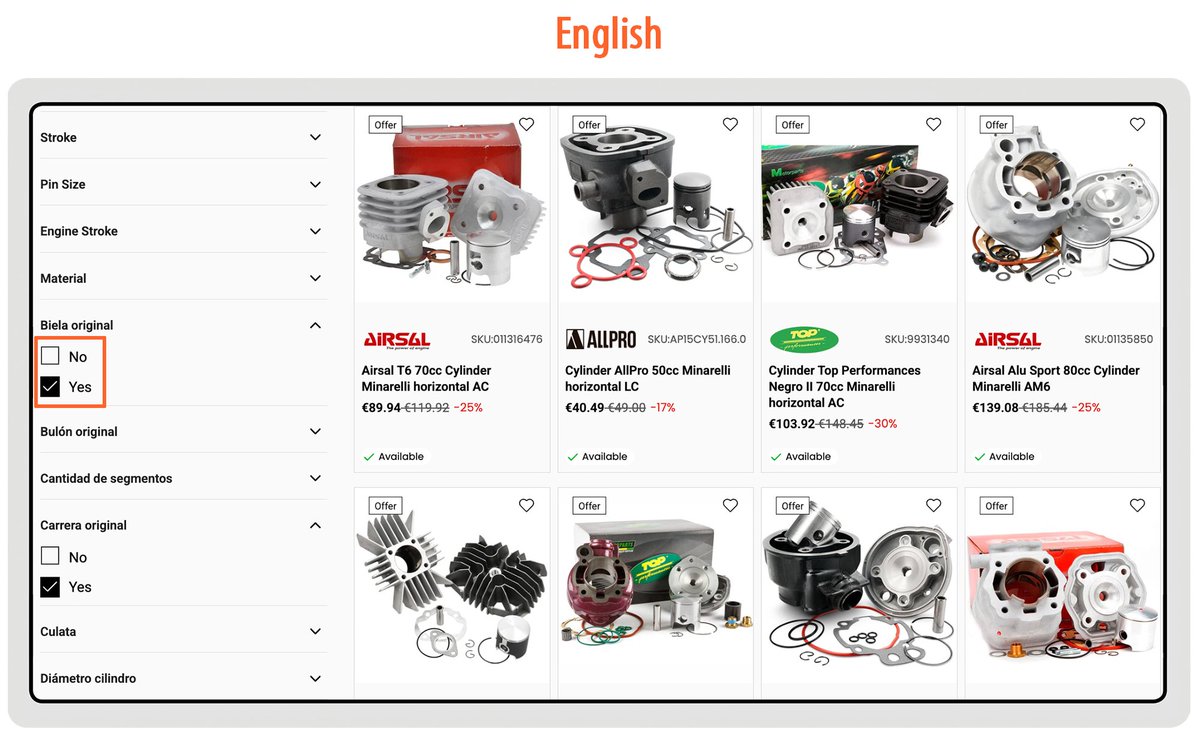
Filters now work in multiple languages If your store has more than one language, filter values will automatically appear inside the facet panel in the same language as the rest of your storefront. This works with Shopify’s built-in translations as well as third-party translation apps. Facet values are pulled directly from product metafields, so the filters will display the same translations that are used in your product data. Because of that, the quality of the filter translations depends on whether the metafield values themselves are translated in the product card. This update is enabled by default for all stores. You don’t need to configure anything.
Convermax tweet mediaConvermax tweet mediaConvermax tweet media
English
0
0
1
17
Convermax
Convermax@convermax·
New Reporting in Convermax Analytics - Products We’ve added a new Products section to Convermax Reporting. It gives you more detailed insights into how your products are performing. With this update, you can answer questions such as: - With which vehicles was a specific product added to the cart? - How many times was it viewed before purchase? - How often did it appear in search results? and many more. To access this data, go to Convermax Dashboard → Reporting. Click on the Products section. What the metrics mean: - Search Appearances How many times a product showed up in keyword-based search results after a user entered a search term. Searches performed using filters only, without a keyword, are not counted. - Impressions How many times the product card was actually visible in search results on the user’s screen (at least 50% visibility). Repeated views, such as scrolling back to the same product, are not counted. - Product View How many times the Product Detail Page was opened, whether from search results, category navigation, or direct visits via the browser. - Add to Cart How many times the product was added to the cart. For now, we count only the action itself, not the quantity added in a single click. Quantity tracking is coming in the next update. - Confirm Order How many times the product was ordered and how much revenue it generated. If discounts were applied in the cart, the revenue would reflect it. If there are other events you’d like to see in our Reporting, write them in the comments or email our support team.
GIF
English
0
0
1
18
Convermax
Convermax@convermax·
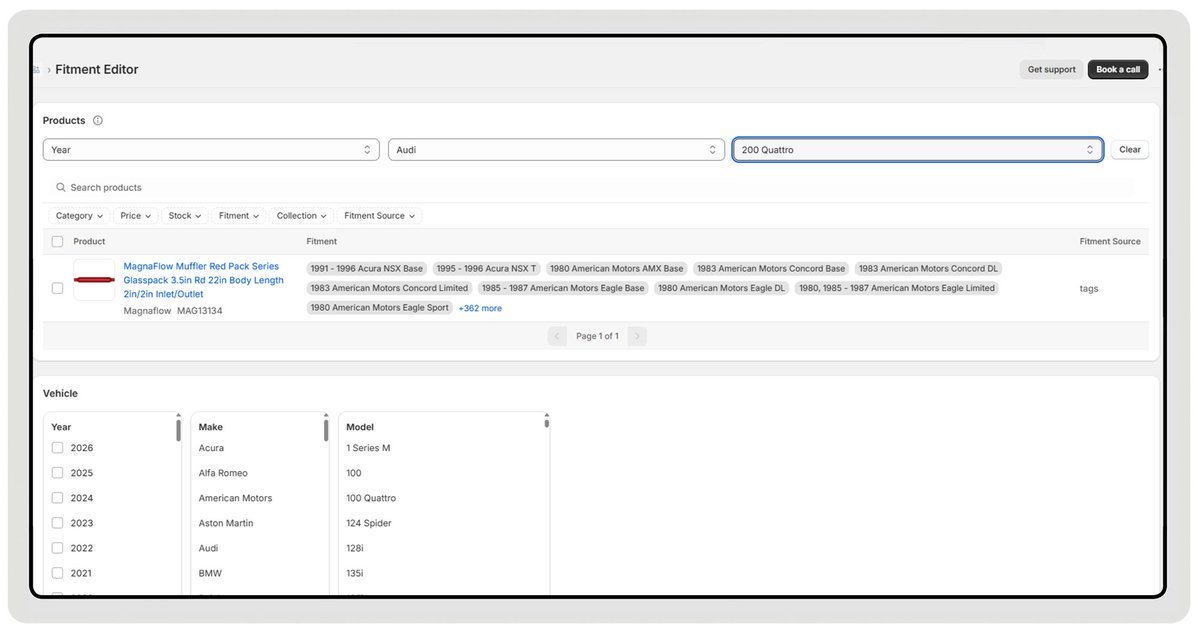
Fitment Editor Update: filters and bulk actions The Fitment Editor now includes a Year Make Model bar, allowing merchants to filter all store products by vehicle. This makes it easy to view products assigned to a specific vehicle and update them in bulk when needed. We also added other filters to sort products by: - brand - price - stock - fitment - fitment source. Merchants can combine multiple filters, select all matching products, and apply bulk actions with a single click. For example, you can quickly find all products that fit a specific vehicle and review or update their fitment. Another use-case scenario: you can locate products missing fitment data and fix them all together. The updated Fitment Editor is now live for both Shopify and BigCommerce apps.
Convermax tweet mediaConvermax tweet media
English
1
0
2
50
Convermax
Convermax@convermax·
Dashboard got a new look We’ve completely redesigned the Convermax Dashboard. The new layout is cleaner, more intuitive, and easier to navigate. The functionality remained the same (new features are coming soon!), and the flow has improved.
GIF
English
0
0
1
22
Convermax
Convermax@convermax·
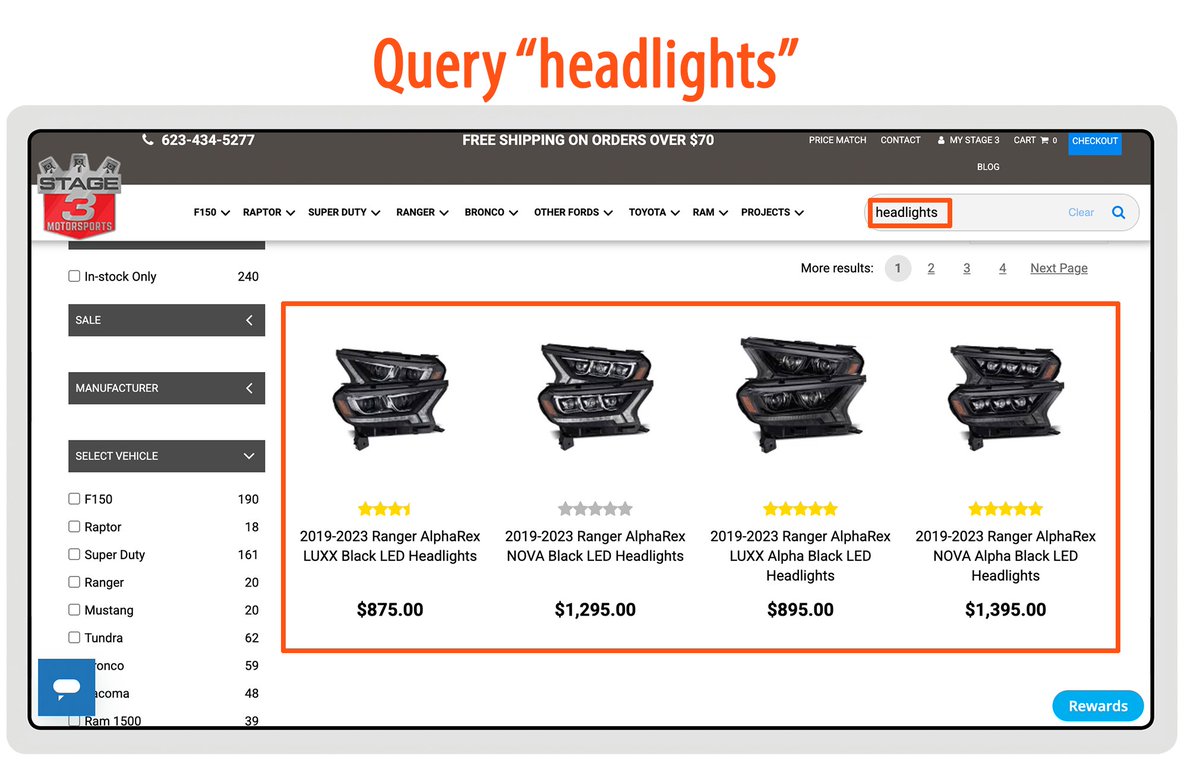
Search Results Re-ranker Our new AI-powered search plugin adjusts the order of products based on the search query. It analyzes the products returned on the first results page and re-ranks them so they better match the shoppers’ intents behind the keywords and show the most relevant product first. The model works on a defined set of documents and the original query, scoring each product to correct relevance where traditional ranking falls short. The re-ranking happens page by page. As a result, your shoppers see more relevant results at the top of the page. 📷
Convermax tweet mediaConvermax tweet media
English
0
0
1
21
Convermax
Convermax@convermax·
New fitment source: SureDone Merchants who manage their data via SureDone can connect it as a data source inside the Convermax app. To enable it, simply enter your SureDone username and API token. Once added, the connection is established, and your data from SureDone becomes available for indexing and use inside your store.
Convermax tweet media
English
0
0
1
13
Convermax
Convermax@convermax·
Fitment-related Products With this new widget, shoppers can see fitment-related product suggestions directly on the product page, even if they haven’t selected their vehicle yet. The widget displays recommendations based on Year, Make, Model fields, the product title, and the product category. This allows customers to discover relevant alternatives and complementary products without a pre-selected vehicle. Previously, related products logic depended on the selected vehicle and product category. With this update, vehicle selection is optional. Product relevance is now determined by the product itself and its vector representation, which carries the full set of vehicles the product is compatible with. Now, shoppers get fitment-related recommendations no matter how they browse your store.
Convermax tweet media
English
0
0
2
14