Sabitlenmiş Tweet

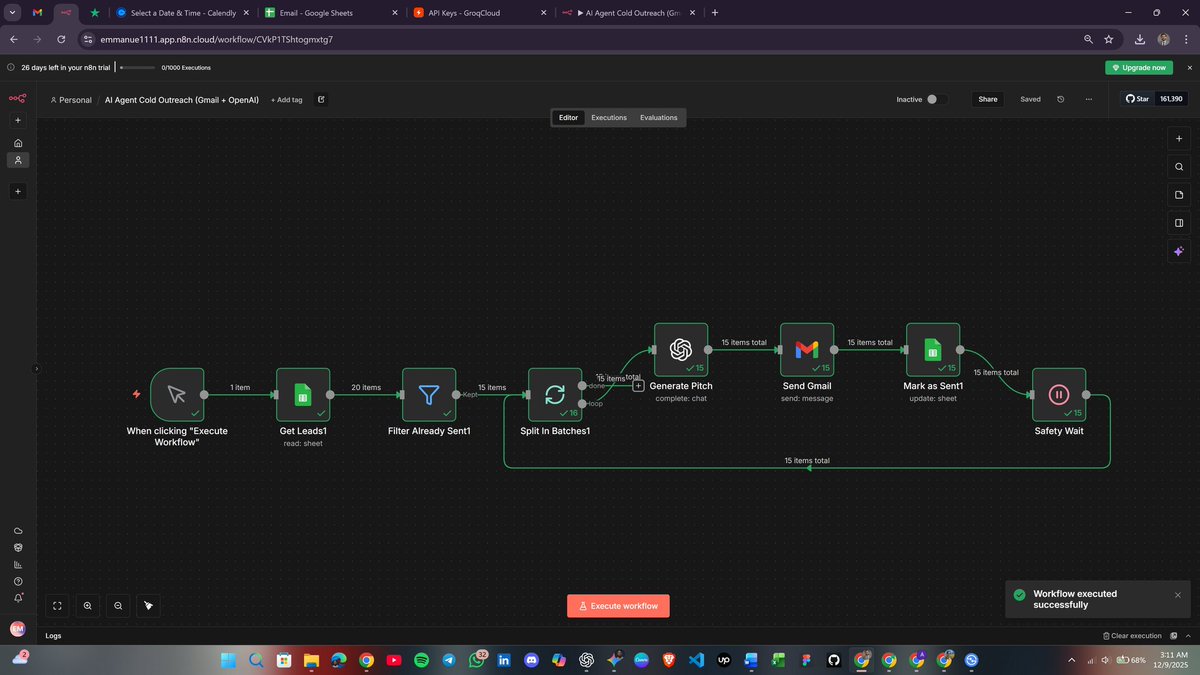
I was kinda bored, so I decided to build a simple workflow to help me send my cold emails 🥱


English
Emmanuel Bosun | Automation
1.1K posts

@emmanbosun
I build AI agents and give classic AI automation to increase your productivity. AI Expert, Cybersecurity. Let's work together → https://t.co/LrhGCQTWcS



@_Nsznn Where I wan see N500m??



Building one online course traditionally takes 70 to 320 hours and costs anywhere from $5,000 to $50,000 per finished hour of content. Writing. Slide design. Image sourcing. Voice recording. Video editing. Five different skill sets, five different tools, and one creator drowning in tabs. I spent the last 3 months building something to fix that for an ed tech client. It's a 4 workflow AI pipeline in n8n; 270 nodes total that turns a single form submission into a complete, production-ready course: written content, AI-generated slide images, Google Slides decks, ElevenLabs voiceovers, and compiled MP4 videos per module. All delivered to the client's Google Drive, with email links. Here's what's under the hood: 𝗪𝗼𝗿𝗸𝗳𝗹𝗼𝘄 𝟭 — 𝗢𝘂𝘁𝗹𝗶𝗻𝗲 & 𝗖𝗼𝗻𝘁𝗲𝗻𝘁 (𝟴𝟬 𝗻𝗼𝗱𝗲𝘀) Form intake → optional reference materials uploaded to an OpenAI Vector Store → two AI Assistants spin up: one writes the outline, the other critiques it like a senior instructional designer. The self-correction loop runs before any human sees it. Optional human approval over email. The full course material is generated in two parts to bypass token limits. 𝗪𝗼𝗿𝗸𝗳𝗹𝗼𝘄 𝟮 — 𝗜𝗺𝗮𝗴𝗲𝘀 & 𝗦𝗹𝗶𝗱𝗲𝘀 (𝟳𝟲 𝗻𝗼𝗱𝗲𝘀) Slides are parsed, a Drive folder structure is built per module, Gemini generates an image for every single slide, and Google Slides presentations are populated via batchUpdate. 𝗪𝗼𝗿𝗸𝗳𝗹𝗼𝘄 𝟯 — 𝗔𝘂𝗱𝗶𝗼 (𝟯𝟴 𝗻𝗼𝗱𝗲𝘀) ElevenLabs TTS with 7 voice options and 12 tone styles. Per-slide narration, rate-limit-aware loops, binary cleared after each upload to prevent memory blowups. 𝗪𝗼𝗿𝗸𝗳𝗹𝗼𝘄 𝟰 — 𝗩𝗶𝗱𝗲𝗼 (𝟳𝟲 𝗻𝗼𝗱𝗲𝘀) Creatomate renders each slide as a video clip, then merges them per module. Final delivery email goes out with every Drive link organized. 𝗧𝗵𝗲 𝗱𝗲𝘀𝗶𝗴𝗻 𝗯𝗮𝗿 𝘄𝗮𝘀 𝗵𝗶𝗴𝗵 The client wasn't going to accept slop. They wanted videos that actually looked like a real course; clean typography, proper image framing, consistent layout per module, and audio that sat right against the visuals. That meant iterating on Creatomate templates, Gemini prompts, and slide population logic until every module rendered like something a human design team had touched. 𝗧𝗵𝗲 𝗽𝗮𝗿𝘁 𝗜'𝗺 𝗺𝗼𝘀𝘁 𝗽𝗿𝗼𝘂𝗱 𝗼𝗳: 𝗲𝗿𝗿𝗼𝗿 𝗵𝗮𝗻𝗱𝗹𝗶𝗻𝗴 & 𝗿𝗲𝗴𝗲𝗻𝗲𝗿𝗮𝘁𝗶𝗼𝗻 Anyone who's built a long workflow knows the real cost isn't building it, it's what happens when something breaks on slide 47 of 52. I hit a lot of errors during development. OpenAI runs that hung indefinitely. Gemini returns empty image data when the prompts tripped the safety filters. Google Slides batchUpdate throwing 400s on malformed JSON. ElevenLabs returning blank MP3s. Creatomate renders failing silently. n8n's JavaScript heap blowing up on large runs. I tracked every one of them down and built guards around each so the workflow doesn't fail in production. The system has: → A Google Sheets state store that tracks every run by a unique ID, so workflows can resume from where they failed instead of restarting → Deduplication guards on Workflows 3 and 4 if voiceovers or videos were already generated for a run, they're reused, not regenerated (saves real money on ElevenLabs and Creatomate) → Polling loops with status checks for every async API (OpenAI Runs, Creatomate renders, Drive uploads) → Memory management: binary audio/video data is explicitly cleared after each Drive upload to prevent n8n heap crashes on long runs → Five regeneration forms: single image, slide text, module images, voiceover, module video that reads state from Sheets and rebuilds ONLY the broken piece, no full pipeline rerun needed → Auto-cleanup of OpenAI Assistants and Vector Stores after each run, so nothing orphaned bleeds money 𝗕𝗲𝗳𝗼𝗿𝗲 𝗶𝘁 𝘄𝗲𝗻𝘁 𝗹𝗶𝘃𝗲, 𝗶𝘁 𝗴𝗼𝘁 𝘁𝗲𝘀𝘁𝗲𝗱 Multiple full end-to-end test runs across different course briefs, different module counts, and different voice and video settings. Every failure mode was reproduced and patched. Edge cases on tiny courses, edge cases on large courses, runs with reference materials, runs without. The pipeline only went to production after it could handle every scenario the client would realistically throw at it. 𝗗𝗲𝗹𝗶𝘃𝗲𝗿𝗮𝗯𝗹𝗲𝘀 𝗶𝗻𝗰𝗹𝘂𝗱𝗲𝗱: 📄 Client Documentation: the non-technical guide for the team that uses it 📄 Developer Documentation: full build instructions, credential setup, and troubleshooting guide 📄 User Guide: walkthrough of the form, regeneration flows, and what to expect at each stage Real execution stats from one production run: 3 sections, 9 modules, 52 slides, ~1 hour of finished video content. Total cost to the client: $24–$38 in API spend. Total time start to finish: ~90 minutes. The traditional way: 6 weeks and $5K minimum. This way: 90 minutes and lunch money. This is what AI automation is actually for. Not chatbots. Not demos. Production pipelines that replace weeks of work with one form submission. If you're an ed tech founder, training company, or course creator looking to scale content production without scaling your team let's talk. #n8n #AIAutomation #EdTech #WorkflowAutomation #AICourseCreation

Introducing Claude Managed Agents: everything you need to build and deploy agents at scale. It pairs an agent harness tuned for performance with production infrastructure, so you can go from prototype to launch in days. Now in public beta on the Claude Platform.