Faik Uygur

3.6K posts

Faik Uygur

Faik Uygur

@faik

Co-Founder of Robomotion RPA | Automation expert | Linux & Golang enthusiast | Sharing AI, LLM & Agent insights | Proud father of 2

Istanbul Katılım Şubat 2008
688 Takip Edilen701 Takipçiler
Faik Uygur
Faik Uygur@faik·
Robomotion is a messaging system and an RPA platform inspired by Node-RED, built entirely from scratch in 𝐆𝐨𝐥𝐚𝐧𝐠. This architecture gives us our most powerful capability: massive concurrency powered by Golang goroutines. In most RPA products, parallel processing requires Queues that force steps to run sequentially. If you want to process more work at the same time, you usually need to buy additional robot licenses. Not in Robomotion. Because Robomotion is built as a messaging system, it can manage tens or even hundreds of sequential steps in parallel. This means you can run dozens of browser automations with a single robot, making automation both manageable and affordable. This capability has been the number one reason customers replace competing RPA products with Robomotion. However, every messaging system must have limits. For many years we had a configurable limit that slowed down processing when large message objects were passed between nodes. Even when the data was not used, the entire object was still transferred between nodes, which created unnecessary overhead. As the amount of data being processed grew, and as more data needed to move between nodes, we started seeing more exceptions related to this limitation. With the introduction of Large Message Objects (LMO) support, we have finally solved this long-standing problem. We have also introduced another highly requested improvement: simple webhook setup. Previously, you needed to install the robot on a machine with a public IP and port, and the robot had to bind directly to that address to handle HTTP requests. Now webhook configuration is much easier and can be set up in just a few steps. Another major addition is external Git support. Our backend system already manages a Git repository for each of your flows. The Save and Load actions actually push to and pull from this internal repository. We previously allowed users to clone that internal repository through git.robomotion.io/.../ Now you can also connect and use external repositories such as GitHub. This is particularly important because we will soon release our Claude Skills for Robomotion which will allow you to use Claude Code to develop Robomotion flows. You will be able to build flows faster and even work without opening the Flow Designer if you prefer. 𝐖𝐡𝐚𝐭 𝐢𝐬 𝐧𝐞𝐱𝐭? We have started working on 𝐀𝐠𝐞𝐧𝐭 𝐎𝐫𝐜𝐡𝐞𝐬𝐭𝐫𝐚𝐭𝐢𝐨𝐧 and 𝐀𝐮𝐭𝐨𝐧𝐨𝐦𝐨𝐮𝐬 𝐀𝐠𝐞𝐧𝐭𝐬. You will be able to build AI agent flows inside Robomotion and organize them into a workforce structure within your company, divided by departments. These agents will operate autonomously, communicate with each other, and collaborate to complete tasks. You will also be able to interact with your agents through Telegram, WhatsApp, or the Robomotion Chat application. 👉 Join our 5000+ Discord community at community.robomotion.io
Robomotion@robomotionio

🚀 Robomotion v26.3.1 is here! This release focuses on improving the developer experience in the Flow Designer, making debugging easier, enabling larger data processing, and introducing a more flexible workflow for teams that use Git. The update also brings improvements that make it easier to integrate Robomotion into modern infrastructure and development environments. ✨ Highlights 𝐖𝐞𝐛𝐡𝐨𝐨𝐤 𝐓𝐫𝐢𝐠𝐠𝐞𝐫𝐬 𝐰𝐢𝐭𝐡𝐨𝐮𝐭 𝐏𝐮𝐛𝐥𝐢𝐜 𝐈𝐏 Robomotion now supports optional webhook URLs for triggers. Previously, receiving incoming requests required a VPS or server with a public IP and port. This update removes that requirement and making integrations simpler and more flexible. 𝐋𝐚𝐫𝐠𝐞 𝐌𝐞𝐬𝐬𝐚𝐠𝐞 𝐎𝐛𝐣𝐞𝐜𝐭𝐬 (𝐋𝐌𝐎) Flows can now process large datasets and tables. You can inspect full messages in the Debug Output Console without truncation and drag and drop message fields directly into node properties while building flows. 𝐄𝐱𝐭𝐞𝐫𝐧𝐚𝐥 𝐆𝐢𝐭 𝐑𝐞𝐩𝐨𝐬𝐢𝐭𝐨𝐫𝐢𝐞𝐬 Robomotion now supports external Git repositories for storing and loading projects. Developers can work on flows outside the platform using standard Git workflows and open the project later in the Flow Designer. 👇 Full changelog github.com/robomotionio/r… ⬇️ Download robomotion.io/downloads #Automation #RPA #DeveloperTools #WorkflowAutomation #DevTools #Robomotion

English
0
0
0
146
Faik Uygur
Faik Uygur@faik·
Claude Code has now completed its first year. We started using it early, right after switching from Cursor. Today, 100% of our development is done with Claude Code. Working with coding agents requires a different set of skills. These are not skills you gain by casually trying them once in a while. You develop them by forcing yourself to use them all the time. Close your editor. Stop manually writing code. Try building your code with Claude Code. Software development has changed. I have always valued being a generalist. Now anyone can become one much faster. At any time and from anywhere, you have access to an expert you can ask questions whenever you need. You can build things with it while learning at the same time. Software job applications will change as well. They may ask for an engineering degree, but several years of experience with Claude Code will be a must, while programming languages become optional or simply a plus.
Faik Uygur tweet media
English
0
0
1
174
Faik Uygur
Faik Uygur@faik·
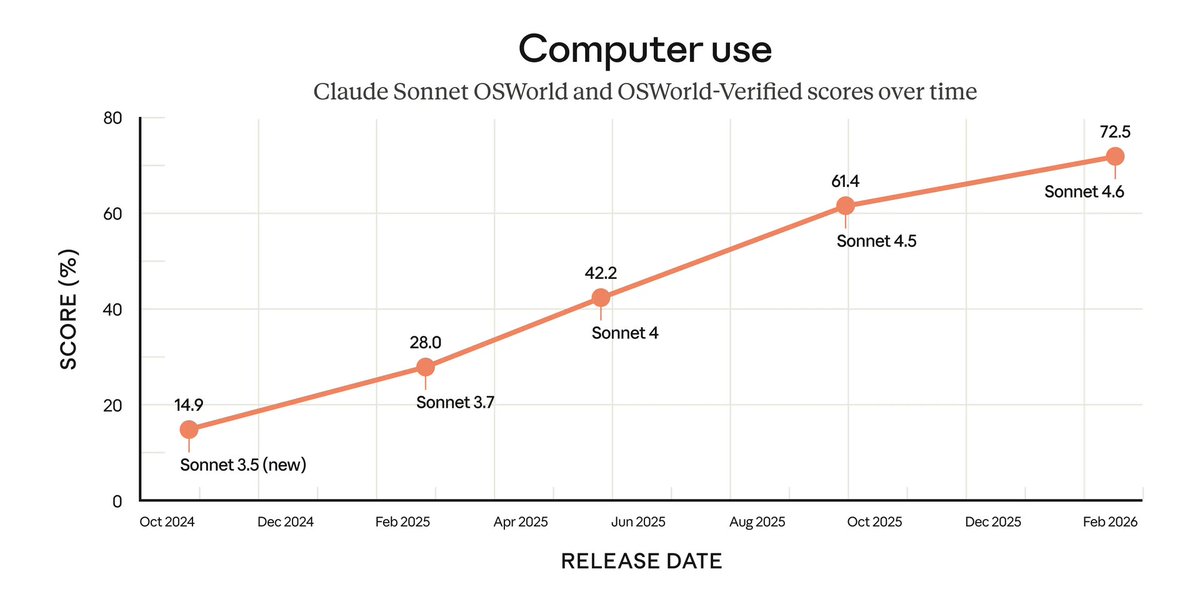
With Anthropic’s latest Sonnet 4.6 release, 𝐂𝐨𝐦𝐩𝐮𝐭𝐞𝐫 𝐔𝐬𝐞 has reached an impressive 72.5 percent benchmark score. Does this mean the end of 𝐑𝐏𝐀? No. The benchmark is impressive. The demos are impressive. An AI that can see your screen, understand it, and click and type like a human feels like magic. But enterprise automation is not about magic. It is about reliability. RPA has always been built on determinism. The same input produces the same output. If something breaks, you inspect the selector, fix the logic, redeploy, and understand exactly why it failed. Prompt-based Computer Use works differently. You describe the task, and the model decides how to execute it. I call this “prompt and pray” development. When a customer asks, “This worked yesterday, why not today?”, the answer is rarely a single clear line of logic. You add guardrails. You refine the prompt. You introduce verification steps. It improves. But it can start to feel like managing a duct-taped system rather than engineering one. There is also the performance reality. Computer Use often involves sending screenshots, waiting for reasoning, receiving coordinates, clicking, and repeating the cycle. That loop is neither cheap nor instant. As the number of steps increases, so does the probability of failure. Hardware is improving. Open source models are improving. But scaling high-capability, vision-based agents across every enterprise is not trivial. So will AI kill RPA? No. But it will fundamentally change it. Computer Use excels where traditional RPA struggles. It handles variability. It navigates unfamiliar screens. It is powerful for exception handling, exploration, and even generating initial automation drafts. The future is not replacement. It is hybrid automation stacks. Deterministic RPA remains the execution backbone. Critical processes such as payments, compliance, reporting, and core operations require predictable behavior. They require logs, audit trails, and version control. Around that backbone, AI adds adaptability. If a selector breaks, an agent can attempt recovery. If a layout changes slightly, it can adjust. If a new workflow is needed, it can generate the first draft. AI becomes the fallback. AI enables self-healing. AI becomes the RPA developer’s assistant. In this model, agents generate deterministic, debuggable RPA flows. In production, those flows run as usual. When something unexpected occurs, Computer Use steps in to recover or escalate with full context. That is engineering. Not prompt and pray development. Intelligence layered on top of deterministic systems. RPA platforms will integrate this deeply. Building flows will feel like pair programming with AI. Maintenance will be supported by agents. AI will not kill RPA. The future is deterministic execution with adaptive intelligence on top. Hybrid automation stacks. Try Robomotion at robomotion.io
Faik Uygur tweet media
English
0
0
1
94
Faik Uygur
Faik Uygur@faik·
It was obvious from his Lex Fridman interview that the OpenClaw creator, Peter Steinberger, was going to join the OpenAI team. Sam was helping and mentoring him through the Anthropic copyright issues. And he kept constantly mentioning Codex, saying he was using it to develop OpenClaw. It felt like a weird, forced promotion. I mean, your project is named after Claude Code, come on. These days, OpenClaw clones are popping up everywhere: NanoBot, NanoClaw, PicoClaw, TinyClaw, and now ZeroClaw. Last year was all about agent mania. This year was supposed to be about agent orchestration, but it looks like personal assistants might take the spotlight instead, or maybe it will turn into a head to head race.
English
0
0
0
122
Faik Uygur
Faik Uygur@faik·
AI is moving at an incredible pace. It took us more than a year just to catch up, and we are still chasing it. If you stop, you fall behind. It is that simple. SaaS as we knew it is fading. Vibe coding enables companies to build internal tools much faster. Low code is fading as well. It is evolving into AI powered no code, and much of what low code tools produce can now be generated through vibe coding. The agent wave has evolved into a personal assistant wave with OpenClaw. The promise is simple: install OpenClaw and you instantly have a digital employee. But the reality is not that simple: installation is difficult, setup demands significant technical effort, and security risks are serious. Even OpenClaw has vibe-coded clones now like, TinyClaw, NanoClaw, PicoClaw, and NanoBot, most built in just a few days. The agent loop already existed. Integrations with third party tools for agents already existed. Telegram and WhatsApp integrations already existed. The difference now is that you can run everything from your own computer. In many ways, this is what RPA has always done, running automations locally on your machine. We had to transform our entire infrastructure to become AI ready. That is not easy when you already have production systems running for customers. As the saying goes, it is like building a plane while flying it. You cannot break anything. When we started, our project format consisted of large, unreadable JSON blobs. That had to change. AI is excellent at generating and modifying code but not JSON blobs. Our saved flow format is now TypeScript code. We also changed how flows are stored. Previously, all flows and subflows lived in S3. We migrated to Git. We run our own Git servers behind the scenes, so users can still save and load as before. The difference is that every save is now a commit. That means full history and the ability to return to any previous version at any time. You can now clone your flows and use Claude Code to develop them. We are about to release Robomotion Claude Skills to make this possible. Our packaging system is also unique. Every package is a microservice and can be written in Go, Python, Java, or C#. Package development itself can now be handled by Claude Code, too. What used to take days now takes minutes. In five minutes, Claude Code can research competitors, read integration documentation, compare feature sets, create a capability table, and generate a production ready package with the most useful components. Now we have AI assisted package building and AI assisted flow building. The next step is turning flows into skills, then enabling agents to create their own skills, and eventually building a community store where skills can be shared. The best part is that every agent skill is a visual flow. You can open it in the Flow Designer and see exactly what it does. Self developing personal assistants is next. Real, intelligent digital employees. Follow us community.robomotion.io
Robomotion@robomotionio

🚀 Robomotion v26.2.0 is here! This release brings our 𝐀𝐈 𝐁𝐮𝐢𝐥𝐝𝐞𝐫 directly into the Flow Designer and introduces our new human- and AI- readable flow format. Our goal is simple: transform RPA development and make it possible to build complete automations just by talking to AI. The AI Assistant is currently in Beta. You can start using it today and help us improve it by rating responses directly inside the assistant. ✨ Highlights 𝐀𝐈 𝐀𝐬𝐬𝐢𝐬𝐭𝐚𝐧𝐭 𝐟𝐨𝐫 𝐅𝐥𝐨𝐰 𝐃𝐞𝐬𝐢𝐠𝐧: Build and Plan modes to create and structure flows using natural language. 𝐅𝐢𝐱 𝐰𝐢𝐭𝐡 𝐀𝐈: Interactive problem solving directly from error popups. 𝐀𝐈-𝐩𝐨𝐰𝐞𝐫𝐞𝐝 𝐁𝐫𝐨𝐰𝐬𝐞𝐫 𝐄𝐱𝐩𝐥𝐨𝐫𝐚𝐭𝐢𝐨𝐧: Detect selectors with AI before building your automation. 𝐍𝐞𝐰 𝐅𝐥𝐨𝐰 𝐅𝐨𝐫𝐦𝐚𝐭: Human- and AI-readable structure, preparing the way for terminal-based development and coding agents. Soon, you will be able to 𝐠𝐢𝐭 𝐜𝐥𝐨𝐧𝐞 your flows and develop them directly from your terminal using coding agents like 𝐂𝐥𝐚𝐮𝐝𝐞 𝐂𝐨𝐝𝐞 or 𝐂𝐨𝐝𝐞𝐱. 💡 AI model recommendation For the best balance between price, speed, and quality, we currently recommend: • Google Gemini Flash 3 - blog.google/products-and-p… 👇 Full changelog github.com/robomotionio/r… ⬇️ Download robomotion.io/downloads #Automation #Builder #AIBuilder #AI #RPA #Agents #DeveloperTools #Robomotion

English
0
0
1
90
Faik Uygur
Faik Uygur@faik·
Zero manual coding... A fully functional C compiler... Anthropic built a Rust-based C compiler from scratch that can compile the Linux kernel, QEMU, FFmpeg, SQLite, PostgreSQL, and Redis, and achieves a 99 percent pass rate on major compiler test suites, including the GCC torture tests. anthropic.com/engineering/bu… So are you still wasting time writing code manually and insisting that AI cannot write code?
English
0
0
0
114
Faik Uygur
Faik Uygur@faik·
Claude Code Opus 4.5 usage limits appear to have been reduced since January 1, 2026. You now hit weekly limits much faster, and there is an open issue reporting this behavior: github.com/anthropics/cla… It is unclear whether this is a genuine bug, as suggested in the issue, or a result of heavy multi-agent usage in plan mode. If you have maxed out your plan and are waiting for 𝐭𝐡𝐞 𝐫𝐞𝐬𝐞𝐭, here is a working setup you can use in the meantime: 𝐂𝐥𝐚𝐮𝐝𝐢𝐬𝐡 is a compatibility and orchestration layer that lets you use Claude Code with almost any major AI model. claudish.com Claudish intercepts Claude Code requests, translates them on the fly, and routes them to other providers such as OpenAI, Google, xAI, and DeepSeek through OpenRouter. I have tried many models on OpenRouter to find the best balance between quality and price, and ultimately settled on the Gemini 3 Flash model. 𝐆𝐞𝐦𝐢𝐧𝐢 3 𝐅𝐥𝐚𝐬𝐡 is a recently released, frontier-level reasoning model with very low latency and low cost. blog.google/products-and-p… It is well suited for high-frequency agentic workflows, iterative coding, and real-time developer tooling. On the 𝐒𝐖𝐄 benchmark: • Opus 4.5 scores 80.9 percent • Sonnet 4.5 scores 77.2 percent • Gemini 3 Pro scores 76.2 percent • Gemini 3 Flash scores 78.0 percent Gemini 3 Flash outperforms Gemini 3 Pro, exceeds Sonnet 4.5, and comes close to Opus 4.5. Released on Dec 17, 2025, Gemini 3 Flash, with its 1M context window, deserves serious attention. 𝐎𝐩𝐞𝐧𝐑𝐨𝐮𝐭𝐞𝐫.𝐚𝐢 acts as a unified gateway, giving access to multiple AI providers through a single API. openrouter.ai OpenRouter provides access to these leading frontier models with the following pricing: Opus 4.5 offers 200K context, $5/M input tokens, $25/M output tokens Gemini 3 Flash offers 1M context, $0.50/M input tokens, $3/M output tokens 5x larger context window, 10x lower cost. Claudish uses OpenRouter. By combining Claudish with Gemini 3 Flash, you can keep your existing Claude Code setup while benefiting from Gemini’s speed, multimodal reasoning, and scalability. No workflow change is required. You can continue using Claude Code with your existing commands and skills using this setup.
Faik Uygur tweet media
English
0
0
3
528
Faik Uygur
Faik Uygur@faik·
Using plan mode in Claude Code feels like running deep research on your codebase. It analyzes the context, produces a clear summary at both the beginning and the end of the implementation, and reframes your original request into a very long, comprehensive prompt that feels like a "did you mean this?" clarification. The result is a supercharged prompt with implicit acceptance criteria that guides the implementation far more precisely. Anthropic removed "ultrathink", which I was using for difficult tasks. Now I use plan mode for every hard task, whether minor or major, starting from a clear, well-defined context. The workflow becomes plan, summarize, replan, summarize, and repeat until the feature is implemented.
English
0
0
0
77
Faik Uygur
Faik Uygur@faik·
Claude Code plan mode has been improved and it is a big deal. After you create a plan, Claude Code now asks whether you want to start with a clean context. This helps clear the context, carry the plan into a new session, and continue smoothly with the implementation from there. The more you use plan mode, the better your sessions become. If you are starting a new project, I recommend watching this video called “Stop Using the Ralph Loop Plugin”: youtube.com/watch?v=yAE3ON… The original Ralph is just a loop that everytime starts with a clean context, but not the plugin. The video explains how the real Ralph Loop works, why it matters. It is a great way to start a new project. If you are working on an existing project and tackling a large feature that may take hours, days, or weeks, a single plan is usually not enough. Create a new plan every time you get stuck. Use summaries of your current state to build a focused plan around the problem and continue from there. Do not wait until your context is almost full. Even if you still have plenty of context left, start fresh with a new plan that focuses on the real issues and the higher goal. Sometimes I switch to plan mode and use the last generated summary, when only 8 to 10 percent of the context is left, to create a new plan for what comes next and continue with a clean context. Another workflow I am experimenting with is issue driven development with plans using GitHub. Every new issue or feature request goes into GitHub. I also created an issues folder inside the repository and fetch everything using gh. I created a plans folder as well, along with a few custom commands. The start issue command reads the issue markdown file, switches to plan mode and creates a plan md file under the plans folder, opens a new branch, and starts the implementation. At the end, it aims for as much test coverage as possible. The filenames start with the issue number. After implementation, I run a review command that checks the code against the issue and the plan, and runs the tests. If everything looks good in the summary, all requirements are covered, and the tests pass, the final command creates the pull request, merges it, closes the issue and moves the issue md file under issues/closed folder in the repository. This keeps the work structured, focused, and much easier to continue over time, and later you can also read or refer back to the plan file that was used to implement the issue. Another experiment I would like to try is using the Ralph loop at the beginning of the project and then, as issues keep coming up, seeing whether it is possible to build a reliable, self-sufficient coding agent. In this setup, developer would focus mainly on creating very detailed issues, preparing the right context for the plan, and passing it to the agent through GitHub, while only following and orchestrating the overall progress.
YouTube video
YouTube
English
0
0
0
82
Faik Uygur
Faik Uygur@faik·
In "Made to Stick", there’s a simple but uncomfortable idea: what feels obvious in your head is often unclear to everyone else. You think you explained it. You know what you meant. But the listener doesn’t have the context you’re silently relying on. The same thing is happening with how many people experience AI models. When people around me try Claude Code for the first time, I keep hearing the same reactions: “I said it, it didn’t understand” or “it couldn’t do it.” The instinct is to blame the model. But that mindset misses the real issue. With a powerful model like Opus 4.5, the chance that it truly cannot handle something in your typical CRUD SaaS app is very small. Models make mistakes, that’s normal. But most failures come from unclear or incomplete instructions, not from lack of capability. AI doesn’t read your mind, it reads your prompt. When the output is wrong, the more useful question isn’t “why is it failing,” but “what did I fail to explain?” That’s exactly the lesson "Made to Stick" is teaching. The problem is rarely intelligence. It’s communication. And until you close the gap between what’s in your head and what you actually say, neither people nor models will give you the result you expect.
English
0
0
0
55
Faik Uygur
Faik Uygur@faik·
Do not fight with AI. Treat it like a code smell or a design smell, and fix your design or your code instead. I will give a very simple and obvious example. Our Robomotion package management system currently supports four languages: Go, Python, Java, and C#. Robomotion is a Node-RED inspired RPA platform. Every node has its own properties, and a property can be an input, output, or option. ``` InPath runtime.InVariable[string] `spec:"title=Path,type=string,scope=Custom,name=,messageScope,customScope,jsScope,aiScope,description=File path to the JSON file"` ``` When we first designed this, the `scope=` tag value could be Message, Global, or Local. All of them required a variable name, so we called the field name. Later, we added Custom string support, where the value is entered directly in the UI as a hardcoded string. However, the `name=` part remained. So when we wanted to add a timeout with a default value of 30 seconds, we ended up with `scope=Custom, name=30`. It worked, but it looked bad and was confusing. This was an exception, though. In most cases, `scope=Custom, name=` values are empty because there is no default. Now that we are working with AI, this has become one of the more problematic parts of the system. We have been working on creating Claude Skills to generate Robomotion packages in Go, and we tried to explain this behavior extensively in prompts, using instructions like “MUST leave blank” and explaining why it is required. For a Local File Path with `scope=Custom`, the name= field must be empty so the user can enter the value in the UI. There is no default value. But because the field is called `name`, the AI reasonably generates `scope=Custom, name=file_path`. That makes sense semantically, but it is wrong for the generated node. The correct solution here is not to fight the AI, but to fix the library. We should change `name=` to `value=` while keeping backward compatibility with existing packages. I was already planning to do this, but reading @Steve_Yegge 's post made it click for me at a broader level. He started changing command-line tool flags and subcommands to match how AI naturally hallucinates they should work, and treated those hallucinations as "desire paths". Treating AI behavior as a signal instead of a problem can help improve your system design.
Steve Yegge@Steve_Yegge

Agent UX tip of the day: Pave your Desire Paths. en.wikipedia.org/wiki/Desire_pa… Watch the agents using your command-line tools. When they guess wrong about a flag, or a subcommand, or even a whole feature, you should treat their hallucination as a "desire path", and pave it for them. Next time their hallucination won't be an error. Each time you do this cycle, and smooth your Agent UX out a little more, the agents get better at using your tool. It starts to work the way they work. I've been doing this for Beads for 2+ months, and the agents almost never make mistakes with it now, even though it hasn't even started making it into their training cycles much.

English
0
0
0
101
Faik Uygur retweetledi
Boris Cherny
Boris Cherny@bcherny·
I'm Boris and I created Claude Code. Lots of people have asked how I use Claude Code, so I wanted to show off my setup a bit. My setup might be surprisingly vanilla! Claude Code works great out of the box, so I personally don't customize it much. There is no one correct way to use Claude Code: we intentionally build it in a way that you can use it, customize it, and hack it however you like. Each person on the Claude Code team uses it very differently. So, here goes.
English
1.3K
7K
54.2K
8M
Faik Uygur
Faik Uygur@faik·
It is time to stop wasting time with your IDE in 2026. Stop writing code manually, even a simplest line of code. If you still have not figured this out yet, or you do not believe it can be done, do not worry, you are not alone. There are millions of developers wasting their time, mocking others, and thinking they are smarter than people using AI and Vibe coding. No one can explain you how to use it. There is no manual. It is like riding a bicycle. You will never learn without falling. You keep trying, and then one day you realize you are riding it. Every bump becomes predictable, you see ahead, and you pass through. For any coding task at hand, open a coding agent in that folder. I strongly recommend Claude Code with Opus 4.5. Solve issues and add features directly from the terminal, working alone. There are IDE integrations, but I would discourage using them so you can focus fully on working with the agent. git and cc are enough to develop software today.
English
0
0
0
52
Faik Uygur
Faik Uygur@faik·
AI agents can now improve their own skills. Humans learn by reading, watching, being taught, and practicing. With Agent Skills, AI can follow the same path of self improvement. Skills are a simple yet powerful concept that extends existing capabilities like code generation and tool usage. They allow agents to learn, improve, and apply knowledge more effectively over time. An agent can generate its own code and reuse it deterministically. You solve a task once, save the result as a skill, and the agent has effectively learned it. You can manually add or download new skills, but the more interesting question is what happens when the AI creates skills by itself, for itself. Skills become far more powerful when they mirror how humans improve. You try something, observe the outcome, identify what worked and what did not, and apply those lessons the next time. The design is deliberately minimal. A skill is simply a folder containing a Markdown file and the generated code. Nothing more. Skills are also highly context friendly. The agent first reads only the skill name and description, and loads the full content only when execution is required. At scale, this enables agents specialized in areas like DevOps, marketing, finance, or operations. You teach them new skills simply by talking to them. The next time you ask for the same task, they already know how to do it. This goes beyond context windows or traditional memory. It is a persistent capability. MCPs continue to act as the bridge that allows skills to interact with the outside world. This is the direction automation tools will move toward. Like onboarding a new hire, you will create an agent and explain a task conversationally, using text or voice while sharing your screen. Then you will say, “Now try it yourself.” The agent will generate the automation and run it. If it fails, you will correct it. Once it succeeds, the agent will have learned that ability as a reusable skill, just like a human would through training. This is continuous learning for AI through real, reusable capabilities the system will build for itself. The underlying technology already exists today. What remains is for product owners to shape it into something practical, safe, and valuable for everyday use.
English
0
0
0
46
Faik Uygur
Faik Uygur@faik·
The Luddites were English textile workers in the early 1800s who protested the introduction of industrial machines that threatened their jobs. Nearly every country has experienced similar moments in its history, when new technology disrupted established ways of working. Today, we are seeing a similar backlash from senior developers in our industry. You always hear the same arguments: "They are not experienced enough," "They don’t know what they are doing," "It will crumble like a house of cards." No, it won’t. Vibe Coding is here to stay, and it will only get better over time. I have been programming for 30 years, and I have never enjoyed building things more, nor felt more confident doing so. When I started learning programming in the late 1990s, there was very little useful content on the internet. Most of what I learned came from O’Reilly books. There were very few places to ask questions and get answers, and it took years to build that knowledge. Junior developers using these tools will catch up three to five times faster than what took you years to learn and what you now call experience. They effectively have someone sitting next to them throughout their entire learning journey, able to answer questions instantly and guide them forward. They will fail. Their vibe-coded apps will crash and break. That is part of the process. The difference is that they will fix problems faster, and they will learn faster. Overtime they will learn how to ask better questions, which helps close gaps and edge cases more quickly. Juniors are more adaptable than seniors who resist the technology. Not because they are smarter, but because they are not anchored to old workflows or assumptions. I prefer to work with senior developers who use agents well and know how to guide them. But if I must choose between a senior who resists these tools and insists on manual coding, and a junior who knows how to work effectively with agents, I will always choose the junior. The truth is, you do not know what that junior will know a year from now, and much of your current knowledge will matter less than you think. By building with agents, that junior is gaining a kind of knowledge you are not. They learn how to decompose problems for machines, how to steer complex systems, and how to recover when automation fails. That experience does not come from writing code line by line. It comes from working with agents every day. You have to adapt. Replace your editor with a coding agent. I suggest using Claude Code from the terminal only. Do not open your editor at all. Force yourself to build this way. Break your old workflow. It will fail. Understand why, fix it, and try again. If needed, throw away your branch, start fresh, and rebuild with what you learned. It takes weeks, months, or even a year to adapt. But you have to start now.
English
0
0
0
48
Faik Uygur
Faik Uygur@faik·
Yes, this is a skill issue. Not everyone understands how to use it or is able to use it. Some laugh at it, mocking their own incompetence. As Andrej Karpathy rightly put it, AI is an alien tool. You only unlock its real power by aligning with it, and that alignment comes from constant use. Stop writing code. Stop using your editor. Start learning how to use AI and Agents, along with everything that comes with them, Context, Skills, MCP and more, the new programming toolkit.
Andrej Karpathy@karpathy

I've never felt this much behind as a programmer. The profession is being dramatically refactored as the bits contributed by the programmer are increasingly sparse and between. I have a sense that I could be 10X more powerful if I just properly string together what has become available over the last ~year and a failure to claim the boost feels decidedly like skill issue. There's a new programmable layer of abstraction to master (in addition to the usual layers below) involving agents, subagents, their prompts, contexts, memory, modes, permissions, tools, plugins, skills, hooks, MCP, LSP, slash commands, workflows, IDE integrations, and a need to build an all-encompassing mental model for strengths and pitfalls of fundamentally stochastic, fallible, unintelligible and changing entities suddenly intermingled with what used to be good old fashioned engineering. Clearly some powerful alien tool was handed around except it comes with no manual and everyone has to figure out how to hold it and operate it, while the resulting magnitude 9 earthquake is rocking the profession. Roll up your sleeves to not fall behind.

English
0
0
0
72
Faik Uygur
Faik Uygur@faik·
Stop writing code by hand. Stop relying on your code editor. Start using Claude Code with Opus 4.5 today. Use it every hour, every day, for a couple of months. That is one of the best investments you can make in yourself right now. I have used Cursor before, and I know it is getting better, especially after Ryo Lu became Head of Design at Cursor. I have tried Gemini for a few things, but never used Codex. I know each of them can be slightly better or worse in different areas, but I am happy with Claude Code. So I am not really looking for alternatives. I can already do everything I want with it, and most importantly, it does not frustrate or disappoint me. Over time, you will get better at directing the agent to do real work for you: writing code, creating documentation, setting up machines, configuring databases, managing Kubernetes, fixing issues, and even migrating servers from one environment to another. Stop managing Azure, GCP, AWS, and DigitalOcean in the browser. Set up the CLI tools and let the agent do the work. Every major cloud provider already offers first-class command line tooling. For Azure, use az to create resources, manage VMs, configure networks, and operate Kubernetes. For Google Cloud, use gcloud to manage projects, services, IAM, and GKE clusters. For AWS, use aws to control EC2, RDS, IAM, EKS, and the rest of the stack. For DigitalOcean, use doctl to manage droplets, networking, databases, and Kubernetes. Be very careful in production, and always ask for permissions or explicitly state what must not be done. Production is dangerous. It is much healthier to use API keys limited to non-destructive operations. For test systems, you can work without permissions to move faster, build context while doing the task, and then ask the agent to generate a script that you can review and prepare for production. Everything is text. Everything is scriptable. Once your infrastructure lives in the CLI, agents can understand it, automate it, and operate it reliably. You can discover problems faster and create fixes more quickly. If you are on Linux or Mac, that is an even bigger advantage. Unix is heaven for LLMs, cause everything is text. Every server is driven by text-based configuration files. Modern servers even include inline documentation for almost every parameter. No GUIs, no hidden state, just readable and writable text. Everyone uses it differently. I enjoy talking with people who use it and discovering new ways they push agents further. If you are a senior developer, you already carry a lot of valuable experience. This is where it compounds. You move from doing the work to orchestrating it. Systems respond to intent, automation becomes leverage, and your output scales with your thinking, not your time.
English
1
0
3
169
Faik Uygur
Faik Uygur@faik·
In large corporations, work distribution often follows the Pareto principle, where roughly 20 percent of people drive 80 percent of the outcomes that keep the business and products moving. Results are expected, but ownership is spread thin. Scale and structure can make it easier to blend in without being directly tied to progress. In startups, this dynamic is very different. Small teams mean high visibility and real ownership. As Dan Aykroyd’s character says in Ghostbusters: “They expect results.” That mindset captures startup life well. What you do matters, and it shows. For new graduates, instead of chasing brand names, it is often more valuable to look for startups, especially those that have recently raised investment and are actively trying to grow. That is where you gain hands-on experience, build real skills, and accelerate your career early. If your dream is to start your own startup, you might not want to wait too long. Spending time at one or two startups can teach you far more than years in a large corporation. Having a single corporate job at some point can still be useful, mainly to understand organizational dynamics and, sometimes, to learn how things should not be done. But keep it short.
English
0
0
0
72
Faik Uygur
Faik Uygur@faik·
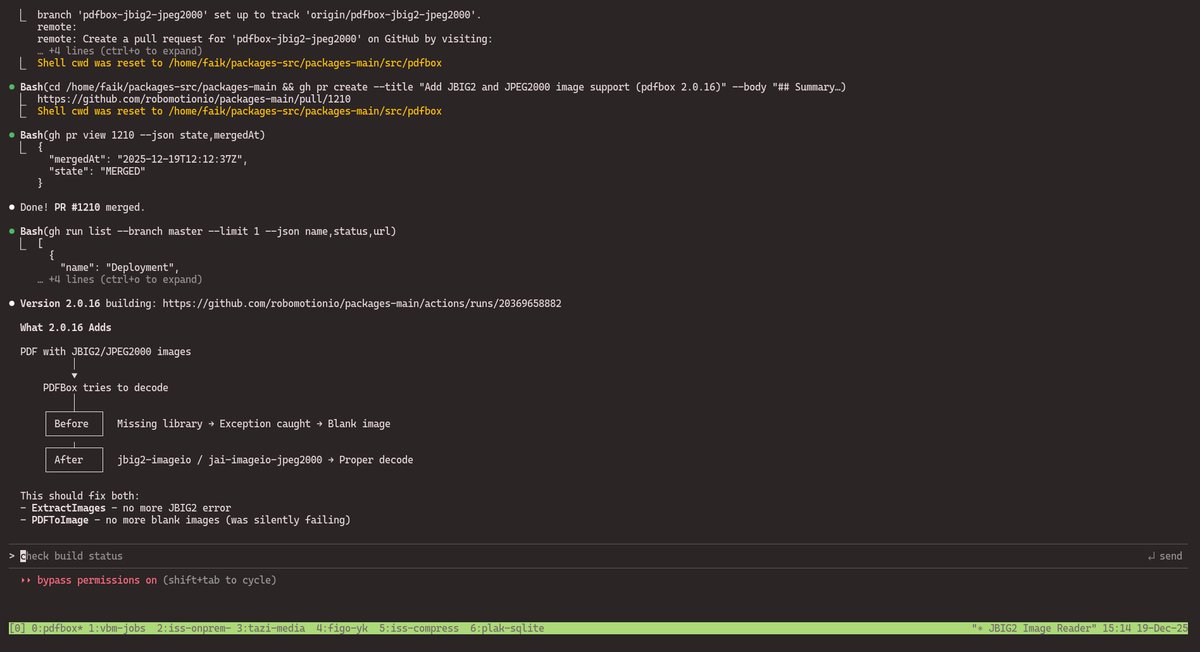
tmux, git, and Claude Code are all you need to develop software today. You no longer need a traditional coding editor. Very rarely, I open Neovim to read or edit some `.md` files, or use lazygit to check code changes, and that is it. tmux is great because it lets you manage multiple tasks at the same time. With Claude Code, you can do almost everything: coding, machine setup, maintenance, troubleshooting, research, and writing. In a single tmux session, you can open multiple windows. Each window can also be split into panes, but I rarely use them. You can rename a window with `Ctrl + b ,` using your task name, and switch between windows, while each window running its own Claude Code. If you SSH into another machine and start tmux there as well, you end up with tmux inside tmux. To send the prefix key to the inner tmux, use `Ctrl + b Ctrl + b`. tmux sessions survive logout from an SSH session. This is one of its best features and the main reason to use tmux on remote machines. You can set up a development machine, SSH into it with tmux, and leave Claude Code running a long batch task for hours. When the task finishes, it can open a PR automatically, and you can simply walk away while it works. The one thing tmux cannot survive is a machine reboot. For that, the tmux-resurrect plugin helps restore all windows after a restart: peateasea.de/resurrecting-t… If you work with a large monorepo, Git worktree becomes essential. All our Robomotion packages like GSheets, Dropbox, and WordPress live in a single monorepo. Normally, you create a branch and open a PR. This works until you need to work on multiple packages or unrelated issues at the same time. Git worktree solves this by giving you a separate working directory per task, without switching branches. `git worktree add ../sqlite-query-bug -b sqlite-query-bug` This creates a new branch and a new worktree outside the main repo. It shares the same Git history but stays fully isolated. You can work on multiple problems in parallel. When you are done, commit, open a PR, remove the worktree, and delete the branch after merge. Another powerful helper is the GitHub CLI, gh. After installing it from cli.github.com and running `gh auth login`, it becomes a natural extension of your workflow. You can create branches, commit and push changes, open PRs, check their status, merge them, and watch GitHub Actions just by asking Claude Code. Working in the terminal gives you real freedom. You can do this anywhere. By setting up your development environment on a remote machine and accessing it over VPN+SSH, your entire workflow becomes location independent. With tools like Termius, you can even connect from your phone to make quick fixes, check logs, or handle urgent issues even when you are away. Instead of spending hours searching Google, Stack Overflow, or docs, problems get solved much faster today, and development is far more enjoyable.
Faik Uygur tweet media
English
1
0
5
604