fankychristian

52.7K posts

fankychristian banner
fankychristian

fankychristian

@fankych

Experienced IT Infrastructure related to Data Center, ITOM, ITSM, ITAM, IoT and Industry4.0. Speaker, Writer, Blogger & Content Marketing B2B.

jakarta Katılım Nisan 2009
4.9K Takip Edilen1.9K Takipçiler
Sabitlenmiş Tweet
fankychristian
fankychristian@fankych·
Happy customer tells 3 person, unhappy customer tells 3000 person..
English
1
24
49
0
fankychristian retweetledi
Visual Info Technology
Visual Info Technology@VisualInforTech·
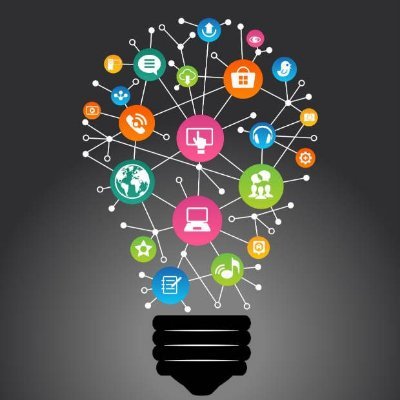
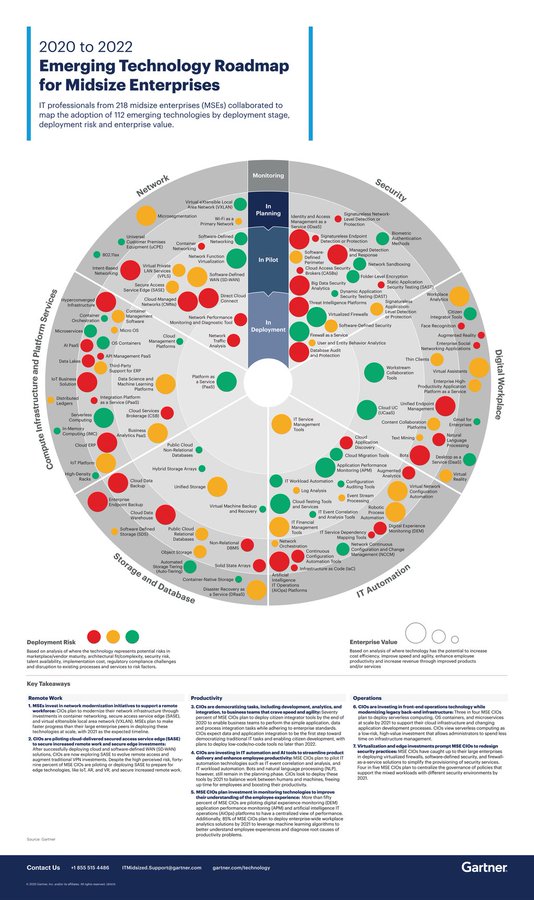
Training employees on cybersecurity isn’t just a box to tick—it’s a mindset shift that turns the workforce into the first line of defense, especially as human error remains the most common entry point for digital threats. rt @antgrasso
Visual Info Technology tweet media
English
0
2
10
84
fankychristian retweetledi
C-Suite Tech Point
C-Suite Tech Point@CsuiteTechPoint·
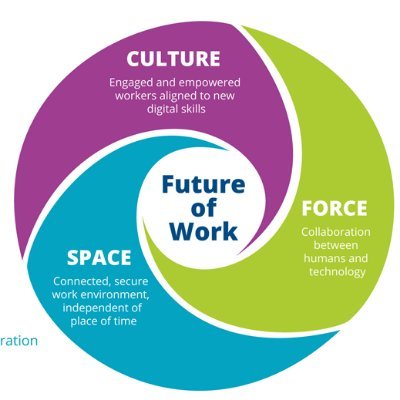
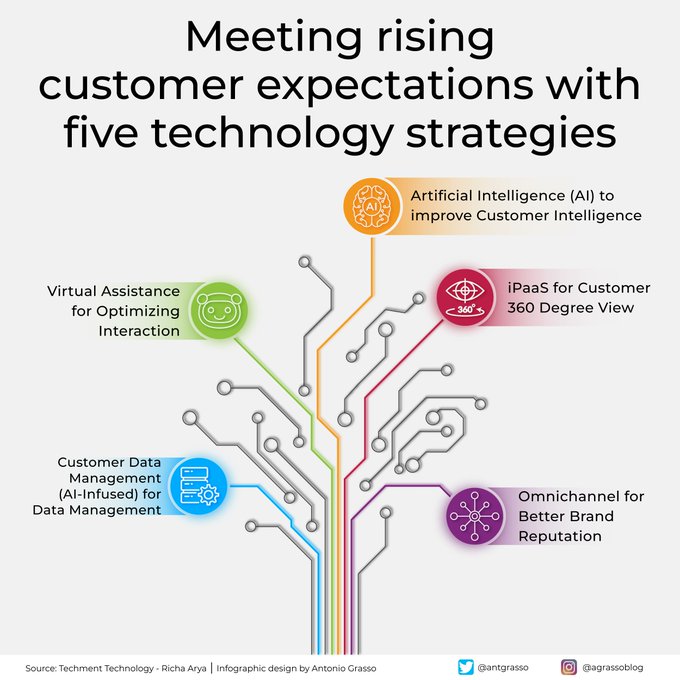
In a world where the only constant is change, customer expectations are shifting as our society and economy change. Many companies need to adapt their strategies as change accelerates, and technology can help narrow the gap. By @antgrasso
C-Suite Tech Point tweet media
English
0
3
8
73
fankychristian retweetledi
IoT and More
IoT and More@IotMore·
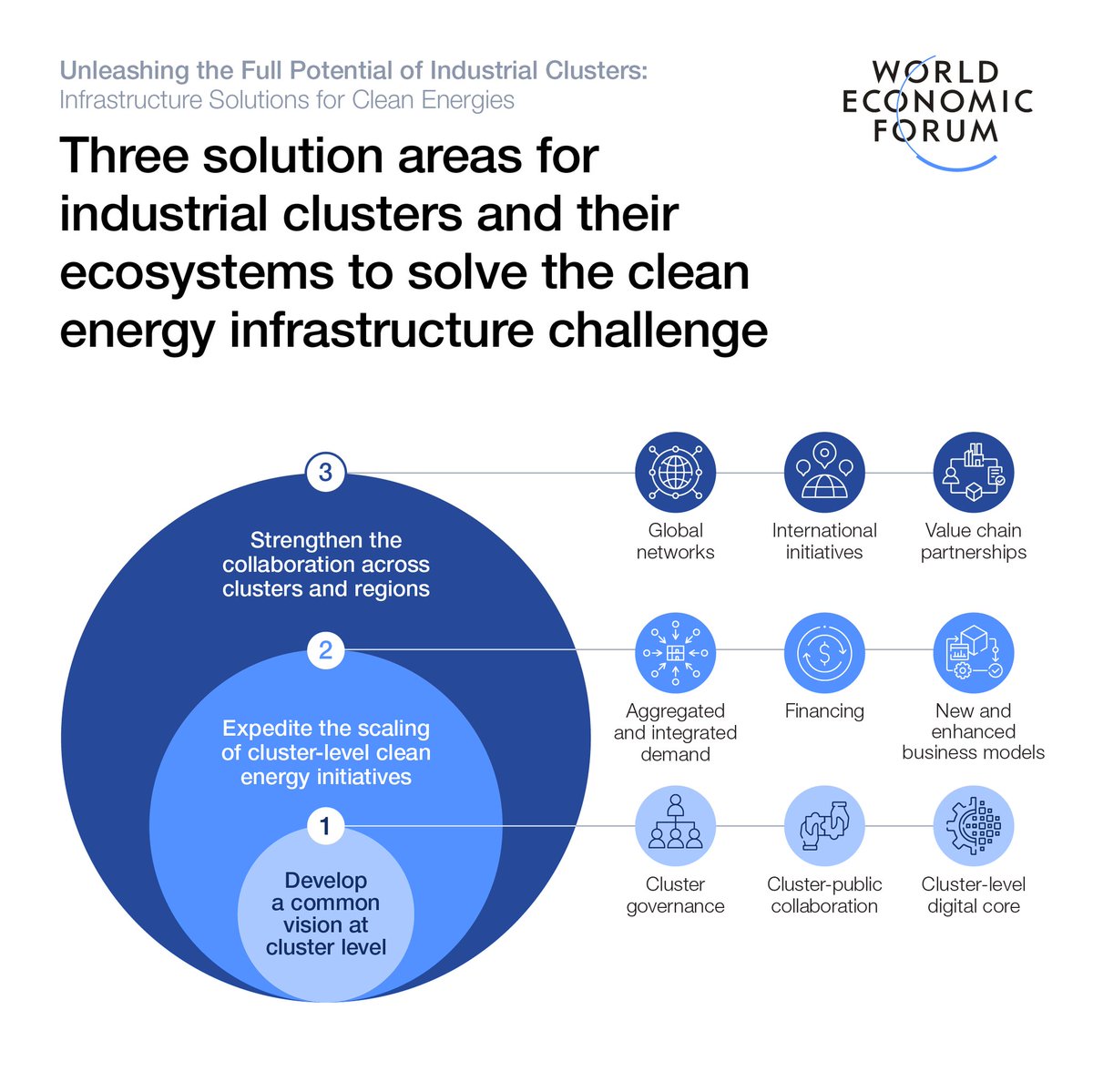
Written with @Accenture & @EPRINews, this World Economic Forum white paper explores the current state of clean #energy and #infrastructure, while identifying solutions in accelerating its deployment. Find out more about how to l .. rt @wef
IoT and More tweet media
English
0
2
4
76
fankychristian retweetledi
Sakhil Khan
Sakhil Khan@sakhil_ai·
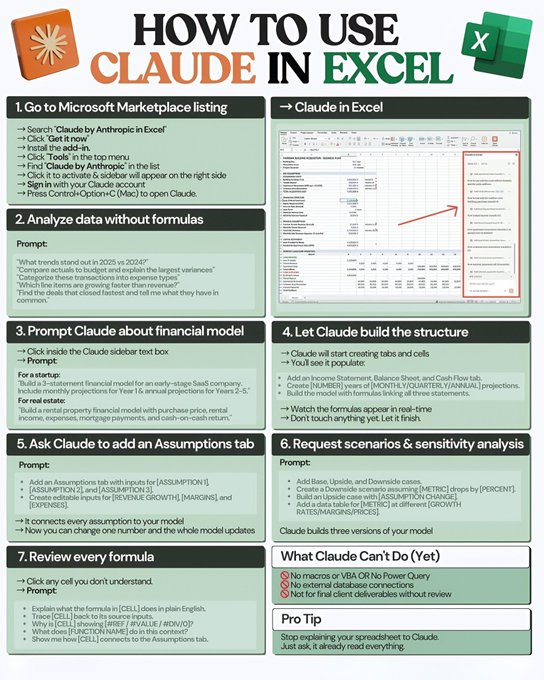
HOW TO USE CLAUDE IN EXCEL --- 1. Go to Microsoft Marketplace listing → Search “Claude by Anthropic in Excel” → Click “Get it now” → Install the add-in → Click “Tools” in the top menu → Find “Claude by Anthropic” in the list → Click it to activate & sidebar will appear on the right side → Sign in with your Claude account → Press Control+Option+C (Mac) to open Claude. --- → Claude in Excel --- 2. Analyze data without formulas Prompt: “What trends stand out in 2025 vs 2024?” “Compare actuals to budget and explain the largest variances” “Categorize these transactions into expense types” “Which line items are growing faster than revenue?” “Find the deals that closed fastest and tell me what they have in common.” --- 3. Prompt Claude about financial model → Click inside the Claude sidebar text box → Prompt: For a startup: “Build a 3-statement financial model for an early-stage SaaS company. Include monthly projections for Year 1 & annual projections for Years 2–5.” For real estate: “Build a rental property financial model with purchase price, rental income, expenses, mortgage payments, and cash-on-cash return.” --- 4. Let Claude build the structure → Claude will start creating tabs and cells → You’ll see it populate: • Add Income Statement, Balance Sheet, and Cash Flow tab • Create [NUMBER] years of [MONTHLY/QUARTERLY/ANNUAL] projections. • Build the model with formulas linking all three statements. → Watch the formulas appear in real-time → Don’t touch anything yet. Let it finish. --- 5. Ask Claude to add an Assumptions tab Prompt: • Add an Assumptions tab with inputs for [ASSUMPTION 1], [ASSUMPTION 2], and [ASSUMPTION 3]. • Create editable inputs for [REVENUE GROWTH], [MARGINS], and [EXPENSES]. → It connects every assumption to your model → Now you can change one number and the whole model updates --- 6. Request scenarios & sensitivity analysis Prompt: • Add Base, Upside, and Downside cases. • Create a Downside scenario assuming [METRIC] drops by [PERCENT]. • Build an Upside case with [ASSUMPTION CHANGE]. • Add a data table for [METRIC] at different [GROWTH RATES/MARGINS/PRICES]. Claude builds three versions of your model --- 7. Review every formula → Click any cell you don’t understand. → Prompt: • Explain what the formula in [CELL] does in plain English. • Trace [CELL] back to its source inputs. • Why is [CELL] showing #REF/#VALUE/#DIV/0? • What does [FUNCTION NAME] do in this context? • Show me how [CELL] connects to the Assumptions tab. --- What Claude Can’t Do (Yet) ⛔ No macros or VBA OR No Power Query ⛔ No external database connections ⛔ Not for final client deliverables without review --- Pro Tip Stop explaining your spreadsheet to Claude. Just ask, it already read everything. ❤️ Like 🔁 Retweet 🔖 Bookmark Follow👤 @sakhil_ai for more such posts
Sakhil Khan tweet media
English
58
97
265
11.9K
fankychristian retweetledi
Aastha
Aastha@aastha_mhaske·
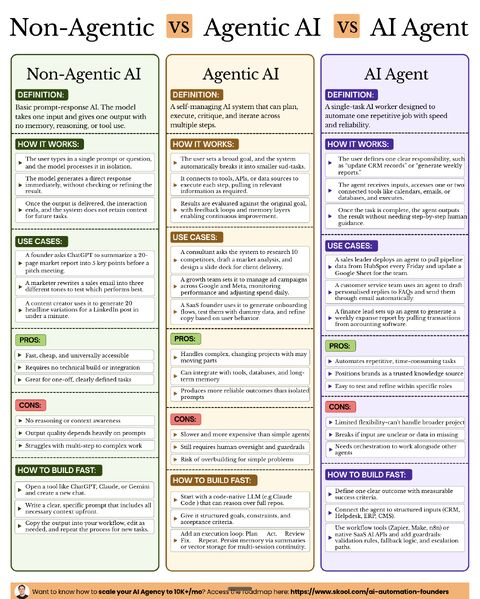
Most people use “AI Agent” to describe everything. That’s where the confusion starts. Because these are 𝗧𝗛𝗥𝗘𝗘 completely different things: --- 1️⃣ 𝗡𝗼𝗻-𝗔𝗴𝗲𝗻𝘁𝗶𝗰 𝗔𝗜 → One input. One output. • No memory • No planning • No tools Flow: prompt → response → done Use it for: • Summaries • Emails • Content generation Pros: fast, cheap, simple Cons: breaks on anything multi-step --- 2️⃣ 𝗔𝗴𝗲𝗻𝘁𝗶𝗰 𝗔𝗜 → AI that plans, executes, and improves • Breaks goals into tasks • Uses tools & APIs • Evaluates and loops Flow: goal → plan → act → check → repeat Use it for: • Research + analysis + output • Campaign management • Multi-step workflows Pros: handles complexity Cons: slower, expensive, needs guardrails --- 3️⃣ 𝗔𝗜 𝗔𝗴𝗲𝗻𝘁 → A focused worker for one job • Single responsibility • Connected to 1–2 tools • Runs reliably without supervision Use it for: • Weekly reports • CRM updates • Email automation Pros: reliable, easy to test Cons: limited scope --- The real problem? People mix these up. They either: → Overbuild (using agents for simple tasks) → Underbuild (using prompts for complex systems) --- Before you build anything, ask: 𝗪𝗵𝗮𝘁 𝗹𝗲𝘃𝗲𝗹 𝗼𝗳 𝗔𝗜 𝗱𝗼𝗲𝘀 𝘁𝗵𝗶𝘀 𝗽𝗿𝗼𝗯𝗹𝗲𝗺 𝗮𝗰𝘁𝘂𝗮𝗹𝗹𝘆 𝗻𝗲𝗲𝗱? That one question saves time, money, and effort. --- Know what you’re building... before you build it. ♻️ Repost to help someone avoid this mistake 🚀
Aastha tweet media
English
2
19
76
2.5K
fankychristian retweetledi
Python Developer
Python Developer@PythonDvz·
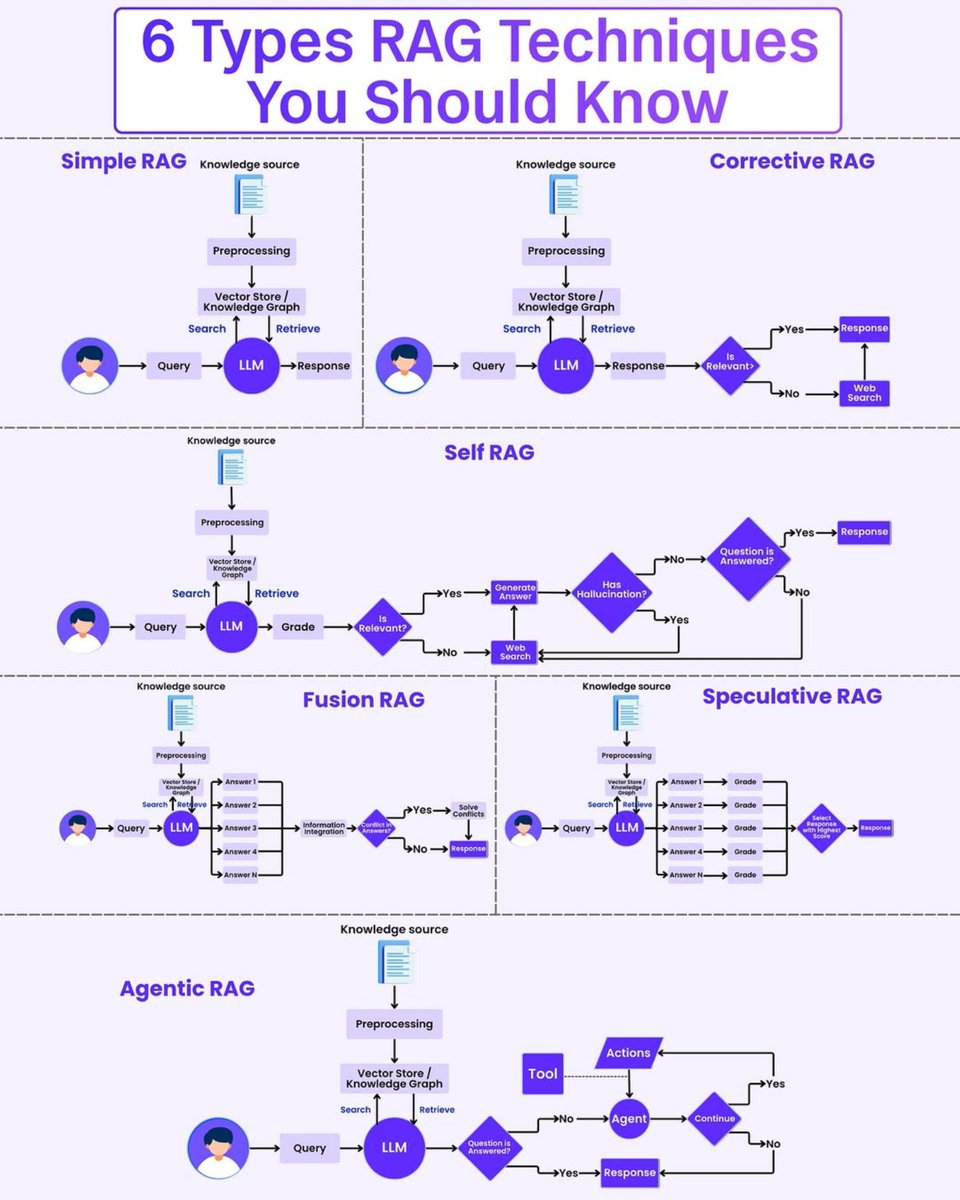
6 Types of RAG techniques explained
Python Developer tweet media
English
3
39
186
5.4K
fankychristian retweetledi
Nainsi Dwivedi
Nainsi Dwivedi@NainsiDwiv50980·
Most developers treat Claude Code like a smarter autocomplete. That's the wrong mental model. It's actually a 4-layer engineering system: 1️⃣ CLAUDE.md → persistent project memory Architecture, rules, team conventions 2️⃣ Skills → auto-invoked knowledge packs Testing patterns, code review, deploy workflows 3️⃣ Hooks → deterministic guardrails Security checks, formatting, automation 4️⃣ Agents → specialized sub-agents Break complex tasks into parallel workflows Once these are configured properly: Claude stops behaving like a chatbot. It starts behaving like a senior engineer on your team. Most people never reach this level because they skip the setup. The gap between average AI output and production-level results isn't the model. It's the infrastructure around it. Here’s the full breakdown on exactly how to build this 👇
Nainsi Dwivedi tweet media
Suryansh Tiwari@Suryanshti777

x.com/i/article/2034…

English
39
122
595
104.3K
fankychristian retweetledi
Antonio Grasso
Antonio Grasso@antgrasso·
One reflection from the discussions at MWC is that digital inclusion is not only about expanding connectivity. Infrastructure is essential, but real participation in the digital economy also depends on skills and sustainable models that make networks viable in remote regions.
Antonio Grasso@antgrasso

x.com/i/article/2031…

English
4
55
73
3.2K
fankychristian retweetledi
Python Programming
Python Programming@PythonPr·
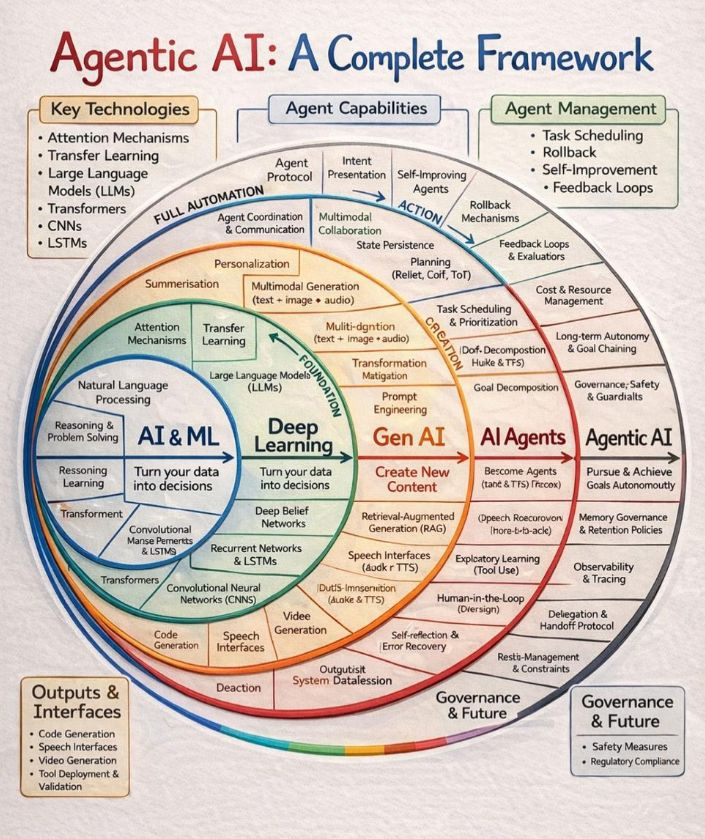
Agentic AI: A Complete Framework
Python Programming tweet media
English
9
182
650
30.4K
fankychristian retweetledi
Sumanth
Sumanth@Sumanth_077·
From OCR to Agentic Doc Extraction! LandingAI just released a free course on Document AI that teaches you how to build document processing pipelines that extract text, tables, charts, and forms without losing layout context. Traditional OCR extracts text but loses critical information. Table structures with merged cells disappear. Relationships between charts and captions break. Multi-column reading order gets scrambled. This course shows you how to build agentic workflows that process documents the way humans do, using Agentic Document Extraction (ADE). Here’s what it covers: • Why traditional OCR breaks on complex documents • How layout detection and reading order preserve structure • Using ADE to parse PDFs into Markdown and JSON while keeping layout intact • Building RAG pipelines with ADE and vector databases • Deploying event-driven document workflows on AWS 3 hours, 6 hands-on code examples. It's completely free. Link to the course in the comments!
Sumanth tweet media
English
18
233
1.4K
106.1K
fankychristian retweetledi
Aytekin
Aytekin@aytekintank·
Since Jotform first partnered with @Canva, we’ve seen designs evolve from static visuals into functional, engaging tools with streamlined workflows. But why stop there? Today, I’m excited to share that @Jotform is launching the first native AI chatbot integration for Canva designs. The Jotform AI Chatbot for Canva transforms static designs into interactive, conversational experiences. By adding a chatbot directly to your Canva designs, you can answer questions, book appointments, track orders, and collect customer inquiries in real time. We’re thrilled to continue expanding Canva’s AI ecosystem together and to keep making conversational experiences easier to build for every type of creator. Give Jotform’s Chatbot for Canva a try here: jotform.com/ai/canva-agent…
English
11
47
222
1.7M