Frank Morales Lopez

117 posts

Frank Morales Lopez banner
Frank Morales Lopez

Frank Morales Lopez

@fmorales_lopez

Analytics Specialist | Interested in #ecommerce #digitalanalytics, #CRO and #Growth. Enjoy learn something each day ⭐

Lima, Perú Katılım Aralık 2019
110 Takip Edilen8 Takipçiler
Frank Morales Lopez retweetledi
Pablo Moratinos 🦊
Pablo Moratinos 🦊@pablomoratinos·
Desde siempre me han flipado los mecanismos mentales que afectan al "pricing". ¿Por qué algunas propuestas nos parecen más atractivas que otras, no necesariamente más baratas? He escrito un post en el blog de @eswordpresscom con todo lo que sé sobre el sesgo de anclaje y cómo influye en este campo. Ofertas, tablas de precios, señuelos, percepción... pura psicología aplicada al #marketingonline y al #growth

Pablo Moratinos 🦊 tweet media
Español
2
15
19
996
Frank Morales Lopez retweetledi
Himanshu Sharma
Himanshu Sharma@analyticsnerd·
🚨 #GA4 (just like Universal Analytics) does not give you the liberty to tag internal links. Here is what happens when you tag internal links and how you can avoid the consequences. ⚠ GA4 primarily relies on UTM tracking parameters to identify traffic sources, mediums, and campaigns. However, GA4 (just like Universal Analytics) does not give you the liberty to tag internal links. . . UTM parameters are designed specifically for tracking "external" campaigns and traffic sources. UTMs can override the original source/medium when used on internal links. For example, If a user initially came to your website through a Google organic search and then clicked on an internal link with UTM parameters, the source/medium might be reported as the parameters set on the internal link rather than Google. Over time, this can significantly skew data in your reports, making it look like you are getting more traffic from the UTM-tagged sources (like email or social campaigns) than you actually are. If a user converts after clicking an internal link with UTM parameters, the conversion might be attributed to the wrong source/medium. This can mislead marketing teams into thinking a tagged campaign is more (or less) effective than it truly is. . . To avoid these issues: 1) Ensure that everyone involved in content development and marketing understands the correct use of UTM parameters. 2) Periodically audit the use of UTM parameters on your website. 3) If you want to track user interactions with specific content types or sections, use 'content grouping' instead of UTM parameters. 4) If you want to track clicks on internal links or buttons, use event tracking instead of UTM parameters. 5) If you want to track clicks on internal promotion, add to cart, checkout, etc, use ecommerce tracking instead of UTM parameters.
Himanshu Sharma tweet media
English
1
14
47
2.8K
Himanshu Sharma
Himanshu Sharma@analyticsnerd·
All the events you track in your #GA4 property should be ‘key events’. And if they are not, who set up your tracking? Your key events may not always be your conversion events, but they should still be important to your business. And if they are unimportant, then why are you tracking them? I often hear two big complaints about GA4: exceeding the data API quota and daily BigQuery export limits. These two limits are good enough for many businesses to give up on GA4 completely. . . Here are some solutions. 1) Evaluate your tracking requirements once again. Are you collecting unnecessary event data, especially at the expense of business-critical information? Audit your GA4 property and identify the most critical events directly impacting your business objectives. Track these events first. Remove any unnecessary events. The best practice is to minimize the number of events you track so you don't easily hit the API quota or BigQuery export limits. . . 2) Avoid collecting high cardinality dimensions (dimensions with a large number of distinct values). High cardinality dimensions can cause problems for API quota limits and BigQuery export limits because they can increase the amount of data that needs to be processed. Even one high cardinality dimension can negatively affect the cardinality limit of most of the data you see in your GA4 property. So, the best practice is to avoid collecting high cardinality dimensions. For example, client IDs can easily become a high cardinality dimension and introduce (other) rows in most of your data tables. Do you really need to track client IDs? . . 3) Create a solid business case and approval process in your organization before you start tracking new events or high cardinality dimensions. . . 4) Instead of tracking separate events for similar user actions, use event parameters to capture additional information related to a single event. This can help you reduce the total number of events while still collecting the required data. . . 5) Find and remove duplicate events. . . 6) Track different parts of a website via different GA4 properties. That way, you can send more than 1 million events daily without exceeding the export limit and minimize cardinality issues. . . 7) Specify the events and/or data streams to exclude from GA4 BigQuery daily export, thus potentially overcoming the export limit. . . 8) Don't pull data directly from a data platform (like GA4 and Facebook) into Looker Studio, and try manipulating it there. Pull data from a data platform into Google Sheets or BigQuery, manipulate it there, and then use it in Looker Studio only after that. . . 9) If everything else fails and you still can't reduce the volume of events you track or send, upgrade to GA4 360.
Himanshu Sharma tweet media
English
1
4
19
1.6K
Frank Morales Lopez retweetledi
Product Hackers 🚀
Product Hackers 🚀@Product_Hackers·
🤔 ¿Acabas de descubrir esto del #Growth pero no sabes por dónde empezar? 👣 @josek_net te lo pone fácil gracias a este post en el que recopila los mejores libros para hacer Growth 🧠 El mindset de seguir siempre aprendiendo 🙌🏻 i.mtr.cool/ecdhtdbshq
Español
0
1
2
293
Frank Morales Lopez retweetledi
Himanshu Sharma
Himanshu Sharma@analyticsnerd·
Use my simple blue print to implement any type of #GA4 tracking (event tracking, ecommerce tracking, scroll tracking etc.). This should reduce the number of times you have to explain to clients who ask you to “throw a tag in, can you track this? It’ll only take you 15 minutes”...... No, it won’t. **Step-1: Planning** At this stage, you sit down with your client/boss/stakeholders/IT team and plan out exactly: >> What data will you collect (tracking requirements)? Develop a great understanding of the customers' purchase journey and map out the entire conversions/sales process, from lead generation ads to post-sales follow-up. >> What is required to get the desired data (implementation setup requirements/resources), and whether getting the desired data is technically feasible (technical feasibility study). >> How you will collect the data (functional and technical designs). >> How the tags would be deployed (tag deployment planning). >> How the data should be processed. >> How the data should be reported. >> Risk assessments: Risk associated with tag deployment and the project in general (including tag auditing and GDPR compliance). I suggest creating a project scope document at this stage, which clearly outlines the project Plan, Project deliverables, Exclusions, milestones, Requirements, Assumptions and Project cost and terms of work. . . **Step-2: Configuration** Configure your GA4 Property settings and GTM container tags' settings at this stage. You may also need to configure your CMS, shopping cart, staging website, CRM, call tracking software, or any other tool(s) if they are also part of the implementation setup. . . **Step-3: Collection** At this stage, you create the functionality (based on your technical and functional design) to collect the required data and then send it to the Google Analytics server for processing. . . **Step-4: Processing** At this stage, Google Analytics processes the collected data according to your configuration settings (like 'dimension scope' and tag rule) and designed functionality. If you are unsatisfied with how the data is being processed, you need to go back to the previous step(s). . . **Step-5: Reporting** At this stage, the processed data is available in Google Analytics reports or your custom app. If you are unsatisfied with how the data is being reported, you need to go back to the previous step(s). . . **Step-6: Querying** At this stage, you, or the end-user, query the data via the reporting interface or API. You query the data to test your implementation setup. An end-user may query the data to get the desired report. . . If you are wondering why these six steps, I created these steps based on the Google Analytics developers' documentation. That's how Google expects developers to implement a GA4/GTM setup.
Himanshu Sharma tweet media
English
0
6
29
1.2K
Frank Morales Lopez retweetledi
Juan González Villa
Juan González Villa@seostratega·
Google ha publicado la transcripción de su última sesión Office Hours (respuestas a dudas de los usuarios sobre SEO). En abril han respondido 23 preguntas, sobre temas como paginaciones, usos de la API de indexación, etc. Destaco y resumo algunas de las respuestas 👇
Español
2
18
83
8.9K
Frank Morales Lopez retweetledi
Chris Long
Chris Long@chris_nectiv·
New Technical SEO article: How to perform an internal linking audit with Screaming Frog: seotesting.com/blog/internal-… This is a fantastic guide by @RyanJonesSEO that covers a variety of ways to utilize @screamingfrog in order to analyze the internal linking structure of your website.
English
4
19
78
6.1K
Frank Morales Lopez retweetledi
Product Hackers 🚀
Product Hackers 🚀@Product_Hackers·
🌟 "GROWTH", "Growth Hacking" y "Growth Marketing" no son lo mismo ❌  En Product Hackers desmitificamos estos términos para enfocarnos en el GROWTH, la estrategia completa y multidisciplinar para hacer crecer negocios 🧵 producthackers.com/es/blog/que-es…
Product Hackers 🚀 tweet media
Español
1
3
4
397
Frank Morales Lopez retweetledi
Neil Patel
Neil Patel@neilpatel·
This is how most marketers use ChatGPT… Prompt: Give me 10 content ideas around [insert subject] The issue with that prompt is that you get terrible results. Instead, you should try this prompt. ***Start Prompt*** Please do customer research for the [insert your industry, and ideally, it should be at least two words] industry. Tell me 10 questions and 10 problems that [insert a description of your ideal customer] face. Please place the results in a table. The Y-axis should be labeled 1 through 10, and the X-axis should be labeled "Questions" and "Problems." ***End Prompt*** You’ll generate 20 content ideas with this prompt. I ask ChatGPT to show me both questions and problems because “questions” gives you content ideas for very target and specific issues people are facing. While asking ChatGPT for “problems” gives you more general issues people face within your industry. Try it out.
English
27
79
502
63.7K
Frank Morales Lopez retweetledi
Himanshu Sharma
Himanshu Sharma@analyticsnerd·
If you operate a low-traffic website (less than 1000 visitors/day), your #GA4 tracking will be completely screwed if you don't do this. Your tracking will be screwed because of a gradual increase in the lack of consented data in your GA4 property. There are two categories of data in the context of GA4 data modelling: Observed data and modelled data. . . Observed data is the actual data which comes directly from users who granted consent for GA4 to track their behaviour using identifiers like cookies or app IDs. Observed data provide precise and reliable information about user behaviour, including metrics like user counts, sessions, page views, events, and conversions. . . Modelled data is the estimated data for users who did not grant consent (opt-out users). The modelled data also comes directly from users who granted consent for GA4 to track their behaviour using identifiers like cookies or app IDs. In other words, the modelling itself leverages observed data. . . Machine learning algorithms analyze patterns and behaviour of users who consented and use these insights to estimate the behaviour of similar opt-out users. Therefore, modelled data isn't directly collected from opt-out users but inferred from observed data with similar characteristics. This distinction is crucial for interpreting reports in GA4. While modelled data helps fill in data gaps and provide insights into opt-out user behaviour, it's important to remember that it's an estimation and may not be as accurate as observed data. . . Now, here is the bummer. For data modelling to kick in, your GA4 property needs 1,000+ daily users with analytics_storage='granted' for 7 of the previous 28 days. So, in real life, you will need a lot more than 1000 visitors/day because most of them will likely deny consent. And the population of users who deny consent will only increase in the future. Using BigQuery won't save you either, as modelled data is not available in BigQuery export.  . . No observed data = no modelled data. Without enough observed data from consenting users, GA4's data modelling techniques won't have enough information to generate reliable estimates for opt-out user behaviour. So what you can do then? Find ways to maximize observed data collection. 1) Review your consent messaging and design to improve user acceptance rates. Offer incentives or rewards for users who consent, such as exclusive content, discounts, or early access to features. 2) Focus on first-party data collection (user-provided data), like collecting email addresses. 3) Use server-side tagging. Server-side tagging can reduce reliance on user consent in several ways like converting third-party data into first-party data. 4) Gather user data (qualitative and quantitative) from multiple online and offline endpoints. The GA4 data can be easily enhanced in any data warehouse or CDP. 5) Increase your overall website traffic.
English
2
9
39
6.5K
Servando Silva
Servando Silva@ServandoCPA·
Ese momento 🤩 cuando el cliente te dice que los resultados de consultoría SEO le generan más leads/clientes que todo el equipo de ventas (llamadas en frío 🥶) Y están considerando duplicar el presupuesto para SEO y contenido 😎
Servando Silva tweet media
Español
4
2
39
1.8K
Himanshu Sharma
Himanshu Sharma@analyticsnerd·
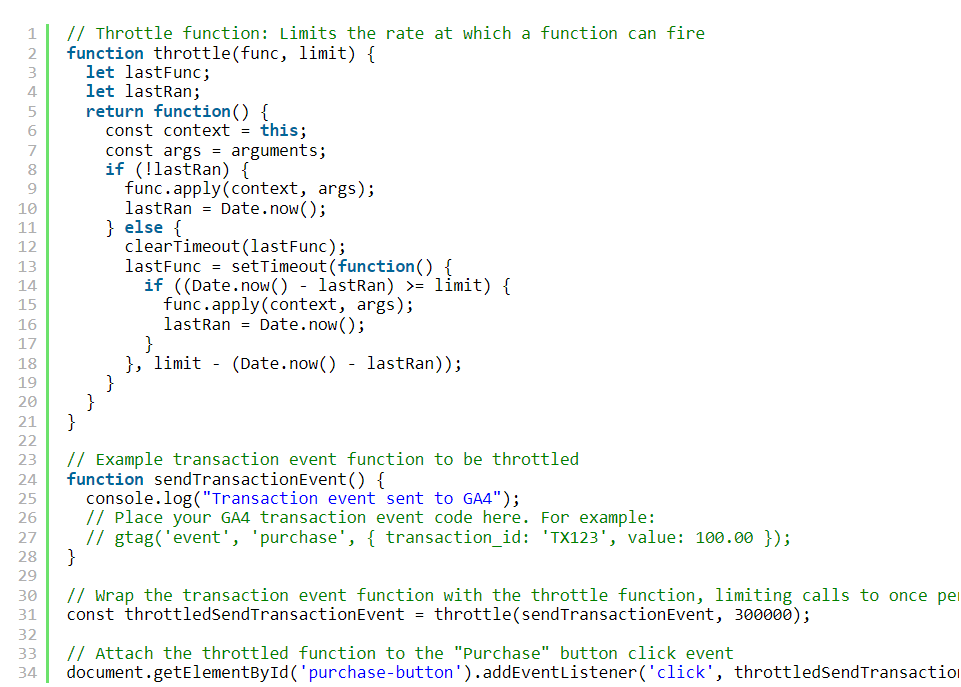
Debouncing vs Throttling to avoid duplicate purchases in #GA4 Both debouncing and throttling functions can be used to avoid duplicate transactions in GA4. Imagine an e-commerce website with a “Complete Purchase” button. When clicked, it triggers a function to process the transaction and record the purchase event. You want to avoid duplicate purchase events if the user clicks the button multiple times quickly, either by accident or because they are impatient while waiting for the confirmation page to load. Use debouncing to wait until the user has finished making rapid clicks, processing the purchase only after they have stopped. This is particularly useful for ensuring that a single intentional action is captured. Example use case: Ensuring the purchase is only processed after the user stops clicking, avoiding unintended multiple transactions. . . Use throttling to control the rate of function execution during continuous clicks, ensuring the purchase is processed immediately but not too frequently. Example use case: Preventing multiple transactions during a short, continuous series of clicks. . . Debouncing delays the function execution until there’s a pause in the event triggering the function. Whereas, throttling controls the execution frequency to a fixed rate, ensuring the function executes at regular intervals. In summary, choose debouncing when you need the function to run once after the events have paused or stopped and choose throttling when you need to guarantee that a function runs periodically throughout a series of events.
Himanshu Sharma tweet media
English
2
7
18
1.3K
Iñaki Gorostiza
Iñaki Gorostiza@hello_google·
Todo el mundo debería tener 5 minutos al día para no hacer nada.
Español
1
0
4
383
Carlos Sánchez
Carlos Sánchez@SEO_Tecnico·
@fmorales_lopez si no me dan acceso al cms, pero tengo acceso a los archivos y es apache o litespeed, o acceso al server, por medio del encabezado http... Pero vamos lo ideal es poder trabajar con acceso y sin tener que hackear
Español
1
0
0
19
Carlos Sánchez
Carlos Sánchez@SEO_Tecnico·
Pretender que un equipo de SEO te solucione los problemas sin dar accesos ni permisos es como intentar que te reparen un coche sin darle las llaves al del taller.
Español
1
2
13
576