
Sabitlenmiş Tweet
ガーデニア
9.6K posts

ガーデニア
@gardenoides
asalkan niat baik, pasti ada jalan.
Bukit Berbunga Katılım Ocak 2024
199 Takip Edilen13 Takipçiler
ガーデニア retweetledi

ガーデニア retweetledi

ガーデニア retweetledi

I’m so lucky I get to live to see a beautiful picture like this
allison harvard burke@alliharvard
English
ガーデニア retweetledi



ガーデニア retweetledi

There is this guy on youtube name GAKHED who films his cats with a 1999 camcorder and in this time of brainrot and toxic internet it's the most calming and soothing thing i've seen.
This is what spring felt like as a kid. ❤️
English
ガーデニア retweetledi

jujur gue uda mulai kecanduan belajar excel grgr ini org kaya KOKKK BISAAA EZ BGT
Irilrahmanr@catonlythoughts
Tips n trick excel ga semua orang tau nih guys!
Indonesia
ガーデニア retweetledi

Mending belajar excel dulu kakk. Sekarang mah yg dibutuhin "bisa excel" Bukan bisa dalam pro tapi paham excel aja. Setelah excel, belajar inggris biar kamu menguasai dunia. Setelah udah pro semua, belajar mandarin. Biar kamu langsung nego gaji aja
Tanyarlfes@tanyarlfes
💚 antara bahasa inggris, excel, sama bahasa mandarin, mending belajar yang mana dulu ya?
Indonesia
ガーデニア retweetledi

Tahukah kamu???
Hatimu dan hati jodohmu itu sudah diatur frekuensinya oleh Allah. Jarak dan waktu tidak akan pernah bisa membatalkan apa yang sudah tertulis di lauhil mahfudz.
Ketahuilah...
Pemilik hatimu dan pemilik hatinya adalah Dzat yang sama, yaitu Allah Subhanahu wa Ta'ala. Sebelum kalian saling mengenal di dunia, Allah sudah tahu kapan hatinya akan digerakkan untuk mencarimu, dan kapan hatimu akan siap untuk menerimanya.
Semua sudah disetting dengan presisi yang sempurna. Tidak akan tertukar, tidak akan terlambat, dan tidak akan tertinggal.
Indonesia
ガーデニア retweetledi
siapa yang pengen pake excel tanpa mouse? yuk aku mulai dari shortcut yg biasanya admin atau siapapun pake yaaa ✨”
📌 ALT + H + O + I → Rapihin lebar kolom otomatis
📌 ALT + H + B + A → Border tabel instan
📌 CTRL + T → Bikin tabel otomatis
📌 CTRL + SHIFT + 4 → Format currency sekali klik 💸
📌 ALT + H + M + C → Merge cell lebih cepat
semoga bermanfaat yaaa 😍😍😍

nana@americanona02
gilaaa, 15 ribu likes 😭😭. aku aman kok, gak ditambahin kerjaan tapi disuruh ngajarin pivot aja hari ini 🙏. kalo di excel, ALT adalah kunci. Tinggal pencet ALT, nanti ada begini begini tapi gak langsung jago ya, harus banyak banyak pake excel 😭🙏
Indonesia
ガーデニア retweetledi

“Jangan minta yang kecil, kepada Dia yang Maha Besar.”
Ada yg ngetik ini di threads kemarin.
Terus langsung inget kalo besok hari Arafah. Hari dimana bukan malaikat, tapi Allah yang turun langsung ke bumi.
Maka dari itu, berdo’a lah se-banyak dan se-mustahil mungkin.
Manfaatkan momen hari arafah ini dengan se baik-baik nya🫶
Ini ada list do’a yg bisa kalian baca, incase bingung mau do’a apa😅

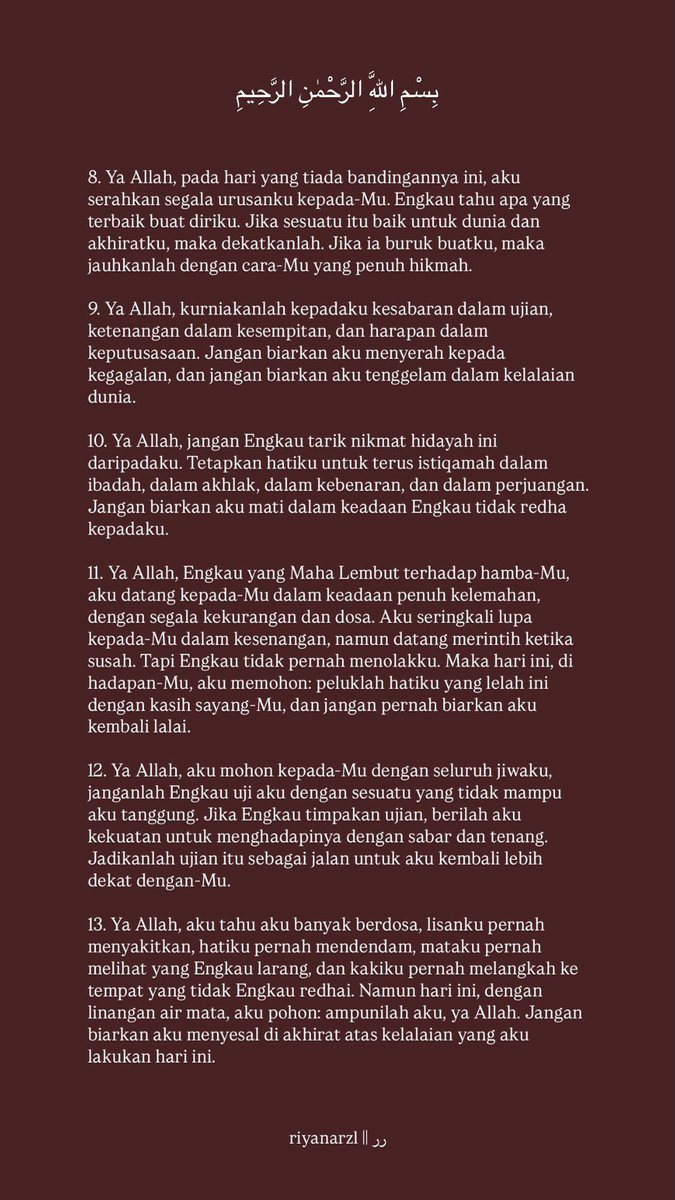
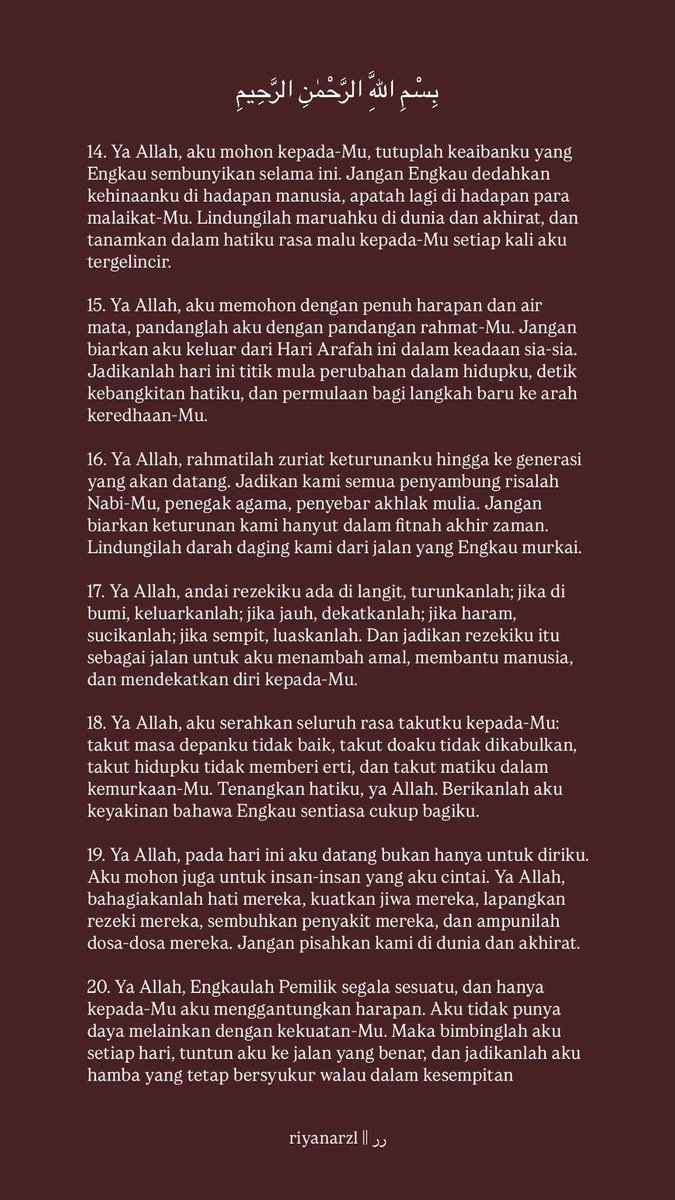

Indonesia
ガーデニア retweetledi

10 DUA for ARAFAH
⭐️ Dua' Arafah ⭐️
Laa ilaaha illallaahu wahdahuulaa syariikalah, lahul mulku walahul hamdu wahuwa 'alaa kulli syai'in qadiir..
⭐️ Du'a for world & hereafter ⭐️
Rabbanaa aatinaa fiddunyaa hasanah wa fil aakhirati hasanah waqina adzaabannaar
⭐️ Du'a to Open Doors ⭐️
Rabbi inni limaa anzalta ilayya min khairin faqiir
⭐️ Du'a for Forgiveness ⭐️
Allahumma innaka 'afuwwun tuhibbul 'afwaa fa' fu'anni
⭐️ Du'a for Marriage/Family ⭐️
Rabbana hablana min azwajina wa dzurriyatina qurrota a'yun waj'alna lilmuttaqiina imaama
⭐️ Du'a for Jannah & Protect from Hellfire ⭐️
Allahumma inni as 'alukal Jannah wa a'udzubika minannaar
⭐️ Du'a for Knowledge & Rizq ⭐️
Allahumma inni as'alukal 'ilman naafi'an, wa rizqan thayyiban, wa 'amalan mutaqabbalan
⭐️ Du'a for Tawakkal ⭐️
Hasbiyallahu laa ilaaha illa Huwa 'alaihi tawakkaltu wa Huwa rabbul 'arsyil 'azhiim
⭐️ Du'a for Guidance ⭐️
Allahumma inni as'alukal hudaa wattuqaa wal'afafa walghina
⭐️ Du'a for Forgiveness, Health & Rizq ⭐️
Allahumaghfirlii warhamni wajburni wahdini wa'aafini wa'fu'anni
Indonesia
ガーデニア retweetledi


ガーデニア retweetledi

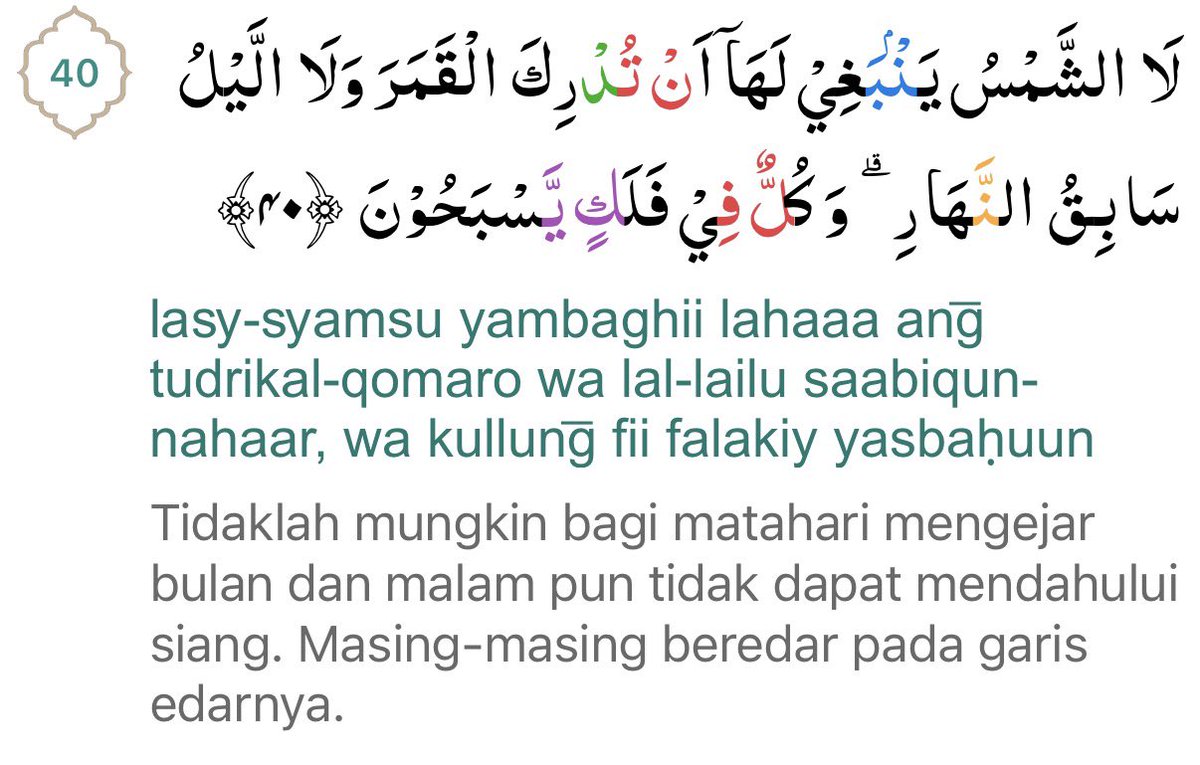
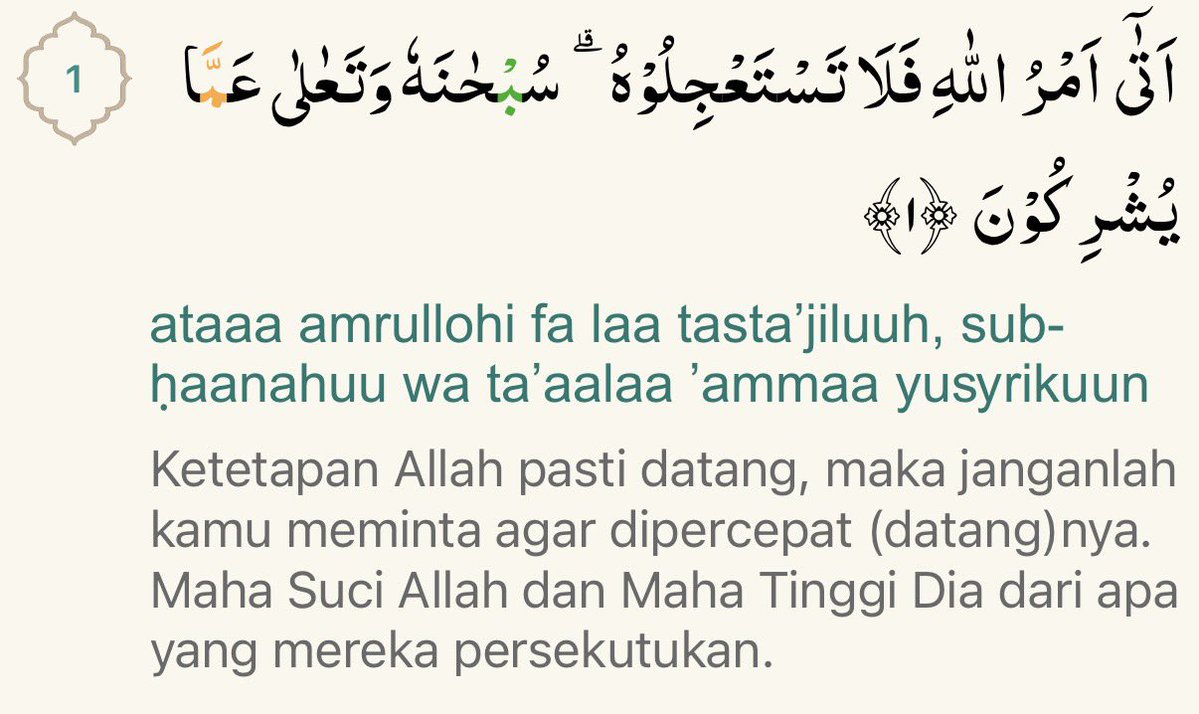
this two, reminder for me kalau semua udah diatur sama Allah.
miw.@lilaccountz
qrt tweet ini dengan ayat Quran yang jadi pegangan hidupmu?
Indonesia
ガーデニア retweetledi

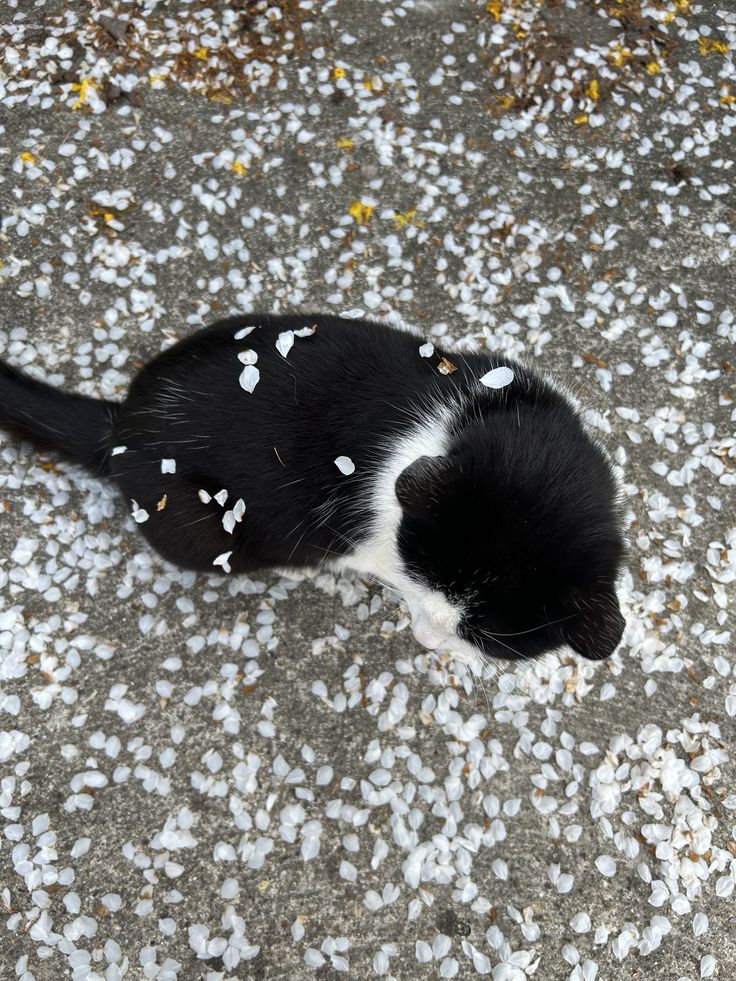
Yang digigit itu pasti yang paling lasak 😅
No Cats No Life@NoCatsNoLife_m
Moms have it tough in every world IG📸 : akarare
Indonesia
ガーデニア retweetledi


ガーデニア retweetledi

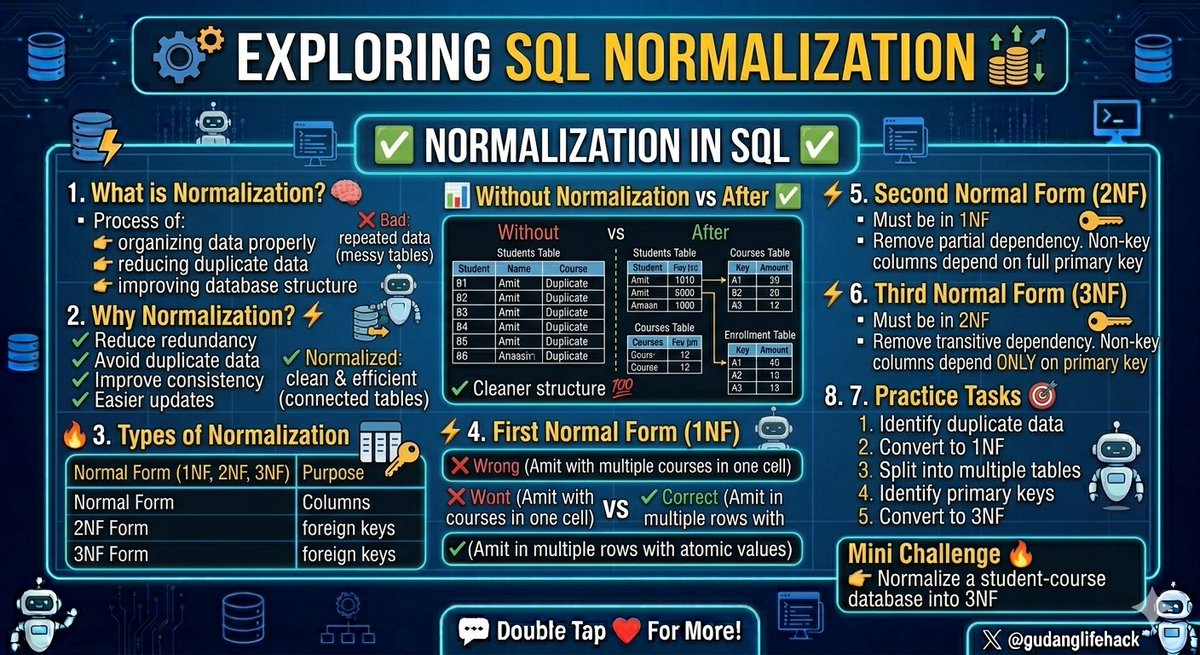
Now, let’s move to the next topic: 🔥
✅ Normalization in SQL
🧠 1. What is Normalization?
Normalization is the process of
👉 organizing data properly
👉 reducing duplicate data
👉 improving database structure
Think like this 👇
❌ Bad database → repeated data everywhere
✅ Normalized database → clean & efficient
⚡ 2. Why Normalization?
✔ Reduce data redundancy
✔ Avoid duplicate data
✔ Improve consistency
✔ Easier updates
📊 Example (Without Normalization)
Student data repeated multiple times
student_id student_name course instructor
1 Amit SQL Rahul
1 Amit Python Rahul
✅ After Normalization
👨🎓 Students Table
student_id student_name
1 Amit
📘 Courses Table
course_id course
101 SQL
📝 Enrollment Table
student_id course_id
1 101
✔ Cleaner structure 💯
🔥 3. Types of Normalization
Normal Form Purpose
1NF Remove repeating groups
2NF Remove partial dependency
3NF Remove transitive dependency
⚡ 4. First Normal Form (1NF)
👉 Each column should contain atomic values
❌ Wrong:
student courses
Amit SQL, Python
✅ Correct:
student course
Amit SQL
Amit Python
⚡ 5. Second Normal Form (2NF)
👉 Must already be in 1NF
👉 Remove partial dependency
Non-key columns should depend on full primary key
⚡ 6. Third Normal Form (3NF)
👉 Must already be in 2NF
👉 Remove transitive dependency
Non-key columns should depend ONLY on primary key
🎯 7. Practice Tasks
1. Identify duplicate data
2. Convert table into 1NF
3. Split data into multiple tables
4. Identify primary keys
5. Convert table into 3NF
⚡ Mini Challenge 🔥
👉 Normalize a student-course database into 3NF
Double Tap ❤️ For More
(Save this for later)
Tips Excel@gudanglifehack
Now, let’s move to the next topic: 🔥 ✅ Transactions (COMMIT, ROLLBACK & SAVEPOINT) One of the most important real-world SQL concepts 💰 🧠 1. What is a Transaction? A Transaction is a group of SQL operations executed as a single unit 👉 Either ALL operations succeed 👉 Or ALL fail Think like bank transfer 💳👇 - Money deducted from Account A - Money added to Account B If one fails → everything should reverse 💯 ⚡ 2. ACID Properties Atomicity All or nothing Consistency Data stays valid Isolation Transactions don’t interfere Durability Saved permanently after commit ⚡ 3. COMMIT 👉 Saves changes permanently UPDATE accounts SET balance = balance - 1000 WHERE acc_id = 1; COMMIT; ✔ Changes permanently saved ❌ 4. ROLLBACK 👉 Undo changes if something goes wrong UPDATE accounts SET balance = balance - 1000 WHERE acc_id = 1; ROLLBACK; ✔ Reverts changes 🔥 5. Transaction Example START TRANSACTION; UPDATE accounts SET balance = balance - 1000 WHERE acc_id = 1; UPDATE accounts SET balance = balance + 1000 WHERE acc_id = 2; COMMIT; ✔ Money transfer completed safely ⚡ 6. SAVEPOINT 👉 Create checkpoint inside transaction START TRANSACTION; UPDATE employees SET salary = salary + 5000 WHERE department = 'IT'; SAVEPOINT salary_updated; DELETE FROM employees WHERE emp_id = 101; ROLLBACK TO salary_updated; COMMIT; ✔ Undo only deletion, keep salary update 🎯 7. Practice Tasks 1. Start a transaction 2. Update employee salary 3. Commit transaction 4. Rollback transaction 5. Use savepoint and rollback to savepoint ⚡ Mini Challenge 🔥 👉 Transfer ₹5000 between two accounts using transaction ✅ Solution: START TRANSACTION; -- Deduct money from sender UPDATE accounts SET balance = balance - 5000 WHERE acc_id = 1; -- Add money to receiver UPDATE accounts SET balance = balance + 5000 WHERE acc_id = 2; COMMIT; 🧠 How It Works 1️⃣ Transaction starts 2️⃣ ₹5000 deducted from Account 1 3️⃣ ₹5000 added to Account 2 4️⃣ COMMIT saves both changes permanently Without transactions: ❌ Data corruption possible Transactions are critical in: 👉 Banking 👉 E-commerce 👉 Payment systems 💯 Double Tap ❤️ For More (Save this later)
English
ガーデニア retweetledi

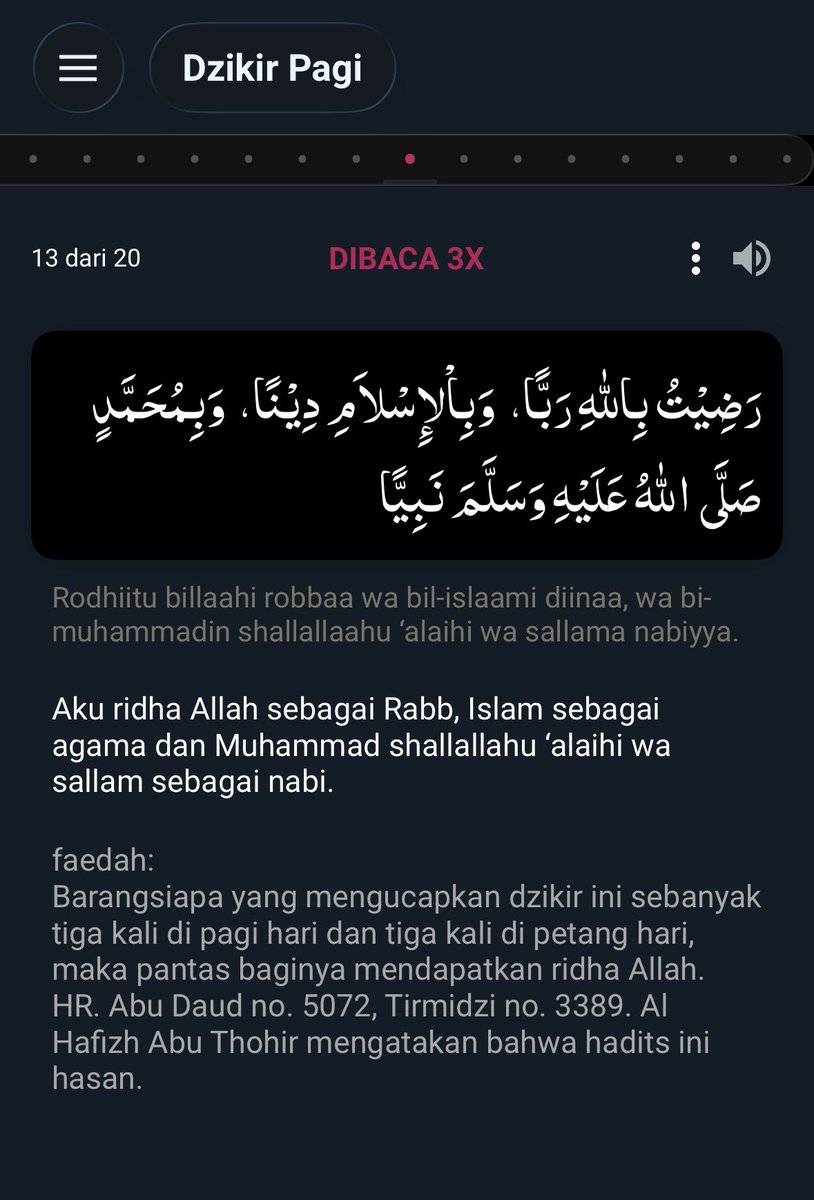
• Allahumma innaka ‘afuwwun tuhibbul ‘afwa fa‘fu ‘anni (×100)🤲🏾
• Ashhadu an la ilaha illa Allah, wa ashhadu anna Muhammadan rasulullah (×100)🤲🏾
• La ilaha illa Allah, wahdahu la sharika lah, lahul-mulku wa lahul-hamdu wa huwa ‘ala kulli shay’in qadir (×100)🤲🏾
Indonesia
ガーデニア retweetledi

ガーデニア retweetledi
ガーデニア retweetledi

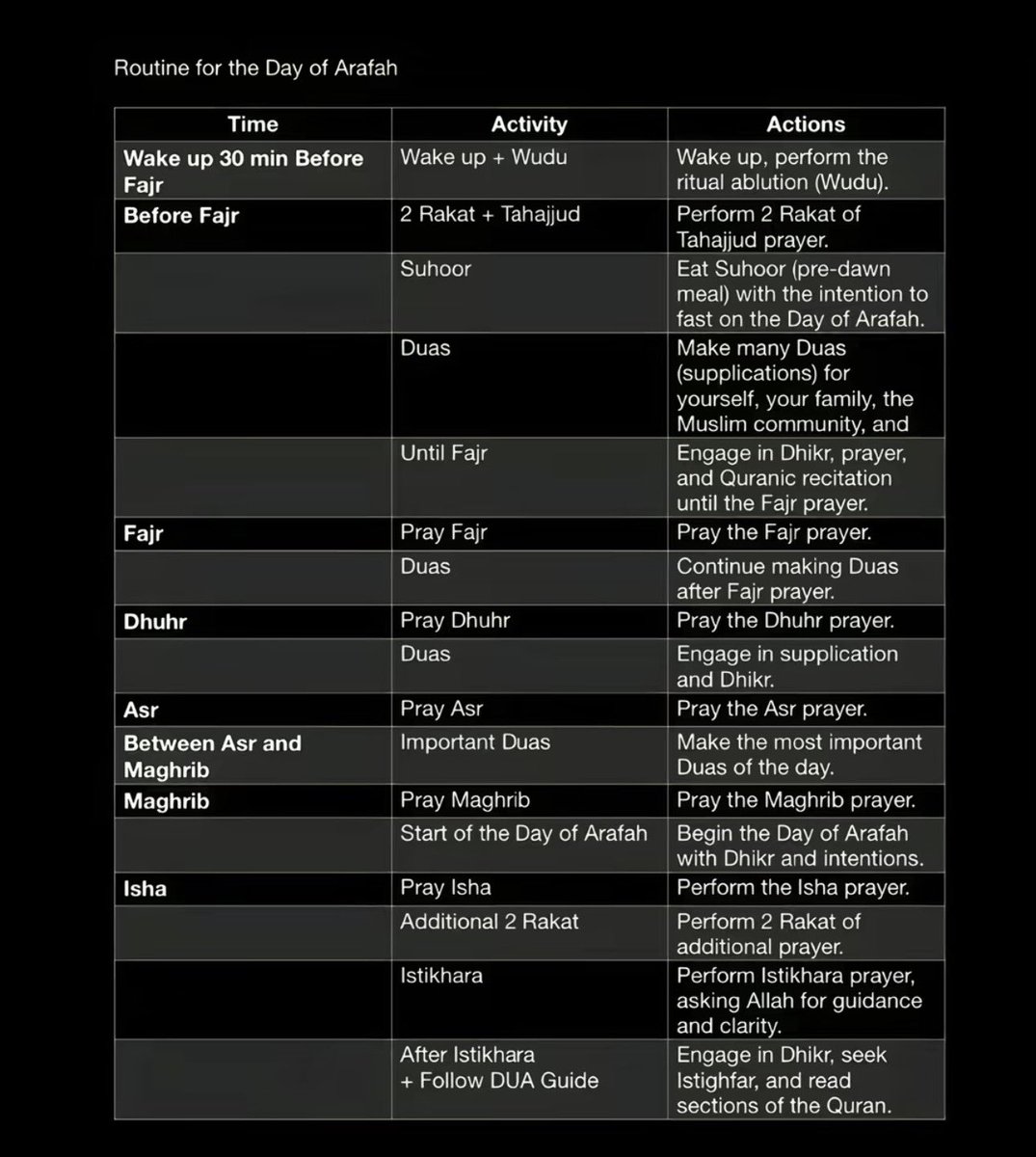
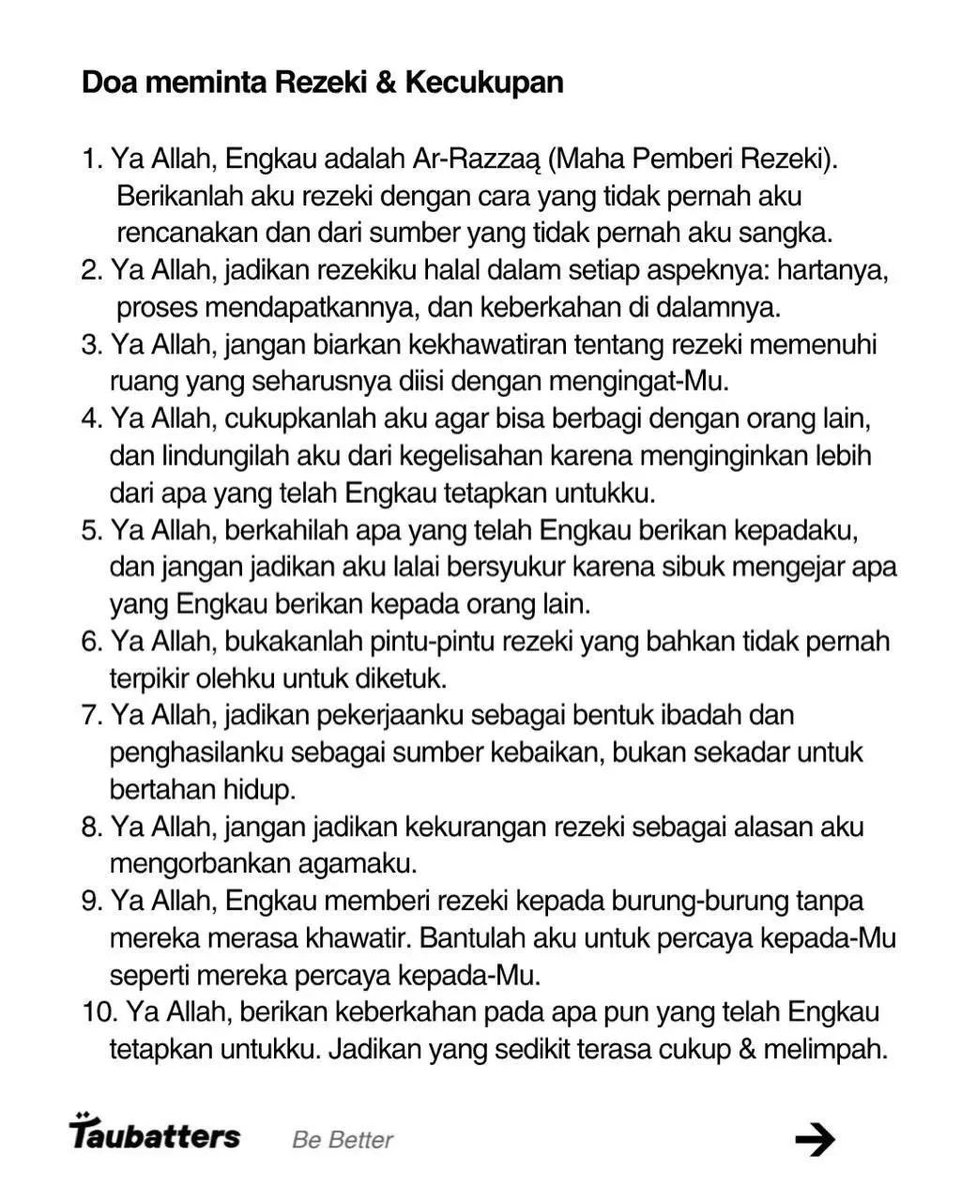
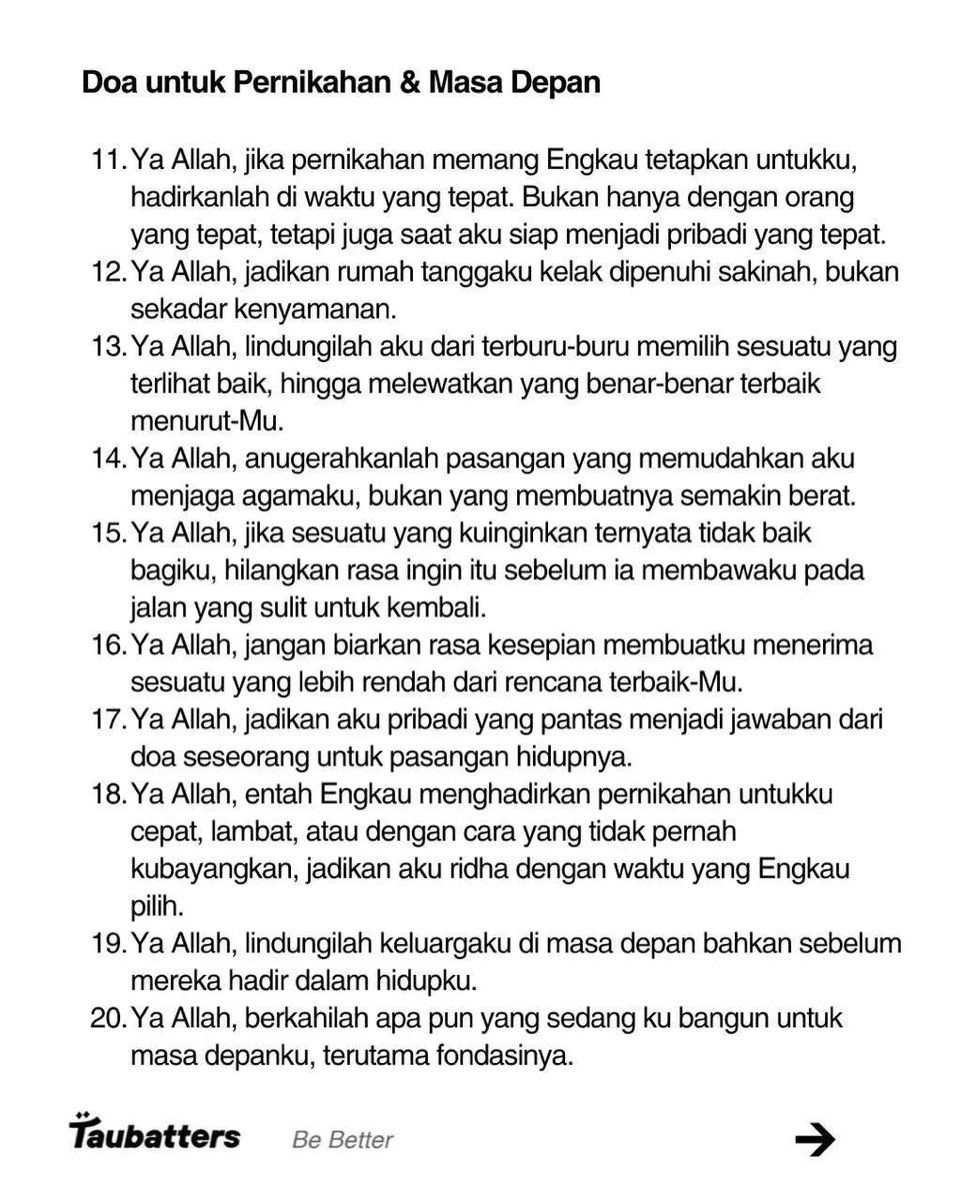
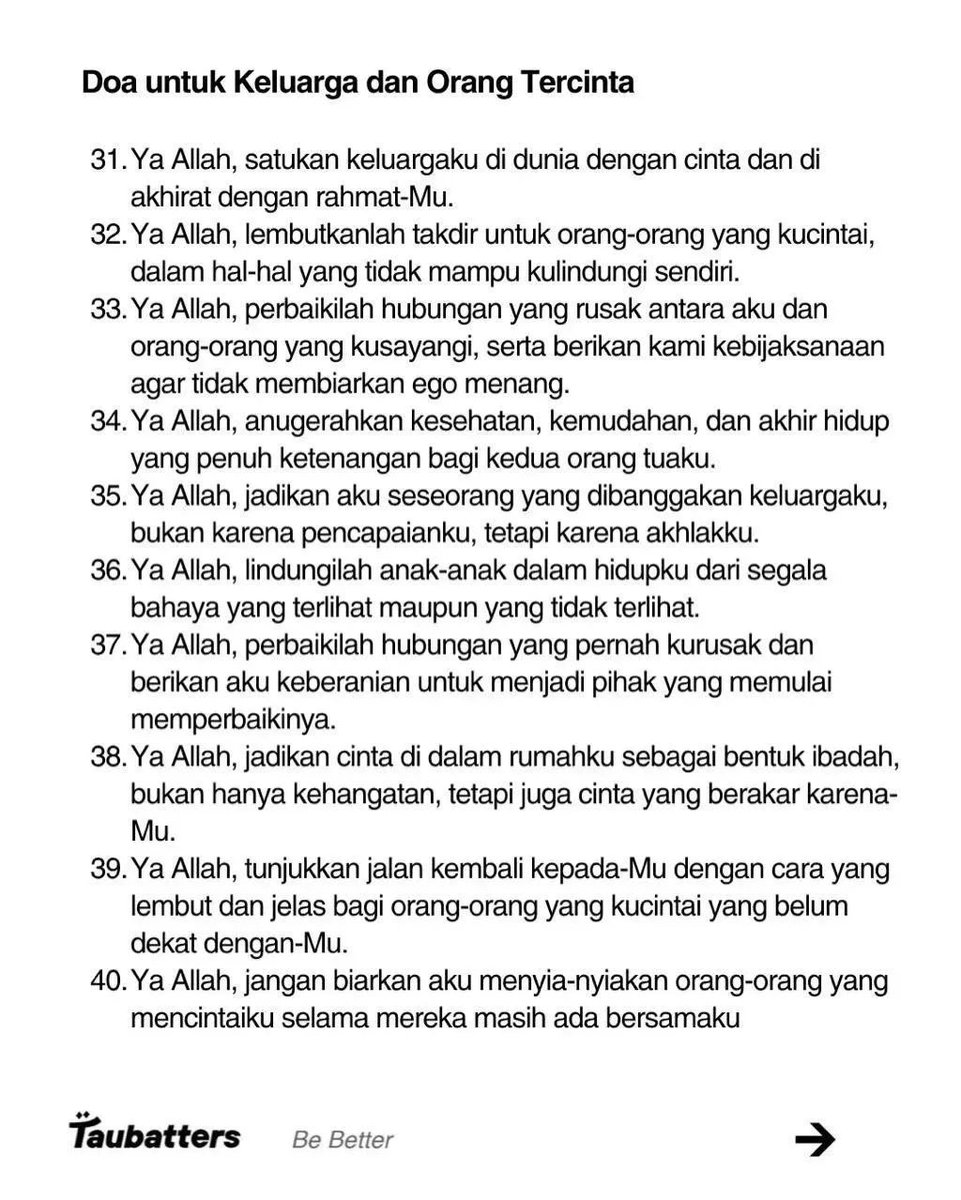
save dan bagikan jaks
kita doa yg kenceng, yang dirasa mustahil, selasa 26 mei dari ashar sampe maghrib🙏🏽

Indonesia