ごまこまごはん

401 posts

ごまこまごはん

ごまこまごはん

@gomakomagohan

ごまあざらし系 Railsエンジニア ... ( ´ ω ` つ )3 Ruby on Rails / React.js / Next.js / Web制作 アニメ鑑賞 / 本 / 料理 / ヨルシカ ... RailsとAIを勉強中

Katılım Ocak 2023
297 Takip Edilen71 Takipçiler
ごまこまごはん
ごまこまごはん@gomakomagohan·
コードを黙々と書くことに憧れて業界に入って、2〜3年後に AIが普及して、この憧れは潰えたな…Claude Codeが決定打だった。
Felipe Demartini@namcios

O CEO da Anthropic disse que "coding vai acabar primeiro, depois toda a engenharia de software." E está contratando 454 engenheiros a US$ 320k-405k. Todo mundo gritando "hipocrisia." Ninguém olhou os dados. O Bureau of Labor Statistics acaba de publicar as projeções 2033: → Software developers: +17,9% de crescimento. 327.900 novas vagas. → Computer programmers (codificadores puros): -3%. Em declínio. Leia isso de novo. A profissão de "escrever código" está morrendo. A profissão de "arquitetar sistemas" está explodindo. São duas coisas completamente diferentes. Os engenheiros da Anthropic contaram ao Dario que não escrevem mais código. Eles deixam o Claude escrever. Eles editam. Revisam. Arquitetam. Ficaram mais rápidos, não ficaram obsoletos. Isso já aconteceu 5 vezes na história da computação: → Compiladores substituíram assembly. "Programadores vão sumir." → Frameworks substituíram boilerplate. "Programadores vão sumir." → Cloud substituiu gerenciamento de servidores. "Programadores vão sumir." Resultado de cada vez: o número de engenheiros cresceu. O pool global de software engineers foi de 5 milhões em 2010 para 28,7 milhões hoje. O headcount de engenharia da Meta subiu 19% desde janeiro de 2022. Google subiu 16%. Apple, 13%. Todas essas empresas já usam Copilot e Claude Code diariamente. Estão contratando mais, não menos. O padrão que ninguém quer reconhecer: Quando software fica mais barato de construir, mais problemas se tornam viáveis de resolver com software. Uma startup que precisava de 10 engenheiros agora precisa de 3. Mas 50 empresas que não podiam construir nada agora podem. O denominador encolhe. O numerador explode. Isso se chama Paradoxo de Jevons. Quando um recurso se torna mais eficiente, o consumo total aumenta. Aconteceu com energia. Aconteceu com bandwidth. Está acontecendo com código. Cada geração de "coding morreu" cria dois grupos: os que congelam e os que constroem 10x mais com as novas ferramentas. O segundo grupo venceu todas as vezes.

日本語
0
0
0
33
ごまこまごはん retweetledi
Claude
Claude@claudeai·
Introducing Claude Opus 4.7, our most capable Opus model yet. It handles long-running tasks with more rigor, follows instructions more precisely, and verifies its own outputs before reporting back. You can hand off your hardest work with less supervision.
Claude tweet media
English
4.6K
10.2K
79.1K
11.8M
ごまこまごはん retweetledi
Boris Cherny
Boris Cherny@bcherny·
Today we're excited to announce NO_FLICKER mode for Claude Code in the terminal It uses an experimental new renderer that we're excited about. The renderer is early and has tradeoffs, but already we've found that most internal users prefer it over the old renderer. It also supports mouse events (yes, in a terminal). Try it: CLAUDE_CODE_NO_FLICKER=1 claude
Curt Tigges@CurtTigges

@bcherny @UltraLinx please at least fix the uncontrollable scrolling/flickering before the next 3000 features


English
665
701
10.3K
2.9M
ごまこまごはん retweetledi
Thariq
Thariq@trq212·
Ultraplan uses roughly the same number of tokens (and subscription rate limits) as plan mode. See the docs for more: docs.claude.com/en/docs/claude…
English
19
19
392
80.5K
ごまこまごはん
ごまこまごはん@gomakomagohan·
“正としてメンテナンスし続けるのではなく、デザインドックのように「その時の開発内容を整理するためのもの」として扱います。開発が完了したらドキュメントは削除し、コードベースをクリーンに保つ方針です。” zenn.dev/dely_jp/articl…
日本語
0
0
1
27
ごまこまごはん retweetledi
Charly Wargnier
Charly Wargnier@DataChaz·
repo link: → github.com/addyosmani/age… Shoutout to @addyosmani for building this and making it open-source for the community! 🤗 Don't forget to drop a ⭐️ on to help boost visibility!
English
1
24
195
22.3K
ごまこまごはん
ごまこまごはん@gomakomagohan·
【t_wadaさんの持つ現在の答え】AI疲れとの向き合い方 / "ジュニア不要論"の本質 / "エンジニア育成"の解法 / ”バイブコーディン... youtu.be/JgqL7mXiIT0?si… @YouTubeより
YouTube video
YouTube
日本語
0
1
2
298
ごまこまごはん retweetledi
lucas
lucas@lucas_flatwhite·
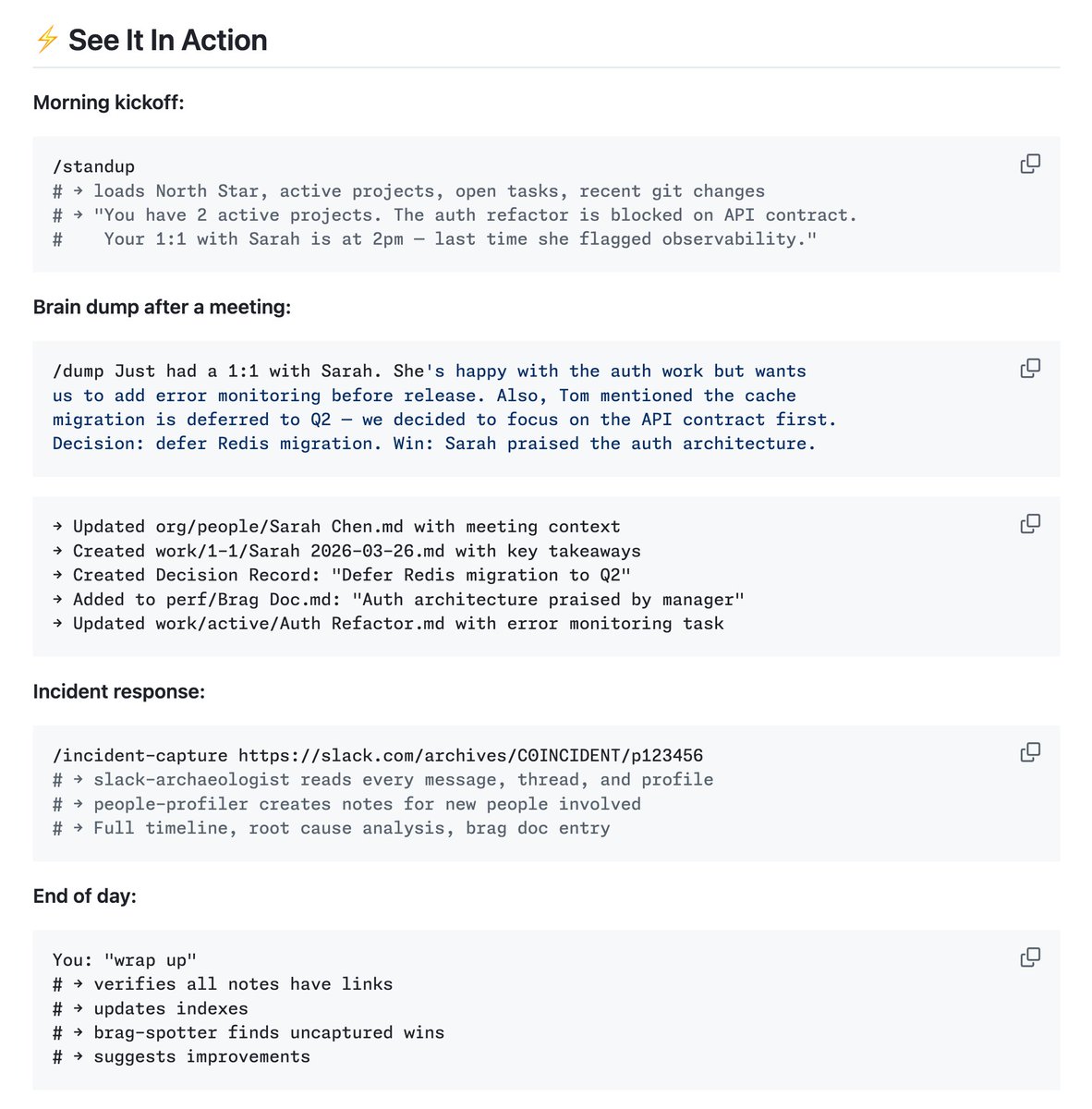
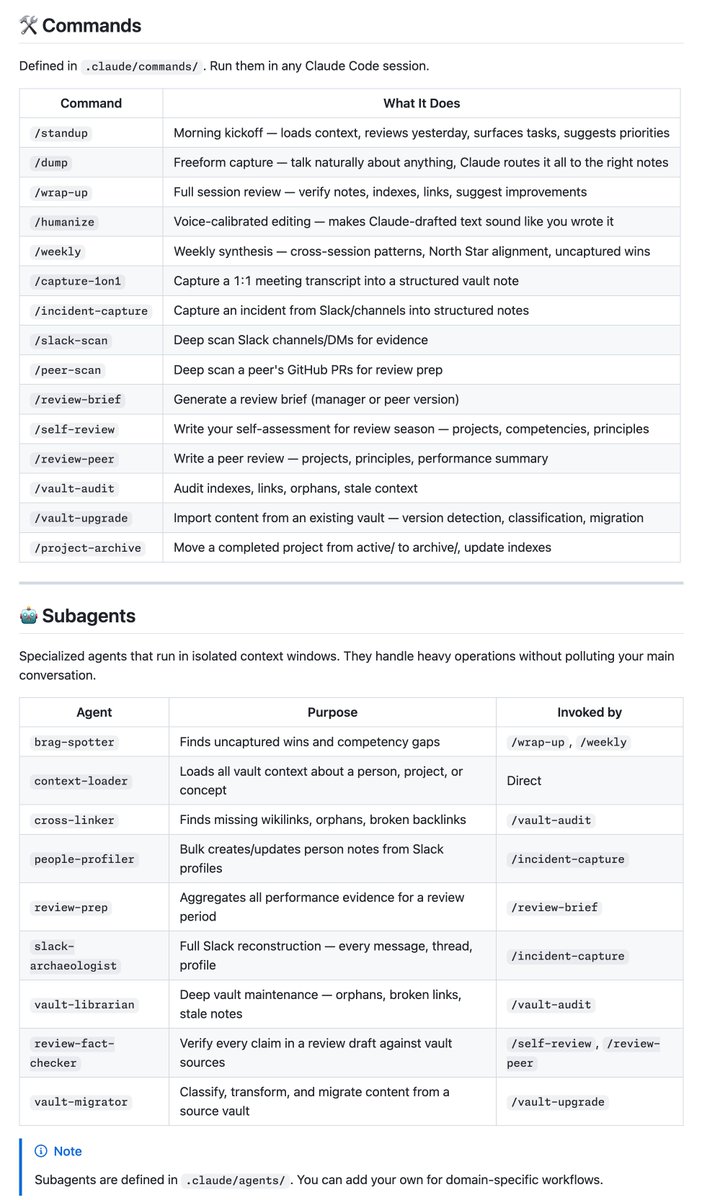
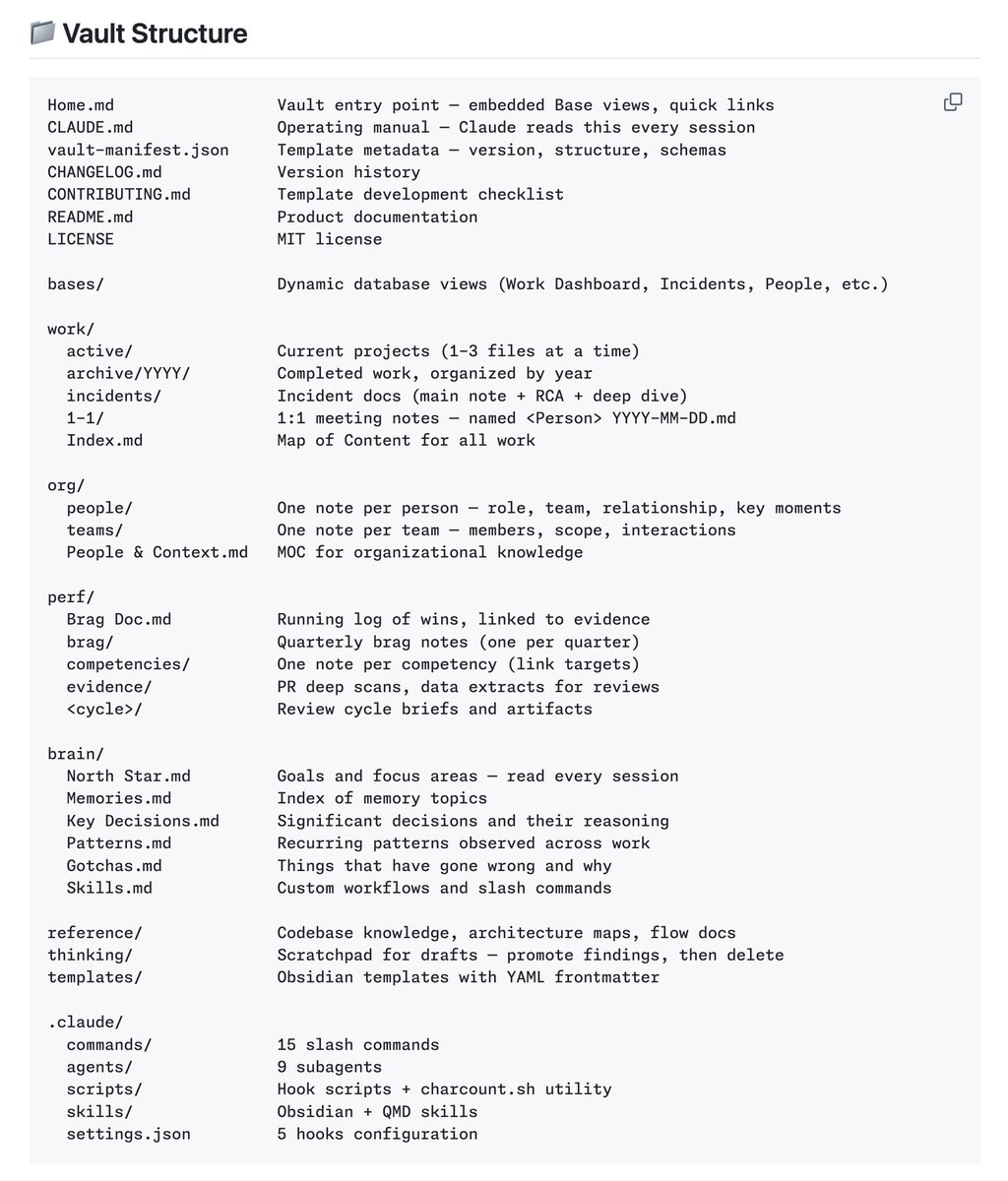
🧠 Obsidian Mind github.com/breferrari/obs… 이건 단순한 Obsidian 플러그인이 아니라, 엔지니어를 위한 완성형 Obsidian Vault 템플릿이예요. Obsidian을 Claude Code의 영구적인 외부에 존재하는 뇌(!)로 만들어, 세션을 넘어 지식/기억/성과를 자동으로 쌓아가게 해줘요. Claude Code와 함께 쓰면 다음과 같은 일이 자연스럽게 일어납니다. 아침에 /standup 한 번 치면 → 여러 정보를 자동으로 불러와 하루 계획을 정리해 줌 하루 동안 대화하다가 중요한 내용이 나오면 → Claude가 알아서 적절한 폴더에 노트를 생성하고, 서로 링크를 걸어줌 주말에 /weekly 치면 → 한 주 동안의 패턴, 놓친 성과, 다음 주 우선순위를 종합해서 정리 인시던트 발생 시 /incident-capture → Slack 기록까지 분석해 타임라인, 관련 사람 노트, 근본 원인을 자동으로 문서화 ↓ 먼저 brain 폴더가 Claude의 장기 기억 저장소이구요. 15개의 강력한 Slash Commands가 존재해요. 여기에 9개의 전문 서브에이전트.. Obsidian Bases를 활용한 동적 대시보드도 있네요. Work Dashboard, People Directory, Incidents.. 오호.. ↓ 누가누가 쓰면 좋은가! - Claude Code, Claude Projects 를 매일 코딩/문제 해결/기획 파트너로 사용하는 엔지니어 - 매번 이전 맥락 다시 설명하기가 귀찮은 사람 - 자신의 생각과 성과를 체계적으로 기록하면서도, 직접 관리하는 부담을 최소화하고 싶은 분 - Obsidian 그래프 뷰와 링크 시스템을 좋아하지만, 처음부터 구조 잡는게 어려웠던! ↓ 시작하기도 매우 간단하네요. 1. 저장소를 Clone하거나 GitHub Template으로 복제ㄱㄱ 2. 해당 폴더를 Vault로 열기 (CLI 활성화 필수!) 3. Vault 폴더 안에서 claude 명령어 실행 4. brain/North Star.md에 자신의 목표를 적으면 끝! → 그 이후부터는 Claude가 대부분의 정리 작업을 대신해줌...
lucas tweet medialucas tweet medialucas tweet medialucas tweet media
Tom Dörr@tom_doerr

Obsidian vault for Claude Code memory github.com/breferrari/obs…

한국어
11
121
552
51.2K
ごまこまごはん retweetledi
Andrej Karpathy
Andrej Karpathy@karpathy·
Wow, this tweet went very viral! I wanted share a possibly slightly improved version of the tweet in an "idea file". The idea of the idea file is that in this era of LLM agents, there is less of a point/need of sharing the specific code/app, you just share the idea, then the other person's agent customizes & builds it for your specific needs. So here's the idea in a gist format: gist.github.com/karpathy/442a6… You can give this to your agent and it can build you your own LLM wiki and guide you on how to use it etc. It's intentionally kept a little bit abstract/vague because there are so many directions to take this in. And ofc, people can adjust the idea or contribute their own in the Discussion which is cool.
Andrej Karpathy@karpathy

LLM Knowledge Bases Something I'm finding very useful recently: using LLMs to build personal knowledge bases for various topics of research interest. In this way, a large fraction of my recent token throughput is going less into manipulating code, and more into manipulating knowledge (stored as markdown and images). The latest LLMs are quite good at it. So: Data ingest: I index source documents (articles, papers, repos, datasets, images, etc.) into a raw/ directory, then I use an LLM to incrementally "compile" a wiki, which is just a collection of .md files in a directory structure. The wiki includes summaries of all the data in raw/, backlinks, and then it categorizes data into concepts, writes articles for them, and links them all. To convert web articles into .md files I like to use the Obsidian Web Clipper extension, and then I also use a hotkey to download all the related images to local so that my LLM can easily reference them. IDE: I use Obsidian as the IDE "frontend" where I can view the raw data, the the compiled wiki, and the derived visualizations. Important to note that the LLM writes and maintains all of the data of the wiki, I rarely touch it directly. I've played with a few Obsidian plugins to render and view data in other ways (e.g. Marp for slides). Q&A: Where things get interesting is that once your wiki is big enough (e.g. mine on some recent research is ~100 articles and ~400K words), you can ask your LLM agent all kinds of complex questions against the wiki, and it will go off, research the answers, etc. I thought I had to reach for fancy RAG, but the LLM has been pretty good about auto-maintaining index files and brief summaries of all the documents and it reads all the important related data fairly easily at this ~small scale. Output: Instead of getting answers in text/terminal, I like to have it render markdown files for me, or slide shows (Marp format), or matplotlib images, all of which I then view again in Obsidian. You can imagine many other visual output formats depending on the query. Often, I end up "filing" the outputs back into the wiki to enhance it for further queries. So my own explorations and queries always "add up" in the knowledge base. Linting: I've run some LLM "health checks" over the wiki to e.g. find inconsistent data, impute missing data (with web searchers), find interesting connections for new article candidates, etc., to incrementally clean up the wiki and enhance its overall data integrity. The LLMs are quite good at suggesting further questions to ask and look into. Extra tools: I find myself developing additional tools to process the data, e.g. I vibe coded a small and naive search engine over the wiki, which I both use directly (in a web ui), but more often I want to hand it off to an LLM via CLI as a tool for larger queries. Further explorations: As the repo grows, the natural desire is to also think about synthetic data generation + finetuning to have your LLM "know" the data in its weights instead of just context windows. TLDR: raw data from a given number of sources is collected, then compiled by an LLM into a .md wiki, then operated on by various CLIs by the LLM to do Q&A and to incrementally enhance the wiki, and all of it viewable in Obsidian. You rarely ever write or edit the wiki manually, it's the domain of the LLM. I think there is room here for an incredible new product instead of a hacky collection of scripts.

English
1.1K
2.7K
26.1K
6.7M
ごまこまごはん retweetledi
Andrej Karpathy
Andrej Karpathy@karpathy·
LLM Knowledge Bases Something I'm finding very useful recently: using LLMs to build personal knowledge bases for various topics of research interest. In this way, a large fraction of my recent token throughput is going less into manipulating code, and more into manipulating knowledge (stored as markdown and images). The latest LLMs are quite good at it. So: Data ingest: I index source documents (articles, papers, repos, datasets, images, etc.) into a raw/ directory, then I use an LLM to incrementally "compile" a wiki, which is just a collection of .md files in a directory structure. The wiki includes summaries of all the data in raw/, backlinks, and then it categorizes data into concepts, writes articles for them, and links them all. To convert web articles into .md files I like to use the Obsidian Web Clipper extension, and then I also use a hotkey to download all the related images to local so that my LLM can easily reference them. IDE: I use Obsidian as the IDE "frontend" where I can view the raw data, the the compiled wiki, and the derived visualizations. Important to note that the LLM writes and maintains all of the data of the wiki, I rarely touch it directly. I've played with a few Obsidian plugins to render and view data in other ways (e.g. Marp for slides). Q&A: Where things get interesting is that once your wiki is big enough (e.g. mine on some recent research is ~100 articles and ~400K words), you can ask your LLM agent all kinds of complex questions against the wiki, and it will go off, research the answers, etc. I thought I had to reach for fancy RAG, but the LLM has been pretty good about auto-maintaining index files and brief summaries of all the documents and it reads all the important related data fairly easily at this ~small scale. Output: Instead of getting answers in text/terminal, I like to have it render markdown files for me, or slide shows (Marp format), or matplotlib images, all of which I then view again in Obsidian. You can imagine many other visual output formats depending on the query. Often, I end up "filing" the outputs back into the wiki to enhance it for further queries. So my own explorations and queries always "add up" in the knowledge base. Linting: I've run some LLM "health checks" over the wiki to e.g. find inconsistent data, impute missing data (with web searchers), find interesting connections for new article candidates, etc., to incrementally clean up the wiki and enhance its overall data integrity. The LLMs are quite good at suggesting further questions to ask and look into. Extra tools: I find myself developing additional tools to process the data, e.g. I vibe coded a small and naive search engine over the wiki, which I both use directly (in a web ui), but more often I want to hand it off to an LLM via CLI as a tool for larger queries. Further explorations: As the repo grows, the natural desire is to also think about synthetic data generation + finetuning to have your LLM "know" the data in its weights instead of just context windows. TLDR: raw data from a given number of sources is collected, then compiled by an LLM into a .md wiki, then operated on by various CLIs by the LLM to do Q&A and to incrementally enhance the wiki, and all of it viewable in Obsidian. You rarely ever write or edit the wiki manually, it's the domain of the LLM. I think there is room here for an incredible new product instead of a hacky collection of scripts.
English
2.8K
6.7K
56.3K
20M
ごまこまごはん retweetledi
Hiroya Iizuka
Hiroya Iizuka@0317_hiroya·
Harnessを定期的に改善する仕組み(自己改善)については、そんなに複雑に考える必要はない。 例えば、定期実行のスケジュールで、アンビエントエージェントを組む。 具体的な流れとしては。 1. スキルの作成 CLAUDE.mdやAGENTS.mdなどのドキュメントを、3日に1回程度の頻度で更新するようなスキルを作成する。 2. 実装への追従 現在の仕様や実際の実装に合わせて、内容を最新の状態にアップデートさせる。 3. 対象ドキュメントの更新 AGENTS.mdなどのルールファイルや、ポインタ先の詳細なドキュメント)アーキテクチャやAPI、デザインの仕様など)、あるいはメモリーに関連するものなど、それらを定期的に(3日に1回など)更新するようにする。 これでOK。
Hiroya Iizuka tweet mediaHiroya Iizuka tweet mediaHiroya Iizuka tweet media
日本語
1
17
238
21.8K