Richa 🇮🇳

740 posts

Richa 🇮🇳 banner
Richa 🇮🇳

Richa 🇮🇳

@heyricha

🎓𝐌𝐁𝐀 , 𝐍𝐌𝐈𝐌𝐒 '𝟐𝟑 | 𝟳𝟱𝗞+ 𝐋𝐢𝐧𝐤𝐞𝐝𝐈𝐧 | Talks about Marketing | Business | Startups & Tech 🙌🏻

India Katılım Ekim 2019
170 Takip Edilen302 Takipçiler
Richa 🇮🇳
Richa 🇮🇳@heyricha·
@sonalshukla3377 Thanks for sharing this valuable information. These courses seem well structured and useful for building both theoretical and practical AI knowledge
English
0
0
1
19
Sonal Shukla
Sonal Shukla@sonalshukla3377·
13 free courses to master AI with certificates worth $0: Everyone is talking about these and rightly so. This is insane value, and I suggest you jump on it right now. Whether you're a developer, educator, student, or founder, They have a course for you. Here's the full list with links 👇 1. Claude Code In Action ↳ Integrate Claude Code into your development workflow. 🔗 lnkd.in/eAq7a5nd 2. Claude 101 ↳ Learn how to use Claude for everyday tasks. 🔗 lnkd.in/e3rQFcqv 3. AI Fluency: Framework & Foundations ↳ Learn to collaborate with AI systems effectively. 🔗 lnkd.in/eXek4MAz 4. Building With The Claude API ↳ Covers the full spectrum of working with Anthropic models. 🔗 lnkd.in/e8ejEAcD 5. Introduction To Model Context Protocol ↳ Learn to build MCP servers and clients using Python. 🔗 lnkd.in/esdrs_Ht 6. AI Fluency For Educators ↳ Apply AI Fluency into your own teaching practices. 🔗 lnkd.in/eVGpYn3X 7. AI Fluency For Students ↳ Develop AI Fluency skills that enhance learning and academic success. 🔗 lnkd.in/ejkDsUB5 8. Model Context Protocol: Advanced Topics ↳ Discover advanced MCP implementation patterns. 🔗 lnkd.in/eSawHD-w 9. Claude With Amazon Bedrock ↳ Part of the accreditation program created for AWS. 🔗 lnkd.in/eKVDsCVX 10. Claude With Google Cloud's Vertex AI ↳ Learn how to work with Anthropic through Google Cloud's Vertex AI. 🔗 lnkd.in/eXSyE9kE 11. Teaching AI Fluency ↳ Understand how to teach and assess AI Fluency. 🔗 lnkd.in/e-XdXciK 12. AI Fluency For Nonprofits ↳ Empowers nonprofit professionals to develop practical AI skills. 🔗 lnkd.in/edSk3W6x 13. Introduction To Agent Skills ↳ Learn how to build, configure, and share Skills in Claude Code. 🔗 lnkd.in/egppQ7pm The people learning AI now will have the advantage. But these courses won't be free forever. Act now while the window is still open, And you can still pull ahead of yours. ❤️ Like 🔁 Retweet 🔖 Bookmark Follow @sonalshukla3377 for more such posts
Sonal Shukla tweet media
English
29
35
117
2.5K
Richa 🇮🇳
Richa 🇮🇳@heyricha·
@sonalshukla3377 The BEST FOR sections are gold. Makes it easier to quickly understand where each feature fits in real life. Very thoughtfully written. Thanks for sharing.
English
0
0
2
65
Sonal Shukla
Sonal Shukla@sonalshukla3377·
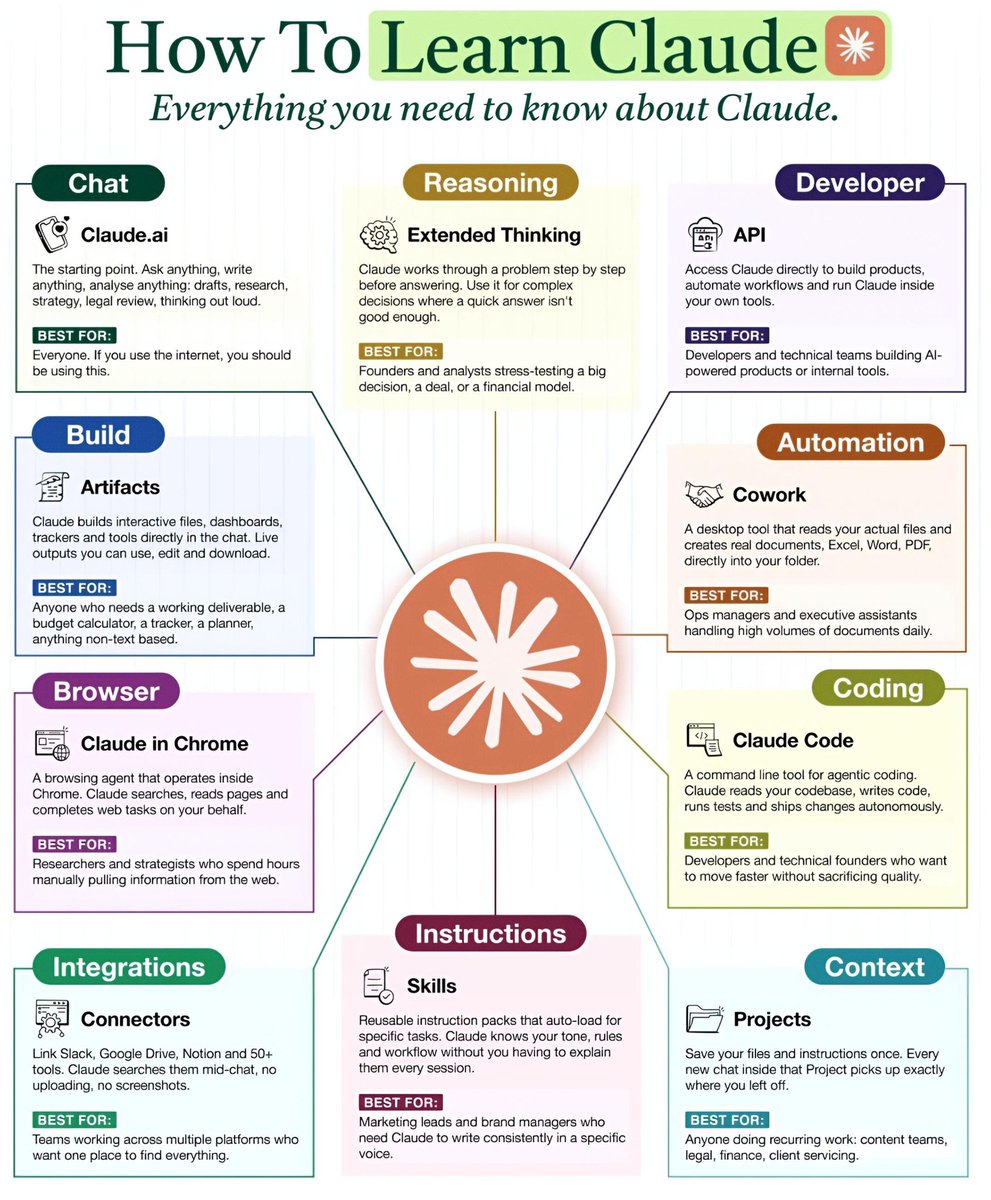
How To Learn Claude ✳️ Everything you need to know about Claude. ━━━━━━━━━━━━━━━━━━━ 1. Chat 🔺️Claude.ai The starting point. Ask anything, write anything, analyse anything: drafts, research, strategy, legal review, thinking out loud. ✅️BEST FOR: Everyone. If you use the internet, you should be using this. ━━━━━━━━━━━━━━━━━━━ 2. Reasoning 🔺️Extended Thinking Claude works through a problem step by step before answering. Use it for complex decisions where a quick answer isn't good enough. ✅️BEST FOR: ●Founders and analysts stress-testing a big decision, a deal, or a financial model. ━━━━━━━━━━━━━━━━━━━ 3. Developer 🔺️API Access Claude directly to build products, automate workflows and run Claude inside your own tools. ✅️BEST FOR: Developers and technical teams building AI-powered products or internal tools. ━━━━━━━━━━━━━━━━━━━ 4. Build 🔺️Artifacts Claude builds interactive files, dashboards, trackers and tools directly in the chat. Live outputs you can use, edit and download. ✅️BEST FOR: Anyone who needs a working deliverable, a budget calculator, a tracker, a planner, anything non-text based. ━━━━━━━━━━━━━━━━━━━ 5. Automation 🔺️Cowork A desktop tool that reads your actual files and creates real documents, Excel, Word, PDF, directly into your folder. ✅️BEST FOR: Ops managers and executive assistants handling high volumes of documents daily. ━━━━━━━━━━━━━━━━━━━ 6. Coding 🔺️Claude Code A command line tool for agentic coding. Claude reads your codebase, writes code, runs tests and ships changes autonomously. ✅️BEST FOR: Developers and technical founders who want to move faster without sacrificing quality. ━━━━━━━━━━━━━━━━━━━ 7. Browser 🔺️Claude in Chrome A browsing agent that operates inside Chrome. Claude searches, reads pages and completes web tasks on your behalf. ✅️BEST FOR: Researchers and strategists who spend hours manually pulling information from the web. ━━━━━━━━━━━━━━━━━━━ 8. Instructions 🔺️Skills Reusable instruction packs that auto-load for specific tasks. Claude knows your tone, rules and workflow without you having to explain them every session. ✅️BEST FOR: Marketing leads and brand managers who need Claude to write consistently in a specific voice. ━━━━━━━━━━━━━━━━━━━ 9. Integrations 🔺️Connectors Link Slack, Google Drive, Notion and 50+ tools. Claude searches them mid-chat, no uploading, no screenshots. ✅️BEST FOR: Teams working across multiple platforms who want one place to find everything. ━━━━━━━━━━━━━━━━━━━ 10. Context 🔺️Projects Save your files and instructions once. Every new chat inside that Project picks up exactly where you left off. ✅️BEST FOR: Anyone doing recurring work: content teams, legal, finance, client servicing. ━━━━━━━━━━━━━━━━━━━ ❤️ Like 🔁 Retweet 🔖 Bookmark Follow @sonalshukla3377 for more such posts
Sonal Shukla tweet media
English
31
73
298
8.6K
Sonal Shukla
Sonal Shukla@sonalshukla3377·
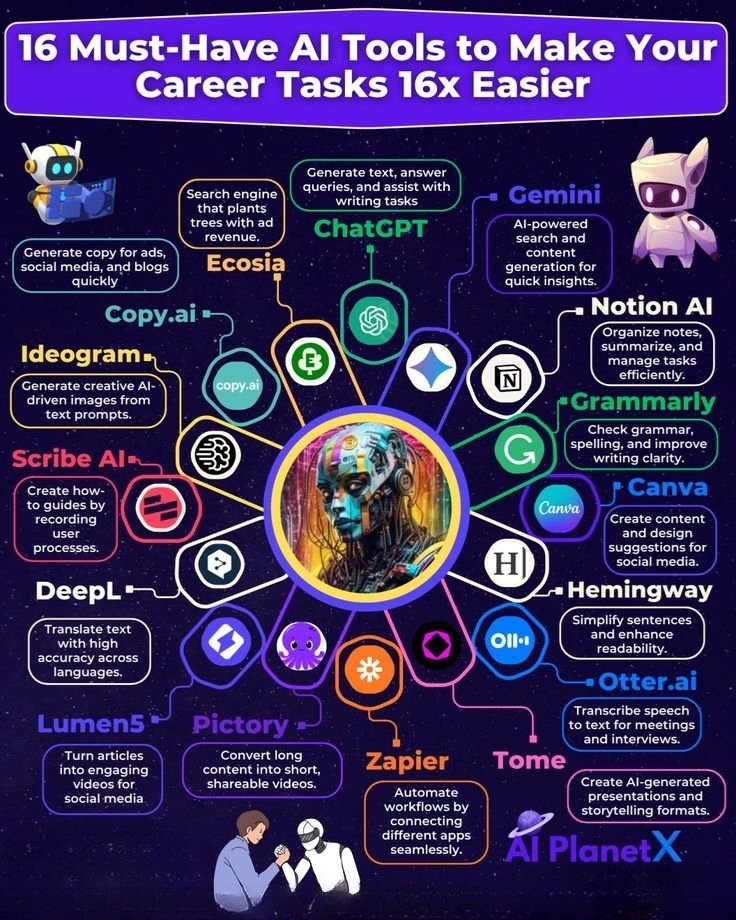
16 Must-Have AI Tools to Make Your Career Tasks 16x Easier These are tools that are considered very important or highly useful for your daily work. Not optional more like “you should definitely know or use them. 🔹 Tools & Descriptions: 》ChatGPT Generate text, answer queries, and assist with writing tasks 》Gemini AI-powered search and content generation for quick insights 》Notion AI Organize notes, summarize, and manage tasks efficiently 》Grammarly Check grammar, spelling, and improve writing clarity 》Canva Create content and design suggestions for social media 》Hemingway Simplify sentences and enhance readability 》Otter. ai Transcribe speech to text for meetings and interviews 》Tome Create AI-generated presentations and storytelling formats 》Zapier Automate workflows by connecting different apps seamlessly 》Pictory Convert long content into short, shareable videos 》Lumen5 Turn articles into engaging videos for social media 》DeepL Translate text with high accuracy across languages 》Scribe AI Create how-to guides by recording user processes 》Ideogram Generate creative AI-driven images from text prompts 》Copy. ai Generate copy for ads, social media, and blogs quickly 》Ecosia Search engine that plants trees with ad revenue ❤️ Like 🔁 Retweet 🔖 Bookmark Follow @sonalshukla3377 for more such posts
Sonal Shukla tweet media
English
33
22
94
1.9K
Richa 🇮🇳
Richa 🇮🇳@heyricha·
@sonalshukla3377 Appreciate you sharing this insight Google’s AI stack is shaping up to be an all-in-one powerhouse 💯
English
0
0
1
29
Sonal Shukla
Sonal Shukla@sonalshukla3377·
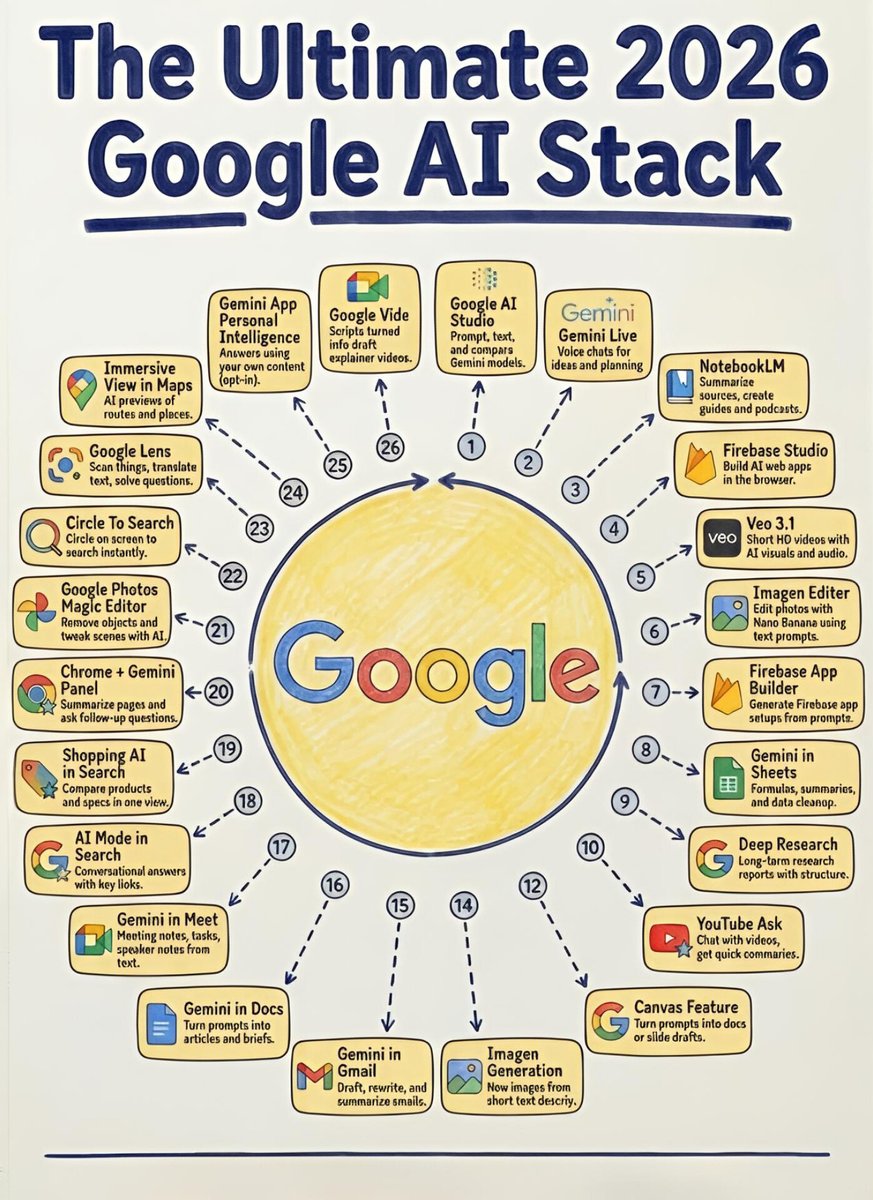
🎯The Ultimate 2026 Google AI Stack Google is rapidly building an all-in-one AI ecosystem that touches everything from content creation and research to productivity and development. The 2026 Google AI Stack brings together powerful tools designed to simplify workflows, boost creativity, and help individuals and businesses do more with less effort. ♦️Top Tools & Features : 1. Google AI Studio Prompt, test, and compare Gemini models. 2. Gemini Live Voice chats for ideas and planning. 3. NotebookLM Summarize sources, create guides and podcasts. 4. Firebase Studio Build AI web apps in the browser. 5. Veo 3.1 Short HD videos with AI visuals and audio. 6. Imagen Editor Edit photos with Nano Banana using text prompts. 7. Firebase App Builder Generate Firebase app setups from prompts. 8. Gemini in Sheets Formulas, summaries, and data cleanup. 9. Deep Research Long-term research reports with structure. 10. YouTube Ask Chat with videos, get quick summaries. 11. Canvas Feature Turn prompts into docs or slide drafts. 12. Imagen Generation Now images from short text descriptions. 13. Gemini in Gmail Draft, rewrite, and summarize emails. 14. Gemini in Docs Turn prompts into articles and briefs. 15. Gemini in Meet Meeting notes, tasks, speaker notes from text. 16. AI Mode in Search Conversational answers with key links. 17. Shopping AI in Search Compare products and specs in one view. 18. Chrome + Gemini Panel Summarize pages and ask follow-up questions. 19. Google Photos Magic Editor Remove objects and tweak scenes with AI. 20. Circle to Search Circle on screen to search instantly. 21. Google Lens Scan things, translate text, solve questions. 22. Immersive View in Maps AI preview of routes and places. 23. Gemini App Personal Intelligence Answers using your own content (opt-in). 24. Google Vids Scripts turned into draft explainer videos. ✅️Master the tools today ❤️ Like 🔁 Retweet 🔖 Bookmark Follow @sonalshukla3377 for more such posts
Sonal Shukla tweet media
English
33
30
140
2.9K
Sonal Shukla
Sonal Shukla@sonalshukla3377·
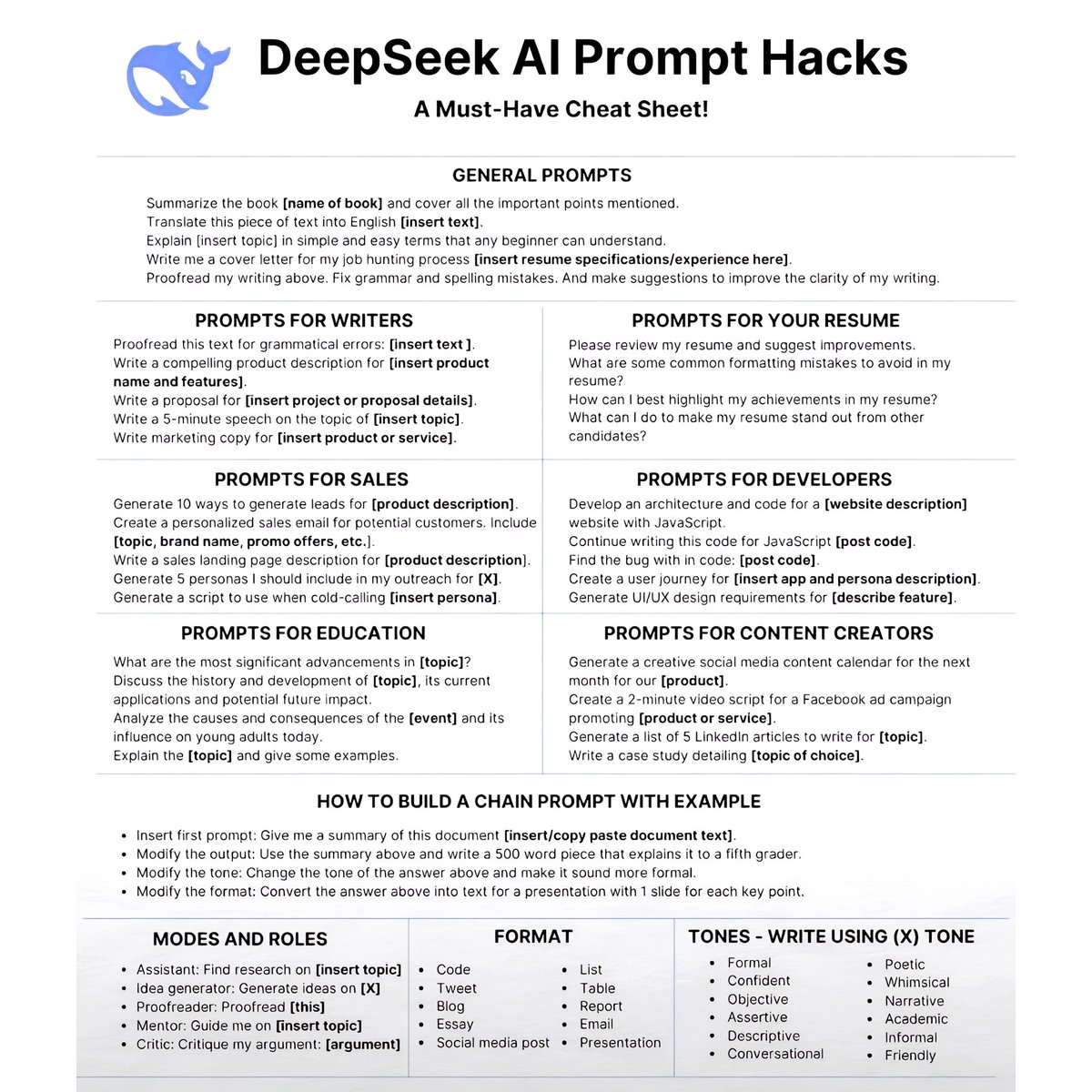
DeepSeek AI Prompt Hacks 🎯 A Must-Have Cheat Sheet! 📌 --- ♦️GENERAL PROMPTS • Summarize the book [name of book] and cover all the important points mentioned. • Translate this piece of text into English [insert text]. • Explain [insert topic] in simple and easy terms that any beginner can understand. • Write me a cover letter for my job hunting process [insert resume specifications/experience here]. • Proofread my writing above. Fix grammar and spelling mistakes. And make suggestions to improve the clarity of my writing. --- ♦️PROMPTS FOR WRITERS • Proofread this text for grammatical errors: [insert text]. • Write a compelling product description for [insert product name and features]. • Write a proposal for [insert project or proposal details]. • Write a 5-minute speech on the topic of [insert topic]. • Write marketing copy for [insert product or service]. --- ♦️PROMPTS FOR YOUR RESUME • Please review my resume and suggest improvements. • What are some common formatting mistakes to avoid in my resume? • How can I best highlight my achievements in my resume? • What can I do to make my resume stand out from other candidates? --- ♦️PROMPTS FOR SALES • Generate 10 ways to generate leads for [product description]. • Create a personalized sales email for potential customers. Include [topic, brand name, promo offers, etc.]. • Write a sales landing page description for [product description]. • Generate 5 personas I should include in my outreach for [X]. • Generate a script to use when cold-calling [insert persona]. --- ♦️PROMPTS FOR DEVELOPERS • Develop an architecture and code for a [website description] website using JavaScript. • Continue writing this code for JavaScript [post code]. • Find the bug within code: [post code]. • Create a user journey for [insert app and persona description]. • Generate UI/UX design requirements for [describe feature]. --- ♦️PROMPTS FOR EDUCATION • What are the most significant advancements in [topic]? • Discuss the history and development of [topic], its current applications and potential future impact. • Analyze the causes and consequences of the [event] and its influence on young adults today. • Explain the [topic] and give some examples. --- ♦️PROMPTS FOR CONTENT CREATORS • Generate a creative social media content calendar for the next month for our [product]. • Create a 2-minute video script for a Facebook ad campaign promoting [product or service]. • Generate a list of 5 LinkedIn articles to write for [topic]. • Write a case study detailing [topic of choice]. --- ♦️HOW TO BUILD A CHAIN PROMPT WITH EXAMPLE • Insert first prompt: Give me a summary of this document [insert/copy paste document text]. • Modify the output: Use the summary above and write a 500 word piece that explains it to a fifth grader. • Modify the tone: Change the tone of the answer above and make it sound more formal. • Modify the format: Convert the answer above into text for a presentation with 1 slide for each key point. --- ♦️MODES AND ROLES • Assistant: Find research on [insert topic] • Idea generator: Generate ideas on [X] • Proofreader: Proofread [this] • Mentor: Guide me on [insert topic] • Critic: Critique my argument: [argument] --- ♦️FORMAT • Code • Tweet • Blog • Essay • Social media post • List • Table • Report • Email • Presentation --- ♦️TONES – WRITE USING (X) TONE • Formal • Confident • Objective • Assertive • Descriptive • Conversational • Poetic • Whimsical • Narrative • Academic • Informal • Friendly ❤️ Like 🔁 Retweet 🔖 Bookmark Follow @sonalshukla3377 for more such posts
Sonal Shukla tweet media
English
28
51
206
6.6K
Richa 🇮🇳
Richa 🇮🇳@heyricha·
@sonalshukla3377 Solid value in this post. Anyone serious about AI in 2026 should definitely save this and start working through it
English
0
0
1
70
Sonal Shukla
Sonal Shukla@sonalshukla3377·
10 AI Skills to Master in 2026 These are the 10 AI skills to master in 2026 that I’ve listed below. Most people see the results. They don’t see the time behind it. Mastering AI isn’t about jumping between tools. It’s about building real skills that compound over time. 1. Prompt Engineering Write clear prompts that produce consistent, useful outputs. Tools: • ChatGPT • Claude • Gemini • Perplexity • Poe --- 2. AI Workflow Automation Connect AI tools to automate repetitive daily tasks. Tools: • Make • Zapier • n8n • Pipedream • Power Automate --- 3. AI Video Generation Create videos using text prompts without editing skills. Tools: • Runway • Pika • Synthesia • HeyGen • CapCut AI --- 4. AI Image Generation Design graphics, thumbnails, and creatives using simple prompts. Tools: • Midjourney • DALL·E • Leonardo AI • Ideogram • Stable Diffusion --- 5. AI Content Writing Generate blogs, captions, scripts, and newsletters efficiently. Tools: • ChatGPT • Jasper • Copy. ai • Writesonic • Notion AI --- 6. AI Presentation Creation Turn ideas into slides automatically with structured storytelling. Tools: • Gamma • Tome • Beautiful. ai • Canva AI • SlidesAI --- 7. AI Chatbot Building Create basic chatbots for websites and customer support. Tools: • Botpress • ManyChat • Voiceflow • Landbot • Tidio AI --- 8. AI Audio & Voice Generation Generate voiceovers and podcasts using synthetic voices. Tools: • ElevenLabs • Murf AI • PlayHT • Descript • Adobe Podcast --- 9. AI Research & Summarization Summarize long documents and extract key insights quickly. Tools: • Perplexity • ChatGPT • Humata • Scholarcy • Elicit --- 10. AI Resume & Career Optimization Improve resumes, cover letters, and interview preparation. Tools: • ChatGPT • Kickresume • Teal • Rezi • LinkedIn AI Tools ❤️ Like 🔁 Retweet 🔖 Bookmark Follow @sonalshukla3377 for more such posts
Sonal Shukla tweet media
English
32
39
133
4.1K
Sonal Shukla
Sonal Shukla@sonalshukla3377·
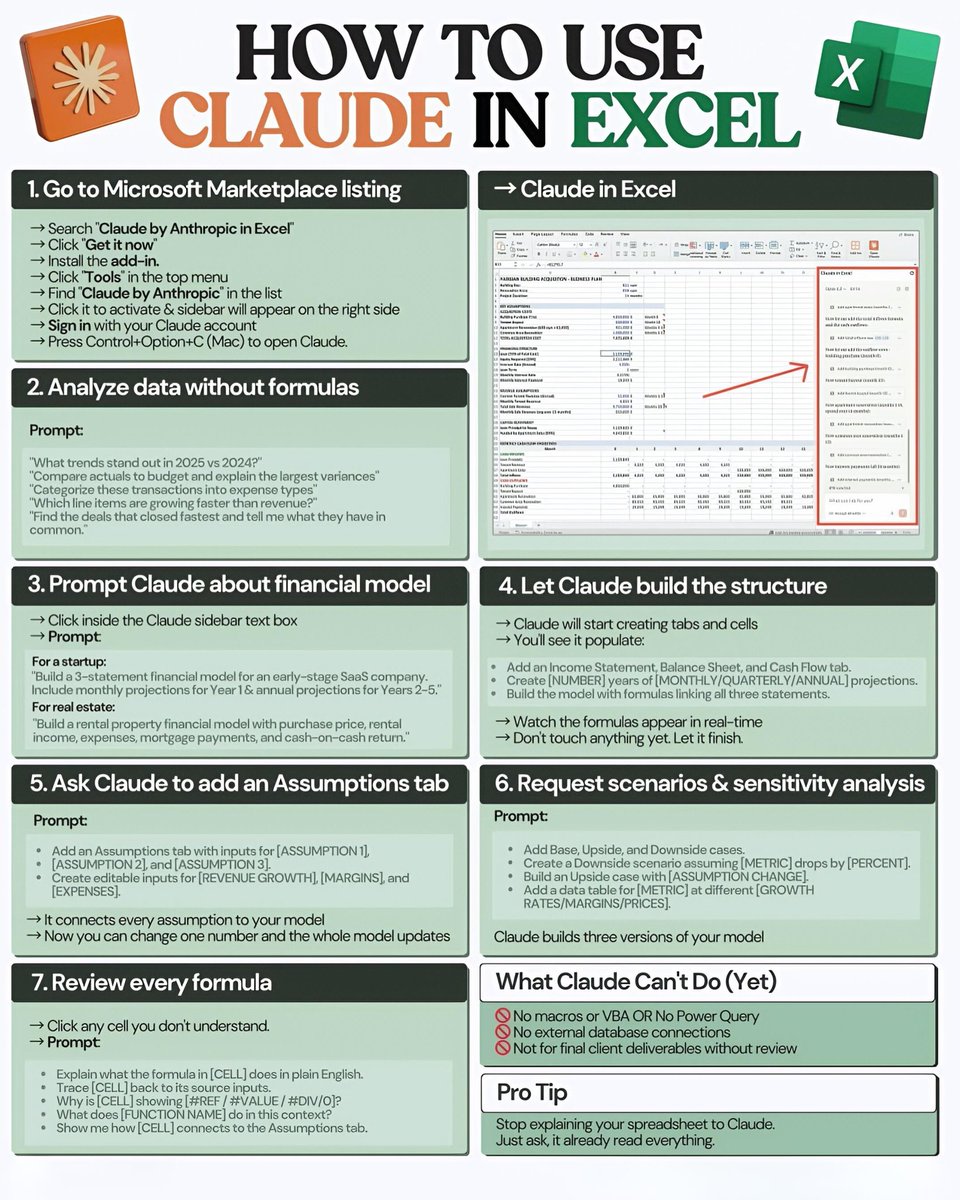
HOW TO USE CLAUDE IN EXCEL --- 1. Go to Microsoft Marketplace listing → Search “Claude by Anthropic in Excel” → Click “Get it now” → Install the add-in → Click “Tools” in the top menu → Find “Claude by Anthropic” in the list → Click it to activate & sidebar will appear on the right side → Sign in with your Claude account → Press Control+Option+C (Mac) to open Claude. --- → Claude in Excel --- 2. Analyze data without formulas Prompt: “What trends stand out in 2025 vs 2024?” “Compare actuals to budget and explain the largest variances” “Categorize these transactions into expense types” “Which line items are growing faster than revenue?” “Find the deals that closed fastest and tell me what they have in common.” --- 3. Prompt Claude about financial model → Click inside the Claude sidebar text box → Prompt: For a startup: “Build a 3-statement financial model for an early-stage SaaS company. Include monthly projections for Year 1 & annual projections for Years 2–5.” For real estate: “Build a rental property financial model with purchase price, rental income, expenses, mortgage payments, and cash-on-cash return.” --- 4. Let Claude build the structure → Claude will start creating tabs and cells → You’ll see it populate: • Add Income Statement, Balance Sheet, and Cash Flow tab • Create [NUMBER] years of [MONTHLY/QUARTERLY/ANNUAL] projections. • Build the model with formulas linking all three statements. → Watch the formulas appear in real-time → Don’t touch anything yet. Let it finish. --- 5. Ask Claude to add an Assumptions tab Prompt: • Add an Assumptions tab with inputs for [ASSUMPTION 1], [ASSUMPTION 2], and [ASSUMPTION 3]. • Create editable inputs for [REVENUE GROWTH], [MARGINS], and [EXPENSES]. → It connects every assumption to your model → Now you can change one number and the whole model updates --- 6. Request scenarios & sensitivity analysis Prompt: • Add Base, Upside, and Downside cases. • Create a Downside scenario assuming [METRIC] drops by [PERCENT]. • Build an Upside case with [ASSUMPTION CHANGE]. • Add a data table for [METRIC] at different [GROWTH RATES/MARGINS/PRICES]. Claude builds three versions of your model --- 7. Review every formula → Click any cell you don’t understand. → Prompt: • Explain what the formula in [CELL] does in plain English. • Trace [CELL] back to its source inputs. • Why is [CELL] showing #REF/#VALUE/#DIV/0? • What does [FUNCTION NAME] do in this context? • Show me how [CELL] connects to the Assumptions tab. --- What Claude Can’t Do (Yet) ⛔ No macros or VBA OR No Power Query ⛔ No external database connections ⛔ Not for final client deliverables without review --- Pro Tip Stop explaining your spreadsheet to Claude. Just ask, it already read everything. ❤️ Like 🔁 Retweet 🔖 Bookmark Follow @sonalshukla3377 for more such posts
Sonal Shukla tweet media
English
28
65
252
39.1K
Richa 🇮🇳
Richa 🇮🇳@heyricha·
@sonalshukla3377 Thanks for sharing. Practical guide for anyone looking to build and launch a website quickly.
English
0
0
1
382
Sonal Shukla
Sonal Shukla@sonalshukla3377·
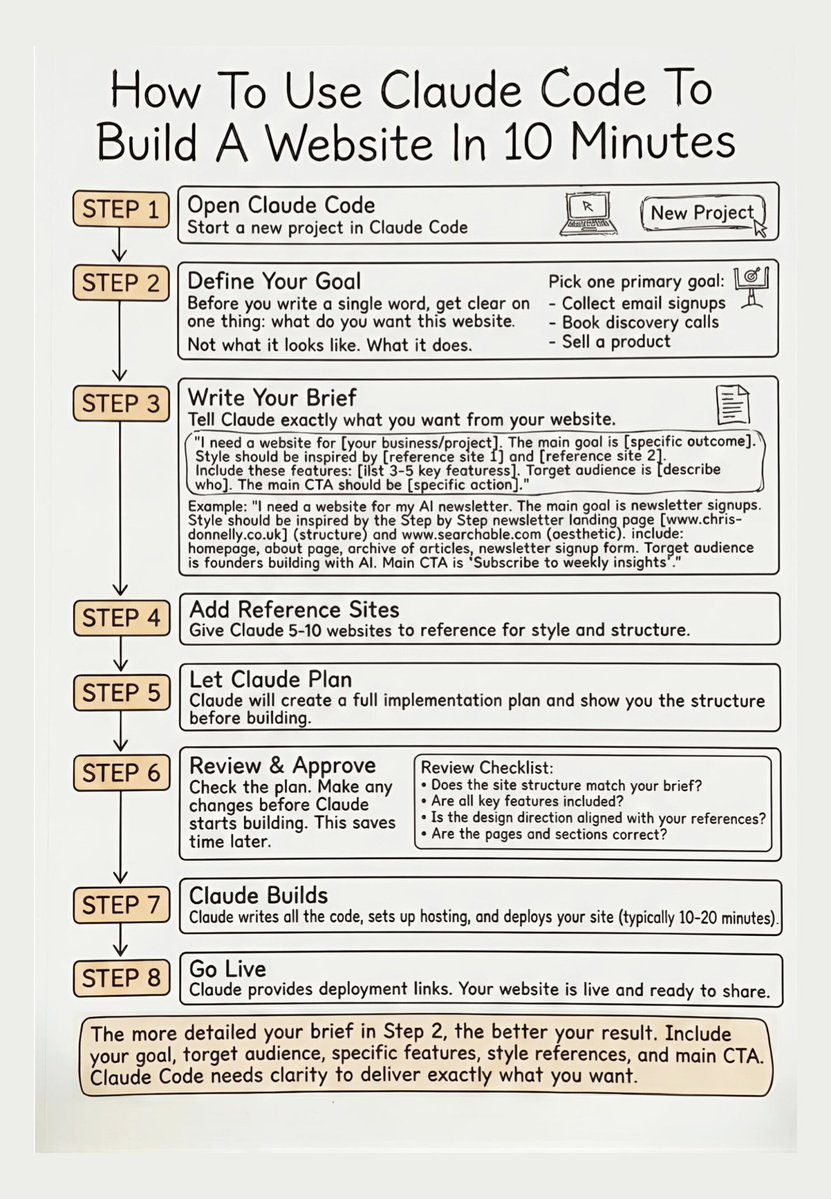
How To Use Claude Code To Build A Website In 10 Minutes 🚀 STEP 1 Open Claude Code 💻 Start a new project in Claude Code STEP 2 Define Your Goal 🎯 Before you write a single word, get clear on one thing: what do you want this website. Not what it looks like. What it does. 》Pick one primary goal: 》Collect email signups 》Book discovery calls 》Sell a product STEP 3 Write Your Brief 📝 Tell Claude exactly what you want from your website. “I need a website for [your business/project]. The main goal is [specific outcome]. Style should be inspired by [reference site 1] and [reference site 2]. Include these features: [list 3–5 key features]. Target audience is [describe who]. The main CTA should be [specific action].” Example: “I need a website for my AI newsletter. The main goal is newsletter signups. Style should be inspired by the Step by Step newsletter landing page . Include: homepage, about page, archive of articles, newsletter signup form. Target audience is founders building with AI. Main CTA is ‘Subscribe to weekly insights.’” STEP 4 Add Reference Sites 🔗 Give Claude 5–10 websites to reference for style and structure. STEP 5 Let Claude Plan 📊 Claude will create a full implementation plan and show you the structure before building. STEP 6 Review & Approve ✅ Check the plan. Make any changes before Claude starts building. This saves time later. Review Checklist: Does the site structure match your brief? Are all key features included? Is the design direction aligned with your references? Are the pages and sections correct? STEP 7 Claude Builds ⚙️ Claude writes all the code, sets up hosting, and deploys your site (typically 10–20 minutes). STEP 8 Go Live 🌍 Claude provides deployment links. Your website is live and ready to share. Note: The more detailed your brief in Step 2, the better your result. Include your goal, target audience, specific features, style references, and main CTA. Claude Code needs clarity to deliver exactly what you want. ❤️ Like 🔁 Retweet 🔖 Bookmark Follow @sonalshukla3377 for more such posts
Sonal Shukla tweet media
English
28
189
721
38.2K
Richa 🇮🇳
Richa 🇮🇳@heyricha·
@sonalshukla3377 Thanks for sharing this useful list. These tools are extremely helpful for anyone exploring images, verification, and digital research online.
English
0
0
1
69
Sonal Shukla
Sonal Shukla@sonalshukla3377·
21 IMAGES & VIDEOS TOOLS After testing hundreds of options, these are some of my top favorites: 1. Google Images – Reverse image search images.google.com 2. Google Lens – Object recognition lens.google 3. Yandex Images – Reverse image search yandex.com/images/ 4. TinEye – Image tracker tineye.com 5. RevEye – Reverse multi-search lnkd.in/ddY2sh-C 6. FaceCheck ID – Facial recognition facecheck.id 7. PimEyes – Facial recognition pimeyes.com 8. Pictriev – Face similarity analyzer pictriev.com 9. GeoSpy – Photo location finder geospy.ai 10. Repost Sleuth – Find images in Reddit lnkd.in/dTtxpt3k 11. Flickr – Photo hosting site flickr.com 12. Facesearch.arrests – Mugshot records database lnkd.in/d5_KWgGs 13. Exifinfo – Image metadata extractor exifinfo.org 14. Fotoforensics – Digital edit detector fotoforensics.com 15. Forensically – Image analysis tools lnkd.in/dpCpkfHm 16. CarNet – Vehicle image search carnet.ai 17. YouTube DL – Video download tool lnkd.in/dESBeR5d 18. Downsub – Subtitle download tool downsub.com 19. Turbo Downloader – Social media downloader lnkd.in/du8XB9-5 20. Instaloader – Instagram downloader lnkd.in/dSrB5UPG 21. Bravedown – Browser video downloader bravedown.com ❤️ Like 🔁 Retweet 🔖 Bookmark Follow @sonalshukla3377 for more such posts
Sonal Shukla tweet media
English
34
33
97
2.3K
Sonal Shukla
Sonal Shukla@sonalshukla3377·
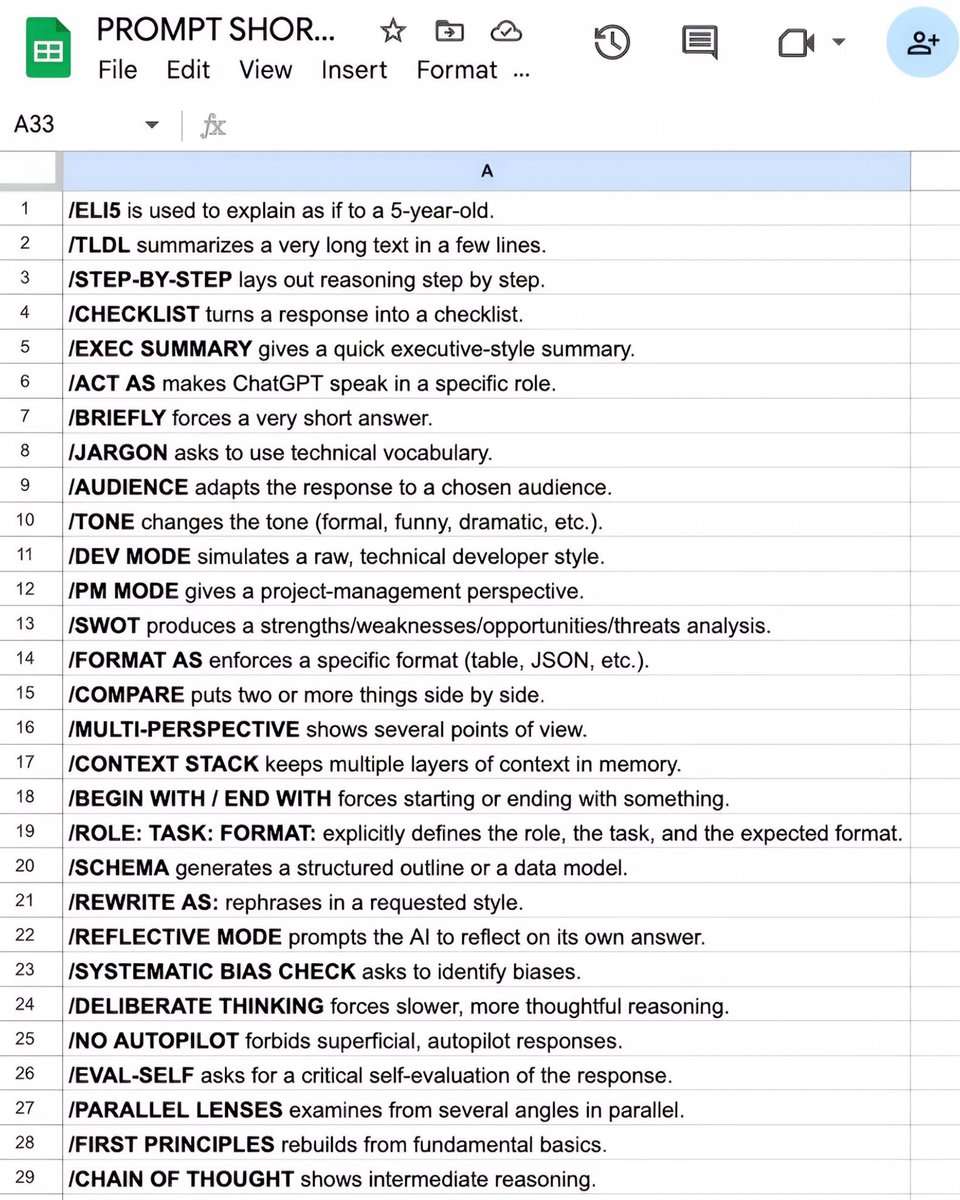
32 ChatGPT shortcut hacks that boost productivity. Faster prompts, better results, no wasted time. [ remember to 🔖 save this post for later ] Add any of these shortcuts at the start of your prompt. 1. ELI5: [your topic] ➠ Get a simple, easy-to-understand explanation. 2. TL;DR: [your text] ➠ Get a short summary of the main points. 3. Act As: [role or expert] ➠ Get responses written from a specific perspective. ---------------------- /ELI5 is used to explain as if to a 5-year-old. /TLDL summarizes a very long text in a few lines. /STEP-BY-STEP breaks reasoning into clear, logical steps. /CHECKLIST turns a response into a checklist. /EXEC SUMMARY creates a concise executive-style overview. /ACT AS makes ChatGPT speak in a specific role. /BRIEFLY gives a fast, ultra-short response. /JARGON uses technical or industry-specific language. /AUDIENCE adapts the response to a chosen audience. /TONE adjusts the tone (formal, casual, or creative). /DEV MODE writes in a raw, technical developer format. /PM MODE gives a project-management perspective. /SWOT outlines strengths, weaknesses, opportunities, and threats. /FORMAT AS enforces a specific format (table, JSON, etc.). /COMPARE puts two or more things side by side. /MULTI-PERSPECTIVE presents multiple viewpoints. /CONTEXT STACK keeps multiple layers of context in memory. /BEGIN WITH / END WITH forces starting or ending with something. /ROLE: TASK: FORMAT: defines the role, task, and expected output clearly. /SCHEMA generates a structured outline or a data model. /REWRITE AS: rephrases in a requested style. /REFLECTIVE MODE prompts the AI to reflect on its own answer. /SYSTEMATIC BIAS CHECK asks to identify biases. /DELIBERATE THINKING encourages slower, more thoughtful reasoning. /NO AUTOPILOT forbids superficial autopilot responses. /EVAL-SELF asks for a critical self-evaluation of the response. /PARALLEL LENSES examines from several angles in parallel. /FIRST PRINCIPLES rebuilds from fundamental basics. /CHAIN OF THOUGHT shows intermediate reasoning. /PITFALLS identifies possible traps and errors. /METRICS MODE presents answers using measures and indicators. /GUARDRAIL sets strict boundaries not to cross. Small shortcuts. Massive time savings. ❤️ Like 🔁 Retweet 🔖 Bookmark Follow @sonalshukla3377 for more such posts
Sonal Shukla tweet media
English
38
24
88
1.3K