IPCisco

7.5K posts

IPCisco banner
IPCisco

IPCisco

@ip_cisco

Network | Linux | Information Tech Cisco | Nokia | Huawei | Juniper https://t.co/BDidg6KDxA https://t.co/f7YpgsxTGm https://t.co/5Y5hc4xu3z Gokhan Kosem

United States Katılım Ocak 2015
3.7K Takip Edilen35.2K Takipçiler
IPCisco
IPCisco@ip_cisco·
Cisco VLAN Trunk Configuration Made Easy | Connect Multiple VLANs Across Switches 🔗 How can a single cable carry traffic from multiple VLANs? A VLAN trunk allows multiple VLANs to travel over a single physical link between network devices using IEEE 802.1Q tagging. Trunk links are essential for connecting switches, routers, and Layer 3 devices while maintaining VLAN separation across the network. In this carousel, you'll learn how to configure a Cisco VLAN Trunk, allow specific VLANs, verify trunk status, and troubleshoot common trunking issues. Join IPCisco Gold Membership and get access to: ✅ Complete CCNA & CCNP Courses ✅ 3,000+ Practice Questions ✅ 100+ Packet Tracer Labs ✅ Cheat Sheets & Flashcards ✅ Interview Vaults ✅ Lifetime Content Updates 👉 Visit ipcisco.com #Cisco #ccna #packetracer #networkengineer #ciscocertification
IPCisco tweet mediaIPCisco tweet media
English
0
7
30
1.9K
IPCisco
IPCisco@ip_cisco·
Cisco EIGRP for IPv6 Configuration Made Easy | Master Dynamic IPv6 Routing 🚀 Ready to route IPv6 networks with Cisco EIGRP? EIGRP for IPv6 (EIGRPv6) provides fast convergence, efficient routing updates, and reliable neighbor discovery for modern IPv6 networks. While it shares many concepts with IPv4 EIGRP, it requires IPv6 routing to be enabled and is configured directly on interfaces instead of using network statements. In this carousel, you'll learn how to configure Cisco EIGRP for IPv6, establish neighbor relationships, advertise IPv6 routes, and verify that your routing is working correctly. Join IPCisco Gold Membership and get access to: ✅ Complete CCNA & CCNP Courses ✅ 3,000+ Practice Questions ✅ 100+ Packet Tracer Labs ✅ Cheat Sheets & Flashcards ✅ Interview Vaults ✅ Lifetime Content Updates 👉 Visit ipcisco.com #Cisco #ccna #packetracer #networkengineer #ciscocertification
IPCisco tweet mediaIPCisco tweet media
English
0
6
20
1.4K
IPCisco
IPCisco@ip_cisco·
HSRP vs VRRP vs GLBP!!! | IPCisco . HSRP, VRRP, and GLBP are First Hop Redundancy Protocols (FHRP). They act as a digital safety net for your network. They allow multiple physical routers to share a single virtual IP address as a default gateway. If the main router dies, another takes over instantly without interrupting your connection. Network Engineer, Network Technician and Network Administration. #ccna #cisconetworking #ciscoccna #networkengineer #ccnp #ccnpencor #encor
IPCisco tweet media
English
0
8
74
1.8K
IPCisco
IPCisco@ip_cisco·
IP ADDRESS TYPES!!! | IPCisco . An IP (Internet Protocol) address is a unique number that identifies a device on a network, like your phone or computer. It lets devices find and talk to each other. The main types are public and private IP addresses, which are used based on version and how they are assigned. Network Engineer, Network Technician and Network Administration. #ccna #cisconetworking #ciscoccna #networkengineer #ccnp #ccnpencor #encor
IPCisco tweet media
English
1
13
76
2.2K
IPCisco
IPCisco@ip_cisco·
Cisco VLAN Configuration Made Easy | Create & Manage VLANs Like a Pro 🌐 Want to organize your network, improve security, and reduce unnecessary broadcast traffic? Virtual LANs (VLANs) divide a physical network into multiple logical networks, making enterprise networks more secure, scalable, and easier to manage. VLANs are one of the first technologies every CCNA student learns and a fundamental skill for every network engineer. In this carousel, you'll learn how to create Cisco VLANs, assign switch ports to the correct VLANs, and verify that your configuration is working properly. Join IPCisco Gold Membership and get access to: ✅ Complete CCNA & CCNP Courses ✅ 3,000+ Practice Questions ✅ 100+ Packet Tracer Labs ✅ Cheat Sheets & Flashcards ✅ Interview Vaults ✅ Lifetime Content Updates 👉 Visit ipcisco.com #Cisco #ccna #packetracer #networkengineer #ciscocertification
IPCisco tweet media
English
0
7
72
2.5K
IPCisco
IPCisco@ip_cisco·
Want to control exactly which traffic is allowed or denied? | Extended ACL Config Extended Access Control Lists (ACLs) provide granular traffic filtering by matching source and destination IP addresses, protocols, and port numbers. They are commonly used to enhance network security and control access between different network segments. In this carousel, you'll learn how to configure a Cisco Extended ACL, apply it to an interface, and verify that your filtering rules work as expected. Want to go beyond the basics? Join IPCisco Gold Membership and get access to: ✅ Complete CCNA & CCNP Courses ✅ 3,000+ Practice Questions ✅ 100+ Packet Tracer Labs ✅ Cheat Sheets & Flashcards ✅ Interview Vaults ✅ Lifetime Content Updates 👉 Visit ipcisco.com #Cisco #ccna #packetracer #networkengineer #ciscocertification
IPCisco tweet media
English
0
8
45
1.9K
IPCisco
IPCisco@ip_cisco·
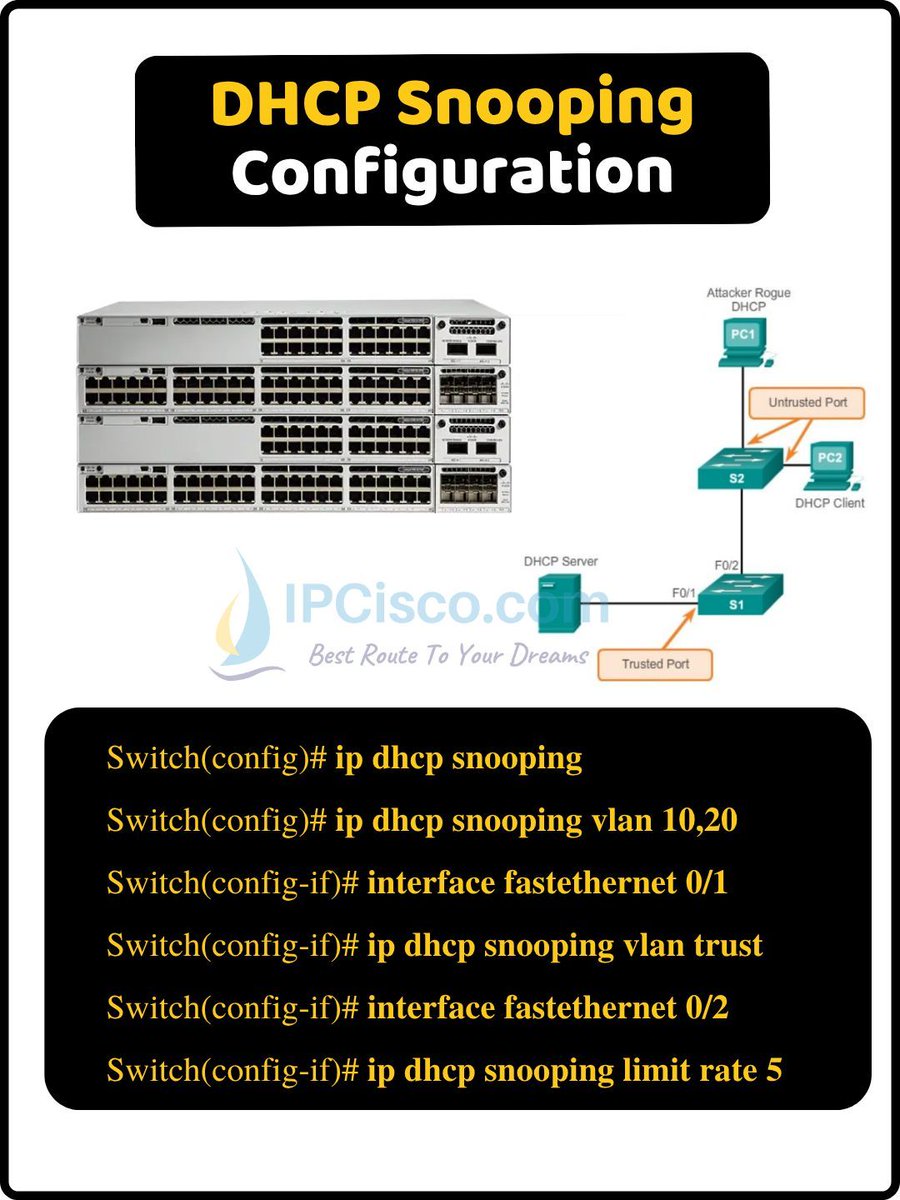
What if a rogue DHCP server starts assigning incorrect IP addresses? DHCP Snooping is a Layer 2 security feature that protects your network by allowing DHCP messages only from trusted ports while blocking unauthorized DHCP servers. It also builds a trusted binding table used by security features like Dynamic ARP Inspection (DAI) and IP Source Guard. In this carousel, you'll learn how to configure Cisco DHCP Snooping, define trusted interfaces, and verify that your network is protected against rogue DHCP attacks. Join IPCisco Gold Membership and get access to: ✅ Complete CCNA & CCNP Courses ✅ 3,000+ Practice Questions ✅ 100+ Packet Tracer Labs ✅ Cheat Sheets & Flashcards ✅ Interview Vaults ✅ Lifetime Content Updates 👉 Visit ipcisco.com #Cisco #ccna #packetracer #networkengineer #ciscocertification
IPCisco tweet mediaIPCisco tweet media
English
0
8
40
1.8K
IPCisco
IPCisco@ip_cisco·
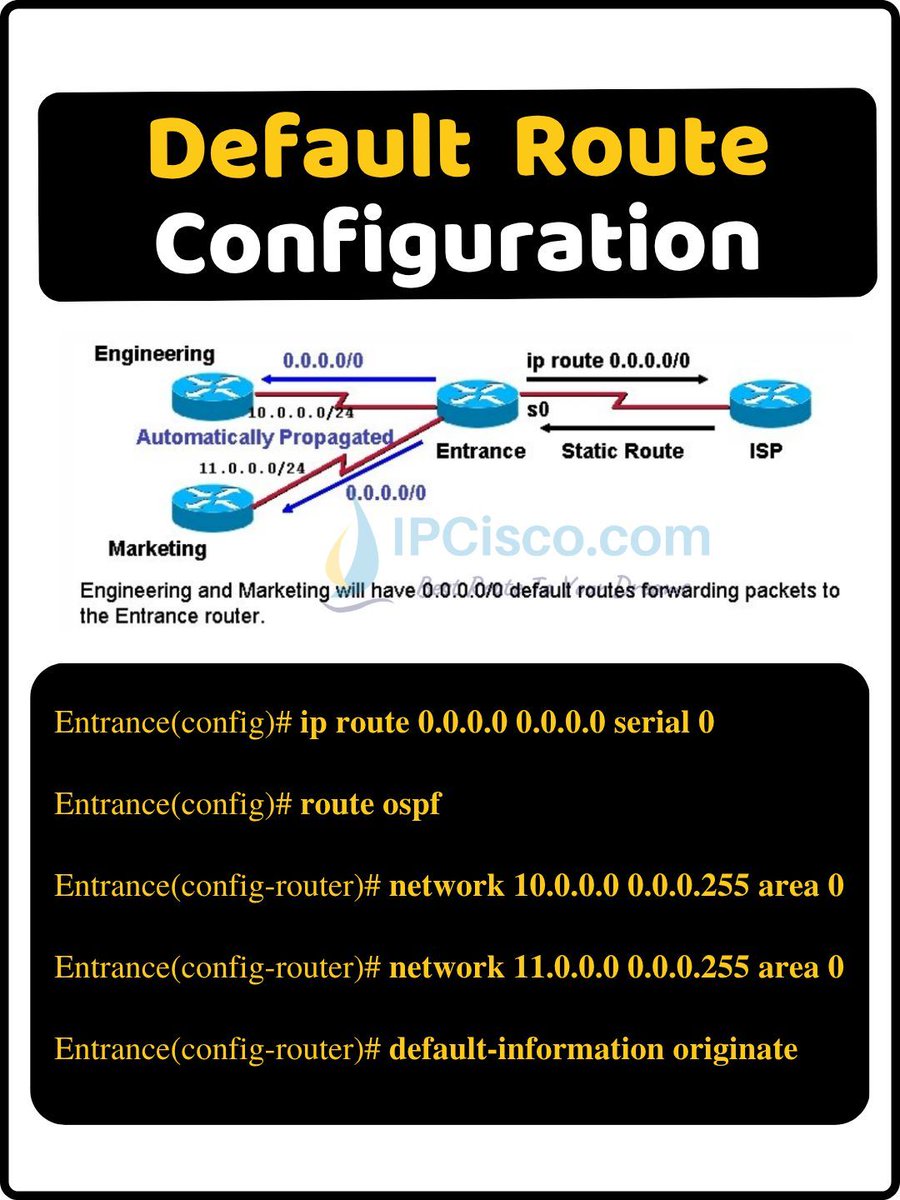
Cisco Default Route Configuration Made Easy | Simplify Your Network Routing Where should a router send packets when no specific route exists? A Default Route acts as the gateway of last resort, forwarding traffic destined for unknown networks to a specified next-hop router or exit interface. It simplifies routing tables, reduces configuration complexity, and is commonly used to provide Internet access or connect branch offices to a central network. In this carousel, you'll learn how to configure a Cisco Default Route, verify that it is installed correctly, and understand when to use static default routes in real-world network designs. Join IPCisco Gold Membership and get access to: ✅ Complete CCNA & CCNP Courses ✅ 3,000+ Practice Questions ✅ 100+ Packet Tracer Labs ✅ Cheat Sheets & Flashcards ✅ Interview Vaults ✅ Lifetime Content Updates 👉 Visit ipcisco.com #Cisco #ccna #packetracer #networkengineer #ciscocertification
IPCisco tweet mediaIPCisco tweet media
English
0
7
36
1.6K