
Krishna Saini
951 posts

Krishna Saini
@krishnasaini1
Web Developer at Amazon miniTV IITR 2015
Bengaluru Katılım Nisan 2011
360 Takip Edilen339 Takipçiler
Krishna Saini retweetledi

If you want to get better at giving talks, there is only one way: give more talks.
Most avoid it early in their careers. It feels uncomfortable, and it is super easy to tell yourself you will do it once you are more senior. You do not get senior and then start speaking. You start speaking, and that is part of how you get 'senior' (ofc you should have something to talk about first)
The first few talks will feel rough - of course - and that is fine and completely normal. Nobody becomes a confident speaker by waiting until they feel ready. You get there by giving bad talks, learning from them, and then giving better ones.
That is exactly how I got better. My early YouTube videos and talks were not great - I stuttered, rushed through parts, and missed things I wanted to say. But each time, I actually improved a little. Also, posting 200+ videos on YouTube helped.
Also, the opportunities are everywhere if you look for them. It does not have to be a conference stage. A team sync, an internal tech talk, a local meetup - all of these count - and none of them requires you to be an expert. They just require you to show up and try.
Each time you do it, something improves. Your flow, your pacing, your ability to read the room, and how you handle unexpected questions. These small improvements compound over time.
So do not wait to feel ready. Start now, start small, and let the reps do the work.
English
@arpit_bhayani What about slack ? How do you maintain your sanity with constant msg give that some are important ones too
English

I follow Inbox Zero, and for me, it is genuinely a way to build trust with the people I work with. Here's how...
The idea is simple: every email gets acted on, delegated, scheduled, or cleared. Nothing sits there "for later." My inbox is a queue. Of course, I am not talking about notification emails from Jenkins, GitHub, general groups, etc. :)
The first benefit I get is reliability. Nothing important gets buried. I have the confidence that if something reaches my inbox, I have seen it and made a decision - even if that decision is to ignore it.
There is also a trust angle with managers and teammates. When I respond consistently, without being nudged, people notice. It reduces follow-ups and signals that I am on top of things. More than anything, it removes the mental tax of uncertainty.
One practical thing: not all emails deserve equal attention. I route the noise out of the inbox, like CI/CD alerts, GitHub notifications, and automated reports.
To me, Inbox Zero is about staying on top of human communication (we can say that now, I guess). It is not about an OCD for a clean inbox - but about making sure nothing important slips through the cracks, and I always know what's going on.
English

@RealAnkush DMing as I have multiple window with multiple tabs opened all the time. On mobile also. Some tabs are open from weeks.
English

Are you a tab hoarder? Do you have too many tabs open on your browser right now? Does it give you anxiety?
Do you want to get to them without committing to bookmarking, but still want to stop them from hogging up your machine? Is it slowing you down? Is it wearing you down?
If so, DM me and I may have something for you.
English
Krishna Saini retweetledi

Fall in love with some activity, and do it! Nobody ever figures out what life is all about, and it doesn't matter. Explore the world. Nearly everything is really interesting if you go into it deeply enough. Work as hard and as much as you want to on the things you like to do the best. Don't think about what you want to be, but what you want to do. Keep up some kind of a minimum with other things so that society doesn't stop you from doing anything at all.
English
Krishna Saini retweetledi

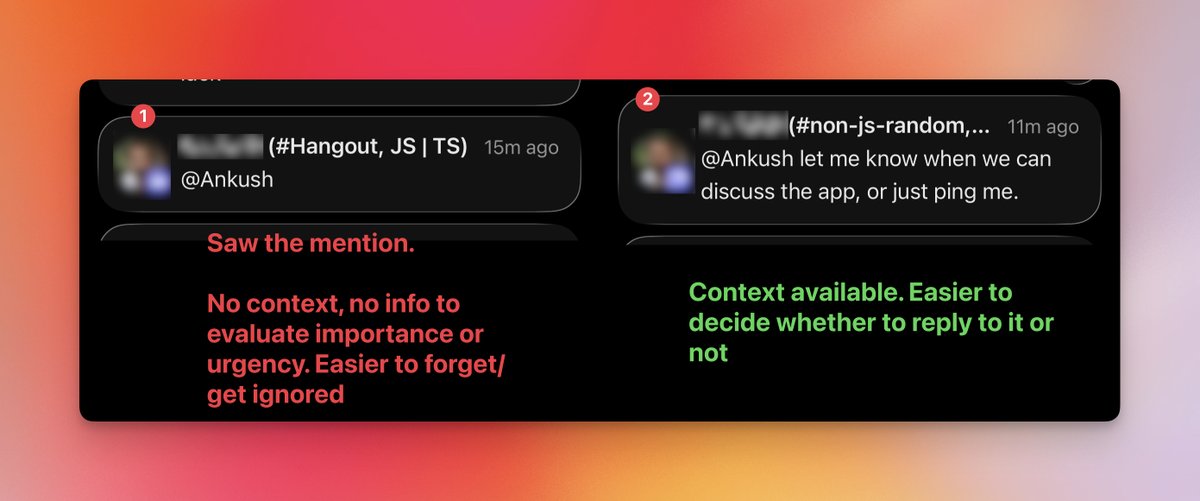
When you send a message to somebody, don't be in a rush to hit enter.
Do not just write an @ mention at the very end on its own.
While it's useful that it sends them a notification, it also sends them just a single notification with no content, leaving the recipient with no clue whether they should open it or not if they glance it.
If you include the context of the message, it helps them identify if it is something they want to open now or if it can be dealt with later.
I also notice there are some people who send messages line by line. Two words here, three words next and so on. It's just a pain to read those messages, especially when you see the first notification, jump into the app to read the rest, and find yourself just sitting there waiting for them to send the next sentence.
Just take some time. Draft your message first. Press Shift + Enter to write your lines. Or, write it in a different app and bring it over when you are ready.
Why do you want to hook the person into reading your message when you are not actually ready to send it?

English
Krishna Saini retweetledi

True. When I joined my company I used to read code repos of projects from different domains which were related to my project. This helped me understand how other teams are writing code, patterns, best practices and maintaining the project. I was also able to get functional knowledge about their space in detail. This not just helped me improve my knowledge but also helped me debug production issues because I was immediately able to identify if the issue if in my scope or from a different domain.
English
Krishna Saini retweetledi

Krishna Saini retweetledi

Level up: React ref callback 101
wrote a short blog on multiple use cases of using callback Ref in React.
@megamind19/level-up-react-ref-callback-101-ef956cdeaa45" target="_blank" rel="nofollow noopener">medium.com/@megamind19/le…
Give it a read.
English

#javascript #tip
document.activeElement is a read-only property that returns the element currently focused in the browser.
Eg: after clicking an input, document.activeElement === input.
Useful for focus management, accessibility checks, and debugging keyboard navigation issues
English

playground link -codesandbox.io/p/sandbox/tv64…
detailed blog link @megamind19/what-if-react-re-renders-before-useeffect-runs-ec4cf587a6b3?postPublishedType=initial" target="_blank" rel="nofollow noopener">medium.com/@megamind19/wh…
English
Krishna Saini retweetledi

Let me talk about something obvious but with a bit of quantification...
Theoretically, both arrays and linked lists take O(n) time to traverse, but here's what actually happens when you benchmark by summing 100k integers
- Array: 68,312 ns
- Linked List: 181,567 ns
Summing an array is ~3x faster than LinkedList. Same algorithm, same complexity, but wildly different performance.
The reason is cache behavior. When you access array[0], the CPU fetches an entire cache line (64 bytes), which includes array[0] through array[15]. The next 15 accesses are essentially free. Arrays hit the cache about 94% of the time.
Linked lists suffer from pointer chasing. Each node is allocated separately by malloc(), scattered randomly in memory. Each access likely requires a new cache line fetch, resulting in a 70% cache miss rate.
This is a good example of why Big O notation tells only part of the story. Spatial locality and cache-friendliness can make a 2-3x difference even when the theoretical complexity is identical.
I am sure you would have known this, but this crude benchmark quantifies just how fast cache-friendly algorithms can be.
Hope this helps.
English

The reliable way to check if a property exists directly on an object (not on its prototype) is
Object.prototype.hasOwnProperty.call(obj, key).
In modern JavaScript (ES2022+), you can also use Object.hasOwn(obj, key).
English
Krishna Saini retweetledi