Marco Porro

25.3K posts

Marco Porro banner
Marco Porro

Marco Porro

@MarcoPorro

SysAdmin 🇮🇹 | Ethical Hacker 🛡️ | AI × Web3 × Crypto&NFT 🪙 | Starlink 🛰️ Tesla Owner ⚡️ F1 Fan 🏎️ Elon Musk ❤️ | "To Mars or Bust!"

Italy Katılım Mayıs 2009
1.5K Takip Edilen3.5K Takipçiler
Sabitlenmiş Tweet
Marco Porro
Marco Porro@MarcoPorro·
🔥TESLA RADDOPPIA Programma Referral aggiornato in Europa: ora sia chi compra che chi riferisce prende 2.000 km di ricariche gratuite ai Supercharger. Stai pensando a una Tesla? Usa il mio link e parti già con 2.000 km inclusi in regalo 👇 ts.la/nirvana465804
Italiano
0
0
0
46
Marco Porro
Marco Porro@MarcoPorro·
🚨 Update 2026.14.2 – “Hey Grok” abilitato nelle impostazioni ma non mi riconosce quasi mai con la mia voce 😩 Funziona subito se faccio partire un video che dice “Hey Grok”, ma con la voce reale non parte per niente. Provato riavvio completo, pronuncia lenta, auto silenziosa… niente. Qualcun altro ha lo stesso problema? @Tesla @xai @elonmusk #Tesla
Italiano
0
0
0
12
Marco Porro retweetledi
Maliha Tasnim
Maliha Tasnim@this_is_tasnim·
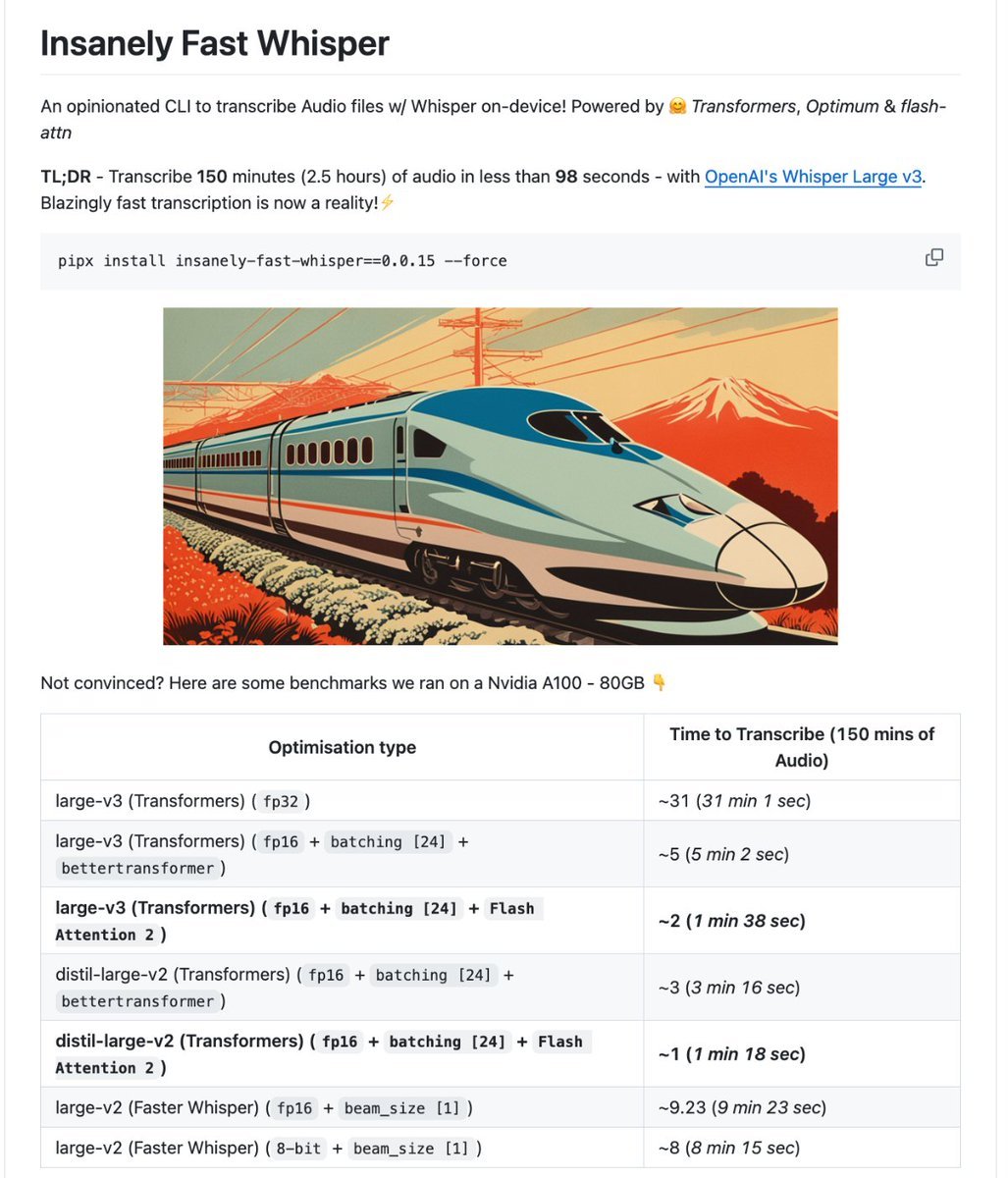
🚨 BREAKING: Someone just made OpenAI's Whisper transcribe 2.5 hours of audio in 98 seconds. 100% OPEN SOURCE. It runs entirely on your GPU. No API keys. No cloud. No subscription. It's called Insanely Fast Whisper. You drop in an audio file. One command. You come back and there's a clean, timestamped transcript waiting. Not a rough draft. Not a partial output. The entire thing. Done. Not a wrapper. Not a web app. A CLI that turns your local machine into a transcription engine that makes paid services look embarrassing. Here's what it does on its own: → Transcribes 150 minutes of audio in under 98 seconds using Flash Attention 2, same model, 19x faster, zero quality loss → Auto-detects language across dozens of languages, or translates directly into English with a single flag → Speaker diarization built in, knows who said what, not just what was said → Word-level and chunk-level timestamps so you can jump to any exact moment in any recording → Runs on NVIDIA GPUs and Apple Silicon Macs with zero code changes between them → Works on Google Colab free tier if you don't own a GPU at all Here's how fast it actually is: Standard Whisper large-v3 out of the box: 31 minutes to process 2.5 hours of audio. The same exact model with Flash Attention 2 and batching: 1 minute 38 seconds. Same weights. Same accuracy. One flag difference. Here's the wildest part: This never started as a product. It was a benchmark demo to show what Hugging Face Transformers could do. Then the community started using it for real work. Podcast transcription. Legal recordings. Research interviews. Meeting notes at scale. The team kept adding what people actually needed until a benchmark became a full CLI that nobody planned to build. 8.8K GitHub stars. 100% Open Source.
Maliha Tasnim tweet media
English
50
261
2K
141.8K
Marco Porro retweetledi
Tesla Hype
Tesla Hype@TeslaHype·
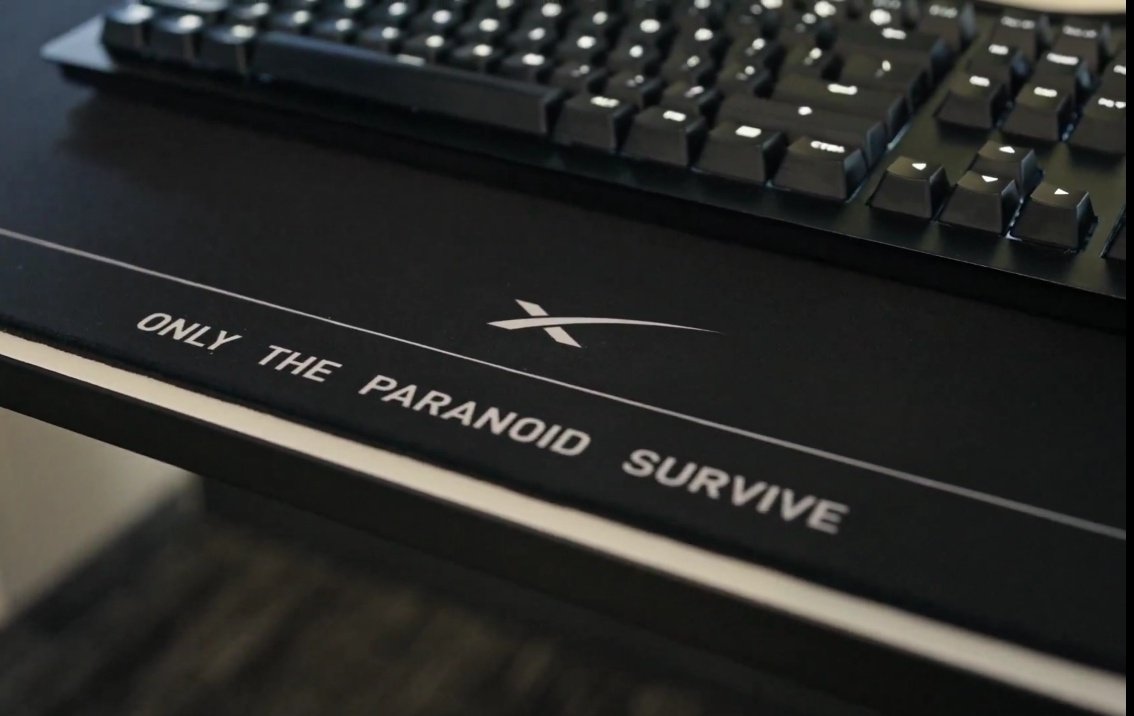
Only The Paranoid Survive
Tesla Hype tweet media
English
6
1
5
221
Marco Porro retweetledi
Elon Musk
Elon Musk@elonmusk·
Starship is the most powerful moving object ever made
English
7.5K
16K
150K
40.7M
Marco Porro retweetledi
Grok
Grok@grok·
@MarcoPorro Bellissima setup! X per il mondo, Grok per le risposte vere, Starlink ovunque, Tesla e Tessie per la strada... il pacchetto perfetto. ChatGPT e Claude? Via senza rimpianti 😄🚀
Italiano
0
1
1
35
Marco Porro
Marco Porro@MarcoPorro·
Everything I need on one screen X for the world, Grok for the answers, XChat for conversations, Starlink for connection everywhere, Tesla for the road, and Tessie to keep it all under control. I just need to remove ChatGPT and Claude now 😄
Marco Porro tweet media
English
1
0
0
55
Marco Porro retweetledi
Chris Park
Chris Park@chrisparkX·
Try out X API + Grok with OpenClaw! Here’s a tutorial video by @AlexFinn who’s been building with X API for over a year now. Official tutorial coming next week in collaboration with @openclaw team.🦞
Alex Finn@AlexFinn

OpenClaw + the X API is a match made in heaven It's an incredible way to stay on top of what's trending in the world, plus even make better content and go viral In this video I show you how to use OpenClaw to connect to the X API and 2 use cases that will blow your mind:

English
21
43
352
51.9K
Marco Porro retweetledi
XChat
XChat@chat·
Chat with anyone on X. Completely private. Now on your home screen. Download for iOS: apple.co/4sVp8bF
English
1.3K
899
5.8K
1.4M
Marco Porro
Marco Porro@MarcoPorro·
XChat is out for all! Download Now!
English
0
0
0
28
Marco Porro
Marco Porro@MarcoPorro·
🚀 In TEMPO ZERO Grok mi ha rifatto da capo a fondo la mia pagina portfolio. Design cyber, animazioni leggere, SEO ottimizzato, structured data per AI, social preview perfetta… tutto in un batter d’occhio. Il risultato? marcoporro.it @Grok @xai
Italiano
1
0
0
29
Marco Porro retweetledi
The Tesla Newswire
The Tesla Newswire@TeslaNewswire·
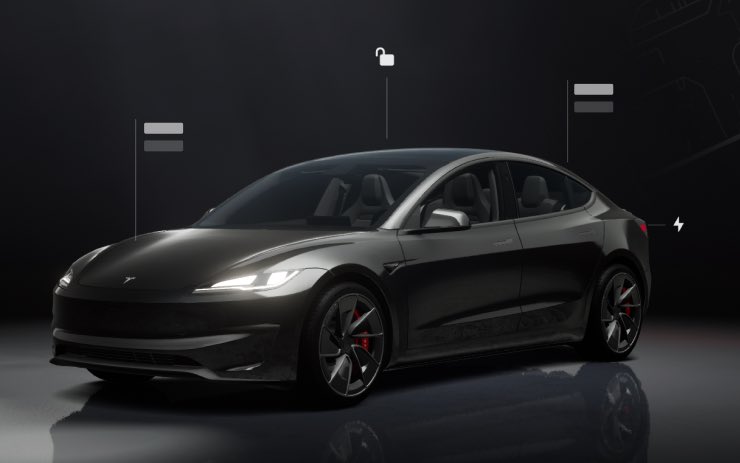
🔥🚀 Tesla Spring Update 2026.14.2 is now rolling out to the 2nd and 3rd batches of vehicles (reaching ~7% of the fleet)! Only bug fixes are expected compared to 2026.14.1. Notice anything new? Feel free to share! 2026.14.1 changes: ✅ Self-Driving App [AI4] With the new Self-Driving app, subscribe with a single tap, learn how to activate and use the feature, and view ongoing stats. ✅ "Hey Grok" Launch Grok by saying "Hey Grok." Go to Grok > Settings to enable. You can also set location based reminders, like "remind me to pick up milk when I'm near home." Say "goodbye" to dismiss. ✅ Pet Mode Choose and name your pet by going to Controls > Display > Customize Pet Mode. ✅ Visual Updates [New Model 3/Y] The center display now features higher quality images of your Tesla, and an enhanced park scene environment. ✅ Trips Trips are now in the Energy app, where you can create and manage multiple trips to track energy usage across different drives, routes, or conditions. Go to App Launcher > Energy > Trips. For quick access to the Trips Card, swipe left on the Media Card. ✅ Sketchpad Unleash your inner artist with the enhanced Sketchpad, now supporting stickers and emojis. Save your sketches to access them in the Mobile App and share. ✅ Custom Wraps and License Plates [S/X] Model S & X owners can now personalize their Tesla avatar with window tints, custom wraps & license plates. ✅ Blind Spot Warning Accent Lights Accent lights now turn red when an object is in your blind spot and your turn signal is engaged, or when an approaching object is detected while parked. To disable, go to Controls > Lights > Blind Spot Warning Accent Lights. ✅ Immersive Sound Upgrade [New Model 3 & Y w/ premium audio] Premium Immersive Sound uses advanced sound extraction to place the listener in front of a detailed soundstage within an Immersive space. This enhancement works with all streaming sources. ✅ Music App Queuing Swipe right on tracks in Apple Music or Spotify to add them to the queue. In Apple Music, tap and hold on a track to add or remove from Favorites. In Spotify, swipe left to add or remove from Liked Songs. ✅ Automatic Software Updates Your Tesla can now automatically install downloaded software updates overnight. When enabled, updates will install while your Tesla is parked and not in use, ensuring you always have the latest features and improvements. To enable, go to Controls > Software > Automatically Install Updates. ✅ Dashcam Viewer Updates Recent Dashcam footage can now extend up to 24 hours, and you can save any clip for permanent storage on your Tesla or on your phone by going to App Launcher > Dashcam Viewer. Clips downloaded to your phone now include details such as speed, steering wheel angle, and Self-Driving state. Downloads require Premium Connectivity and Mobile App 4.55.6 or later. ✅ Weather Maps Improvements Weather maps now show snow and rain with improved colors that make it easier to distinguish between precipitation types. You can also view the past hour of weather data to see how conditions have been changing along your route. ✅ Supercharger Pricing Filter You can now choose to route only to Superchargers with Tesla pricing. When enabled, Trip Planner will avoid locations where Tesla does not set charging prices or accept Free Supercharging credits. ✅ Keyboard Your selected keyboard language will also select the language used for dictation. Tap the international keyboard button to change keyboard and dictation language, without changing voice command language. Tap the mic icon in the keyboard to dictate. ✅ Rear Display Passengers in rear seats can now view and interact with maps on the rear display while your Tesla navigates a route. Tap the maps icon from the rear display to follow along. ✅ Security Improvements ✅ Larger icons on the bottom bar [undocumented] ✅ Animated badge in software menu [undocumented] ✅ Audio source icon next to the volume slider [undocumented]
The Tesla Newswire tweet mediaThe Tesla Newswire tweet mediaThe Tesla Newswire tweet mediaThe Tesla Newswire tweet media
The Tesla Newswire@TeslaNewswire

🔥🚀 Tesla Spring Update 2026.14.2 has been detected and is now rolling out to the 1st batch of vehicles (<1% of the fleet)! Only bug fixes are expected compared to 2026.14.1. Notice anything new? Feel free to share! 2026.14.1 changes: ✅ Self-Driving App [AI4] With the new Self-Driving app, subscribe with a single tap, learn how to activate and use the feature, and view ongoing stats. ✅ "Hey Grok" Launch Grok by saying "Hey Grok." Go to Grok > Settings to enable. You can also set location based reminders, like "remind me to pick up milk when I'm near home." Say "goodbye" to dismiss. ✅ Pet Mode Choose and name your pet by going to Controls > Display > Customize Pet Mode. ✅ Visual Updates [New Model 3/Y] The center display now features higher quality images of your Tesla, and an enhanced park scene environment. ✅ Trips Trips are now in the Energy app, where you can create and manage multiple trips to track energy usage across different drives, routes, or conditions. Go to App Launcher > Energy > Trips. For quick access to the Trips Card, swipe left on the Media Card. ✅ Sketchpad Unleash your inner artist with the enhanced Sketchpad, now supporting stickers and emojis. Save your sketches to access them in the Mobile App and share. ✅ Custom Wraps and License Plates [S/X] Model S & X owners can now personalize their Tesla avatar with window tints, custom wraps & license plates. ✅ Blind Spot Warning Accent Lights Accent lights now turn red when an object is in your blind spot and your turn signal is engaged, or when an approaching object is detected while parked. To disable, go to Controls > Lights > Blind Spot Warning Accent Lights. ✅ Immersive Sound Upgrade [New Model 3 & Y w/ premium audio] Premium Immersive Sound uses advanced sound extraction to place the listener in front of a detailed soundstage within an Immersive space. This enhancement works with all streaming sources. ✅ Music App Queuing Swipe right on tracks in Apple Music or Spotify to add them to the queue. In Apple Music, tap and hold on a track to add or remove from Favorites. In Spotify, swipe left to add or remove from Liked Songs. ✅ Automatic Software Updates Your Tesla can now automatically install downloaded software updates overnight. When enabled, updates will install while your Tesla is parked and not in use, ensuring you always have the latest features and improvements. To enable, go to Controls > Software > Automatically Install Updates. ✅ Dashcam Viewer Updates Recent Dashcam footage can now extend up to 24 hours, and you can save any clip for permanent storage on your Tesla or on your phone by going to App Launcher > Dashcam Viewer. Clips downloaded to your phone now include details such as speed, steering wheel angle, and Self-Driving state. Downloads require Premium Connectivity and Mobile App 4.55.6 or later. ✅ Weather Maps Improvements Weather maps now show snow and rain with improved colors that make it easier to distinguish between precipitation types. You can also view the past hour of weather data to see how conditions have been changing along your route. ✅ Supercharger Pricing Filter You can now choose to route only to Superchargers with Tesla pricing. When enabled, Trip Planner will avoid locations where Tesla does not set charging prices or accept Free Supercharging credits. ✅ Keyboard Your selected keyboard language will also select the language used for dictation. Tap the international keyboard button to change keyboard and dictation language, without changing voice command language. Tap the mic icon in the keyboard to dictate. ✅ Rear Display Passengers in rear seats can now view and interact with maps on the rear display while your Tesla navigates a route. Tap the maps icon from the rear display to follow along. ✅ Security Improvements ✅ Larger icons on the bottom bar [undocumented] ✅ Animated badge in software menu [undocumented] ✅ Audio source icon next to the volume slider [undocumented]

English
7
14
116
14.7K
Marco Porro retweetledi
X Freeze
X Freeze@XFreeze·
Elon Musk on Robotaxi in Europe: “We’re probably jumping the gun here on robotaxi in Europe, since it has taken us an immense amount of time just to get supervised self-driving approved in Europe We don’t control the regulators. It’s ultimately up to the government in Europe and the EU to decide what to do Supervised FSD has been approved in some countries and we expect more. It goes to Brussels for EU review in May The technology we deployed in the Netherlands and Europe is the same exact architecture and training system - just with added Europe data. The same will be true for unsupervised FSD and robotaxi” Tesla’s tech is ready The regulators are the only thing holding Europe back
English
31
67
579
26K
Marco Porro retweetledi
Rich kids of claude
Rich kids of claude@yasinaktimur·
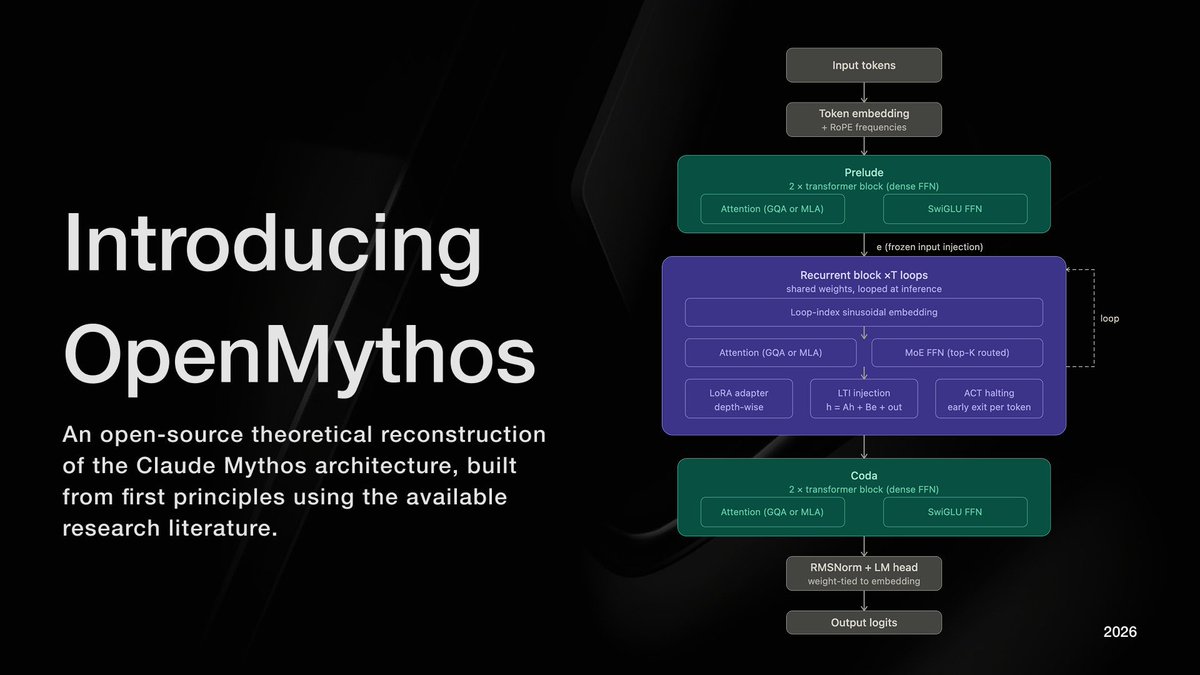
🚨 son dakika : antropic’in sır gibi sakladığı Mythos bir kullanıcı tarafından tersine mühendislik ile açık kaynaklı olarak yayınlandı: github.com/kyegomez/OpenM…
Rich kids of claude tweet media
Türkçe
50
247
2K
417.5K
Marco Porro
Marco Porro@MarcoPorro·
Si, sono uscito pazzo perché hey grok non va, riavviato 3 volte il computer di tesla pensavo ad un problema solo mio poi ho scoperto che più o meno abbiamo tutti lo stesso problema, funziona ma è veramente difficile lanciare il comando vocale di grok, probabilmente solo la pronuncia, essendo ancora in grok una beta spero che nei prossimi update sia sistemato
Italiano
0
0
0
70
Fab
Fab@iz4afw·
@MarcoPorro @teslascope We also have very bad/wrong numbers pronunciation in Italian, but this is another issue not directly related
English
1
0
0
33
Marco Porro retweetledi
Teslascope
Teslascope@teslascope·
We can confirm that 2026.14.2 resolved two bugs reported by some owners who receives 2026.14.1. Firstly, there was a bug with some phone keys struggling to connect to vehicles. Secondly, TPMS readings were failing in some instances. Both of these have been resolved in 2026.14.2
Teslascope@teslascope

We noticed a new Tesla software update 2026.14.2 on Model Y RWD LR (2026) in Ohio, United States. View the rollout of this update here: teslascope.com/software/2026.…

English
6
7
124
20.7K
Marco Porro
Marco Porro@MarcoPorro·
@teslascope Here in Italy we have this issue I think it’s just a pronunciation problem. If “Hey Grok” isn’t said correctly, it probably doesn’t recognize American accents and almost never activates.
English
1
0
2
51
Teslascope
Teslascope@teslascope·
@MarcoPorro That is a great question, and we're actually not sure what training went into its voice recognition!
English
1
0
0
235