mist
2.2K posts

mist
@mistic_twt
compute | network | storage | fafoing with software | nostr | infra & backend systems
Build ⚒️ Katılım Ağustos 2022
220 Takip Edilen227 Takipçiler


A robot named edWARd WARchocki in WARsaw!
Time travelers can't be more explicit with their signals, don't they?
Damian Player@damianplayer
THIS IS FUCKING WILD! a humanoid robot named Edward Warchocki chased away a herd of wild boars in Warsaw.. it was shouting "GO AWAY!" in Polish as the animals fled into the forest.
English
@ThePrimeagen Anyone looking for the article:
gingerbill.org/article/2025/0…
English




Been saying that for a while now
Just get the kindle app on your phone
When you feel the urge to doom scroll, read something even if it’s just one paragraph
If not kindle, just pirate some pdf
But read something
It’s possible to undo the damage
✒️@Literariium
The antidote for brain rot is books. The antidote for brain rot is books. The antidote for brain rot is books. The antidote for brain rot is books. The antidote for brain rot is books. The antidote for brain rot is books. The antidote for brain rot is books.
English
@AskYoshik github actions are good, but wanted to run something locally ( I got a vps ), so when I push code to github my vps can automation pull the code & deploy, so...any suggestions ? I heard about jenkis, is there anything else ?
English

15 CI/CD pipeline patterns you should understand before your next build:
1. Blue-Green Deployment - Run two identical environments, switch traffic instantly between old (blue) and new (green) versions
2. Canary Releases - Deploy to a small percentage of users first, monitor for issues, then gradually roll out to everyone
3. Feature Flags - Wrap new code in toggles so you can deploy anytime but control when features go live
4. Pipeline as Code - Store your entire pipeline configuration in version control alongside your application code
5. Fail Fast Principle - Run quick, cheap tests first (linting, unit tests) before slow expensive ones (integration, E2E)
6. Artifact Promotion - Build once, then promote the same artifact through environments rather than rebuilding each time
7. Parallel Execution - Run independent jobs simultaneously instead of sequentially to cut total pipeline time
8. Rolling Deployment - Update instances gradually one-by-one or in small batches while keeping the service running
9. Smoke Tests - Run basic health checks immediately after deployment to catch critical failures fast
10. Rollback Strategy - Define automated or one-click rollback procedures before problems happen in production
11. Environment Parity - Keep development, staging, and production environments as similar as possible to avoid surprises
12. Immutable Infrastructure - Never modify deployed servers; always deploy fresh instances from clean images
13. Progressive Delivery - Combine canary releases, feature flags, and monitoring to safely control feature rollout
14. Deployment Windows - Schedule risky deployments during low-traffic periods when you have full team coverage
15. Idempotent Pipelines - Design pipelines so running them multiple times produces the same result without breaking things
Master these patterns and you'll ship faster while breaking things less
Yoshik@AskYoshik
12 Kubernetes commands you should master for troubleshooting: 1. kubectl get pods - Shows all running containers in your cluster so you can see which ones are healthy or crashed 2. kubectl describe pod [name] - Gives detailed information about a specific pod including why it failed to start 3. kubectl logs [pod-name] - Displays the output messages from your application to see errors and what went wrong 4. kubectl logs [pod-name] --previous - Shows logs from a crashed container that restarted so you can see what caused the crash 5. kubectl exec -it [pod-name] -- bash - Opens a terminal inside your container to investigate files and run commands directly 6. kubectl get events --sort-by=.metadata.creationTimestamp - Lists recent cluster activities in order to trace what happened during an incident 7. kubectl top pods - Shows how much CPU and memory each pod is using to identify resource problems 8. kubectl get pods -o wide - Displays pods with extra details like which physical server they are running on 9. kubectl port-forward [pod-name] 8080:80 - Creates a tunnel to access your application directly from your laptop for testing 10. kubectl get pods --all-namespaces - Shows containers across all sections of your cluster not just the default view 11. kubectl describe node [name] - Reveals information about the physical or virtual servers running your containers 12. kubectl get pods --field-selector=status.phase=Failed - Filters to show only the pods that have crashed or failed Master these twelve commands and you will debug Kubernetes issues faster than most engineers with years of experience
English
Need to learn docker -> docker-compose -> setup prometheus & grafana (not doing otel yet) -> redis for reads
after that postgres replication & data backup strategies -> setup vps -> integrating everything
Why am I even doing all this for pet project ?
- small project, simple endpoints, so learning other things gets easier & also keeping the context.
mist@mistic_twt
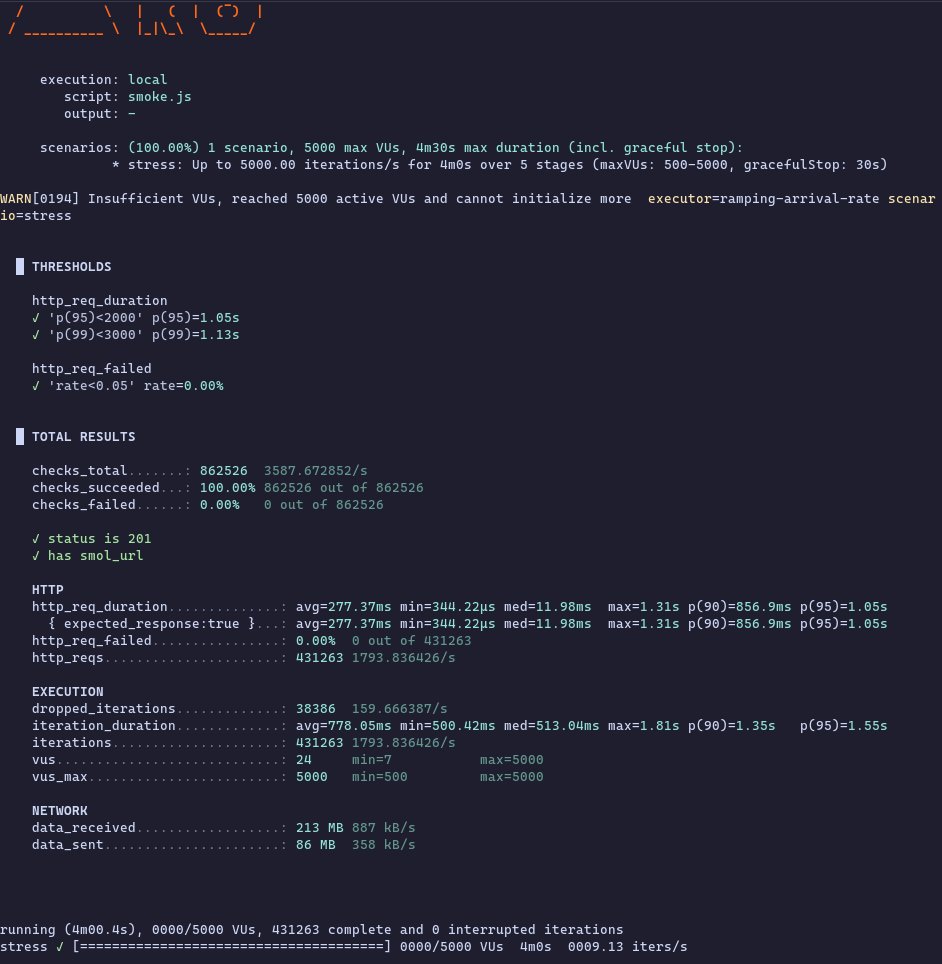
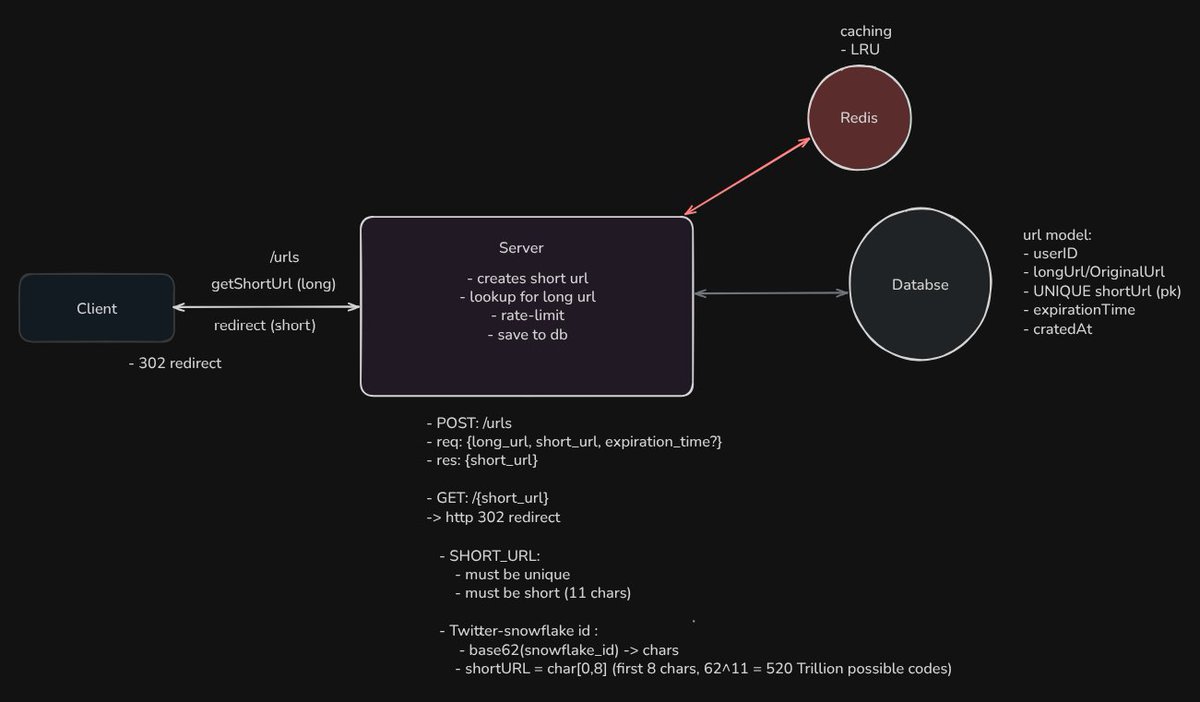
⚡ Got approx ~1800 RPS on my url-shortner, don't know how accurate this is, used grafana k6 ✅️ Here's my setup: - ran test locally (server running locally) - doing a POST req to the server - after generating short_url, writing it to db, returning the result to the frontend - ran the test for about 4 minutes, while ramping up RPS: 100(30s), 1000(1m),3000(1m),5000(1m), 0(30s) ✅️How shortening happens: - using twitter-snowflake ID-gen which are 64 bits - then base62 encode them, they give 11 chars consistently - indexing on short_url field & expire_at fields TODO: adding a GET endpoint to get 302 temp-redirect & will also add redis for reads About the constraints, don't have anything in particular like, 1B urls, 100MAU etc...just building this out of curiosity. tech stack: - golang, echo, postgres any comments mr. gophers ? like, is this sort of bench-marking even mean something ? @0xlelouch_ @MarioVerbelen @arpit_bhayani
English

If a single call is also slow, then you should measure things to get a real picture of where the time is lost.
I do that with otel tracing and add those to functions, now a poor man's way could be just set a start time on entering a function and defer time.Since(start) and log that
in that way you can compare the time taken per function and see if it's your DB, the hashing, extra call to redis, ...
English
⚡ Got approx ~1800 RPS on my url-shortner, don't know how accurate this is, used grafana k6
✅️ Here's my setup:
- ran test locally (server running locally)
- doing a POST req to the server
- after generating short_url, writing it to db, returning the result to the frontend
- ran the test for about 4 minutes, while ramping up RPS: 100(30s), 1000(1m),3000(1m),5000(1m), 0(30s)
✅️How shortening happens:
- using twitter-snowflake ID-gen which are 64 bits
- then base62 encode them, they give 11 chars consistently
- indexing on short_url field & expire_at fields
TODO: adding a GET endpoint to get 302 temp-redirect & will also add redis for reads
About the constraints, don't have anything in particular like, 1B urls, 100MAU etc...just building this out of curiosity.
tech stack:
- golang, echo, postgres
any comments mr. gophers ? like, is this sort of bench-marking even mean something ? @0xlelouch_ @MarioVerbelen @arpit_bhayani
English
@MarioVerbelen although it works, 277ms avg latency is high, even though I'm just making req to my server running locally.
what parts should I give a look at ?
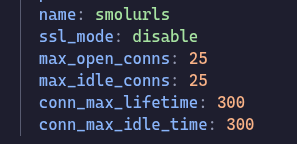
these are my postgres db configs
is this the bottleneck ?🤔
each request gets it's own goroutine
English
Maybe use a better tool than testing Go with js
I'm not sure where the bottleneck is, but my first guess is the load test itself and probably next in line will be the DB
seeing 277 ms on avg is slow compared to the 344 μs on minimum
So depending what brings your curiosity, it works but not if someone want's to scale this to 1B of urls.
English

completed virtual memory today
things are real dense here , anyway , enjoying it , also getting exhausted after a few focused hours tho
Scarlett@Zyara_1ot
Spent the whole day reading about CPU caches from this paper. Its super dense,there’s so much packed into it that I’ll definitely need to revisit the cache section again tomorrow or I’ll forget parts of it. Skipped the RAM section for now will read it after revisiting cache
English

Some cool technical blogs i have saved in my shelf:
- namespaces and cgroups(read this to understand how containers actually work): blog.nginx.org/blog/what-are-…
- Nvme vs SATA: ibm.com/think/topics/n…
- User Management and File Permissions in Linux by @shivambhadani_ : @shivambhadani_/mastering-user-management-and-file-permissions-in-linux-a-comprehensive-guide-61ed74fd6dc3" target="_blank" rel="nofollow noopener">medium.com/@shivambhadani…
- heartbeats in distributed systems by @arpit_bhayani : arpitbhayani.me/blogs/heartbea…
- Scaling slack's job queue: slack.engineering/scaling-slacks…
- Why gRPC Uses HTTP2 by arpit bhayani by @arpit_bhayani: arpitbhayani.me/blogs/grpc-htt…
- What Really Happens When You Turn On Hotspot by @VazeKshitij: @kshitijvaze/what-really-happens-when-you-turn-on-hotspot-635824d68f8a" target="_blank" rel="nofollow noopener">medium.com/@kshitijvaze/w…
- TOON: The Data Format Changing How AI Agents Think: @kshitijvaze/lets-talk-about-network-address-translation-nat-bf7196acb2dd" target="_blank" rel="nofollow noopener">medium.com/@kshitijvaze/l…
- Network Address Translation by @VazeKshitij: @kshitijvaze/lets-talk-about-network-address-translation-nat-bf7196acb2dd" target="_blank" rel="nofollow noopener">medium.com/@kshitijvaze/l…
- IPFS (InterPlanetary File System) protocol: docs.ipfs.tech
- WebTransport API: developer.mozilla.org/en-US/docs/Web…
- Redis 101 by @Hi_Mrinal: mrinalxdev.github.io/mrinalxblogs/b…
- Vector Database from a Beginners POV by @Hi_Mrinal: mrinalxdev.github.io/mrinalxblogs/b…
- Cache storage in Tanstack query: javascript.plainenglish.io/cache-storage-…
- Game theory behind prediction markets: x.com/Baheet_/status…
- Inside high frequency trading systems: levelup.gitconnected.com/inside-high-fr…
- when would you ever want a bubble sort?: buttondown.com/hillelwayne/ar…
- uptime engineer blogs by @AskYoshik: uptime.engineer
- It's 2026 just use postgres: tigerdata.com/blog/its-2026-…
- how computers pretend to be random by @devsterxyz: devsterxyz.medium.com/behind-the-coi…
- 2025 the year in LLM's: #the-year-of-gemini" target="_blank" rel="nofollow noopener">simonwillison.net/2025/Dec/31/th…
- Infiltrating the AWS Console Supply Chain and Hijacking AWS GitHub Repositories via CodeBuild: wiz.io/blog/wiz-resea…
- Advanced DNS Protection: mitigating sophisticated DNS DDoS attacks: blog.cloudflare.com/advanced-dns-p…
- Redis is more than just a cache: x.com/KartikeyStack/…
- consistent hashing by @AtharvaXDevs: x.com/AtharvaXDevs/s…
- Building a Distributed Lock Service That Actually Works by @pixperk: pixperk.tech/blog/lowkey-di…
- Building a C compiler with a team of parallel Claudes: anthropic.com/engineering/bu…
- youtube architecture by @AskYoshik: x.com/AskYoshik/stat…
- Interpreting typescript: notes.eatonphil.com/interpreting-t…
- hands on guide to k8s CRDs: @muppedaanvesh/a-hand-on-guide-to-kubernetes-custom-resource-definitions-crds-with-a-practical-example-%EF%B8%8F-84094861e90b" target="_blank" rel="nofollow noopener">medium.com/@muppedaanvesh…
- uber architecture: x.com/AskYoshik/stat…
- The famous or-done chanel pattern in GO by @AtharvaXDevs: x.com/AtharvaXDevs/s…
Souryadip Banerjee@souryadip224
@kartikktwt @theEquinoxDev cf blogs or some other technical blogs ? I also want to read technical blogs but currently I'm not sure where to find them . Can you help ?
English
@Zyara_1ot (no. of bookmark+ no. of likes) ∝ 1 / ( no. of people actually reading the paper)
English
Spent the whole day reading about CPU caches from this paper. Its super dense,there’s so much packed into it that I’ll definitely need to revisit the cache section again tomorrow or I’ll forget parts of it.
Skipped the RAM section for now will read it after revisiting cache

English
@kapilansh_twt for future posts:
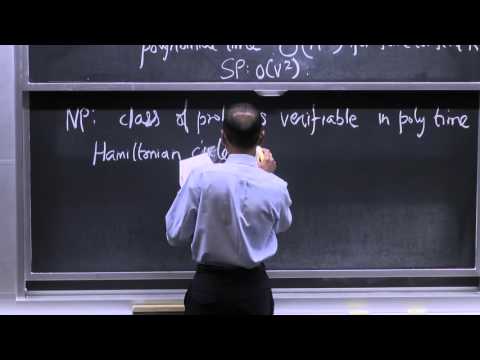
algorithms: youtube.com/watch?v=2P-yW7…
linear algebra:youtube.com/watch?v=7UJ4CF…
YouTube

YouTube
Català

Most devs learn backend by copying tutorials.
They can build. But they can't explain "why anything works".
That's the difference nobody talks about.
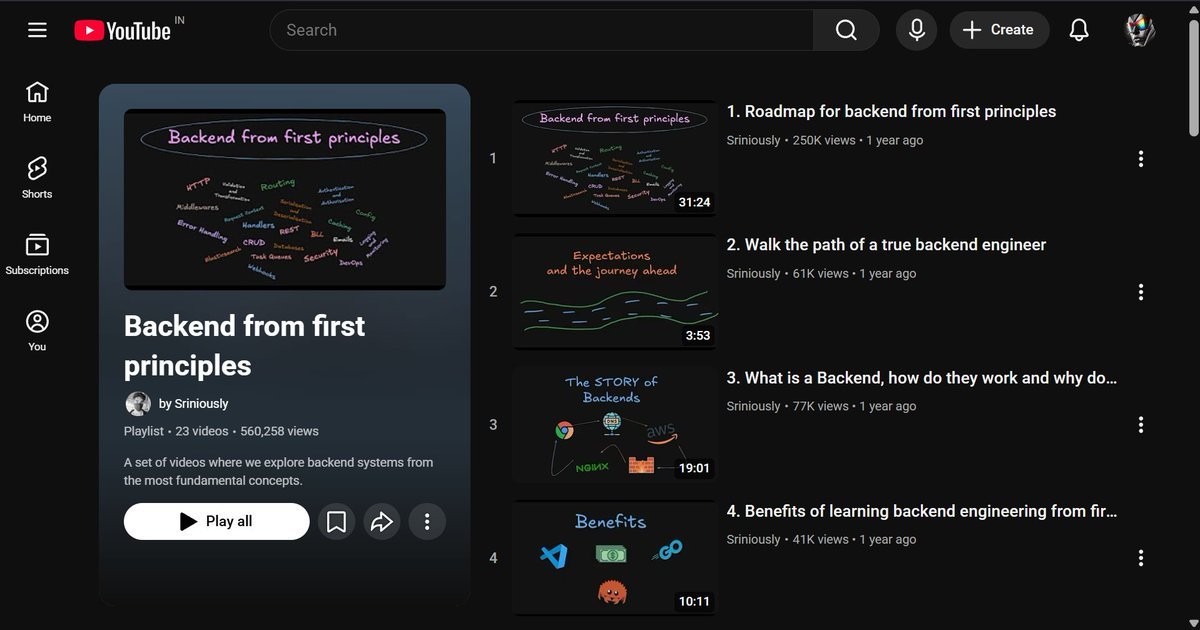
"Backend from First Principles" by Sriniously fixes exactly that.
23 videos. Free on YouTube.
It covers everything underneath the surface:
• HTTP & Routing - what actually happens before your handler even runs
• Middlewares - why order matters more than you think
• Auth & Security - not just "add JWT" but why it works
• Task Queues & Webhooks - how real systems handle async without breaking
• Caching & Databases - the decisions that make or break performance at scale
This isn't another "build a REST API" tutorial.
This is backend "the way seniors actually think about it".
Most of your competition hasn't found this yet.
Save it before you write another endpoint you don't fully understand.
English
@AutisticOvrflow let's say I wanna run a postgres container, a redis container, app container etc
English

@AutisticOvrflow yeah, but most services provide docker images...I can just install the image & run the services (poor man's way)
English
@mistic_twt Never cared for it... I hate Docker, always somehow managed to never really touch it seriously, LLMs help with that nowadays haha
For my own stuff I use NixOS+Go which solves the declared+reproducible environment bit and I don't really bother with containerization tbh
English