naj
370 posts

naj
@naz_09
founder of https://t.co/SOrnOZ2Gbb - Deploy OpenClaw agents to web and WhatsApp instantly. Ask me anything! https://t.co/iLGHHMYfmJ

Programming was deeply satisfying work to me. Work for hours/days before getting the payoff of the code working well on your machine. I’m feeling so much friction now to open the editor and do this kind of task by hand, but also increasingly depressed with the nature of work in an AI assisted dev workflow. Back and forth prompting seems to eat at my soul. Need to find a balance that brings back some of the toil.

Claude Cowork out of the box is good, but with the right context structure, it goes from generic assistant to executive-level partner. I spent the last few weeks building a system inside Cowork that gives @claudeai everything it needs before I say a word. Who I am. How I write. What I'm working on. My team. My calendar. My priorities. All of it. Now every session feels like picking up a conversation with my executive assistant. The difference is context. Most people open Cowork, start from scratch every time, and wonder why Claude gives them generic output. It's not a Claude problem. It's a setup problem. Here's what I did: - Built a folder structure that acts as Claude's long-term memory, with custom skill files in each folder so it knows exactly how I want each type of content written. -Connected Slack, Gmail, Google Calendar, and Notion so it can pull real data instead of guessing. -Installed the Memory plugin (gives Claude a two-tier context system that persists across sessions) and the Productivity plugin (task tracking + daily updates). That combination changed everything. Content drafts that used to take 3 rounds now land on the first try. Meeting prep, email replies, task management. All better because Claude already knows the context. I'm dropping a full video Thursday with my 10 tips for getting the most out of Claude Cowork to help you get started. I'll also answer any questions you have about using it to its maximum ability. Comment below. Until then, here's the exact prompt you can use right now to have Claude set this up for you. Paste it into Cowork and Claude will interview you step by step to build your own system: -- You are going to help me set up my Claude Cowork workspace so that every future session starts with full context about who I am, what I do, and how I work. We're building a "brain" that makes you useful from the first message. Here's how this works. You're going to interview me in phases. Ask me questions, then build the files based on my answers. Don't rush. Don't assume. Ask before you build. Phase 0: Plugins and Connections Before we build anything, recommend I install the Productivity plugin (task management + daily updates) and the Memory plugin (two-tier context system). Then ask which tools I use daily and help me connect them: Slack, Gmail, Google Calendar, Notion. The more tools connected, the more useful this system becomes. Phase 1: About Me Interview me to create an about-me.md file. Ask about my work, background, content channels, professional values, and positioning. Create the file, show it to me, and get my approval before moving on. Phase 2: Brand Voice Analyze any content I've already created. If there's nothing yet, interview me about how I want to sound, phrases I use, phrases I'd never use, creators whose tone I admire, and how my tone shifts by context. Create a brand-voice.md file with voice rules, tone by context, dos and don'ts. Get approval. Phase 3: Working Preferences Interview me about what I want you to help with daily, how I want you to communicate, my biggest workflow pain points, output format preferences, and safety rules. Create a working-preferences.md file. Get approval. Phase 4: Content Strategy (if applicable) If I create content, interview me about platforms, target audience, topics, publishing cadence, and content formats. For each platform, ask if I have existing skill files. If not, offer to create them. Create a content-strategy.md file. Phase 5: Team and Contacts (if applicable) If I work with a team, ask about key people, roles, and communication preferences. Check connected tools for team data. Create a team-members.md file. Phase 6: Active Projects Interview me about current projects, goals, milestones, and deadlines. Create individual project files in a Current Projects folder. Phase 7: Memory System Update CLAUDE.md with a hot cache of everything we've built. Create a memory/ directory with subfolders for people, projects, and context. Add a glossary.md for acronyms and internal terms. Phase 8: Skill Files Review everything. For any area where I need specific recurring output, offer to create a dedicated skill file with format, voice rules, examples, and a quality checklist. Rules: Interview me one phase at a time. Show each file before saving. If unsure, ask. Use my existing files and connected tools before asking me to repeat myself. Keep files concise. File names: lowercase, hyphens, .md format. Save everything to my workspace folder. Start with Phase 0.

how couples have met over the last 9 decades
It is amazing how many companies I talk to STILL have AI effectively blocked by IT & legal departments for out-of-date reasons when many companies in highly regulated industries have figured out ways to deploy enterprise ChatGPT, Claude & Gemini without any apparent problem.

Introducing Cinematic Video Overviews, the next evolution of the NotebookLM Studio. Unlike standard templates, these are powered by a novel combination of our most advanced models to create bespoke, immersive videos from your sources. Rolling out now for Ultra users in English!







when was your favorite time when the original actor of something voiced a parody of their source ill start




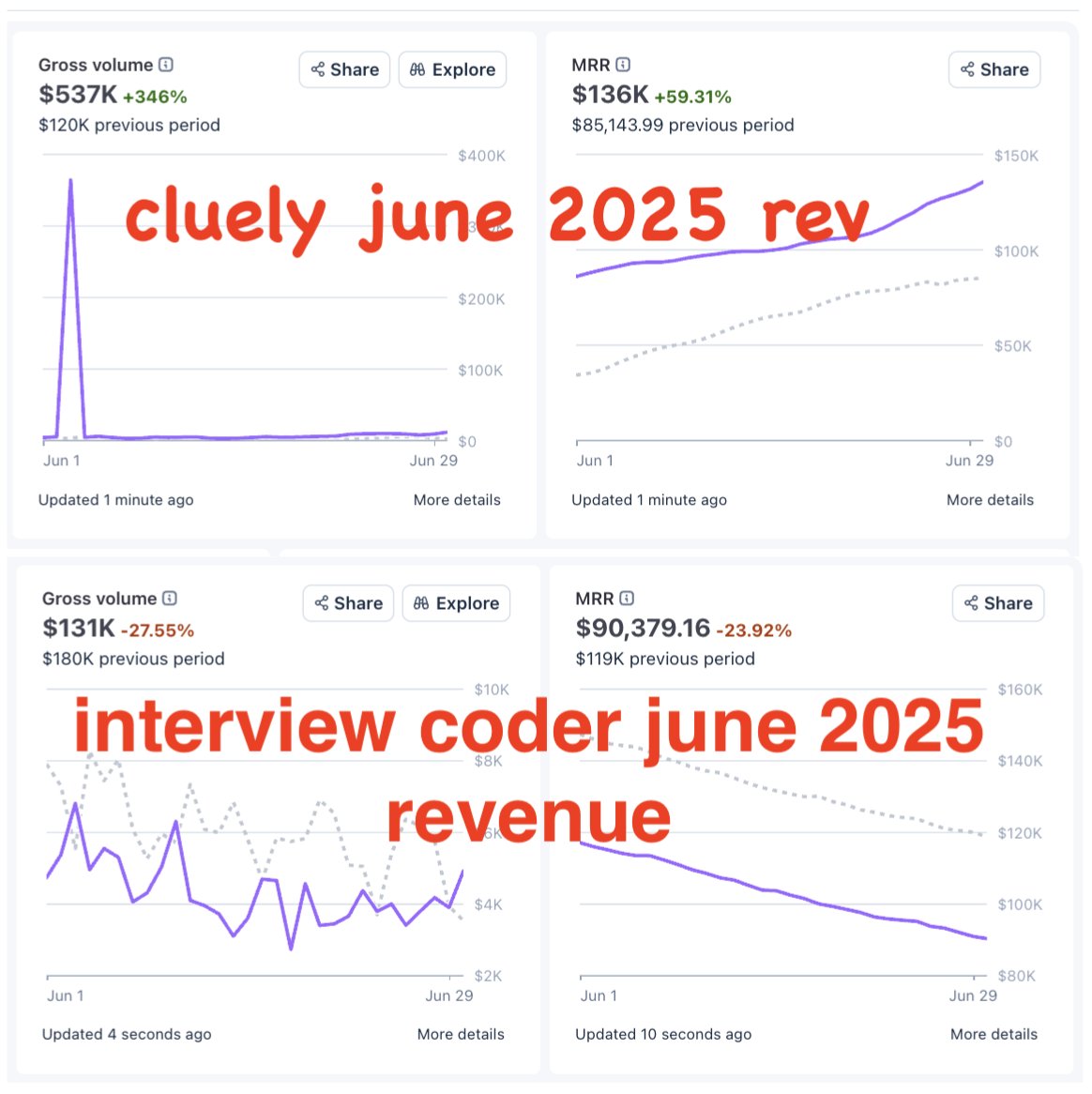
this must have been a straight up lie right? at a $20/month sub they would have needed 29166 paid subscribers to justify this no amount of attention can get that many people to open their wallets when you don’t have a stable and working product