Nile

517 posts

Nile banner
Nile

Nile

@niledatabase

PostgreSQL reengineered for multi-tenant apps 🇳 https://t.co/GtzbJHUZdf 🌟https://t.co/z2bjQ0WQlF 📹 https://t.co/b66eeQjeNM 💬https://t.co/kxPgnbSyud

Remote Katılım Mart 2023
45 Takip Edilen2.3K Takipçiler
Sabitlenmiş Tweet
Nile
Nile@niledatabase·
✨We are finally excited to go live today! Nile is a Postgres platform to ship multi-tenant AI applications - fast, safe, and limitless thenile.dev Nile decouples storage from compute, virtualizes tenants, and supports vertical and horizontal scaling globally to provide 1. Unlimited Postgres databases, Unlimited virtual tenant databases 2. Customer-specific vector embeddings at 10x lower cost 3. Secure isolation for customer's data and embeddings 4. Autoscale to millions of tenants and billions of embedding 5. Place tenants on serverless or provisioned compute - globally 6. Tenant-level branching, backups, schema migration, and insights
English
1
11
62
19.1K
Nile retweetledi
Ram
Ram@sriramsubram·
@niledatabase is looking to hire strong cloud engineers with expertise in building control planes, billing platforms, and orchestration engines. Experience integrating across the stack, including UI, is a plus. Message me if interested or if you know anyone who will be world-class at it.
English
0
5
9
3.4K
Nile retweetledi
Ali Tavallaie
Ali Tavallaie@AliTavallaie·
People ask why I recommend DBaaS like @niledatabase. Simple: managing databases, security, and infrastructure is time-consuming. Why handle operational burdens myself when I can focus on building and let experts manage the database for me?
English
2
1
9
1.8K
Nile retweetledi
Ram
Ram@sriramsubram·
If you want to achieve high availability, you cannot have long-running transactions
English
4
3
55
11.5K
Nile retweetledi
Ram
Ram@sriramsubram·
If you are a startup and your application is slow, your OLTP DB performance is not the problem 99.9% of the time. Perceived latency your user might see : 600-800ms for page load DB query latency : 5-10ms Focus on the right problem to optimize
English
5
1
18
5.1K
Nile retweetledi
Ram
Ram@sriramsubram·
Thoughts on building highly available systems. A bit long and a brain dump of things I have learnt over multiple decades of building large-scale databases and storage systems. At massive scale (10,000+ nodes), you will have failures all the time. Correlated failures are even more common. At this scale, 0 downtime across all customer fleet is not practical. All the focus should be to reduce blast radius. Reducing the number of customers impacted or reducing % of operations impacted for a specific customer is blast radius mgmt Here are some techniques to think about when you design systems to be fault tolerant 1. If an instance crashes (lower blast radius), you typically fail over to another instance. For stateful systems, this is achieved through replication. For stateless, it is about rebalancing connections to other available instances. It gets tricky to re-establish connections if the connections are stateful. If an instance is serving traffic for multiple customers, you don't want to failover all the load to another instance and saturate the other node. You want to redistribute the load across multiple instances. 2. A particular subsystem of an instance (lower blast radius) can fail (for eg. a specific volume). You typically kill the instance and failover to another in this case as well. It is better to have full failure than dealing with partial failures. The failover rules of 1 applies here. 3. Multiple instances can fail at the same time (medium blast radius). For stateful systems, it boils down to how many replicas you would want to have. It becomes a cost vs availability question. There is also a latency issue. With replication, your latency for writes will be the latency of the slowest replica in the write quorum. More replicas increases the probability of the quorum having atleast one replica that is slow. For stateless, you would need enough capacity to take the load of the failed instances. A good way to model your system is to decide how many correlated failures should it withstand. N<=2 is a system that will be available for atmost 2 instance failures. One interesting point here is that you can apply interesting blast radius techniques in the cloud to ensure you can minimize correlated failures. For example, AWS EC2 has placement groups. You can have the replicas on different placement groups and this ensures that the replicas are all on different hardware. 4. Bare metal machines can fail (medium blast radius). You can host multiple VMs on a single bare metal machine for cost efficiency. The blast radius is much higher when this happens and you would need the ability to fail over to different VMs on different bare metal machines to absorb the load. The more the machines that can absorb the load, the easier the fail over will be. This has a tradeoff with what steady state utilization you want to maintain for each bare metal machine. 5. Entire zone and regions can fail (high blast radius). This requires zonal fail overs and regional fail overs. Regional failover without dataloss is possible if you do sync replication across regions but in most cases it is not practical. For cross zone replication, you want the client to also fail over to the same zone to avoid cross zone network cost. This is more of an issue if you are dealing with high bandwidth services like Kafka. 6. Networks can have partial and full failures (high blast radius). Partial failures or network partitions are some of the hardest to design for. Your internal health checks could think everything is fine while customers cannot connect. You always want a health check that connects from the outside. When networks fail, the hard part is detecting it quickly. Once you detect it, failover mechanisms are the standard process. 7. Global systems like DNS failures (high blast radius) are horrible in causing some of the biggest outages. You typically want to have redundancy for these global systems to ensure your system is resilient to these failures 8. Config, software and maintenance changes (low to high blast radius depending on how you design your system) By far the most common reasons for service impact is when you roll out new changes. You want to divide your fleet into cells and have strong control over the order of deployment and how you test them after every cell is upgraded. In pretty much all my past companies, we had to build a large scale fleet mgr that automated the ability to push a new config, software or perform maintenance (security patches, os upgrades) one cell at a time. You also want the ability to rollback. The most critical thing is to rollback any change without compatibility issues to ensure the failure time is minimized. 9. Kubernetes failures (low to high blast radius depending on how many you pack) K8s manages 1000's of VMs (or bare metals) and a single K8s going down definitely impacts a large number of customers. You typically want to have k8s healthchecks and perform failover. This is a bit tricky since you want to build the ability to failover the instances of one k8s across multiple k8s for good load mgmt. You could keep some empty k8s clusters to take ownership when such failures happen. 10. External systems (low to high depending on how you design) Your system will depend on many external systems like auth, storage, certificates, metrics etc. You have to design your system in a way where non critical external service failures should never impact your quality of service. For example, failure of usage tracking service should not impact your core service. You also want to keep the number of external system dependencies to a minimum. For critical third party systems, you need to have redundancy and also ensure the third party provides a high availability guarantee. 11. Data plane vs control plane Control plane operations are metadata operations that help with system mgmt. Data plane operations are the actual read/write of business data. For example, with DBs, provisioning DB is a control plane operation. Writing and reading data is a data plane operation. There are also levels of control plane operations (turtles all the way). Global control plane operations, regional control plane operations and per-system level control plane operations. Isolating these and ensure their failures dont impact the data plane operations are essential. There are probably a lot more that I am not capturing here but it is important to understand that it is very hard to categorize a system as available or not available. There are many levels of failures and blast radius determines that number of customers impacted. Build great resilient systems and understand the tradeoffs you make with cost, time and availability.
English
3
29
222
18.4K
Nile retweetledi
Ram
Ram@sriramsubram·
You should not use MCP against your production database! MCP is useful during development l/testing and it ends there
English
2
1
13
15.5K
Nile retweetledi
Ram
Ram@sriramsubram·
There are different reasons/benefits with every OLTP DB architecture. I would classify them into largely three types and I have run and managed all three versions in my lifetime. Pick your option based on what your company needs 1. Full local storage. This is kind of how we ran DBs during the early days of cloud except that local storage capacity has improved substantially. The instance stores all data locally and replicates to other replicas for durability. Writes have to sync replicate to other replicas before success. Reads can be really fast by reading from local SSD Pros: A. Best latency for reads B. Predictable performance for reads Cons: A. You have to use at least three nodes for any setup since local storage will be lost. B. Your avg cost is high since you have to over provision for peak storage/compute. You can pick from a few compute/storage options C. Max storage you can have is subjected to the local disk size. You then have to move the data to another instance when you need more storage. You cannot scale to arbitrary large amount of storage since you are subjected to the max local storage the cloud vendors give you (pretty large for most usecases) D. Cannot achieve instant scale up of storage or compute. You have to plan in advance and give enough buffer to move data to another configuration E. Don’t get to support things like branching, read replicas using same storage etc 2. EBS based storage. This decouples storage from compute using remote block storage. This model has been adopted by most cloud providers over the years to solve some of the problems with one but had trade offs Writes have to be written remotely. Reads can be read from local memory or has to read remotely if it is not in the cache Pros A. You can scale and pay for storage you use. You don’t have to provision for peak. Avg cost you pay for storage is less. B. You can dynamically scale out storage instantly C. You don’t need three nodes for durability. EBS already provides you that. You still need three nodes for availability and 0 downtime failover for production DBs Cons A. Latency for reads is not predictable. Depends on if the data is in cache or remote. The IOPS have significantly increased over time though but expensive B. You cannot instantly scale compute without some downtime. EBS does not allow you to mount multiple computes to the same volume to help switch. Mounting a volume can take hundreds of seconds C. The absolute cost of EBS is expensive compared to building your own distributed storage but that is not easy D. Things like instant branching, time travel or using the same storage for multiple read replicas is not possible 3. Object storage based. Writes are still on a faster remote storage medium. Can be own WAL storage or S3 one zone if you are on only one cloud or single zone. Reads are tiered. Reads can be from local memory, local SSD, remote cache or S3. Pros: A. Instant vertical scaling of compute since it is stateless and does not rely on block storage. Does not need data moving for more compute or storage capacity B. Better read performance than EBS since you can also use additional local SSD for caching. Read latency is based on how much you want to cache C. Ability to use cheap storage like S3 for less frequently used data. Works out cheaper than EBS from what I have seen D. Pay for the storage you use and does not require provisioning for peak or moving data E. Get the ability to support things like instant branching, share same copy for read replicas or time travel instantly if you choose to build a storage system that supports that F. Does not three nodes for durability. For high availability, you would still need three nodes Cons A. Latency depends on caching. So, you can get low latency but have to cache your working set. Still hard to achieve 100% predictability since you have to fetch data from remote cache sometimes Overall picking a DB is more nuanced and really depends on companies requirements and what latencies they can tolerate. It is possible to achieve single digit latencies in all approaches but you could see double digit latencies sometimes in 2 and 3 (the advancement in networking will influence this a lot in the future). There are many operational and cost benefits in 2 and 3. It is possible to achieve high availability in all three versions. There are more variations to these architectures but that is for another day
Sam Lambert@samlambert

The similarity between Neon and Aurora's results shows that the performance problem with separating storage and compute is fundamental.

English
9
24
217
38.1K
Nile retweetledi
Gwen (Chen) Shapira
Gwen (Chen) Shapira@gwenshap·
Learning Postgres: from “SELECT ” to "reading the source code for fun". Here’s my favorite list of resources to level up your PostgreSQL skills. No matter if you are a total beginner or quite experienced - there is always more to discover. 🔹 Beginner: - The official PostgreSQL tutorial (surprisingly good) - Select Star SQL (Not Postgres, but totally underrated for SQL) - pgExercises - pgTune (first-pass help in tuning PG configs) 🔹 Intermediate: - Learn EXPLAIN, ANALYZE, cost estimates and planning. - Learn transaction isolation and vacuum - Use pg_stat_statements and auto_explain for diagnosis - Visualizers: Depesz, Pev2, Dalibo, pgMustard - Diagnostics tools: HypoPG, POWA, pgBadger - Learn more about: Index types, JSONB, full-text search, vectors 🔹 Advanced - Read The Internals of PostgreSQL (Suzuki) and Postgres 14 Internals (Postgres Pros) – Watch PGConf talks for internals and future direction - Follow the developer mailing list and the commits - Write an extension or fix a bug – Bonus: Chat with Postgres hackers on Discord What helped you go from novice to power user?
English
3
24
211
13.4K
Nile retweetledi
Gwen (Chen) Shapira
Gwen (Chen) Shapira@gwenshap·
You think 'SELECT 1;' is simple? Let’s walk through everything that happens just to return the number 1 from an existing connection to Postgres. 1. Client sends the query. Whether you're using psql, JDBC, or a web app — it’s a client over TCP. Likely TLS. Postgres has "simple" and "extended" protocols. Lets assume the client uses the simple protocol to send a Query message with the string SELECT 1;. 2. Postgres receives the packet. The backend process (one per connection) is waiting on a socket. It parses the message, strips the semicolon, and begins query processing. 3. Parse stage Even for SELECT 1, Postgres builds a parse tree. This includes a SelectStmt, a ResTarget, and a Constant. 4. Rewrite stage This is where views and rewrite rules are resolved. Even simple queries go through this machinery, though nothing changes in our case. 5. Analyze stage Types are validated, functions resolved and table/column names are replaced with their identifiers. 5. Planner/Optimizer Yes, even SELECT 1 gets planned. This is where statistics (if available) get evaluated and Postgres decides how to execute the query. In this case, the plan is simple. No scans, no joins, just a constant. 6. Executor The executor evaluates the constant, formats the result (1 as a text string), and prepares the output. 7. Send response The server sends a RowDescription, a DataRow, and a CommandComplete over the wire. Everything is encoded in Postgres's binary or text format — depending on the client’s preferences. 8. Idle again Postgres goes back to idle state, ready for the next query. But it keeps your session alive — complete with transaction state, GUC settings, and locks (if any). All that… to give you one little 1. hashtag#PostgreSQL hashtag#Databases hashtag#TechDeepDive
Gwen (Chen) Shapira tweet media
English
1
10
59
3.2K
Nile retweetledi
Gwen (Chen) Shapira
Gwen (Chen) Shapira@gwenshap·
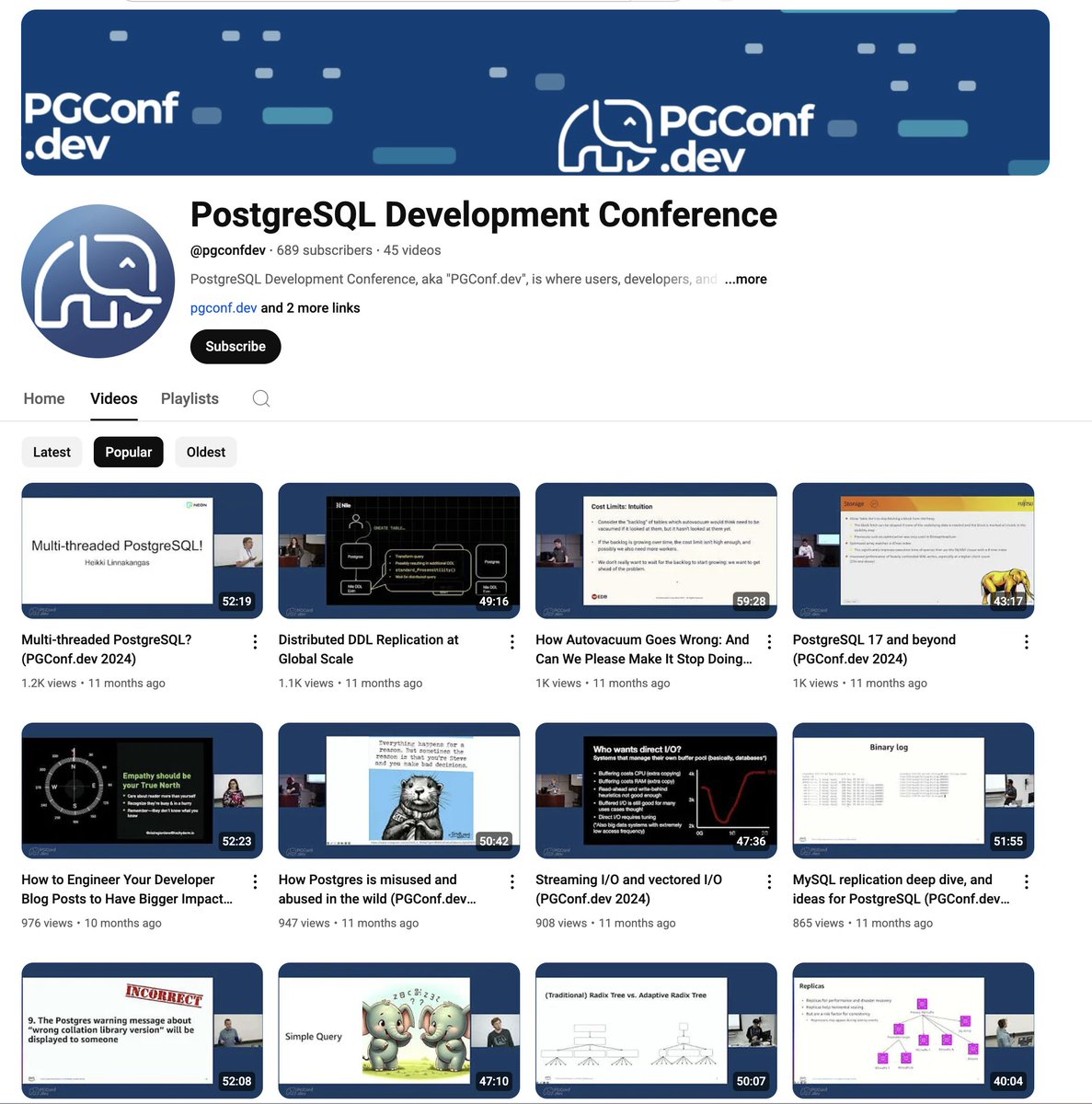
Videos from PgConfDev are starting to show up on YouTube! Great time to catch up on both the new content and the amazing talks from past events. You can start with my talk: "Scaling Postgres to Million Tenants"
Gwen (Chen) Shapira tweet mediaGwen (Chen) Shapira tweet media
English
0
25
118
5.4K
Nile retweetledi
Gwen (Chen) Shapira
Gwen (Chen) Shapira@gwenshap·
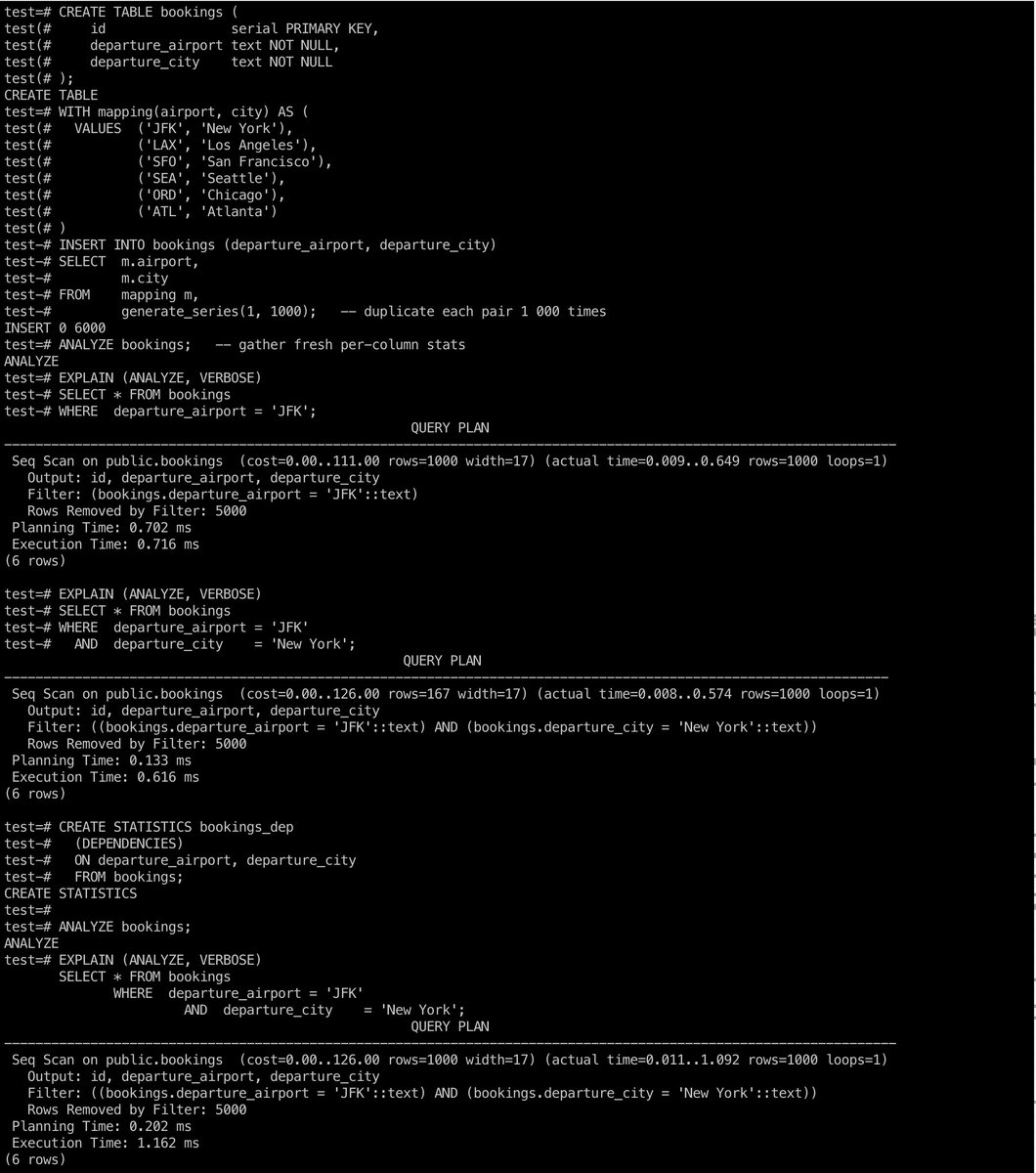
❓Why is Postgres still wrong about row counts even after ANALYZE? ❗️One possible issue can be "dependent columns". Per-column stats assume independence. If columns are related, the planner will over/under estimate and may choose a bad plan. For example: – Predicate: departure_airport = 'JFK' AND departure_city = 'NYC' – Reality: JFK airport is always in NYC – Planner’s belief: Two separate filters → tiny intersection → very low cardinality The solution is to teach Postgres about the dependency by creating your own multi-column statistics (MCV): 1️⃣ CREATE STATISTICS bookings_dep (DEPENDENCIES) ON departure_airport, departure_city FROM bookings; 2️⃣ ANALYZE bookings; That captures the conditional probability matrix—row estimate collapses, index scan chosen. The screenshot shows how the original row count estimate is 10% of the real row count, and how the custom statistics fix the issue.
Gwen (Chen) Shapira tweet media
English
1
16
67
5.2K
Nile retweetledi
Gwen (Chen) Shapira
Gwen (Chen) Shapira@gwenshap·
“Why is Postgres seq-scanning rather than use this index?” 🤯 Short answer: the planner thinks that index won’t help (or can’t use it). Longer answer—5 usual suspects 👇 1️⃣ Stale stats: ANALYZE hasn’t run; filter looks un-selective. 2️⃣ Truly un-selective: Stats are right; scan really is cheaper. 3️⃣ Complex estimates: Many joins / ORs / CTE / functions scramble row estimates. 4️⃣ Handcuffs on: RLS limits optimizations or GUCs forbid the path. 5️⃣ Planner bugs: Very rare but... 🛠️ Debug flow: ANALYZE ➜ rethink predicate ➜ simplify query ➜ audit policies & GUCs ➜ If still wrong, try pg_hint_plan (force an index to prove a point) or hypopg (hypothetical indexes) before filing a bug.
English
1
5
31
2.2K
Nile retweetledi
Gwen (Chen) Shapira
Gwen (Chen) Shapira@gwenshap·
🚨 New blog alert: Postgres 18 beta 1 was released last week, and includes native support for UUIDv7. Great opportunity to explain why UUIDv7 is a great fit for your database keys, and show you how to use them in PG18.
English
5
27
159
11.9K
Nile retweetledi
Gwen (Chen) Shapira
Gwen (Chen) Shapira@gwenshap·
🚨 PostgreSQL 18 Beta is here 🚨 Highlights: ⚡️ Async I/O (with io_uring) — 2–3x speedups on seq scans, vacuums 🔍 Skip scan + smarter OR/IN optimizations 🔄 Keep planner stats during major upgrades 🧬 uuidv7() and virtual generated columns 🔐 OAuth login 📊 EXPLAIN ANALYZE now shows I/O, CPU, WAL 🧱 Temporal constraints, LIKE on nondeterministic collation, casefolding 🧪 New wire protocol version: 3.2 (first since 2003!) Your mission, should you choose to accept it: Test the beta. Break things. Report bugs. Help shape Postgres 18.
English
9
48
285
17.4K
Nile retweetledi
Gwen (Chen) Shapira
Gwen (Chen) Shapira@gwenshap·
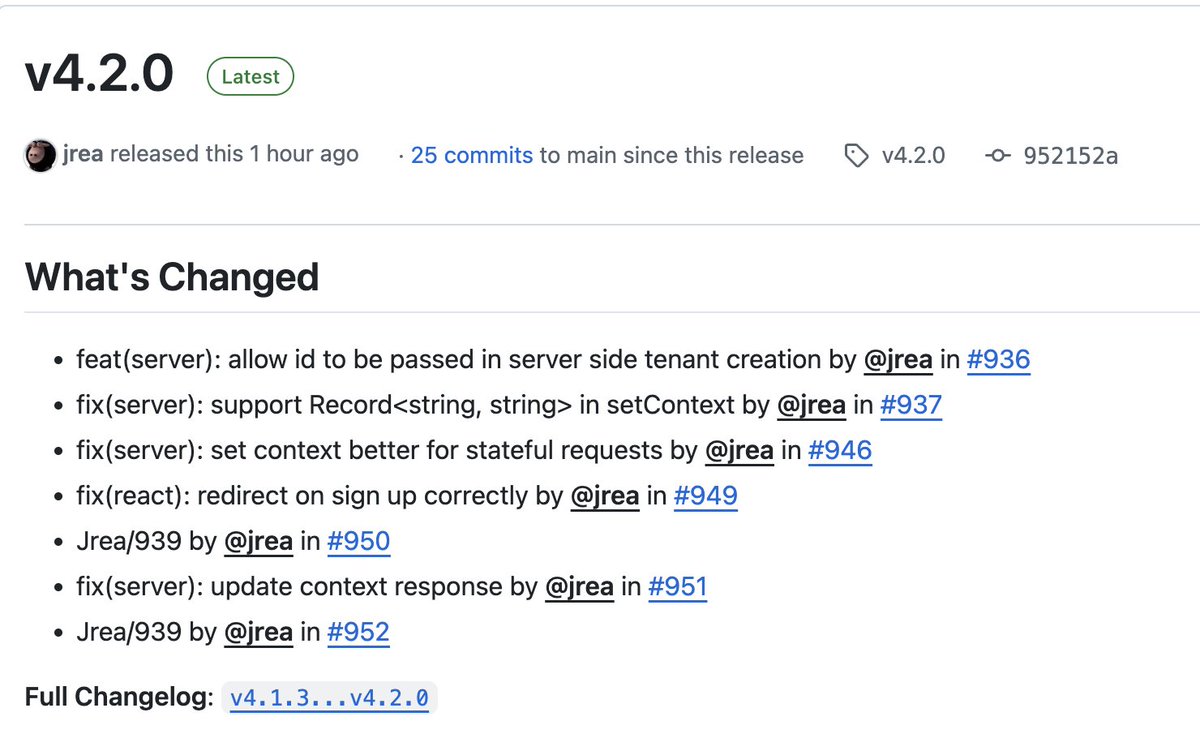
🚢 New release: NileJS v4.2.0: - Async route handlers with built-in context = smoother DX 📷👇 - You can now pass a custom tenant ID in createTenant Plus a bunch of bug fixes
Gwen (Chen) Shapira tweet mediaGwen (Chen) Shapira tweet media
English
1
2
4
1.2K