Olusola A.

183 posts

Olusola A. banner
Olusola A.

Olusola A.

@olusolautomates

Exploring automation systems that make work simpler, smarter, and more human.

Katılım Haziran 2012
151 Takip Edilen154 Takipçiler
Olusola A.
Olusola A.@olusolautomates·
Connect your CRM to the rest of your stack with Zapier and stop copying data by hand. Set up Zaps that sync new leads, deal updates, and customer activity from your CRM to the tools your team already uses: email for instant follow-up, calendar for bookings, Slack for alerts, spreadsheets for reporting, and invoicing tools for faster billing. This works with HubSpot, GHL, and many other CRMs, so your sales team can keep one source of truth while every system stays updated automatically. Less admin. Fewer missed handoffs. Faster sales cycles. #Zapier #CRM #Automation #SmallBusiness #AIAutomation
English
0
0
1
15
Olusola A.
Olusola A.@olusolautomates·
Are your managers spending hours every week pulling numbers, chasing updates, and formatting reports? Stop burning time on manual reporting. With Monday.com or n8n, you can automate weekly performance reports so they generate and hit inboxes every Friday morning without anyone lifting a finger. Track key metrics, pull data from your tools, compile the report, and send it automatically. That means less admin, fewer delays, and more time spent leading the team instead of assembling spreadsheets. If your weekly reporting still depends on manual copy and paste, it’s probably costing you more than you think. #Monday #n8n #Automation #Reporting #Productivity
English
0
0
1
24
Olusola A.
Olusola A.@olusolautomates·
Make vs Zapier in 2026: here’s the honest breakdown for small business owners. If you need advanced workflows, branching logic, and lower costs at scale, Make is hard to beat. Its visual builder gives you more control when automations get complex. If you want speed, simplicity, and the biggest app library, Zapier still wins. It’s easier to set up, easier to hand off, and better for teams that want quick wins without a learning curve. My rule: choose Make for complex, high-volume automations. Choose Zapier for straightforward business processes and broad app coverage. The best tool depends on your business size, workflow complexity, and how much time you want to spend managing automations. #MakeCom #Zapier #Automation #NoCode #AITools
English
1
0
0
29
Olusola A.
Olusola A.@olusolautomates·
Want to automate client onboarding with Airtable? Here’s a simple hands-free flow for freelancers and agencies: 1. A client fills out your intake form 2. Airtable instantly creates a new record 3. A welcome email goes out automatically 4. Your onboarding tasks get created for your team 5. A calendar invite is sent without you touching anything The result: faster response times, fewer missed steps, and a smoother first impression for every client. Set it up once, and every new client moves through the same process while you stay focused on delivery instead of admin. #Airtable #Automation #ClientOnboarding #NoCode #SmallBusiness
English
0
0
2
77
Olusola A.
Olusola A.@olusolautomates·
Small business owners are often paying for 7 separate tools when GoHighLevel can replace them with one platform. GHL combines CRM, email marketing, SMS, funnels, scheduling, reputation management, and reporting in one place. That means fewer logins, less tech chaos, and lower monthly software costs. Instead of stitching together apps that don’t talk to each other, you get a system built to capture leads, follow up automatically, book appointments, manage reviews, and track results from one dashboard. For many businesses, the ROI is simple: reduce software spend, save time, and close more deals with better automation. One platform. Less overhead. More growth. #GoHighLevel #GHL #CRM #Automation #SmallBusiness
English
0
0
0
40
Olusola A.
Olusola A.@olusolautomates·
n8n is an open-source automation platform built for developers and technical founders who want more than a locked-down SaaS workflow tool. You can self-host it, customize it deeply, and avoid per-task pricing that gets expensive as your automations scale. That matters when you need full control over data, infrastructure, logic, and integrations. Why developers are switching to n8n: it gives you the flexibility of code with the speed of visual automation. You can build AI workflows, connect APIs, create complex branching logic, and keep everything running on your own stack. If you want automation without vendor lock-in, n8n is worth a close look. #n8n #OpenSource #Automation #AIAutomation #NoCode
English
0
0
0
71
Olusola A.
Olusola A.@olusolautomates·
5 Monday.com automations every project manager needs If you manage projects, these 5 automations will save hours every week: 1. Auto-assign tasks when a status changes so work moves instantly to the right owner 2. Notify your team when a deadline is approaching so nothing slips through the cracks 3. Sync Monday.com with Google Calendar to keep schedules aligned across tools 4. Create recurring tasks for weekly check-ins, standups, and routine deliverables 5. Send weekly progress reports automatically so stakeholders stay updated without extra admin Step-by-step, each one removes manual follow-up and keeps projects moving faster with less effort. Which one would you set up first? #Monday #MondayCom #ProjectManagement #Automation #Productivity
English
0
0
0
41
Olusola A.
Olusola A.@olusolautomates·
Your leads aren’t disappearing because they’re bad leads. They’re slipping through because follow-up is manual, slow, and inconsistent. A form gets submitted. Someone on the team says they’ll respond. Then a few hours pass. Maybe a day. By then, the lead has already talked to a competitor. That’s where automation saves the deal. With GHL or Zapier, you can trigger an instant follow-up sequence the moment a lead submits a form. Auto-send the text. Notify the rep. Start the email sequence. Book the next step while the lead is still interested. For sales teams and SMBs, speed matters. The first business to respond usually gets the conversation. Stop relying on memory and messy handoffs. Build a system that follows up every time. #GHL #LeadAutomation #GoHighLevel #Zapier #SmallBusiness
English
0
0
0
25
Olusola A.
Olusola A.@olusolautomates·
Airtable + Make can replace 3 separate tools in your business without making your stack messy. Use Airtable as your single database for clients, deals, tasks, and status updates. Then connect it to Make to automate your client management workflow: new lead comes in → Airtable creates the record deal closes → task list and onboarding steps are triggered project status changes → reports update automatically That means you can skip a separate CRM, project tracker, and reporting tool because everything lives in one system and updates itself. For small business owners, this means less software to manage, fewer manual updates, and a cleaner view of every client from first contact to final delivery. #Airtable #MakeCom #Automation #SmallBusiness #NoCode
English
0
0
1
32
Olusola A.
Olusola A.@olusolautomates·
Still sending invoices manually? That’s not just tedious. It’s money leaking out of your business. Freelancers and SMBs lose hours every week chasing unpaid invoices, sending reminders, and following up on “just checking in” emails. Meanwhile, late payments quietly kill cash flow. With GHL or Zapier, you can automate the whole process: invoice creation gets triggered when a job is marked complete, reminders go out automatically before and after the due date, and follow-ups keep happening until payment lands. Realistically, this can save 5 to 10 hours a month, sometimes more, while reducing overdue invoices and improving collections without extra effort. Stop doing admin work like it’s 2015. Automate it, get paid faster, and protect your cash flow. #GHL #GoHighLevel #Automation #InvoiceAutomation #SmallBusiness
English
0
0
0
85
Olusola A.
Olusola A.@olusolautomates·
Make.com is a visual automation platform that lets small business owners build workflows by dragging and dropping steps instead of coding. It connects with 1,000+ apps, so you can automate things like lead capture, follow-ups, invoicing, reports, and team notifications in one place. Why do small businesses love it? Because it makes automation accessible to non-technical teams and is often more cost-effective than Zapier when you need complex workflows with multiple steps. If you want to save time, reduce manual work, and connect the tools you already use, Make.com is a smart no-code option worth exploring. #MakeCom #Automation #SmallBusiness #NoCode #AITools
English
1
0
1
55
Olusola A.
Olusola A.@olusolautomates·
An agency we worked with was losing hours every week to the same grind: chasing follow ups, pulling client reports, and sending onboarding docs one by one. The team wasn’t doing bad work. They were just buried in repetitive work. We built one n8n system that handled the full workflow end to end. New lead comes in, follow up goes out, onboarding starts, internal tasks are created, and weekly reports are sent automatically. Result? 15 hours saved every week. That’s 15 hours the team got back for strategy, sales, and client work that actually grows the business. Less manual busywork. Fewer dropped balls. Lower overhead. For agency owners, this is where automation pays off fast. #n8n #AIAutomation #WorkflowAutomation #AgencyLife #NoCode
English
0
0
0
65
Olusola A.
Olusola A.@olusolautomates·
Stop wasting 2 hours a day on manual data entry. If you’re still copying leads from forms into your CRM, moving orders into your invoices, or updating customer info across 3 different apps, you’re not just losing time. You’re creating errors. With Make.com or Zapier, you can auto-sync leads, orders, and customer data across your tools instantly. A new form submission can update your CRM, send a Slack alert, create a task, and add the contact to your email list without touching a spreadsheet. No more copy-paste mistakes. No more missed follow-ups. No more busywork eating into the time you should spend on sales and growth. #MakeCom #Zapier #Automation #SmallBusiness #NoCode
English
0
0
0
49
Olusola A.
Olusola A.@olusolautomates·
If your sales funnel lives in 5+ tools, you’re losing time and deals. GoHighLevel brings your CRM, email, SMS, calendar booking, and automations into one system so leads move from first touch to booked call without manual follow-up. For agencies and service businesses, that means fewer logins, tighter follow-up, and a sales process that actually runs while you focus on closing. Set up one workflow once, then let GHL handle lead routing, reminders, nurture sequences, and appointment booking automatically. That’s how you replace scattered tools with a funnel that works 24/7. #GoHighLevel #GHL #SalesFunnel
English
0
0
1
54
Olusola A.
Olusola A.@olusolautomates·
If I were building a small business automation stack in 2026, I’d keep it simple and complete: Make for workflows, Airtable for your database, GHL for CRM and client communication, n8n for advanced automations, and Monday for project management. Why this stack works: Airtable gives you a flexible single source of truth, Make handles everyday automations fast, GHL keeps leads, follow-up, and sales in one place, n8n covers the deeper custom logic when your processes get more advanced, and Monday keeps delivery and internal work organized. Together, they cover the full business stack from lead capture to client fulfillment. No random app sprawl. No gaps between sales, ops, and delivery. If you want a system that scales without becoming messy, this is the setup to learn. #Automation #SmallBusiness #AITools
English
0
0
2
39
Olusola A.
Olusola A.@olusolautomates·
Stop losing leads after the first message. With GHL + AI, you can build workflows that watch client behavior and trigger personalized follow-up SMS and emails automatically. Example: If a lead books a call, no-show? AI sends a tailored re-engagement text. If someone opens but doesn’t reply? Trigger a smarter email based on their intent. If a prospect goes cold? Keep the follow-up going without manual work. That means every lead gets timely, relevant communication without your team chasing replies all day. For agencies and coaches, this is how you turn your CRM into a follow-up machine that works 24/7. Never lose a lead again. #GoHighLevel #AIAutomation #CRM
English
0
0
1
40
Olusola A.
Olusola A.@olusolautomates·
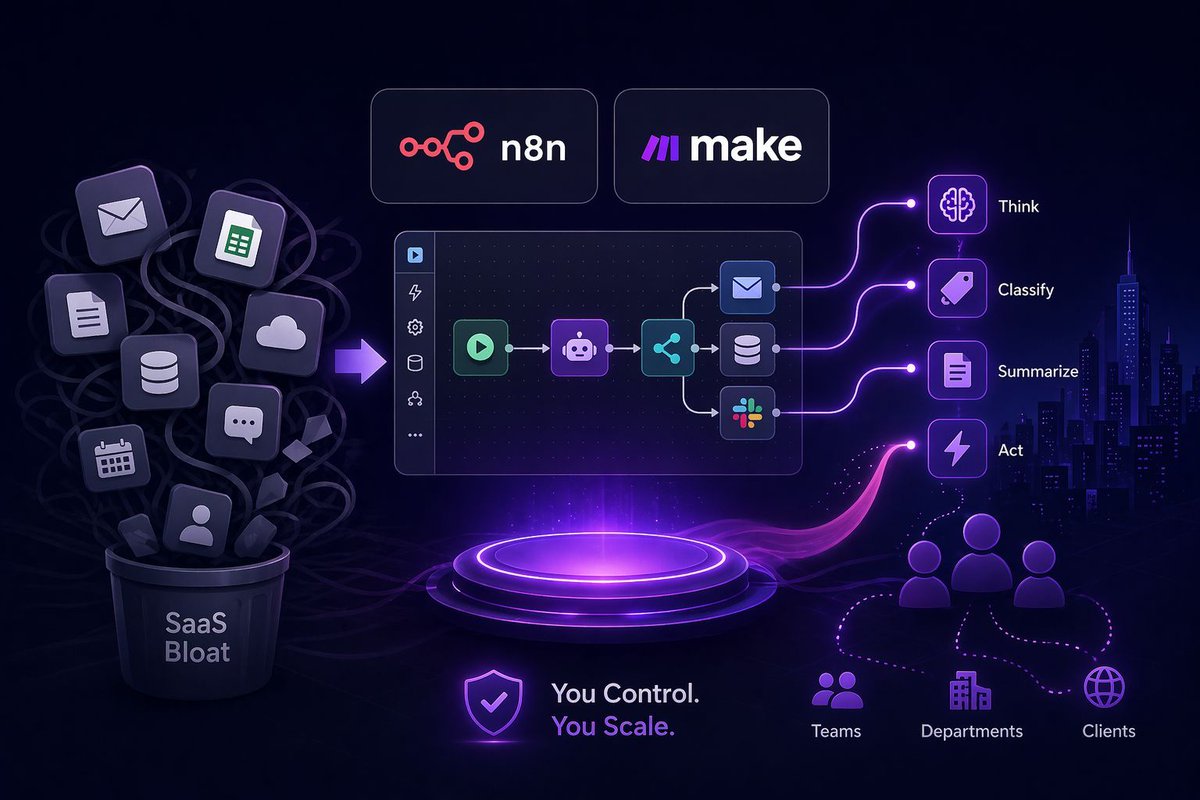
n8n and Make are quietly becoming the default stack for modern business automation. Both give you visual workflow builders that make complex automations easier to design, test, and ship without heavy code. Both are significantly more affordable, which matters when you’re scaling processes across teams, clients, and departments. And both support AI integrations, so you can build workflows that do more than move data. You can create systems that think, classify, summarize, and act. The bigger shift is clear: businesses are moving away from expensive SaaS bloat and toward flexible, connected automation stacks they actually control. That’s where the future is headed. #n8n #MakeCom #FutureOfWork
Olusola A. tweet media
English
0
0
2
32
Olusola A.
Olusola A.@olusolautomates·
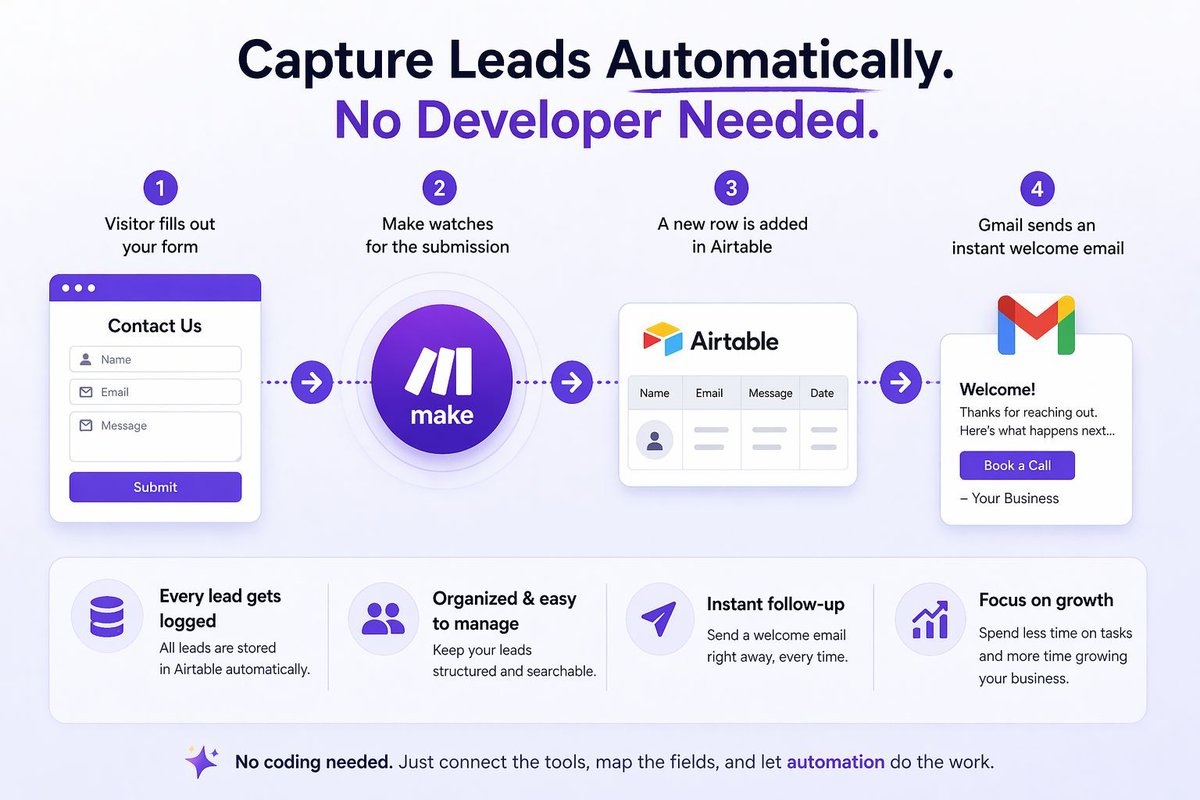
Want to capture leads automatically without hiring a developer? Here’s a simple setup with Airtable + Make that works for entrepreneurs and small businesses: A visitor fills out your form → Make watches for the submission → a new row is added in Airtable with their details → Gmail sends an instant welcome email. That means every lead gets logged, organized, and followed up with right away, even while you’re busy running the business. Use case: a consultant, coach, or agency can collect inquiries from a website form, store each lead in Airtable, and send a polished email with next steps, a booking link, or a free resource. No coding needed. Just connect the tools, map the fields, and let automation handle the follow-up. #Airtable #MakeCom #LeadGeneration
Olusola A. tweet media
English
2
0
1
55
Olusola A.
Olusola A.@olusolautomates·
5 repetitive tasks every small business should automate today: Invoice follow-ups so you stop chasing payments manually Lead capture so every form submission goes straight into your CRM Appointment reminders so no-shows drop without extra admin Social media posting so your content stays consistent even on busy days Client onboarding emails so every new customer gets the right info instantly Tools like Make and Zapier can connect your apps and turn these tasks into simple workflows that run in the background. Less busywork, fewer mistakes, more time to sell and serve. #Automation #SmallBusiness #Productivity
English
1
1
1
47
Olusola A.
Olusola A.@olusolautomates·
Build your first n8n workflow in under 30 minutes If you have never used n8n before, start simple: install n8n, connect two apps, set a trigger, and test the workflow. No code needed. A great first automation is: form submission → Google Sheet → email notification Here is the flow: 1. A form is submitted 2. n8n catches the trigger 3. The response is saved to Google Sheets 4. An email is sent automatically to notify your team or confirm the submission This is the fastest way to learn how n8n works because you see a real outcome right away. You will understand triggers, actions, data mapping, and testing without getting buried in complexity. If you are a beginner, focus on one small workflow first. If you are a developer, use it to validate how quickly n8n can replace repetitive manual tasks. #n8n #Automation #NoCode #AIAutomation #WorkflowAutomation
English
0
0
1
63