Pushpendra Tripathi

64K posts

Pushpendra Tripathi banner
Pushpendra Tripathi

Pushpendra Tripathi

@pushpendratips

AI Content Creator || #50K+ Audience on #LinkedIn 🔗 Follow my other X account: @TipsUjjwal DM/mail for collab - 📩 [email protected]

India Katılım Nisan 2022
81 Takip Edilen14.6K Takipçiler
Sabitlenmiş Tweet
Pushpendra Tripathi
Pushpendra Tripathi@pushpendratips·
🟧 Become a Full-Stack Developer — for FREE! Everything you need to go from Beginner → Pro 👇 🟧 HTML → React → Next.js 🟧 Node.js → APIs → TypeScript 🟧 Python → SQL → AWS 🟧 DSA → OOP → JWT 🟧 35+ MERN Projects + Interview Prep 🟧 Handwritten Notes ✨ Learn Full-Stack step-by-step — from scratch! 🔥 Like & Repost 💬 Comment “Web” 🟧 Follow @pushpendratips (so I can DM you)
Pushpendra Tripathi tweet media
English
30
26
72
722
Pushpendra Tripathi retweetledi
Ujjwal Technical Tips
Ujjwal Technical Tips@TipsUjjwal·
🎯𝟭𝟲 𝗖𝗵𝗿𝗼𝗺𝗲 𝗘𝘅𝘁𝗲𝗻𝘀𝗶𝗼𝗻𝘀 𝗧𝗵𝗮𝘁 𝗔𝘂𝘁𝗼𝗺𝗮𝘁𝗲 𝗬𝗼𝘂𝗿 𝗪𝗼𝗿𝗸 𝗜𝗻 𝟮𝟬𝟮𝟲 One of these extensions alone could save you hours of repetitive work every month. ➡️ 𝟭. 𝗧𝗼𝗱𝗼𝗶𝘀𝘁 Task management, project tracking, reminders, and team collaboration. ➡️ 𝟮. 𝗖𝗹𝗼𝗰𝗸𝗶𝗳𝘆 Time tracking, project timers, and productivity reporting. ➡️ 𝟯. 𝗠𝗲𝗿𝗹𝗶𝗻 𝗔𝗜 Use AI on any webpage, summarize content, and reply to emails with one click. ➡️ 𝟰. 𝗚𝗿𝗮𝗺𝗺𝗮𝗿𝗹𝘆 Grammar checking, writing improvement, and vocabulary suggestions. ➡️ 𝟱. 𝗘𝘃𝗲𝗿𝗻𝗼𝘁𝗲 𝗪𝗲𝗯 𝗖𝗹𝗶𝗽𝗽𝗲𝗿 Note-taking, web page saving, and article annotation. ➡️ 𝟲. 𝗣𝗼𝗰𝗸𝗲𝘁 Save articles for later, read offline, and get content suggestions. ➡️ 𝟳. 𝗦𝗰𝗿𝗶𝗯𝗲 Auto-generate step-by-step guides from any workflow you do on screen. ➡️ 𝟴. 𝗙𝗼𝗿𝗲𝘀𝘁 Focus timer with gamification, website blocking, and tree planting. ➡️ 𝟵. 𝗟𝗼𝗼𝗺 Record your screen, send video messages, and collaborate with teams. ➡️ 𝟭𝟬. 𝗣𝗲𝗿𝗽𝗹𝗲𝘅𝗶𝘁𝘆 𝗔𝗜 Search the web with AI, get cited answers, and research any topic fast. ➡️ 𝟭𝟭. 𝗟𝗶𝗴𝗵𝘁𝘀𝗵𝗼𝘁 Fast and easy screenshot capture tool. ➡️ 𝟭𝟮. 𝗦𝗶𝗱𝗲𝗿 𝗔𝗜 Chat with AI on any page, summarize PDFs, and translate text instantly. ➡️ 𝟭𝟯. 𝗧𝗼𝗴𝗴𝗹 𝗧𝗿𝗮𝗰𝗸 Track time, report on projects, and manage team workloads. ➡️ 𝟭𝟰. 𝗭𝗮𝗽𝗶𝗲𝗿 Automate workflows, connect apps, and cut repetitive tasks. ➡️ 𝟭𝟱. 𝗔𝘀𝗮𝗻𝗮 Manage tasks, track projects, and keep teams aligned. ➡️ 𝟭𝟲. 𝗡𝗼𝘁𝗶𝗼𝗻 𝗪𝗲𝗯 𝗖𝗹𝗶𝗽𝗽𝗲𝗿 Save any webpage directly into your Notion workspace in one click. ❤️ Like 🔁 Retweet 🔖 Bookmark Follow @TipsUjjwal for more such posts
Ujjwal Technical Tips tweet media
English
8
8
34
319
Pushpendra Tripathi retweetledi
Ujjwal Technical Tips
Ujjwal Technical Tips@TipsUjjwal·
All Paid Courses (Free for First 3000 People) 𝗣𝗮𝗶𝗱 𝗖𝗼𝘂𝗿𝘀𝗲 𝗙𝗥𝗘𝗘 (PART - 1) 1. Artificial Intelligence 2. Machine Learning 3. Cloud Computing 4. Ethical Hacking 5. Data Analytics 6. AWS Certified 7. Data Science 8. BIG DATA 9. Python 10. MBA 11. Google Cloud Fundamentals 12. Business Intelligence 13. Deep Learning (72 Hours only ) To get- 1. Follow @TipsUjjwal [MUST] 2. Like & Retweet to get DM 3. Reply " All "
Ujjwal Technical Tips tweet media
English
14
17
52
239
Meenakshi Yadav
Meenakshi Yadav@MeenakshiYACS·
📊 𝗠𝗔𝗦𝗧𝗘𝗥 𝗘𝗫𝗖𝗘𝗟 𝗪𝗜𝗧𝗛 𝗔𝗜 🚀 𝗕𝗢𝗢𝗦𝗧 𝗬𝗢𝗨𝗥 𝗘𝗙𝗙𝗜𝗖𝗜𝗘𝗡𝗖𝗬 ✅ 𝗕𝗲𝗻𝗲𝗳𝗶𝘁𝘀 𝗼𝗳 𝗜𝗻𝘁𝗲𝗴𝗿𝗮𝘁𝗶𝗻𝗴 𝗔𝗜 𝗶𝗻 𝗘𝘅𝗰𝗲𝗹 🔹 𝗔𝘂𝘁𝗼𝗺𝗮𝘁𝗲𝘀 𝗥𝗲𝗽𝗲𝘁𝗶𝘁𝗶𝘃𝗲 𝗧𝗮𝘀𝗸𝘀: Streamlines and speeds up daily processes. 🔹 𝗣𝗿𝗲𝗱𝗶𝗰𝘁𝗶𝘃𝗲 𝗔𝗻𝗮𝗹𝘆𝘀𝗶𝘀: Analyzes historical data to predict future trends. 🔹 𝗡𝗮𝘁𝘂𝗿𝗮𝗹 𝗟𝗮𝗻𝗴𝘂𝗮𝗴𝗲 𝗣𝗿𝗼𝗰𝗲𝘀𝘀𝗶𝗻𝗴: Simplifies report creation through conversational queries. 🔹 𝗗𝗮𝘁𝗮 𝗖𝗹𝗲𝗮𝗻𝗶𝗻𝗴 & 𝗣𝗿𝗲𝗽𝗮𝗿𝗮𝘁𝗶𝗼𝗻: Detects and corrects errors and inconsistencies. 🔹 𝗗𝗮𝘁𝗮 𝗘𝘅𝘁𝗿𝗮𝗰𝘁𝗶𝗼𝗻: Converts scanned documents and images into editable text. 🔹 𝗜𝗱𝗲𝗮 𝗚𝗲𝗻𝗲𝗿𝗮𝘁𝗶𝗼𝗻 & 𝗗𝗲𝗰𝗶𝘀𝗶𝗼𝗻-𝗠𝗮𝗸𝗶𝗻𝗴: Provides actionable insights for strategic planning. ──────────────────── ✅ 𝗕𝗘𝗦𝗧 𝗣𝗥𝗔𝗖𝗧𝗜𝗖𝗘𝗦 𝗙𝗢𝗥 𝗔𝗜 𝗜𝗡 𝗘𝗫𝗖𝗘𝗟 🔸 𝗗𝗮𝘁𝗮 𝗖𝗼𝗻𝘀𝗶𝘀𝘁𝗲𝗻𝗰𝘆 Keep data clean and formatted uniformly. 🔸 𝗟𝗲𝘃𝗲𝗿𝗮𝗴𝗲 𝗧𝗿𝗮𝗶𝗻𝗶𝗻𝗴 𝗥𝗲𝘀𝗼𝘂𝗿𝗰𝗲𝘀 Use online courses and tutorials to learn AI features. 🔸 𝗦𝘁𝗮𝘆 𝗘𝗻𝗴𝗮𝗴𝗲𝗱 Join forums to learn from peers and industry experts. 🔸 𝗧𝗿𝗼𝘂𝗯𝗹𝗲𝘀𝗵𝗼𝗼𝘁 𝗘𝗳𝗳𝗲𝗰𝘁𝗶𝘃𝗲𝗹𝘆 Regularly check formulas, validate outputs, and use support channels for guidance. 🔸 𝗦𝗲𝗰𝘂𝗿𝗶𝘁𝘆 𝗔𝘄𝗮𝗿𝗲𝗻𝗲𝘀𝘀 Protect your data by using AI tools that comply with data privacy regulations. 🔸 𝗗𝗼𝗰𝘂𝗺𝗲𝗻𝘁 𝗣𝗿𝗼𝗰𝗲𝘀𝘀𝗲𝘀 Keep a record of how AI tools are used for repeatable, efficient workflows. ──────────────────── ✅ 𝗧𝗢𝗣 𝗙𝗥𝗘𝗘 𝗘𝗫𝗖𝗘𝗟 𝗔𝗜 𝗧𝗢𝗢𝗟𝗦 🤖 𝗙𝗼𝗿𝗺𝘂𝗹𝗮 𝗕𝗼𝘁 🔹 𝗨𝘀𝗲: Generate complex Excel formulas using natural language. 🔹 𝗕𝗲𝘀𝘁 𝗙𝗼𝗿: Users needing quick formula solutions without manual input. 💬 𝗖𝗵𝗮𝘁𝗚𝗣𝗧 𝗳𝗼𝗿 𝗘𝘅𝗰𝗲𝗹 🔹 𝗨𝘀𝗲: Automate table creation, draft summaries, and handle complex tasks in Excel. 🔹 𝗕𝗲𝘀𝘁 𝗙𝗼𝗿: Seamlessly integrating advanced AI within your Excel workflow. ✨ 𝗦𝗵𝗲𝗲𝘁 𝗔𝗜 🔹 𝗨𝘀𝗲: Generate responses for ideas, articles, and more directly within Excel. 🔹 𝗕𝗲𝘀𝘁 𝗙𝗼𝗿: Expanding Excel’s capability to include text generation. 🟣 𝗦𝗵𝗲𝗲𝘁𝗚𝗼𝗱 🔹 𝗨𝘀𝗲: Create complex formulas with plain English and simplify data cleaning. 🔹 𝗕𝗲𝘀𝘁 𝗙𝗼𝗿: Quick, comprehensive Excel solutions. 🟢 𝗙𝗼𝗿𝗺𝘂𝗹𝗮𝗿𝗶𝘇𝗲𝗿 🔹 𝗨𝘀𝗲: Convert text instructions to functional Excel formulas. 🔹 𝗕𝗲𝘀𝘁 𝗙𝗼𝗿: Simplifying the process of writing formulas. 📈 𝗡𝘂𝗺𝗲𝗿𝗼𝘂𝘀.𝗮𝗶 🔹 𝗨𝘀𝗲: Generate responses for ideas, articles, and more directly within Excel. 🔹 𝗕𝗲𝘀𝘁 𝗙𝗼𝗿: Expanding Excel’s capability to include text generation. 🧩 𝗚𝗣𝗧 𝗘𝘅𝗰𝗲𝗹 🔹 𝗨𝘀𝗲: Generate Excel formulas across different spreadsheet software. 🔹 𝗕𝗲𝘀𝘁 𝗙𝗼𝗿: Users who work with Excel alternatives. 🤖 𝗔𝗜 𝗘𝘅𝗰𝗲𝗹 𝗕𝗼𝘁 🔹 𝗨𝘀𝗲: Create complex formulas using simple prompts. 🔹 𝗕𝗲𝘀𝘁 𝗙𝗼𝗿: Users looking for a broad, user-friendly formula generator. 📄 𝗠𝘆𝗦𝗵𝗲𝗲𝘁𝗔𝗜 🔹 𝗨𝘀𝗲: Generate Excel or Google Sheets formulas from text. 🔹 𝗕𝗲𝘀𝘁 𝗙𝗼𝗿: Quick, on-the-go formula creation. ──────────────────── ✅ 𝗣𝗥𝗢 𝗧𝗜𝗣𝗦 𝗙𝗢𝗥 𝗜𝗡𝗧𝗘𝗚𝗥𝗔𝗧𝗜𝗡𝗚 𝗔𝗜 𝗜𝗡 𝗘𝗫𝗖𝗘𝗟 ✅ 𝗦𝘁𝗮𝗿𝘁 𝘄𝗶𝘁𝗵 𝗖𝗹𝗲𝗮𝗻 𝗗𝗮𝘁𝗮 Ensure well-organized and error-free data. ✅ 𝗘𝘅𝗽𝗹𝗼𝗿𝗲 𝗘𝘅𝗰𝗲𝗹 𝗧𝗲𝗺𝗽𝗹𝗮𝘁𝗲𝘀 Utilize built-in templates optimized for AI functions. ✅ 𝗦𝘁𝗮𝘆 𝗨𝗽𝗱𝗮𝘁𝗲𝗱 Regularly update Excel for the newest AI features. ✅ 𝗘𝘅𝗽𝗲𝗿𝗶𝗺𝗲𝗻𝘁 Test different AI add-ins for best results. ✅ 𝗨𝘀𝗲 𝗛𝗲𝗹𝗽 𝗙𝗲𝗮𝘁𝘂𝗿𝗲𝘀 Familiarize yourself with the “Help” section for new AI integrations. ❤️ Like 🔁 Retweet 🔖 Bookmark Follow @MeenakshiYACS for more such posts #AI #ArtificialIntelligence #GenerativeAI #CareerGrowth #Upskilling
Meenakshi Yadav tweet media
English
54
9
64
1.6K
Pushpendra Tripathi retweetledi
Ujjwal Technical Tips
Ujjwal Technical Tips@TipsUjjwal·
Claude can make you more money than anything before. So I built the Advanced Claude Mastery Course • 80+ Chapters • 1000+ New AI tools • 2000+ New ClaudePrompts 100% FREE for the next 48hrs only Just: • Like • Follow • Repost • Reply "Claude" Must follow me to get DM. Free for 48 hours.
Ujjwal Technical Tips tweet media
English
10
9
41
194
Pushpendra Tripathi retweetledi
Ujjwal Technical Tips
Ujjwal Technical Tips@TipsUjjwal·
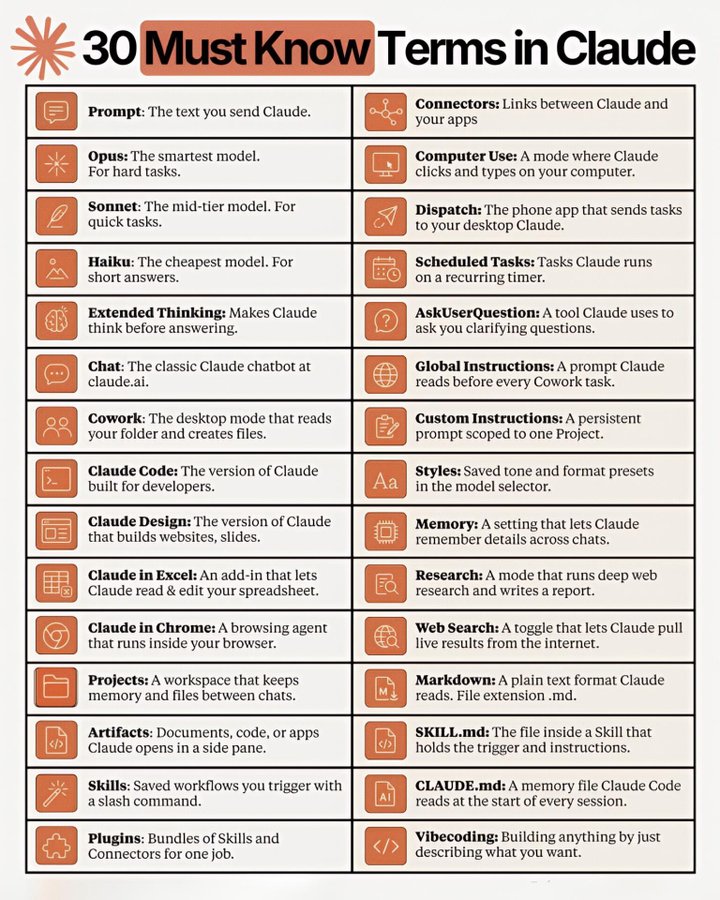
🎯𝟯𝟬 𝗠𝘂𝘀𝘁 𝗞𝗻𝗼𝘄 𝗧𝗲𝗿𝗺𝘀 𝗶𝗻 𝗖𝗹𝗮𝘂𝗱𝗲 Discover the language of Claude in simple words. Save this guide before your next AI conversation. ➡️ 𝗣𝗿𝗼𝗺𝗽𝘁: The text you send Claude. ➡️ 𝗢𝗽𝘂𝘀: The smartest model. For hard tasks. ➡️ 𝗦𝗼𝗻𝗻𝗲𝘁: The mid-tier model. For quick tasks. ➡️ 𝗛𝗮𝗶𝗸𝘂: The cheapest model. For short answers. ➡️ 𝗘𝘅𝘁𝗲𝗻𝗱𝗲𝗱 𝗧𝗵𝗶𝗻𝗸𝗶𝗻𝗴: Makes Claude think before answering. ➡️ 𝗖𝗵𝗮𝘁: The classic Claude chatbot at claude.ai. ➡️ 𝗖𝗼𝘄𝗼𝗿𝗸: The desktop mode that reads your folder and creates files. ➡️ 𝗖𝗹𝗮𝘂𝗱𝗲 𝗖𝗼𝗱𝗲: The version of Claude built for developers. ➡️ 𝗖𝗹𝗮𝘂𝗱𝗲 𝗗𝗲𝘀𝗶𝗴𝗻: The version of Claude that builds websites, slides. ➡️ 𝗖𝗹𝗮𝘂𝗱𝗲 𝗶𝗻 𝗘𝘅𝗰𝗲𝗹: An add-in that lets Claude read & edit your spreadsheet. ➡️ 𝗖𝗹𝗮𝘂𝗱𝗲 𝗶𝗻 𝗖𝗵𝗿𝗼𝗺𝗲: A browsing agent that runs inside your browser. ➡️ 𝗣𝗿𝗼𝗷𝗲𝗰𝘁𝘀: A workspace that keeps memory and files between chats. ➡️ 𝗔𝗿𝘁𝗶𝗳𝗮𝗰𝘁𝘀: Documents, code, or apps Claude opens in a side pane. ➡️ 𝗦𝗸𝗶𝗹𝗹𝘀: Saved workflows you trigger with a slash command. ➡️ 𝗣𝗹𝘂𝗴𝗶𝗻𝘀: Bundles of Skills and Connectors for one job. ➡️ 𝗖𝗼𝗻𝗻𝗲𝗰𝘁𝗼𝗿𝘀: Links between Claude and your apps. ➡️ 𝗖𝗼𝗺𝗽𝘂𝘁𝗲𝗿 𝗨𝘀𝗲: A mode where Claude clicks and types on your computer. ➡️ 𝗗𝗶𝘀𝗽𝗮𝘁𝗰𝗵: The phone app that sends tasks to your desktop Claude. ➡️ 𝗦𝗰𝗵𝗲𝗱𝘂𝗹𝗲𝗱 𝗧𝗮𝘀𝗸𝘀: Tasks Claude runs on a recurring timer. ➡️ 𝗔𝘀𝗸𝗨𝘀𝗲𝗿𝗤𝘂𝗲𝘀𝘁𝗶𝗼𝗻: A tool Claude uses to ask you clarifying questions. ➡️ 𝗚𝗹𝗼𝗯𝗮𝗹 𝗜𝗻𝘀𝘁𝗿𝘂𝗰𝘁𝗶𝗼𝗻𝘀: A prompt Claude reads before every Cowork task. ➡️ 𝗖𝘂𝘀𝘁𝗼𝗺 𝗜𝗻𝘀𝘁𝗿𝘂𝗰𝘁𝗶𝗼𝗻𝘀: A persistent prompt scoped to one Project. ➡️ 𝗦𝘁𝘆𝗹𝗲𝘀: Saved tone and format presets in the model selector. ➡️ 𝗠𝗲𝗺𝗼𝗿𝘆: A setting that lets Claude remember details across chats. ➡️ 𝗥𝗲𝘀𝗲𝗮𝗿𝗰𝗵: A mode that runs deep web research and writes a report. ➡️ 𝗪𝗲𝗯 𝗦𝗲𝗮𝗿𝗰𝗵: A toggle that lets Claude pull live results from the internet. ➡️ 𝗠𝗮𝗿𝗸𝗱𝗼𝘄𝗻: A plain text format Claude reads. File extension .md. ➡️ 𝗦𝗞𝗜𝗟𝗟.𝗺𝗱: The file inside a Skill that holds the trigger and instructions. ➡️ 𝗖𝗟𝗔𝗨𝗗𝗘.𝗺𝗱: A memory file Claude Code reads at the start of every session. ➡️ 𝗩𝗶𝗯𝗲𝗰𝗼𝗱𝗶𝗻𝗴: Building anything by just describing what you want. ❤️ Like 🔁 Retweet 🔖 Bookmark Follow @TipsUjjwal for more such posts
Ujjwal Technical Tips tweet media
English
15
16
63
1.7K
Pushpendra Tripathi retweetledi
Ujjwal Technical Tips
Ujjwal Technical Tips@TipsUjjwal·
🚀 𝗔𝗜 𝗧𝗼𝗼𝗹𝘀 𝗦𝗵𝗶𝗳𝘁: 𝟮𝟬𝟮𝟱 ➜ 𝟮𝟬𝟮𝟲 The AI stack is evolving fast. Here's what many early adopters are switching to: 🎬 𝗩𝗶𝗱𝗲𝗼 𝗘𝗱𝗶𝘁𝗶𝗻𝗴 2025: Premiere Pro ➜ 2026: Hyperframes 📊 𝗦𝗽𝗿𝗲𝗮𝗱𝘀𝗵𝗲𝗲𝘁𝘀 2025: Excel ➜ 2026: Claude in Excel 🌐 𝗕𝗿𝗼𝘄𝘀𝗲𝗿 2025: Chrome ➜ 2026: Perplexity Comet 🔍 𝗥𝗲𝘀𝗲𝗮𝗿𝗰𝗵 2025: Google ➜ 2026: Perplexity ⚙️ 𝗔𝘂𝘁𝗼𝗺𝗮𝘁𝗶𝗼𝗻 2025: n8n ➜ 2026: Zapier ✍️ 𝗪𝗿𝗶𝘁𝗶𝗻𝗴 2025: ChatGPT ➜ 2026: Supenli 🖼️ 𝗜𝗺𝗮𝗴𝗲 𝗘𝗱𝗶𝘁𝗶𝗻𝗴 2025: Photoshop ➜ 2026: ChatGPT 📽️ 𝗣𝗿𝗲𝘀𝗲𝗻𝘁𝗮𝘁𝗶𝗼𝗻𝘀 2025: PowerPoint ➜ 2026: Gamma 📝 𝗡𝗼𝘁𝗲-𝘁𝗮𝗸𝗶𝗻𝗴 2025: Fireflies ➜ 2026: Granola 🌍 𝗪𝗲𝗯𝘀𝗶𝘁𝗲𝘀 2025: WordPress ➜ 2026: Manus 🔎 𝗦𝗲𝗮𝗿𝗰𝗵 2025: Google ➜ 2026: Gemini 🎨 𝗗𝗲𝘀𝗶𝗴𝗻 2025: Canva ➜ 2026: Claude Design 💡 Which AI tool has become indispensable in your workflow? ❤️ Like 🔁 Retweet 🔖 Bookmark Follow @TipsUjjwal for more such posts
Ujjwal Technical Tips tweet media
English
14
19
54
1.8K
Pushpendra Tripathi retweetledi
Ujjwal Technical Tips
Ujjwal Technical Tips@TipsUjjwal·
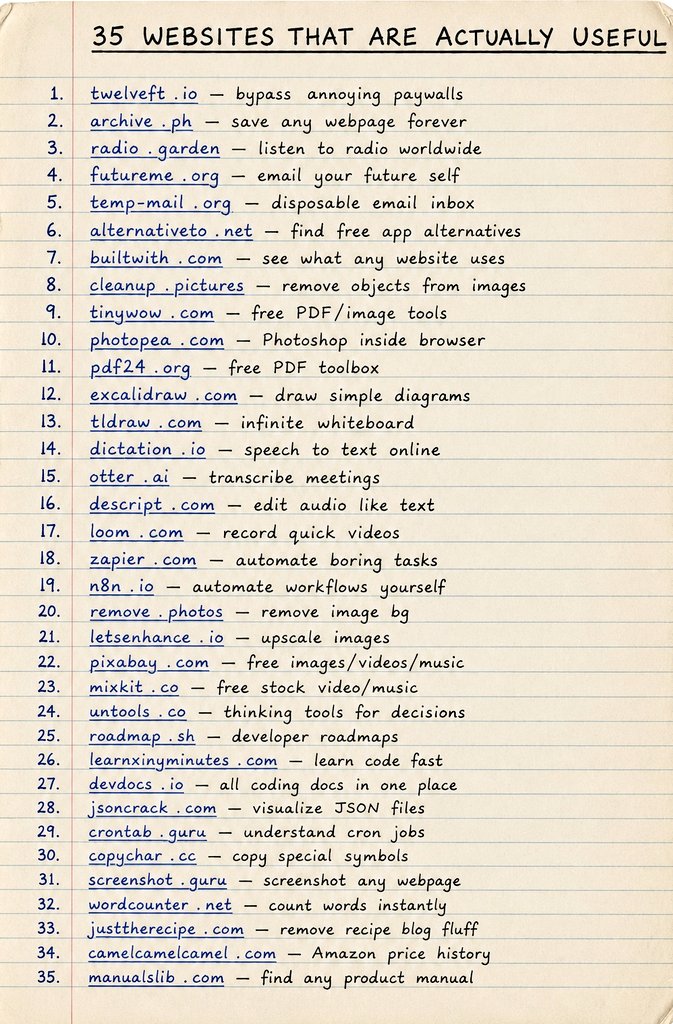
𝟯𝟱 𝗪𝗘𝗕𝗦𝗜𝗧𝗘𝗦 𝗧𝗛𝗔𝗧 𝗔𝗥𝗘 𝗔𝗖𝗧𝗨𝗔𝗟𝗟𝗬 𝗨𝗦𝗘𝗙𝗨𝗟 🚀 Discover some of the internet's most practical websites that can save time, boost productivity, simplify work, and help you learn new skills. Whether you're a student, creator, developer, or professional, these tools can make everyday tasks much easier. ▶️ twelveft.io — bypass annoying paywalls ▶️ archive.ph — save any webpage forever ▶️ radio.garden — listen to radio worldwide ▶️ futureme.org — email your future self ▶️ temp-mail.org — disposable email inbox ▶️ alternativeto.net — find free app alternatives ▶️ builtwith.com — see what any website uses ▶️ cleanup.pictures — remove objects from images ▶️ tinywow.com — free PDF/image tools ▶️ photopea.com — Photoshop inside browser ▶️ pdf24.org — free PDF toolbox ▶️ excalidraw.com — draw simple diagrams ▶️ tldraw.com — infinite whiteboard ▶️ dictation.io — speech to text online ▶️ otter.ai — transcribe meetings ▶️ descript.com — edit audio like text ▶️ loom.com — record quick videos ▶️ zapier.com — automate boring tasks ▶️ n8n.io — automate workflows yourself ▶️ remove.photos — remove image bg ▶️ letsenhance.io — upscale images ▶️ pixabay.com — free images/videos/music ▶️ mixkit.co — free stock video/music ▶️ untools.co — thinking tools for decisions ▶️ roadmap.sh — developer roadmaps ▶️ learnxinyminutes.com — learn code fast ▶️ devdocs.io — all coding docs in one place ▶️ jsoncrack.com — visualize JSON files ▶️ crontab.guru — understand cron jobs ▶️ copychar.cc — copy special symbols ▶️ screenshot.guru — screenshot any webpage ▶️ wordcounter.net — count words instantly ▶️ justtherecipe.com — remove recipe blog fluff ▶️ camelcamelcamel.com — Amazon price history ▶️ manualslib.com — find any product manual ❤️ Like 🔁 Retweet 🔖 Bookmark Follow @TipsUjjwal for more such posts
Ujjwal Technical Tips tweet media
English
6
9
34
681
Pushpendra Tripathi retweetledi
Ujjwal Technical Tips
Ujjwal Technical Tips@TipsUjjwal·
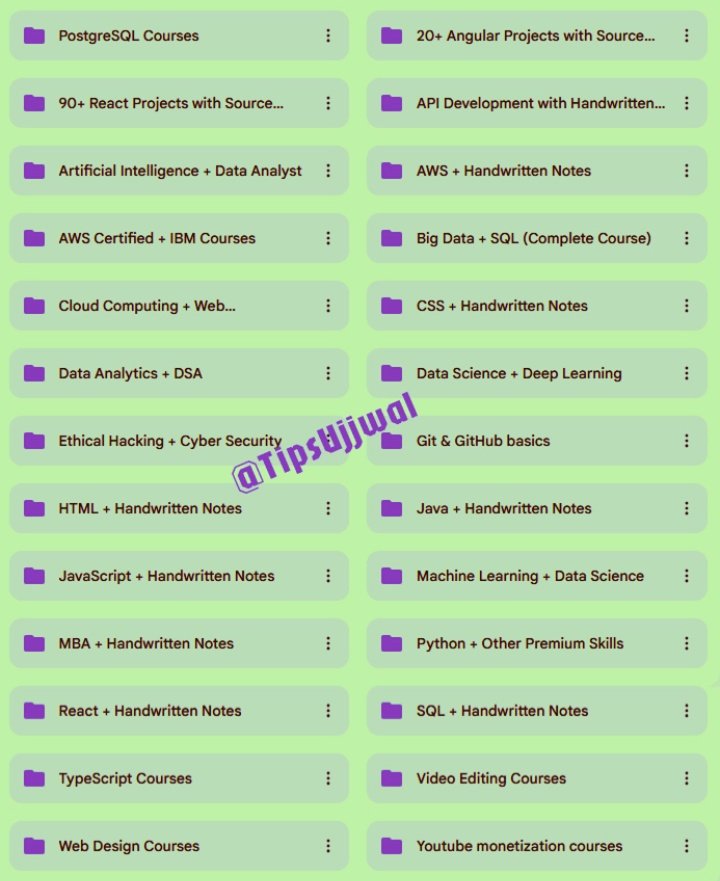
🚀🚀 PAID COURSES FREE – PART 1 (2026) 🚀🚀 🔹 Worth $500+ | ⏳ Valid for 72 Hours Only 🎓 Courses You’ll Get: 🔹 Artificial Intelligence + Data Analyst 🔹 Machine Learning + Data Science 🔹 Cloud Computing + Web Development 🔹 Ethical Hacking + Cyber Security 🔹 Data Analytics + DSA 🔹 AWS Certified + IBM Programs 🔹 Data Science + Deep Learning 🔹 Big Data + SQL (Complete Course) 🔹 Python + Other Premium Skills 🔹 MBA + Handwritten Notes 🎁 Steps to Unlock FREE Access: 🔹 Follow:👉 @TipsUjjwal 📩 (So I can DM you) 🔹 Like & 🔁 Retweet this post 🔹 Reply: “SEND” ⚡ Limited Time | Limited Seats | Act Fast! ⚡
Ujjwal Technical Tips tweet media
English
12
16
40
283
Pushpendra Tripathi
Pushpendra Tripathi@pushpendratips·
🎯𝗙𝗥𝗘𝗘 𝘃𝘀 𝗣𝗔𝗜𝗗 𝗔𝗜 𝗧𝗢𝗢𝗟𝗦 𝟮𝟬𝟮𝟲 ✅ 𝟴 𝗖𝗮𝘁𝗲𝗴𝗼𝗿𝗶𝗲𝘀 • 𝟴𝟬 𝗧𝗼𝗼𝗹𝘀 • 𝗧𝗵𝗲 𝗛𝗼𝗻𝗲𝘀𝘁 𝗚𝘂𝗶𝗱𝗲 𝗪𝗥𝗜𝗧𝗜𝗡𝗚 • Free: ChatGPT, Claude, Gemini, Copy.ai, Writesonic • Paid: Jasper AI, Grammarly Pro, Wordtune, Surfer SEO, Peppertype 𝗩𝗜𝗗𝗘𝗢 • Free: CapCut, Canva Video, Pika Labs, InVideo, Luma AI • Paid: Runway Gen-4, Sora2, Synthesia, HeyGen, Google Veo3 𝗜𝗠𝗔𝗚𝗘 • Free: DALL·E, Leonardo AI, Craiyon, Microsoft Designer, Ideogram • Paid: Midjourney V7, NanoBanana Pro, Adobe Firefly, Flux Pro, Recraft 𝗖𝗢𝗗𝗜𝗡𝗚 • Free: GitHub Copilot Free, Replit AI, Codeium, Google Colab AI, Loveable AI • Paid: Cursor IDE, Windsurf, Bolt.new, Copilot, Tabnine 𝗩𝗢𝗜𝗖𝗘 & 𝗔𝗨𝗗𝗜𝗢 • Free: Suno AI, Udio, Descript, ElevenLabs Free, Murf AI • Paid: ElevenLabs Pro, HeyGen, Speechify, Fathom, Nyota AI 𝗥𝗘𝗦𝗘𝗔𝗥𝗖𝗛 • Free: Perplexity AI, NotebookLM, Semantic Scholar, Consensus AI, ChatGPT Search • Paid: Perplexity Pro, Google Deep Research, ChatGPT Search, Elicit AI, Scite 𝗗𝗘𝗦𝗜𝗚𝗡 • Free: Canva, Microsoft Designer, Figma AI, AutoDraw, Pixiccut • Paid: Adobe Photoshop, Adobe Illustrator, Looka, Uizard, Framer ❤️ Like 🔁 Retweet 🔖 Bookmark Follow @TipsUjjwal for more such posts
Pushpendra Tripathi tweet media
English
2
6
16
407
Pushpendra Tripathi retweetledi
Pushpendra Tripathi
Pushpendra Tripathi@pushpendratips·
🟧 Become a Full-Stack Developer — for FREE! Everything you need to go from Beginner → Pro 👇 🟧 HTML → React → Next.js 🟧 Node.js → APIs → TypeScript 🟧 Python → SQL → AWS 🟧 DSA → OOP → JWT 🟧 35+ MERN Projects + Interview Prep 🟧 Handwritten Notes ✨ Learn Full-Stack step-by-step — from scratch! 🔥 Like & Repost 💬 Comment “Web” 🟧 Follow @pushpendratips (so I can DM you)
Pushpendra Tripathi tweet media
English
30
26
72
722
Pushpendra Tripathi retweetledi
Pushpendra Tripathi
Pushpendra Tripathi@pushpendratips·
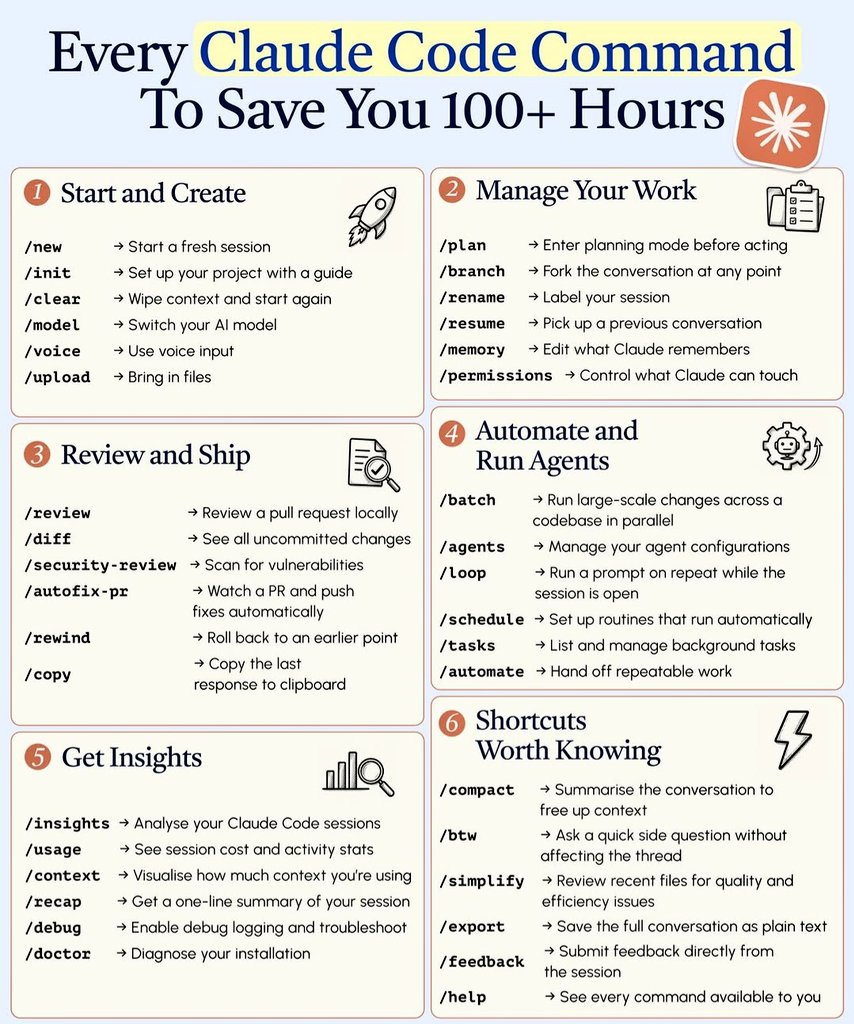
🔴𝗘𝘃𝗲𝗿𝘆 𝗖𝗹𝗮𝘂𝗱𝗲 𝗖𝗼𝗱𝗲 𝗖𝗼𝗺𝗺𝗮𝗻𝗱 𝗧𝗼 𝗦𝗮𝘃𝗲 𝗬𝗼𝘂 𝟭𝟬𝟬+ 𝗛𝗼𝘂𝗿𝘀 💡The only Claude Code command cheat sheet you'll ever need. ① 𝗦𝘁𝗮𝗿𝘁 𝗮𝗻𝗱 𝗖𝗿𝗲𝗮𝘁𝗲 🚀 /new➜Start a fresh session /init➜Set up your project with a guide /clear➜Wipe context and start again /model➜Switch your AI model /voice➜Use voice input /upload➜Bring in files ② 𝗠𝗮𝗻𝗮𝗴𝗲 𝗬𝗼𝘂𝗿 𝗪𝗼𝗿𝗸 📋 /plan➜Enter planning mode before acting /branch➜Fork the conversation at any point /rename➜Label your session /resume➜Pick up a previous conversation /memory➜Edit what Claude remembers /permissions➜Control what Claude can touch ③ 𝗥𝗲𝘃𝗶𝗲𝘄 𝗮𝗻𝗱 𝗦𝗵𝗶𝗽 📄 /review➜Review a pull request locally /diff➜See all uncommitted changes /security-review➜Scan for vulnerabilities /autofix-pr➜Watch a PR and push fixes automatically /rewind➜Roll back to an earlier point /copy➜Copy the last response to clipboard ④ 𝗔𝘂𝘁𝗼𝗺𝗮𝘁𝗲 𝗮𝗻𝗱 𝗥𝘂𝗻 𝗔𝗴𝗲𝗻𝘁𝘀 ⚙️ /batch➜Run large-scale changes across a codebase in parallel /agents➜Manage your agent configurations /loop➜Run a prompt on repeat while the session is open /schedule➜Set up routines that run automatically /tasks➜List and manage background tasks /automate➜Hand off repeatable work ⑤ 𝗚𝗲𝘁 𝗜𝗻𝘀𝗶𝗴𝗵𝘁𝘀 📊 /insights➜Analyse your Claude Code sessions /usage➜See session cost and activity stats /context➜Visualise how much context you're using /recap➜Get a one-line summary of your session /debug➜Enable debug logging and troubleshoot /doctor➜Diagnose your installation ⑥ 𝗦𝗵𝗼𝗿𝘁𝗰𝘂𝘁𝘀 𝗪𝗼𝗿𝘁𝗵 𝗞𝗻𝗼𝘄𝗶𝗻𝗴 ⚡ /compact➜Summarise the conversation to free up context /btw➜Ask a quick side question without affecting the thread /simplify➜Review recent files for quality and efficiency issues /export➜Save the full conversation as plain text /feedback➜Submit feedback directly from the session /help➜See every command available to you ❤️ Like 🔁 Retweet 🔖 Bookmark Follow @pushpendratips for more such posts
Pushpendra Tripathi tweet media
English
5
15
40
1.1K
Pushpendra Tripathi retweetledi
Ujjwal Technical Tips
Ujjwal Technical Tips@TipsUjjwal·
🎯𝗙𝗥𝗘𝗘 𝘃𝘀 𝗣𝗔𝗜𝗗 𝗔𝗜 𝗧𝗢𝗢𝗟𝗦 𝟮𝟬𝟮𝟲 ✅ 𝟴 𝗖𝗮𝘁𝗲𝗴𝗼𝗿𝗶𝗲𝘀 • 𝟴𝟬 𝗧𝗼𝗼𝗹𝘀 • 𝗧𝗵𝗲 𝗛𝗼𝗻𝗲𝘀𝘁 𝗚𝘂𝗶𝗱𝗲 𝗪𝗥𝗜𝗧𝗜𝗡𝗚 • Free: ChatGPT, Claude, Gemini, Copy.ai, Writesonic • Paid: Jasper AI, Grammarly Pro, Wordtune, Surfer SEO, Peppertype 𝗩𝗜𝗗𝗘𝗢 • Free: CapCut, Canva Video, Pika Labs, InVideo, Luma AI • Paid: Runway Gen-4, Sora2, Synthesia, HeyGen, Google Veo3 𝗜𝗠𝗔𝗚𝗘 • Free: DALL·E, Leonardo AI, Craiyon, Microsoft Designer, Ideogram • Paid: Midjourney V7, NanoBanana Pro, Adobe Firefly, Flux Pro, Recraft 𝗖𝗢𝗗𝗜𝗡𝗚 • Free: GitHub Copilot Free, Replit AI, Codeium, Google Colab AI, Loveable AI • Paid: Cursor IDE, Windsurf, Bolt.new, Copilot, Tabnine 𝗩𝗢𝗜𝗖𝗘 & 𝗔𝗨𝗗𝗜𝗢 • Free: Suno AI, Udio, Descript, ElevenLabs Free, Murf AI • Paid: ElevenLabs Pro, HeyGen, Speechify, Fathom, Nyota AI 𝗥𝗘𝗦𝗘𝗔𝗥𝗖𝗛 • Free: Perplexity AI, NotebookLM, Semantic Scholar, Consensus AI, ChatGPT Search • Paid: Perplexity Pro, Google Deep Research, ChatGPT Search, Elicit AI, Scite 𝗗𝗘𝗦𝗜𝗚𝗡 • Free: Canva, Microsoft Designer, Figma AI, AutoDraw, Pixiccut • Paid: Adobe Photoshop, Adobe Illustrator, Looka, Uizard, Framer ❤️ Like 🔁 Retweet 🔖 Bookmark Follow @TipsUjjwal for more such posts
Ujjwal Technical Tips tweet media
English
6
6
29
1.4K
Safwan
Safwan@tec_safwan·
100+ AI Tools to Finish Hours of Work in Minutes: 1. Presentation - Gamma AI - Decktopus - Beautiful AI - Slides AI - Designs AI 2. Ideas - Claude - ChatGPT - Bing Chat - Perplexity - Copilot 3. Website - Dora - 10Web - Framer - Unicorn - Style AI 4. Writing - Jasper - HIX AI - Longshot - Textblaze - Jenny AI 5. Meeting - Tldv - Krisp - Otter - Fathom - Noty AI 6. Chatbot - Droxy - Chatbase - Chatsimple - CustomGPT - Mutual Info 7. Automation - Make - Zapier - Xembly - Bardeen - Levity 8. UI/UX - Figma - UiMagic - Uizard - InstantAI - Photoshop 9. Image - Fotor - Leap AI - Midjourney - Stability AI - Microsoft Designer 10. Video - Klap - Opus - Eightify - InVideo - HeyGen 11. Design - Canva - Flair AI - Designify - Clipdrop - Magician Design 12. Prompts - FlowGPT - Alicent AI - PromptBox - Promptbase - Snack Prompt 13. Productivity - Notion - Merlin - Trello - Grammarly - TinyWow 14. Logo Generator - Looka - Brandmark - LogoMakr - Stockimg - Namecheap 15. Marketing - Pencil - Ai-Ads - AdCopy - Simplified - AdCreative 16. Twitter - Typefully - Tweetlify - Tapilo - Hypefury - TweetHunter Follow @tec_safwan more AI content.
Safwan tweet media
English
34
30
62
2.7K
Mohini Goyal
Mohini Goyal@Mohiniuni·
Most people install Claude and ask one question. Get one answer. And wonder why everyone else gets dramatically better results. Here's the setup I'd recommend if you want Claude to become part of your daily work. 1. Give Claude a permanent role. Instead of saying: Write a LinkedIn post. Start with: You're my content strategist. Your job is to help me create content that gets saved, shared, and generates qualified leads. A consistent role leads to more consistent outputs. 2. Create separate Projects. Don't keep everything in one chat. Examples: - Marketing - Sales - Content - Finance - Hiring - Client A - Client B - Personal Learning Each project should have its own context. 3. Upload your knowledge once. Every project should include: - SOPs - Brand guidelines - Tone of voice - FAQs - Pricing docs - Product information - Previous campaigns - Customer personas Claude writes much better when it already knows your business. 4. Teach Claude your writing style. Paste: - 5 LinkedIn posts you love - Emails you've written - Sales pages - Blog posts Then ask: Analyse my writing style and use it in future responses. 5. Give Claude your rules. Examples: - Always write in simple English. - Never use clichés. - Avoid long introductions. - Use bullet points. - Challenge weak ideas. - Never invent facts. These small rules improve almost every output. 6. Ask Claude to ask questions first. Instead of answering immediately, tell it: Before completing any important task, ask me any missing questions. This prevents weak outputs. 7. Build reusable workflows. Instead of creating prompts repeatedly, Create workflows for: - Weekly reports - Client proposals - Research - Content ideas - Meeting summaries - Competitor analysis - SOP writing 8. Give Claude examples. Bad instruction: Write cold emails. Better: Here are five cold emails that performed well. Learn the pattern and create three new versions. Examples beat explanations. 9. Use checklists. Ask Claude to verify: - Grammar - Logic - Missing information - Weak arguments - Repetition - CTA Before giving you the final answer. 10. Ask for assumptions first. Before solving anything, tell me your assumptions before you begin. You'll catch mistakes before they happen. There's prompt engineering, automation, AI agents, Python, workflows, APIs, ethics, and so much more. The links below are a great place to start if you want to go beyond basic prompting. 1. Google Prompting Essentials Specialisation imp.i384100.net/GKPPy2 2. Generative AI: Prompt Engineering Basics imp.i384100.net/KBJn4n 3. Start Writing Prompts like a Pro imp.i384100.net/L0ge10 4. Prompt Engineering for ChatGPT imp.i384100.net/YV1Qnm 5. Google Prompting Essentials Specialisation imp.i384100.net/GKPPy2 6. AI Foundations for Business Professionals Specialisation imp.i384100.net/Bnqeaq 7. Advanced Topics in Artificial Intelligence imp.i384100.net/aO3YVM 8. Deep Learning Specialisation imp.i384100.net/Xmzoag 9. GPT Vision: Seeing the World through Generative AI imp.i384100.net/QjVzQo 10. AI Agent Developer Specialisation imp.i384100.net/Xmzojg 11. Agentic AI and AI Agents for Leaders Specialisation imp.i384100.net/DyDAx2 Bookmark and follow for more.
Mohini Goyal tweet media
English
19
27
68
1.7K
Tafsirul
Tafsirul@heytafsirul·
120 AI Tools powering the next generation of work. 🤯 📈 1. Ideas - YOU - Claude - ChatGPT - Perplexity - Bing Chat 2. Presentation - Prezi - Pitch - PopAi - Slides AI - Slidebean 3. Website - Dora - Wegic - 10Web - Framer - Durable 4. Writing - Rytr - Jasper - Copy AI - Textblaze - Writesonic 5. AI Models - RenderNet - Glambase App - Luma AI - Sora (OpenAI) - Leonardo AI 6. Meeting - Tldv - Krisp - Otter - Avoma - Fireflies 7. Chatbots - Poe - Claude - Gemini - ChatGPT - HuggingChat 7. Automation - ClickUp - Drift - Outreach - Emplifi - Phrasee 8. UI/UX - Uizard - Visily - Khroma - Galileo AI - VisualEyes 9. Image - Stylar - Freepik - Phygital+ - StockIMG - Bing Create 10. Video - Pictory - HeyGen - Nullface - Decohere - Synthesia 11. Design - Looka - Clipdrop - Autodraw - Vance AI - Designs AI 12. Marketing - AdCopy - Predis AI - Howler AI - Bardeen AI - AdCreative 13. Twitter - Typefully - Postwise - Metricool - Tribescaler - TweetHunter Follow👤 @heytafsirul for curated AI content you’ll actually use. 🧠
Tafsirul tweet media
English
15
26
56
1K