
React Navigation
529 posts


React Navigation
@reactnavigation
Routing and navigation for React Native and Web apps. Maintained by @satya164
Katılım Şubat 2018
10 Takip Edilen10.8K Takipçiler
New versions of `@react-navigation/bottom-tabs` are out for 7.x and 8.x.
You can now specify `tabBarSelectionEnabled: false` to disable selection of a tab on press with native tabs, and listen to the `tabPress` event to implement custom behavior.

Software Mansion@swmansion
React Native Screens 4.25.0 is here 📲 👉 Legacy architecture is no longer supported 👉 Release candidate version of Tabs API 👉 Color scheme & RTL support in Tabs 👉 Comprehensive MoreNavigationController handling 👉 Prevent native selection support in Tabs And more.
English
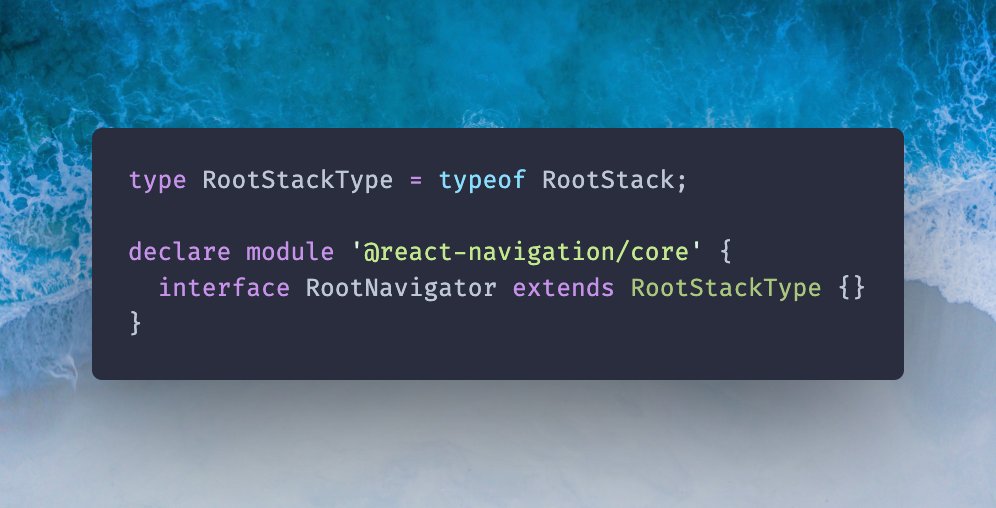
React Navigation 7 now supports module augmentation for specifying root types.
We backported this from React Navigation 8, so new apps start using it to make the upgrade easier.
The old global augmentation still works for backward compatibility.
English
Don't forget to check out the repo and give him a ⭐️
github.com/eds2002/react-…
English
Huge shoutout to @trpfsu for react-native-screen-transitions - an incredible library that lets you build advanced gesture-driven navigation animations in React Native. 🙌
Check out his blog post, which shows how to use it: from recreating the iOS page transition to the brand-new navigation.zoom() transition.
Link below 👇
English
React Navigation retweetledi

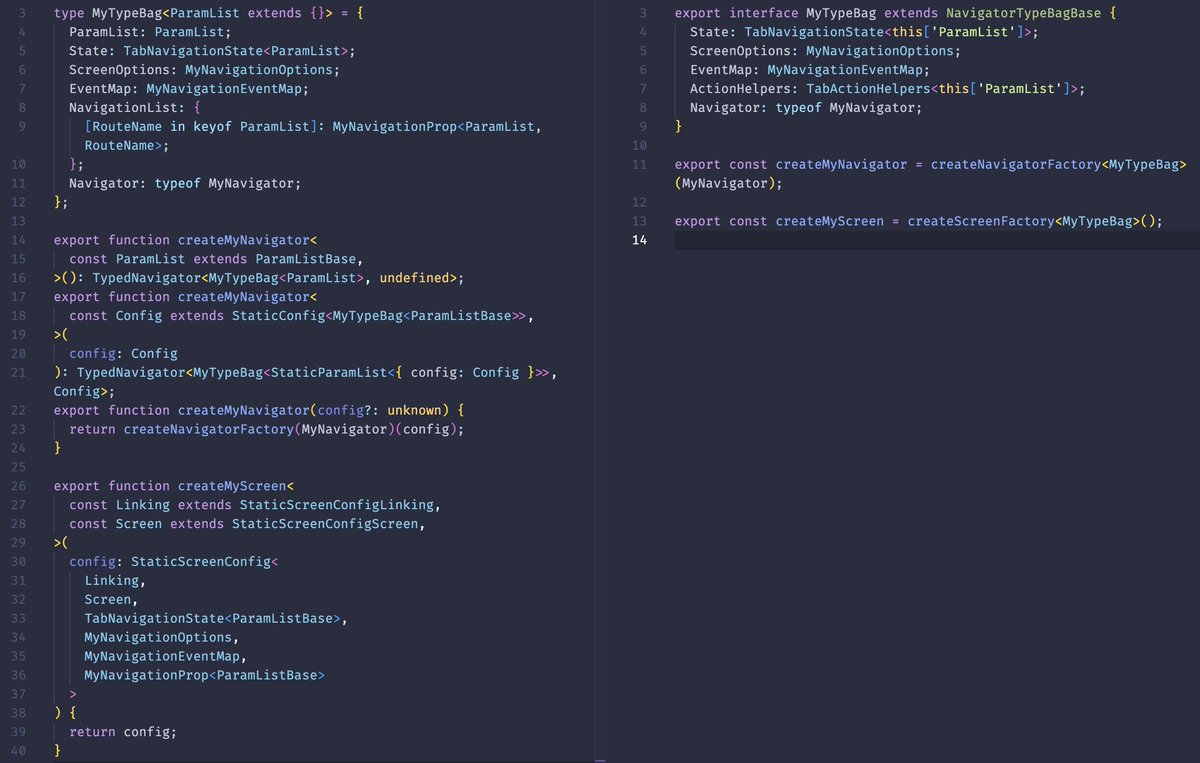
Worked with Claude to dramatically simplify the type annotation needed for custom navigators in React Navigation 8.
I was not happy with the verbosity. Really glad how it turned out.
Also, TIL that we can use `this` in interface, which also works for properties merged with `&`.
English
React Navigation retweetledi
In React Navigation 8, we're working on a way to "retain" screens: navigation.retain(true)
Retained screens stay alive and are not unmounted when you go back from them.
Next time you navigate to the screen, it'll animate in the existing instance.
English
React Navigation retweetledi

The videos showcasing how each navigator works in the @reactnavigation docs look absolutely stunning!
Amazing job @satya164 🫶
English
top tabs usually have swipe gesture because the tabs at the top are farther from your finger. so swipe gesture provides an easy way to switch tabs.
swipe gesture with bottom tabs is against design guidelines.
for Android, Material Guidelines explicitly say not to do it:
> Don't swipe between destinations
> Source: m3.material.io/components/nav…
for iOS, while there don't seem to be explicit guidance, the tabs themselves can be positioned can as a sidebar on larger screens - where tab items are shown vertically, so a horizontal swipe gesture would be unintuitive.
since react navigation wants to follow platform guidelines, this won't be supported in the built-in navigator.
but react navigation is flexible, so if you really want it:
- use material top tabs with tab bar position at bottom
- build your own navigator that implements this
English

@betomoedano @expo @reactnavigation @reactnative
Is swipe navigation between bottom tabs (like Instagram) supported out of the box, or do we need to implement it manually with gestures?
English
React Navigation retweetledi

React Native Header Motion v1 is out 🎉
Build scroll-driven animated headers your own way!
🖐️ New in v1: header panning
Users can drag the header itself to scroll, making the gesture feel continuous with the scrollable.
🗒️ pawicao.github.io/react-native-h…
More details in the thread 👇
English
Not sure if this is released in a stable version of React Native Screens, as the last version was released on February 24, and that PR was merged 28 days ago.
Once it's released, we'll need to add support for it.
In the case of colorScheme, it'll be automatically set based on React Navigation theme once integrated.
English

@reactnavigation Do new props from RN Screen automatically show up? Or do we need a newer version?
Looking for `colorScheme` prop as mentioned here
#issuecomment-4154501180" target="_blank" rel="nofollow noopener">github.com/software-mansi…
English
Native iOS split view is coming to React Navigation 🔜
Powered by React Native Screens 🫶
Let us know your use cases so we can test and ensure that the API is suitable for a wide range of usage 👇
English
@qarthii The safe area isn't applied by default in react-native-screens, so this should work well with the current implementation.
English

@reactnavigation Suppose we display a map on detail view controller, the map should occupy whole screen and the master view controller should float. ( This is the current behaviour in ios 26 when disabling safe area constraint from detailVC )
English
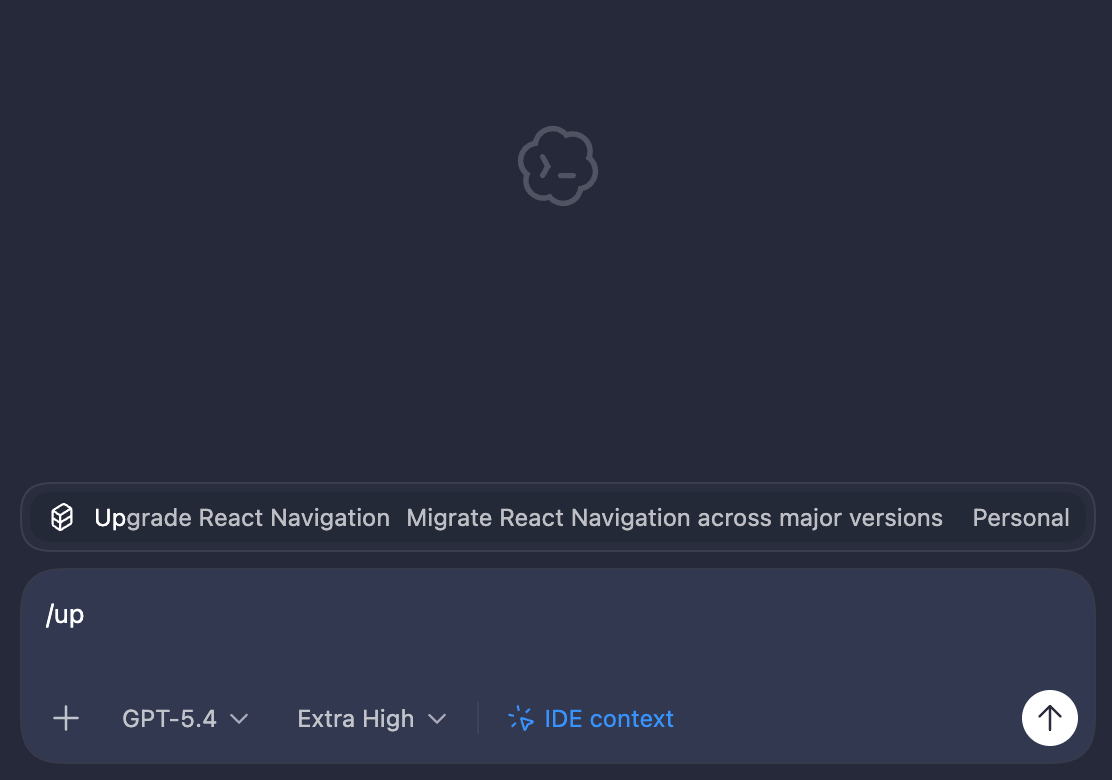
We just published 2 new skills for React Navigation
- Upgrade React Navigation
- Migrate to Static Config
$ npx skills add react-navigation/skills
Try it out and let us know what can be improved 🙏
English
Sick. Seeing people make cool stuff that can be used by others with React Navigation makes me happy.
Ed@trpfsu
super happy with how the new .navigation.zoom() is coming along in screen transitions, here's how it looks on iOS and Android
English
@_liamandr If you haven't read our blog post about upcoming improvements, give it a read #better-typescript-types-for-static-configuration" target="_blank" rel="nofollow noopener">reactnavigation.org/blog/2025/12/1…
Dynamic API is still supported, of course; the Static API is an abstraction on top of it to improve DX.
English
@_liamandr The static nature means we can infer the navigation structure statically, so static types can be automatically inferred, deep link config can be automated, etc.
Similar reasons to why many routers use a file system API - static structure means tools can work with it.
English
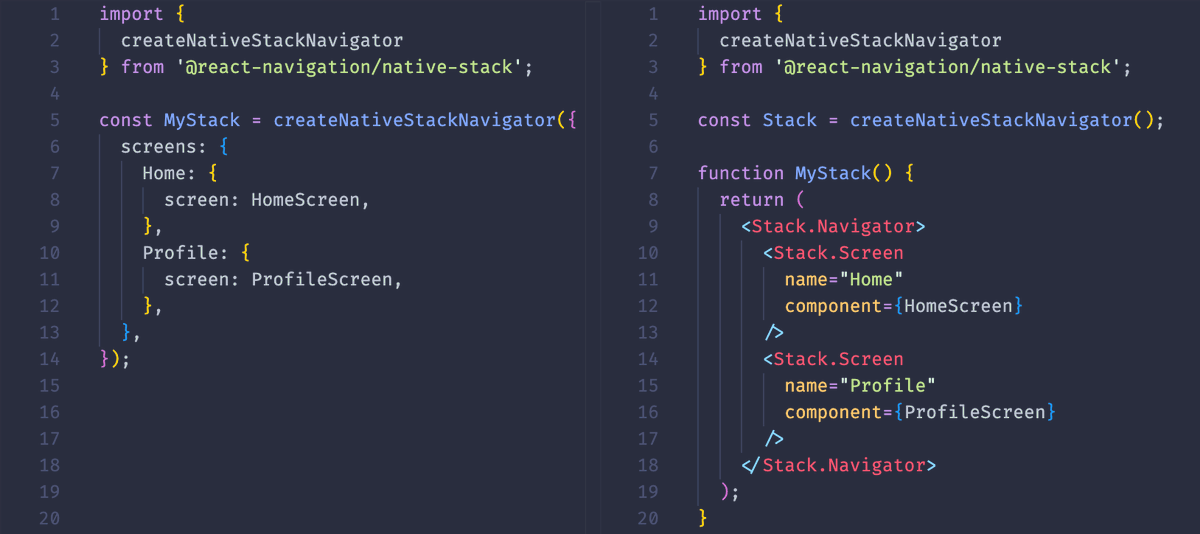
If you are building a new app or boilerplate in 2026 and use React Navigation, please use the Static API.
We have done a lot of work to reduce boilerplate further and improve TypeSafety in React Navigation 8.
Unless you really need to build the list of screens dynamically at runtime, you'll likely find that the Static API can do everything you need.
If you remember the Static API from React Navigation 4 and earlier, the new Static API is very different. It's built on the dynamic core that React Navigation 5 brought, so it has a lot of dynamism built-in.
The static parts are only constrained by what we need to make type inference and deep linking automatic.
English
@lowkhieyed @sssajjad007 There won't be any noticeable performance differences. They are just different APIs, not different implementations.
English

@sssajjad007 @reactnavigation The only thing I want to hear
English