I've realized that repeated actions do work with some shortcuts, but not when going from quarters to sixths like with the regular version (U, I, J, K). I guess my best bet will be to come up with shorcuts for sixths; not ideal, but...yeah
@rectangleapp Hello. Is there a way to have "repeated actions" on Rectangle Pro? For example, on the regular Rectangle I was able to hit Ctrl+Option+U multiple times to switch between different sizes. I can't find a way to enable this on Pro
@speedfreak228 Sometimes the licensing library from Paddle can get tripped up, and because of this I allow the trial to continue for some time after expiration. Unfortunately that means the payment window will be displayed, but everything will still be functional.
@rectangleapp i downloaded rectangle pro to try the free trial. When i try to use the app is says free trail has expired. It the first time opening the app.
@rectangleapp Hello. Q: I first selected the recommended shortcut set, but now I want to switch to the Spectacle set instead. How do I do that? Deleted and reinstalled didn't work :(
@bosoxholic Thanks for asking. At the moment, I don’t have any bundles. This is in part due to having some apps on the App Store and some not. Which apps would you like in a bundle?
@rectangleapp Howdy! quick question regarding your apps (including Rectangle). Do you offer the ability to buy your apps as a single package (ie one flat payment)? Or do I need to buy each app individually?
@estrobink (If you're a keyboard-only user and are happy with Rectangle, then you might not see as much of a speed increase with Rectangle Pro. The performance time of the snap from command executed to window being repositioned is identical between the two)
@estrobink Thanks for asking! Rectangle Pro adds features like the window throw, which makes snapping apps to the right places much faster if you're a mouse/trackpad user. Snap windows under the cursor, whether in focus or not. You can also position multiple windows with one shortcut.
Shortkit: Efficiency Through Technology
In the quiet moments of life, we are sometimes faced with challenges that not only test our resilience but also ignite a spark of ingenuity within us.
The year 2020 may be recalled by many for its global upheaval, but for me, it marked a deeply personal moment. A diving accident catapulted me into a new world where physical limitations clashed with my passions. This is how technology became my ally in navigating this uncharted territory and led me to create a Mac app using ChatGPT.
In the wake of my accident, my focus was to find ways to continue doing the work I love - music production. Traditionally, I would have gone straight to a piano to get started… but that wasn't an option. Instead, my focus shifted to achieving the nuanced dance of mouse clicks and keyboard commands that could give me similar results. Necessity led me to the QuadStick - a piece of technology that allowed me to operate a computer with my mouth. With customizable breath control macros at my disposal, I found a new way to interact with my digital workspace.
Unfortunately, not everything could be accomplished with joystick and breath alone. When it came to typing, voice-to-text technology became my voice on the screen, translating my spoken words into written form. For tasks less suited to voice commands, an on-screen keyboard stood in for the tactile response of physical keys. These tools, diverse yet complementary, wove a tapestry of efficiency that brought me back to my music.
Despite these adaptations, certain tasks, particularly those requiring the use of commands for system maintenance, proved to be a cumbersome thorn in my workflow. Typing out these commands with the on-screen keyboard in Terminal was becoming a chore that siphoned time and energy from my creative processes. It was clear I needed a more streamlined solution. There were some apps & options available that sort of did what I was looking for, but I really wanted something custom and super simple.
This past year, there has been a massive buzz about the capabilities of AI and ChatGPT. It intrigued me - could AI assist me in transcending my limitations further? With no prior experience in application development and only a modest background in basic web coding, I delved into the potential of making my own app using Xcode and SwiftUI, guided by AI.
After only a couple weeks working with ChatGPT, I created "Shortkit". I designed it to be an intuitive extension, allowing the execution of custom commands through a simple menu bar dropdown on Mac. It can trigger Siri Shortcuts, system commands, or even run scripts. Developing it was a journey that not only enriched my technical knowledge but also gave me a deeper understanding of how to harness AI as a collaborator. The application is available for free on my website and on GitHub. I will also be open-sourcing the code in the future.
The process was not without its challenges. There were moments when ChatGPT was super frustrating, requiring me to probe repeatedly before it gave me the answers I needed. But the experience taught me the art of asking & framing my inquiries in ways that led to more precise and actionable answers.
Shortkit is more than just a tool; it's an invitation to like-minded individuals - people with an interest in doing something that they don't quite know how to do. I encourage you to explore different things, and try using AI as a collaborator. It can quite literally be the perfect teacher.
This has just been one part of my journey - from an accident that could have ended my musical endeavors to developing an application that streamlined my creative process. It is a narrative about the power of human adaptability and the potential of technology to empower us. I want to be a beacon of that capability.
As I reflect, I am reminded that within each of us lies an indomitable spirit, waiting to turn adversities into opportunities. With Shortkit, I've not only unlocked new avenues in my own sphere but also hope to inspire others to see technology as a versatile ally in their pursuits, regardless of the hurdles that life may place in their path.
I also want to shout out and thank Ryan Hanson, the creator of the Rectangle app, who helped answer a couple tricky questions for me in the final stages of development.
Visit my website if you’re on a Mac and want to try Shortkit. It's free!
lucasradouch.com/shortkit
@ksample__ Thanks for the update. Unfortunately, this indeed looks to be the same bug that’s in that Github issue. I can file an issue with Adobe, but there’s not really anything that makes sense to modify within Rectangle for this.
@rectangleapp Hey Ryan. Just a quick bit I noticed recently. When I use rectangle to resize Adobe CC apps it then resizes the window automatically when I click in the app. Not sure what's happening here I've ran out of troubleshooting options. OSX 12.6.5. Rectangle Ver 0.7 (76).
@azerbarret It should go through the list of windows on your screen in order from frontmost to bottom, and will apply each of your layouts as it comes across each window. Could be a bug. GitHub is a better place to track than Twitter. I can create an issue, but it's better if you do.
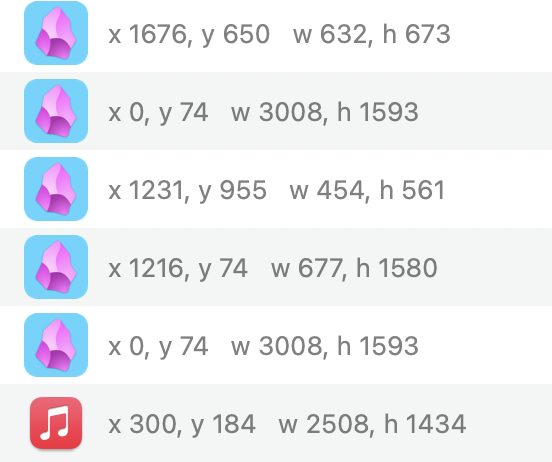
@rectangleapp Hi, apparently the App Layouts function doesn't support multiple windows on the same app. I've five Obsidian windows open but after messing them and restoring from the saved layouts (screenshot), four of them doesn't restore to the same dimensions at all.
@cwoodruff You can use Rectangle Pro. In the prefs window, add a "Custom Size & Position". Values > 1 will be in pixel dimensions.
rectangleapp.com/pro
@Treybastian@Smutchings Thankfully, macOS hasn't broken the window API that Rectangle relies on in any macOS release (hence Spectacle still being usable having not been updated in many years). Rectangle is typically updated every month, and I'm planning a release probably this week.
@Patrick48158588 Probably not in a way that’s better than a good 7 day view in good kanban software. You can save off an app layout in Rectangle Pro, but you’re not guaranteed to get the identical ordering of windows that you want.
@rectangleapp Will you be able to "swap" windows in rectangleapp? Example: I have a layout with three windows in columns,¼, ½, ¼ . Sometimes I swap one of the smaller windows with the middle, focusing on that task/app. Could this be possible?
I just upgraded to macOS Ventura and my beloved window manager Divvy has finally kicked the bucket. What’s the best *simple* macOS window manager? 98% of the time I’m running “set to full size” or “set to 50% (left/right/up/down)”
@kn9ts@mattstauffer Spectacle hasn't been maintained for many years, but Rectangle is nearly a drop-in replacement for it (also free and open source). rectangleapp.com
@chrisalbon Magnet would be better if it let you drag the border between 2 windows to resize them both. Do any of the other macOS window managers do that?