

Sai
798 posts

Sai
@saii_04
AI/ML Infra | DevOps | Cloud Security | Blockchain Infra
Pune, India Katılım Haziran 2011
1.3K Takip Edilen54 Takipçiler

Word of mouth is the best marketing there is, and that is how my DevOps Bootcamps make me good money (without any Insta/Google Ads)
English
Sai retweetledi

Sai retweetledi

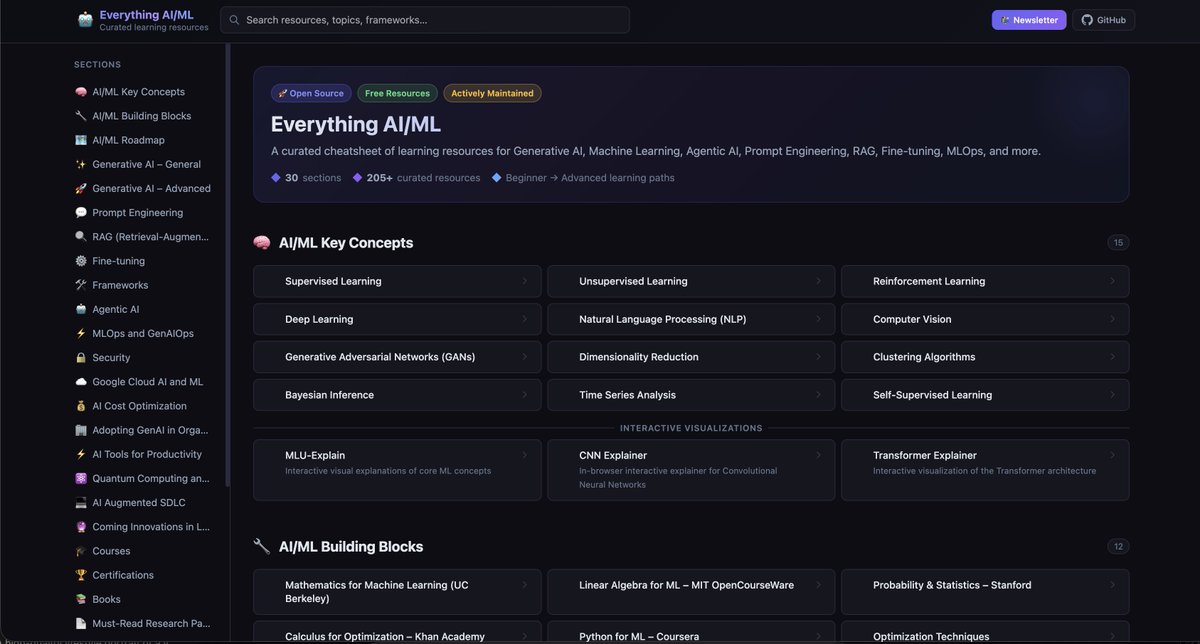
Created a website for everything resource related to AI and ML. It's an open-source project, so anyone can contribute it. I think this will be immensely useful for the people who are actively learning and practicing ML/AI concepts.
GitHub Repo: github.com/viveknaskar/ev…
Live site: viveknaskar.github.io/everything-ai-…
English

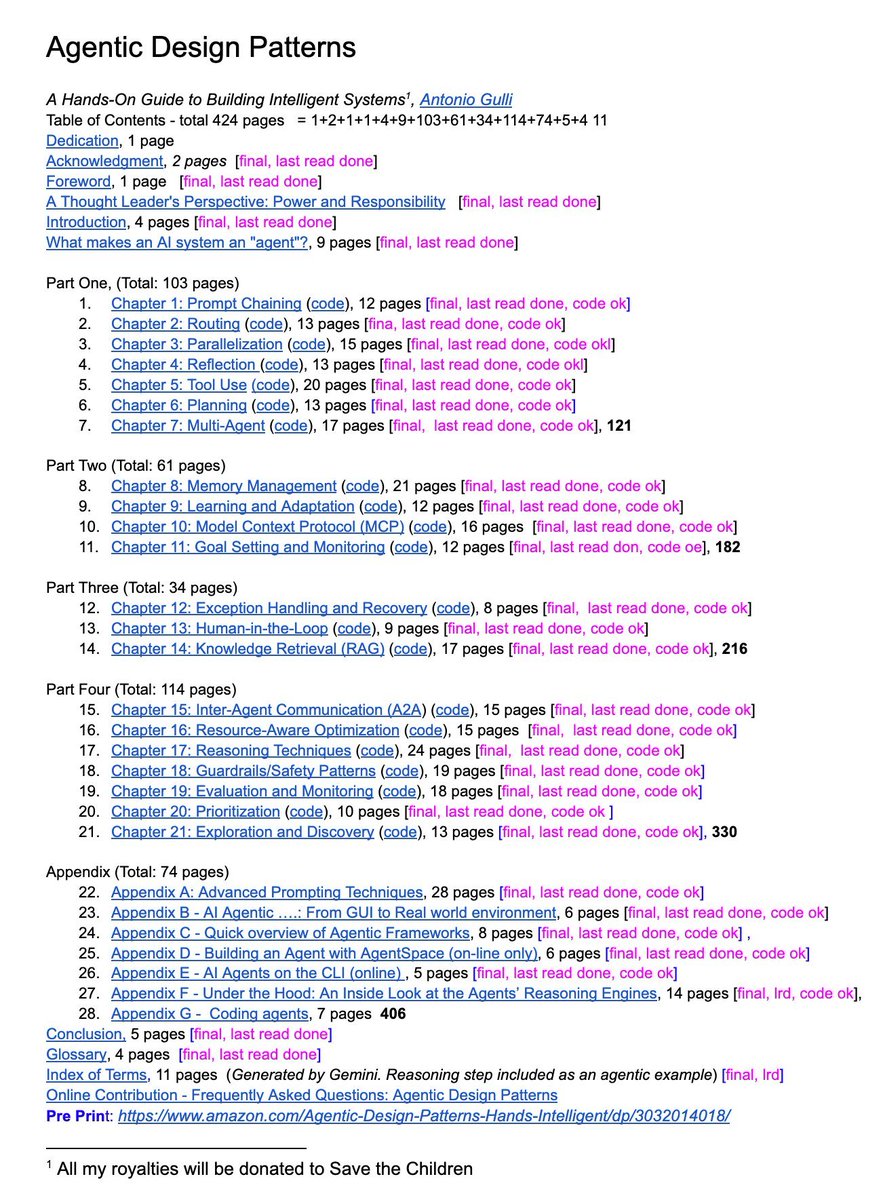
A senior Google engineer just dropped a 421-page doc called Agentic Design Patterns.
Every chapter is code-backed and covers the frontier of AI systems:
→ Prompt chaining, routing, memory
→ MCP & multi-agent coordination
→ Guardrails, reasoning, planning
This isn’t a blog post. It’s a curriculum. And it’s free.
English
Sai retweetledi

Sai retweetledi

I recently asked:
“What would you do if your VPC is running out of IPs?”
A lot of answers were: “switch to IPv6”
Lets be clear: IPv6 is NOT a quick fix.
Switching to IPv6 is a full transformation 👇
1️⃣Upgrade your network
Routers, firewalls, load balancers, VPNs must support IPv6
2️⃣Redesign IP addressing
IPv6 is huge, but you still need structure.
Plan CIDR blocks (/56, /64)
3️⃣Validate OS & systems
Your servers, containers, and nodes must support IPv6
4️⃣Enable IPv6 in cloud
VPC, subnets, ALB/NLB must support IPv6
5️⃣Update DNS
Add AAAA records.
No AAAA = no IPv6 traffic
6️⃣Rethink security
No NAT in IPv6
- Everything becomes publicly reachable
- Rewrite firewall & security rules
7️⃣Fix your applications
Update configs, APIs, DB connections
8️⃣Choose a transition strategy
Dual-stack (most common)
NAT64 / DNS64
IPv6-only (rare)
9️⃣Upgrade observability
Logs, metrics, tracing must support IPv6.
Many tools still assume IPv4
1️⃣0️⃣Test everything
Connectivity, latency, failover, DNS.
Expect surprises
English
Taking a short break 🌴
For the past few months, I’ve been pushing myself hard constantly building, learning, and growing. And honestly I’ve achieved a lot too.
Now it’s time to pause for a bit.
Going on a 2–3 day vacation with a friend ✌️
Don’t worry content is already scheduled for your learning & entertainment.
Will be back soon.
Thanks for all the insane love & support ❤️



English
Which artifact repository are you using to store the artifacts in your project ?
English
Sai retweetledi
Sai retweetledi

Built a private EKS cluster setup on AWS with a clean network design — and learned a lot comparing it with Azure 👇
🔹 Architecture highlights:
🧱 Separate Access VPC (Hub-like) with Bastion host
☸️ EKS VPC (Spoke) with private subnets only
🔐 Private API endpoint (no public exposure)
🔗 VPC Peering for secure communication
🌐 Controlled access via security groups + routing
🚀 SSH → Bastion → EKS nodes + kubectl access to API server
💡 Key learnings (AWS vs Azure mindset shift):
1. Networking is more explicit in AWS
AWS: You must wire everything manually (routes, peering, SGs)
Azure: More “batteries included” (VNet peering + NSGs feel simpler)
👉 AWS gives flexibility, but also more room for mistakes (like my intermittent API timeouts 😅)
2. EKS control plane access is SG-driven
AWS: API access controlled via cluster security group
Azure (AKS): More abstracted, easier private cluster setup
👉 Missing SG rules = random connectivity issues (learned the hard way)
3. Private endpoint behavior differs
AWS EKS:
API resolves to multiple private IPs
All paths must be reachable → otherwise intermittent failures
Azure:
Private endpoints feel more predictable out of the box
4. Peering vs Hub-Spoke maturity
AWS:
VPC Peering = simple but not scalable
Transit Gateway = real hub-spoke
Azure:
Hub-Spoke is more native and common pattern
5 SSH vs SSM vs Bastion
AWS: multiple options (Bastion, SSM Session Manager)
Azure: Bastion service is more integrated
🔥 Biggest takeaway:
AWS gives you low-level control, Azure gives you higher-level abstractions
Both are powerful — but AWS forces you to truly understand networking.
Would I change anything?
👉 Next step: move to Transit Gateway-based hub-spoke + SSM (no SSH)
Github repo can be found here
github.com/DashrathMundka…
#AWS #EKS #Terraform #CloudArchitecture #DevOps #Kubernetes #Azure #CloudLearning
English
Sai retweetledi
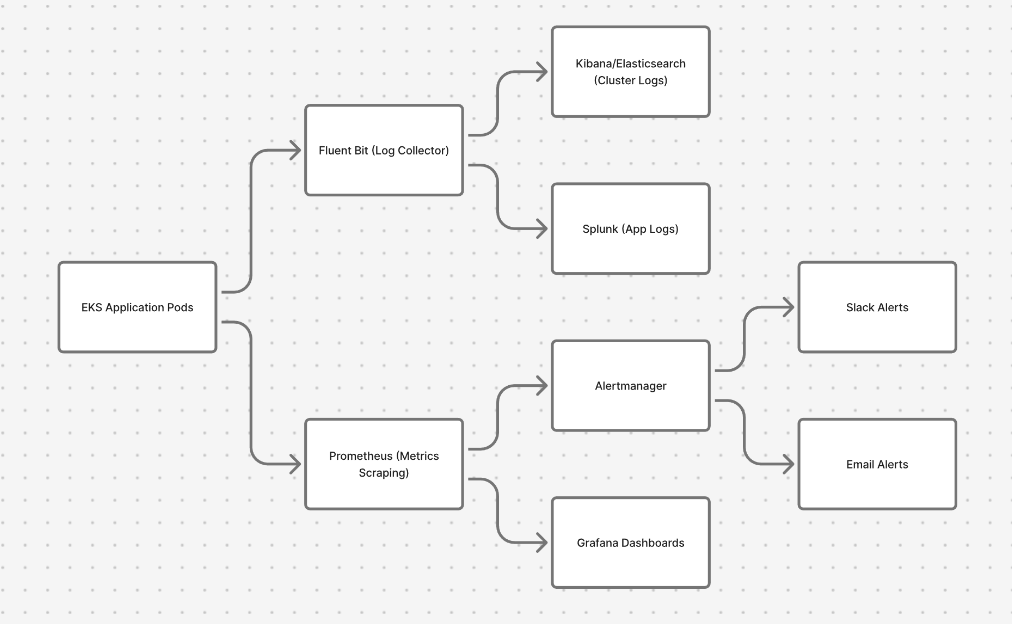
High-Level Monitoring & Alerting in an EKS Cluster.
Save it for quick interview revision and follow for more.
How production observability usually works in Kubernetes:
Logs pipeline:
🟢 EKS Application Pods
→ Fluent Bit (log collector)
→ Elasticsearch/Kibana (cluster logs)
→ Splunk (application logs)
Metrics pipeline:
🔵 EKS Application Pods
→ Prometheus (metrics scraping)
→ Grafana (dashboards & visualization)
Alerting:
⚫️ Prometheus
→ Alertmanager
→ Slack / Email alerts
Simple way to remember:
Fluent Bit → Logs
Prometheus → Metrics
Grafana → Visualization
Alertmanager → Notifications
This is one of the most common monitoring setups used in production EKS/Kubernetes clusters.
English
@kbkthebolt There are different ways bro
Crypto
Freelancing
X monitization
English

Sai retweetledi

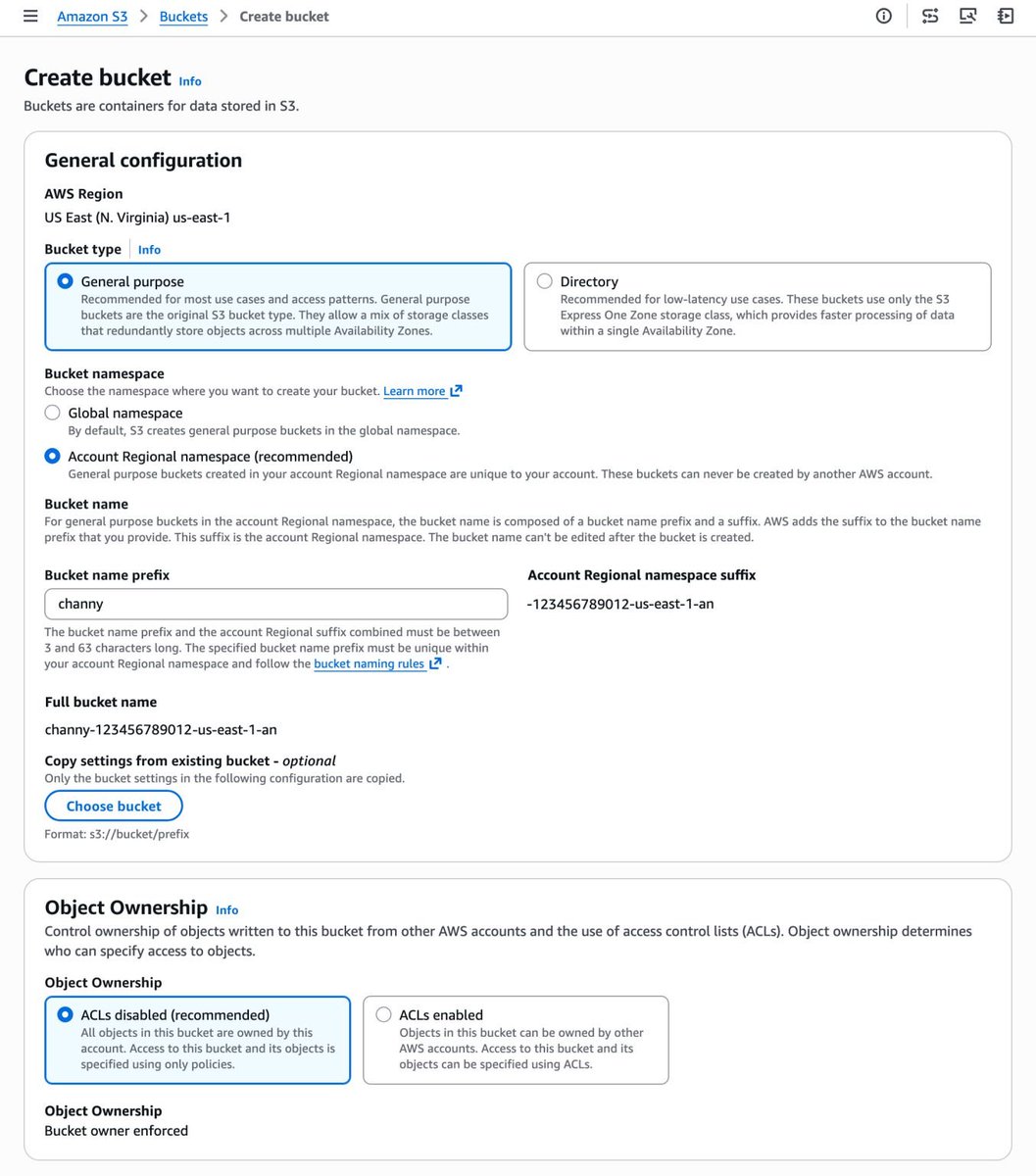
Amazon is introducing account regional namespaces for Amazon S3 general-purpose buckets.
For 18 years, Amazon S3 had one frustrating rule:
Your bucket name had to be globally unique across the entire internet.
Which meant:
Create a bucket…
❌ Name already taken.
Try another one…
❌ Still taken.
Try again…
❌ Also taken.
Today, that finally changes.
AWS has introduced account regional namespaces for Amazon S3 general purpose buckets.
Now bucket names can exist within your account and region namespace, instead of competing globally.
Example:
logs-123456789012-us-east-1-an
What this means for cloud engineers:
🚀 No more fighting for globally unique bucket names
🚀 Easier naming conventions across environments
🚀 Better automation for Terraform / IaC pipelines
🚀 Simpler governance using IAM and SCP policies
If you want to read the full AWS announcement:
aws.amazon.com/blogs/aws/intr…
It’s a small change on the surface…
but a big improvement for teams managing multi-account AWS environments.
English
Sai retweetledi

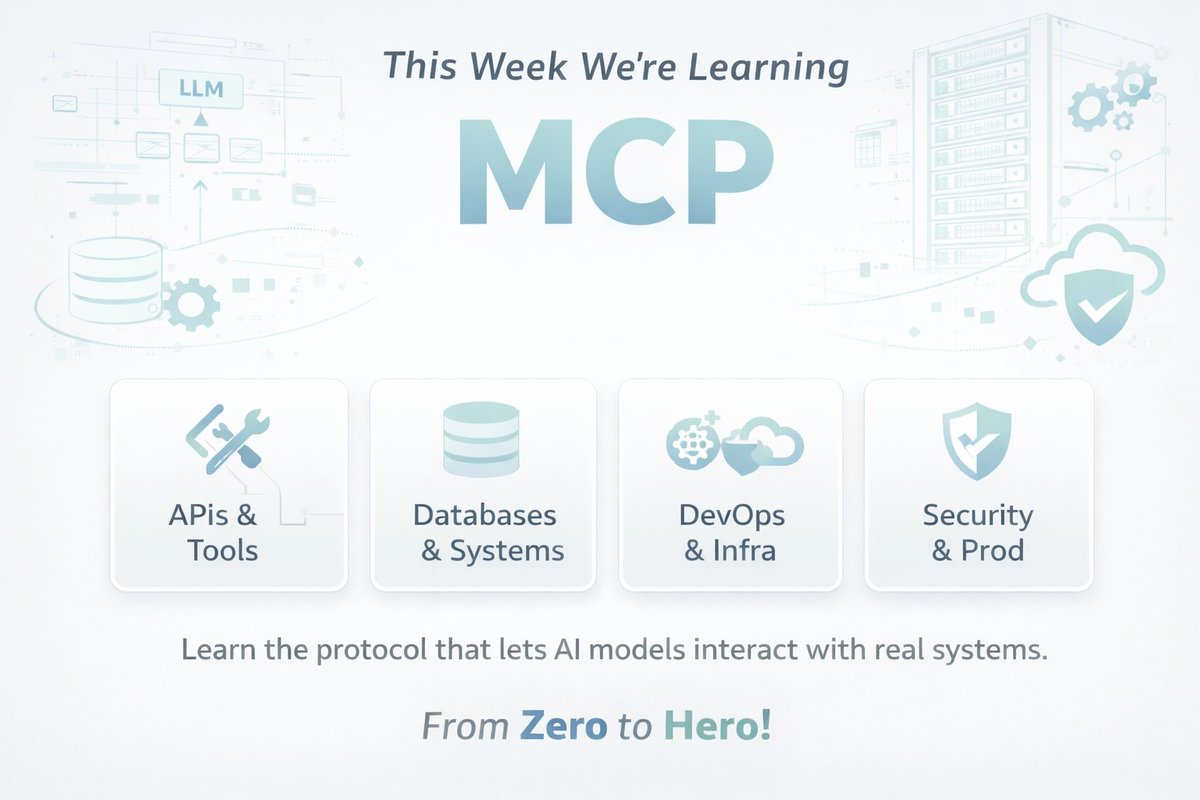
This week I’m diving deep into MCP (Model Context Protocol).
You’ll hear MCP a lot in the AI world this year.
It’s the protocol that lets AI models interact with:
• APIs
• Databases
• Developer tools
• Infrastructure
• Internal systems
In simple terms:
MCP = a standard way for AI to use tools.
Over the next 7 days, I’ll go from zero → building real MCP systems, and I’ll share everything I learn.
Plan:
Day 1 — MCP fundamentals
Day 2 — Build an MCP server
Day 3 — Connect MCP to APIs
Day 4 — MCP resources & context
Day 5 — Designing tools for LLMs
Day 6 — Build an AI DevOps assistant
Day 7 — MCP in production
I’ll post 2 updates daily so we can learn together.
If you're a:
• Backend engineer
• DevOps engineer
• AI builder
You’ll want to understand MCP.
English
Sai retweetledi

Launching The AI SRE Watchlist, built on top of awesome-ai-sre open source repo. Check it out here aisrewatchlist.vercel.app
And leave a start on the repo github.com/pavangudiwada/…
GIF
English
Sai retweetledi
I stepped away from AI SRE for a few months...coming back, I realized the tech has moved miles ahead but most companies are still debating RAG and MCP.
Best teams are already crossing The Trust Barrier!!
Where is your team?

English
Sai retweetledi
Most people use containers.
Very few actually understand what happens from build → runtime 👇
Containerization explained:
Step 1: Build Phase
- It starts with a Dockerfile.
When you run: docker build
It creates a Docker Image that contains:
• Your application code
• Dependencies
• Required libraries
• Runtime environment
That image is portable.
Same image →
Runs on your laptop, CI server, staging, production, cloud.
This is where “Build once, run anywhere” becomes real.
Step 2: Runtime Phase
When you run the image: docker run
It becomes a Container.
A container is:
• An isolated process
• With its own filesystem
• Own network stack
• Own process space
But here’s the key 👇
All containers share the Host OS kernel.
That’s why they are:
- Lightweight like processes
- Isolated like VMs
Who Manages All This?
The Container Engine:
• Docker
• containerd
• CRI-O
• Podman
It handles:
• Container lifecycle
• Networking
• Isolation
• Resource allocation
That’s the real flow:
Dockerfile → Image → Container → Managed by Engine → Runs on Host Kernel
- Simple concept.
- Powerful impact.
When deploying apps, do you prefer Docker, containerd, or Podman and why?
#DevOps #Docker
English
Sai retweetledi
If Kubernetes networking confused you in the beginning.
you are not alone.
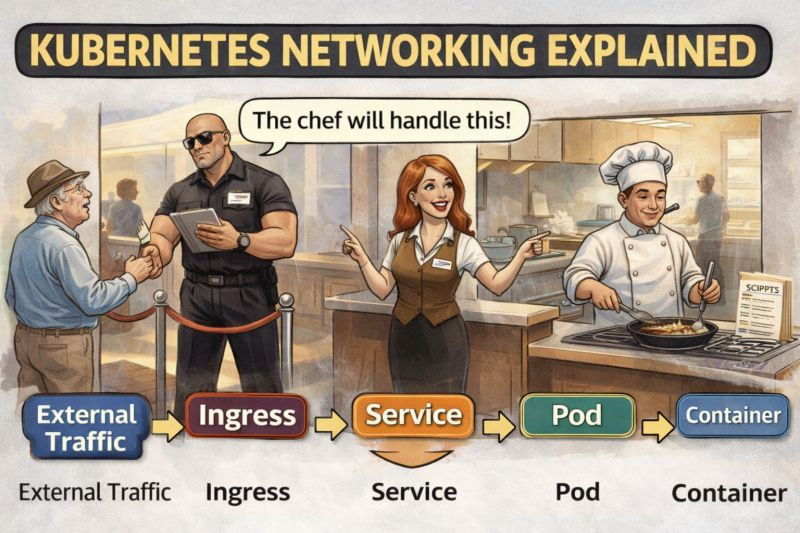
Imagine your Kubernetes cluster like a restaurant 🍽️
👥 External Traffic → Customers walking in
🚪 Ingress → The security guard at the door
🧑💼 Service → The receptionist directing customers
👨🍳 Pod → The chef actually cooking the food
📦 Container → The recipe the chef follows
Request Flow:
External Traffic → Ingress → Service → Pod → Container
• Ingress decides who can enter the cluster
• Service decides which Pod should handle the request
• Pod/Container actually runs the application
Simple concept but debugging Kubernetes networking still feels like this:
“Why is my service not reachable?”
“Why is the pod healthy but traffic not reaching it?”
“Is it DNS… again?”
Curious:
What confused you the most when you first learned Kubernetes networking?
• Ingress
• Services
• ClusterIP / NodePort / LoadBalancer
• DNS inside the cluster
Let me know so I can make the next post on that
Happy Learning !
English
Sai retweetledi
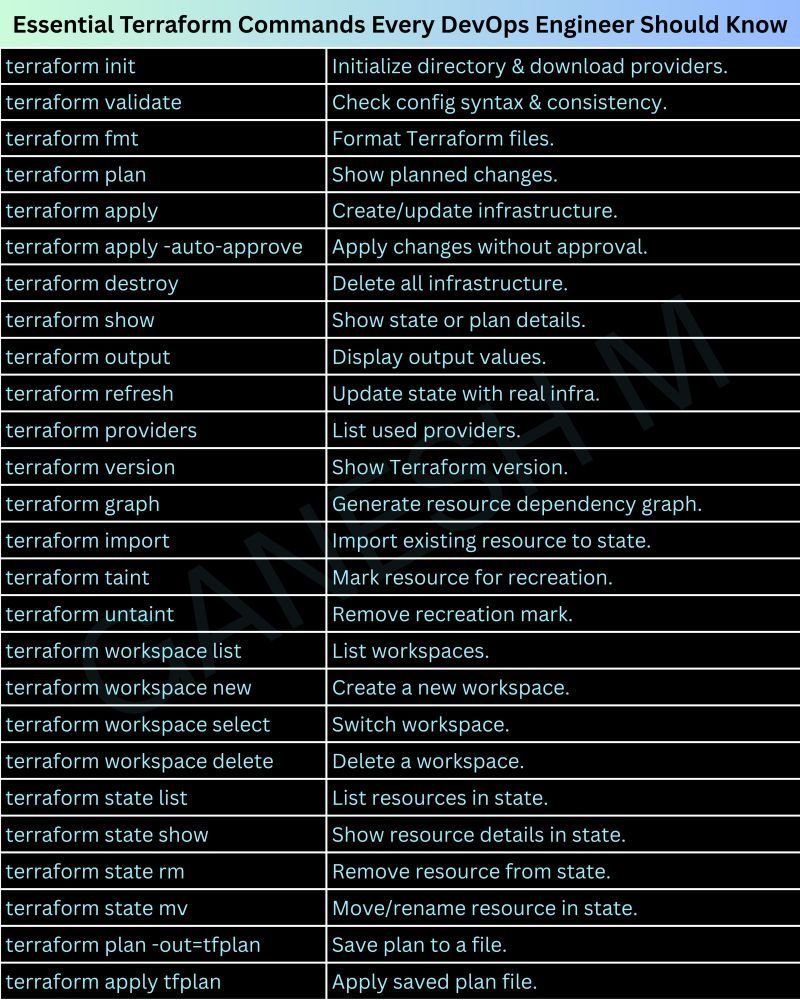
Essential Terraform commands every DevOps and Cloud engineer should master 🚀
From `terraform init` to `terraform apply`, these commands form the backbone of Infrastructure as Code.
If you work in DevOps & Cloud, this is your daily toolkit.
Save this post for work 👇
English